介绍
ggpubr是我经常会用到的R包,它傻瓜式的画图方式对很多初次接触R绘图的人来讲是很友好的。该包有个stat_compare_means函数可以做组间假设检验分析。更多知识分享请到 [https://zouhua.top/](https://zouhua.top/**)。
安装
安装R包可参考如何安装R包。
install.packages("ggpubr")devtools::devtools::install_github("kassambara/ggpubr")library(ggpubr)plotdata <- data.frame(sex = factor(rep(c("F", "M"), each=200)),weight = c(rnorm(200, 55), rnorm(200, 58)))
密度图density
ggdensity(plotdata,x = "weight",add = "mean",rug = TRUE, # x轴显示分布密度color = "sex",fill = "sex",palette = c("#00AFBB", "#E7B800"))
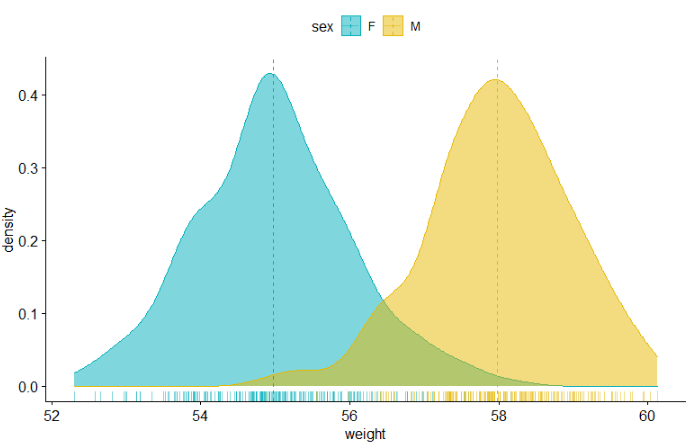
柱状图histogram
gghistogram(plotdata,x = "weight",bins = 30,add = "mean",rug = TRUE,color = "sex",fill = "sex",palette = c("#00AFBB", "#E7B800"))
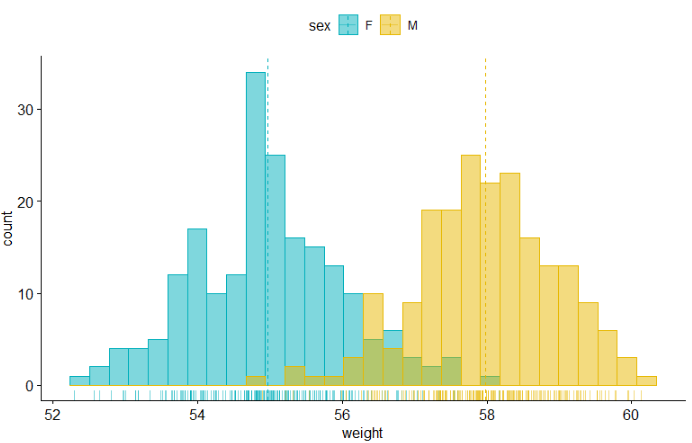
箱线图boxplot
df <- ToothGrowthhead(df)my_comparisons <- list( c("0.5", "1"), c("1", "2"), c("0.5", "2") )ggboxplot(df,x = "dose",y = "len",color = "dose",palette =c("#00AFBB", "#E7B800", "#FC4E07"),add = "jitter",shape = "dose")+stat_compare_means(comparisons = my_comparisons)+ # Add pairwise comparisons p-valuestat_compare_means(label.y = 50)
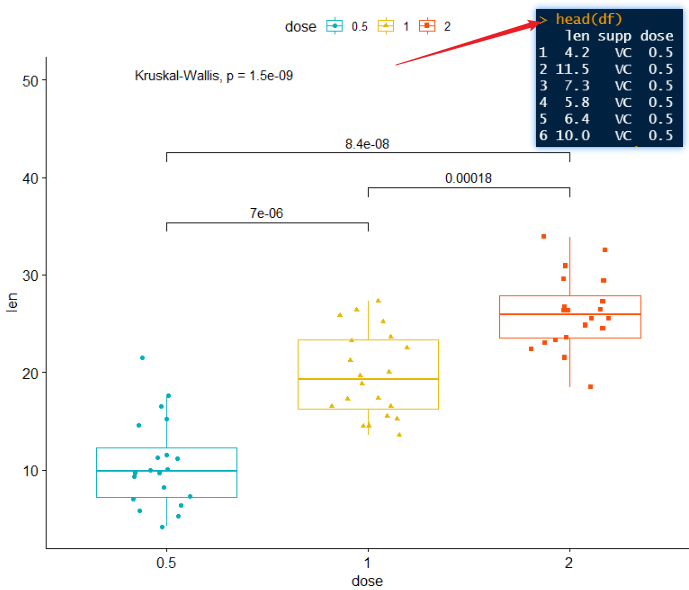
小提琴图violin
ggviolin(df,x = "dose",y = "len",fill = "dose",palette = c("#00AFBB", "#E7B800", "#FC4E07"),add = "boxplot",add.params = list(fill = "white"))+stat_compare_means(comparisons = my_comparisons, label = "p.signif")+ # Add significance levelsstat_compare_means(label.y = 50)

点图dotplot
ggdotplot(ToothGrowth,x = "dose",y = "len",color = "dose",palette = "jco",binwidth = 1)
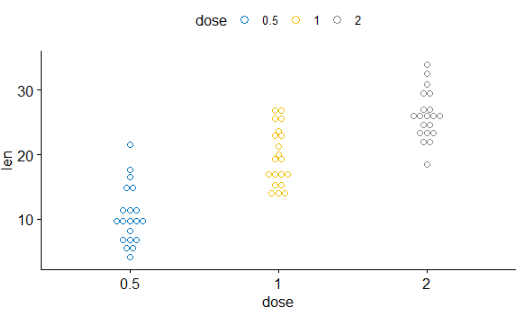
有序条形图 ordered bar plots
data("mtcars")dfm <- mtcarsdfm$cyl <- as.factor(dfm$cyl)dfm$name <- rownames(dfm)head(dfm[, c("name", "wt", "mpg", "cyl")])ggbarplot(dfm,x = "name", y = "mpg",fill = "cyl", # change fill color by cylcolor = "white", # Set bar border colors to whitepalette = "jco", # jco journal color palett. see ?ggparsort.val = "asc", # Sort the value in dscending ordersort.by.groups = TRUE, # Sort inside each groupx.text.angle = 90) # Rotate vertically x axis texts

偏差图Deviation graphs
dfm$mpg_z <- (dfm$mpg -mean(dfm$mpg))/sd(dfm$mpg)dfm$mpg_grp <- factor(ifelse(dfm$mpg_z < 0, "low", "high"),levels = c("low", "high"))# Inspect the datahead(dfm[, c("name", "wt", "mpg", "mpg_z", "mpg_grp", "cyl")])ggbarplot(dfm, x = "name", y = "mpg_z",fill = "mpg_grp", # change fill color by mpg_levelcolor = "white", # Set bar border colors to whitepalette = "jco", # jco journal color palett. see ?ggparsort.val = "asc", # Sort the value in ascending ordersort.by.groups = FALSE, # Don't sort inside each groupx.text.angle = 90, # Rotate vertically x axis textsylab = "MPG z-score",rotate = FALSE,xlab = FALSE,legend.title = "MPG Group")

棒棒糖图 lollipop chart
ggdotchart(dfm, x = "name", y = "mpg",color = "cyl", # Color by groupspalette = c("#00AFBB", "#E7B800", "#FC4E07"), # Custom color palettesorting = "descending", # Sort value in descending orderadd = "segments", # Add segments from y = 0 to dotsrotate = TRUE, # Rotate verticallygroup = "cyl", # Order by groupsdot.size = 6, # Large dot sizelabel = round(dfm$mpg), # Add mpg values as dot labelsfont.label = list(color = "white", size = 9,vjust = 0.5), # Adjust label parametersggtheme = theme_pubr()) # ggplot2 theme

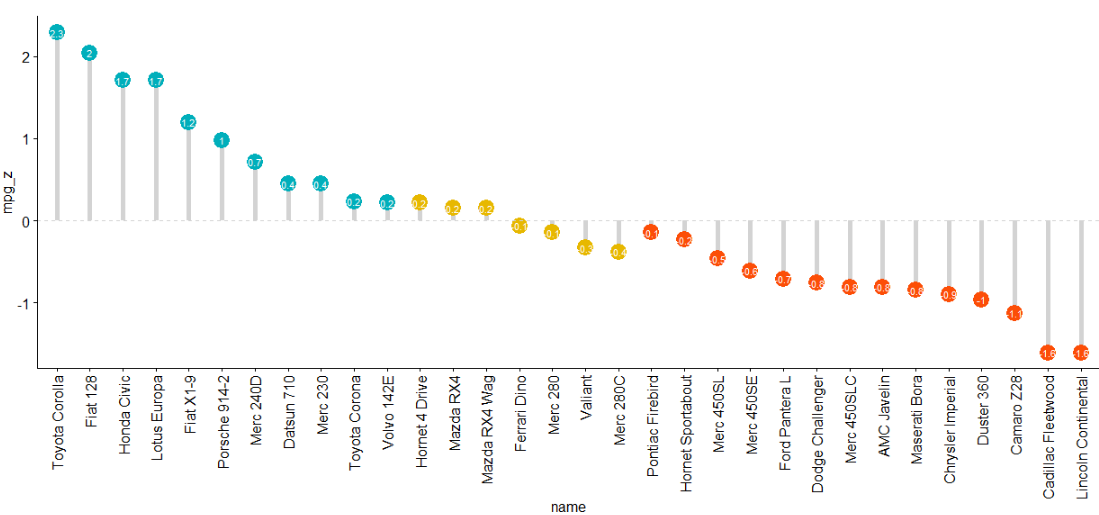
偏差图Deviation graph
ggdotchart(dfm, x = "name", y = "mpg_z",color = "cyl", # Color by groupspalette = c("#00AFBB", "#E7B800", "#FC4E07"), # Custom color palettesorting = "descending", # Sort value in descending orderadd = "segments", # Add segments from y = 0 to dotsadd.params = list(color = "lightgray", size = 2), # Change segment color and sizegroup = "cyl", # Order by groupsdot.size = 6, # Large dot sizelabel = round(dfm$mpg_z,1), # Add mpg values as dot labelsfont.label = list(color = "white", size = 9,vjust = 0.5), # Adjust label parametersggtheme = theme_pubr())+ # ggplot2 themegeom_hline(yintercept = 0, linetype = 2, color = "lightgray")
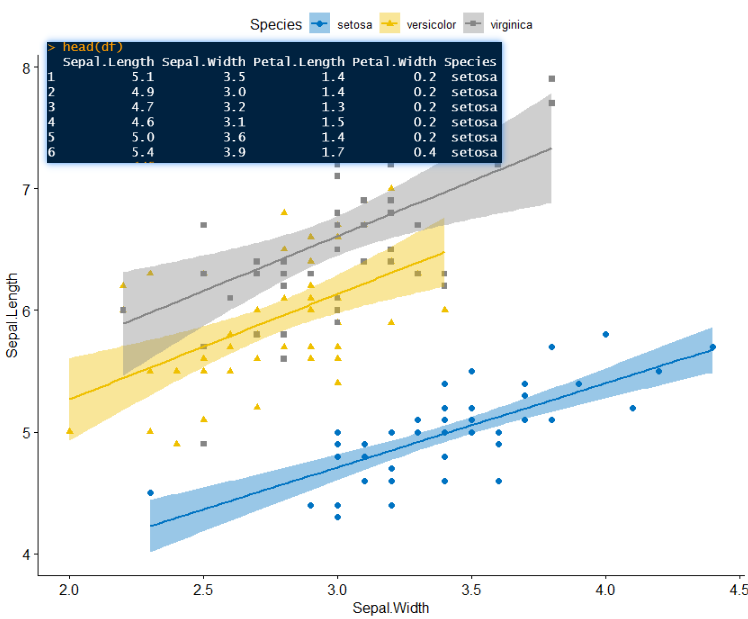
散点图scatterplot
df <- datasets::irishead(df)ggscatter(df,x = 'Sepal.Width',y = 'Sepal.Length',palette = 'jco',shape = 'Species',add = 'reg.line',color = 'Species',conf.int = TRUE)
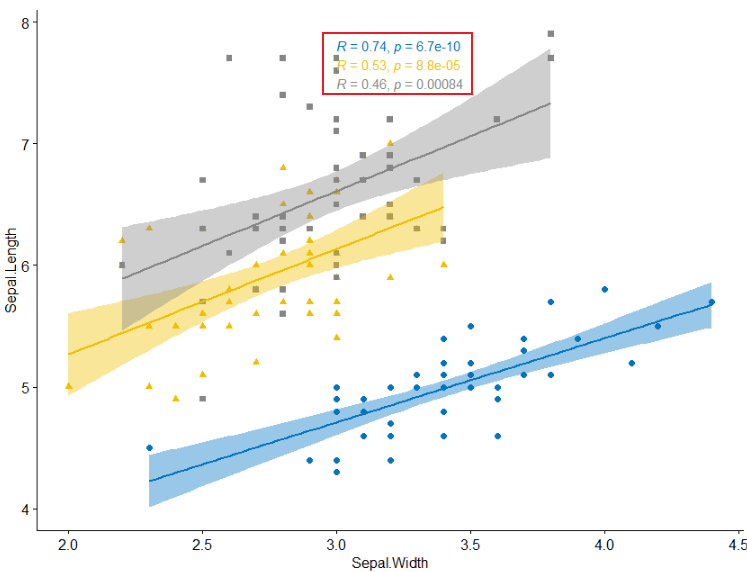
- 添加回归线的系数
ggscatter(df,x = 'Sepal.Width',y = 'Sepal.Length',palette = 'jco',shape = 'Species',add = 'reg.line',color = 'Species',conf.int = TRUE)+stat_cor(aes(color=Species),method = "pearson", label.x = 3)
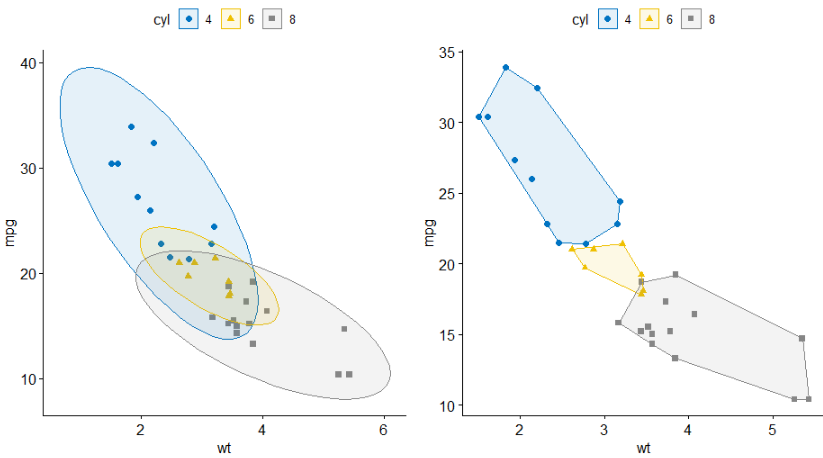
- 添加聚类椭圆 concentration ellipses
data("mtcars")dfm <- mtcarsdfm$cyl <- as.factor(dfm$cyl)dfm$name <- rownames(dfm)p1 <- ggscatter(dfm,x = "wt",y = "mpg",color = "cyl",palette = "jco",shape = "cyl",ellipse = TRUE)p2 <- ggscatter(dfm,x = "wt",y = "mpg",color = "cyl",palette = "jco",shape = "cyl",ellipse = TRUE,ellipse.type = "convex")cowplot::plot_grid(p1, p2, align = "hv", nrow = 1)
- 添加mean和stars
ggscatter(dfm, x = "wt", y = "mpg",color = "cyl", palette = "jco",shape = "cyl",ellipse = TRUE,mean.point = TRUE,star.plot = TRUE)

- 显示点标签
dfm$name <- rownames(dfm)p3 <- ggscatter(dfm,x = "wt",y = "mpg",color = "cyl",palette = "jco",label = "name",repel = TRUE)p4 <- ggscatter(dfm,x = "wt",y = "mpg",color = "cyl",palette = "jco",label = "name",repel = TRUE,label.select = c("Toyota Corolla", "Merc 280", "Duster 360"))cowplot::plot_grid(p3, p4, align = "hv", nrow = 1)

气泡图bubble plot
ggscatter(dfm,x = "wt",y = "mpg",color = "cyl",palette = "jco",size = "qsec",alpha = 0.5)+scale_size(range = c(0.5, 15)) # Adjust the range of points size

连线图 lineplot
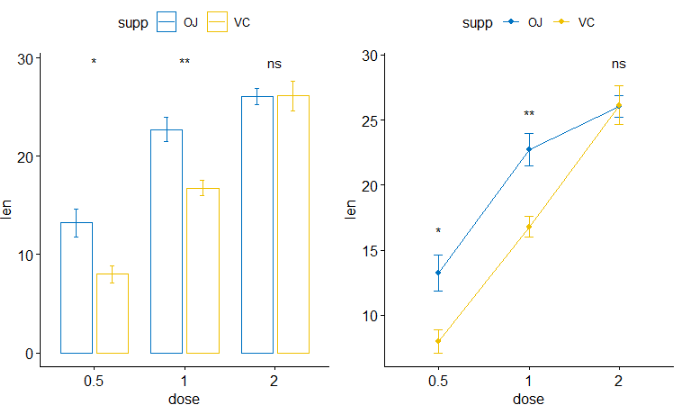
p1 <- ggbarplot(ToothGrowth,x = "dose",y = "len",add = "mean_se",color = "supp",palette = "jco",position = position_dodge(0.8))+stat_compare_means(aes(group = supp), label = "p.signif", label.y = 29)p2 <- ggline(ToothGrowth,x = "dose",y = "len",add = "mean_se",color = "supp",palette = "jco")+stat_compare_means(aes(group = supp), label = "p.signif",label.y = c(16, 25, 29))cowplot::plot_grid(p1, p2, ncol = 2, align = "hv")
添加边沿图 marginal plots
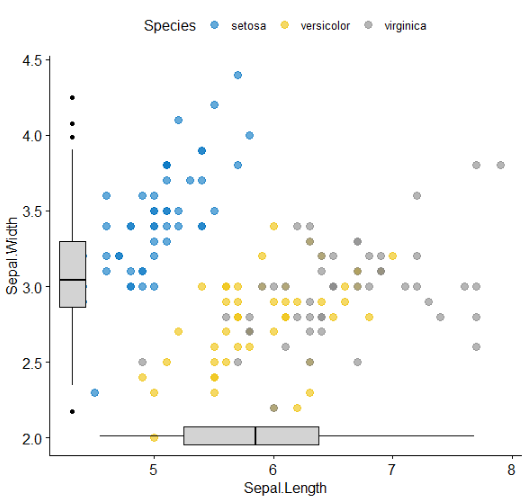
library(ggExtra)p <- ggscatter(iris,x = "Sepal.Length",y = "Sepal.Width",color = "Species",palette = "jco",size = 3,alpha = 0.6)ggMarginal(p, type = "boxplot")

- 第二种添加方式: 分别画出三个图,然后进行组合
sp <- ggscatter(iris,x = "Sepal.Length",y = "Sepal.Width",color = "Species",palette = "jco",size = 3,alpha = 0.6,ggtheme = theme_bw())xplot <- ggboxplot(iris,x = "Species",y = "Sepal.Length",color = "Species",fill = "Species",palette = "jco",alpha = 0.5,ggtheme = theme_bw())+ rotate()yplot <- ggboxplot(iris,x = "Species",y = "Sepal.Width",color = "Species",fill = "Species",palette = "jco",alpha = 0.5,ggtheme = theme_bw())sp <- sp + rremove("legend")yplot <- yplot + clean_theme() + rremove("legend")xplot <- xplot + clean_theme() + rremove("legend")cowplot::plot_grid(xplot, NULL, sp, yplot, ncol = 2, align = "hv",rel_widths = c(2, 1), rel_heights = c(1, 2))

- 上图主图和边沿图之间的space太大,第三种方法能克服这个缺点
library(cowplot)# Main plotpmain <- ggplot(iris, aes(x = Sepal.Length, y = Sepal.Width, color = Species))+geom_point()+ggpubr::color_palette("jco")# Marginal densities along x axisxdens <- axis_canvas(pmain, axis = "x")+geom_density(data = iris, aes(x = Sepal.Length, fill = Species),alpha = 0.7, size = 0.2)+ggpubr::fill_palette("jco")# Marginal densities along y axis# Need to set coord_flip = TRUE, if you plan to use coord_flip()ydens <- axis_canvas(pmain, axis = "y", coord_flip = TRUE)+geom_boxplot(data = iris, aes(x = Sepal.Width, fill = Species),alpha = 0.7, size = 0.2)+coord_flip()+ggpubr::fill_palette("jco")p1 <- insert_xaxis_grob(pmain, xdens, grid::unit(.2, "null"), position = "top")p2 <- insert_yaxis_grob(p1, ydens, grid::unit(.2, "null"), position = "right")ggdraw(p2)

- 第四种方法,通过grob设置
# Scatter plot colored by groups ("Species")#::::::::::::::::::::::::::::::::::::::::::::::::::::::::::sp <- ggscatter(iris, x = "Sepal.Length", y = "Sepal.Width",color = "Species", palette = "jco",size = 3, alpha = 0.6)# Create box plots of x/y variables#::::::::::::::::::::::::::::::::::::::::::::::::::::::::::# Box plot of the x variablexbp <- ggboxplot(iris$Sepal.Length, width = 0.3, fill = "lightgray") +rotate() +theme_transparent()# Box plot of the y variableybp <- ggboxplot(iris$Sepal.Width, width = 0.3, fill = "lightgray") +theme_transparent()# Create the external graphical objects# called a "grop" in Grid terminologyxbp_grob <- ggplotGrob(xbp)ybp_grob <- ggplotGrob(ybp)# Place box plots inside the scatter plot#::::::::::::::::::::::::::::::::::::::::::::::::::::::::::xmin <- min(iris$Sepal.Length); xmax <- max(iris$Sepal.Length)ymin <- min(iris$Sepal.Width); ymax <- max(iris$Sepal.Width)yoffset <- (1/15)*ymax; xoffset <- (1/15)*xmax# Insert xbp_grob inside the scatter plotsp + annotation_custom(grob = xbp_grob, xmin = xmin, xmax = xmax,ymin = ymin-yoffset, ymax = ymin+yoffset) +# Insert ybp_grob inside the scatter plotannotation_custom(grob = ybp_grob,xmin = xmin-xoffset, xmax = xmin+xoffset,ymin = ymin, ymax = ymax)
二维密度图 2d density
sp <- ggscatter(iris, x = "Sepal.Length", y = "Sepal.Width",color = "lightgray")p1 <- sp + geom_density_2d()# Gradient colorp2 <- sp + stat_density_2d(aes(fill = ..level..), geom = "polygon")# Change gradient color: customp3 <- sp + stat_density_2d(aes(fill = ..level..), geom = "polygon")+gradient_fill(c("white", "steelblue"))# Change the gradient color: RColorBrewer palettep4 <- sp + stat_density_2d(aes(fill = ..level..), geom = "polygon") +gradient_fill("YlOrRd")cowplot::plot_grid(p1, p2, p3, p4, ncol = 2, align = "hv")

混合图
混合表、字体和图
# Density plot of "Sepal.Length"#::::::::::::::::::::::::::::::::::::::density.p <- ggdensity(iris, x = "Sepal.Length",fill = "Species", palette = "jco")# Draw the summary table of Sepal.Length#::::::::::::::::::::::::::::::::::::::# Compute descriptive statistics by groupsstable <- desc_statby(iris, measure.var = "Sepal.Length",grps = "Species")stable <- stable[, c("Species", "length", "mean", "sd")]# Summary table plot, medium orange themestable.p <- ggtexttable(stable, rows = NULL,theme = ttheme("mOrange"))# Draw text#::::::::::::::::::::::::::::::::::::::text <- paste("iris data set gives the measurements in cm","of the variables sepal length and width","and petal length and width, respectively,","for 50 flowers from each of 3 species of iris.","The species are Iris setosa, versicolor, and virginica.", sep = " ")text.p <- ggparagraph(text = text, face = "italic", size = 11, color = "black")# Arrange the plots on the same pageggarrange(density.p, stable.p, text.p,ncol = 1, nrow = 3,heights = c(1, 0.5, 0.3))

- 注释table在图上
density.p <- ggdensity(iris, x = "Sepal.Length",fill = "Species", palette = "jco")stable <- desc_statby(iris, measure.var = "Sepal.Length",grps = "Species")stable <- stable[, c("Species", "length", "mean", "sd")]stable.p <- ggtexttable(stable, rows = NULL,theme = ttheme("mOrange"))density.p + annotation_custom(ggplotGrob(stable.p),xmin = 5.5, ymin = 0.7,xmax = 8)

systemic information
sessionInfo()
R version 3.6.1 (2019-07-05)Platform: x86_64-w64-mingw32/x64 (64-bit)Running under: Windows 10 x64 (build 19042)Matrix products: defaultlocale:[1] LC_COLLATE=Chinese (Simplified)_China.936 LC_CTYPE=Chinese (Simplified)_China.936[3] LC_MONETARY=Chinese (Simplified)_China.936 LC_NUMERIC=C[5] LC_TIME=Chinese (Simplified)_China.936attached base packages:[1] stats graphics grDevices utils datasets methods baseother attached packages:[1] ggpubr_0.4.0 ggplot2_3.3.2loaded via a namespace (and not attached):[1] zip_2.0.4 Rcpp_1.0.3 cellranger_1.1.0 pillar_1.4.6 compiler_3.6.1 forcats_0.5.0[7] tools_3.6.1 digest_0.6.27 lifecycle_0.2.0 tibble_3.0.4 gtable_0.3.0 pkgconfig_2.0.3[13] rlang_0.4.8 openxlsx_4.2.3 ggsci_2.9 rstudioapi_0.10 curl_4.3 haven_2.3.1[19] rio_0.5.16 withr_2.1.2 dplyr_1.0.2 generics_0.0.2 vctrs_0.3.4 hms_0.5.3[25] grid_3.6.1 tidyselect_1.1.0 glue_1.4.2 data.table_1.13.2 R6_2.4.1 rstatix_0.6.0[31] readxl_1.3.1 foreign_0.8-73 carData_3.0-4 farver_2.0.3 tidyr_1.0.0 purrr_0.3.3[37] car_3.0-10 magrittr_1.5 scales_1.1.0 backports_1.1.10 ellipsis_0.3.1 abind_1.4-5[43] colorspace_1.4-1 ggsignif_0.6.0 labeling_0.4.2 stringi_1.4.3 munsell_0.5.0 broom_0.7.2[49] crayon_1.3.4
Reference
参考文章如引起任何侵权问题,可以与我联系,谢谢。

若有收获,就点个赞吧
0 人点赞


