0 基本简介
Filebeat是一个开源的文本日志收集器,它是elastic公司Beats数据采集产品的一个子产品,采用go语言开发,一般安装在业务服务器上作为代理来监测日志目录或特定的日志文件,并把它们发送到logstash、elasticsearch、redis或Kafka等。可以在官方地址https://www.elastic.co/downloads/beats下载各个版本的Filebeat。
Filebeat是一个轻量级的日志监测、传输工具,它最大的特点是性能稳定、配置简单、占用系统资源很少。这也是强烈推荐Filebeat的原因。下图是官方给出的Filebeat架构图: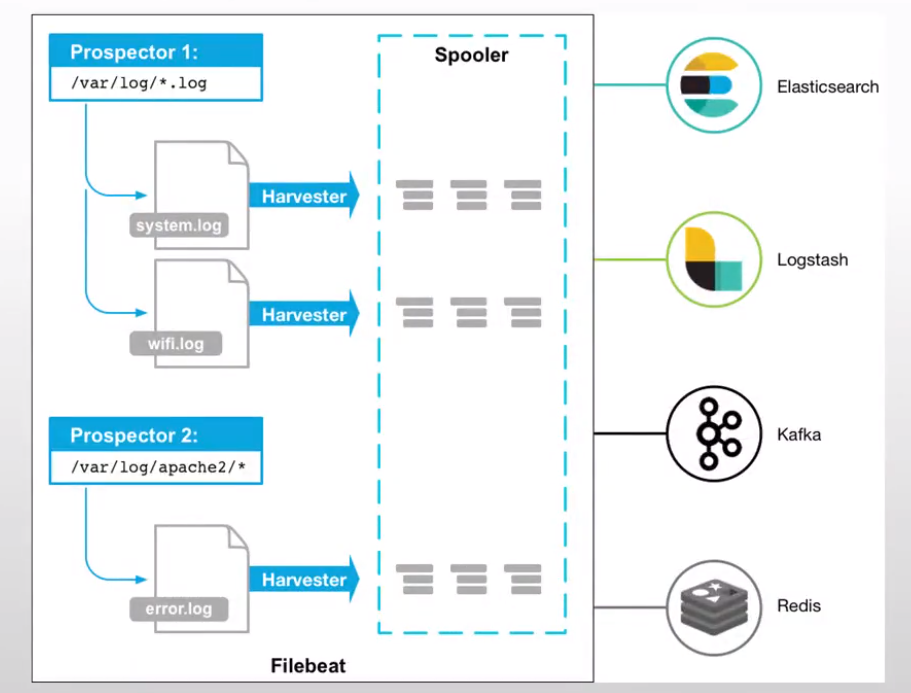
从图中可以看出,Filebeat主要由两个组件构成: prospector(探测器)和harvester(收集器)。这两类组件一起协作完成Filebeat的工作。
其中,Harvester负责进行单个文件的内容收集,在运行过程中,每一个Harvester会对一个文件逐行进行内容读取,并且把读写到的内容发送到配置的output中。当Harvester开始进行文件的读取后,将会负责这个文件的打开和关闭操作,因此,在Harvester运行过程中,文件都处于打开状态。如果在收集过程中,删除了这个文件或者是对文件进行了重命名,Filebeat依然会继续对这个文件进行读取,这时候将会一直占用着文件所对应的磁盘空间,直到Harvester关闭。
Prospector负责管理Harvster,它会找到所有需要进行读取的数据源。然后交给Harvster进行内容收集,如果
input type配置的是log类型,Prospector将会去配置路径下查找所有能匹配上的文件,然后为每一个文件创建一个Harvster。
综上所述,filebeat的工作流程为︰当开启filebeat程序的时候,它会启动一个或多个探测器(prospector)去检
测指定的日志目录或文件,对于探测器找出的每一个日志文件,filebeat会启动收集进程(harvester),每一个收集进程读取一个日志文件的内容,然后将这些日志数据发送到后台处理程序(spooler),后台处理程序会集合这些事件,最后发送集合的数据到output指定的目的地。
1 安装部署
elastic官网提供了多种安装方式,具体方法参见官方网站elastic.co
2 主配置文件
2.1 配置文件语法
filebeat.inputs:- type: logenabled: true #是否开启日志采集功能paths:- /var/log/*.log #指定日志收集的路径,支持通配符,可以写多个filebeat.config.modules: #内置的收集日志的模块配置文件的存放路径path: ${path.config}/modules.d/*.ymlreload.enabled: false #当模块的配置文件有更新时,此程序是否要自动加载,false不加载,true加载setup.template.settings:index.number_of_shards: 1output.console: #添加输出到终端即屏幕上pretty: true# 输出到logstash#output.logstash:# logstash的IP和端口# hosts: ["172.26.139.148.5044"]processors: #- add_host_metadata: #添加此主机的源数据信息到输出数据中,比如IP MAC OS等信息when.not.contains.tags: forwarded
2.2 输出示例
下图message字段的内容就是我自己定义的一个测试文件中的内容
备注:当运行filebeat输出到控制台时,当我们终止了filebeat进程时,需要删除/var/lib/filebeat/目录下的文件才可以正常运行第二次filebeat输出到终端
[root@gitlab ~]# filebeat{"@timestamp": "2021-07-28T01:32:35.942Z","@metadata": {"beat": "filebeat","type": "_doc","version": "7.13.4"},"log": {"offset": 0,"file": {"path": "/test/test.log"}},"message": "Hello xiang shi chuan,This is filebeat test logs","input": {"type": "log"},"agent": {"type": "filebeat","version": "7.13.4","hostname": "gitlab.xsc.org","ephemeral_id": "9fe4035e-d1ba-4a56-bdc2-3b5e82972ea9","id": "7ac65998-f73a-4ab5-87eb-03a01dffd3d3","name": "gitlab.xsc.org"},"ecs": {"version": "1.8.0"},"host": {"ip": ["10.0.0.253","fe80::60b4:786d:82a1:67c5","192.168.235.253","fe80::1dc7:a766:ef32:5e31","172.17.0.1","172.18.0.1","fe80::42:c4ff:fe99:ea06"],"mac": ["00:0c:29:9d:f9:ae","00:0c:29:9d:f9:b8","02:42:a0:f8:8b:f7","02:42:c4:99:ea:06"],"name": "gitlab.xsc.org","hostname": "gitlab.xsc.org","architecture": "x86_64","os": {"type": "linux","platform": "centos","version": "7 (Core)","family": "redhat","name": "CentOS Linux","kernel": "3.10.0-957.el7.x86_64","codename": "Core"},"id": "c3a242bc4cc14d5cb4bff8d8c65e27e6","containerized": false}}
2.3 自定义输出格式
output.console: #添加输出到终端即屏幕上codec.format:string: '%{[@timestamp]} %{[message]}'pretty: true
3 模块使用
3.1 使能模块
filebeat提供了很多已经写好的公共模块,我们可以直接使用,就不需要去修改主配置文件了,直接enable开启就可以使用,同时也可以对模块做一些自定义的修改
[root@gitlab modules.d]# filebeat modules enable nginxEnabled nginx
3.2 修改模块配置
在默认的配置上添加了var.paths路径,可以定义多个,但是默认情况下Filebeat还是会去/var/log/nginx/目录下去查找日志
[root@gitlab ~]# cat /etc/filebeat/modules.d/nginx.yml# Module: nginx# Docs: https://www.elastic.co/guide/en/beats/filebeat/7.13/filebeat-module-nginx.html- module: nginx# Access logsaccess:enabled: true# Set custom paths for the log files. If left empty,# Filebeat will choose the paths depending on your OS.var.paths:- "/var/log/test/*.log"# Error logserror:enabled: true# Set custom paths for the log files. If left empty,# Filebeat will choose the paths depending on your OS.#var.paths:# Ingress-nginx controller logs. This is disabled by default. It could be used in Kubernetes environments to parse ingress-nginx logsingress_controller:enabled: false# Set custom paths for the log files. If left empty,# Filebeat will choose the paths depending on your OS.#var.paths:
3.3 查看模块输出
filebeat -e 可以查看扩展模块的输出信息
[root@gitlab modules.d]# filebeat -e2021-07-28T10:43:45.205+0800 INFO instance/beat.go:665 Home path: [/usr/share/filebeat] Config path: [/etc/filebeat] Data path: [/var/lib/filebeat] Logs path: [/var/log/filebeat]2021-07-28T10:43:45.207+0800 INFO instance/beat.go:673 Beat ID: 62e4bec4-db87-45cc-9be8-1cceeaa98e002021-07-28T10:43:45.209+0800 INFO [add_cloud_metadata] add_cloud_metadata/add_cloud_metadata.go:101 add_cloud_metadata: hosting provider type not detected.2021-07-28T10:43:45.233+0800 INFO [seccomp] seccomp/seccomp.go:124 Syscall filter successfully installed2021-07-28T10:43:45.233+0800 INFO [beat] instance/beat.go:1014 Beat info {"system_info": {"beat": {"path": {"config": "/etc/filebeat", "data": "/var/lib/filebeat", "home": "/usr/share/filebeat", "logs": "/var/log/filebeat"}, "type": "filebeat", "uuid": "62e4bec4-db87-45cc-9be8-1cceeaa98e00"}}}2021-07-28T10:43:45.233+0800 INFO [beat] instance/beat.go:1023 Build info {"system_info": {"build": {"commit": "1907c246c8b0d23ae4027699c44bf3fbef57f4a4", "libbeat": "7.13.4", "time": "2021-07-14T18:42:41.000Z", "version": "7.13.4"}}}2021-07-28T10:43:45.233+0800 INFO [beat] instance/beat.go:1026 Go runtime info {"system_info": {"go": {"os":"linux","arch":"amd64","max_procs":2,"version":"go1.15.14"}}}2021-07-28T10:43:45.233+0800 INFO [beat] instance/beat.go:1030 Host info {"system_info": {"host": {"architecture":"x86_64","boot_time":"2021-07-26T07:39:52+08:00","containerized":false,"name":"gitlab.xsc.org","ip":["127.0.0.1/8","::1/128","10.0.0.253/24","fe80::60b4:786d:82a1:67c5/64","192.168.235.253/24","fe80::1dc7:a766:ef32:5e31/64","172.17.0.1/16","172.18.0.1/16","fe80::42:c4ff:fe99:ea06/64"],"kernel_version":"3.10.0-957.el7.x86_64","mac":["00:0c:29:9d:f9:ae","00:0c:29:9d:f9:b8","02:42:a0:f8:8b:f7","02:42:c4:99:ea:06"],"os":{"type":"linux","family":"redhat","platform":"centos","name":"CentOS Linux","version":"7 (Core)","major":7,"minor":6,"patch":1810,"codename":"Core"},"timezone":"CST","timezone_offset_sec":28800,"id":"c3a242bc4cc14d5cb4bff8d8c65e27e6"}}}2021-07-28T10:43:45.234+0800 INFO [beat] instance/beat.go:1059 Process info {"system_info": {"process": {"capabilities": {"inheritable":null,"permitted":["chown","dac_override","dac_read_search","fowner","fsetid","kill","setgid","setuid","setpcap","linux_immutable","net_bind_service","net_broadcast","net_admin","net_raw","ipc_lock","ipc_owner","sys_module","sys_rawio","sys_chroot","sys_ptrace","sys_pacct","sys_admin","sys_boot","sys_nice","sys_resource","sys_time","sys_tty_config","mknod","lease","audit_write","audit_control","setfcap","mac_override","mac_admin","syslog","wake_alarm","block_suspend"],"effective":["chown","dac_override","dac_read_search","fowner","fsetid","kill","setgid","setuid","setpcap","linux_immutable","net_bind_service","net_broadcast","net_admin","net_raw","ipc_lock","ipc_owner","sys_module","sys_rawio","sys_chroot","sys_ptrace","sys_pacct","sys_admin","sys_boot","sys_nice","sys_resource","sys_time","sys_tty_config","mknod","lease","audit_write","audit_control","setfcap","mac_override","mac_admin","syslog","wake_alarm","block_suspend"],"bounding":["chown","dac_override","dac_read_search","fowner","fsetid","kill","setgid","setuid","setpcap","linux_immutable","net_bind_service","net_broadcast","net_admin","net_raw","ipc_lock","ipc_owner","sys_module","sys_rawio","sys_chroot","sys_ptrace","sys_pacct","sys_admin","sys_boot","sys_nice","sys_resource","sys_time","sys_tty_config","mknod","lease","audit_write","audit_control","setfcap","mac_override","mac_admin","syslog","wake_alarm","block_suspend"],"ambient":null}, "cwd": "/etc/filebeat/modules.d", "exe": "/usr/share/filebeat/bin/filebeat", "name": "filebeat", "pid": 50432, "ppid": 125280, "seccomp": {"mode":"filter"}, "start_time": "2021-07-28T10:43:44.940+0800"}}}2021-07-28T10:43:45.234+0800 INFO instance/beat.go:309 Setup Beat: filebeat; Version: 7.13.42021-07-28T10:43:45.234+0800 INFO [publisher] pipeline/module.go:113 Beat name: gitlab.xsc.org2021-07-28T10:43:45.234+0800 WARN beater/filebeat.go:178 Filebeat is unable to load the Ingest Node pipelines for the configured modules because the Elasticsearch output is not configured/enabled. If you have already loaded the Ingest Node pipelines or are using Logstash pipelines, you can ignore this warning.2021-07-28T10:43:45.235+0800 INFO [monitoring] log/log.go:117 Starting metrics logging every 30s2021-07-28T10:43:45.235+0800 INFO instance/beat.go:473 filebeat start running.2021-07-28T10:43:45.235+0800 INFO memlog/store.go:119 Loading data file of '/var/lib/filebeat/registry/filebeat' succeeded. Active transaction id=02021-07-28T10:43:45.235+0800 INFO memlog/store.go:124 Finished loading transaction log file for '/var/lib/filebeat/registry/filebeat'. Active transaction id=02021-07-28T10:43:45.235+0800 WARN beater/filebeat.go:381 Filebeat is unable to load the Ingest Node pipelines for the configured modules because the Elasticsearch output is not configured/enabled. If you have already loaded the Ingest Node pipelines or are using Logstash pipelines, you can ignore this warning.2021-07-28T10:43:45.235+0800 INFO [registrar] registrar/registrar.go:109 States Loaded from registrar: 02021-07-28T10:43:45.235+0800 INFO [crawler] beater/crawler.go:71 Loading Inputs: 12021-07-28T10:43:45.236+0800 INFO log/input.go:157 Configured paths: [/test/*.log]2021-07-28T10:43:45.236+0800 INFO [crawler] beater/crawler.go:141 Starting input (ID: 12725964982972559051)2021-07-28T10:43:45.237+0800 INFO log/harvester.go:302 Harvester started for file: /test/test.log2021-07-28T10:43:45.237+0800 INFO log/input.go:157 Configured paths: [/var/log/test/*.log]2021-07-28T10:43:45.237+0800 INFO log/input.go:157 Configured paths: [/var/log/nginx/error.log*]2021-07-28T10:43:45.237+0800 INFO [crawler] beater/crawler.go:108 Loading and starting Inputs completed. Enabled inputs: 12021-07-28T10:43:45.237+0800 INFO cfgfile/reload.go:164 Config reloader started2021-07-28T10:43:45.238+0800 INFO log/input.go:157 Configured paths: [/var/log/test/*.log]2021-07-28T10:43:45.238+0800 INFO log/input.go:157 Configured paths: [/var/log/nginx/error.log*]2021-07-28T10:43:45.238+0800 INFO cfgfile/reload.go:224 Loading of config files completed.2021-07-28T10:43:45.239+0800 INFO log/harvester.go:302 Harvester started for file: /var/log/test/test.log{"@timestamp": "2021-07-28T02:43:45.237Z","@metadata": {"beat": "filebeat","type": "_doc","version": "7.13.4"},"host": {"os": {"type": "linux","platform": "centos","version": "7 (Core)","family": "redhat","name": "CentOS Linux","kernel": "3.10.0-957.el7.x86_64","codename": "Core"},"id": "c3a242bc4cc14d5cb4bff8d8c65e27e6","containerized": false,"ip": ["10.0.0.253","fe80::60b4:786d:82a1:67c5","192.168.235.253","fe80::1dc7:a766:ef32:5e31","172.17.0.1","172.18.0.1","fe80::42:c4ff:fe99:ea06"],"mac": ["00:0c:29:9d:f9:ae","00:0c:29:9d:f9:b8","02:42:a0:f8:8b:f7","02:42:c4:99:ea:06"],"hostname": "gitlab.xsc.org","architecture": "x86_64","name": "gitlab.xsc.org"},"log": {"offset": 0,"file": {"path": "/test/test.log"}},"message": "Hello xiang shi chuan,This is filebeat test logs","input": {"type": "log"},"agent": {"version": "7.13.4","hostname": "gitlab.xsc.org","ephemeral_id": "b4277349-4c3e-4c28-85e3-5a2688011bdb","id": "62e4bec4-db87-45cc-9be8-1cceeaa98e00","name": "gitlab.xsc.org","type": "filebeat"},"ecs": {"version": "1.8.0"}}{"@timestamp": "2021-07-28T02:43:45.237Z","@metadata": {"beat": "filebeat","type": "_doc","version": "7.13.4"},"log": {"file": {"path": "/test/test.log"},"offset": 50},"message": "Hello This two line message","input": {"type": "log"},"host": {"name": "gitlab.xsc.org","id": "c3a242bc4cc14d5cb4bff8d8c65e27e6","containerized": false,"ip": ["10.0.0.253","fe80::60b4:786d:82a1:67c5","192.168.235.253","fe80::1dc7:a766:ef32:5e31","172.17.0.1","172.18.0.1","fe80::42:c4ff:fe99:ea06"],"mac": ["00:0c:29:9d:f9:ae","00:0c:29:9d:f9:b8","02:42:a0:f8:8b:f7","02:42:c4:99:ea:06"],"hostname": "gitlab.xsc.org","architecture": "x86_64","os": {"version": "7 (Core)","family": "redhat","name": "CentOS Linux","kernel": "3.10.0-957.el7.x86_64","codename": "Core","type": "linux","platform": "centos"}},"agent": {"type": "filebeat","version": "7.13.4","hostname": "gitlab.xsc.org","ephemeral_id": "b4277349-4c3e-4c28-85e3-5a2688011bdb","id": "62e4bec4-db87-45cc-9be8-1cceeaa98e00","name": "gitlab.xsc.org"},"ecs": {"version": "1.8.0"}}{"@timestamp": "2021-07-28T02:43:45.239Z","@metadata": {"beat": "filebeat","type": "_doc","version": "7.13.4","pipeline": "filebeat-7.13.4-nginx-access-pipeline"},"service": {"type": "nginx"},"agent": {"type": "filebeat","version": "7.13.4","hostname": "gitlab.xsc.org","ephemeral_id": "b4277349-4c3e-4c28-85e3-5a2688011bdb","id": "62e4bec4-db87-45cc-9be8-1cceeaa98e00","name": "gitlab.xsc.org"},"fileset": {"name": "access"},"input": {"type": "log"},"event": {"module": "nginx","dataset": "nginx.access","timezone": "+08:00"},"ecs": {"version": "1.9.0"},"host": {"hostname": "gitlab.xsc.org","architecture": "x86_64","os": {"platform": "centos","version": "7 (Core)","family": "redhat","name": "CentOS Linux","kernel": "3.10.0-957.el7.x86_64","codename": "Core","type": "linux"},"id": "c3a242bc4cc14d5cb4bff8d8c65e27e6","containerized": false,"ip": ["10.0.0.253","fe80::60b4:786d:82a1:67c5","192.168.235.253","fe80::1dc7:a766:ef32:5e31","172.17.0.1","172.18.0.1","fe80::42:c4ff:fe99:ea06"],"name": "gitlab.xsc.org","mac": ["00:0c:29:9d:f9:ae","00:0c:29:9d:f9:b8","02:42:a0:f8:8b:f7","02:42:c4:99:ea:06"]},"log": {"offset": 0,"file": {"path": "/var/log/test/test.log"}},"message": "Nginx test1 message!!!!!!!!!"}{"@timestamp": "2021-07-28T02:43:45.239Z","@metadata": {"beat": "filebeat","type": "_doc","version": "7.13.4","pipeline": "filebeat-7.13.4-nginx-access-pipeline"},"log": {"offset": 29,"file": {"path": "/var/log/test/test.log"}},"message": "Nginx test2 message!!!!!!!!!","fileset": {"name": "access"},"service": {"type": "nginx"},"event": {"module": "nginx","dataset": "nginx.access","timezone": "+08:00"},"input": {"type": "log"},"ecs": {"version": "1.9.0"},"host": {"architecture": "x86_64","os": {"platform": "centos","version": "7 (Core)","family": "redhat","name": "CentOS Linux","kernel": "3.10.0-957.el7.x86_64","codename": "Core","type": "linux"},"id": "c3a242bc4cc14d5cb4bff8d8c65e27e6","containerized": false,"name": "gitlab.xsc.org","ip": ["10.0.0.253","fe80::60b4:786d:82a1:67c5","192.168.235.253","fe80::1dc7:a766:ef32:5e31","172.17.0.1","172.18.0.1","fe80::42:c4ff:fe99:ea06"],"mac": ["00:0c:29:9d:f9:ae","00:0c:29:9d:f9:b8","02:42:a0:f8:8b:f7","02:42:c4:99:ea:06"],"hostname": "gitlab.xsc.org"},"agent": {"ephemeral_id": "b4277349-4c3e-4c28-85e3-5a2688011bdb","id": "62e4bec4-db87-45cc-9be8-1cceeaa98e00","name": "gitlab.xsc.org","type": "filebeat","version": "7.13.4","hostname": "gitlab.xsc.org"}}
4 输出到Elasticsearch
配置output模块,指定es的地址和端口,indices字段可以进行自定义索引,默认的索引不方便我们查看
# ---------------------------- Elasticsearch Output ----------------------------output.elasticsearch:# Array of hosts to connect to.hosts: ["10.0.0.51:9200"]indices:- index: "nginx_test_%{+yyyy.MM.dd}"

若有收获,就点个赞吧
0 人点赞


