Sed 是一个流式处理器,处理文本内容的每一行,按照顺序逐个执行指定的处理命令。更多的 sed 命令工作原理,可以参考 How-sed-Works。网络上到处可见的是 sed 命令的使用示例,所以,这里并不会提供大量的示例命令给大家借鉴,而是强调 sed 命令格式,并介绍一些命令的特殊字符。当我们熟悉了 sed 命令格式和一些特殊字符之后,就可以通过 man sed 的手册查阅 sed 命令参数,无需再花时间翻阅网上的资料。
命令格式
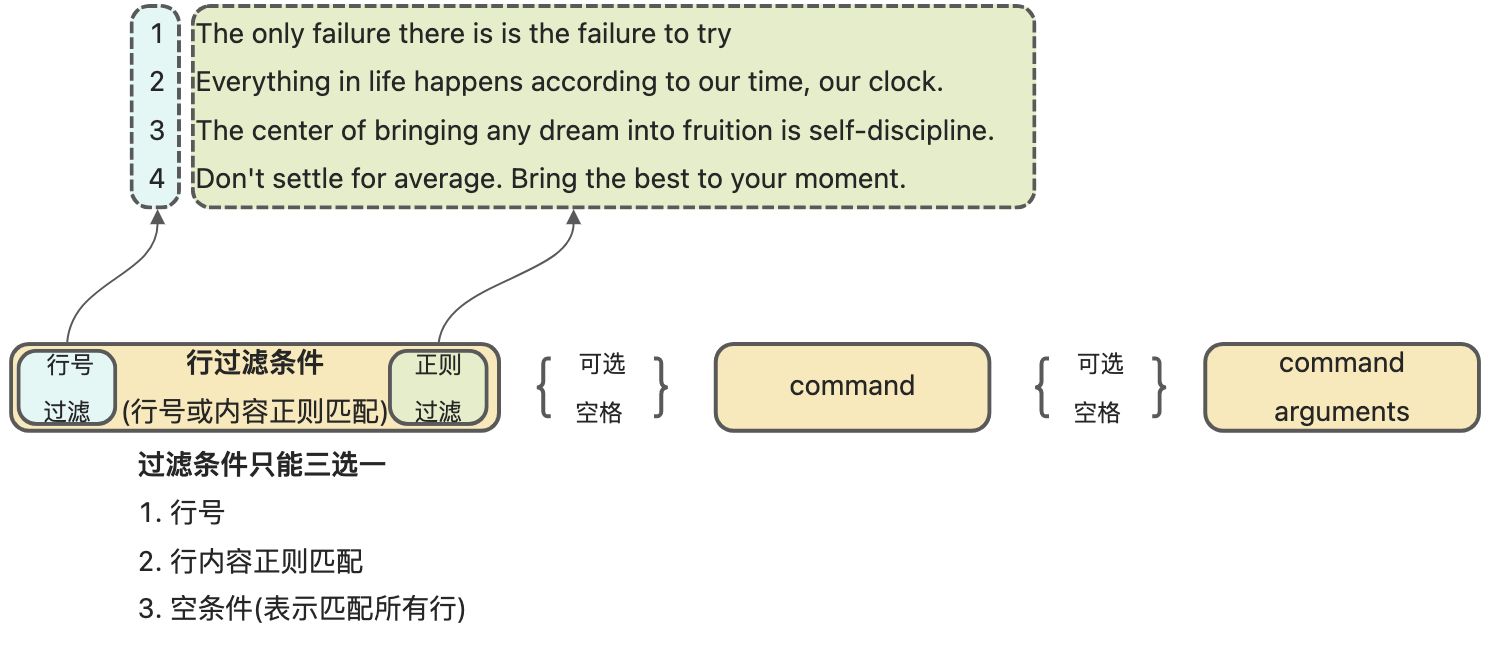
sed options [conditions] command [arguments]
说明: 中括号 […] 表示可选,所以处理命令是必填项。
conditions 分别有行号,行内容的过滤条件,这是可选条件,不加任何过滤条件表示匹配所有行;
command 一般是一个字母,如 d 表示删除,s 表示替换;
arguments 是 command 的参数,如 s/xx/XX/g。
假设我们有一个文件,暂且命名为 daily.txt 每日一句。
1 The only failure there is is the failure to try.2 Everything in life happens according to our time, our clock.3 The center of bringing any dream into fruition is self-discipline.4 Don't settle for average. Bring the best to your moment.
选项 options
| 选项 | 说明 | 用法 |
|---|---|---|
| -e | 追加执行命令 | # 删除第一行和第三行 sed -e ‘1d’ -e ‘3d’ file.txt |
| -f | 执行 sed 命令文件 | # 执行 script.sed 的命令集合 sed -f script.sed file.txt |
| -n | 静默模式, 表示只输出命中的内容,通常与命令 p 一起使用 | # 打印第三和第四行的内容 sed -n ‘3,4p’ |
| -i | 表示编辑原文件,也就是说对原文件进行修改 | # 替换 $file_name 里的 Good 为 Execellent sed -i ‘s/Good/Execellent/g’ file.txt |
| -i “文件缀名” | 表示编辑原文件,但修改前使用指定的后缀名备份原文件 | # 替换 file.txt 里的 Good 为 Execellent,并将原文件重命名为 file.txt.bak sed -i “.bak” ‘s/Good/Execellent/g’ file.txt |
| -E | 拓展的正则表达式 Basic Regex vs Extended Regex |
# 替换 gray 及 grey 为 blue sed -E ‘s/gr[ae]y/blue/g’ file.txt |
| -r | 等价于 -E,这是过时的选项,为了保持兼容 | # 替换 gray 及 grey 为 blue sed -r ‘s/gr[ae]y/blue/g’ file.txt |
过滤条件(可选)
行号过滤
| 行号范围 | 说明 | 用法 |
|---|---|---|
| n | 指定行号 | # 打印第三行 sed -n ‘3 p’ file.txt |
| n,m | 指定行号范围, 如果 n < m, 那么仅选择第 n 行 | # 打印第三到第五行 sed -n ‘3,5 p’ file.txt |
| n,$ | 指定第 n 行开始到最后一行 | # 打印第三到最后一行 sed -n ‘3,$ p’ file.txt |
行内容正则过滤
2.1. 传统斜杠分隔符
匹配格式可以使用传统的斜杠 /xxx/,如 sed -n '/hello world/ p' file.txt。
2.2 定义分隔符
也可以使用反斜杠定义分隔符,如 sed -n '\#hello world# p' file.txt,其中就是用了 # 定义了 # 号作为正则的分隔符,等价于 sed -n '\|hello world| p' file.txt,注意到这里使用了 | 竖线作为分隔符。
在过滤一些文件路径时,定义正则分隔符能够简化正则内容的作用,譬如匹配 /usr/bin/mysql,传统使用斜杠的写法是 sed -n '/\/usr\/bin\/mysql/ p' file.txt,如果使用定制分隔符方式,sed -n '\#/usr/bin/mysql#' file.txt,就能在不转义斜杠 / 的前提下完成工作。
2.3. 更多内容
参考 BRE(Basic Regular Expressions) and ERE(Extended Regular Expressions) 获取更多说明和例子,如匹配内容时忽略大小写 sed -n '/HELLO WORLD/I p' file.txt,就能打印出 hello world、Hello World 等所有行数据。
条件取反
在过滤条件的最后添加 ! (感叹号)表示条件取反。例如sed '1,2! d' file.txt 表示保留第一行及第二行,删除其他行。sed -n '/hello world/! p' file.xt 表示打印不包含 hello world 的所有行数据。
匹配多行
可以使用匹配行范围的条件,譬如现在需要匹配 html 内的 div 元素,html 内容如下所示。
<html>
  <div>
    The only failure there is is the failure to try.
  </div>
  <div>
    Don't settle for average. Bring the best to your moment.
  </div>
</html>
sed -n '/<div>/,/<\/div>/ p' input.html

# 输出结果
#  <div>
#    The only failure there is is the failure to try.
#  </div>
#  <div>
#    Don't settle for average. Bring the best to your moment.
#  </div>
从<div开始匹配,直到 </div> 结束,如果没能遇到 </div> 则直到文本的结尾。除了使用正则匹配,还能混合使用行号及正则条件进行范围匹配,更多的例子可以参考 。
命令 command [arguments]
s/regex/replacement/[flags]
替换文本内容,格式如 s/regex/replacement/flags,或自定义分隔符,s 的下一个字符就是分隔符,s{分隔符},例如 s|regex|replacement|flags。
regex
正则匹配参考 BRE(Basic Regular Expressions) and ERE(Extended Regular Expressions) 上的说明,同样通过 sed -E 的选项来决定使用的是 BRE 还是 ERE,不过建议使用 ERE。
replacement
将命中正则条件的内容替换成特定的内容,特别说明的是 &、\N 替换字符,& 表示匹配的内容,\N 表示匹配的组序号。如 echo 'abcXXXXXXXXXX123' | sed -E 's/(abc).*(123)/\1\2/g' 输出 abc123,其中 \1 表示 abc,\2 表示 123;又例如echo 'def123' | sed 's/def/abc&/g' 输出 abcdef123,其中 & 表示 def。
flags(可选项)
若没有定义 flags 标识,则只会替换一次,如 echo 'aaaa' | sed 's/a/b/' 输出 baaa,想要替换所有字符可以增加 g 标记,如 echo 'aaaa' | sed 's/a/b/g' 就会如期输出 bbbb。
| g | 全局替换,替换所有命中匹配条件的字符。 |
|---|---|
| Number | 替换的连续出现的命中正则的个数,例如 sed 's/a/&:/10' file.txt 等价于 sed 's/aaaaaaaaaa/&:/' file.txt。注意这里的 & 表示命中匹配的字符。 |
| w filename | 将替换后的结果保存到指定文件,默认情况下输出到控制台,更多例子参考 https://www.grymoire.com/Unix/Sed.html#uh-10。 |
| I i |
正则匹配时忽略大小写,例如 sed 's/abc/123/i' file.txt,其中 ABC、abc、Abc 都会被替换成 123。 |
q[exit-code]
匹配后退出,并设置程序返回码,例如 sed '/bad/ q 42' file.txt 表示遇到 bad 关键字则返回 42 错误码。
d 删除行
删除一行数据。
a 追加行
在当前匹配行下面插入一行自定义的文本内容。
a text
a \
text
sed 'a hello' file.txt

sed 'a \
hello' file.txt
i 插入行
在当前匹配行上面插入一行自定义的文本内容。
i text
i \
text
sed 'i hello' file.txt

sed 'i \
hello' file.txt
c 改变一行
使用自定义的文本内容替换一行数据。
分别可以使用以下格式
c text
c \
text
sed 'c hello' file.txt

sed 'c \
hello' file.txt
= 行号
在行内容之前新增一行并打印行号,sed '=' file.txt。
多命令(分号)
command1;command2;command3;…
多条命令组合使用,可以使用分号(;)连接,对每一行数据按照顺序执行所有的命令,如替换一行里面的所有黄色及红色为蓝色,sed 's/yellow/blue/g; s/red/blue/g' file.txt,还能分别针对多行数据,如删除第一行、第六行、第九行 sed '1d;6d;9d' file.txt。
组合命令(大括号)
{
command1
command2
…
}
类似于分号,但使用 {} 表示多条命令合并为一条指令,并按顺序执行其内部的命令,例如下列例子所示。
# 替换一行里面的所有黄色及红色为蓝色
sed '{
      s/yellow/blue/g
      s/red/blue/g
     }' file.txt

# 删除第一行、第六行、第九行
sed '{
      1d
      6d
      9d
     }' file.txt
参考资料

若有收获,就点个赞吧
0 人点赞


