声明脚本解析器
#!/bin/bash定义在 bash 脚本的首行位置,表示指定脚本内容的运行引擎,bash 引擎的语法都能够通过 man bash 手册获取。
SHELL GRAMMAR...Compound CommandsA compound command is one of the following:(list){ list; }((expression))[[ expression ]]for name [ [ in [ word ... ] ] ; ] do list ; donefor (( expr1 ; expr2 ; expr3 )) ; do list ; doneselect name [ in word ] ; do list ; donecase word in [ [(] pattern [ | pattern ] ... ) list ;; ] ... esacif list; then list; [ elif list; then list; ] ... [ else list; ] fiwhile list-1; do list-2; doneuntil list-1; do list-2; doneShell Function Definitionsname () compound-command [redirection]function name [()] compound-command [redirection]
可用的解析器
> cat /etc/shells

# List of acceptable shells for chpass(1).
# Ftpd will not allow users to connect who are not using
# one of these shells.

/bin/bash
/bin/csh
/bin/dash
/bin/ksh
/bin/sh
/bin/tcsh
/bin/zsh
也就是说可用的解析器定义如下
#!/bin/bash

#!/bin/csh

#!/bin/dash

#!/bin/ksh

#!/bin/sh

#!/bin/tcsh

#!/bin/zsh
输出与输入
(覆盖输出)
>>(追加输出)
<(覆盖输入)
<<(追加输入) (EOF …换行… EOF)
2> (错误输出 - stderr)
read 命令双引号、单引号、反引号
"``"支持 $XXX 形式的变量输出,也支持反引号的内容解析 ```bash NAME=edward echo “hello $NAME”
hello edward
`'``'` **不支持** _$XXX_ 形式的变量输出,**也不支持**反引号的内容解析
```bash
> NAME=edward
> echo 'hello $NAME'
hello $NAME


> echo 'date: `date +%F`'
date: `date +%F`
`````` 以脚本形式解析反引号内容,支持 $XXX 形式的变量输出
> echo "date: `date +%F`"
date: 2022-06-04

> cmd_date="date"
> echo "date: `$cmd_date +%F`"
date: 2022-06-04
算术运算
1. expr (只支持整数)
运算符前后必须带有空格,乘号 * 必须要转义为 \*
> expr 1 + 2
3

> expr 2 - 2
0

> expr 2 \* 2
4

> expr 2 / 2
1

> expr 10 % 3
1
2. $((…)) (只支持整数)
> echo $((1+2))
3

> echo $((2 -2))
0

> echo $((2* 2))
4

> echo $((2 / 2))
1

> echo $((10 % 3))
1
3. let var=expr (只支持整数)
能够同时运算及完成赋值,let sum=1+2, let sum=”1 + 2”。
> sum=`expr 1 + 2`
> echo $sum
3

> sum=$((1 + 2))
> echo $sum
3

# 使用 let var=expr 直接完成赋值
> let sum=1+2 # 等价于 let sum="1+2" let sum='1+2' let sum='1 + 2'
> echo $sum
3
4. bc (支持整数及浮点数)
bc 命令支持浮点数计算,默认是交互式,也可以通过管道流的方式直接计算结果。
> bc

scale=2

10/3
3.33
echo "scale=2;10/3" | bc
3.33
echo 命令
-n 忽略自动追加换行符
-e 支持解析 \a(发出声音) \n \r \t \b(删除前一个字符) 这类制表符
格式化输出 (ANSI 标准),参考
> echo "\u001b[31mHello World\u001b[0m"
变量
变量名的命名规范,只支持纯英文及下划线(**_**),如 **MY_NAME="edward"**。
- 命名只能使用英文字母,数字和下划线,首个字符不能以数字开头。(错误示例
5cookie="cookies") - 中间不能有空格,可以使用下划线 _。(错误示例
my name="edward") - 不能使用标点符号。(错误示例
my.name="edward") - 不能使用 bash 里的关键字(可用 help 命令,
bash -c help,查看保留关键字)。1. 局部变量
表示当前执行脚本有效,执行的子脚本将不共享局部变量。 ```bash NAME=”edward” # 字符串 AGE=23 # 数字
echo “name=$NAME, age=${AGE}”
<a name="L7KOq"></a>
### 2. 全局变量
通过 `export` 关键字将变量可以在子脚本中共享使用,表示子脚本也能够使用的变量,参考如下两个脚本。
```bash
> cat env.sh

#!/bin/bash

export NAME="edward"

echo "name=${NAME}"

bash ./env2.sh
> cat env2.sh

#!/bin/bash

echo "env2's name=$NAME"
> bash env.sh

name=edward
env2's name=edward
3. 删除变量(unset)
支持删除局部变量及全局变量。
> NAME="edward"
> echo "name=$NAME"
name=edward

> unset NAME

> echo "name=$NAME"
name=
4. 环境变量关联文件
配置~/.bash_profile文件定义当前用户登录后的环境变量(全局变量),即通过 export 命令设置全局变量。通过源码发现,~/.bash_profile 包含 ~/.bashrc,而 ~/.bashrc 又包含了 /etc/bashrc。/etc/profile、~/.bash_profile 关系如下图所示。下图是指 login shell 加载的脚本文件,其中蓝色背景部分是指 non-login shell 加载的脚本文件。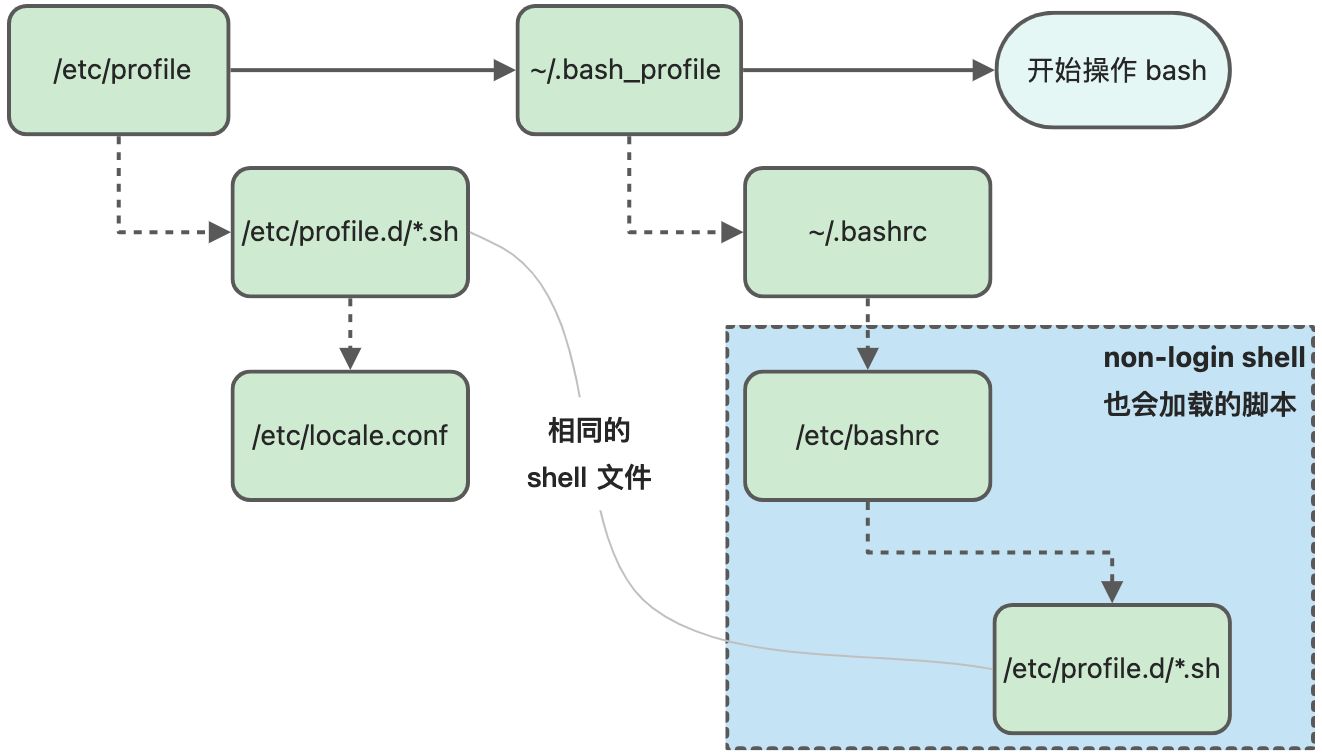
5. Shell 环境变量
man bash命令内容有对脚本初始化的环境变量说明,定位到 “Shell Variables” 部分。
Shell Variables

  BASH_VERSION
    Expands to a string describing the version of this instance of bash.

  OLDPWD The previous working directory as set by the cd command.

  PWD    The current working directory as set by the cd command.

  ... ...
read 命令(交互式输入)
read 选项
-a 后跟一个变量,该变量会被认为是个数组,然后给其赋值,默认是以空格为分割符(将在下一节介绍数组)
-p 打印前缀信息
-t 限定时间内完成输入,否则直接退出(单位秒)
-s 安静模式(slient) 即不显示输入内容
-n 输入的最大字符个数
新增 read.sh 脚本文件,内容如下
#!/bin/bash

read -p "What's your name:" name            # 字符串
read -p "What's your hobbies:" -a hobbies   # 数组 (空格作为分隔符)
read -p "What's your password:" -s password # 字符串

echo

echo "Your name:${name}, hobbies:${hobbies[*]}, password:${password}"
结合输入流完成自动输入 << EOF ... EOF。
> bash read.sh << EOF
> edward
> running swimming
> 102938102938
> EOF

Your name:edward, hobbies:running swimming, password:102938102938
数组
1. 索引数组 | Array
#!/bin/bash
# 声明时赋值
ARR=("123" "456" "789")

# 单独赋值
ARR[3]="abc"
ARR[4]="def"
ARR[5]="ghi"

echo "${!ARR[@]}" # 输出 0 1 2 3 4 5
echo "${ARR[@]}"  # 输出 123 456 789 abc def ghi
2. 关联数组 | Map
需要 Bash 版本支持 declare -A 参数,表示关联数组
#!/bin/bash

declare -A MAP=([name]="edward" [age]=20 [company]="coremail")

MAP[hobby]="Swimming"

echo "${!MAP[@]}" # 输出 name age company
echo "${MAP[@]}"  # 输出 edward 20 coremail
条件判断
1. if 判断
# 执行 command 之后校验 $? 是否等于 0
# $? == 0 表示 true, $? != 0 表示 false

if command; then
  ...
else
  ...
fi

if command; then
  ...
elif command; then
  ...
else
  ...
fi
#!/bin/bash

# 判断 IP 是否能够有效访问
if ping -c1 -t1 $IP &> /dev/null; then
  echo "$IP OK"
if

# 数学算式判断
if (( 1+2 > 1 )); then
  echo "1+2 > 1"
fi
2. if 多条件判断
注意字符串比较使用 == 两个等于号。
#!/bin/bash

if [[ "$1" == "zhangsan" ]]; then
  echo "Hi zhangsan"
elif [[ "$1" == "lisi" ]]; then
  echo "Hi lisi"
else
  echo "Usage: $0 zhangsan|lisi"
fi
3. test 命令 (man test 完整说明)
test 命令还同时支持 [ expression ]、 [[ expression ]] 两种格式,个人更推荐使用 [[ expression ]] 语法。
test "str1" == "str1"; echo $? # 输出 0
test "str1" == "str2"; echo $? # 输出 1

test -z "";    echo $? # zero 输出0
test -z "abc"; echo $? # zero 输出1

test -n "abc"; echo $? # non-zero 输出0
test -n "";    echo $? # non-zero 输出1

# 等价于中括号形式 [ expression ] 必须带有空格
[ "str1" == "str1" ]; echo $? # 输出 0
[ "str1" == "str2" ]; echo $? # 输出 1

[ -z "" ];    echo $? # zero 输出0
[ -z "abc" ]; echo $? # zero 输出1

[ -n "abc" ]; echo $? # non-zero 输出0
[ -n "" ];    echo $? # non-zero 输出1
更推荐使用 [[ expression ]] 语法,除了支持 test 选项及 [ expression ] 之外还额外支持字符串通配符匹配。
[[ "abcd" == "ab*" ]]; echo $? # 输出 0

[[ -z "" ]]; echo $?    # 输出 0
[[ -z "abc" ]]; echo $? # 输出 1
配合 if 语法使用
# 最朴素的判断
if test 10 -lt 11; then
  echo "10 < 11"
fi

# 单中括号, 等价于 test 命令
if [ 3 -gt 2 ]; then
  echo "3 > 2"
fi

# 双中括号
if [[ "abcdefg" == abc* ]]; then
  echo "abcdefg matched abc*"
fi
if [[ "abcdefg" == a*efg ]]; then
  echo "abcdefg matched a*efg"
fi
test 1 -eq 1; echo $? # 1 == 1, 输出 0
test 1 -ne 2; echo $? # 1 != 2, 输出 0
test 1 -lt 2; echo $? # 1 < 2 , 输出 0
test 2 -gt 1; echo $? # 2 > 1 , 输出 0
test 1 -le 1; echo $? # 1 <= 1, 输出 0
test 1 -ge 1; echo $? # 1 >= 1, 输出 0
-d file       True 如果文件夹存在.
-e file       True 如果文件或文件夹存在
-f file       True 如果文件存在.
-g file       True 如果文件存在且设置了 sgid
-r file       True 如果文件存在且只读权限
-s file       True 如果文件存在且内容非空
-u file       True 如果文件存在且设置了 suid
-w file       True 如果文件存在且具有写权限
-x file       True 如果文件存在且有执行权限;
              True 如果是文件夹则表示可以被搜索
-L file       True 如果文件存在且类型为软链接文件(symbolic link)
-O file       True 如果文件拥有者与当前执行进程用户匹配
-G file       True 如果文件所属群组与当前执行进程用户匹配
-S file       True 如果文件存在且类型为 Socket 文件

file1 -nt file2    True 如果 file1 比 file2 更加新
file1 -ot file2    True 如果 file1 比 file2 更加旧
file1 -ef file2    True 如果 file1 是 file2 的硬链接文件(inode 相同)

# 使用方法
test -d "/tmp/dir/edward" 或 [ -d "/tmp/dir/edward"]
4. 组合条件 && || !
> [ "str1" == "str1" ] && [ "ab" == "cd" ]
> echo $? # 输出 0

> [ "str1" == "str2" ] || [ "ab" == "ab" ]; echo $? # 输出 0

> [ ! "str1" == "str2" ] && [ "ab" == "ab" ]; echo $? # 输出 0
配合 if 使用
# 组合条件判断
if [ ! "str1" == "str2" ] && [ "ab" == "ab" ]; then
  echo "str1 != str2 and ab == ab"
fi

if [ ! "str1" == "str2" ] && [[ "ab" == a* ]]; then # 注意这里是 [[ "ab" == a* ]]
  echo "str1 != str2 and ab == ab"
fi
for 循环
1. 遍历序列
# 输出 1 2 3 4 5 6 7 8 9
for i in `seq 1 9`; do
  echo -n "$i "
done

# 输出 1 2 3 4 5 6 7 8 9
for i in $(seq 1 9); do
  echo -n "$i "
done

# 输出 9 8 7 6 5 4 3 2 1
for i in `seq 9 -1 1`; do
  echo -n "$i "
done
2. 数组说明
数组定义的语法 NAME=("v1" "v2" "v3"), ${ARR[@]}、${ARR[*]}的区别及使用结果参考如下表格所示。
| 输入 ARR=(“123” “4 5 6” “a b”) | 结果 | for i in .. 遍历 |
|---|---|---|
| ${ARR[@]} | # 变成 6 个元素 “123” “4” “5” “6” “a” “b” |
for i in ${ARR[@]}; do echo $i; done> 输出 |
123 4 5 6 a b
|
| “${ARR[@]}” | # 变成 3 个元素
“123” “4 5 6” “a b” | for i in “${ARR[@]}”; do echo $i; done> 输出
123 4 5 6 a b
|
| ${ARR[]} | # 变成 6 个元素, 使用了空格合并数组元素
“123” “4” “5” “6” “a” “b”
IFS=”,”
# 变成 3 个元素
“123”,”4 5 6”,”a b” | for i in ${ARR[]}; do echo $i; done> 输出
123 4 5 6 a b
IFS=”,”
for i in ${ARR[*]}; do echo $i; done> 输出
123 4 5 6 a b
|
| “${ARR[]}” | # 定义逗号作为分隔符
IFS=’,’
# 变成 1 个元素, 使用逗号分隔符合并数组元素
“123,4 5 6,a b” | for i in “${ARR[]}”; do echo $i; done> 输出
123 4 5 6 a b
IFS=”,”
for i in “${ARR[*]}”; do echo $i; done> 输出
123,4 5 6,a b
|
3. 遍历数组
# 输出
# 123
# 456
# a b
ARR=("123" "456" "a b")
# 请一定要带双引号引用 "${ARR[@]}", 否则 "a b" 会被无解析为 "a" "b"
for i in "${ARR[@]}"; do
  echo "$i"
done

# 万能方式! 即不需要考虑数组元素是否存在空格, 如 "a b" 这类数组元素
# 0=123
# 1=456
# 2=a b
ARR=("123" "456" "a b")
# 这里使用 ${!ARR[@]} == "${!ARR[@]}"
for i in ${!ARR[@]}; do
  echo "$i=${ARR[$i]}"
done
4. 遍历关联数组(Map)
# 输出
# name=edward
# age=23
declare -A MAP=([name]=edward [age]=23)
# 由于 key 可能存在空格, 因此需要双引号包裹 "${!ARR[@]}"
for k in "${!MAP[@]}"; do
  echo "$k=${MAP[$k]}"
done
5. 遍历字符串
# 输出
# abc
# def
# ghi
STR="abc def ghi"
# 注意这里的 $STR 不能加入双引号, 因为 "$STR" 会被认为是一个完整的字符串!
for w in $STR; do
  echo "$w"
done
6. 遍历文件内容
cat temp.txt
hi, edward \
how are you

# 输出
# line: hi, edward \
# line: how are you
while read -r line; do # read -r 表示输出反斜杠(\)
  echo "line: $line"
done < temp.txt

# 不带 -r 参数
# 输出
# line: hi, edward how are you
while read line; do
  echo "line: $line"
done < temp.txt
7. break / continue
break 及 continue 都支持参数,如 break 2 表示结束上一层的循环,continue 2 表示继续上一层的循环。
# 输出 1 2 3 4 6 7 8 9
for i in `seq 1 9`; do
  if [ $i -eq 5 ]; then
    continue
  fi
  echo -n "$i "
done

# 输出 1 2 3 4
for i in `seq 1 9`; do
  if [ $i -eq 5 ]; then
    break
  fi
  echo -n "$i "
done

# 嵌套 for 循环的 contine / break
for (( i=0;i<10;i++ )); do
  for (( j=0;j<10;j++)); do
    echo "$i, $j"
    if [ $j -eq 5 ]; then
      break 2 # break 上一层的 for 循环
    fi
  done
done

# 嵌套 for 循环的 contine / break
for (( i=0;i<10;i++ )); do
  for (( j=0;j<10;j++)); do
    echo "$i, $j"
    if [ $j -eq 5 ]; then
      continue 2 # continue 上一层的 for 循环
    fi
  done
done
while 循环
# 输出 1 2 3 4 5 6 7 8 9
i=1
while [ $i -lt 10 ]; do
  echo -n "$i "
  i=$((i+1))
  # let i=$i+1
  # i=`expr $i + 1`
done

# 输出 1 2 3 4 5 6 7 8 9
i=1
while test $i -lt 10; do
  echo -n "$i "
  let i=$i+1
done

# 输出 1 2 3 4 5 6 7 8 9
i=1
while (( $i < 10 )); do
  echo -n "$i "
  i=`expr $i + 1`
done
until 循环
与 while 语法相似,但不同的是判断条件是取非操作,建议使用 while 代替 until,并通过 ! 感叹号取非操作代替 until 的条件判断。也就是 while !condition == until condition。
# 输出 1 2 3 4 5 6 7 8 9
i=1
until [ ! $i -lt 10 ]; do # 注意到这里的感叹号 "!"
  echo -n "$i "
  i=$((i+1))
done
case 多条件判断
1. 语法
case $VAR in
pattern1)
  dosomething
  ;;
pattern2)
  dosomething
  ;;
pattern3|pattern4)
  dosomething
  ;;
*)
  dodefault
  ;;
esac
2. 数字翻译
#!/bin/bash

case $1 in
"1")
  echo "one"
  ;;
"2")
  echo "two"
  ;;
"3")
  echo "three"
  ;;
*)
  echo "Usage: $0 1|2|3"
  ;;
esac
function 函数
1. 函数语法
name() {
  ... commands ...
}

# 建议使用此语法
function name {
  ... commands ...
}
2. 函数调用
#!/bin/bash

# 函数定义
hi() {
  echo "Hi"
}
function hello {
  echo "Hello"
}

# 函数调用
hi    # 输出 Hi
hello # 输出 Hello
3. 函数参数
| 定义 | 说明 | 示例 |
|---|---|---|
| $0 | 脚本名称 | > bash test.sh $0: test.sh |
| $ |
> func val1 val2 “val 3” $1: val1 $2: val2 $3: val 3 |
|
| $@ |
获取所有参数,并使用空格将所有参数分隔多个字符串 | > func val1 val2 “val 3” $@: val1 val2 val 3 |
| “$@” | 使用空格将所有参数(使用双引号)分隔多个字符串 形式: “$1” “$2 “$3” … |
> func val1 val2 “val 3” “$@”: “val1” “val2” “val 3” |
| $* | 获取所有参数,以 IFS 第一个字符作为分隔符将所有参数分隔多个字符串 形式: “$1”c”$2”c”$3”c…”,其中 c 是 IFS 的第一个字符,若 IFS 为空则使用空格 |
> IFS=”,” > func val1 val2 “val 3” $*: “val1”,”val2”,”val 3” # 三个元素 |
| “$*” | 获取所有参数,以 IFS 第一个字符作为分隔符合并成一个字符串 形式: “$1c$2c$3c…”,其中 c 是 IFS 的第一个字符,若 IFS 为空则使用空格 |
> IFS=”,” > func val1 val2 “val 3” “$*”: “val1,val2,val 3” # 一个元素 |
| $# | 参数个数 | > func val1 val2 “val 3” $#: 3 |
| $$ | 获取当前 shell 脚本执行的进程号 | $$: 552 |
| $? | 获取上一条指令的执行状态 |
看一下 man bash 手册的原文注释。
   Special Parameters
       The shell treats several parameters specially.  These parameters may only be referenced; assignment to them is not allowed.
       *      Expands to the positional parameters, starting from one.  When the expansion occurs within double quotes, it expands to a single word with the
              value of each parameter separated by the first character of the IFS special variable.  That is, "$*" is equivalent to "$1c$2c...", where c  is
              the  first  character of the value of the IFS variable.  If IFS is unset, the parameters are separated by spaces.  If IFS is null, the parame‐
              ters are joined without intervening separators.
       @      Expands to the positional parameters, starting from one.  When the expansion occurs within double quotes, each parameter expands to a separate
              word.  That is, "$@" is equivalent to "$1" "$2" ...  If the double-quoted expansion occurs within a word, the expansion of the first parameter
              is joined with the beginning part of the original word, and the expansion of the last parameter is joined with the last part of  the  original
              word.  When there are no positional parameters, "$@" and $@ expand to nothing (i.e., they are removed).
       #      Expands to the number of positional parameters in decimal.
       ?      Expands to the exit status of the most recently executed foreground pipeline.
       -      Expands to the current option flags as specified upon invocation, by the set builtin command, or those set by the shell itself (such as the -i
              option).
       $      Expands to the process ID of the shell.  In a () subshell, it expands to the process ID of the current shell, not the subshell.
       !      Expands to the process ID of the most recently executed background (asynchronous) command.
       0      Expands to the name of the shell or shell script.  This is set at shell initialization.  If bash is invoked with a file of commands, $0 is set
              to the name of that file.  If bash is started with the -c option, then $0 is set to the first argument after the string to be executed, if one
              is present.  Otherwise, it is set to the file name used to invoke bash, as given by argument zero.
       _      At shell startup, set to the absolute pathname used to invoke the shell or shell script being executed as passed in the environment  or  argu‐
              ment list.  Subsequently, expands to the last argument to the previous command, after expansion.  Also set to the full pathname used to invoke
              each command executed and placed in the environment exported to that command.  When checking mail, this parameter holds the name of  the  mail
              file currently being checked.
4. 变量作用范围
#!/bin/bash

var1='A'
var2='B'

my_function () {
  local var1='C' # local 仅作用于当前函数范围
  var2='D'
  echo "Inside function: var1: $var1, var2: $var2"
}

echo "Before executing function: var1: $var1, var2: $var2"

my_function

echo "After executing function: var1: $var1, var2: $var2"

# 输出
Before executing function: var1: A, var2: B
Inside function: var1: C, var2: D
After executing function: var1: A, var2: D
5. 返回值
返回值的范围是 0~255, 只有 0 表示成功,1~255 都表示失败。$? 表示上一条指令的执行结果。
#!/bin/bash

function my_function {
  echo "some result"
  return 66
}

my_function
echo $?

# 输出
some result
66
通过变量作用域,我们能够返回字符串、数字、甚至是数组。
#!/bin/bash

function my_function {
  func_result="some result"
  # func_result=88
  # func_result=(1 2 3 4)
}

my_function
echo $func_result

# 输出
some result
参考资料

若有收获,就点个赞吧
0 人点赞


