1. 介绍
Spring Boot 使用 ElasticSearch 除了使用 es 官网建议的 RestHighLevelClient ,还可以使用 Spring Data ElasticSearch 提供的相关API。
Spring Data ElasticSearch 对 RestHighLevelClient 进行了封装,使我们使用起来更轻松。
Spring Data ElasticSearch 提供了 实现ElasticsearchRepository类和 ElasticsearchRestTemplate(es7开始) 两种用法,前者用于简单的CRUD操作,后者用于前者无法处理的复杂操作。
前提:
- 必须根据官方文档对应的 Spring Boot 和 es 的版本进行一一对应
- es7 和之前的改动很大,很多API都不再可用,注意变更。 | Spring Data Release Train | Spring Data Elasticsearch | Elasticsearch | Spring Boot | | —- | —- | —- | —- | | 2020.0.0[1] | 4.1.x[1] | 7.9.3 | 2.4.x[1] | | Neumann | 4.0.x | 7.6.2 | 2.3.x | | Moore | 3.2.x | 6.8.12 | 2.2.x | | Lovelace | 3.1.x | 6.2.2 | 2.1.x | | Kay[2] | 3.0.x[2] | 5.5.0 | 2.0.x[2] | | Ingalls[2] | 2.1.x[2] | 2.4.0 | 1.5.x[2] |
2. 前提配置
2.1 改pom
<dependency><groupId>org.springframework.boot</groupId><artifactId>spring-boot-starter-data-elasticsearch</artifactId></dependency>
2.2 写 yml 或 自定义 @Bean
2.2.1 写 yml
org.springframework.boot.autoconfigure.elasticsearch.ElasticsearchRestClientAutoConfiguration 路径下寻找相关配置,并在yml中进行配置

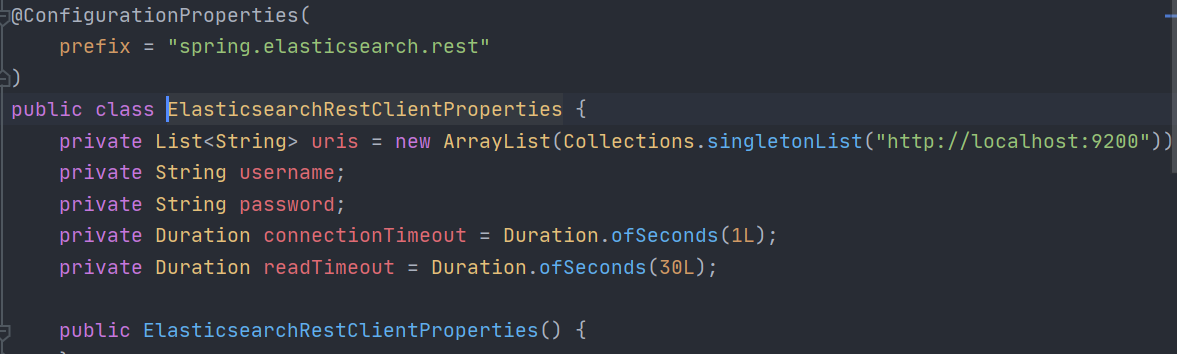
spring:elasticsearch:rest:uris:- localhost:9200- localhost:9201username: xxx # 没有可不写password: xxx # 没有可不写connection-timeout: 1s # 默认值read-timeout: 30s # 默认值
2.2.2 自定义 @Bean
同样为上面的自动装配地址,查找到相应的默认配置,并改成自己的配置
// 默认自动装配源码@Configuration(proxyBeanMethods = false)@ConditionalOnMissingBean({RestHighLevelClient.class})static class RestHighLevelClientConfiguration {RestHighLevelClientConfiguration() {}@BeanRestHighLevelClient elasticsearchRestHighLevelClient(RestClientBuilder restClientBuilder) {return new RestHighLevelClient(restClientBuilder);}}
// 自定义配置package com.edward.config;import org.apache.http.HttpHost;import org.elasticsearch.client.RestClient;import org.elasticsearch.client.RestHighLevelClient;import org.springframework.context.annotation.Bean;import org.springframework.context.annotation.Configuration;@Configurationpublic class EsConfig {@BeanRestHighLevelClient restHighLevelClient() {return new RestHighLevelClient(RestClient.builder(new HttpHost("localhost", 9200)));}}
3. ElasticsearchRepository 用法
必须以上面第二步的配置为前提
3.1 Model
我们先写一个的实体类,借助这个实体类呢来完成基础的CRUD功能。
@Data@Accessors(chain = true)@Document(indexName = "blog", type = "java")public class BlogModel implements Serializable {private static final long serialVersionUID = 6320548148250372657L;@Idprivate String id;private String title;//@Field(type = FieldType.Date, format = DateFormat.basic_date)@DateTimeFormat(pattern = "yyyy-MM-dd")@JsonFormat(pattern = "yyyy-MM-dd", timezone = "GMT+8")private Date time;}
注意id字段是必须的,可以不写注解@Id。
3.2 BlogRepository
public interface BlogRepository extends ElasticsearchRepository<BlogModel, String> {}
3.3 CRUD
dao层的方法除了默认了,也可以自己添加,自己添加时根据提示写出可识别的代码 或者 dao层的抽象方法上标注 @Query 注解并书写 es 查询语句
@RestController@RequestMapping("/blog")public class BlogController {@Autowiredprivate BlogRepository blogRepository;// 新增@PostMapping("/add")public Result add(@RequestBody BlogModel blogModel) {blogRepository.save(blogModel);return Result.success();}// 根据ID修改(覆盖修改)@PostMapping("/update")public Result updateById(@RequestBody BlogModel blogModel) {String id = blogModel.getId();if (StringUtils.isEmpty(id))return Result.error();blogRepository.save(blogModel);return Result.success();}// 根据ID查询@GetMapping("/get/{id}")public Result getById(@PathVariable String id) {if (StringUtils.isEmpty(id))return Result.error();Optional<BlogModel> blogModelOptional = blogRepository.findById(id);if (blogModelOptional.isPresent()) {BlogModel blogModel = blogModelOptional.get();return Result.success(blogModel);}return Result.error();}// 查询所有@GetMapping("/get")public Result getAll() {Iterable<BlogModel> iterable = blogRepository.findAll();List<BlogModel> list = new ArrayList<>();iterable.forEach(list::add);return Result.success(list);/* 分页查询(pageNum,pageSize)Page<User> users = userDao.findAll(PageRequest.of(0, 3));users.map(x -> {System.out.println(x);return null;});*/}// 根据ID删除@DeleteMapping("/delete/{id}")public Result deleteById(@PathVariable String id) {if (StringUtils.isEmpty(id))return Result.error();blogRepository.deleteById(id);/*删除所有数据blogRepository.deleteAll();*/return Result.success();}}
4. ElasticsearchRestTemplate 用法
同样必须以上述2前提配置为基础 这里API较多,只写一个查询作为示例
// 写法1:public List<User> testRestTemplate() {// 构建范围查找条件RangeQueryBuilder rangeQueryBuilder = QueryBuilders.rangeQuery("age").gte(1).lte(4);// 构建 QueryBuilderNativeSearchQueryBuilder nativeSearchQueryBuilder = new NativeSearchQueryBuilder();// 为 QueryBuilder 添加相应配置(范围查找条件、分页等)nativeSearchQueryBuilder.withQuery(rangeQueryBuilder);nativeSearchQueryBuilder.withPageable(PageRequest.of(0, 2));// 搜索List<User> users = elasticsearchRestTemplate.multiGet(nativeSearchQueryBuilder.build(), User.class);return users;}// 写法2:public List<SearchHit<User>> testRestTemplate() {RangeQueryBuilder rangeQueryBuilder = QueryBuilders.rangeQuery("age").gte(1).lte(4);NativeSearchQueryBuilder nativeSearchQueryBuilder = new NativeSearchQueryBuilder();nativeSearchQueryBuilder.withQuery(rangeQueryBuilder);nativeSearchQueryBuilder.withPageable(PageRequest.of(0, 2));SearchHits<User> searchHits = elasticsearchRestTemplate.search(nativeSearchQueryBuilder.build(), User.class);return searchHits.getSearchHits();}
5. 总结
- Spring Data ElasticSearch 比 RestHighLevelClient 要方便很多,不过要注意版本匹配和API的更新迭代。
- 简单操作可用 ElasticsearchRepository 解决,复杂操作可用 ElasticsearchRestTemplate 。

若有收获,就点个赞吧
0 人点赞


