1. IK分词器插件
分词:即把一段中文或者别的划分成一个个的关键字,我们在搜索时候会把自己的信息进行分词,会把数据库中或者索引库中的数据进行分词,然后进行一个匹配操作,默认的中文分词是将每个字看成一个词,比如 “我爱狂神” 会被分为”我”,”爱”,”狂”,”神”,这显然是不符合要求的,所以我们需要安装中文分词器ik来解决这个问题。
IK提供了两个分词算法:ik_smart 和 ik_max_word,其中 ik_smart 为最少切分,ik_max_word为最细粒度划分!
2. 安装步骤
2.1 下载 ik 分词器包
github 地址:https://github.com/medcl/elasticsearch-analysis-ik
github 下载地址:https://github.com/medcl/elasticsearch-analysis-ik/releases
Tip:版本要和 elasticSearch 对应
2.2 下载后解压
将目录拷贝到 elasticSearch 根目录下的 plugins 目录中

2.3 重启 es 服务
启动过程中,你可以看到正在加载”analysis-ik”插件的提示信息。 服务启动后,在命令行运行 elasticsearch-plugin list 命令,确认 ik 插件安装成功。


2.4 kibana 中测试 ik 分词器
ik_smart # 粗粒度分词,优先匹配最长词(有些词只有一个词)ik_max_word # 细粒度分词,会穷尽一个语句中所有分词可能
2.4.1 ik_smart 测试(kibana中测试)
GET _analyze{"analyzer": "ik_smart","text":"中国共产党"}----------------------------{"tokens" : [{"token" : "中国共产党","start_offset" : 0,"end_offset" : 5,"type" : "CN_WORD","position" : 0}]}
2.4.2 ik_max_word 测试(kibana中)
GET _analyze{"analyzer": "ik_max_word","text":"中国共产党"}----------------------------{"tokens" : [{"token" : "中国共产党","start_offset" : 0,"end_offset" : 5,"type" : "CN_WORD","position" : 0},{"token" : "中国","start_offset" : 0,"end_offset" : 2,"type" : "CN_WORD","position" : 1},{"token" : "国共","start_offset" : 1,"end_offset" : 3,"type" : "CN_WORD","position" : 2},{"token" : "共产党","start_offset" : 2,"end_offset" : 5,"type" : "CN_WORD","position" : 3},{"token" : "共产","start_offset" : 2,"end_offset" : 4,"type" : "CN_WORD","position" : 4},{"token" : "党","start_offset" : 4,"end_offset" : 5,"type" : "CN_CHAR","position" : 5}]}
2.5 自定义词库
想让系统识别 “赛亚人” 是一个词,需要编辑自定义词库
设置前:
GET _analyze{"analyzer": "ik_smart","text":"超级赛亚人"}----------------------------{"tokens" : [{"token" : "超级","start_offset" : 0,"end_offset" : 2,"type" : "CN_WORD","position" : 0},{"token" : "赛","start_offset" : 2,"end_offset" : 3,"type" : "CN_CHAR","position" : 1},{"token" : "亚","start_offset" : 3,"end_offset" : 4,"type" : "CN_CHAR","position" : 2},{"token" : "人","start_offset" : 4,"end_offset" : 5,"type" : "CN_CHAR","position" : 3}]}
2.5.1 进入elasticsearch/plugins/ik/config目录
ik 目录是之前将 ik 分词器文件放到 es 的 plugins 文件夹中自定义的目录
2.5.2 新建一个 .dic 文件
创建 .dic 文件,内容为需要识别的词
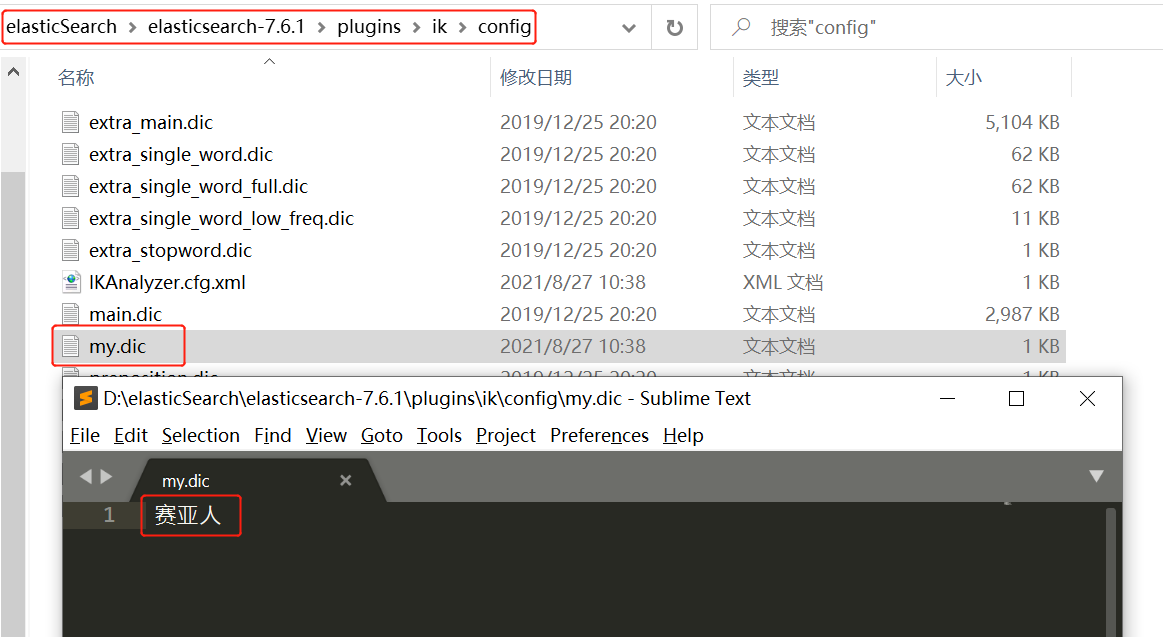
2.5.3 修改 IKAnalyzer.cfg.xml(在ik/config目录下)
在 ext_dic 下配置自己创建的 .dic 文件的 全名
<?xml version="1.0" encoding="UTF-8"?><!DOCTYPE properties SYSTEM "http://java.sun.com/dtd/properties.dtd"><properties><comment>IK Analyzer 扩展配置</comment><!--用户可以在这里配置自己的扩展字典 --><entry key="ext_dict">my.dic</entry><!--用户可以在这里配置自己的扩展停止词字典--><entry key="ext_stopwords"></entry><!--用户可以在这里配置远程扩展字典 --><!-- <entry key="remote_ext_dict">words_location</entry> --><!--用户可以在这里配置远程扩展停止词字典--><!-- <entry key="remote_ext_stopwords">words_location</entry> --></properties>
2.5.4 重启 es 、kibana
下图为 es 启动文件

设置后:
GET _analyze{"analyzer": "ik_smart","text":"超级赛亚人"}----------------------------{"tokens" : [{"token" : "超级","start_offset" : 0,"end_offset" : 2,"type" : "CN_WORD","position" : 0},{"token" : "赛亚人","start_offset" : 2,"end_offset" : 5,"type" : "CN_WORD","position" : 1}]}
3. Rest 风格说明
一种软件架构风格,而不是标准,只是提供了一组设计原则和约束条件。它主要用于客户端和服务器交 互类的软件。基于这个风格设计的软件可以更简洁,更有层次,更易于实现缓存等机制。
ES 基本Rest命令说明:
| method | url地址 | 描述 |
|---|---|---|
| PUT | localhost:9200/索引名称/类型名称/文档id | 创建文档(指定文档id) |
| POST | localhost:9200/索引名称/类型名称 | 创建文档(随机文档id) |
| POST | localhost:9200/索引名称/类型名称/文档id/_update | 修改文档 |
| DELETE | localhost:9200/索引名称/类型名称/文档id | 删除文档 |
| GET | localhost:9200/索引名称/类型名称/文档id | 查询文档通过文档id |
| POST | localhost:9200/索引名称/类型名称/_search | 查询所有数据 |
3.1 查询索引情况(索引列表)
GET _cat/indices?vhealth status index uuid pri rep docs.count docs.deleted store.size pri.store.sizegreen open .kibana_task_manager_1 RU2mfr3aTzyux_am3YtrAQ 1 0 2 0 12.4kb 12.4kbgreen open .apm-agent-configuration 1OTnQrmCRB-JiX484uY7uA 1 0 0 0 283b 283bgreen open .kibana_1 FR3NzGvlQT2zh--70jfL8w 1 0 11 4 29.3kb 29.3kb
3.2 指定索引类型(包括 keyword)
下面的例子中,name 属性不会被分词器拆分,保持整体存入倒排索引中
PUT /test2{"mappings": {"properties": {"name" : {"type" : "text","fields" : {"keyword" : {"type" : "keyword","ignore_above" : 256}}},"age":{"type": "long"},"birthday":{"type": "date"}}}}
4. 增删查改命令
4.1 查
4.1.1 GET 查询(通过文档 id)
GET localhost:9200/索引名称/类型名称/文档id { … // 条件 }
// edward:索引名称 user:类型名称 5:文档idGET /edward/user/5------------------{"_index" : "edward","_type" : "user","_id" : "5","_version" : 1,"_seq_no" : 7,"_primary_term" : 1,"found" : true,"_source" : {"name" : "陈汐","age" : 10,"desc" : "研究技术","tages" : ["show","time","靓仔"]}}
4.1.2 条件查询( _search?q= )
GET/POST localhost:9200/索引名称/类型名称/_search?q=name:龙 通过 _serarch?q=name:龙 查询条件是name属性有“龙”的那些数据。
GET /edward/user/_search?q=name:龙------------------{"took" : 0,"timed_out" : false,"_shards" : {"total" : 1,"successful" : 1,"skipped" : 0,"failed" : 0},"hits" : {"total" : {"value" : 2, // 一共返回的文档数"relation" : "eq" // 条件是等于},"max_score" : 1.4021543, // 匹配分值:分值越高,匹配的内容越多"hits" : [{"_index" : "edward","_type" : "user","_id" : "4","_score" : 1.4021543,"_source" : {"name" : "大龙龙","age" : 50,"desc" : "研究技术","tages" : ["show","time","靓仔"]}},{"_index" : "edward","_type" : "user","_id" : "3","_score" : 1.4021543,"_source" : {"name" : "小龙龙","age" : 40,"desc" : "研究技术","tages" : ["show","time","靓仔"]}}]}}
4.1.3 构建查询( query )
一般的,我们推荐使用构建查询,以后在与程序交互时的查询等也是使用构建查询方式处理查询条件, 因为该方 式可以构建更加复杂的查询条件,也更加一目了然。
4.1.3.1 基本使用
下例,查询条件是一步步构建出来的,将查询条件添加到 match 中即可。
// 语法:GET /索引名/类型名/_search{... // 构建条件}------------------------------------// 案例:GET /edward/user/_search{"query": {"match": {"name":"陈"}}}------------------{"took" : 0,"timed_out" : false,"_shards" : {"total" : 1,"successful" : 1,"skipped" : 0,"failed" : 0},"hits" : {"total" : {"value" : 1,"relation" : "eq"},"max_score" : 1.1631508,"hits" : [{"_index" : "edward","_type" : "user","_id" : "5","_score" : 1.1631508,"_source" : {"name" : "陈汐","age" : 10,"desc" : "一个热爱研究的技术人","tages" : ["靓仔","暖"],"tags" : ["靓仔","帅气"]}}]}}
4.1.3.2 查询全部
// 写法1: match_all的值为空,表示没有查询条件GET /edward/user/_search{"query": {"match_all": {}}}// 写法2:GET /edward/user/_search
4.1.3.3 指定查询返回字段
在查询中,通过 _source 来控制仅返回 name 和 age 属性。
GET /edward/user/_search{"query": {"match_all": {}},"_source": [ // 数组中指定返回的字段名"name","desc"]}------------------{"took" : 0,"timed_out" : false,"_shards" : {"total" : 1,"successful" : 1,"skipped" : 0,"failed" : 0},"hits" : {"total" : {"value" : 6,"relation" : "eq"},"max_score" : 1.0,"hits" : [{"_index" : "edward","_type" : "user","_id" : "1","_score" : 1.0,"_source" : {"name" : "edwarddamon","desc" : "研究技术"}},......]}}
4.1.4 排序查询( sort )
在条件查询的基础上,我们又通过 sort 来做排序,排序对象是 age , order 是 desc 降序。
GET /edward/user/_search{"query": {"match_all": {}},"sort": [{"age": {"order": "asc"}}]}
注意:在排序的过程中,只能使用可排序的属性进行排序。那么可以排序的属性有哪些呢?
- 数字
- 日期
- ID
其他都不行!
4.1.5 分页查询( from,size )
GET /edward/user/_search{"query": {"match_all": {}},"sort": [{"age": {"order": "asc"}}],"from": 0, // 开始的下标(从0开始)"size": 2 // 每次返回的条数}
4.1.6 布尔查询(bool)
4.1.6.1 must(and)
如下例,要求 name 属性包含“龙”,并且 age 属性为 40 。
GET /edward/user/_search{"query": {"bool": {"must": [{"match": {"name": "龙"}},{"match": {"age": 40}}]}}}
4.1.6.2 should(or)
如下例,要求 name 属性包含“龙”,或者 age 属性为 40 。
GET /edward/user/_search{"query": {"bool": {"should": [{"match": {"name": "龙"}},{"match": {"age": 40}}]}}}
4.1.6.3 must_not(not)
查询 age 属性不是 40 的数据。
GET /edward/user/_search{"query": {"bool": {"must_not": [{"match": {"age": 40}}]}}}
4.1.6.4 filter(范围、过虑等)
查询 name 属性包含“龙”,并且 age 属性 大于等于45 并且 小于等于60。
GET /edward/user/_search{"query": {"bool": {"must": [{"match": {"name": "龙"}}],"filter": {"range": {"age": {"gte": 45,"lte": 60}}}}}}
这里就用到了 filter 条件过滤查询,过滤条件的范围用 range 表示。
其余操作如下 :
- gt 表示大于
- gte 表示大于等于
- lt 表示小于
- lte 表示小于等于
4.1.7 短语检索
返回了所有 tages 属性中带“暖”和“靓仔”的记录
只要含有这个 tages 满足一个就给我返回这个数据 (or)
GET /edward/user/_search{"query": {"match": {"tages":"暖 靓仔"}}}
- 拓展知识:(and)
match_phrase 称为短语搜索,要求所有的分词必须同时出现在文档中,同时位置必须紧邻一致。
GET edward/user/_search{"query": {"match_phrase": {"name": "大 龙"}}}
4.1.8 精确查找(term)
term 和 match 的区别:
- term:查询的词不会被分词器解析,直接去倒排索引中查找是否有匹配的标签
- match:查询的词会被分词器解析,再用解析后的词去倒排索引中查找是否有匹配的标签 ```java // 查询“孤独”这个词被分词器解析成什么 GET _analyze { “analyzer”: “standard”, “text”: “孤独” }
{
“tokens” : [
{
“token” : “孤”,
“start_offset” : 0,
“end_offset” : 1,
“type” : “
- 用 term 进行精确查询> 此时参数“孤独”不会被分析器解析,则直接用“孤独”去倒排索引中查找;> 由于之前“孤独”被拆分成了“孤”和“独”存入了倒排索引中,所以这里匹配不到。```javaGET /edward/user/_search{"query": {"term": {"name":"孤独"}}}------------{"took" : 0,"timed_out" : false,"_shards" : {"total" : 1,"successful" : 1,"skipped" : 0,"failed" : 0},"hits" : {"total" : {"value" : 0,"relation" : "eq"},"max_score" : null,"hits" : [ ]}}
- 用 match 进行查询
这里的参数“孤独”会被拆分成“孤”独”,再分别用“孤”和“独”去倒排索引中进行查找; 由于之前“孤独”被拆分成了“孤”和“独”存入了倒排索引中,所以这里可以匹配到。
// 写法1:对“孤独”进行拆分再去到怕索引中查询GET /edward/user/_search{"query": {"match": {"name":"孤独"}}}// 写法2:“孤”和“独”是或关系,任意一个在倒排索引中查到了,都匹配GET /edward/user/_search{"query": {"terms": {"name":["孤","独"]}}}------------{"took" : 0,"timed_out" : false,"_shards" : {"total" : 1,"successful" : 1,"skipped" : 0,"failed" : 0},"hits" : {"total" : {"value" : 1,"relation" : "eq"},"max_score" : 3.3479528,"hits" : [{"_index" : "edward","_type" : "user","_id" : "AH4YhnsBQ4foxyhx5ioD","_score" : 3.3479528,"_source" : {"name" : "孤独","age" : 20,"desc" : "研究技术","tages" : ["show","time","靓仔"]}}]}}
4.1.9 高亮显示( highlight )
4.1.9.1 默认高亮样式
默认返回的数据中,入参字段会加上 标签
GET edward/user/_search{"query": {"match": {"name": "龙"}},"highlight": {"fields": {"name":{}}}}-----------------------"hits" : [{"_index" : "edward","_type" : "user","_id" : "4","_score" : 1.4021543,"_source" : {"name" : "大龙龙","age" : 50,"desc" : "研究技术","tages" : ["show","time","靓仔"]},"highlight" : {"name" : ["大<em>龙</em><em>龙</em>"]}},......]
4.1.9.2 自定义高亮样式
默认返回的数据中,入参字段会加上自定义的
标签
GET edward/user/_search{"query": {"match": {"name": "龙"}},"highlight": {"pre_tags": "<c style='color:red'>","post_tags": "</c>","fields": {"name":{}}}}---------------------"hits" : [{"_index" : "edward","_type" : "user","_id" : "4","_score" : 1.4021543,"_source" : {"name" : "大龙龙","age" : 50,"desc" : "研究技术","tages" : ["show","time","靓仔"]},"highlight" : {"name" : ["大<c style='color:red'>龙</c><c style='color:red'>龙</c>"]}},......]
4.2 增
4.2.1 PUT 创建(指定文档 id)
PUT localhost:9200/索引名称/类型名称/文档id { … // 文档内容 }
// PUT:创建命令 edward:索引 user:类型 1:文档idPUT /edward/user/5{"name":"陈汐","age": 10,"desc": "研究技术","tages": ["show","time","靓仔"]}------------------{"_index" : "edward", // 索引"_type" : "user", // 类型"_id" : "5", // id"_version" : 1, // 版本(每次数据修改都会+1)"result" : "created", // 操作类型(创建为created、修改为uodated)"_shards" : { // 分片信息"total" : 2,"successful" : 1,"failed" : 0},"_seq_no" : 7,"_primary_term" : 1}
4.2.2 POST 创建(随机文档 id)
POST localhost:9200/索引名称/类型名称 { … // 文档内容 }
POST /edward/user{"name":"孤独","age": 20,"desc": "研究技术","tages": ["show","time","靓仔"]}------------------{"_index" : "edward","_type" : "user","_id" : "AH4YhnsBQ4foxyhx5ioD", // 随机生成id"_version" : 1,"result" : "created","_shards" : {"total" : 2,"successful" : 1,"failed" : 0},"_seq_no" : 12,"_primary_term" : 1}
4.4 改
4.4.1 PUT 修改(新文档内容覆盖旧的)
用法和 PUT 创建相同,只要将需要修改的字段改为新数据便会覆盖旧内容
缺点:原理是数据覆盖,若原数据(原来不需要修改的数据)不写,则会丢失
Tip:不建议使用
4.4.2 POST 修改(指定修改内容)
POST localhost:9200/索引名称/类型名称/文档id/_update { “doc”:{ … // 修改的内容 } }
POST /edward/user/5/_update{"doc":{"desc":"一个热爱研究的技术人","tages":["靓仔","帅气"]}}------------------{"_index" : "edward","_type" : "user","_id" : "5","_version" : 5,"result" : "updated","_shards" : {"total" : 2,"successful" : 1,"failed" : 0},"_seq_no" : 11,"_primary_term" : 1}
4.5 删
4.5.1 DELETE 删除(指定文档id 或 指定索引)
DELETE localhost:9200/索引名称/类型名称/文档id 删除文档 DELETE localhost:9200/索引名称 删除索引及索引中的所有文档
// 删除指定文档案例:DELETE /edward/user/1---------------------{"_index" : "edward","_type" : "user","_id" : "1","_version" : 2,"result" : "deleted","_shards" : {"total" : 2,"successful" : 1,"failed" : 0},"_seq_no" : 13,"_primary_term" : 1}// 删除索引案例:DELETE /test------------{"acknowledged" : true}
5. 说明
注意 elasticsearch 在第一个版本的开始 每个文档都储存在一个索引中,并分配一个 映射类型,映射类
型用于表示被索引的文档或者实体的类型,这样带来了一些问题, 导致后来在 elasticsearch6.0.0 版本中
一个文档只能包含一个映射类型,而在 7.0.0 中,映 射类型则将被弃用,到了 8.0.0 中则将完全被删
除。
只要记得,一个索引下面只能创建一个类型就行了,其中各字段都具有唯一性,如果在创建映射的时
候,如果没有指定文档类型,那么该索引的默认索引类型是 _doc ,不指定文档id则会内部帮我们生
成一个id字符串。

若有收获,就点个赞吧
0 人点赞


