配置yum 安装dicker-ce
[root@lanixiaoshou ~]# yum-config-manager --add-repo http://mirrors.aliyun.com/docker-ce/linux/centos/docker-ce.repo[root@lanixiaoshou ~]# yum install docker-ce docker-ce-cli containerd.io -y
启动
[root@lanixiaoshou ~]# systemctl enable dockerCreated symlink from /etc/systemd/system/multi-user.target.wants/docker.service to /usr/lib/systemd/system/docker.service.[root@lanixiaoshou ~]# systemctl start docker
镜像加速
[root@lanixiaoshou ~]# vim /usr/lib/systemd/system/docker.service[root@lanixiaoshou ~]# head -14 /usr/lib/systemd/system/docker.service######################################################################[Service]Type=notify######################################################################ExecStart=/usr/bin/dockerd -H fd:// --registry-mirror=https://rncxm540.mirror.aliyuncs.com --containerd=/run/containerd/containerd.sock
重新加载配置文件,重启docker服务
[root@lanixiaoshou ~]# systemctl daemon-reload[root@lanixiaoshou ~]# systemctl restart docker
开启网络转发
[root@lanixiaoshou ~]# vim /etc/sysctl.conf[root@lanixiaoshou ~]# cat /etc/sysctl.conf###########################################net.ipv4.ip_forward = 1[root@lanixiaoshou ~]# sysctl -pnet.ipv4.ip_forward = 1[root@lanixiaoshou ~]# cat /proc/sys/net/ipv4/ip_forward1[root@lanixiaoshou ~]#
拉一个官网centos镜像
[root@lanixiaoshou ~]# docker pull centosUsing default tag: latestlatest: Pulling from library/centos729ec3a6ada3: Pull completeDigest: sha256:f94c1d992c193b3dc09e297ffd54d8a4f1dc946c37cbeceb26d35ce1647f88d9Status: Downloaded newer image for centos:latestdocker.io/library/centos:latest[root@lanixiaoshou ~]# docker imagesREPOSITORY TAG IMAGE ID CREATED SIZEcentos latest 0f3e07c0138f 3 months ago 220MB
创建build文件
[root@lanixiaoshou ~]# mkdir /docker-build[root@lanixiaoshou ~]# cd /docker-build[root@lanixiaoshou docker-build]# vim Dockerfile[root@lanixiaoshou docker-build]# cat DockerfileFROM centos:latestMAINTAINER <lanixiaoshou@gmail.com>RUN yum -y install httpdADD start.sh /usr/local/bin/start.shADD index.html /var/www/html/index.htmlCMD /usr/local/bin/start.sh[root@lanixiaoshou docker-build]# echo "/usr/sbin/httpd -DFOREGROUND" >start.sh[root@lanixiaoshou docker-build]# chmod a+x start.sh[root@lanixiaoshou docker-build]# echo "Teacher MK ignored me and was so lost" >index.html
build镜像
[root@lanixiaoshou docker-build]# docker build -t centos:httpd ./
Sending build context to Docker daemon  4.096kB
Step 1/6 : FROM centos:latest
 ---> 0f3e07c0138f
Step 2/6 : MAINTAINER <lanixiaoshou@gmail.com>
 ---> Running in bd63db620b16
Removing intermediate container bd63db620b16
 ---> d64f5f3fdcb0
Step 3/6 : RUN yum -y install httpd
 ---> Running in dbe949b3e6ab
CentOS-8 - AppStream                            1.4 MB/s | 6.3 MB     00:04
CentOS-8 - Base                                 2.4 MB/s | 7.9 MB     00:03
CentOS-8 - Extras                                87  B/s | 2.1 kB     00:24
Dependencies resolved.
================================================================================
 Package           Arch   Version                               Repository
                                                                           Size
================================================================================
Installing:
 httpd             x86_64 2.4.37-12.module_el8.0.0+185+5908b0db AppStream 1.7 M
Installing dependencies:
 apr               x86_64 1.6.3-9.el8                           AppStream 125 k
 apr-util          x86_64 1.6.1-6.el8                           AppStream 105 k
 centos-logos-httpd
                   noarch 80.5-2.el8                            AppStream  24 k
 httpd-filesystem  noarch 2.4.37-12.module_el8.0.0+185+5908b0db AppStream  35 k
 httpd-tools       x86_64 2.4.37-12.module_el8.0.0+185+5908b0db AppStream 102 k
 mod_http2         x86_64 1.11.3-3.module_el8.0.0+185+5908b0db  AppStream 158 k
 brotli            x86_64 1.0.6-1.el8                           BaseOS    323 k
 mailcap           noarch 2.1.48-3.el8                          BaseOS     39 k
Installing weak dependencies:
 apr-util-bdb      x86_64 1.6.1-6.el8                           AppStream  25 k
 apr-util-openssl  x86_64 1.6.1-6.el8                           AppStream  27 k
Enabling module streams:
 httpd                    2.4

Transaction Summary
================================================================================
Install  11 Packages

Total download size: 2.6 M
Installed size: 7.6 M
Downloading Packages:
(1/11): apr-util-bdb-1.6.1-6.el8.x86_64.rpm      20 kB/s |  25 kB     00:01
(2/11): apr-1.6.3-9.el8.x86_64.rpm               87 kB/s | 125 kB     00:01
(3/11): apr-util-openssl-1.6.1-6.el8.x86_64.rpm 106 kB/s |  27 kB     00:00
(4/11): apr-util-1.6.1-6.el8.x86_64.rpm          66 kB/s | 105 kB     00:01
(5/11): centos-logos-httpd-80.5-2.el8.noarch.rp  94 kB/s |  24 kB     00:00
(6/11): httpd-filesystem-2.4.37-12.module_el8.0 126 kB/s |  35 kB     00:00
(7/11): httpd-tools-2.4.37-12.module_el8.0.0+18 439 kB/s | 102 kB     00:00
(8/11): brotli-1.0.6-1.el8.x86_64.rpm           1.6 MB/s | 323 kB     00:00
(9/11): mailcap-2.1.48-3.el8.noarch.rpm         974 kB/s |  39 kB     00:00
(10/11): mod_http2-1.11.3-3.module_el8.0.0+185+ 331 kB/s | 158 kB     00:00
(11/11): httpd-2.4.37-12.module_el8.0.0+185+590 1.6 MB/s | 1.7 MB     00:01
--------------------------------------------------------------------------------
Total                                           349 kB/s | 2.6 MB     00:07
warning: /var/cache/dnf/AppStream-02e86d1c976ab532/packages/apr-1.6.3-9.el8.x86_64.rpm: Header V3 RSA/SHA256 Signature, key ID 8483c65d: NOKEY
CentOS-8 - AppStream                            1.6 MB/s | 1.6 kB     00:00
Importing GPG key 0x8483C65D:
 Userid     : "CentOS (CentOS Official Signing Key) <security@centos.org>"
 Fingerprint: 99DB 70FA E1D7 CE22 7FB6 4882 05B5 55B3 8483 C65D
 From       : /etc/pki/rpm-gpg/RPM-GPG-KEY-centosofficial
Key imported successfully
Running transaction check
Transaction check succeeded.
Running transaction test
Transaction test succeeded.
Running transaction
  Preparing        :                                                        1/1
  Installing       : apr-1.6.3-9.el8.x86_64                                1/11
  Running scriptlet: apr-1.6.3-9.el8.x86_64                                1/11
  Installing       : apr-util-bdb-1.6.1-6.el8.x86_64                       2/11
  Installing       : apr-util-openssl-1.6.1-6.el8.x86_64                   3/11
  Installing       : apr-util-1.6.1-6.el8.x86_64                           4/11
  Running scriptlet: apr-util-1.6.1-6.el8.x86_64                           4/11
  Installing       : httpd-tools-2.4.37-12.module_el8.0.0+185+5908b0db.    5/11
  Installing       : mailcap-2.1.48-3.el8.noarch                           6/11
  Installing       : brotli-1.0.6-1.el8.x86_64                             7/11
  Running scriptlet: httpd-filesystem-2.4.37-12.module_el8.0.0+185+5908    8/11
  Installing       : httpd-filesystem-2.4.37-12.module_el8.0.0+185+5908    8/11
  Installing       : centos-logos-httpd-80.5-2.el8.noarch                  9/11
  Installing       : mod_http2-1.11.3-3.module_el8.0.0+185+5908b0db.x86   10/11
  Installing       : httpd-2.4.37-12.module_el8.0.0+185+5908b0db.x86_64   11/11
  Running scriptlet: httpd-2.4.37-12.module_el8.0.0+185+5908b0db.x86_64   11/11
  Verifying        : apr-1.6.3-9.el8.x86_64                                1/11
  Verifying        : apr-util-1.6.1-6.el8.x86_64                           2/11
  Verifying        : apr-util-bdb-1.6.1-6.el8.x86_64                       3/11
  Verifying        : apr-util-openssl-1.6.1-6.el8.x86_64                   4/11
  Verifying        : centos-logos-httpd-80.5-2.el8.noarch                  5/11
  Verifying        : httpd-2.4.37-12.module_el8.0.0+185+5908b0db.x86_64    6/11
  Verifying        : httpd-filesystem-2.4.37-12.module_el8.0.0+185+5908    7/11
  Verifying        : httpd-tools-2.4.37-12.module_el8.0.0+185+5908b0db.    8/11
  Verifying        : mod_http2-1.11.3-3.module_el8.0.0+185+5908b0db.x86    9/11
  Verifying        : brotli-1.0.6-1.el8.x86_64                            10/11
  Verifying        : mailcap-2.1.48-3.el8.noarch                          11/11

Installed:
  httpd-2.4.37-12.module_el8.0.0+185+5908b0db.x86_64
  apr-util-bdb-1.6.1-6.el8.x86_64
  apr-util-openssl-1.6.1-6.el8.x86_64
  apr-1.6.3-9.el8.x86_64
  apr-util-1.6.1-6.el8.x86_64
  centos-logos-httpd-80.5-2.el8.noarch
  httpd-filesystem-2.4.37-12.module_el8.0.0+185+5908b0db.noarch
  httpd-tools-2.4.37-12.module_el8.0.0+185+5908b0db.x86_64
  mod_http2-1.11.3-3.module_el8.0.0+185+5908b0db.x86_64
  brotli-1.0.6-1.el8.x86_64
  mailcap-2.1.48-3.el8.noarch

Complete!
Removing intermediate container dbe949b3e6ab
 ---> f4a7124aa88d
Step 4/6 : ADD start.sh /usr/local/bin/start.sh
 ---> fbed75982cf6
Step 5/6 : ADD index.html /var/www/html/index.html
 ---> c141d74f1e17
Step 6/6 : CMD /usr/local/bin/start.sh
 ---> Running in 7e7f20e6fedc
Removing intermediate container 7e7f20e6fedc
 ---> 0ae6ca7eb709
Successfully built 0ae6ca7eb709
Successfully tagged centos:httpd
[root@lanixiaoshou docker-build]# [root@lanixiaoshou docker-build]# chmod a+x start.sh
-bash: [root@lanixiaoshou: command not found
[root@lanixiaoshou docker-build]# [root@lanixiaoshou docker-build]# echo "Teacher MK ignored me and was so lost" >index.html
-bash: [root@lanixiaoshou: command not found
[root@lanixiaoshou docker-build]#
查看当前镜像
保存成tar包
测试运行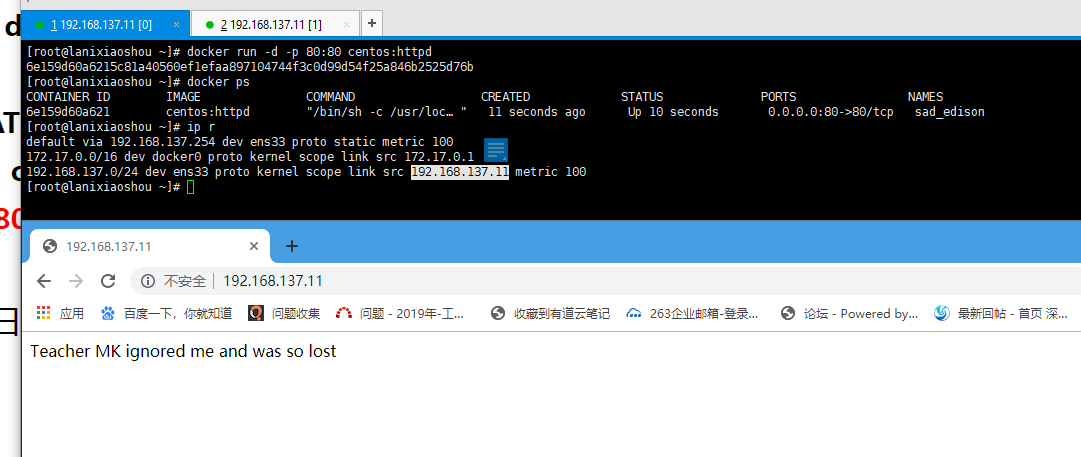

若有收获,就点个赞吧
0 人点赞


