React hooks可以让你在不编写 class 的情况下使用 state 以及其他的 React 特性,它的出现提供了一种新型可复用组件间状态逻辑的途径,替换以往采用的HOC和Render Props的形式.
新增该特性的原由: https://zh-hans.reactjs.org/docs/hooks-intro.html#motivation
🐶 特性
- 多个状态不会产生嵌套,写法还是平铺的(renderProps 可以通过 compose 解决,可不但使用略为繁琐,而且因为强制封装一个新对象而增加了实体数量)。
- Hooks 可以引用其他 Hooks。
更容易将组件的 UI 与状态分离。
React hooks带来了更强的组合设计模式, 与状态的隔离更加清晰.
🐷生命周期
React hooks的生命周期
React class component的生命周期
相比class component, 仅缺少对于不常见的 getSnapshotBeforeUpdate 和 componentDidCatch, 其他的阶段都有对应等价关系.
👍 React hooks
1. 使用useState
const [state, setState] = useState(initialState);
1.1 initialState
仅初次渲染起作用,往后的渲染被忽略
若initialState是一个函数, 则在初始渲染时调用并返回结果
1.2 state
此时state等价于initialState
1.3 setState
提供给更新state使用的函数。
因为setState是不可变的, 故可在使用useEffect和useCallback依赖列表中省略setState 其与class中的setState方法不同, 不能自动合并更新对象
setState(prevState => {
  // 也可以使用 Object.assign
  return {...prevState, ...updatedValues};
});
2. 使用useEffect
useEffect相似等价于componentDidMount, componentDidUpdate , componentWillUnmount, 以下展示三个场景
2.1 每次渲染
React.useEffect( () => {
   Console.log("useEffect runs");
});
2.2 仅当依赖改变时渲染
React.useEffect( () => {
   Console.log("useEffect runs");
}, [state]);
2.3 组件销毁时
useEffect(() => {
  console.log('mounted');
  const subscription = props.source.subscribe();
  return () => {
      console.log('unmounting...');
    subscription.unsubscribe();
  }
}, []) // [] 空数组代表此effect仅在 mounted 和 unmounting 调用一次
建议使用 eslint-plugin-react-hooks 和 exhaustive-deps 配合使用
但useEffect又与componentDidMount、componentDidUpdate不同, 如下图所示, useEffect是在browser paints screen更新后进行延迟处理操作的。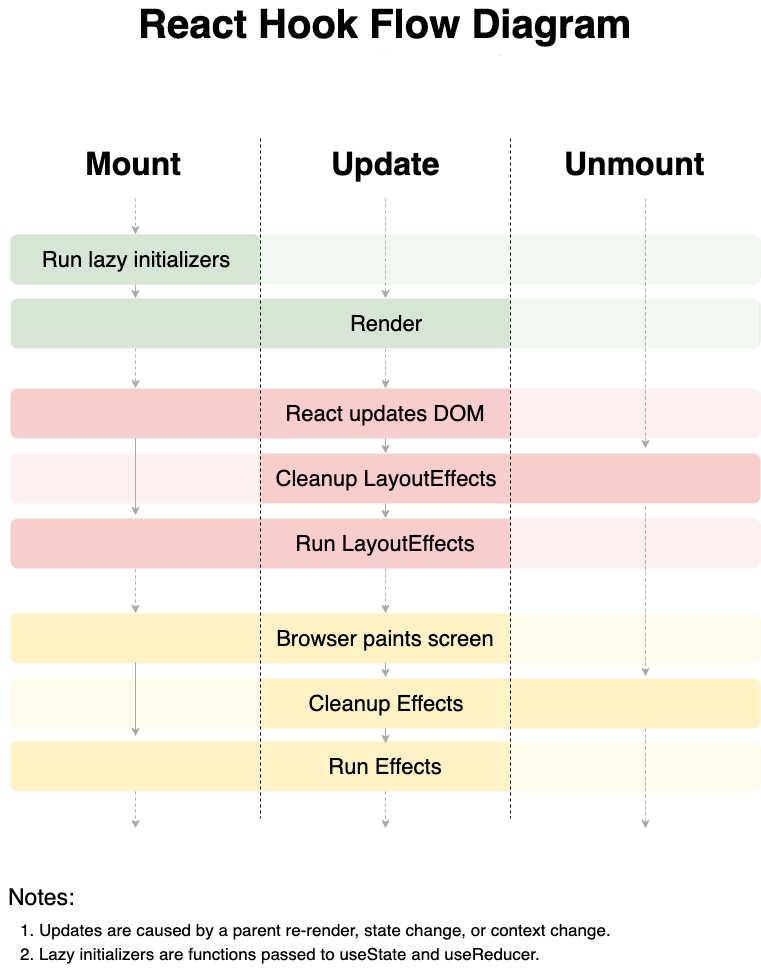
但不是所有的effect都需要延迟, 像处理dom等操作时, 应该在browser paints screen前就要处理完成, 这时就需要使用 useLayoutEffects, 否则就会产生视觉的突兀感, 反正记着优先使用useEffect, 若处理中遇到异常则使用 useLayoutEffect, 见下面.
3. 使用useContext
useContext(MyContext) 等价于 class 中的 static contextType = MyContext 或
import React, { useContext } from "react";
import ReactDOM from "react-dom";
import "./styles.css";

const Context = React.createContext();

function Display() {
  const value = useContext(Context);
  return <div>{value}, I am your Father.</div>;
}

function App() {
  return (
    <Context.Provider value={"Luke"}>
      <Display />
    </Context.Provider>
  );
}

const rootElement = document.getElementById("root");
ReactDOM.render(<App />, rootElement);
4. 使用useReducer
useState的加强版, 可代替去处理复杂深层结构的state, 本质就是使用 dispatch 替换 callback
**
局部状态不推荐使用
useReducer, 会导致函数内部更复杂, 难以阅读, 在多组件通信时可结合 useContext一起使用
const initialState = {count: 0};

function reducer(state, action) {
  switch (action.type) {
    case 'increment':
      return {count: state.count + 1};
    case 'decrement':
      return {count: state.count - 1};
    default:
      throw new Error();
  }
}

function Counter() {
  const [state, dispatch] = useReducer(reducer, initialState);
  return (
    <>
      Count: {state.count}
      <button onClick={() => dispatch({type: 'decrement'})}>-</button>
      <button onClick={() => dispatch({type: 'increment'})}>+</button>
    </>
  );
}
4.1 initialState
此时state等价于initialState
惰性初始化
function init(initialState) {
  return {count: initialState};
}

const [state, dispatch] = useReducer(reducer, initialState, init);
5. 使用useCallback
useCallback(fn, deps) 等价于 useMemo(() => fn, deps), 初始化后会fn会仅当deps发生变化时重新渲染, 主要用作缓存函数
const memoizedCallback = useCallback(
  () => {
    doSomething(a, b);
  },
  [a, b],
);
6. 使用useMemo
useMemo会在渲染时运行callback并赋值, 主要用作缓存复杂的函数的结果值
const memoizedValue = useMemo(() => computeExpensiveValue(a, b), [a, b]);
7. 使用useRef
useRef是一种主要用来访问Dom的方式, 无论节点如何变化, 其属性current仍指向dom节点
const refContainer = useRef(initialValue);
7.1 initialValue
此时initialValue 等价于refContainer.current
7.2 refContainer
refContainer是一个mutable的ref object, 其在整个component生命周期内保持不变
8. 使用useImperativeHandle
useImperativeHandle 主要用来暴露本身component的自定义属性给父级component使用
该例子展示可以在父级组件中调用子组件暴露的方法和对象:
import React, {
  useRef,
  useEffect,
  useImperativeHandle,
  forwardRef
} from "react";
import { render } from "react-dom";

const ChildInput = forwardRef((props, ref) => {
  const inputRef = useRef(null);

  useImperativeHandle(ref, () => ({
    ref: inputRef.current,
    doSomething: console.log
  }));

  return <input type="text" name="child input" ref={inputRef} />;
});

function App() {
  const inputRef = useRef(null);

  useEffect(() => {
    inputRef.current.ref.focus();
    inputRef.current.doSomething("打印");
  }, []);

  return (
    <div>
      <ChildInput ref={inputRef} />
    </div>
  );
}

const rootElement = document.getElementById("root");
render(<App />, rootElement);

9. 使用useLayoutEffect
useLayoutEffect是一种用于在浏览器绘制前同步渲染页面的方案
该例子如果使用useEffect代替useLayoutEffect则会出现节点闪烁的情况:
import React, { useState, useLayoutEffect, useRef } from "react";
import ReactDOM from "react-dom";
import "./styles.css";

const LayoutEffectComponent = () => {
  const [width, setWidth] = useState(0);
  const [height, setHeight] = useState(0);
  const el = useRef();

  useLayoutEffect(() => {
    console.log("el.current", el.current.clientWidth);
    setWidth(el.current.clientWidth);
    setHeight(el.current.clientHeight);
  });

  return (
    <div>
      <h1>useLayoutEffect Example</h1>
      <h2>textarea width: {width}px</h2>
      <h2>textarea height: {height}px</h2>
      <textarea
        onClick={() => {
          setWidth(0);
        }}
        ref={el}
      />
    </div>
  );
};

function App() {
  return (
    <div className="App">
      <LayoutEffectComponent />
    </div>
  );
}

const rootElement = document.getElementById("root");
ReactDOM.render(<App />, rootElement);
10. 使用useDebugValue
useDebugValue 用来在react devTools中显示自定义的hook标签
useDebugValue(value)
🦄 实践例子
下面展示一个用react hooks构建todo列表的demo:


1. 组件
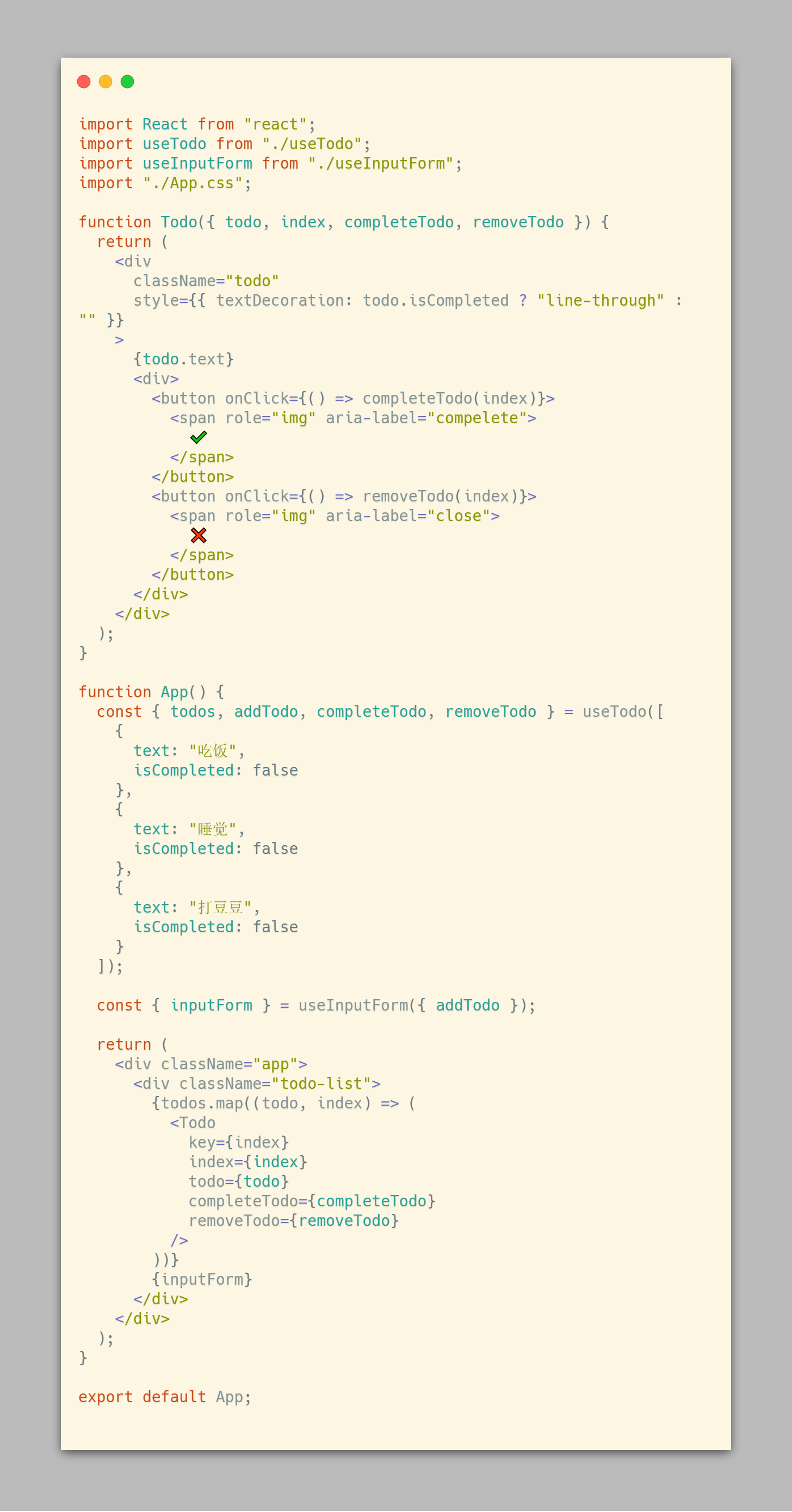
App.js
组件也可以写成自定义模式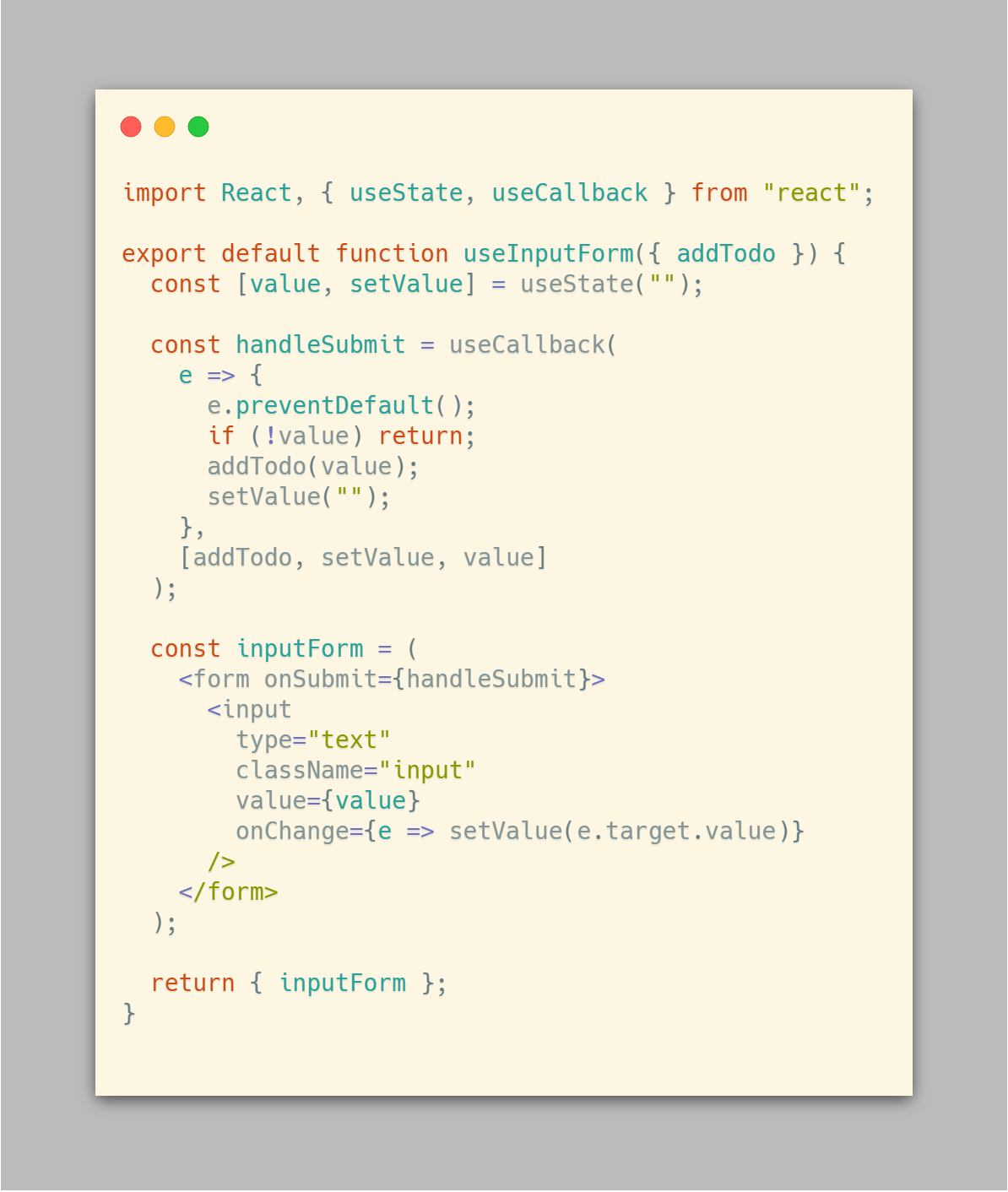
useInputForm.js
2. 逻辑
抽离相关逻辑为了更好的维护和复用, 状态与 UI 的界限会越来越清晰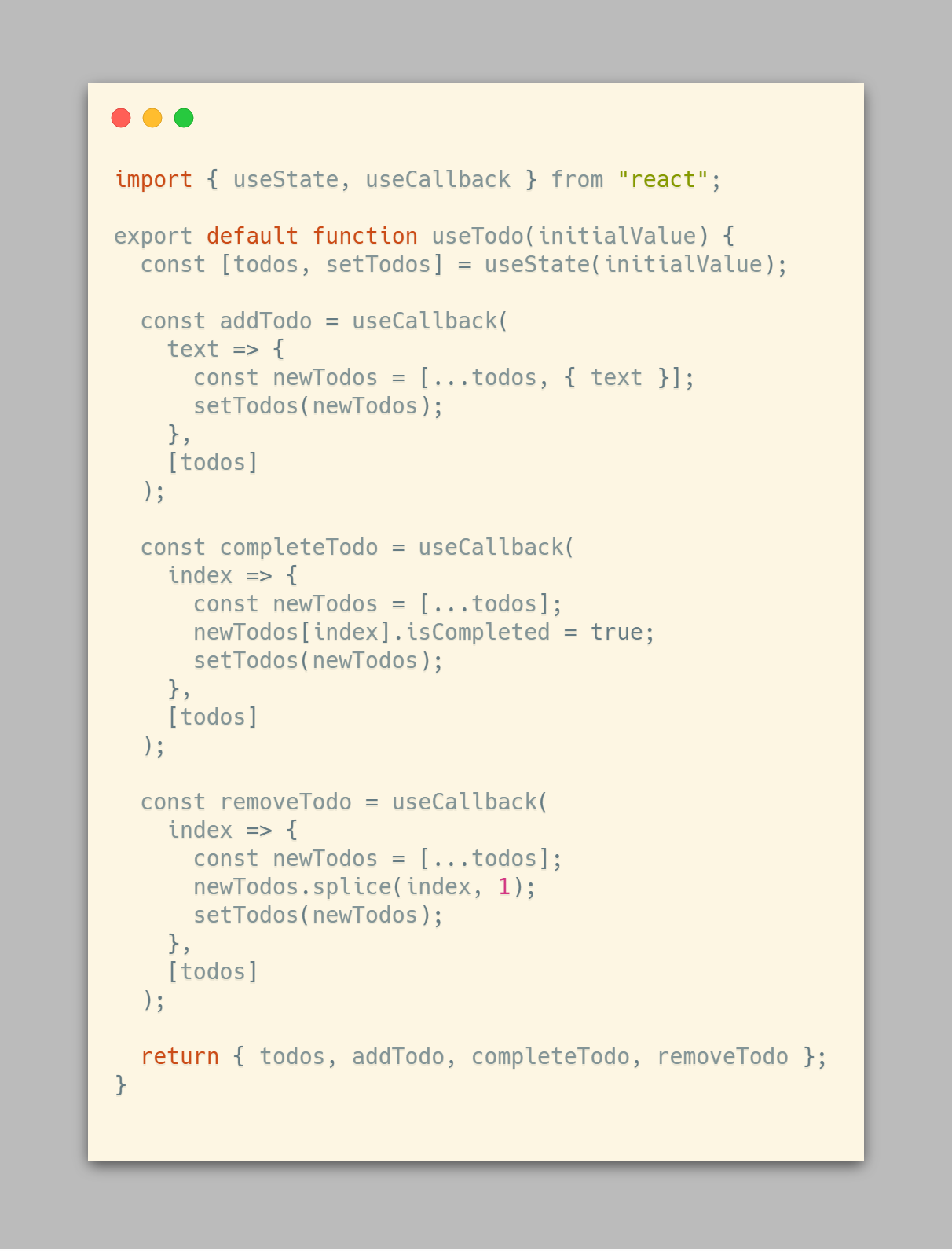
useTodo.js
另相关代码已同步与Gist, 使用CodeExpander即可生成以上代码图片.
🐲FAQ
1. 可以在函数内直接声明常量或普通函数吗?
不可以, 考虑每次渲染会重新执行, 推荐放到函数组件外层避免性能问题或使用 useCallback 声明.
👻常用库
(持续更新…)

若有收获,就点个赞吧
0 人点赞


