Tiup简介
TiUP 是 TiDB 4.0 版本引入的集群运维工具,TiUP cluster 是 TiUP 提供的使用 Golang 编写的集群管理组件,通过 TiUP cluster 组件就可以进行日常的运维工作,包括部署、启动、关闭、销毁、弹性扩缩容、升级 TiDB 集群,以及管理 TiDB 集群参数。
目前 TiUP 可以支持部署 TiDB、TiFlash、TiDB Binlog、TiCDC,以及监控系统。
使用TIUP部署集群
整体架构
| 主机 | 角色 | |
|---|---|---|
| 192.168.25.132 | 中控机,tidb-server,tikv-server,pd-server | |
| 192.168.25.134 | tikv-server,pd-server,monitoring_servers,grafana_servers,alertmanager_servers | |
| 192.168.25.136 | tikv-server,pd-server |
tidb-server为无状态的服务这里搭建了一个节点作为测试,可通过lvs部署多个节点负载。注意:在生产环境中控机应该单独部署为一台主机中,管理整个集群。
安装前准备:
下面开始安装,注意安装前关闭所有主机的防火墙和swap,以避免端口不通的问题。
临时关闭防火墙:systemctl stop firewalld
永久关闭防火墙,需要重启服务器:systemctl disable firewalld
临时关闭swap:swapoff -a
永久关闭swap,需要重启服务器:sed -ri ‘s/.swap./#&/‘ /etc/fstab
安装 TiUP 工具
以下所有操作均在中控机中执行。
下载安装 TiUP 工具: curl —proto ‘=https’ —tlsv1.2 -sSf https://tiup-mirrors.pingcap.com/install.sh | sh
声明全局环境变量 :source /root/.bash_profile
安装 TiUP cluster 组件 : tiup cluster
如果已经安装 TiUP cluster 组件,可以更新到最新版本: tiup update —self && tiup update cluster
使用 TiUP 工具部署TIDB集群 ,以下操作均在中控级中进行
生成TIDB的配置模板
tiup cluster template > topology.yaml
修改 topology.yaml 文件
这里主要修改,pd-server,tikv-server,tidb-server,monitoring_servers、grafana_servers、alertmanager_servers的ip,这里不安装tiflash-servers,先注释掉,下面是我的配置文件信息:
topology.yaml
# # Global variables are applied to all deployments and used as the default value of# # the deployments if a specific deployment value is missing.global:# # The user who runs the tidb cluster.user: "tidb"# # group is used to specify the group name the user belong to if it's not the same as user.# group: "tidb"# # SSH port of servers in the managed cluster.ssh_port: 22# # Storage directory for cluster deployment files, startup scripts, and configuration files.deploy_dir: "/tidb-deploy"# # TiDB Cluster data storage directorydata_dir: "/tidb-data"# # Supported values: "amd64", "arm64" (default: "amd64")arch: "amd64"# # Resource Control is used to limit the resource of an instance.# # See: https://www.freedesktop.org/software/systemd/man/systemd.resource-control.html# # Supports using instance-level `resource_control` to override global `resource_control`.# resource_control:# # See: https://www.freedesktop.org/software/systemd/man/systemd.resource-control.html#MemoryLimit=bytes# memory_limit: "2G"# # See: https://www.freedesktop.org/software/systemd/man/systemd.resource-control.html#CPUQuota=# # The percentage specifies how much CPU time the unit shall get at maximum, relative to the total CPU time available on one CPU. Use values > 100% for allotting CPU time on more than one CPU.# # Example: CPUQuota=200% ensures that the executed processes will never get more than two CPU time.# cpu_quota: "200%"# # See: https://www.freedesktop.org/software/systemd/man/systemd.resource-control.html#IOReadBandwidthMax=device%20bytes# io_read_bandwidth_max: "/dev/disk/by-path/pci-0000:00:1f.2-scsi-0:0:0:0 100M"# io_write_bandwidth_max: "/dev/disk/by-path/pci-0000:00:1f.2-scsi-0:0:0:0 100M"# # Monitored variables are applied to all the machines.monitored:# # The communication port for reporting system information of each node in the TiDB cluster.node_exporter_port: 9100# # Blackbox_exporter communication port, used for TiDB cluster port monitoring.blackbox_exporter_port: 9115# # Storage directory for deployment files, startup scripts, and configuration files of monitoring components.# deploy_dir: "/tidb-deploy/monitored-9100"# # Data storage directory of monitoring components.# data_dir: "/tidb-data/monitored-9100"# # Log storage directory of the monitoring component.# log_dir: "/tidb-deploy/monitored-9100/log"# # Server configs are used to specify the runtime configuration of TiDB components.# # All configuration items can be found in TiDB docs:# # - TiDB: https://pingcap.com/docs/stable/reference/configuration/tidb-server/configuration-file/# # - TiKV: https://pingcap.com/docs/stable/reference/configuration/tikv-server/configuration-file/# # - PD: https://pingcap.com/docs/stable/reference/configuration/pd-server/configuration-file/# # - TiFlash: https://docs.pingcap.com/tidb/stable/tiflash-configuration# ## # All configuration items use points to represent the hierarchy, e.g:# # readpool.storage.use-unified-pool# # ^ ^# # - example: https://github.com/pingcap/tiup/blob/master/examples/topology.example.yaml.# # You can overwrite this configuration via the instance-level `config` field.# server_configs:# tidb:# tikv:# pd:# tiflash:# tiflash-learner:# # Server configs are used to specify the configuration of PD Servers.pd_servers:# # The ip address of the PD Server.- host: 192.168.25.132- host: 192.168.25.134- host: 192.168.25.136# # SSH port of the server.# ssh_port: 22# # PD Server name# name: "pd-1"# # communication port for TiDB Servers to connect.# client_port: 2379# # Communication port among PD Server nodes.# peer_port: 2380# # PD Server deployment file, startup script, configuration file storage directory.# deploy_dir: "/tidb-deploy/pd-2379"# # PD Server data storage directory.# data_dir: "/tidb-data/pd-2379"# # PD Server log file storage directory.# log_dir: "/tidb-deploy/pd-2379/log"# # numa node bindings.# numa_node: "0,1"# # The following configs are used to overwrite the `server_configs.pd` values.# config:# schedule.max-merge-region-size: 20# schedule.max-merge-region-keys: 200000# - host: 10.0.0.1# ssh_port: 22# name: "pd-1"# client_port: 2379# peer_port: 2380# deploy_dir: "/tidb-deploy/pd-2379"# data_dir: "/tidb-data/pd-2379"# log_dir: "/tidb-deploy/pd-2379/log"# numa_node: "0,1"# config:# schedule.max-merge-region-size: 20# schedule.max-merge-region-keys: 200000#- host: 10.0.1.13# ssh_port: 22# name: "pd-1"# client_port: 2379# peer_port: 2380# deploy_dir: "/tidb-deploy/pd-2379"# data_dir: "/tidb-data/pd-2379"# log_dir: "/tidb-deploy/pd-2379/log"# numa_node: "0,1"# config:# schedule.max-merge-region-size: 20# schedule.max-merge-region-keys: 200000# # Server configs are used to specify the configuration of TiDB Servers.tidb_servers:# # The ip address of the TiDB Server.- host: 192.168.25.132# # SSH port of the server.# ssh_port: 22# # The port for clients to access the TiDB cluster.# port: 4000# # TiDB Server status API port.# status_port: 10080# # TiDB Server deployment file, startup script, configuration file storage directory.# deploy_dir: "/tidb-deploy/tidb-4000"# # TiDB Server log file storage directory.# log_dir: "/tidb-deploy/tidb-4000/log"# # The ip address of the TiDB Server.#- host: 10.0.1.15# ssh_port: 22# port: 4000# status_port: 10080# deploy_dir: "/tidb-deploy/tidb-4000"# log_dir: "/tidb-deploy/tidb-4000/log"#- host: 10.0.1.16# ssh_port: 22# port: 4000# status_port: 10080# deploy_dir: "/tidb-deploy/tidb-4000"# log_dir: "/tidb-deploy/tidb-4000/log"# # Server configs are used to specify the configuration of TiKV Servers.tikv_servers:# # The ip address of the TiKV Server.- host: 192.168.25.132# # SSH port of the server.# ssh_port: 22# # TiKV Server communication port.# port: 20160# # TiKV Server status API port.# status_port: 20180# # TiKV Server deployment file, startup script, configuration file storage directory.# deploy_dir: "/tidb-deploy/tikv-20160"# # TiKV Server data storage directory.# data_dir: "/tidb-data/tikv-20160"# # TiKV Server log file storage directory.# log_dir: "/tidb-deploy/tikv-20160/log"# # The following configs are used to overwrite the `server_configs.tikv` values.# config:# log.level: warn# # The ip address of the TiKV Server.- host: 192.168.25.134# ssh_port: 22# port: 20160# status_port: 20180# deploy_dir: "/tidb-deploy/tikv-20160"# data_dir: "/tidb-data/tikv-20160"# log_dir: "/tidb-deploy/tikv-20160/log"# config:# log.level: warn- host: 192.168.25.136# ssh_port: 22# port: 20160# status_port: 20180# deploy_dir: "/tidb-deploy/tikv-20160"# data_dir: "/tidb-data/tikv-20160"# log_dir: "/tidb-deploy/tikv-20160/log"# config:# log.level: warn# # Server configs are used to specify the configuration of TiFlash Servers.#tiflash_servers:# # The ip address of the TiFlash Server.# - host: 10.0.1.20# # SSH port of the server.# ssh_port: 22# # TiFlash TCP Service port.# tcp_port: 9000# # TiFlash HTTP Service port.# http_port: 8123# # TiFlash raft service and coprocessor service listening address.# flash_service_port: 3930# # TiFlash Proxy service port.# flash_proxy_port: 20170# # TiFlash Proxy metrics port.# flash_proxy_status_port: 20292# # TiFlash metrics port.# metrics_port: 8234# # TiFlash Server deployment file, startup script, configuration file storage directory.# deploy_dir: /tidb-deploy/tiflash-9000## With cluster version >= v4.0.9 and you want to deploy a multi-disk TiFlash node, it is recommended to## check config.storage.* for details. The data_dir will be ignored if you defined those configurations.## Setting data_dir to a ','-joined string is still supported but deprecated.## Check https://docs.pingcap.com/tidb/stable/tiflash-configuration#multi-disk-deployment for more details.# # TiFlash Server data storage directory.# data_dir: /tidb-data/tiflash-9000# # TiFlash Server log file storage directory.# log_dir: /tidb-deploy/tiflash-9000/log# # The ip address of the TiKV Server.#- host: 10.0.1.21# ssh_port: 22# tcp_port: 9000# http_port: 8123# flash_service_port: 3930# flash_proxy_port: 20170# flash_proxy_status_port: 20292# metrics_port: 8234# deploy_dir: /tidb-deploy/tiflash-9000# data_dir: /tidb-data/tiflash-9000# log_dir: /tidb-deploy/tiflash-9000/log# # Server configs are used to specify the configuration of Prometheus Server.monitoring_servers:# # The ip address of the Monitoring Server.- host: 192.168.25.134# # SSH port of the server.# ssh_port: 22# # Prometheus Service communication port.# port: 9090# # ng-monitoring servive communication port# ng_port: 12020# # Prometheus deployment file, startup script, configuration file storage directory.# deploy_dir: "/tidb-deploy/prometheus-8249"# # Prometheus data storage directory.# data_dir: "/tidb-data/prometheus-8249"# # Prometheus log file storage directory.# log_dir: "/tidb-deploy/prometheus-8249/log"# # Server configs are used to specify the configuration of Grafana Servers.grafana_servers:# # The ip address of the Grafana Server.- host: 192.168.25.134# # Grafana web port (browser access)# port: 3000# # Grafana deployment file, startup script, configuration file storage directory.# deploy_dir: /tidb-deploy/grafana-3000# # Server configs are used to specify the configuration of Alertmanager Servers.alertmanager_servers:# # The ip address of the Alertmanager Server.- host: 192.168.25.134# # SSH port of the server.# ssh_port: 22# # Alertmanager web service port.# web_port: 9093# # Alertmanager communication port.# cluster_port: 9094# # Alertmanager deployment file, startup script, configuration file storage directory.# deploy_dir: "/tidb-deploy/alertmanager-9093"# # Alertmanager data storage directory.# data_dir: "/tidb-data/alertmanager-9093"# # Alertmanager log file storage directory.# log_dir: "/tidb-deploy/alertmanager-9093/log"
3. 检查和自动修复集群存在的潜在风险
tiup cluster check ./topology.yaml —apply —user root -p

如果出现Fail表示有错误,解决方案见官方文档: https://docs.pingcap.com/zh/tidb/stable/troubleshoot-tidb-cluster
4. 部署 TiDB 集群
注意部署的tidb版本,可以通过 tiup cluster list 来查看现有的版本。tidb-test 表示集群的名称。
tiup cluster deploy tidb-test v5.0.0 ./topology.yaml —user root -p

5. 检查集群情况
tiup cluster display tidb-test
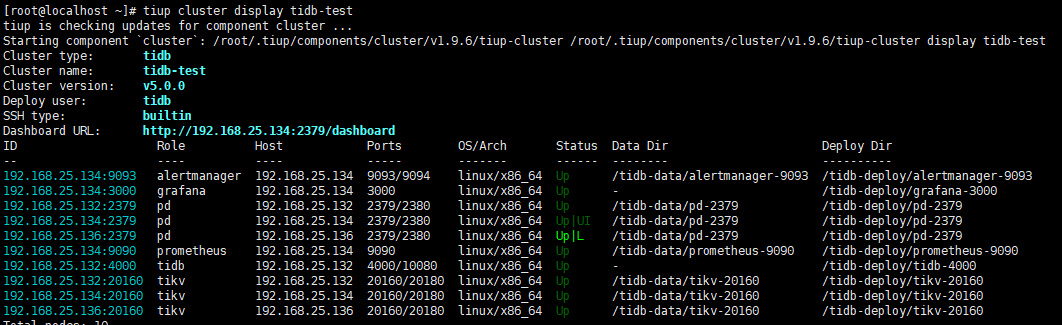
如果出现status为down的,使用tiup启动集群
tiup cluster start tidb-test
6.使用navicat连接tidb数据库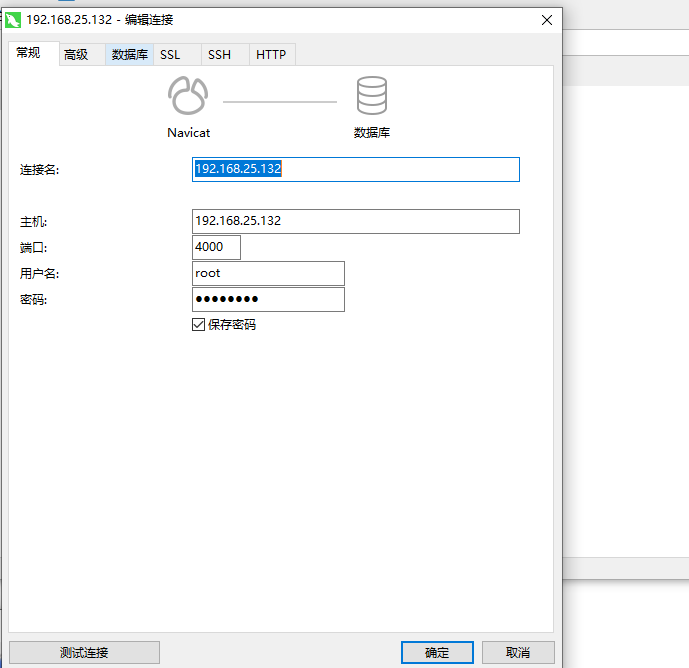 ‘
‘
到这里集群就已经搭建成功了.
tidb要求:
Linux 操作系统版本要求
| Linux 操作系统平台 | 版本 |
|---|---|
| Red Hat Enterprise Linux | 7.3 及以上的 7.x 版本 |
| CentOS | 7.3 及以上的 7.x 版本 |
| Oracle Enterprise Linux | 7.3 及以上的 7.x 版本 |
| Ubuntu LTS | 16.04 及以上的版本 |
注意
- TiDB 只支持 Red Hat 兼容内核 (RHCK) 的 Oracle Enterprise Linux,不支持 Oracle Enterprise Linux 提供的 Unbreakable Enterprise Kernel。
- TiDB 在 CentOS 7.3 的环境下进行过大量的测试,同时社区也有很多该操作系统部署的最佳实践,因此,建议使用 CentOS 7.3 以上的 7.x Linux 操作系统来部署 TiDB。
- 以上 Linux 操作系统可运行在物理服务器以及 VMware、KVM 及 XEN 主流虚拟化环境上。
- 目前尚不支持 Red Hat Enterprise Linux 8.0、CentOS 8 Stream 和 Oracle Enterprise Linux 8.0,因为目前对这些平台的测试还在进行中。
- 不计划支持 CentOS 8 Linux,因为 CentOS 的上游支持已于 2021 年 12 月 31 日终止。
- TiDB 将不再支持 Ubuntu 16.04。强烈建议升级到 Ubuntu 18.04 或更高版本。
其他 Linux 操作系统版本(例如 Debian Linux 和 Fedora Linux)也许可以运行 TiDB,但尚未得到 TiDB 官方支持。
软件配置要求
中控机软件配置
| 软件 | 版本 |
|---|---|
| sshpass | 1.06 及以上 |
| TiUP | 0.6.2 及以上 |
注意
中控机需要部署 TiUP 软件来完成 TiDB 集群运维管理。
目标主机建议配置软件
| 软件 | 版本 |
|---|---|
| sshpass | 1.06 及以上 |
| numa | 2.0.12 及以上 |
| tar | 任意 |
服务器建议配置
TiDB 支持部署和运行在 Intel x86-64 架构的 64 位通用硬件服务器平台或者 ARM 架构的硬件服务器平台。对于开发,测试,及生产环境的服务器硬件配置(不包含操作系统 OS 本身的占用)有以下要求和建议:
开发及测试环境
| 组件 | CPU | 内存 | 本地存储 | 网络 | 实例数量(最低要求) |
|---|---|---|---|---|---|
| TiDB | 8 核+ | 16 GB+ | 无特殊要求 | 千兆网卡 | 1(可与 PD 同机器) |
| PD | 4 核+ | 8 GB+ | SAS, 200 GB+ | 千兆网卡 | 1(可与 TiDB 同机器) |
| TiKV | 8 核+ | 32 GB+ | SSD, 200 GB+ | 千兆网卡 | 3 |
| TiFlash | 32 核+ | 64 GB+ | SSD, 200 GB+ | 千兆网卡 | 1 |
| TiCDC | 8 核+ | 16 GB+ | SAS, 200 GB+ | 千兆网卡 | 1 |
注意
- 验证测试环境中的 TiDB 和 PD 可以部署在同一台服务器上。
- 如进行性能相关的测试,避免采用低性能存储和网络硬件配置,防止对测试结果的正确性产生干扰。
- TiKV 的 SSD 盘推荐使用 NVME 接口以保证读写更快。
- 如果仅验证功能,建议使用 TiDB 数据库快速上手指南进行单机功能测试。
- TiDB 对于磁盘的使用以存放日志为主,因此在测试环境中对于磁盘类型和容量并无特殊要求。
生产环境
| 组件 | CPU | 内存 | 硬盘类型 | 网络 | 实例数量(最低要求) | | —- | —- | —- | —- | —- | —- | | TiDB | 16 核+ | 32 GB+ | SAS | 万兆网卡(2 块最佳) | 2 | | PD | 4核+ | 8 GB+ | SSD | 万兆网卡(2 块最佳) | 3 | | TiKV | 16 核+ | 32 GB+ | SSD | 万兆网卡(2 块最佳) | 3 | | TiFlash | 48 核+ | 128 GB+ | 1 or more SSDs | 万兆网卡(2 块最佳) | 2 | | TiCDC | 16 核+ | 64 GB+ | SSD | 万兆网卡(2 块最佳) | 2 | | 监控 | 8 核+ | 16 GB+ | SAS | 千兆网卡 | 1 |
注意
- 生产环境中的 TiDB 和 PD 可以部署和运行在同服务器上,如对性能和可靠性有更高的要求,应尽可能分开部署。
- 生产环境强烈推荐使用更高的配置。
- TiKV 硬盘大小配置建议 PCI-E SSD 不超过 2 TB,普通 SSD 不超过 1.5 TB。
- TiFlash 支持多盘部署。
- TiFlash 数据目录的第一块磁盘推荐用高性能 SSD 来缓冲 TiKV 同步数据的实时写入,该盘性能应不低于 TiKV 所使用的磁盘,比如 PCI-E SSD。并且该磁盘容量建议不小于总容量的 10%,否则它可能成为这个节点的能承载的数据量的瓶颈。而其他磁盘可以根据需求部署多块普通 SSD,当然更好的 PCI-E SSD 硬盘会带来更好的性能。
- TiFlash 推荐与 TiKV 部署在不同节点,如果条件所限必须将 TiFlash 与 TiKV 部署在相同节点,则需要适当增加 CPU 核数和内存,且尽量将 TiFlash 与 TiKV 部署在不同的磁盘,以免互相干扰。
- TiFlash 硬盘总容量大致为:整个 TiKV 集群的需同步数据容量 / TiKV 副本数 TiFlash 副本数。例如整体 TiKV 的规划容量为 1 TB、TiKV 副本数为 3、TiFlash 副本数为 2,则 TiFlash 的推荐总容量为 1024 GB / 3 2。用户可以选择同步部分表数据而非全部,具体容量可以根据需要同步的表的数据量具体分析。
- TiCDC 硬盘配置建议 1 TB+ PCIE-SSD。
以上源自官方文档
https://docs.pingcap.com/zh/tidb/v4.0/hardware-and-software-requirements

若有收获,就点个赞吧
0 人点赞


