使用接口实现多态 需要满足以下两个条件。
- 定义接口并使用类实现了接口中的成员。
- 创建接口的实例指向不同的实现类对象。
假设接口名称为 ITest,分别定义两个实现类来实现接口的成员,示例代码如下。
interface ITest{void methodA();}class Test1 : ITest{public void methodA(){Console.WriteLine("Test1 类中的 methodA 方法");}}class Test2 : ITest{public void methodA(){Console.WriteLine("Test2 类中的 methodA 方法");}}
使用多态的方式调用实现类中的方法,Main 方法中的代码如下。
class Program
{
    static void Main(string[] args)
    {
        ITest test1 = new Test1();  //创建接口的实例test1指向实现类Test1的对象
        test1.methodA();
        ITest test2 = new Test2();  //创建接口的实例test2指向实现类Test2的对象
        test2.methodA();
    }
}
【实例】创建绘制图形的接口,分别使用两个类来实现接口绘制不同的图形。
根据题目要求,在绘制图形的接口中包括图形面积、坐标、颜色属性,并编写一个方法输出图形的描述,即属性值。接口定义的代码如下。
interface IShape
{
    double Area { get; }
    double X { get; set; }
    double Y { get; set; }
    string Color { get; set; }
    void Draw();
}
下面分别使用矩形类 (Rectangle) 和圆类 (Circle) 实现该接口,并实现接口中的所有成员,代码如下。
class Rectangle :IShape
{
    //为矩形的长和宽赋值
    public Rectangle(double length,double width)
    {
        this.Length = length;
        this.Width = width;
    }
    public double Length { get; set; }//定义长方形的长度
    public double Width { get; set; }//定义长方形的宽度
    public double Area
    {
        get
        {
            return Length * Width;//计算长方形面积
        }
    }
    public string Color { get; set; }
    public double X { get; set; }
    public double Y { get; set; }
    public void Draw()
    {
        Console.WriteLine("绘制图形如下:");
        Console.WriteLine("在坐标 {0},{1} 的位置绘制面积为 {2} 颜色为 {3} 的矩形", X, Y, Area, Color);
    }
}
class Circle : IShape
{
    //为圆的半径赋值
    public Circle(double radius)
    {
        this.Radius = radius;
    }
    public double Radius { get; set; }
    public double Area
    {
        get
        {
            return Radius * Radius * 3.14;
        }
    }
    public string Color { get; set; }
    public double X { get; set; }
    public double Y { get; set; }
    public void Draw()
    {
        Console.WriteLine("绘制图形如下:");
        Console.WriteLine("在坐标为 {0},{1} 的位置绘制面积为 {2} 颜色为 {3} 的圆形", X, Y, Area, Color);
    }
}
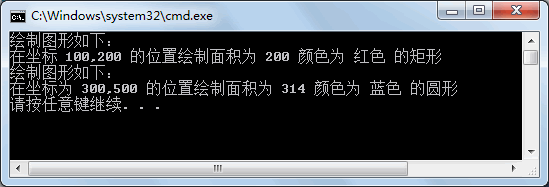
在 Main 方法中分别调用实现类中的属性和方法,代码如下。
class Program
{
    static void Main(string[] args)
    {
        IShape shape1 = new Rectangle(10, 20);//创建接口对象
        shape1.X = 100;
        shape1.Y = 200;
        shape1.Color = "红色";
        shape1.Draw();
        IShape shape2 = new Circle(10);//创建接口对象2
        shape2.X = 300;
        shape2.Y = 500;
        shape2.Color = "蓝色";
        shape2.Draw();
    }
}
与 “IShape shapel = newRectangle( 10,20);” 等效的代码如下。
Reatangle rectangle = new Rectangle();
rectangle.Length = 10;
rectangle.Width = 20;
IShape shape1 = rectangle;

若有收获,就点个赞吧
0 人点赞


