1.什么是泛型
先回想下集合arraylist类,在 ArrayList 中以 double 类型存入学生考试成绩,但存入值时并没有做验证,存入了其他数据类型的值
ArrayList arrayList=new ArrayList();arrayList.Add(100);arrayList.Add("abc");arrayList.Add(85.5);foreach (int d in arrayList){Console.WriteLine(d);}
在用foreach循环遍历集合的时候,由于数据类型不一致,会抛出异常。
为了避免类似的情况产生,将集合中元素的类型都指定为 double 类型,不能在集合中输入其他类型的值,这种设置方式即为泛型的一种应用。
换言之,泛型是可以把集合元素数据类型统一为一种规定的数据类型的集合
2.泛型方法
- 在C#语言中泛型方法是指通过泛型来约束方法中的参数类型,也可以理解为对数据类型设置了参数。
- 如果没有泛型,每次方法中的参数类型都是固定的,不能随意更改。
- 在使用泛型后,方法中的数据类型则有指定的泛型来约束,即可以根据提供的泛型来传递不同类型的参数。
- 定义泛型方法需要在方法名和参数列表之间加上
<>,并在其中使用T来代表参数类型。 - 当然,也可以使用其他的标识符来代替参数类型, 但通常都使用
T来表示。下面通过实例来演示泛型方法的使用。实例:创建泛型方法,实现对两个数的求和运算。
class Program
{
  static void Main(string[] args)
  {
      //将T设置为double类型
      Add<double>(3.3, 4);
      //将T设置为int类型
      Add<int>(3, 4);
  }
  //加法运算
  private static void Add<T>(T a, T b)
  {
      double sum = double.Parse(a.ToString()) + double.Parse(b.ToString());
      Console.WriteLine(sum);
  }
}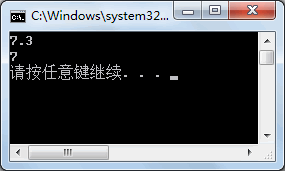
从上面的执行效果可以看出,在调用 Add 方法时能指定不同的参数类型执行加法运算。如果在调用 Add 方法时,没有按照中规定的类型传递参数,则会出现编译错误,这样就可以尽量避免程序在运行时出现异常。 3.泛型类
C#语言中泛型类的定义与泛型方法类似,是在泛型类的名称后面加上,当然,也可以定义多个类型,即“
这样,在类的成员中即可使用 T1、T2 等类型来定义。class 类名<T1,T2,…> { //类的成员 }实例:定义泛型类,并在泛型类中定义数组,提供添加和显示数组中全部元素的 方法。
Main方法class MyTest<T> { private T[] items = new T[3];//自定义一个类型为T的数组items[] private int index = 0;//数组索引为index //向数组中添加项 public void Add(T t) { if (index < 3) { items[index] = t; index++; } else { Console.WriteLine("数组已满!"); } } //读取数组中的全部项 public void Show() { foreach(T t in items) { Console.WriteLine(t); } } }class Program { static void Main(string[] args) { MyTest<int> test = new MyTest<int>(); test.Add(10); test.Add(20); test.Add(30); test.Show(); } }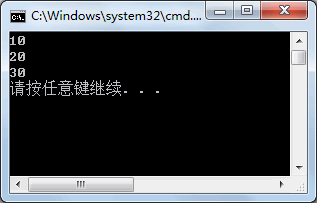
4.泛型集合
泛型集合是泛型中最常见的应用,主要用于约束集合中存放的元素。由于在集合中能存放任意类型的值,在取值时经常会遇到数据类型转换异常的情况,因此推荐在定义集合时使用泛型集合。
List
List<T> 变量名 = new List<T>();
实例:使用泛型集合 List 实现对学生信息的添加和遍历。
将学生信息定义为一个类,并在该类中定义学号、姓名、年龄属性。在泛型集合 List
class Program
{
    static void Main(string[] args)
    {
        //定义泛型集合
        List<Student> list = new List<Student>();
        //向集合中存入3名学员
        list.Add(new Student(1, "小明", 20));//构造器中添加id name age
        list.Add(new Student(2, "小李", 21));
        list.Add(new Student(3, "小赵", 22));
        //遍历集合中的元素
        foreach(Student stu in list)
        {
            Console.WriteLine(stu);
        }
    }
}
class Student
{
    //提供有参构造方法,为属性赋值
    public Student(int id,string name,int age)
    {
        this.id = id;
        this.name = name;
        this.age = age;
    }
    //学号
    public int id { get; set; }
    //姓名
    public string name { get; set; }
    //年龄
    public int age { get; set; }
    //重写ToString 方法 改变直接输出student类型的文字
    public override string ToString()
    {
        return id + ":" + name + ":" + age;
    }
}

若有收获,就点个赞吧
0 人点赞


