1、_cat
| 序号 | 命令 | 解释 |
|---|---|---|
| 1 | GET http://localhost:9200/_cat | cat包含的所有命令 |
| 2 | GET http://localhost:9200/_cat/nodes | 查看所有节点 |
| 3 | GET http://localhost:9200/_cat/health | 查看es健康状况 |
| 4 | GET http://localhost:9200/_cat/master | 查看主节点信息 |
| 5 | GET http://localhost:9200/_cat/indices | 查看所有索引 |
2、put/post 新增数据
post新增如果不指定id,会自动生成id。指定id就会修改当前id的数据,并新增版本号。
put必须指定id,一般用于修改操作,不指定id会报错。
3、数据修改乐观锁
_seq_no 并发控制字段,每次更新会+1
_primary_term 同上,主分片重新分配,如重启,会变化
更新携带以上两个字段,实现乐观锁机制 ?if_seq_no=0&_primary_term=1
更新前查询数据,利用 _seq_no 和 _primary_term 去更新数据,如果同时两个操作都在修改同一条数据,当其中一个操作执行完会更新 _seq_no 和 _primary_term 此时,另一个更新操作就会失败,返回status:409错误。
4、Query DSL
4.1 _bulk 批量导入
数据来源官方提供https://raw.githubusercontent.com/elastic/elasticsearch/master/docs/src/test/resources/accounts.json
curl -X POST "localhost:9200/bank/_bulk?pretty&refresh" -H 'Content-Type: application/json' -d'{"index":{"_id":"1"}}{"index":{"_id":"6"}}{"account_number":6,"balance":5686,"firstname":"Hattie","lastname":"Bond","age":36,"gender":"M","address":"671 Bristol Street","employer":"Netagy","email":"hattiebond@netagy.com","city":"Dante","state":"TN"}{"index":{"_id":"13"}}
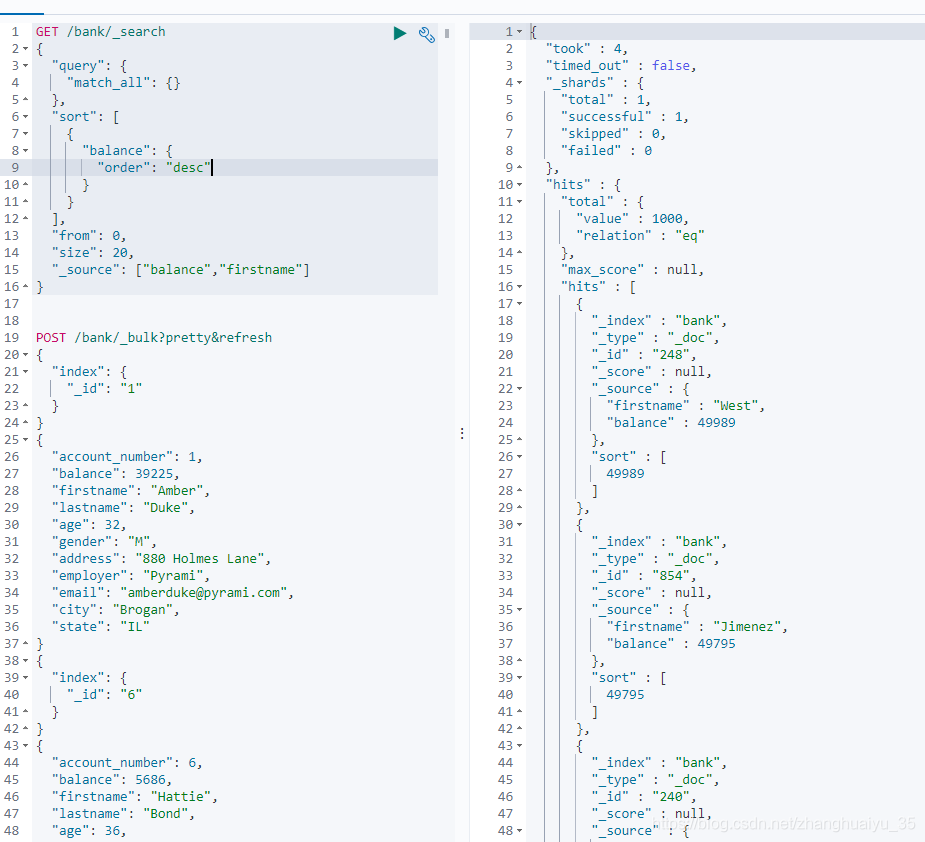
4.2 match_all 匹配所有文档
最简单的查询,它匹配所有文档,给出所有文档的分数为1.0
_source:自定义返回数据的字段
curl -XGET "http://localhost:9200/bank/_search" -H 'Content-Type: application/json' -d'{"query": {"match_all": {}},"sort": [{"balance": {"order": "desc"}}],"from": 0,"size": 20,"_source": ["balance","firstname"]}
4.3 match 全文检索
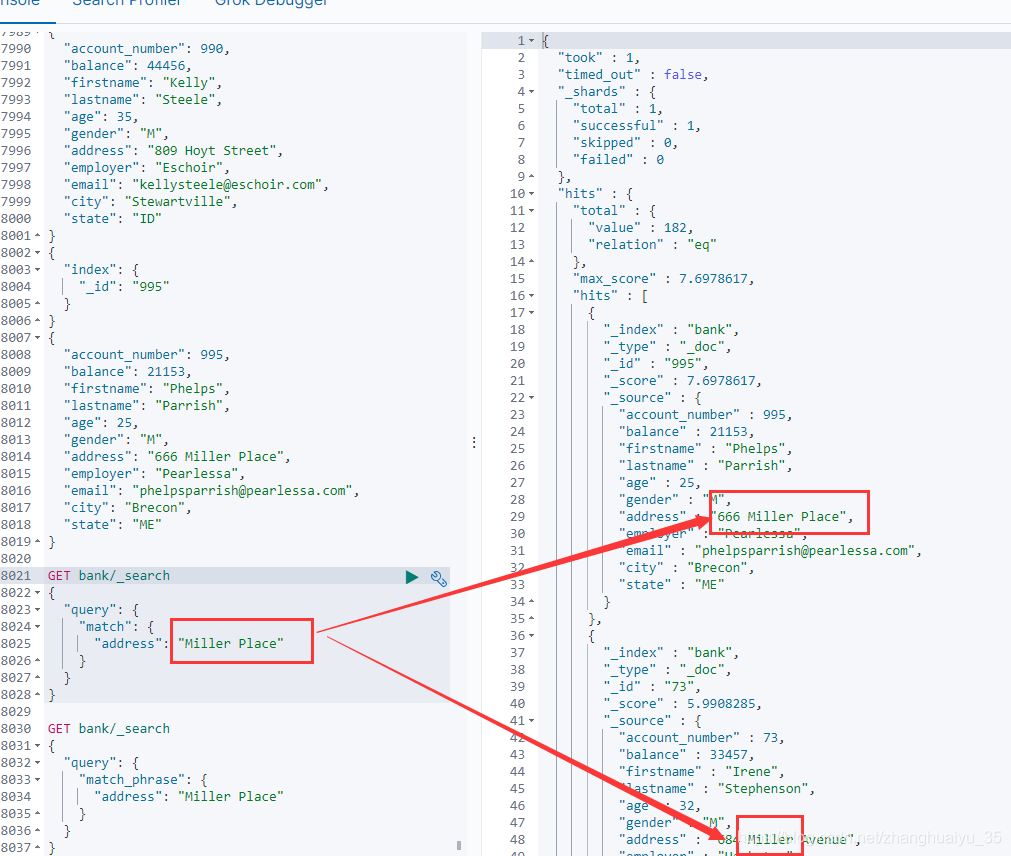
检索字符类型数据为全文检索(模糊查询,空格分词,查询mill不会查询出miller数据),检索数值型数据则为精确匹配
curl -XGET "http://localhost:9200/bank/_search" -H 'Content-Type: application/json' -d'{"query": {"match": {"address": "Miller"}}}
4.4 match_phrase 短语匹配
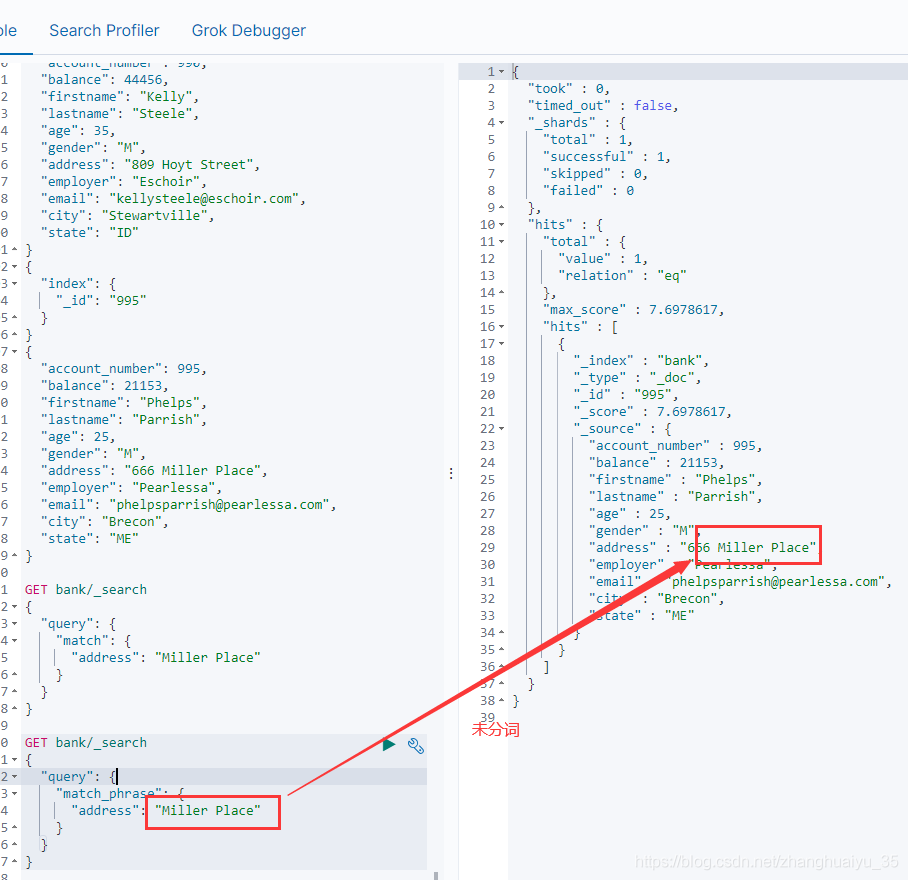
不分词
短语匹配
"address": "Miller Place"
GET bank/_search{"query": {"match_phrase": {"address": "Miller Place"}}}
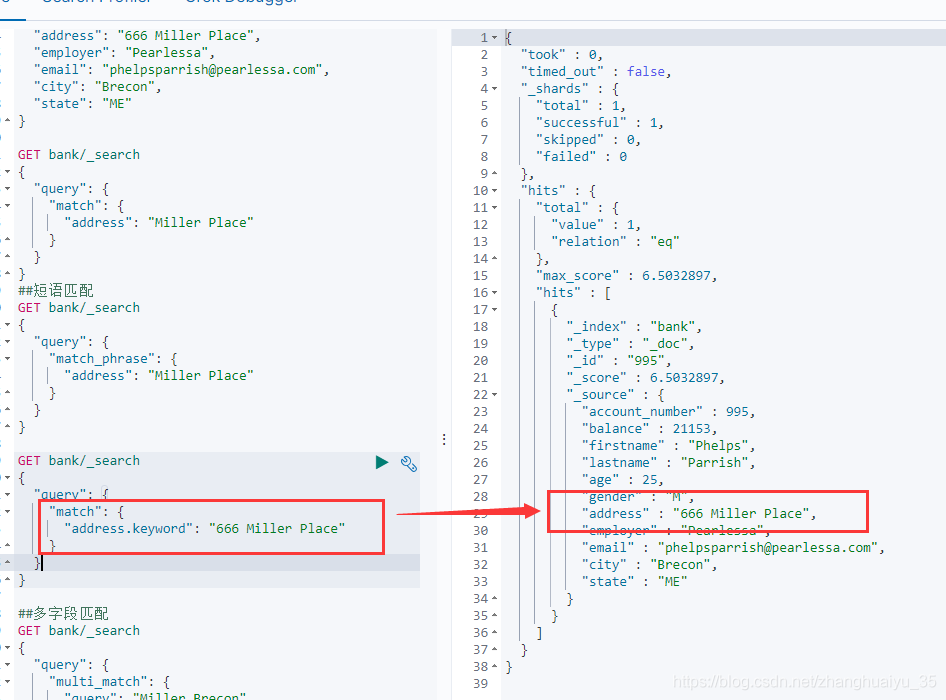
不分词匹配还有字段名.keyword作为查询字段来防止分词
GET bank/_search{"query": {"match": {"address.keyword": "666 Miller Place"}}}
matchphrase 和 *.keyword的区别
match_phrase 的值是整个短语不会被分词,但是会类似%查询值%查询
.keyword查询相当于 _=查询值
4.5 multi_match 多字段匹配
会进行分词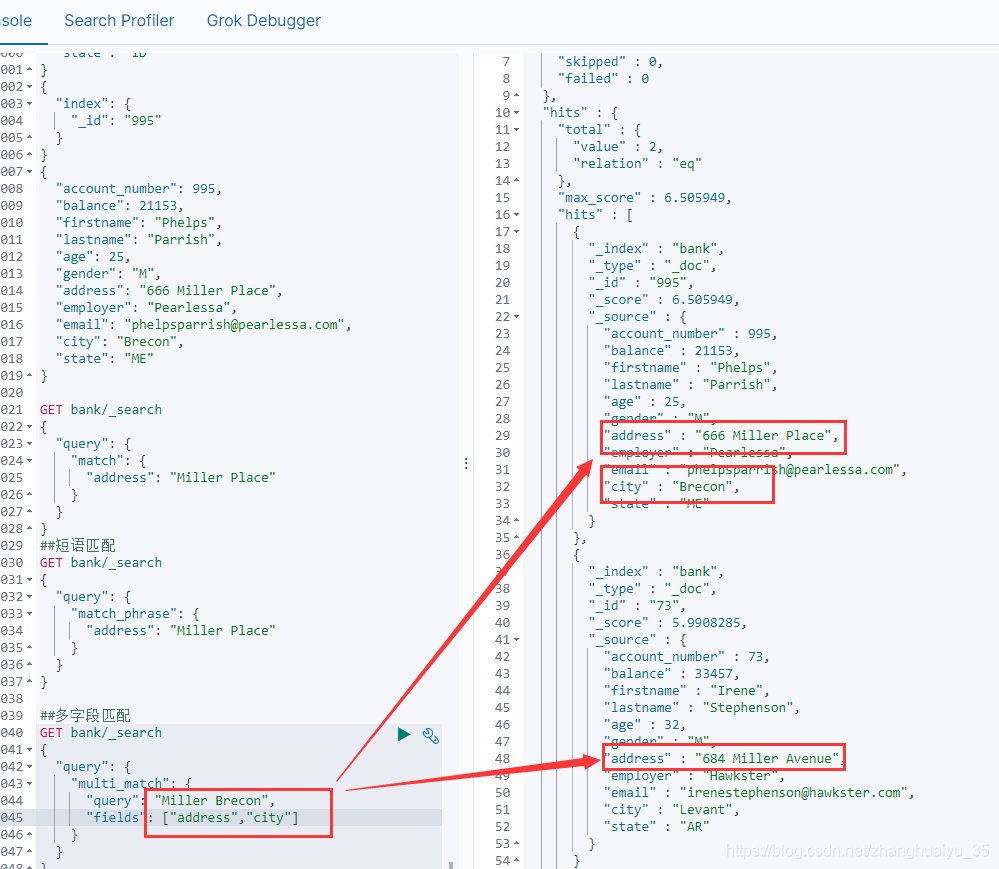
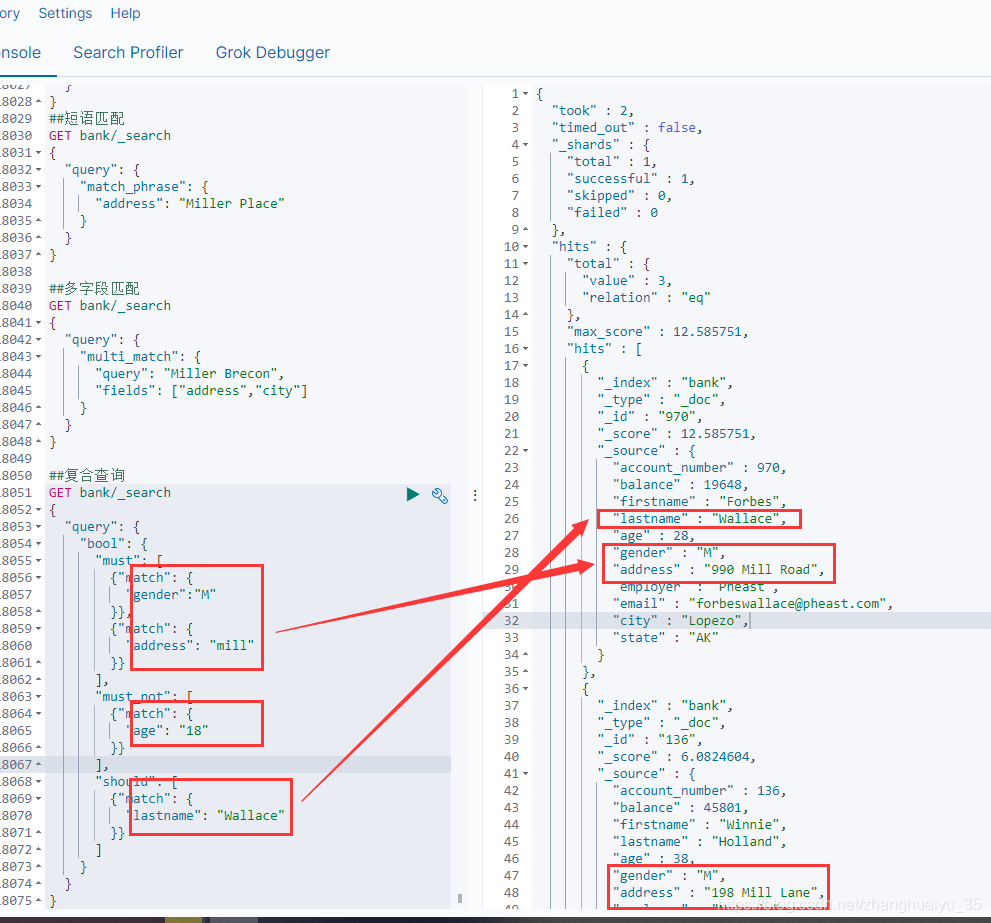
4.6 bool 复合查询
合并多个查询条件
must:必须满足,满足的得分高
must_not :必须不满足,不会提高文档得分
should :最好满足,不满足也可以,满足的得分高
##复合查询GET bank/_search{"query": {"bool": {"must": [{"match": {"gender":"M"}},{"match": {"address": "mill"}}],"must_not": [{"match": {"age": "18"}}],"should": [{"match": {"lastname": "Wallace"}}]}}}
4.7 bool-filter 过滤查询
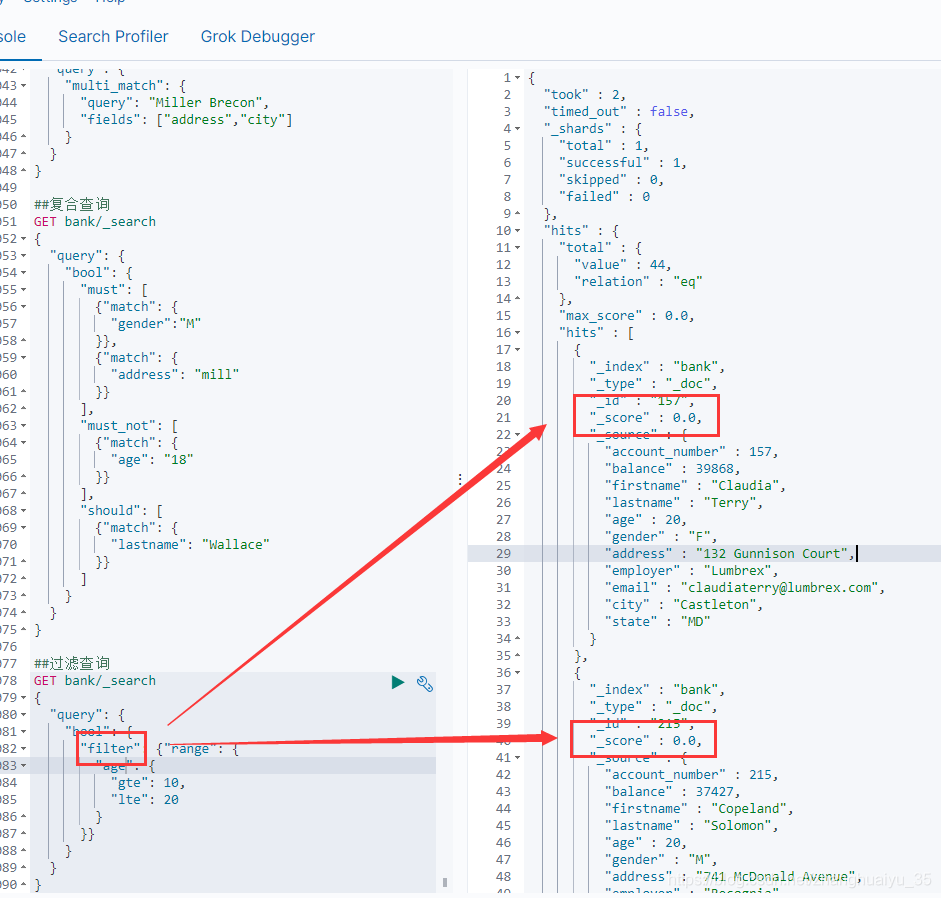
filter条件满足的不会提高数据得分,可用于不参与得分的字段查询,或者对查询出来的数据进行过滤,必须与复合查询一起使用,同级别的有must、must_not、should 都是复合查询中的查询规则。
层级关系:
bool -> must、must_not、should、
filter -> match、match_all、multi_match、match_phrase
##过滤查询GET bank/_search{"query": {"bool": {"filter": {"range": {"age": {"gte": 10,"lte": 20}}}}}}
4.8 term查询
和match一样,匹配某个属性的值。全文检索字段用match,非text字段匹配用term。【规范化查询】
4.9 aggregations 聚合
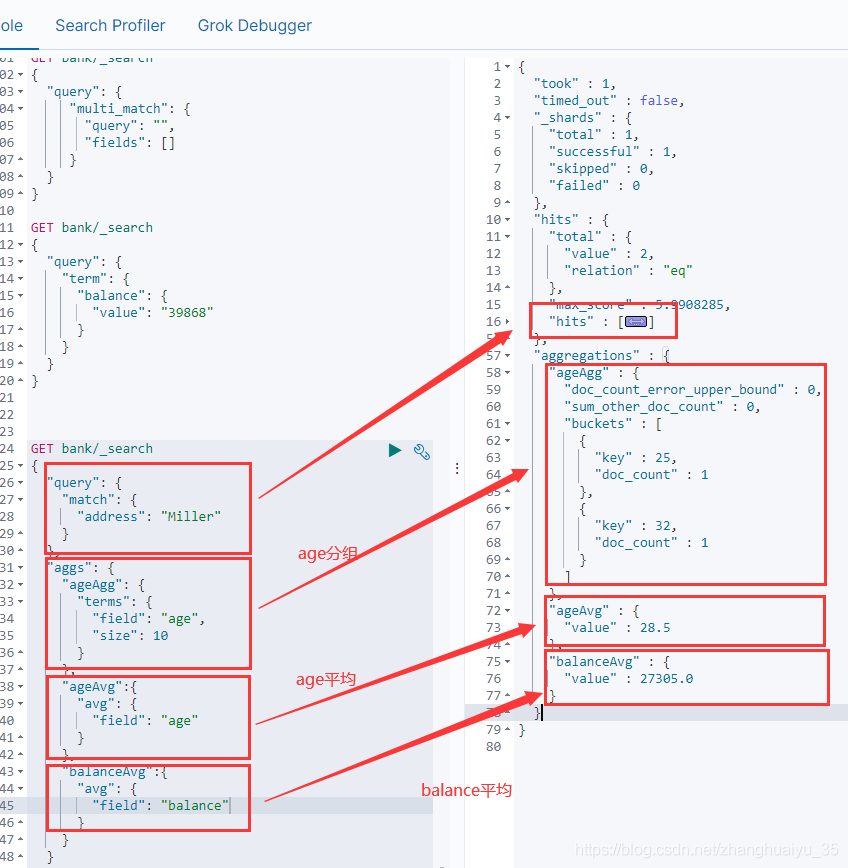
数据分组,相当于group by,可查询多组聚合,平均值等
只查看聚合结果,不查看查询数据,则添加 “size”:0
GET bank/_search{"query": {"match": {"address": "Miller"}},"aggs": {"ageAgg": {"terms": {"field": "age","size": 10}},"ageAvg":{"avg": {"field": "age"}},"balanceAvg":{"avg": {"field": "balance"}}},"size":0}
多级聚合
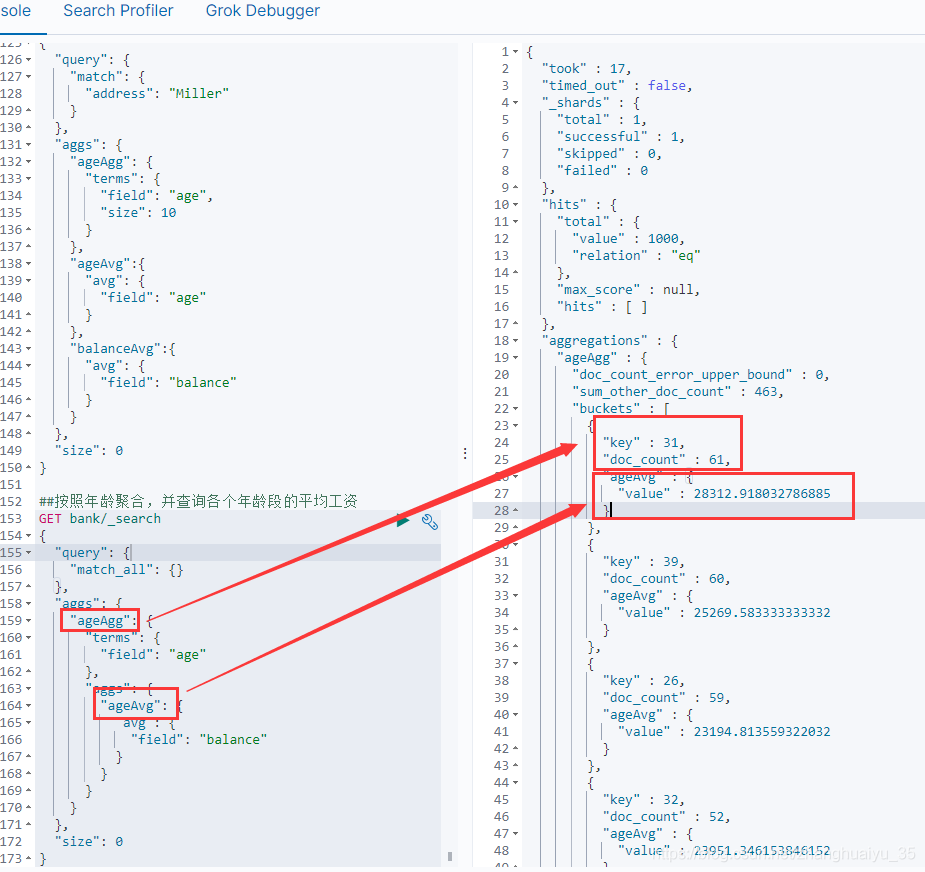
##按照年龄聚合,并查询各个年龄段的平均工资GET bank/_search{"query": {"match_all": {}},"aggs": {"ageAgg": {"terms": {"field": "age"},"aggs": {"ageAvg": {"avg": {"field": "balance"}}}}},"size": 0}
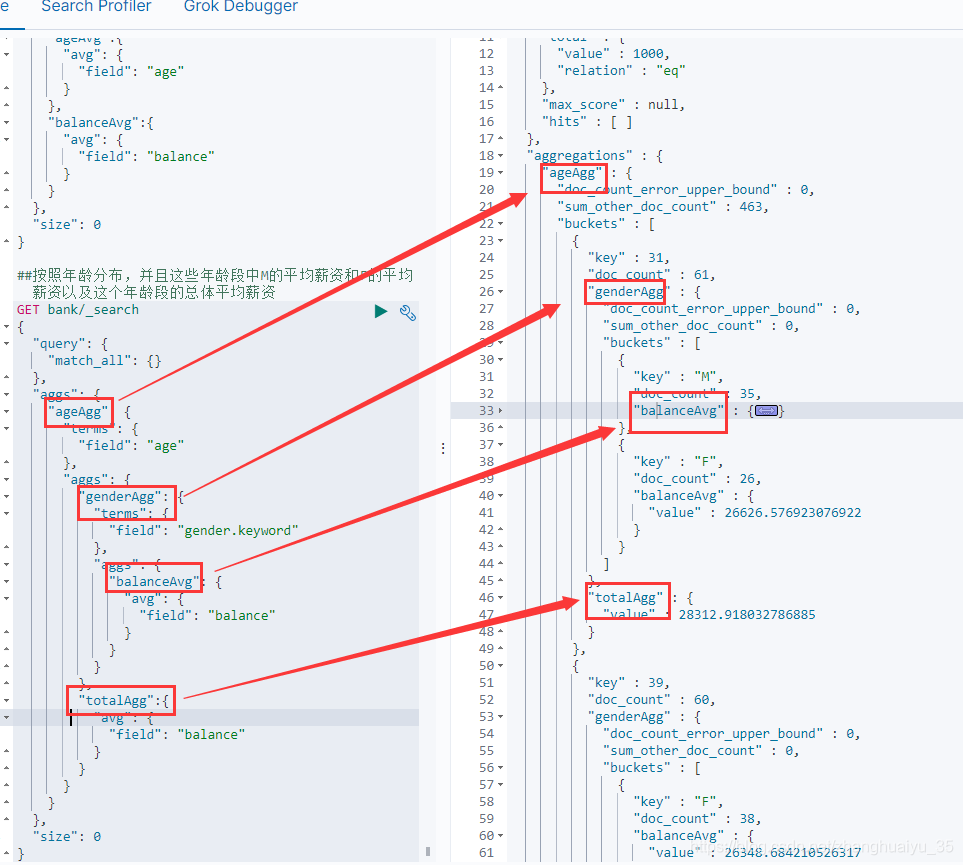
##按照年龄分布,并且这些年龄段中M的平均薪资和F的平均薪资以及这个年龄段的总体平均薪资GET bank/_search{"query": {"match_all": {}},"aggs": {"terms": {"field": "age"},"aggs": {"genderAgg": {"terms": {"field": "gender.keyword"},"aggs": {"balanceAvg": {"avg": {"field": "balance"}}}},"totalAgg":{"avg": {"field": "balance"}}}}},"size": 0}
5、mapping
es导入数据会自动根据数据创建对应的数据类型,大概为:
文本 -> text
数值 -> long
ES常用的数据类型有:https://www.elastic.co/guide/en/elasticsearch/reference/7.4/mapping-types.html
string text and keyword Numeric long, integer, short, byte, double,
float, half_float, scaled_float Date date Boolean boolean Object
object for single JSON objects Nested nested for arrays of JSON
objects IP ip for IPv4 and IPv6 addresses
##keyword 表示该字段不分词,lastname类型为text表示分词,但fields内的keyword的类型为keyword,则查询lastname.keyword 不分词
PUT /my-index{"mappings": {"properties": {"age": { "type": "integer" },"email": { "type": "keyword" },"name": { "type": "text" },"lastname" : {"type" : "text","fields" : {"keyword" : {"type" : "keyword","ignore_above" : 256}}}}}}
"type" : "text",
查询索引mapping
GET my-index/_mapping
6、添加新的映射字段
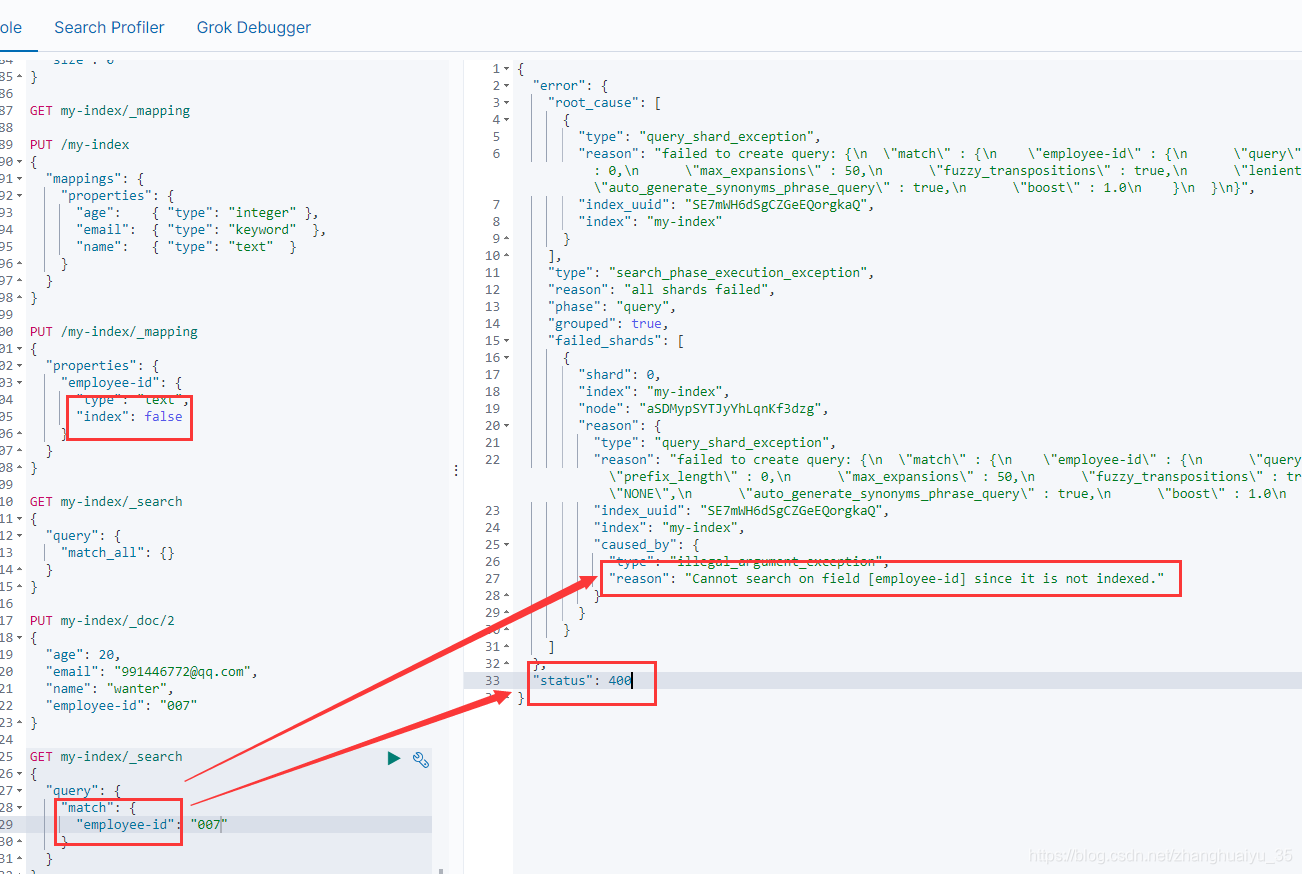
index 索引选项控制字段值是否被索引。它接受真或假,默认为真。未编入索引的字段不可查询。
PUT /my-index/_mapping{"properties": {"employee-id": {"type": "text","index": false}}}
7、ik分词器
安装
https://github.com/medcl/elasticsearch-analysis-ik/releases
找到对应版本下载,解压到elasticsearch-7.4.2/plugins下,可以重命名ik,启动es即可
检测是否安装成功
http://localhost:9200/_cat/plugins
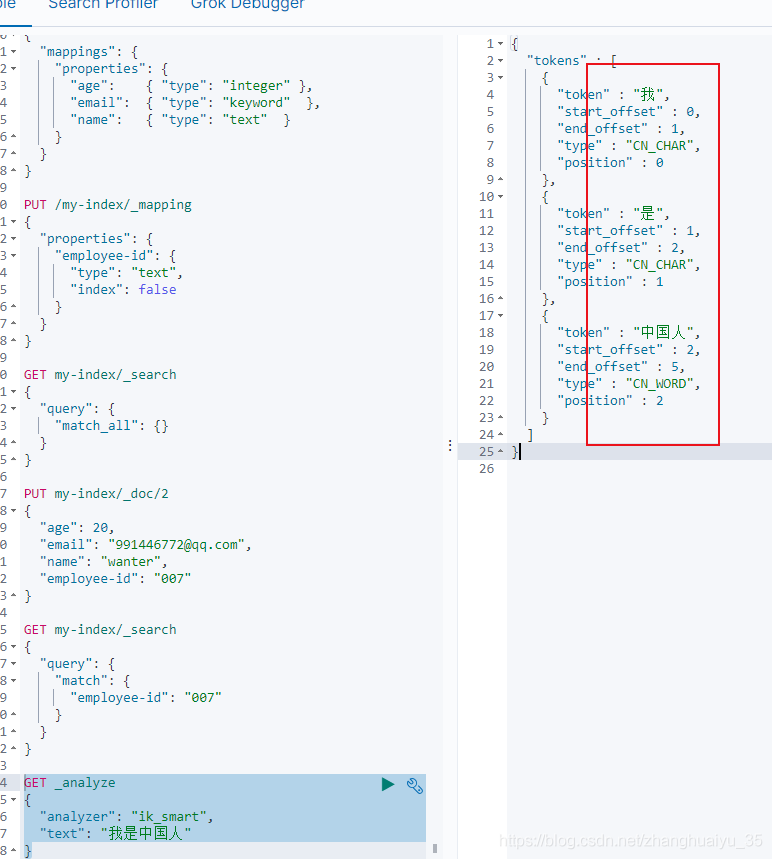
检测分词效果
GET _analyze{"analyzer": "ik_smart","text": "我是中国人"}
热更新 IK 分词使用方法
目前该插件支持热更新 IK 分词,通过上文在 IK 配置文件中提到的如下配置
<!--用户可以在这里配置远程扩展字典 --><entry key="remote_ext_dict">location</entry><!--用户可以在这里配置远程扩展停止词字典--><entry key="remote_ext_stopwords">location</entry>
其中 location 是指一个 url,比如 http://yoursite.com/getCustomDict,该请求只需满足以下两点即可完成分词热更新。
该 http 请求需要返回两个头部(header),一个是 Last-Modified,一个是 ETag,这两者都是字符串类型,只要有一个发生变化,该插件就会去抓取新的分词进而更新词库。
该 http 请求返回的内容格式是一行一个分词,换行符用 \n 即可。
满足上面两点要求就可以实现热更新分词了,不需要重启 ES 实例。
可以将需自动更新的热词放在一个 UTF-8 编码的 .txt 文件里,放在 nginx 或其他简易 http server 下,当 .txt 文件修改时,http server 会在客户端请求该文件时自动返回相应的 Last-Modified 和 ETag。可以另外做一个工具来从业务系统提取相关词汇,并更新这个 .txt 文件。
QAQ:
自定义词典为什么没有生效? 请确保你的扩展词典的文本格式为 UTF8 编码 ik_max_word 和 ik_smart 什么区别?
ik_max_word:
会将文本做最细粒度的拆分,比如会将“中华人民共和国国歌”拆分为“中华人民共和国,中华人民,中华,华人,人民共和国,人民,人,民,共和国,共和,和,国国,国歌”,会穷尽各种可能的组合,适合
Term Query(字符型分词查询); ik_smart:
会做最粗粒度的拆分,比如会将“中华人民共和国国歌”拆分为“中华人民共和国,国歌”,适合 Phrase 查询(短语查询,不分词)。
8、springboot整合high-level-client
- pom引用
<dependency><groupId>org.elasticsearch.client</groupId><artifactId>elasticsearch-rest-high-level-client</artifactId><version>7.4.2</version></dependency>
- 初始化client,并加载到spring容器内
@Configurationpublic class ElasticSearchClient {@Beanpublic RestHighLevelClient esRestClient() {RestHighLevelClient client = new RestHighLevelClient(RestClient.builder(new HttpHost("localhost", 9200, "http")));return client;}}
9、保存数据
1、配置文件添加RequestOptions
@Configurationpublic class ElasticSearchClient {public static final RequestOptions COMMON_OPTIONS;static {RequestOptions.Builder builder = RequestOptions.DEFAULT.toBuilder();// builder.addHeader("Authorization", "Bearer " + TOKEN);// builder.setHttpAsyncResponseConsumerFactory(// new HttpAsyncResponseConsumerFactory// .HeapBufferedResponseConsumerFactory(30 * 1024 * 1024 * 1024));COMMON_OPTIONS = builder.build();}@Beanpublic RestHighLevelClient esRestClient() {RestHighLevelClient client = new RestHighLevelClient(RestClient.builder(new HttpHost("localhost", 9200, "http")));return client;}}
@Autowiredprivate RestHighLevelClient restClient;@Testpublic void index() throws IOException {IndexRequest request = new IndexRequest("users");request.id("1");User user = new User();user.setAge(18);user.setName("wanter");user.setGender("男");String jsonString = JSON.toJSONString(user);request.source(jsonString, XContentType.JSON);//同步执行IndexResponse indexResponse = restClient.index(request, RequestOptions.DEFAULT);System.out.println(indexResponse);}
输出:IndexResponse[index=users,type=_doc,id=1,version=1,result=created,seqNo=0,primaryTerm=1,shards={“total”:2,”successful”:1,”failed”:0}]
10、检索及解析
https://www.elastic.co/guide/en/elasticsearch/client/java-rest/7.4/java-rest-high-search.html
DSL:address匹配mill,对结果年龄分组,不同年龄组统计性别和平均薪资
DSL:
{"size": 10,"query": {"match": {"address": {"query": "mill","operator": "OR","prefix_length": 0,"max_expansions": 50,"fuzzy_transpositions": true,"lenient": false,"zero_terms_query": "NONE","auto_generate_synonyms_phrase_query": true,"boost": 1}}},"aggregations": {"ageAgg": {"terms": {"field": "age","size": 10,"min_doc_count": 1,"shard_min_doc_count": 0,"show_term_doc_count_error": false,"order": [{"count": "desc"},{"key": "asc"}]},"aggregations": {"genderAgg": {"terms": {"field": "gender.keyword","size": 10,"min_doc_count": 1,"shard_min_doc_count": 0,"show_term_doc_count_error": false,"order": [{"count": "desc"},{"key": "asc"}]}},"totalAgg": {"avg": {"field": "balance"}}}}}}
结果:
{"took": 1,"timed_out": false,"shards": {"total": 1,"successful": 1,"skipped": 0,"failed": 0},"hits": {"total": {"value": 4,"relation": "eq"},"max_score": 5.4032025,"hits": [{"index": "bank","type": "doc","id": "970","score": 5.4032025,"source": {"account_number": 970,"balance": 19648,"firstname": "Forbes","lastname": "Wallace","age": 28,"gender": "M","address": "990 Mill Road","employer": "Pheast","email": "forbeswallace@pheast.com","city": "Lopezo","state": "AK"}},{"index": "bank","type": "doc","id": "136","score": 5.4032025,"source": {"account_number": 136,"balance": 45801,"firstname": "Winnie","lastname": "Holland","age": 38,"gender": "M","address": "198 Mill Lane","employer": "Neteria","email": "winnieholland@neteria.com","city": "Urie","state": "IL"}},{"index": "bank","type": "doc","id": "345","score": 5.4032025,"source": {"account_number": 345,"balance": 9812,"firstname": "Parker","lastname": "Hines","age": 38,"gender": "M","address": "715 Mill Avenue","employer": "Baluba","email": "parkerhines@baluba.com","city": "Blackgum","state": "KY"}},{"index": "bank","type": "doc","id": "472","score": 5.4032025,"_source": {"account_number": 472,"balance": 25571,"firstname": "Lee","lastname": "Long","age": 32,"gender": "F","address": "288 Mill Street","employer": "Comverges","email": "leelong@comverges.com","city": "Movico","state": "MT"}}]},"aggregations": {"lterms#ageAgg": {"doc_count_error_upper_bound": 0,"sum_other_doc_count": 0,"buckets": [{"key": 38,"doc_count": 2,"sterms#genderAgg": {"doc_count_error_upper_bound": 0,"sum_other_doc_count": 0,"buckets": [{"key": "M","doc_count": 2}]},"avg#totalAgg": {"value": 27806.5}},{"key": 28,"doc_count": 1,"sterms#genderAgg": {"doc_count_error_upper_bound": 0,"sum_other_doc_count": 0,"buckets": [{"key": "M","doc_count": 1}]},"avg#totalAgg": {"value": 19648}},{"key": 32,"doc_count": 1,"sterms#genderAgg": {"doc_count_error_upper_bound": 0,"sum_other_doc_count": 0,"buckets": [{"key": "F","doc_count": 1}]},"avg#totalAgg": {"value": 25571}}]}}}
@Autowiredprivate RestHighLevelClient restClient;@Testpublic void search() throws IOException {SearchRequest searchRequest = new SearchRequest();//设置索引searchRequest.indices("bank");SearchSourceBuilder sourceBuilder = new SearchSourceBuilder();//构造条件sourceBuilder.query(QueryBuilders.matchQuery("address","mill"));TermsAggregationBuilder ageAgg = AggregationBuilders.terms("ageAgg").field("age");ageAgg.subAggregation(AggregationBuilders.terms("genderAgg").field("gender.keyword"));ageAgg.subAggregation(AggregationBuilders.avg("totalAgg").field("balance"));sourceBuilder.aggregation(ageAgg);sourceBuilder.size(10);searchRequest.source(sourceBuilder);System.out.println(sourceBuilder.toString());//执行查询SearchResponse searchResponse = restClient.search(searchRequest, RequestOptions.DEFAULT);System.out.println(searchResponse.toString());//获取数据并映射到对象中解析SearchHits hits = searchResponse.getHits();SearchHit[] searchHits = hits.getHits();for (SearchHit searchHit : searchHits) {String index = searchHit.getIndex();String sourceString = searchHit.getSourceAsString();Account account = JSON.parseObject(sourceString, Account.class);System.out.println(account);}//获取统计信息解析Aggregations aggregations = searchResponse.getAggregations();Terms ageAgg1 = aggregations.get("ageAgg");for (Terms.Bucket bucket : ageAgg1.getBuckets()) {System.out.println("年龄:"+bucket.getKey()+"==>数量:"+bucket.getDocCount());Aggregations aggregations1 = bucket.getAggregations();Terms genderAgg = aggregations1.get("genderAgg");for (Terms.Bucket genderAggBucket : genderAgg.getBuckets()) {System.out.println("性别:"+genderAggBucket.getKey()+"==>数量:"+genderAggBucket.getDocCount());}Avg totalAgg = aggregations1.get("totalAgg");System.out.println("年龄段平均薪资:"+totalAgg.getValue());}}
Account(account_number=970, balance=19648, firstname=Forbes, lastname=Wallace, age=28, gender=M, address=990 Mill Road, employer=Pheast, email=forbeswallace@pheast.com, city=Lopezo, state=AK)
Account(account_number=136, balance=45801, firstname=Winnie, lastname=Holland, age=38, gender=M, address=198 Mill Lane, employer=Neteria, email=winnieholland@neteria.com, city=Urie, state=IL)
Account(account_number=345, balance=9812, firstname=Parker, lastname=Hines, age=38, gender=M, address=715 Mill Avenue, employer=Baluba, email=parkerhines@baluba.com, city=Blackgum, state=KY)
Account(account_number=472, balance=25571, firstname=Lee, lastname=Long, age=32, gender=F, address=288 Mill Street, employer=Comverges, email=leelong@comverges.com, city=Movico, state=MT)
年龄:38==>数量:2
性别:M==>数量:2
年龄段平均薪资:27806.5
年龄:28==>数量:1
性别:M==>数量:1
年龄段平均薪资:19648.0
年龄:32==>数量:1
性别:F==>数量:1
年龄段平均薪资:25571.0


若有收获,就点个赞吧
0 人点赞


