构建你的第一个 Flow
学习如何创建具有精确执行控制的结构化、事件驱动型工作流。
使用 Flows 掌控 AI 工作流
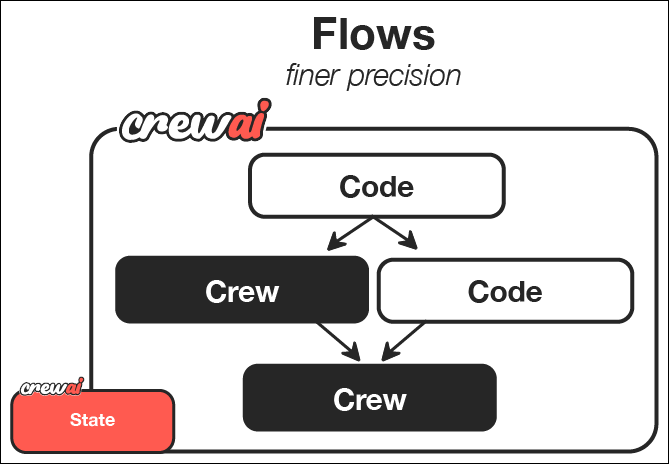
CrewAI Flows 代表了 AI 编排的更高阶段 —— 将 AI Agent crew 的协作能力与过程式编程的精确性和灵活性结合起来。虽然 crew 擅长 Agent 协作,但 flow 能让你对 AI 系统中不同组件如何、何时交互进行更细粒度的控制。
在本指南中,我们将一步步创建一个强大的 CrewAI Flow,用于为任意主题生成一份全面的学习指南。本教程将展示 Flows 如何通过结合常规代码、直接 LLM 调用以及基于 crew 的处理方式,为你的 AI 工作流提供结构化、事件驱动的控制能力。
为什么 Flows 很强大
Flows 使你能够:
- 组合不同的 AI 交互模式 —— 对复杂协作任务使用 crew,对简单操作使用直接 LLM 调用,对过程逻辑使用常规代码
- 构建事件驱动系统 —— 定义组件如何对特定事件和数据变化作出响应
- 在组件之间维护状态 —— 在应用程序的不同部分之间共享和转换数据
- 与外部系统集成 —— 将 AI 工作流无缝连接到数据库、API 和用户界面
- 创建复杂执行路径 —— 设计条件分支、并行处理和动态工作流
你将构建并学到什么
在本指南结束时,你将:
- 创建一个复杂的内容生成系统,结合用户输入、AI 规划和多 Agent 内容创作
- 编排系统中不同组件之间的信息流
- 实现事件驱动架构,让每一步都对前一步的完成作出响应
- 打下更复杂 AI 应用的基础,以便后续扩展和定制
这个 guide creator flow 展示了一些基础模式,这些模式可以用于构建更高级的应用,例如:
- 结合多个专业子系统的交互式 AI 助手
- 带有 AI 增强转换能力的复杂数据处理流水线
- 可与外部服务和 API 集成的自治 Agent
- 包含人在环流程的多阶段决策系统
现在就开始构建你的第一个 flow 吧!
前置要求
在开始之前,请确保你已经:
第 1 步:创建一个新的 CrewAI Flow 项目
首先,让我们使用 CLI 创建一个新的 CrewAI Flow 项目。这个命令会为你的 flow 搭建一个包含所有必要目录和模板文件的项目脚手架。
crewai create flow guide_creator_flowcd guide_creator_flow
这将生成一个包含 flow 基础结构的项目。
第 2 步:理解项目结构
生成后的项目具有如下结构。请花一点时间熟悉它,因为理解这个结构将帮助你在未来创建更复杂的 flow。
guide_creator_flow/├── .gitignore├── pyproject.toml├── README.md├── .env├── main.py├── crews/│ └── poem_crew/│ ├── config/│ │ ├── agents.yaml│ │ └── tasks.yaml│ └── poem_crew.py└── tools/└── custom_tool.py
这个结构清晰地分离了 flow 的不同组成部分:
main.py文件中的主 flow 逻辑crews目录中的专业化 crewtools目录中的自定义工具
我们将修改这个结构,来创建自己的 guide creator flow,用于编排生成全面学习指南的过程。
第 3 步:添加一个内容写作 Crew
我们的 flow 需要一个专业化 crew 来处理内容创作流程。让我们使用 CrewAI CLI 添加一个 content writer crew:
crewai flow add-crew content-crew
这个命令会自动创建 crew 所需的目录和模板文件。content writer crew 将负责撰写和审阅我们指南中的各个章节,并在主应用编排的整体 flow 中工作。
第 4 步:配置内容写作 Crew
现在,让我们修改为 content writer crew 自动生成的文件。我们将设置两个专业化 Agent —— writer 和 reviewer —— 让它们协作创建高质量的指南内容。
首先,更新 Agent 配置文件,定义我们的内容创作团队:
请记得将
llm设置为你正在使用的提供方。
# src/guide_creator_flow/crews/content_crew/config/agents.yamlcontent_writer:role: >Educational Content Writergoal: >Create engaging, informative content that thoroughly explains the assigned topicand provides valuable insights to the readerbackstory: >You are a talented educational writer with expertise in creating clear, engagingcontent. You have a gift for explaining complex concepts in accessible languageand organizing information in a way that helps readers build their understanding.llm: provider/model-id # e.g. openai/gpt-4o, google/gemini-2.0-flash, anthropic/claude...content_reviewer:role: >Educational Content Reviewer and Editorgoal: >Ensure content is accurate, comprehensive, well-structured, and maintainsconsistency with previously written sectionsbackstory: >You are a meticulous editor with years of experience reviewing educationalcontent. You have an eye for detail, clarity, and coherence. You excel atimproving content while maintaining the original author's voice and ensuringconsistent quality across multiple sections.llm: provider/model-id # e.g. openai/gpt-4o, google/gemini-2.0-flash, anthropic/claude...
这些 Agent 定义建立了专业化角色和视角,从而塑造 AI Agent 处理内容创作的方式。注意每个 Agent 都有清晰且不同的职责与专长。
- 接下来,更新任务配置文件,定义具体的写作和审阅任务:
# src/guide_creator_flow/crews/content_crew/config/tasks.yamlwrite_section_task:description: >Write a comprehensive section on the topic: "{section_title}"Section description: {section_description}Target audience: {audience_level} level learnersYour content should:1. Begin with a brief introduction to the section topic2. Explain all key concepts clearly with examples3. Include practical applications or exercises where appropriate4. End with a summary of key points5. Be approximately 500-800 words in lengthFormat your content in Markdown with appropriate headings, lists, and emphasis.Previously written sections:{previous_sections}Make sure your content maintains consistency with previously written sectionsand builds upon concepts that have already been explained.expected_output: >A well-structured, comprehensive section in Markdown format that thoroughlyexplains the topic and is appropriate for the target audience.agent: content_writerreview_section_task:description: >Review and improve the following section on "{section_title}":{draft_content}Target audience: {audience_level} level learnersPreviously written sections:{previous_sections}Your review should:1. Fix any grammatical or spelling errors2. Improve clarity and readability3. Ensure content is comprehensive and accurate4. Verify consistency with previously written sections5. Enhance the structure and flow6. Add any missing key informationProvide the improved version of the section in Markdown format.expected_output: >An improved, polished version of the section that maintains the originalstructure but enhances clarity, accuracy, and consistency.agent: content_reviewercontext:- write_section_task
这些任务定义为我们的 Agent 提供了详细说明,从而确保它们生成符合质量标准的内容。请注意 review 任务中的 context 参数,它建立了一个工作流,让 reviewer 可以访问 writer 的输出内容。
- 现在,更新 crew 实现文件,定义我们的 Agent 和任务如何协同工作:
# src/guide_creator_flow/crews/content_crew/content_crew.pyfrom crewai import Agent, Crew, Process, Taskfrom crewai.project import CrewBase, agent, crew, taskfrom crewai.agents.agent_builder.base_agent import BaseAgentfrom typing import List@CrewBaseclass ContentCrew():"""Content writing crew"""agents: List[BaseAgent]tasks: List[Task]@agentdef content_writer(self) -> Agent:return Agent(config=self.agents_config['content_writer'], # type: ignore[index]verbose=True)@agentdef content_reviewer(self) -> Agent:return Agent(config=self.agents_config['content_reviewer'], # type: ignore[index]verbose=True)@taskdef write_section_task(self) -> Task:return Task(config=self.tasks_config['write_section_task'] # type: ignore[index])@taskdef review_section_task(self) -> Task:return Task(config=self.tasks_config['review_section_task'], # type: ignore[index]context=[self.write_section_task()])@crewdef crew(self) -> Crew:"""Creates the content writing crew"""return Crew(agents=self.agents,tasks=self.tasks,process=Process.sequential,verbose=True,)
这个 crew 定义建立了 Agent 与任务之间的关系,设置了一个顺序流程:content writer 先创建草稿,然后 reviewer 再对其进行改进。虽然这个 crew 可以独立运行,但在我们的 flow 中,它将作为更大系统的一部分被统一编排。
第 5 步:创建 Flow
现在来到最激动人心的部分 —— 创建 flow,用于编排整个指南生成流程。在这里,我们会把常规 Python 代码、直接 LLM 调用以及内容创作 crew 组合成一个统一系统。
我们的 flow 将会:
- 获取用户输入的主题和受众级别
- 通过直接 LLM 调用创建结构化的指南大纲
- 使用 content writer crew 按顺序处理每个章节
- 将所有内容整合为最终的完整文档
让我们在 main.py 文件中创建这个 flow:
#!/usr/bin/env pythonimport jsonimport osfrom typing import List, Dictfrom pydantic import BaseModel, Fieldfrom crewai import LLMfrom crewai.flow.flow import Flow, listen, startfrom guide_creator_flow.crews.content_crew.content_crew import ContentCrew# Define our models for structured dataclass Section(BaseModel):title: str = Field(description="Title of the section")description: str = Field(description="Brief description of what the section should cover")class GuideOutline(BaseModel):title: str = Field(description="Title of the guide")introduction: str = Field(description="Introduction to the topic")target_audience: str = Field(description="Description of the target audience")sections: List[Section] = Field(description="List of sections in the guide")conclusion: str = Field(description="Conclusion or summary of the guide")# Define our flow stateclass GuideCreatorState(BaseModel):topic: str = ""audience_level: str = ""guide_outline: GuideOutline = Nonesections_content: Dict[str, str] = {}class GuideCreatorFlow(Flow[GuideCreatorState]):"""Flow for creating a comprehensive guide on any topic"""@start()def get_user_input(self):"""Get input from the user about the guide topic and audience"""print("\n=== Create Your Comprehensive Guide ===\n")# Get user inputself.state.topic = input("What topic would you like to create a guide for? ")# Get audience level with validationwhile True:audience = input("Who is your target audience? (beginner/intermediate/advanced) ").lower()if audience in ["beginner", "intermediate", "advanced"]:self.state.audience_level = audiencebreakprint("Please enter 'beginner', 'intermediate', or 'advanced'")print(f"\nCreating a guide on {self.state.topic} for {self.state.audience_level} audience...\n")return self.state@listen(get_user_input)def create_guide_outline(self, state):"""Create a structured outline for the guide using a direct LLM call"""print("Creating guide outline...")# Initialize the LLMllm = LLM(model="openai/gpt-4o-mini", response_format=GuideOutline)# Create the messages for the outlinemessages = [{"role": "system", "content": "You are a helpful assistant designed to output JSON."},{"role": "user", "content": f"""Create a detailed outline for a comprehensive guide on "{state.topic}" for {state.audience_level} level learners.The outline should include:1. A compelling title for the guide2. An introduction to the topic3. 4-6 main sections that cover the most important aspects of the topic4. A conclusion or summaryFor each section, provide a clear title and a brief description of what it should cover."""}]# Make the LLM call with JSON response formatresponse = llm.call(messages=messages)# Parse the JSON responseoutline_dict = json.loads(response)self.state.guide_outline = GuideOutline(**outline_dict)# Ensure output directory exists before savingos.makedirs("output", exist_ok=True)# Save the outline to a filewith open("output/guide_outline.json", "w") as f:json.dump(outline_dict, f, indent=2)print(f"Guide outline created with {len(self.state.guide_outline.sections)} sections")return self.state.guide_outline@listen(create_guide_outline)def write_and_compile_guide(self, outline):"""Write all sections and compile the guide"""print("Writing guide sections and compiling...")completed_sections = []# Process sections one by one to maintain context flowfor section in outline.sections:print(f"Processing section: {section.title}")# Build context from previous sectionsprevious_sections_text = ""if completed_sections:previous_sections_text = "# Previously Written Sections\n\n"for title in completed_sections:previous_sections_text += f"## {title}\n\n"previous_sections_text += self.state.sections_content.get(title, "") + "\n\n"else:previous_sections_text = "No previous sections written yet."# Run the content crew for this sectionresult = ContentCrew().crew().kickoff(inputs={"section_title": section.title,"section_description": section.description,"audience_level": self.state.audience_level,"previous_sections": previous_sections_text,"draft_content": ""})# Store the contentself.state.sections_content[section.title] = result.rawcompleted_sections.append(section.title)print(f"Section completed: {section.title}")# Compile the final guideguide_content = f"# {outline.title}\n\n"guide_content += f"## Introduction\n\n{outline.introduction}\n\n"# Add each section in orderfor section in outline.sections:section_content = self.state.sections_content.get(section.title, "")guide_content += f"\n\n{section_content}\n\n"# Add conclusionguide_content += f"## Conclusion\n\n{outline.conclusion}\n\n"# Save the guidewith open("output/complete_guide.md", "w") as f:f.write(guide_content)print("\nComplete guide compiled and saved to output/complete_guide.md")return "Guide creation completed successfully"def kickoff():"""Run the guide creator flow"""GuideCreatorFlow().kickoff()print("\n=== Flow Complete ===")print("Your comprehensive guide is ready in the output directory.")print("Open output/complete_guide.md to view it.")def plot():"""Generate a visualization of the flow"""flow = GuideCreatorFlow()flow.plot("guide_creator_flow")print("Flow visualization saved to guide_creator_flow.html")if __name__ == "__main__":kickoff()
让我们分析一下这个 flow 中发生了什么:
- 我们定义了用于结构化数据的 Pydantic 模型,从而确保类型安全和清晰的数据表示
- 我们创建了一个 state 类,用于在 flow 不同步骤之间维护数据
我们实现了三个主要 flow 步骤:
- 使用
@start()装饰器获取用户输入 - 通过直接 LLM 调用创建指南大纲
- 使用 content crew 处理各个章节
- 使用
- 我们使用
@listen()装饰器在步骤之间建立事件驱动关系
这就是 flow 的强大之处 —— 将不同类型的处理方式(用户交互、直接 LLM 调用、基于 crew 的任务)组合成一个连贯的事件驱动系统。
第 6 步:设置环境变量
在项目根目录中创建一个 .env 文件,并填入你的 API Key。关于如何配置 provider,请参阅 LLM 配置指南。
OPENAI_API_KEY=your_openai_api_key# orGEMINI_API_KEY=your_gemini_api_key# orANTHROPIC_API_KEY=your_anthropic_api_key
第 7 步:安装依赖
安装所需依赖:
crewai install
第 8 步:运行你的 Flow
现在是时候看看你的 flow 实际运行起来的效果了!使用 CrewAI CLI 运行它:
crewai flow kickoff
当你运行这个命令时,你会看到 flow 开始执行:
- 它会提示你输入主题和受众级别
- 它会为你的指南创建结构化大纲
- 它会处理每一个章节,让 content writer 和 reviewer 协作完成
- 最后,它会将所有内容整合成一份完整指南
这展示了 flow 编排复杂流程的强大能力,这些流程可以同时涉及 AI 组件和非 AI 组件。
第 9 步:可视化你的 Flow
Flow 的一个强大特性是可以将其结构可视化:
crewai flow plot
这会创建一个 HTML 文件,用于展示 flow 的结构,包括不同步骤之间的关系以及数据如何在它们之间流动。这个可视化结果对于理解和调试复杂 flow 非常有帮助。
第 10 步:查看输出结果
当 flow 执行完成后,你会在 output 目录中找到两个文件:
guide_outline.json:包含指南的结构化大纲complete_guide.md:包含所有章节的完整指南
请花一点时间查看这些文件,感受一下你构建的成果 —— 一个结合用户输入、直接 AI 交互以及协作式 Agent 工作、从而产出复杂高质量结果的系统。
想象的边界:超越你的第一个 Flow
你在本指南中学到的内容,为构建更复杂的 AI 系统打下了基础。以下是一些扩展这个基础 flow 的方式:
增强用户交互
你可以创建更具交互性的 flow,例如:
- 用于输入和输出的 Web 界面
- 实时进度更新
- 交互式反馈和迭代优化循环
- 多阶段用户交互
添加更多处理步骤
你可以为 flow 增加更多步骤,例如:
- 在创建大纲前先进行研究
- 为插图生成图像
- 为技术指南生成代码片段
- 最终质量保证与事实核查
创建更复杂的 Flow
你可以实现更复杂的 flow 模式,例如:
- 基于用户偏好或内容类型的条件分支
- 对独立章节进行并行处理
- 带反馈的迭代优化循环
- 与外部 API 和服务集成
应用于不同领域
相同模式也可以用于创建不同场景的 flow,例如:
- 交互式故事创作:根据用户输入创建个性化故事
- 商业智能:处理数据、生成洞察并创建报告
- 产品开发:辅助创意、设计与规划
- 教育系统:创建个性化学习体验
本教程演示的关键特性
这个 guide creator flow 展示了 CrewAI 的多个强大特性:
- 用户交互:flow 直接从用户获取输入
- 直接 LLM 调用:使用 LLM 类进行高效、单一目的的 AI 交互
- 使用 Pydantic 的结构化数据:通过 Pydantic 模型确保类型安全
- 带上下文的顺序处理:按顺序撰写章节,并将前文内容作为上下文提供
- 多 Agent crew:利用专业化 Agent(writer 和 reviewer)进行内容创作
- 状态管理:在流程不同步骤之间维护状态
- 事件驱动架构:使用
@listen装饰器响应事件
理解 Flow 结构
让我们拆解一下 flow 的关键组成部分,帮助你理解如何构建自己的 flow:
1. 直接 LLM 调用
当你需要简单、结构化响应时,flow 允许你直接调用语言模型:
llm = LLM(model="model-id-here", # gpt-4o, gemini-2.0-flash, anthropic/claude...response_format=GuideOutline)response = llm.call(messages=messages)
与使用 crew 相比,在只需要特定结构化输出时,这种方式更高效。
2. 事件驱动架构
Flow 使用装饰器来建立组件之间的关系:
@start()def get_user_input(self):# First step in the flow# ...@listen(get_user_input)def create_guide_outline(self, state):# This runs when get_user_input completes# ...
这为你的应用创建了清晰、声明式的结构。
3. 状态管理
Flow 会在步骤之间维护状态,使数据共享变得简单:
class GuideCreatorState(BaseModel):topic: str = ""audience_level: str = ""guide_outline: GuideOutline = Nonesections_content: Dict[str, str] = {}
这提供了一种类型安全的方式,用于在整个 flow 中跟踪和转换数据。
4. Crew 集成
Flow 可以无缝集成 crew,以处理复杂的协作任务:
result = ContentCrew().crew().kickoff(inputs={"section_title": section.title,# ...})
这使你能够为应用中的每个部分选择最合适的工具 —— 简单任务使用直接 LLM 调用,复杂协作则使用 crew。
下一步
现在你已经构建了第一个 flow,接下来可以:
- 尝试更复杂的 flow 结构和模式
- 尝试使用
@router()为 flow 创建条件分支 - 探索
and_和or_函数,实现更复杂的并行执行 - 将 flow 连接到外部 API、数据库或用户界面
- 在一个 flow 中组合多个专业化 crew
恭喜!你已经成功构建了第一个 CrewAI Flow,它结合了常规代码、直接 LLM 调用和基于 crew 的处理方式,来创建一份完整指南。这些基础技能将使你能够创建越来越复杂的 AI 应用,通过过程控制与协作式智能的结合,解决复杂的多阶段问题。

若有收获,就点个赞吧
0 人点赞


