3.1 字典的定义
- dictionary(字典) 是除列表以外Python之中最灵活的数据类型
- 字典同样可以用来存储多个数据
- 通常用于存储 描述一个 物体 的相关信息
- 和列表的区别
- 列表 是 有序 的对象集合
- 字典 是 无序 的对象集合
- 字典用{}定义
字典使用键值对存储数据,键值对之间使用,分隔
在 ipython3 中定义一个 字典,例如:xiaoming = {}
输入 xiaoming. 按下 TAB 键,ipython 会提示 字典 能够使用的函数如下:
In [1]: xiaoming.xiaoming.clear xiaoming.items xiaoming.setdefaultxiaoming.copy xiaoming.keys xiaoming.updatexiaoming.fromkeys xiaoming.pop xiaoming.valuesxiaoming.get xiaoming.popitem
3.3 循环遍历
遍历 就是 依次 从 字典 中获取所有键值对
# for 循环内部使用的 `key 的变量` in 字典for k in xiaoming:print("%s: %s" % (k, xiaoming[k]))
提示:在实际开发中,由于字典中每一个键值对保存数据的类型是不同的,所以针对字典的循环遍历需求并不是很多
3.4 应用场景
尽管可以使用for in遍历字典
- 但是在开发中,更多的应用场景是:
- 使用 多个键值对,存储 描述一个 物体 的相关信息 —— 描述更复杂的数据信息
将 多个字典 放在 一个列表 中,再进行遍历,在循环体内部针对每一个字典进行 相同的处理
card_list = [{"name": "张三","qq": "12345","phone": "110"},{"name": "李四","qq": "54321","phone": "10086"}]
04. 字符串
4.1 字符串的定义
字符串就是一串字符,是编程语言中表示文本的数据类型
- 在 Python 中可以使用一对双引号“或者一对单引号‘定义一个字符串
- 虽然可以使用\”或者\’做字符串的转义,但是在实际开发中:
- 如果字符串内部需要使用 “,可以使用 ‘ 定义字符串
- 如果字符串内部需要使用 ‘,可以使用 “ 定义字符串
- 虽然可以使用\”或者\’做字符串的转义,但是在实际开发中:
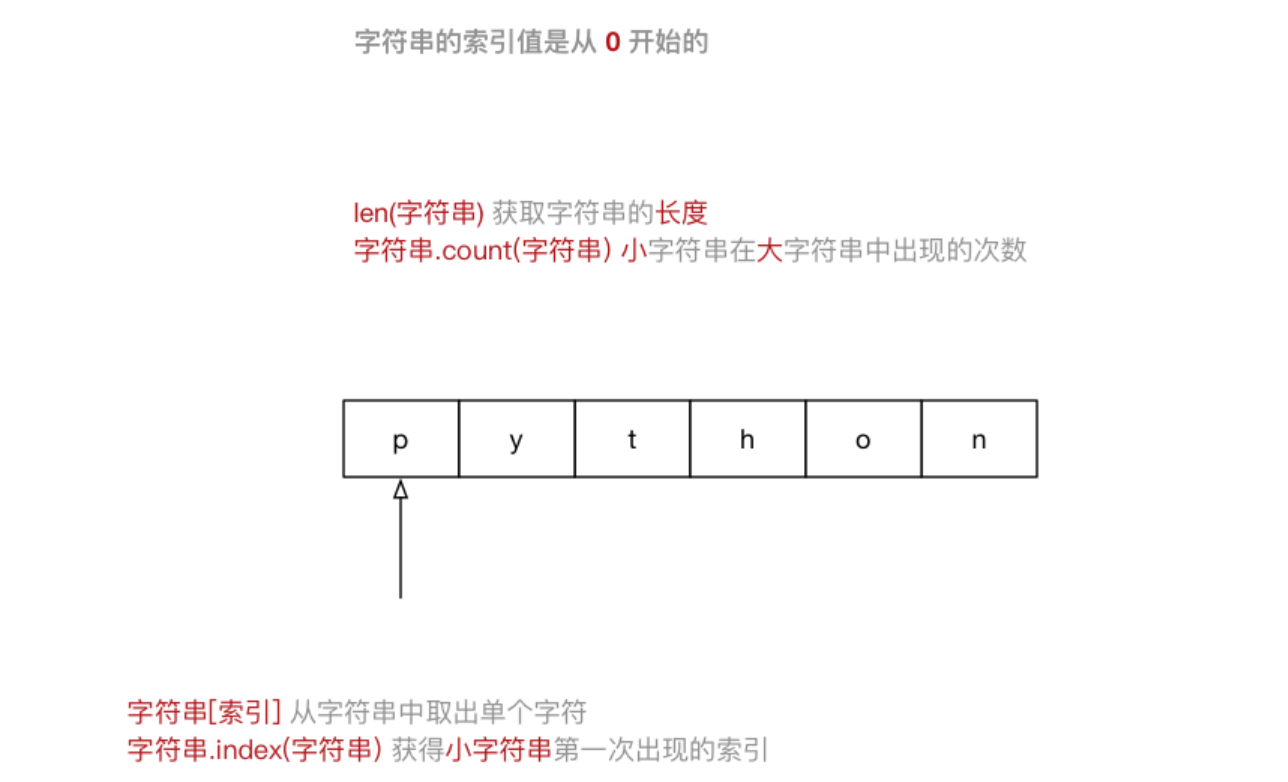
- 可以使用索引获取一个字符串中指定位置的字符,索引计数从0开始
- 也可以使用for循环遍历字符串中每一个字符

大多数编程语言都是用”来定义字符串
string = "Hello Python"for c in string:print(c)
4.2 字符串的常用操作
- 在 ipython3 中定义一个 字符串,例如:hello_str = “”
输入 hello_str. 按下 TAB 键,ipython 会提示 字符串 能够使用的 方法 如下:
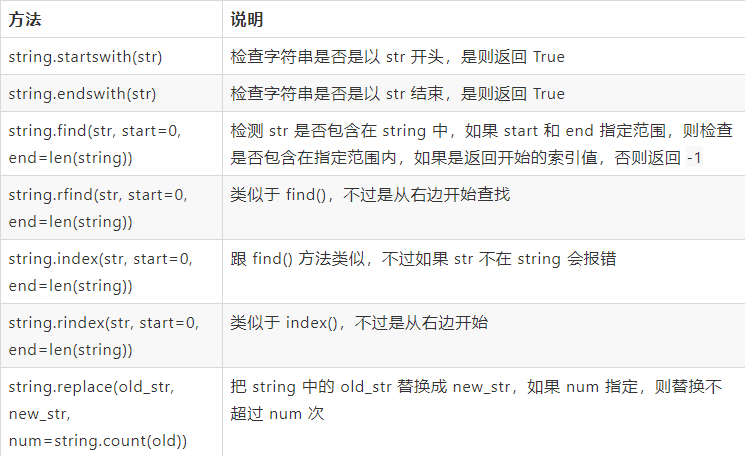
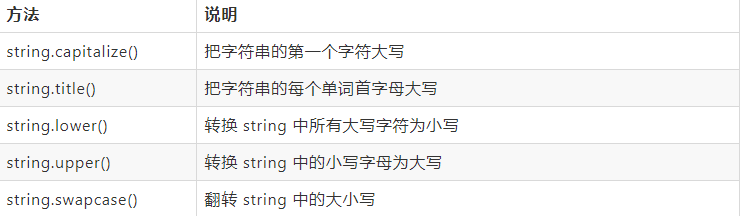
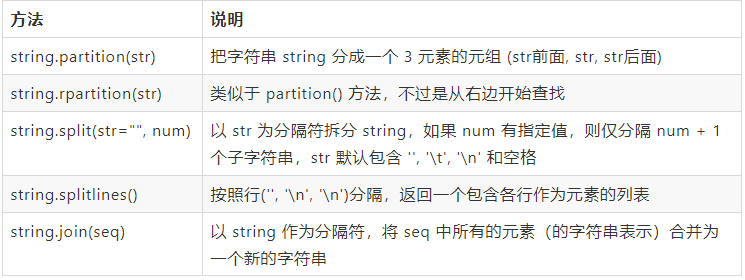
In [1]: hello_str.hello_str.capitalize hello_str.isidentifier hello_str.rindexhello_str.casefold hello_str.islower hello_str.rjusthello_str.center hello_str.isnumeric hello_str.rpartitionhello_str.count hello_str.isprintable hello_str.rsplithello_str.encode hello_str.isspace hello_str.rstriphello_str.endswith hello_str.istitle hello_str.splithello_str.expandtabs hello_str.isupper hello_str.splitlineshello_str.find hello_str.join hello_str.startswithhello_str.format hello_str.ljust hello_str.striphello_str.format_map hello_str.lower hello_str.swapcasehello_str.index hello_str.lstrip hello_str.titlehello_str.isalnum hello_str.maketrans hello_str.translatehello_str.isalpha hello_str.partition hello_str.upperhello_str.isdecimal hello_str.replace hello_str.zfillhello_str.isdigit hello_str.rfind
提示:正是因为 python 内置提供的方法足够多,才使得在开发时,能够针对字符串进行更加灵活的操作!应对更多的开发需求!
1) 判断类型 - 9
2) 查找和替换 - 7
3) 大小写转换 - 5
4) 文本对齐 - 3
5) 去除空白字符 - 3
6) 拆分和连接 - 5
4.3 字符串的切片
切片方法适用于字符串、列表、元组
- 切片 使用 索引值 来限定范围,从一个大的 字符串 中 切出 小的 字符串
- 列表 和 元组 都是 有序 的集合,都能够 通过索引值 获取到对应的数据
- 字典 是一个 无序 的集合,是使用 键值对 保存数据

- 字符串[开始索引:结束索引:步长]



注意:
- 指定的区间属于左闭右开型[开始索引, 结束索引)=>开始索引 >= 范围 < 结束索引
- 从 起始 位开始,到 结束位的前一位 结束(不包含结束位本身)
- 从头开始,开始索引数字可以省略,冒号不能省略
- 到末尾结束,结束索引数字可以省略,冒号不能省略
- 步长默认为1,如果连续切片,数字和冒号都可以省略
索引的顺序和倒序
- 在 Python 中不仅支持顺序索引,同时还支持倒序索引
- 所谓倒序索引就是从右向左计算索引
- 最右边的索引值是 -1,依次递减
演练需求
- 截取从 2 ~ 5 位置 的字符串
- 截取从 2 ~ 末尾 的字符串
- 截取从 开始 ~ 5 位置 的字符串
- 截取完整的字符串
- 从开始位置,每隔一个字符截取字符串
- 从索引 1 开始,每隔一个取一个
- 截取从 2 ~ 末尾 - 1 的字符串
- 截取字符串末尾两个字符
- 字符串的逆序(面试题) ```python num_str = “0123456789”
1. 截取从 2 ~ 5 位置 的字符串
print(num_str[2:6])
2. 截取从 2 ~ 末尾 的字符串
print(num_str[2:])
3. 截取从 开始 ~ 5 位置 的字符串
print(num_str[:6])
4. 截取完整的字符串
print(num_str[:])
5. 从开始位置,每隔一个字符截取字符串
print(num_str[::2])
6. 从索引 1 开始,每隔一个取一个
print(num_str[1::2])
倒序切片
-1 表示倒数第一个字符
print(num_str[-1])
7. 截取从 2 ~ 末尾 - 1 的字符串
print(num_str[2:-1])
8. 截取字符串末尾两个字符
print(num_str[-2:])
9. 字符串的逆序(面试题)
print(num_str[::-1])
```

若有收获,就点个赞吧
0 人点赞


