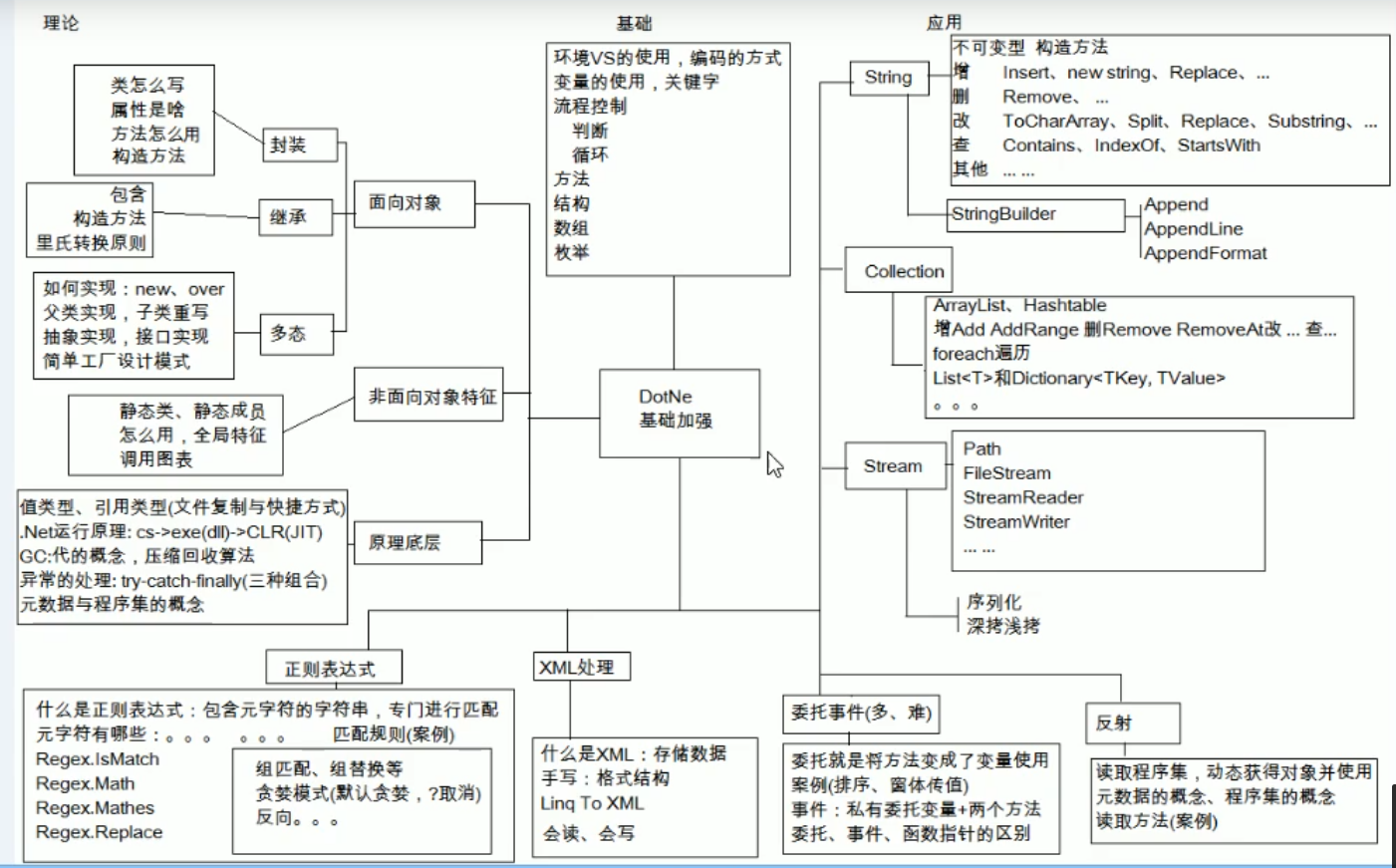
一、String
- 构造方法
new string (char[])
new string (char,int)
// new string (char* ch) C#也可使用指针,一般不用
- 常用属性
—-> 常用方法
—->增:
构造方法
string Insert(int startindex,string value);
string string.Join(string splitStr,IEmunlerable
string Replace(string,string);//“123”.Replace(“2”,”2222”);
运算符 +
string string.Concat(string[]);//string.Join(“”,list)
string PadLeft(int,char); //在字符串的左边填充一定的空格或字符,直到字符长度为int所表示的长度
string PadRight(int,char);
—->删:
string Remove(int startIndex,int count); //“012345”.Remove(3,2); =>”0125”
string Substring(int startIndex,int count); //“012345”.Substring(3,2); =>”45”
string Trim(params char[]);
string TrimStart();
string TrimEnd();
—->改:
首先ToCharArray(),在Join或Concat或构造函数进行拼接
string ToUpper();
string ToLower();
—->查:
bool Contains(string);
int IndexOf(char,int);
int LastIndexOf(char,int); //获得文件名:”C:\123\456\789.mp3”;
int IndexOfAny(char[],int);//找出字符串中所有的a和e
int LastIndexOfAny(char[],int);
bool StartsWith(string);
bool EndsWith(string);
—->其他:
bool string.IsNullOrEmpty(string);
string[] Split(char[],StringSplitOptions.RemoveEmptyEntries);//“I have a dream “.Split(‘ ‘)
//“I have a dream”.Split(new char[ ] { ‘ ‘ },StringSplitOptions.RemoveEmptyEntries );
bool Equals(string);
bool string.Equals(string,string);
int string.Compare(string s1,string s2);
s1>s2 1
s1=s2 0
s1<s2 -1
string string.Format(string, object[ ]); —->返回字符串(类似Console.WriteLine的占位符输出文本)
—-> StringBuilder
->字符串具有不可变性,长期拼接字符串性能较低
Stopwatch ->用于准确测量运行时间
Start();开始计时
Stop();停止计时
属性->Elapsed 统计用时时间
Stringbuilder方法:
Append(string); —->相当于+=,适用于简单拼接
AppendLine(string); —->换行拼接,适用于HTML拼接
AppendFormat(”{0}{1}{2}{3}”,1,”23”,”ab”,true); —->具有格式的拼接
Tostring();
字符比较规则:
—> “A”,”a”,”b” => “b”>”A”>”a”
自定义方法MyCompare
比较规则由文化决定
一般中文规则与英文规则一致,使用英文序(汉字比较实际上是Unicode编码)
Console.WriteLine(string.Compare("a","A")); -1Console.WriteLine(string.Compare("ab","ac")); -1Console.WriteLine(string.Compare("Ab","ac")); -1
面向对象编程经典观点:面向鸭子编程
面向对象程序编程就是面向抽象父类进行编程,具体的实现不用考虑,由子类决定
二、集合
实际开发中,一般方法或API等使用的是数组作为规范,但是实际的使用都是使用集合
—-> List
——>List
->增 Add() AddRange()
->删 Remove(T) RemoveAt(int)
->改 可以像数组一样修改 //list[9]=”123”
->查 bool Contains(T) IndexOf( )
->遍历 for
foreach(类型 临时变量 in 集合)
{
使用临时变量进行处理
}
-> 模拟队列:先进先出
list.Add( ) 进入
list[i]
list.RemoveAt(0)
-> 模拟栈:先进后出(被子与奥利奥)
list.Add( ) 进入
list[list.Count-1]
list.RemoveAt(list.Count-1)
—-> Dictionary
——>Dictionary
->键值对
->为什么要使用这个集合:为了快速查找
->常用方法
->增 Add(键,值)
->删 RemoveKey()
->改 索引 dic[“dictionary”]=”词典”
->查 索引
ContainsKey
-> 遍历(不常用)
foreach(KeyValuePair
{
}<br />//键值对集合,没有顺序
三、文件
https://blog.csdn.net/Lcl_huolitianji/article/details/121489545
文件是什么?
->一堆字节块
->windows环境下文本文件基本格式
->字符集的历史:acsii —> 双子节 —>unicode(utf-16) —>utf-8
->ANSI
->unicode (ff fe) 高位在前,低位在后
->unicode big endian (fe ff) 低位在前,高位在后
->utf-8 (ef bb bf)
如何操作?
->用什么类能做什么事
-> System.IO //input output
—-> File 静态类
AppendAllText
AppendAllLines
ReadAllText
ReadAllLines
WriteAllText
WriteAllLines
—-> Directory 静态类
string[ ] GetFiles(string) //返回指定路径下的所有文件
string[ ] GetDirectories(string) //返回该路径下所有的子文件夹
bool Exist()
—-> Path 处理路径
获得后缀名 GetExtension( )
获得文件名 GetFileName( )
获得没有后缀名的文件名 GetDileNameWithoutExtension( )
获得全路径 GetFullName( )
-> FileInfo DirectoryInfo DriverInfo
—-> 文件流
—-> FileStream
-> FileStream 文件流 将文件以字节的方式进行读写
-> 构造方法:new FileStream(文件路径,FileMode,FileAccess);
FileMode: Create、Apped、Open
-> 读写方法:
->int Readbyte( ); void WriteByte(byte);
-> int Read(byte[] buffer,int offset,int count);
void Write(byte[] buffer,int offset,int count)
->了解
->void Flush( ); //清空缓存,写入硬盘
-> void Dispose( ); //清空非托管资源
-> Position属性 // 文件处理,指针与文本文件书写一样是有位置的
—-> StreanReader与StreanWriter
->StreamReader与StreamWriter 专门针对文本文件的读写操作
-> 读流:
new StreamReader(”文件路径”,Encoding);
->写流:
new StreamWriter(”文件路径”,bool isAppend,Encoding);
-> 读的方法
string ReadLine( ); //读取文件中的一行
string ReadToEnd( ); //读取所有内容
-> 写的方法
void Write(…); //写入内容
void WriteLine(…); //写入一行文本
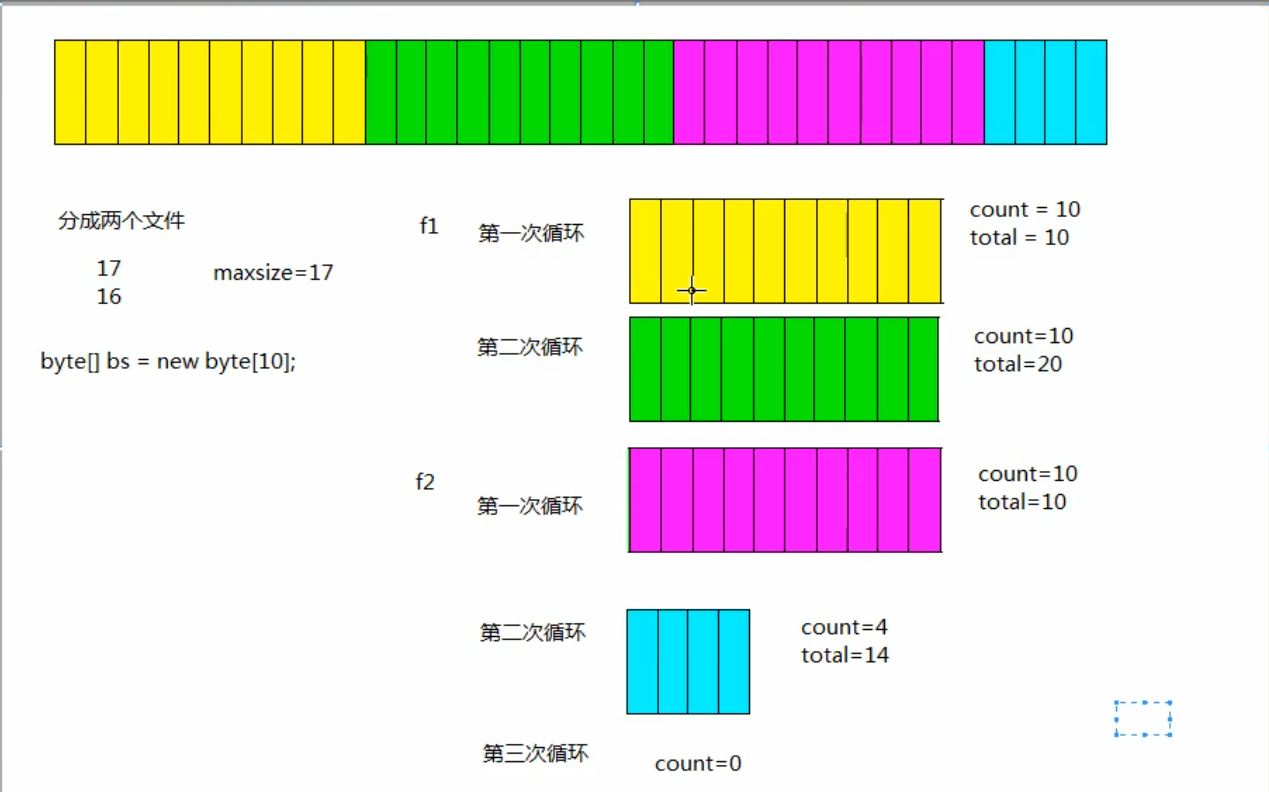
using System;
using System.IO;

namespace 分割文件
{
    class Program
    {
        static void Main(string[] args)
        {
            //提示用户输入文件名
            //保存名,一般使用文件名加一个后缀,后缀注意有序号
            //计算每一个文件要读多少个字节         Math.Ceiling( ) 天花板函数
            //利用循环或分步骤写文件名
            Console.WriteLine("请输入文件名:");
            string fileName = Console.ReadLine();

            using (FileStream fsReader = new FileStream(fileName,FileMode.Open,FileAccess.Read))
            {
                int maxsize = (int)Math.Ceiling(fsReader.Length * 1.0 / 2);
                using (FileStream fsWriter = new FileStream(fileName+".1",FileMode.Create,FileAccess.Write))
                {
                    byte[] buffer = new byte[10];
                    int total = 0;
                    int count = 0;
                    while((count=fsReader.Read(buffer,0,buffer.Length))>0)
                    {
                        fsWriter.Write(buffer, 0, count);
                        total += count;
                        if (total>=maxsize)
                        {
                            break;
                        }
                    }
                }

                using (FileStream fsWriter = new FileStream(fileName + ".2", FileMode.Create, FileAccess.Write))
                {
                    byte[] buffer = new byte[10];
                    int total = 0;
                    int count = 0;
                    while ((count = fsReader.Read(buffer, 0, buffer.Length)) > 0)
                    {
                        fsWriter.Write(buffer, 0, count);
                        total += count;
                        if (total >= maxsize)
                        {
                            break;
                        }
                    }
                }
            }
        }
    }
}
—-> 序列化
-> 序列化就是格式化,是指将一个对象以某种格式进行呈现(将对象保存在指定的硬盘或文件中,一边下次使用)
->二进制序列化
->在需要序列化的类前标记[Serializable]
->创建序列化的对象 BinaryFormatter
->创建流
->调用Serialize方法
->XML序列化
XmlSerializer
->JavaScript序列化(JSON格式的数据)
JavaScriptSeralizer
四、疑问
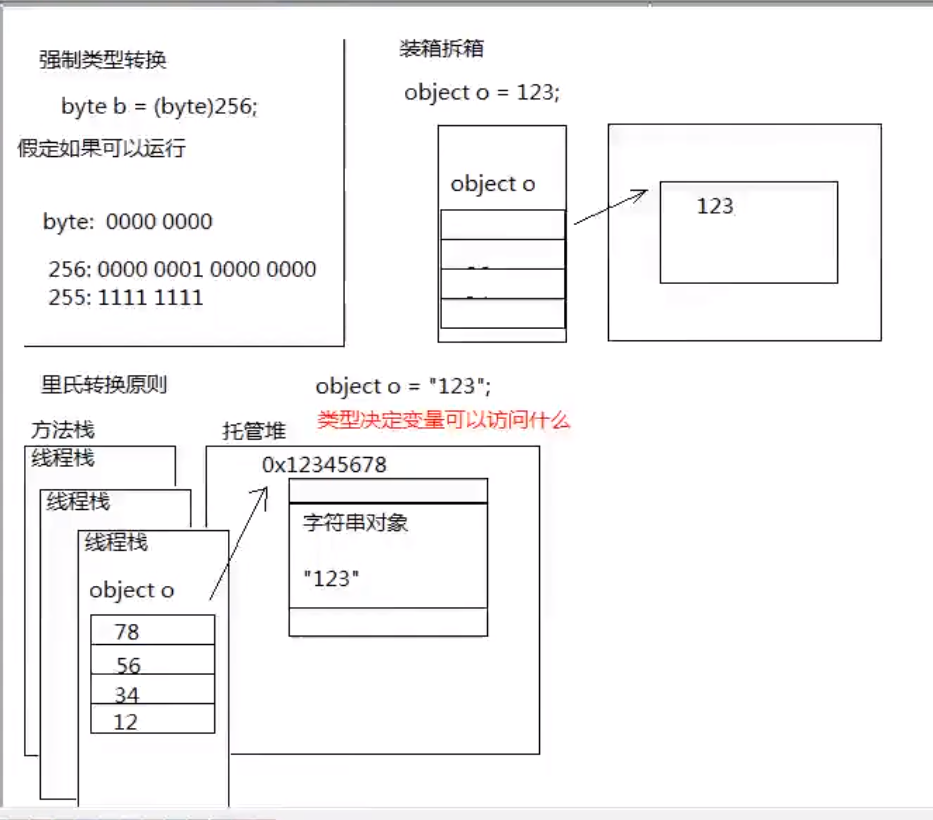
—-> 强制类型转换
int num=10;
double dNum=num; double类型所占内存比int大
int num1 = (int)dNum; //确保数据的万无一失
// 使用截断的办法
// 简单的内存操作
—->里氏转换原则
父类变量存子类对象,父类强制转换为对应的子类
myBase = new MySub( );// 对象存储在一个堆内存中,变量myBase在栈里
// 引用类型的变量在32位机器中只占4个字节
—-> 拆装箱
装箱:将值类型赋值给引用类型
拆箱:将存储值类型的引用类型强制转换为对应的值类型
object o= 123; //123在栈里,o指向堆中
—-> 静态构造函数
class MyClass
{
static int num =10 ; //语法糖
}
class MyClass
{
static int num;
static MyClass()
{
num=10;
}
}
—->HashSet
->唯一的集合
—->Dictionary效率非常高
-> List慢的原因:一个一个的遍历
-> Hash算法(哈希算法):
要求一个函数,可以将数字变成一个指定范围的数字

若有收获,就点个赞吧
0 人点赞


