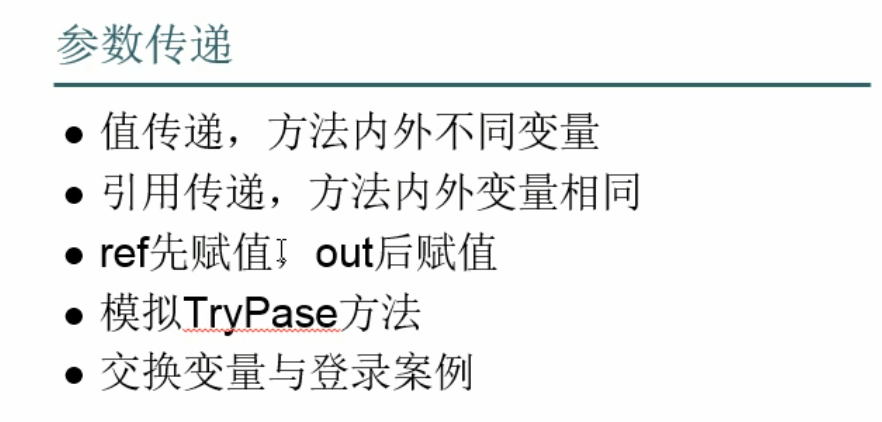
—->out
在方法外拿到方法内部的值
一、XML
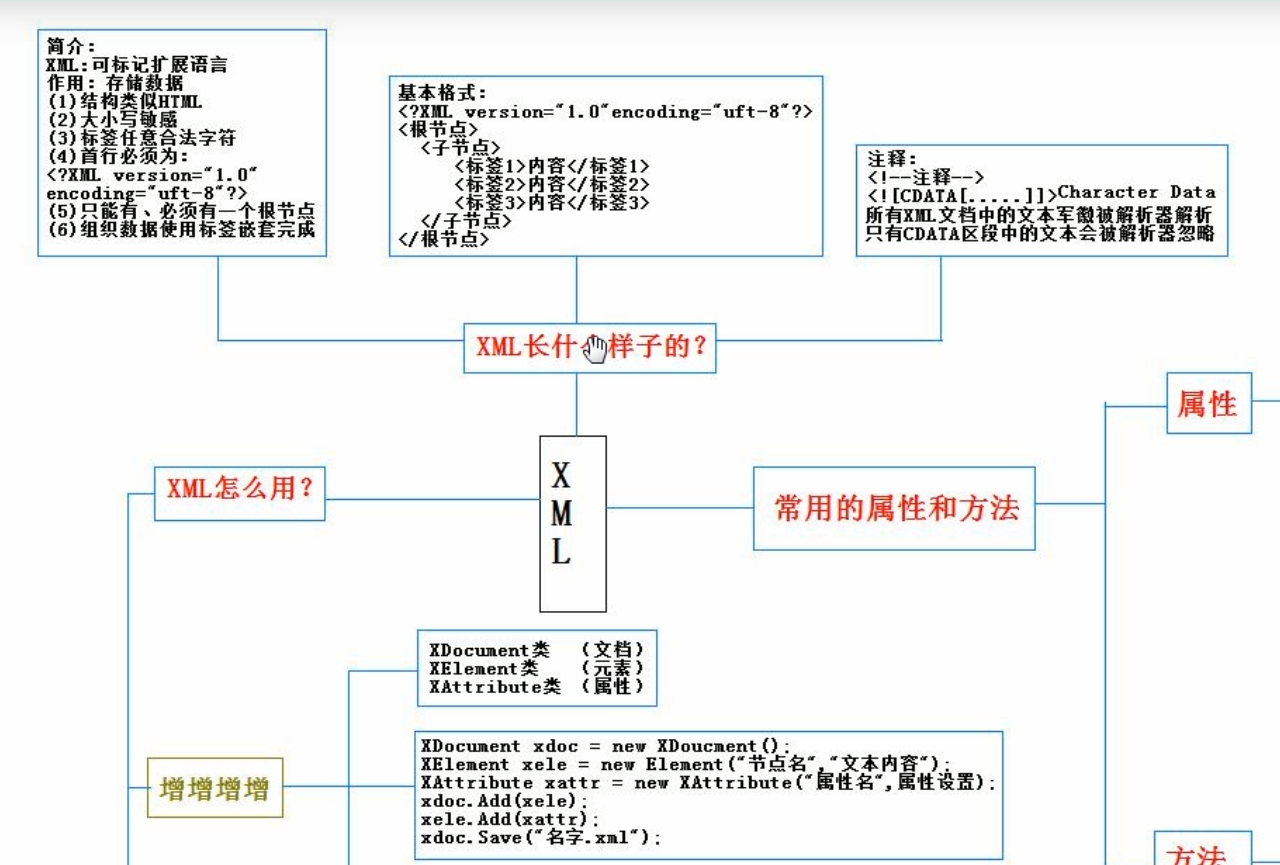
—-> XML简介
—-> XML(X Exrensible Markup Language)可扩展标记语言
-> 用来存储数据使用
->简单的数据列表
->数据交互必须让所有的人了解数据的内容结构(结构化)
->借鉴HTML的存储结构
<标签名>数据</标签名>
<标签名 属性=”值” />
->XML 的基本结构
->首先是一个文本文件
->有一个文档描述
<?xml version=”1.0” encoding=”utf-8”>
->每一个文档必须有,而且只能有一个根节点
在XML中大小写敏感
标签名可以使用任意的合法标识符
标签中可以有属性,属性使用键值对表示,属性的值一定要使用英文的双括号括起来,多个属性使 用空格分列
标签一般成对存在,例如等,但是如果标签中没有子数据,可以写成封闭的
->XML组织数据都是使用标签嵌套完成的,一般数据本身存储在最后一个标签
List
—————————————————————-
—->XML发展
HTML -> XHTML
XAML
—-> 使用C#操作XML
->基本技术
->DOM(Document object model,文档对象模型)
将文档看成是文档对象,里面的所有东西都是节点对象
->传统类库:XmlDocument系
->Linq to XML:XDocument系
-> 序列化技术
XmlSerializable
-> 事件驱动
XmlTextReader
XmlTextWriter
->使用
—->疑问
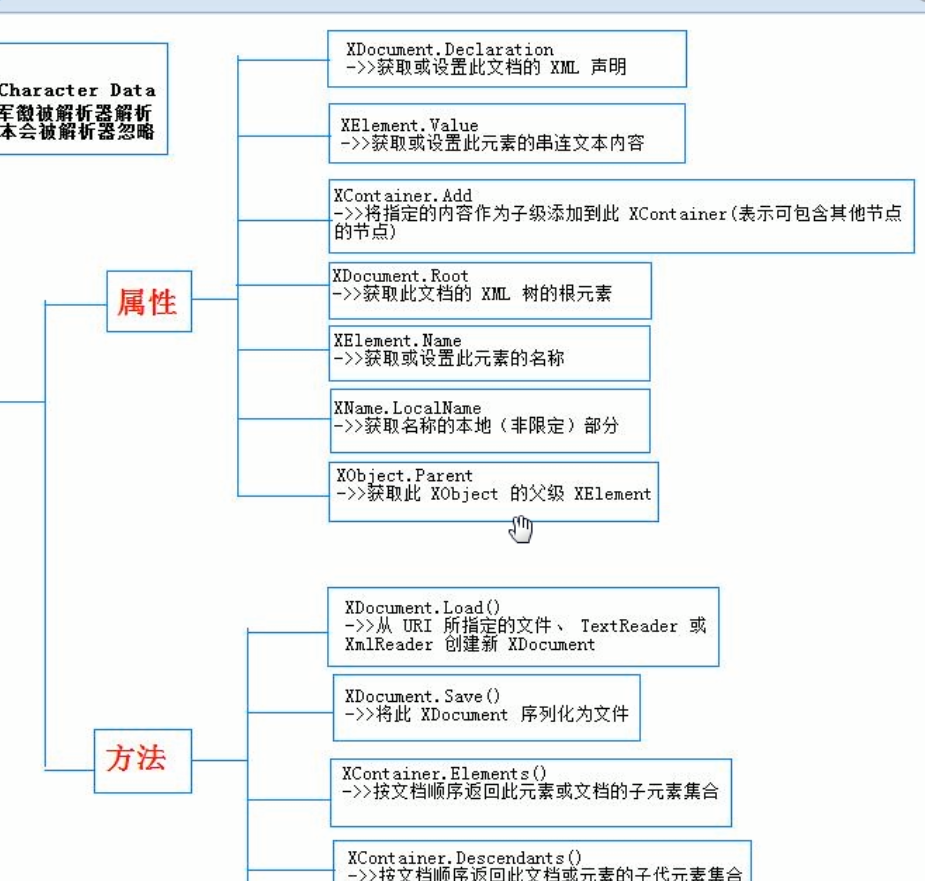
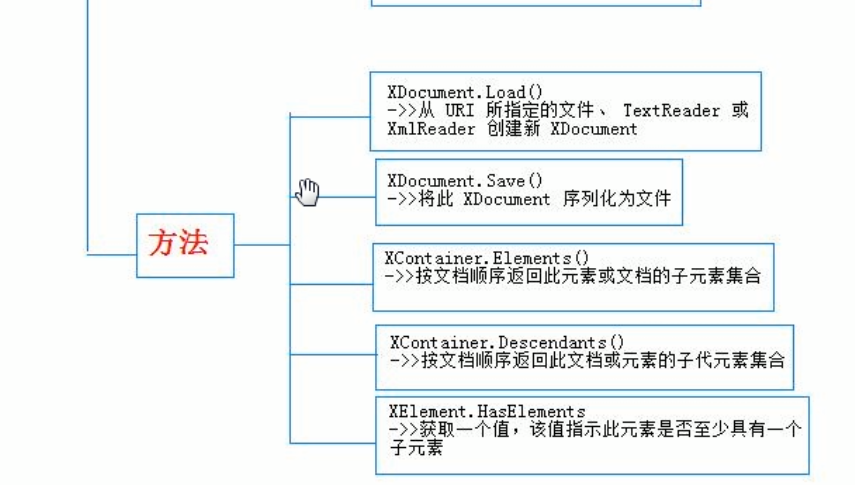
->Elements与Denscendants的区别
Elements返回的是最深层节点(子代)
Denscendants返回的是所有的节点,虽然节点存在父子关系,但在返回的数组中是无差别的(后代)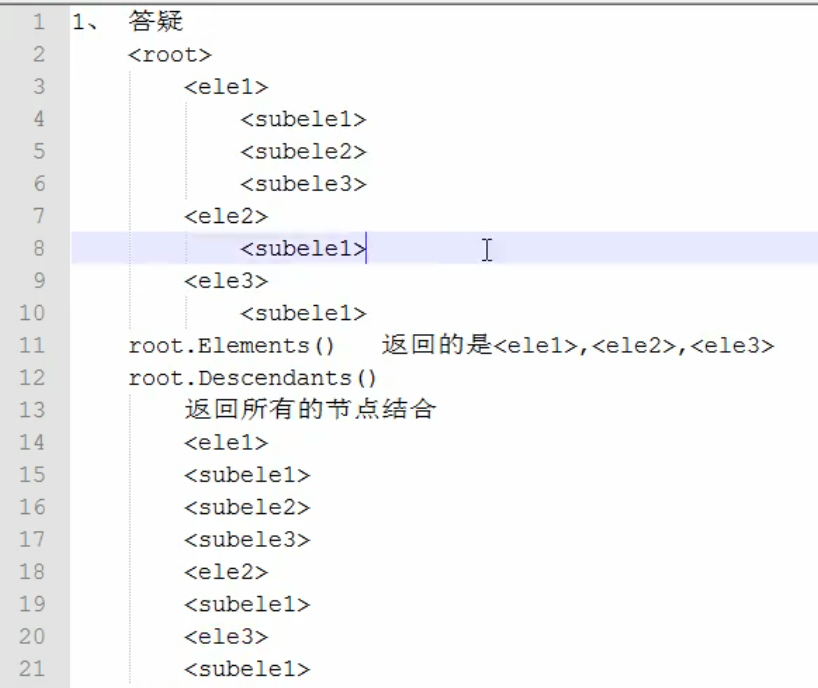
返回的是:
IEnumerable
不考虑遍历的情况下,为了方便理解,解释为XElement[ ]
->Name 与LocalName的区别
Name:包含名字与命名空间:XName
LocalName:string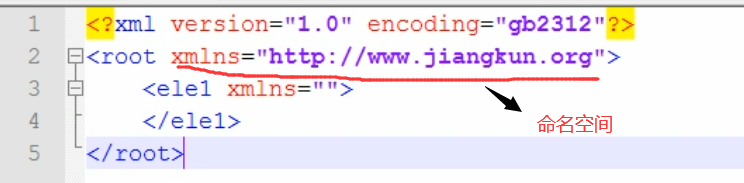

using System;using System.Collections.Generic;using System.Linq;using System.Xml.Linq;namespace LinqTOXMl{class Program{static void Main(string[] args){//命名空间 System.XML.Linq//XDocument//XElement//XAttribute//兼容做法#region linq创建xml//XDocument xdoc = new XDocument();////XElement xRoot = new XElement("root", "这是一个文本内容");//XElement xRoot = new XElement("root");//xRoot.Value = "这是一个文本内容";//XAttribute xAttr = new XAttribute("Id", "12345");//xdoc.Add(xRoot);//xRoot.Add(xAttr);//xdoc.Save("2.xml");#endregion#region 示例//XDocument xdoc = new XDocument();//XElement xRoot = new XElement("root");//xdoc.Add(xRoot);//XElement xPer1 = new XElement("person");//XAttribute xAttr1 = new XAttribute("id", "1");//XAttribute xAttr2 = new XAttribute("测试属性", "测试数据");////xPer.Add(xAttr1, xAttr2);//XElement name1 = new XElement("name", "赵晓虎");//XElement sex1 = new XElement("sex", "男");//XElement age1 = new XElement("age", "44");//xPer1.Add(name1, sex1, age1,xAttr1,xAttr2);//xRoot.Add(xPer1);//XElement xPer2 = new XElement("person");//XAttribute xAttr3 = new XAttribute("id", "2");//XAttribute xAttr4 = new XAttribute("测试属性", "测试数据");////xPer.Add(xAttr1, xAttr2);//XElement name2 = new XElement("name", "牛亮亮");//XElement sex2 = new XElement("sex", "男");//XElement age2 = new XElement("age", "25");//xPer2.Add(name2, sex2, age2, xAttr3, xAttr4);//xRoot.Add(xPer2);//XElement xPer3 = new XElement("person");//XAttribute xAttr5 = new XAttribute("id", "3");//XAttribute xAttr6 = new XAttribute("测试属性", "测试数据");////xPer.Add(xAttr1, xAttr2);//XElement name3 = new XElement("name", "杨洪波");//XElement sex3 = new XElement("sex", "男");//XElement age3 = new XElement("age", "35");//xPer3.Add(name3, sex3, age3, xAttr5, xAttr6);//xRoot.Add(xPer3);//XElement xPer4 = new XElement("person");//XAttribute xAttr7 = new XAttribute("id", "4");//XAttribute xAttr8 = new XAttribute("测试属性", "测试数据");////xPer.Add(xAttr1, xAttr2);//XElement name4 = new XElement("name", "赵剑宇");//XElement sex4 = new XElement("sex", "男");//XElement age4 = new XElement("age", "59");//xPer4.Add(name4, sex4, age4, xAttr7, xAttr8);//xRoot.Add(xPer4);//XElement xPer5 = new XElement("person");//XAttribute xAttr9 = new XAttribute("id", "5");//XAttribute xAttr10 = new XAttribute("测试属性", "测试数据");////xPer.Add(xAttr1, xAttr2);//XElement name5 = new XElement("name", "马伦");//XElement sex5 = new XElement("sex", "男");//XElement age5 = new XElement("age", "60");//xPer5.Add(name5, sex5, age5, xAttr9, xAttr10);//xRoot.Add(xPer5);//xdoc.Save("3.xml");#endregion#region 普通查找//XDocument xdoc = XDocument.Load("3.xml");//List<XElement> list = new List<XElement>();//SearchElementsZhao(xdoc.Root, list);#endregionXDocument xdoc = XDocument.Load("3.xml");//一个是linq查询语法(与sql语句类似),另一个是linq方法语法(lamda表达式完成查找)//linq查询语法//var query = from s in xdoc.Descendants()// where s.Name.LocalName == "name" && s.Value == "赵晓虎"// select s.Parent;//foreach (XElement xele in query)//{//}//linq方法语法foreach(XElement i in xdoc.Descendants().Where(e =>{if (e.Name.LocalName=="name"){if (e.Value=="赵晓虎"){return true;}}return false;})){XElement obj = i.Parent;}}public static void SearchElementsZhao(XElement xele, List<XElement> list){//首先遍历ele的所有子节点foreach (XElement item in xele.Elements()){//判断这个元素的名字是否为name,如果为name看里面是否"赵晓虎"if (item.Name.LocalName == "name"){if (item.Value=="赵晓虎"){list.Add(item.Parent);}}//如果item里面还有子节点就递归SearchElementsZhao(item, list);}}}}
二、正则表达式(Regex,RegExp,Regular Expression)
—->核心功能:匹配
常用功能:匹配、提取、替换
—->什么是正则表达式:一个用于匹配、提取、替换用的包含元字符的字符串
—->元字符
—->基本元字符:
. 通配符,匹配除 \n 外的任意一个字符
[ ] 集合匹配,表示匹配一个出现在[ ]中的一个字符
[^ ] 匹配除字符数组外的任何一个字符
| 或:a|b, 敏感词:病毒|大麻|海洛因|枪械|…
( ) 提高优先级,实现分组。 a(bc)
—-> 限定元字符:
- 紧跟在 + 前面的字符出现任意次,但是至少出现1次(1次或多次)
紧跟在 前面的而字符出现任意次(0次或多次)
linux.入门经典.pdf
? 紧跟在 ?前面的字符出现或不出现(0次或1次)
https?://……
{n} 手机号写法: [0123456789] {11} 身份份写法:[0-9]{17}[X0-9] | {15}
{n,} 出现至少n次 +相当于{1,} 相当于{0,}
{n,m} 出现n到m次—-> 首位元字符
^ 判断是否以某某字符开头:^[0-9]
在集合匹配中表示否定:^[^0-9]
$ 必须使用某某字符结尾:Linux.+pdf$
在分组中表示引用的分组
一般使用在验证中需要一起使用首尾元字符
^[0-9]+$
^([0-9]{17}[xX0-9]|[0-9]{15})$
^(a|b)$ aaaaaa或bbbbbbb a或b
a 包含a这个字符
^a$ 必须是字符串a
—-> 简写元字符
\w 匹配任意一个单词(word)字符,通常指A-Z、a-z和0-9
\W 匹配任意一个非单词字符,指除A-Z、a-z和0-9之外的字符
\s 匹配任意一个空白字符
\S 匹配任意一个非空白字符
\d 匹配任意一个数字字符
\D 匹配任意一个非数字字符
—-> 定位类元字符
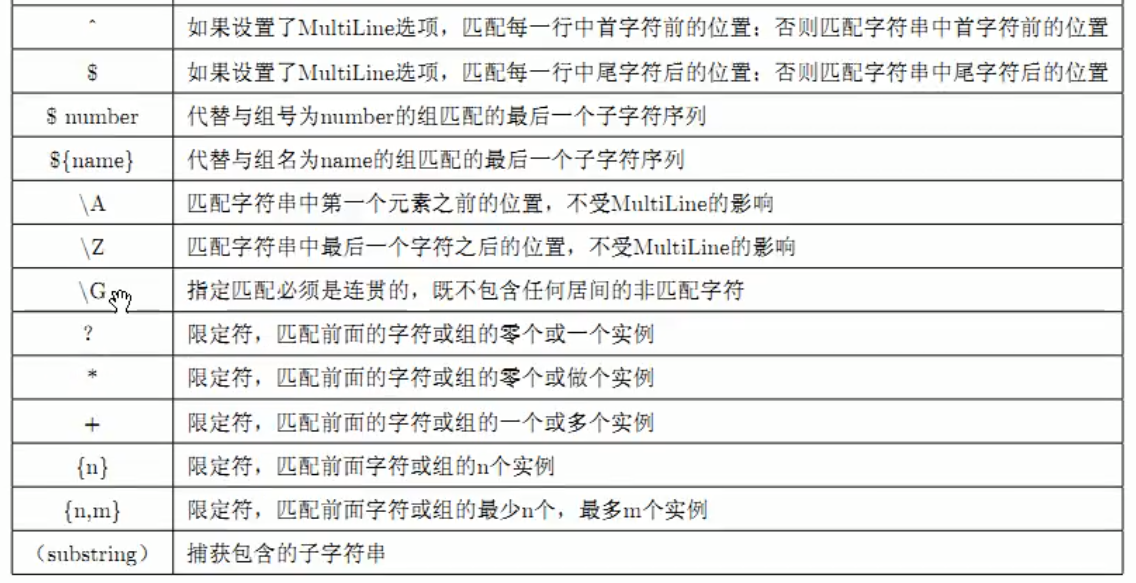
^ 默认情况下,匹配字符串的开始位置;在多行模式下,匹配每行的开始位置
$ 默认情况下,匹配字符串的结束位置,或字符串结尾的 \n 之前的位置;在多行模式下,匹配每行结束之前的位置,或每行结尾的 \n 之前的位置
\A 匹配字符串的开始位置
\Z 匹配字符串的结束位置,或字符串结尾的\n前的位置
\z 匹配字符串的结束位置
\G 匹配上一个匹配结束的位置
\b 匹配一个单词的开始或结束的位置
\B 匹配一个单词的中间位置

不常用元字符: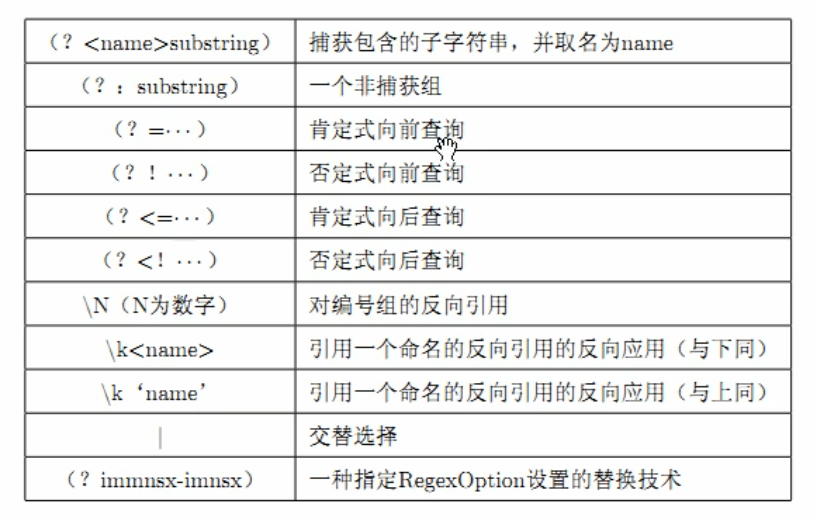
—->正则会造成性能问题
—-> 正则表达式使用
—-> 写正则:
首先明确要做什么?
找规律,看看哪些是必须有的,哪些是不动的
利用 . 、+、( )、等进行写正则
然后在验证、在修改
—-> 使用C#操作正则表达式
->bool IsMatch(string , string);
->Match Match(string , string);
->MatchCollection Matches(string , string);
—->分组操作
-> 如果在提取的过程中希望得到匹配项,同时需要匹配项中的某一个部分的时候
->使用分组可以方便的实现这个功能
只需要用圆括号将需要的部分括起来即可
-> 组编号的问题
Match对象有一个属性,Groups,存储着正则表达式匹配到的组
第0组就是字符串本身
m.Value
m.Group[0].Value
->一般分组步骤
->根据需要加圆括号进行分组,但是注意圆括号必须成对
->从左边往右边数 “(“ ,并从1开始
->当匹配完成后使用Group[组号]即可访问所需要内容
—->贪婪模式(高级)
string str =”1234567890”;
string regex = @”(\d+)(\d+)(\d+)”; 12345678 9 0
正则表达式默认匹配尽可能多
一般在写正则的时候,不需要去考虑贪婪的问题,直接写即可。如果出现了匹配结果比预取的多了,一般是贪婪造成的,再去考虑取消贪婪的问题
—-> 匹配一个整数
整数包含0的正整数与负整数
0 +-1 +-2 … +-n …
不允许0123
要么0 要么就是一个非0开头的数字
^(0|-?[1-9]\d*)$
^与$配合使用表示绝对匹配
—->实现Path功能 (斜线/ 反斜线)
C:\123\456\789.txt
C:\123.txt
(([a-zA-Z]:).*\)((.+)(..+))
using System;
using System.Text.RegularExpressions;

namespace 文件名
{
    class Program
    {
        static void Main(string[] args)
        {
                        //   12               34   5
            string regex = @"(([a-zA-Z]:).*\\)((.+)(\..+))";

            while (true)
            {
                Console.WriteLine("请输入文件路径:");
                string filePath = Console.ReadLine();

                Match m = Regex.Match(filePath, regex);

                Console.WriteLine("根目录为:{0}", m.Groups[2].Value);
                Console.WriteLine("文件路径为:{0}", m.Groups[1].Value);
                Console.WriteLine("文件名为:{0}", m.Groups[3].Value);
                Console.WriteLine("文件扩展名为:{0}", m.Groups[5].Value);
                Console.WriteLine("不带扩展名的文件名为:{0}", m.Groups[4].Value);
            }
        }
    }
}
—-> 替换
string.Replace(原始字符串 ,正则,替换的字符串 )
引用匹配空间
用$加上数字表示正则表达式对应的匹配空间
using System;
using System.IO;
using System.Text.RegularExpressions;

namespace 替换
{
    class Program
    {
        static void Main(string[] args)
        {
            //string str = "12ds--1321------------------313---31----312--2";

            //string s = Regex.Replace(str, "-+", "-");
            //Console.WriteLine(s);


            //引用匹配数据
            string str = "如果你想查阅资料,请点击http://baidu.com或者http://goole.com";
            //<a href= "..."> </a>
            string s = Regex.Replace(str, @"http.+?\.com", "<a href=\"$0\">$0</a>");
            File.WriteAllText("1.html", s);
        }
    }
}

若有收获,就点个赞吧
0 人点赞


