项目背景
ceph-deploy is no longer actively maintained. It is not tested on versions of Ceph newer than Nautilus. It does not support RHEL8, CentOS 8, or newer operating systems.
Cephadm
Cephadm is new in the Octopus v15.2.0 release and does not support older versions of Ceph
https://docs.ceph.com/docs/master/cephadm/
官方文档
https://docs.ceph.com/docs/master/
ceph version 15.2.3
https://docs.ceph.com/docs/master/install/
参考
https://www.cnblogs.com/luoliyu/articles/10808886.html
https://www.cnblogs.com/luoliyu/articles/11122125.html
192.168.11.140 node01
192.168.11.141 node02
192.168.11.142 node03
单网卡
部署系统版本
[root@node01 ~]# uname -raLinux node01 4.18.0-147.8.1.el8_1.x86_64 #1 SMP Thu Apr 9 13:49:54 UTC 2020 x86_64 x86_64 x86_64 GNU/Linux[root@node01 ~]# cat /etc/redhat-releaseCentOS Linux release 8.1.1911 (Core)[root@node01 ~]#
环境准备
1:设置主机名和hosts文件同步
2:各节点免密钥登陆设置
3:设置时间同步 timedatectl set-ntp yes
设置阿里云源
https://mirrors.aliyun.com/ceph/
https://mirrors.aliyun.com/ceph/rpm-15.2.3/
[root@node01 yum.repos.d]# cat ceph.repo
[ceph]name=cephbaseurl=https://mirrors.aliyun.com/ceph/rpm-15.2.3/el8/x86_64/gpgcheck=0priority=1[ceph-noarch]name=cephnoarchbaseurl=https://mirrors.aliyun.com/ceph/rpm-15.2.3/el8/noarch/gpgcheck=0priority=1[ceph-source]name=Ceph source packagesbaseurl=https://mirrors.aliyun.com/ceph/rpm-15.2.3/el8/SRPMS/enabled=0gpgcheck=1type=rpm-mdgpgkey=http://mirrors.aliyun.com/ceph/keys/release.ascpriority=1
追加官方源:
yum install epel-release -y
yum install centos-release-ceph-* -y
yum install ceph -y
[root@node01 ceph-node01]# cd /etc/yum.repos.d/[root@node01 yum.repos.d]# ll总用量 88-rw-r--r--. 1 root root 731 3月 13 03:15 CentOS-AppStream.repo-rw-r--r--. 1 root root 2595 12月 19 10:43 CentOS-Base.repo-rw-r--r--. 1 root root 798 3月 13 03:15 CentOS-centosplus.repo-rw-r--r-- 1 root root 956 5月 19 03:10 CentOS-Ceph-Nautilus.repo-rw-r--r-- 1 root root 945 5月 19 03:39 CentOS-Ceph-Octopus.repo-rw-r--r--. 1 root root 1043 3月 13 03:15 CentOS-CR.repo-rw-r--r--. 1 root root 668 3月 13 03:15 CentOS-Debuginfo.repo-rw-r--r--. 1 root root 743 3月 13 03:15 CentOS-Devel.repo-rw-r--r--. 1 root root 756 3月 13 03:15 CentOS-Extras.repo-rw-r--r--. 1 root root 338 3月 13 03:15 CentOS-fasttrack.repo-rw-r--r--. 1 root root 738 3月 13 03:15 CentOS-HA.repo-rw-r--r--. 1 root root 928 3月 13 03:15 CentOS-Media.repo-rw-r--r--. 1 root root 736 3月 13 03:15 CentOS-PowerTools.repo-rw-r--r--. 1 root root 1382 3月 13 03:15 CentOS-Sources.repo-rw-r--r-- 1 root root 353 3月 19 22:25 CentOS-Storage-common.repo-rw-r--r--. 1 root root 74 3月 13 03:15 CentOS-Vault.repo-rw-r--r--. 1 root root 421 6月 9 16:03 ceph.repo-rw-r--r-- 1 root root 1167 12月 19 00:08 epel-modular.repo-rw-r--r-- 1 root root 1249 12月 19 00:08 epel-playground.repo-rw-r--r-- 1 root root 1104 12月 19 00:08 epel.repo-rw-r--r-- 1 root root 1266 12月 19 00:08 epel-testing-modular.repo-rw-r--r-- 1 root root 1203 12月 19 00:08 epel-testing.repo[root@node01 yum.repos.d]#
开始部署
存储节点node01
uuidgen
sudo vim /etc/ceph/ceph.conf
[global]fsid = d8884d6b-c9ac-4a10-b727-5f4cb2fed114mon initial members = node01mon host = 192.168.11.140public network = 192.168.11.0/24auth cluster required = cephxauth service required = cephxauth client required = cephxosd journal size = 1024osd pool default size = 3osd pool default min size = 2osd pool default pg num = 333osd pool default pgp num = 333osd crush chooseleaf type = 1
ceph-authtool --create-keyring /tmp/ceph.mon.keyring --gen-key -n mon. --cap mon 'allow *'sudo ceph-authtool --create-keyring /etc/ceph/ceph.client.admin.keyring --gen-key -n client.admin --cap mon 'allow *' --cap osd 'allow *' --cap mds 'allow *' --cap mgr 'allow *'sudo ceph-authtool --create-keyring /var/lib/ceph/bootstrap-osd/ceph.keyring --gen-key -n client.bootstrap-osd --cap mon 'profile bootstrap-osd' --cap mgr 'allow r'sudo ceph-authtool /tmp/ceph.mon.keyring --import-keyring /etc/ceph/ceph.client.admin.keyringsudo ceph-authtool /tmp/ceph.mon.keyring --import-keyring /var/lib/ceph/bootstrap-osd/ceph.keyringsudo chown ceph:ceph /tmp/ceph.mon.keyringmonmaptool --create --add node01 192.168.11.140 --fsid d8884d6b-c9ac-4a10-b727-5f4cb2fed114 /tmp/monmapsudo -u ceph mkdir -p /var/lib/ceph/mon/ceph-node01sudo -u ceph ceph-mon --mkfs -i node01 --monmap /tmp/monmap --keyring /tmp/ceph.mon.keyring
sudo systemctl start ceph-mon@node01
sudo systemctl enable ceph-mon@node01
systemctl status ceph-mon@node01.service
sudo ceph -s
cd /etc/ceph
增加存储节点
存储节点node02 node03
同步密钥文件**
scp ceph.conf node02:/etc/ceph
scp ceph.client.admin.keyring node02:/etc/ceph
scp /var/lib/ceph/bootstrap-osd/ceph.keyring node02:/var/lib/ceph/bootstrap-osd
scp ceph.conf node03:/etc/ceph
scp ceph.client.admin.keyring node03:/etc/ceph
scp /var/lib/ceph/bootstrap-osd/ceph.keyring node03:/var/lib/ceph/bootstrap-osd
部署官方源
yum install epel-release -y
yum install centos-release-ceph-* -y
yum install ceph -y
sudo -u ceph mkdir -p /var/lib/ceph/mon/ceph-node02ceph auth get mon. -o /tmp/ceph.mon.keyringceph mon getmap -o /tmp/monmapceph-mon --mkfs -i node02 --monmap /tmp/monmap --keyring /tmp/ceph.mon.keyringtouch /var/lib/ceph/mon/ceph-node02/done
vim /etc/ceph/ceph.conf
[global]fsid = d8884d6b-c9ac-4a10-b727-5f4cb2fed114mon initial members = node01mon host = 192.168.11.140public network = 192.168.11.0/24auth cluster required = cephxauth service required = cephxauth client required = cephxosd journal size = 1024#设置副本数osd pool default size = 3#最小副本数osd pool default min size = 2osd pool default pg num = 333osd pool default pgp num = 333osd crush chooseleaf type = 1osd_mkfs_type = xfsmax mds = 5mds max file size = 100000000000000mds cache size = 1000000#把时钟偏移设置成0.5s,默认是0.05s,由于ceph集群中存在异构PC,导致时钟偏移总是大于0.05s,为了方便同步直接把时钟偏移设置成0.5smon clock drift allowed = .50#设置osd节点down后900s,把此osd节点逐出ceph集群,把之前映射到此节点的数据映射到其他节点。mon osd down out interval = 900[mon.node02]host = node02mon addr = 192.168.11.141:6789
chown -R ceph:ceph /var/lib/ceph
systemctl start ceph-mon@node02
systemctl enable ceph-mon@node02
systemctl status ceph-mon@node02
ceph -s
存储节点node03
sudo -u ceph mkdir -p /var/lib/ceph/mon/ceph-node03ceph auth get mon. -o /tmp/ceph.mon.keyringceph mon getmap -o /tmp/monmapceph-mon --mkfs -i node03 --monmap /tmp/monmap --keyring /tmp/ceph.mon.keyringtouch /var/lib/ceph/mon/ceph-node03/done
vim /etc/ceph/ceph.conf
[global]fsid = d8884d6b-c9ac-4a10-b727-5f4cb2fed114mon initial members = node01mon host = 192.168.11.140public network = 192.168.11.0/24auth cluster required = cephxauth service required = cephxauth client required = cephxosd journal size = 1024#设置副本数osd pool default size = 3#最小副本数osd pool default min size = 2osd pool default pg num = 333osd pool default pgp num = 333osd crush chooseleaf type = 1osd_mkfs_type = xfsmax mds = 5mds max file size = 100000000000000mds cache size = 1000000#把时钟偏移设置成0.5s,默认是0.05s,由于ceph集群中存在异构PC,导致时钟偏移总是大于0.05s,为了方便同步直接把时钟偏移设置成0.5smon clock drift allowed = .50#设置osd节点down后900s,把此osd节点逐出ceph集群,把之前映射到此节点的数据映射到其他节点。mon osd down out interval = 900[mon.node03]host = node03mon addr = 192.168.11.142:6789
chown -R ceph:ceph /var/lib/ceph
systemctl start ceph-mon@node03
systemctl enable ceph-mon@node03
systemctl status ceph-mon@node03
ceph -s
故障处理一
enable-msgr2
[root@node01 ceph]# ceph -scluster:id: d8884d6b-c9ac-4a10-b727-5f4cb2fed114health: HEALTH_WARNno active mgr1 monitors have not enabled msgr2services:mon: 3 daemons, quorum node01,node02,node03 (age 7m)mgr: no daemons activeosd: 3 osds: 3 up (since 7m), 3 in (since 7m)data:pools: 0 pools, 0 pgsobjects: 0 objects, 0 Busage: 0 B used, 0 B / 0 B availpgs:[root@node01 ceph]# ceph osd treeID CLASS WEIGHT TYPE NAME STATUS REWEIGHT PRI-AFF-1 0.05846 root default-3 0.01949 host node010 ssd 0.01949 osd.0 up 1.00000 1.00000-5 0.01949 host node021 ssd 0.01949 osd.1 up 1.00000 1.00000-7 0.01949 host node032 ssd 0.01949 osd.2 up 1.00000 1.00000[root@node01 ceph]# ceph mon versions{"ceph version 15.2.3 (d289bbdec69ed7c1f516e0a093594580a76b78d0) octopus (stable)": 3}[root@node01 ceph]#[root@node01 ~]# ceph health detailHEALTH_WARN no active mgr; 1 monitors have not enabled msgr2[WRN] MGR_DOWN: no active mgr[WRN] MON_MSGR2_NOT_ENABLED: 1 monitors have not enabled msgr2mon.node01 is not bound to a msgr2 port, only v1:192.168.11.140:6789/0[root@node01 ~]# ceph -scluster:id: d8884d6b-c9ac-4a10-b727-5f4cb2fed114health: HEALTH_WARNno active mgr1 monitors have not enabled msgr2services:mon: 3 daemons, quorum node01,node02,node03 (age 22s)mgr: no daemons activeosd: 3 osds: 3 up (since 11m), 3 in (since 101m)data:pools: 0 pools, 0 pgsobjects: 0 objects, 0 Busage: 0 B used, 0 B / 0 B availpgs:[root@node01 ~]#[root@node01 ~]# netstat -tnlp |grep ceph-montcp 0 0 192.168.11.140:6789 0.0.0.0:* LISTEN 2225/ceph-mon
处理动作
health告警,启用了msgr2后就会消失。
ceph mon enable-msgr2
然后重启服务
systemctl restart ceph-mon@node01
[root@node01 ~]# ceph mon enable-msgr2[root@node01 ~]# systemctl restart ceph-mon@node01.service[root@node01 ~]#[root@node01 ~]#[root@node01 ~]# netstat -tnlp |grep ceph-montcp 0 0 192.168.11.140:3300 0.0.0.0:* LISTEN 3800/ceph-montcp 0 0 192.168.11.140:6789 0.0.0.0:* LISTEN 3800/ceph-mon[root@node01 ~]# ceph -scluster:id: d8884d6b-c9ac-4a10-b727-5f4cb2fed114health: HEALTH_WARNno active mgrservices:mon: 3 daemons, quorum node01,node02,node03 (age 3m)mgr: no daemons activeosd: 3 osds: 3 up (since 20m), 3 in (since 110m)data:pools: 0 pools, 0 pgsobjects: 0 objects, 0 Busage: 0 B used, 0 B / 0 B availpgs:[root@node01 ~]#
增加存储节点osd
ceph-volume lvm create —data /dev/nvme0n2
[root@node01 ~]# lsblkNAME MAJ:MIN RM SIZE RO TYPE MOUNTPOINTsr0 11:0 1 1024M 0 romnvme0n1 259:0 0 50G 0 disk├─nvme0n1p1 259:1 0 1G 0 part /boot└─nvme0n1p2 259:2 0 49G 0 part├─cl-root 253:0 0 44G 0 lvm /└─cl-swap 253:1 0 5G 0 lvm [SWAP]nvme0n2 259:3 0 20G 0 disk└─ceph--0c460d1e--13f1--4715--bdc5--52039efec380-osd--block--9713a919--7c37--4e2d--8365--6b01be72b36c253:2 0 20G 0 lvm[root@node01 ~]# sudo ceph-volume lvm list====== osd.0 =======[block] /dev/ceph-0c460d1e-13f1-4715-bdc5-52039efec380/osd-block-9713a919-7c37-4e2d-8365-6b01be72b36cblock device /dev/ceph-0c460d1e-13f1-4715-bdc5-52039efec380/osd-block-9713a919-7c37-4e2d-8365-6b01be72b36cblock uuid e3oXip-JF5d-TLhX-TZNq-nLHH-aCsW-tx3HVccephx lockbox secretcluster fsid d8884d6b-c9ac-4a10-b727-5f4cb2fed114cluster name cephcrush device class Noneencrypted 0osd fsid 9713a919-7c37-4e2d-8365-6b01be72b36cosd id 0type blockvdo 0devices /dev/nvme0n2[root@node01 ~]#
systemctl start ceph-osd@0.service
systemctl status ceph-osd@0.service
systemctl enable ceph-osd@0.service
节点2
systemctl start ceph-osd@1.service
systemctl status ceph-osd@1.service
systemctl enable ceph-osd@1.service
节点3
systemctl start ceph-osd@2.service
systemctl status ceph-osd@2.service
systemctl enable ceph-osd@2.service
[root@node01 ~]# ceph osd treeID CLASS WEIGHT TYPE NAME STATUS REWEIGHT PRI-AFF-1 0.05846 root default-3 0.01949 host node010 ssd 0.01949 osd.0 up 1.00000 1.00000-5 0.01949 host node021 ssd 0.01949 osd.1 up 1.00000 1.00000-7 0.01949 host node032 ssd 0.01949 osd.2 up 1.00000 1.00000[root@node01 ~]#
mgr rbd块存储
ceph auth get-or-create mgr.node01 mon 'allow profile mgr' osd 'allow *' mds 'allow *'sudo -u ceph mkdir /var/lib/ceph/mgr/ceph-node01ceph auth get mgr.node01 -o /var/lib/ceph/mgr/ceph-node01/keyring
systemctl start ceph-mgr@node01
systemctl status ceph-mgr@node01
systemctl enable ceph-mgr@node01
[root@node01 ~]# ceph -s
cluster:id: d8884d6b-c9ac-4a10-b727-5f4cb2fed114health: HEALTH_OKservices:mon: 3 daemons, quorum node01,node02,node03 (age 68m)mgr: node01(active, since 14m)mds: cephfs:1 {0=node01=up:active}osd: 3 osds: 3 up (since 84m), 3 in (since 2h)task status:scrub status:mds.node01: idledata:pools: 4 pools, 81 pgsobjects: 35 objects, 12 MiBusage: 3.0 GiB used, 57 GiB / 60 GiB availpgs: 81 active+clean
激活节点mgr
ceph auth get-or-create mgr.node01 mon 'allow profile mgr' osd 'allow *' mds 'allow *'sudo -u ceph mkdir /var/lib/ceph/mgr/ceph-node01ceph auth get mgr.node01 -o /var/lib/ceph/mgr/ceph-node01/keyringchown -R ceph:ceph /var/lib/ceph/mgr/ceph-node01/keyringsystemctl start ceph-mgr@node01systemctl status ceph-mgr@node01systemctl enable ceph-mgr@node01ceph auth get-or-create mgr.node02 mon 'allow profile mgr' osd 'allow *' mds 'allow *'sudo -u ceph mkdir /var/lib/ceph/mgr/ceph-node02ceph auth get mgr.node02 -o /var/lib/ceph/mgr/ceph-node02/keyringchown -R ceph:ceph /var/lib/ceph/mgr/ceph-node02/keyringsystemctl restart ceph-mgr@node02systemctl status ceph-mgr@node02systemctl enable ceph-mgr@node02ceph auth get-or-create mgr.node03 mon 'allow profile mgr' osd 'allow *' mds 'allow *'sudo -u ceph mkdir -p /var/lib/ceph/mgr/ceph-node03ceph auth get mgr.node03 -o /var/lib/ceph/mgr/ceph-node03/keyringchown -R ceph:ceph /var/lib/ceph/mgr/ceph-node03/keyringsystemctl restart ceph-mgr@node03systemctl status ceph-mgr@node03systemctl enable ceph-mgr@node03
创建一个OSD pool
ceph osd pool create rbd 128
ceph osd lspools
初始化块设备
rbd pool init rbd
rbd create volume1 —size 100M
加载rbd内核模块
modprobe rbd
[root@node01 ~]# ceph osd lspools1 rbd2 cephfs_data3 cephfs_metadata4 device_health_metrics[root@node01 ~]# rbd ls -lNAME SIZE PARENT FMT PROT LOCKvolume1 100 MiB 2[root@node01 ~]#
查看块设备镜像
[root@node01 ~]# rbd info rbd/volume1rbd image 'volume1':size 100 MiB in 25 objectsorder 22 (4 MiB objects)snapshot_count: 0id: 19755e053bbd7block_name_prefix: rbd_data.19755e053bbd7format: 2features: layeringop_features:flags:create_timestamp: Wed Jun 10 00:17:44 2020access_timestamp: Wed Jun 10 00:17:44 2020modify_timestamp: Wed Jun 10 00:17:44 2020[root@node01 ~]#
rbd info显示的RBD镜像的format为2,Format 2的RBD镜像支持RBD分层,支持Copy-On-Write
将块设备映射到系统
rbd map volume1
[root@node01 ~]# rbd map volume1/dev/rbd0[root@node01 ~]# rbd ls -lNAME SIZE PARENT FMT PROT LOCKvolume1 100 MiB 2[root@node01 ~]# mount /dev/rbd0 /ceph-rbd[root@node01 ~]# df -TH文件系统 类型 容量 已用 可用 已用% 挂载点devtmpfs devtmpfs 4.1G 0 4.1G 0% /devtmpfs tmpfs 4.1G 0 4.1G 0% /dev/shmtmpfs tmpfs 4.1G 11M 4.1G 1% /runtmpfs tmpfs 4.1G 0 4.1G 0% /sys/fs/cgroup/dev/mapper/cl-root xfs 48G 6.4G 41G 14% //dev/nvme0n1p1 ext4 1.1G 210M 744M 22% /boottmpfs tmpfs 4.1G 29k 4.1G 1% /var/lib/ceph/osd/ceph-0tmpfs tmpfs 817M 1.2M 816M 1% /run/user/42tmpfs tmpfs 817M 4.1k 817M 1% /run/user/0/dev/rbd0 xfs 97M 6.3M 91M 7% /ceph-rbd
[root@node01 ~]# rbd showmappedid pool namespace image snap device0 rbd volume1 - /dev/rbd0[root@node01 ~]#
mds
sudo -u ceph mkdir /var/lib/ceph/mds/ceph-node01
ceph auth get-or-create mds.node01 osd “allow rwx” mds “allow” mon “allow profile mds”
ceph auth get mds.node01 -o /var/lib/ceph/mds/ceph-node01/keyring
vim /etc/ceph/ceph.conf
[global]fsid = d8884d6b-c9ac-4a10-b727-5f4cb2fed114mon initial members = node01mon host = 192.168.11.140public network = 192.168.11.0/24auth cluster required = cephxauth service required = cephxauth client required = cephxosd journal size = 1024#设置副本数osd pool default size = 3#最小副本数osd pool default min size = 2osd pool default pg num = 333osd pool default pgp num = 333osd crush chooseleaf type = 1osd_mkfs_type = xfsmax mds = 5mds max file size = 100000000000000mds cache size = 1000000#把时钟偏移设置成0.5s,默认是0.05s,由于ceph集群中存在异构PC,导致时钟偏移总是大于0.05s,为了方便同步直接把时钟偏移设置成0.5smon clock drift allowed = .50#设置osd节点down后900s,把此osd节点逐出ceph集群,把之前映射到此节点的数据映射到其他节点。mon osd down out interval = 900[mon.node01]host = node01mon addr = 192.168.11.140:6789[mds.node01]host = 192.168.11.140
systemctl start ceph-mds@node01
systemctl restart ceph-mds@node01
systemctl status ceph-mds@node01
systemctl enable ceph-mds@node01
cephfs 文件存储
创建cephfs OSD pool
ceph osd pool create cephfs_metadata 1
服务器端启动cephfs
ceph fs new cephfs cephfs_metadata cephfs_data
ceph fs ls
验证数据生成
ceph mds stat
[root@node01 ~]# ceph mds statcephfs:1 {0=node01=up:active}[root@node01 ~]#
服务端查看使用情况
[root@node01 ~]# ceph df--- RAW STORAGE ---CLASS SIZE AVAIL USED RAW USED %RAW USEDssd 60 GiB 57 GiB 38 MiB 3.0 GiB 5.06TOTAL 60 GiB 57 GiB 38 MiB 3.0 GiB 5.06--- POOLS ---POOL ID STORED OBJECTS USED %USED MAX AVAILrbd 1 8.3 MiB 12 25 MiB 0.05 18 GiBcephfs_data 2 0 B 0 0 B 0 18 GiBcephfs_metadata 3 13 KiB 22 122 KiB 0 18 GiBdevice_health_metrics 4 21 KiB 1 62 KiB 0 18 GiB[root@node01 ~]#
安装插件
yum -y install ceph-fuse
ceph-authtool -p /etc/ceph/ceph.client.admin.keyring > admin.key
chmod 600 admin.key
[root@node01 ~]# mkdir -p cephfs-data[root@node01 ~]#[root@node01 ~]# mount -t ceph 192.168.11.140:6789:/ /ceph-fs/ -o name=admin,secretfile=admin.key[root@node01 ~]# df -TH文件系统 类型 容量 已用 可用 已用% 挂载点devtmpfs devtmpfs 4.1G 0 4.1G 0% /devtmpfs tmpfs 4.1G 0 4.1G 0% /dev/shmtmpfs tmpfs 4.1G 11M 4.1G 1% /runtmpfs tmpfs 4.1G 0 4.1G 0% /sys/fs/cgroup/dev/mapper/cl-root xfs 48G 6.4G 41G 14% //dev/nvme0n1p1 ext4 1.1G 210M 744M 22% /boottmpfs tmpfs 4.1G 29k 4.1G 1% /var/lib/ceph/osd/ceph-0tmpfs tmpfs 817M 1.2M 816M 1% /run/user/42tmpfs tmpfs 817M 4.1k 817M 1% /run/user/0/dev/rbd0 xfs 97M 6.3M 91M 7% /ceph-rbd192.168.11.140:6789:/ ceph 20G 0 20G 0% /ceph-fs[root@node01 ~]#
故障处理二
[root@node01 ceph-node01]# ceph -scluster:id: d8884d6b-c9ac-4a10-b727-5f4cb2fed114health: HEALTH_WARN1/3 mons down, quorum node01,node021 slow ops, oldest one blocked for 132 sec, mon.node03 has slow opsservices:mon: 3 daemons, quorum node01,node02 (age 0.178562s), out of quorum: node03mgr: node01(active, since 6h), standbys: node03, node02mds: cephfs:1 {0=node01=up:active}osd: 3 osds: 3 up (since 10m), 3 in (since 9h)task status:scrub status:mds.node01: idledata:pools: 4 pools, 81 pgsobjects: 35 objects, 12 MiBusage: 3.0 GiB used, 57 GiB / 60 GiB availpgs: 81 active+clean
处理动作
1:检查node03上mon服务开机后是否自动启动
2:检查node03上的防火墙是否关闭
[root@node03 ~]# systemctl restart ceph-mon@node03[root@node03 ~]#[root@node03 ~]# systemctl status firewalld.service● firewalld.service - firewalld - dynamic firewall daemonLoaded: loaded (/usr/lib/systemd/system/firewalld.service; enabled; vendor preset: enabled)Active: active (running) since Wed 2020-06-10 07:10:42 CST; 12min agoDocs: man:firewalld(1)Main PID: 1491 (firewalld)Tasks: 2 (limit: 49636)Memory: 34.3MCGroup: /system.slice/firewalld.service└─1491 /usr/libexec/platform-python -s /usr/sbin/firewalld --nofork --nopid6月 10 07:10:41 node03 systemd[1]: Starting firewalld - dynamic firewall daemon...6月 10 07:10:42 node03 systemd[1]: Started firewalld - dynamic firewall daemon.6月 10 07:10:42 node03 firewalld[1491]: WARNING: AllowZoneDrifting is enabled. This is considered an insecure configuration option. It>[root@node03 ~]# systemctl disable firewalld.serviceRemoved /etc/systemd/system/multi-user.target.wants/firewalld.service.Removed /etc/systemd/system/dbus-org.fedoraproject.FirewallD1.service.[root@node03 ~]# systemctl stop firewalld.service[root@node03 ~]#[root@node03 ~]# systemctl status ceph-mon@node03● ceph-mon@node03.service - Ceph cluster monitor daemonLoaded: loaded (/usr/lib/systemd/system/ceph-mon@.service; enabled; vendor preset: disabled)Active: active (running) since Wed 2020-06-10 07:18:30 CST; 8min agoMain PID: 3205 (ceph-mon)Tasks: 27Memory: 75.7MCGroup: /system.slice/system-ceph\x2dmon.slice/ceph-mon@node03.service└─3205 /usr/bin/ceph-mon -f --cluster ceph --id node03 --setuser ceph --setgroup ceph6月 10 07:23:20 node03 ceph-mon[3205]: 2020-06-10T07:23:20.394+0800 7f6295089700 -1 mon.node03@2(electing) e4 get_health_metrics repor>6月 10 07:23:25 node03 ceph-mon[3205]: 2020-06-10T07:23:25.395+0800 7f6295089700 -1 mon.node03@2(electing) e4 get_health_metrics repor>6月 10 07:23:30 node03 ceph-mon[3205]: 2020-06-10T07:23:30.395+0800 7f6295089700 -1 mon.node03@2(electing) e4 get_health_metrics repor>6月 10 07:23:35 node03 ceph-mon[3205]: 2020-06-10T07:23:35.396+0800 7f6295089700 -1 mon.node03@2(electing) e4 get_health_metrics repor>6月 10 07:23:40 node03 ceph-mon[3205]: 2020-06-10T07:23:40.397+0800 7f6295089700 -1 mon.node03@2(electing) e4 get_health_metrics repor>6月 10 07:23:45 node03 ceph-mon[3205]: 2020-06-10T07:23:45.398+0800 7f6295089700 -1 mon.node03@2(electing) e4 get_health_metrics repor>6月 10 07:23:50 node03 ceph-mon[3205]: 2020-06-10T07:23:50.398+0800 7f6295089700 -1 mon.node03@2(electing) e4 get_health_metrics repor>6月 10 07:23:55 node03 ceph-mon[3205]: 2020-06-10T07:23:55.399+0800 7f6295089700 -1 mon.node03@2(electing) e4 get_health_metrics repor>6月 10 07:24:00 node03 ceph-mon[3205]: 2020-06-10T07:24:00.398+0800 7f6295089700 -1 mon.node03@2(electing) e4 get_health_metrics repor>6月 10 07:24:05 node03 ceph-mon[3205]: 2020-06-10T07:24:05.399+0800 7f6295089700 -1 mon.node03@2(electing) e4 get_health_metrics repor>[root@node03 ~]#
ceph 优化
待续……
rbd_default_features = 1
故障处理三
[root@node01 ~]# ceph mgr module enable dashboardError ENOENT: all mgr daemons do not support module 'dashboard', pass --force to force enablement
各个mgr节点都要部署 ceph-mgr-dashboard这个安装包
然后修改配置文件ceph.conf 加入
[mon]mgr initial modules = dashboard
然后重启服务
systemctl restart ceph-mgr@node03.service
[root@node03 ~]# yum install ceph-mgr-dashboard -yRepository AppStream is listed more than once in the configurationRepository extras is listed more than once in the configurationRepository PowerTools is listed more than once in the configurationRepository centosplus is listed more than once in the configurationceph 12 kB/s | 1.5 kB 00:00cephnoarch 13 kB/s | 1.5 kB 00:00CentOS-8 - AppStream 4.0 kB/s | 4.3 kB 00:01CentOS-8 - Base - mirrors.aliyun.com 35 kB/s | 3.9 kB 00:00CentOS-8 - Extras - mirrors.aliyun.com 20 kB/s | 1.5 kB 00:00CentOS-8 - Ceph Nautilus 1.7 kB/s | 3.0 kB 00:01CentOS-8 - Ceph Octopus 5.1 kB/s | 3.0 kB 00:00Extra Packages for Enterprise Linux Modular 8 - x86_64 27 kB/s | 7.8 kB 00:00Extra Packages for Enterprise Linux 8 - x86_64 7.2 kB/s | 5.6 kB 00:00依赖关系解决。=======================================================================================================================================软件包 架构 版本 仓库 大小=======================================================================================================================================安装:ceph-mgr-dashboard noarch 2:15.2.3-0.el8 ceph-noarch 3.3 M安装依赖关系:ceph-grafana-dashboards noarch 2:15.2.3-0.el8 ceph-noarch 22 kceph-prometheus-alerts noarch 2:15.2.3-0.el8 ceph-noarch 8.7 kpython3-jwt noarch 1.6.1-2.el8 base 43 kpython3-repoze-lru noarch 0.7-6.el8 centos-ceph-nautilus 33 kpython3-routes noarch 2.4.1-12.el8 centos-ceph-nautilus 196 k事务概要=======================================================================================================================================安装 6 软件包总下载:3.6 M安装大小:19 M下载软件包:(1/6): ceph-grafana-dashboards-15.2.3-0.el8.noarch.rpm 141 kB/s | 22 kB 00:00(2/6): python3-jwt-1.6.1-2.el8.noarch.rpm 1.7 MB/s | 43 kB 00:00(3/6): ceph-prometheus-alerts-15.2.3-0.el8.noarch.rpm 20 kB/s | 8.7 kB 00:00(4/6): python3-routes-2.4.1-12.el8.noarch.rpm 800 kB/s | 196 kB 00:00(5/6): ceph-mgr-dashboard-15.2.3-0.el8.noarch.rpm 4.6 MB/s | 3.3 MB 00:00(6/6): python3-repoze-lru-0.7-6.el8.noarch.rpm 49 kB/s | 33 kB 00:00---------------------------------------------------------------------------------------------------------------------------------------总计 2.9 MB/s | 3.6 MB 00:01运行事务检查事务检查成功。运行事务测试事务测试成功。运行事务准备中 : 1/1安装 : python3-repoze-lru-0.7-6.el8.noarch 1/6安装 : python3-routes-2.4.1-12.el8.noarch 2/6安装 : python3-jwt-1.6.1-2.el8.noarch 3/6安装 : ceph-prometheus-alerts-2:15.2.3-0.el8.noarch 4/6安装 : ceph-grafana-dashboards-2:15.2.3-0.el8.noarch 5/6安装 : ceph-mgr-dashboard-2:15.2.3-0.el8.noarch 6/6运行脚本: ceph-mgr-dashboard-2:15.2.3-0.el8.noarch 6/6验证 : ceph-grafana-dashboards-2:15.2.3-0.el8.noarch 1/6验证 : ceph-mgr-dashboard-2:15.2.3-0.el8.noarch 2/6验证 : ceph-prometheus-alerts-2:15.2.3-0.el8.noarch 3/6验证 : python3-jwt-1.6.1-2.el8.noarch 4/6验证 : python3-repoze-lru-0.7-6.el8.noarch 5/6验证 : python3-routes-2.4.1-12.el8.noarch 6/6已安装:ceph-mgr-dashboard-2:15.2.3-0.el8.noarch ceph-grafana-dashboards-2:15.2.3-0.el8.noarch ceph-prometheus-alerts-2:15.2.3-0.el8.noarchpython3-jwt-1.6.1-2.el8.noarch python3-repoze-lru-0.7-6.el8.noarch python3-routes-2.4.1-12.el8.noarch完毕![root@node03 ~]#[root@node03 ~]# systemctl restart ceph-mgr@node03.service[root@node03 ~]# ceph mgr module enable dashboard[root@node03 ~]#
配置登陆界面用户和密码
[root@node01 ceph-rbd]# ceph dashboard create-self-signed-certSelf-signed certificate created[root@node01 ceph-rbd]# ceph dashboard set-login-credentials admin admin********************************************************************* WARNING: this command is deprecated. ****** Please use the ac-user-* related commands to manage users. *********************************************************************Username and password updated[root@node01 ceph-rbd]# ceph mgr services{"dashboard": "https://node03:8443/"}[root@node01 ceph-rbd]#[root@node01 ceph-rbd]# netstat -lntup|grep 8443tcp6 0 0 :::8443 :::* LISTEN 5068/ceph-mgr[root@node01 ceph-rbd]#
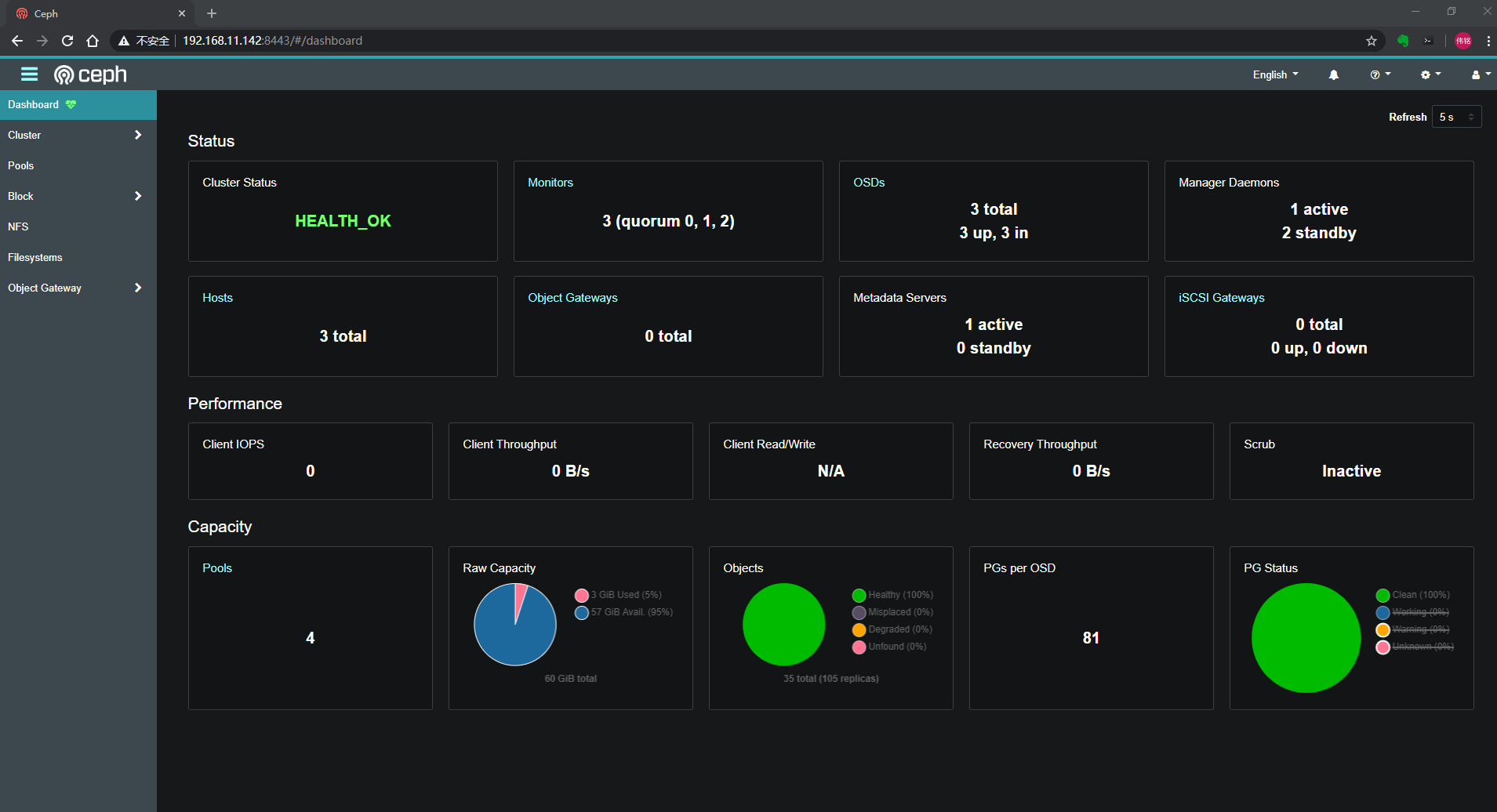
ceph 常用命令
ceph -v
ceph mon versions
ceph device ls
ceph -s
ceph osd tree
ceph health detail
ceph df
ceph fs ls
ceph-volume lvm list
ceph fs volume ls
ceph fs status
[root@node01 ~]# ceph -hGeneral usage:==============usage: ceph [-h] [-c CEPHCONF] [-i INPUT_FILE] [-o OUTPUT_FILE][--setuser SETUSER] [--setgroup SETGROUP] [--id CLIENT_ID][--name CLIENT_NAME] [--cluster CLUSTER][--admin-daemon ADMIN_SOCKET] [-s] [-w] [--watch-debug][--watch-info] [--watch-sec] [--watch-warn] [--watch-error][-W WATCH_CHANNEL] [--version] [--verbose] [--concise][-f {json,json-pretty,xml,xml-pretty,plain,yaml}][--connect-timeout CLUSTER_TIMEOUT] [--block] [--period PERIOD]Ceph administration tooloptional arguments:-h, --help request mon help-c CEPHCONF, --conf CEPHCONFceph configuration file-i INPUT_FILE, --in-file INPUT_FILEinput file, or "-" for stdin-o OUTPUT_FILE, --out-file OUTPUT_FILEoutput file, or "-" for stdout--setuser SETUSER set user file permission--setgroup SETGROUP set group file permission--id CLIENT_ID, --user CLIENT_IDclient id for authentication--name CLIENT_NAME, -n CLIENT_NAMEclient name for authentication--cluster CLUSTER cluster name--admin-daemon ADMIN_SOCKETsubmit admin-socket commands ("help" for help-s, --status show cluster status-w, --watch watch live cluster changes--watch-debug watch debug events--watch-info watch info events--watch-sec watch security events--watch-warn watch warn events--watch-error watch error events-W WATCH_CHANNEL, --watch-channel WATCH_CHANNELwatch live cluster changes on a specific channel(e.g., cluster, audit, cephadm, or '*' for all)--version, -v display version--verbose make verbose--concise make less verbose-f {json,json-pretty,xml,xml-pretty,plain,yaml}, --format {json,json-pretty,xml,xml-pretty,plain,yaml}--connect-timeout CLUSTER_TIMEOUTset a timeout for connecting to the cluster--block block until completion (scrub and deep-scrub only)--period PERIOD, -p PERIODpolling period, default 1.0 second (for pollingcommands only)Local commands:===============ping <mon.id> Send simple presence/life test to a mon<mon.id> may be 'mon.*' for all monsdaemon {type.id|path} <cmd>Same as --admin-daemon, but auto-find admin socketdaemonperf {type.id | path} [stat-pats] [priority] [<interval>] [<count>]daemonperf {type.id | path} list|ls [stat-pats] [priority]Get selected perf stats from daemon/admin socketOptional shell-glob comma-delim match string stat-patsOptional selection priority (can abbreviate name):critical, interesting, useful, noninteresting, debugList shows a table of all available statsRun <count> times (default forever),once per <interval> seconds (default 1)Monitor commands:=================alerts send (re)send alerts immediatelyauth add <entity> [<caps>...] add auth info for <entity> from input file, or random key if noinput is given, and/or any caps specified in the commandauth caps <entity> <caps>... update caps for <name> from caps specified in the commandauth export [<entity>] write keyring for requested entity, or master keyring if none givenauth get <entity> write keyring file with requested keyauth get-key <entity> display requested keyauth get-or-create <entity> [<caps>...] add auth info for <entity> from input file, or random key if noinput given, and/or any caps specified in the commandauth get-or-create-key <entity> [<caps>...] get, or add, key for <name> from system/caps pairs specified inthe command. If key already exists, any given caps must matchthe existing caps for that key.auth import auth import: read keyring file from -i <file>auth ls list authentication stateauth print-key <entity> display requested keyauth print_key <entity> display requested keyauth rm <entity> remove all caps for <name>balancer dump <plan> Show an optimization planbalancer eval [<option>] Evaluate data distribution for the current cluster or specificpool or specific planbalancer eval-verbose [<option>] Evaluate data distribution for the current cluster or specificpool or specific plan (verbosely)balancer execute <plan> Execute an optimization planbalancer ls List all plansbalancer mode none|crush-compat|upmap Set balancer modebalancer off Disable automatic balancingbalancer on Enable automatic balancingbalancer optimize <plan> [<pools>...] Run optimizer to create a new planbalancer pool add <pools>... Enable automatic balancing for specific poolsbalancer pool ls List automatic balancing pools. Note that empty list means allexisting pools will be automatic balancing targets, which is thedefault behaviour of balancer.balancer pool rm <pools>... Disable automatic balancing for specific poolsbalancer reset Discard all optimization plansbalancer rm <plan> Discard an optimization planbalancer show <plan> Show details of an optimization planbalancer status Show balancer statusconfig assimilate-conf Assimilate options from a conf, and return a new, minimal conf fileconfig dump Show all configuration option(s)config generate-minimal-conf Generate a minimal ceph.conf fileconfig get <who> [<key>] Show configuration option(s) for an entityconfig help <key> Describe a configuration optionconfig log [<num:int>] Show recent history of config changesconfig ls List available configuration optionsconfig reset <num:int> Revert configuration to a historical version specified by <num>config rm <who> <name> Clear a configuration option for one or more entitiesconfig set <who> <name> <value> [--force] Set a configuration option for one or more entitiesconfig show <who> [<key>] Show running configurationconfig show-with-defaults <who> Show running configuration (including compiled-in defaults)config-key dump [<key>] dump keys and values (with optional prefix)config-key exists <key> check for <key>'s existenceconfig-key get <key> get <key>config-key ls list keysconfig-key rm <key> rm <key>config-key set <key> [<val>] set <key> to value <val>crash archive <id> Acknowledge a crash and silence health warning(s)crash archive-all Acknowledge all new crashes and silence health warning(s)crash info <id> show crash dump metadatacrash json_report <hours> Crashes in the last <hours> hourscrash ls Show new and archived crash dumpscrash ls-new Show new crash dumpscrash post Add a crash dump (use -i <jsonfile>)crash prune <keep> Remove crashes older than <keep> dayscrash rm <id> Remove a saved crash <id>crash stat Summarize recorded crashesdevice check-health Check life expectancy of devicesdevice get-health-metrics <devid> [<sample>] Show stored device metrics for the devicedevice info <devid> Show information about a devicedevice light on|off <devid> [ident|fault] [--force] Enable or disable the device light. Default type is `ident`Usage:device light (on|off) <devid> [ident|fault] [--force]device ls Show devicesdevice ls-by-daemon <who> Show devices associated with a daemondevice ls-by-host <host> Show devices on a hostdevice ls-lights List currently active device indicator lightsdevice monitoring off Disable device health monitoringdevice monitoring on Enable device health monitoringdevice predict-life-expectancy <devid> Predict life expectancy with local predictordevice query-daemon-health-metrics <who> Get device health metrics for a given daemondevice rm-life-expectancy <devid> Clear predicted device life expectancydevice scrape-daemon-health-metrics <who> Scrape and store device health metrics for a given daemondevice scrape-health-metrics [<devid>] Scrape and store health metricsdevice set-life-expectancy <devid> <from> [<to>] Set predicted device life expectancydf [detail] show cluster free space statsfeatures report of connected featuresfs add_data_pool <fs_name> <pool> add data pool <pool>fs authorize <filesystem> <entity> <caps>... add auth for <entity> to access file system <filesystem> based onfollowing directory and permissions pairsfs clone cancel <vol_name> <clone_name> [<group_name>] Cancel an pending or ongoing clone operation.fs clone status <vol_name> <clone_name> [<group_name>] Get status on a cloned subvolume.fs dump [<epoch:int>] dump all CephFS status, optionally from epochfs fail <fs_name> bring the file system down and all of its ranksfs flag set enable_multiple <val> [--yes-i-really-mean-it] Set a global CephFS flagfs get <fs_name> get info about one filesystemfs ls list filesystemsfs new <fs_name> <metadata> <data> [--force] [--allow-dangerous- make new filesystem using named pools <metadata> and <data>metadata-overlay]fs reset <fs_name> [--yes-i-really-mean-it] disaster recovery only: reset to a single-MDS mapfs rm <fs_name> [--yes-i-really-mean-it] disable the named filesystemfs rm_data_pool <fs_name> <pool> remove data pool <pool>fs set <fs_name> max_mds|max_file_size|allow_new_snaps|inline_data| set fs parameter <var> to <val>cluster_down|allow_dirfrags|balancer|standby_count_wanted|session_timeout|session_autoclose|allow_standby_replay|down|joinable|min_compat_client <val> [--yes-i-really-mean-it] [--yes-i-really-really-mean-it]fs set-default <fs_name> set the default to the named filesystemfs status [<fs>] Show the status of a CephFS filesystemfs subvolume create <vol_name> <sub_name> [<size:int>] [<group_ Create a CephFS subvolume in a volume, and optionally, with aname>] [<pool_layout>] [<uid:int>] [<gid:int>] [<mode>] specific size (in bytes), a specific data pool layout, a specificmode, and in a specific subvolume groupfs subvolume getpath <vol_name> <sub_name> [<group_name>] Get the mountpath of a CephFS subvolume in a volume, andoptionally, in a specific subvolume groupfs subvolume info <vol_name> <sub_name> [<group_name>] Get the metadata of a CephFS subvolume in a volume, and optionally,in a specific subvolume groupfs subvolume ls <vol_name> [<group_name>] List subvolumesfs subvolume resize <vol_name> <sub_name> <new_size> [<group_ Resize a CephFS subvolumename>] [--no-shrink]fs subvolume rm <vol_name> <sub_name> [<group_name>] [--force] Delete a CephFS subvolume in a volume, and optionally, in aspecific subvolume groupfs subvolume snapshot clone <vol_name> <sub_name> <snap_name> Clone a snapshot to target subvolume<target_sub_name> [<pool_layout>] [<group_name>] [<target_group_name>]fs subvolume snapshot create <vol_name> <sub_name> <snap_name> Create a snapshot of a CephFS subvolume in a volume, and[<group_name>] optionally, in a specific subvolume groupfs subvolume snapshot ls <vol_name> <sub_name> [<group_name>] List subvolume snapshotsfs subvolume snapshot protect <vol_name> <sub_name> <snap_name> Protect snapshot of a CephFS subvolume in a volume, and optionally,[<group_name>] in a specific subvolume groupfs subvolume snapshot rm <vol_name> <sub_name> <snap_name> [<group_ Delete a snapshot of a CephFS subvolume in a volume, andname>] [--force] optionally, in a specific subvolume groupfs subvolume snapshot unprotect <vol_name> <sub_name> <snap_name> Unprotect a snapshot of a CephFS subvolume in a volume, and[<group_name>] optionally, in a specific subvolume groupfs subvolumegroup create <vol_name> <group_name> [<pool_layout>] Create a CephFS subvolume group in a volume, and optionally, with[<uid:int>] [<gid:int>] [<mode>] a specific data pool layout, and a specific numeric modefs subvolumegroup getpath <vol_name> <group_name> Get the mountpath of a CephFS subvolume group in a volumefs subvolumegroup ls <vol_name> List subvolumegroupsfs subvolumegroup rm <vol_name> <group_name> [--force] Delete a CephFS subvolume group in a volumefs subvolumegroup snapshot create <vol_name> <group_name> <snap_ Create a snapshot of a CephFS subvolume group in a volumename>fs subvolumegroup snapshot ls <vol_name> <group_name> List subvolumegroup snapshotsfs subvolumegroup snapshot rm <vol_name> <group_name> <snap_name> Delete a snapshot of a CephFS subvolume group in a volume[--force]fs volume create <name> [<placement>] Create a CephFS volumefs volume ls List volumesfs volume rm <vol_name> [<yes-i-really-mean-it>] Delete a FS volume by passing --yes-i-really-mean-it flagfsid show cluster FSID/UUIDhealth [detail] show cluster healthhealth mute <code> [<ttl>] [--sticky] mute health alerthealth unmute [<code>] unmute existing health alert mute(s)influx config-set <key> <value> Set a configuration valueinflux config-show Show current configurationinflux send Force sending data to Influxinsights Retrieve insights reportinsights prune-health <hours> Remove health history older than <hours> hoursiostat Get IO rateslog <logtext>... log supplied text to the monitor loglog last [<num:int>] [debug|info|sec|warn|error] [*|cluster|audit| print last few lines of the cluster logcephadm]mds compat rm_compat <feature:int> remove compatible featuremds compat rm_incompat <feature:int> remove incompatible featuremds compat show show mds compatibility settingsmds count-metadata <property> count MDSs by metadata field propertymds fail <role_or_gid> Mark MDS failed: trigger a failover if a standby is availablemds metadata [<who>] fetch metadata for mds <role>mds ok-to-stop <ids>... check whether stopping the specified MDS would reduce immediateavailabilitymds repaired <role> mark a damaged MDS rank as no longer damagedmds rm <gid:int> remove nonactive mdsmds versions check running versions of MDSsmgr count-metadata <property> count ceph-mgr daemons by metadata field propertymgr dump [<epoch:int>] dump the latest MgrMapmgr fail [<who>] treat the named manager daemon as failedmgr metadata [<who>] dump metadata for all daemons or a specific daemonmgr module disable <module> disable mgr modulemgr module enable <module> [--force] enable mgr modulemgr module ls list active mgr modulesmgr self-test background start <workload> Activate a background workload (one of command_spam, throw_exception)mgr self-test background stop Stop background workload if any is runningmgr self-test cluster-log <channel> <priority> <message> Create an audit log record.mgr self-test config get <key> Peek at a configuration valuemgr self-test config get_localized <key> Peek at a configuration value (localized variant)mgr self-test health clear [<checks>...] Clear health checks by name. If no names provided, clear all.mgr self-test health set <checks> Set a health check from a JSON-formatted description.mgr self-test insights_set_now_offset <hours> Set the now time for the insights module.mgr self-test module <module> Run another module's self_test() methodmgr self-test remote Test inter-module callsmgr self-test run Run mgr python interface testsmgr services list service endpoints provided by mgr modulesmgr versions check running versions of ceph-mgr daemonsmon add <name> <addr> add new monitor named <name> at <addr>mon count-metadata <property> count mons by metadata field propertymon dump [<epoch:int>] dump formatted monmap (optionally from epoch)mon enable-msgr2 enable the msgr2 protocol on port 3300mon feature ls [--with-value] list available mon map features to be set/unsetmon feature set <feature_name> [--yes-i-really-mean-it] set provided feature on mon mapmon getmap [<epoch:int>] get monmapmon metadata [<id>] fetch metadata for mon <id>mon ok-to-add-offline check whether adding a mon and not starting it would break quorummon ok-to-rm <id> check whether removing the specified mon would break quorummon ok-to-stop <ids>... check whether mon(s) can be safely stopped without reducingimmediate availabilitymon rm <name> remove monitor named <name>mon scrub scrub the monitor storesmon set-addrs <name> <addrs> set the addrs (IPs and ports) a specific monitor binds tomon set-rank <name> <rank:int> set the rank for the specified monmon set-weight <name> <weight:int> set the weight for the specified monmon stat summarize monitor statusmon versions check running versions of monitorsnode ls [all|osd|mon|mds|mgr] list all nodes in cluster [type]orch apply [mon|mgr|rbd-mirror|crash|alertmanager|grafana|node- Update the size or placement for a service or apply a large yamlexporter|prometheus] [<placement>] [--unmanaged] specorch apply mds <fs_name> [<placement>] [--unmanaged] Update the number of MDS instances for the given fs_nameorch apply nfs <svc_id> <pool> [<namespace>] [<placement>] [-- Scale an NFS serviceunmanaged]orch apply osd [--all-available-devices] [--preview] [<service_ Create OSD daemon(s) using a drive group specname>] [--unmanaged] [plain|json|json-pretty|yaml]orch apply rgw <realm_name> <zone_name> [<subcluster>] [<port: Update the number of RGW instances for the given zoneint>] [--ssl] [<placement>] [--unmanaged]orch cancel cancels ongoing operationsorch daemon add [mon|mgr|rbd-mirror|crash|alertmanager|grafana| Add daemon(s)node-exporter|prometheus] [<placement>]orch daemon add iscsi <pool> [<fqdn_enabled>] [<trusted_ip_list>] Start iscsi daemon(s)[<placement>]orch daemon add mds <fs_name> [<placement>] Start MDS daemon(s)orch daemon add nfs <svc_arg> <pool> [<namespace>] [<placement>] Start NFS daemon(s)orch daemon add osd [<svc_arg>] Create an OSD service. Either --svc_arg=host:drivesorch daemon add rgw [<realm_name>] [<zone_name>] [<placement>] Start RGW daemon(s)orch daemon rm <names>... [--force] Remove specific daemon(s)orch daemon start|stop|restart|redeploy|reconfig <name> Start, stop, restart, redeploy, or reconfig a specific daemonorch device ls [<hostname>...] [plain|json|json-pretty|yaml] [-- List devices on a hostrefresh]orch device zap <hostname> <path> [--force] Zap (erase!) a device so it can be re-usedorch host add <hostname> [<addr>] [<labels>...] Add a hostorch host label add <hostname> <label> Add a host labelorch host label rm <hostname> <label> Remove a host labelorch host ls [plain|json|json-pretty|yaml] List hostsorch host rm <hostname> Remove a hostorch host set-addr <hostname> <addr> Update a host addressorch ls [<service_type>] [<service_name>] [--export] [plain|json| List services known to orchestratorjson-pretty|yaml] [--refresh]orch osd rm <svc_id>... [--replace] [--force] Remove OSD servicesorch osd rm status status of OSD removal operationorch pause Pause orchestrator background workorch ps [<hostname>] [<service_name>] [<daemon_type>] [<daemon_ List daemons known to orchestratorid>] [plain|json|json-pretty|yaml] [--refresh]orch resume Resume orchestrator background work (if paused)orch rm <service_name> [--force] Remove a serviceorch set backend <module_name> Select orchestrator module backendorch start|stop|restart|redeploy|reconfig <service_name> Start, stop, restart, redeploy, or reconfig an entire service (i.e.all daemons)orch status Report configured backend and its statusorch upgrade check [<image>] [<ceph_version>] Check service versions vs available and target containersorch upgrade pause Pause an in-progress upgradeorch upgrade resume Resume paused upgradeorch upgrade start [<image>] [<ceph_version>] Initiate upgradeorch upgrade status Check service versions vs available and target containersorch upgrade stop Stop an in-progress upgradeosd blacklist add|rm <addr> [<expire:float>] add (optionally until <expire> seconds from now) or remove <addr>from blacklistosd blacklist clear clear all blacklisted clientsosd blacklist ls show blacklisted clientsosd blocked-by print histogram of which OSDs are blocking their peersosd count-metadata <property> count OSDs by metadata field propertyosd crush add <id|osd.id> <weight:float> <args>... add or update crushmap position and weight for <name> with<weight> and location <args>osd crush add-bucket <name> <type> [<args>...] add no-parent (probably root) crush bucket <name> of type <type>to location <args>osd crush class create <class> create crush device class <class>osd crush class ls list all crush device classesosd crush class ls-osd <class> list all osds belonging to the specific <class>osd crush class rename <srcname> <dstname> rename crush device class <srcname> to <dstname>osd crush class rm <class> remove crush device class <class>osd crush create-or-move <id|osd.id> <weight:float> <args>... create entry or move existing entry for <name> <weight> at/tolocation <args>osd crush dump dump crush maposd crush get-device-class <ids>... get classes of specified osd(s) <id> [<id>...]osd crush get-tunable straw_calc_version get crush tunable <tunable>osd crush link <name> <args>... link existing entry for <name> under location <args>osd crush ls <node> list items beneath a node in the CRUSH treeosd crush move <name> <args>... move existing entry for <name> to location <args>osd crush rename-bucket <srcname> <dstname> rename bucket <srcname> to <dstname>osd crush reweight <name> <weight:float> change <name>'s weight to <weight> in crush maposd crush reweight-all recalculate the weights for the tree to ensure they sum correctlyosd crush reweight-subtree <name> <weight:float> change all leaf items beneath <name> to <weight> in crush maposd crush rm <name> [<ancestor>] remove <name> from crush map (everywhere, or just at <ancestor>)osd crush rm-device-class <ids>... remove class of the osd(s) <id> [<id>...],or use <all|any> toremove all.osd crush rule create-erasure <name> [<profile>] create crush rule <name> for erasure coded pool created with<profile> (default default)osd crush rule create-replicated <name> <root> <type> [<class>] create crush rule <name> for replicated pool to start from <root>,replicate across buckets of type <type>, use devices of type<class> (ssd or hdd)osd crush rule create-simple <name> <root> <type> [firstn|indep] create crush rule <name> to start from <root>, replicate acrossbuckets of type <type>, using a choose mode of <firstn|indep> (default firstn; indep best for erasure pools)osd crush rule dump [<name>] dump crush rule <name> (default all)osd crush rule ls list crush rulesosd crush rule ls-by-class <class> list all crush rules that reference the same <class>osd crush rule rename <srcname> <dstname> rename crush rule <srcname> to <dstname>osd crush rule rm <name> remove crush rule <name>osd crush set <id|osd.id> <weight:float> <args>... update crushmap position and weight for <name> to <weight> withlocation <args>osd crush set [<prior_version:int>] set crush map from input fileosd crush set-all-straw-buckets-to-straw2 convert all CRUSH current straw buckets to use the straw2 algorithmosd crush set-device-class <class> <ids>... set the <class> of the osd(s) <id> [<id>...],or use <all|any> toset all.osd crush set-tunable straw_calc_version <value:int> set crush tunable <tunable> to <value>osd crush show-tunables show current crush tunablesosd crush swap-bucket <source> <dest> [--yes-i-really-mean-it] swap existing bucket contents from (orphan) bucket <source> and<target>osd crush tree [--show-shadow] dump crush buckets and items in a tree viewosd crush tunables legacy|argonaut|bobtail|firefly|hammer|jewel| set crush tunables values to <profile>optimal|defaultosd crush unlink <name> [<ancestor>] unlink <name> from crush map (everywhere, or just at <ancestor>)osd crush weight-set create <pool> flat|positional create a weight-set for a given poolosd crush weight-set create-compat create a default backward-compatible weight-setosd crush weight-set dump dump crush weight setsosd crush weight-set ls list crush weight setsosd crush weight-set reweight <pool> <item> <weight:float>... set weight for an item (bucket or osd) in a pool's weight-setosd crush weight-set reweight-compat <item> <weight:float>... set weight for an item (bucket or osd) in the backward-compatibleweight-setosd crush weight-set rm <pool> remove the weight-set for a given poolosd crush weight-set rm-compat remove the backward-compatible weight-setosd deep-scrub <who> initiate deep scrub on osd <who>, or use <all|any> to deep scruballosd destroy <id|osd.id> [--force] [--yes-i-really-mean-it] mark osd as being destroyed. Keeps the ID intact (allowing reuse),but removes cephx keys, config-key data and lockbox keys,rendering data permanently unreadable.osd df [plain|tree] [class|name] [<filter>] show OSD utilizationosd down <ids>... [--definitely-dead] set osd(s) <id> [<id>...] down, or use <any|all> to set all osdsdownosd drain <osd_ids:int>... drain osd idsosd drain status show statusosd drain stop [<osd_ids:int>...] show status for osds. Stopping all if osd_ids are omittedosd dump [<epoch:int>] print summary of OSD maposd erasure-code-profile get <name> get erasure code profile <name>osd erasure-code-profile ls list all erasure code profilesosd erasure-code-profile rm <name> remove erasure code profile <name>osd erasure-code-profile set <name> [<profile>...] [--force] create erasure code profile <name> with [<key[=value]> ...] pairs.Add a --force at the end to override an existing profile (VERYDANGEROUS)osd find <id|osd.id> find osd <id> in the CRUSH map and show its locationosd force-create-pg <pgid> [--yes-i-really-mean-it] force creation of pg <pgid>osd get-require-min-compat-client get the minimum client version we will maintain compatibility withosd getcrushmap [<epoch:int>] get CRUSH maposd getmap [<epoch:int>] get OSD maposd getmaxosd show largest OSD idosd in <ids>... set osd(s) <id> [<id>...] in, can use <any|all> to automaticallyset all previously out osds inosd info [<id|osd.id>] print osd's {id} information (instead of all osds from map)osd last-stat-seq <id|osd.id> get the last pg stats sequence number reported for this osdosd lost <id|osd.id> [--yes-i-really-mean-it] mark osd as permanently lost. THIS DESTROYS DATA IF NO MOREREPLICAS EXIST, BE CAREFULosd ls [<epoch:int>] show all OSD idsosd ls-tree [<epoch:int>] <name> show OSD ids under bucket <name> in the CRUSH maposd map <pool> <object> [<nspace>] find pg for <object> in <pool> with [namespace]osd metadata [<id|osd.id>] fetch metadata for osd {id} (default all)osd new <uuid> [<id|osd.id>] Create a new OSD. If supplied, the `id` to be replaced needs toexist and have been previously destroyed. Reads secrets from JSONfile via `-i <file>` (see man page).osd numa-status show NUMA status of OSDsosd ok-to-stop <ids>... check whether osd(s) can be safely stopped without reducingimmediate data availabilityosd out <ids>... set osd(s) <id> [<id>...] out, or use <any|all> to set all osds outosd pause pause osdosd perf print dump of OSD perf summary statsosd pg-temp <pgid> [<id|osd.id>...] set pg_temp mapping pgid:[<id> [<id>...]] (developers only)osd pg-upmap <pgid> <id|osd.id>... set pg_upmap mapping <pgid>:[<id> [<id>...]] (developers only)osd pg-upmap-items <pgid> <id|osd.id>... set pg_upmap_items mapping <pgid>:{<id> to <id>, [...]} (developers only)osd pool application disable <pool> <app> [--yes-i-really-mean-it] disables use of an application <app> on pool <poolname>osd pool application enable <pool> <app> [--yes-i-really-mean-it] enable use of an application <app> [cephfs,rbd,rgw] on pool<poolname>osd pool application get [<pool>] [<app>] [<key>] get value of key <key> of application <app> on pool <poolname>osd pool application rm <pool> <app> <key> removes application <app> metadata key <key> on pool <poolname>osd pool application set <pool> <app> <key> <value> sets application <app> metadata key <key> to <value> on pool<poolname>osd pool autoscale-status report on pool pg_num sizing recommendation and intentosd pool cancel-force-backfill <who>... restore normal recovery priority of specified pool <who>osd pool cancel-force-recovery <who>... restore normal recovery priority of specified pool <who>osd pool create <pool> [<pg_num:int>] [<pgp_num:int>] [replicated| create poolerasure] [<erasure_code_profile>] [<rule>] [<expected_num_objects:int>] [<size:int>] [<pg_num_min:int>] [on|off|warn] [<target_size_bytes:int>] [<target_size_ratio:float>]osd pool deep-scrub <who>... initiate deep-scrub on pool <who>osd pool force-backfill <who>... force backfill of specified pool <who> firstosd pool force-recovery <who>... force recovery of specified pool <who> firstosd pool get <pool> size|min_size|pg_num|pgp_num|crush_rule| get pool parameter <var>hashpspool|nodelete|nopgchange|nosizechange|write_fadvise_dontneed|noscrub|nodeep-scrub|hit_set_type|hit_set_period|hit_set_count|hit_set_fpp|use_gmt_hitset|target_max_objects|target_max_bytes|cache_target_dirty_ratio|cache_target_dirty_high_ratio|cache_target_full_ratio|cache_min_flush_age|cache_min_evict_age|erasure_code_profile|min_read_recency_for_promote|all|min_write_recency_for_promote|fast_read|hit_set_grade_decay_rate|hit_set_search_last_n|scrub_min_interval|scrub_max_interval|deep_scrub_interval|recovery_priority|recovery_op_priority|scrub_priority|compression_mode|compression_algorithm|compression_required_ratio|compression_max_blob_size|compression_min_blob_size|csum_type|csum_min_block|csum_max_block|allow_ec_overwrites|fingerprint_algorithm|pg_autoscale_mode|pg_autoscale_bias|pg_num_min|target_size_bytes|target_size_ratioosd pool get-quota <pool> obtain object or byte limits for poolosd pool ls [detail] list poolsosd pool mksnap <pool> <snap> make snapshot <snap> in <pool>osd pool rename <srcpool> <destpool> rename <srcpool> to <destpool>osd pool repair <who>... initiate repair on pool <who>osd pool rm <pool> [<pool2>] [--yes-i-really-really-mean-it] [-- remove poolyes-i-really-really-mean-it-not-faking]osd pool rmsnap <pool> <snap> remove snapshot <snap> from <pool>osd pool scrub <who>... initiate scrub on pool <who>osd pool set <pool> size|min_size|pg_num|pgp_num|pgp_num_actual| set pool parameter <var> to <val>crush_rule|hashpspool|nodelete|nopgchange|nosizechange|write_fadvise_dontneed|noscrub|nodeep-scrub|hit_set_type|hit_set_period|hit_set_count|hit_set_fpp|use_gmt_hitset|target_max_bytes|target_max_objects|cache_target_dirty_ratio|cache_target_dirty_high_ratio|cache_target_full_ratio|cache_min_flush_age|cache_min_evict_age|min_read_recency_for_promote|min_write_recency_for_promote|fast_read|hit_set_grade_decay_rate|hit_set_search_last_n|scrub_min_interval|scrub_max_interval|deep_scrub_interval|recovery_priority|recovery_op_priority|scrub_priority|compression_mode|compression_algorithm|compression_required_ratio|compression_max_blob_size|compression_min_blob_size|csum_type|csum_min_block|csum_max_block|allow_ec_overwrites|fingerprint_algorithm|pg_autoscale_mode|pg_autoscale_bias|pg_num_min|target_size_bytes|target_size_ratio <val> [--yes-i-really-mean-it]osd pool set-quota <pool> max_objects|max_bytes <val> set object or byte limit on poolosd pool stats [<pool_name>] obtain stats from all pools, or from specified poolosd primary-affinity <id|osd.id> <weight:float> adjust osd primary-affinity from 0.0 <= <weight> <= 1.0osd primary-temp <pgid> <id|osd.id> set primary_temp mapping pgid:<id>|-1 (developers only)osd purge <id|osd.id> [--force] [--yes-i-really-mean-it] purge all osd data from the monitors including the OSD id andCRUSH positionosd purge-new <id|osd.id> [--yes-i-really-mean-it] purge all traces of an OSD that was partially created but neverstartedosd repair <who> initiate repair on osd <who>, or use <all|any> to repair allosd require-osd-release luminous|mimic|nautilus|octopus [--yes-i- set the minimum allowed OSD release to participate in the clusterreally-mean-it]osd reweight <id|osd.id> <weight:float> reweight osd to 0.0 < <weight> < 1.0osd reweight-by-pg [<oload:int>] [<max_change:float>] [<max_osds: reweight OSDs by PG distribution [overload-percentage-for-int>] [<pools>...] consideration, default 120]osd reweight-by-utilization [<oload:int>] [<max_change:float>] reweight OSDs by utilization [overload-percentage-for-[<max_osds:int>] [--no-increasing] consideration, default 120]osd reweightn <weights> reweight osds with {<id>: <weight>,...})osd rm-pg-upmap <pgid> clear pg_upmap mapping for <pgid> (developers only)osd rm-pg-upmap-items <pgid> clear pg_upmap_items mapping for <pgid> (developers only)osd safe-to-destroy <ids>... check whether osd(s) can be safely destroyed without reducing datadurabilityosd scrub <who> initiate scrub on osd <who>, or use <all|any> to scrub allosd set full|pause|noup|nodown|noout|noin|nobackfill|norebalance| set <key>norecover|noscrub|nodeep-scrub|notieragent|nosnaptrim|pglog_hardlimit [--yes-i-really-mean-it]osd set-backfillfull-ratio <ratio:float> set usage ratio at which OSDs are marked too full to backfillosd set-full-ratio <ratio:float> set usage ratio at which OSDs are marked fullosd set-group <flags> <who>... set <flags> for batch osds or crush nodes, <flags> must be a comma-separated subset of {noup,nodown,noin,noout}osd set-nearfull-ratio <ratio:float> set usage ratio at which OSDs are marked near-fullosd set-require-min-compat-client <version> [--yes-i-really-mean- set the minimum client version we will maintain compatibility withit]osd setcrushmap [<prior_version:int>] set crush map from input fileosd setmaxosd <newmax:int> set new maximum osd valueosd stat print summary of OSD maposd status [<bucket>] Show the status of OSDs within a bucket, or allosd stop <ids>... stop the corresponding osd daemons and mark them as downosd test-reweight-by-pg [<oload:int>] [<max_change:float>] [<max_ dry run of reweight OSDs by PG distribution [overload-percentage-osds:int>] [<pools>...] for-consideration, default 120]osd test-reweight-by-utilization [<oload:int>] [<max_change: dry run of reweight OSDs by utilization [overload-percentage-for-float>] [<max_osds:int>] [--no-increasing] consideration, default 120]osd tier add <pool> <tierpool> [--force-nonempty] add the tier <tierpool> (the second one) to base pool <pool> (thefirst one)osd tier add-cache <pool> <tierpool> <size:int> add a cache <tierpool> (the second one) of size <size> to existingpool <pool> (the first one)osd tier cache-mode <pool> none|writeback|forward|readonly| specify the caching mode for cache tier <pool>readforward|proxy|readproxy [--yes-i-really-mean-it]osd tier rm <pool> <tierpool> remove the tier <tierpool> (the second one) from base pool <pool> (the first one)osd tier rm-overlay <pool> remove the overlay pool for base pool <pool>osd tier set-overlay <pool> <overlaypool> set the overlay pool for base pool <pool> to be <overlaypool>osd tree [<epoch:int>] [up|down|in|out|destroyed...] print OSD treeosd tree-from [<epoch:int>] <bucket> [up|down|in|out|destroyed...] print OSD tree in bucketosd unpause unpause osdosd unset full|pause|noup|nodown|noout|noin|nobackfill|norebalance| unset <key>norecover|noscrub|nodeep-scrub|notieragent|nosnaptrimosd unset-group <flags> <who>... unset <flags> for batch osds or crush nodes, <flags> must be acomma-separated subset of {noup,nodown,noin,noout}osd utilization get basic pg distribution statsosd versions check running versions of OSDspg cancel-force-backfill <pgid>... restore normal backfill priority of <pgid>pg cancel-force-recovery <pgid>... restore normal recovery priority of <pgid>pg debug unfound_objects_exist|degraded_pgs_exist show debug info about pgspg deep-scrub <pgid> start deep-scrub on <pgid>pg dump [all|summary|sum|delta|pools|osds|pgs|pgs_brief...] show human-readable versions of pg map (only 'all' valid withplain)pg dump_json [all|summary|sum|pools|osds|pgs...] show human-readable version of pg map in json onlypg dump_pools_json show pg pools info in json onlypg dump_stuck [inactive|unclean|stale|undersized|degraded...] show information about stuck pgs[<threshold:int>]pg force-backfill <pgid>... force backfill of <pgid> firstpg force-recovery <pgid>... force recovery of <pgid> firstpg getmap get binary pg map to -o/stdoutpg ls [<pool:int>] [<states>...] list pg with specific pool, osd, statepg ls-by-osd <id|osd.id> [<pool:int>] [<states>...] list pg on osd [osd]pg ls-by-pool <poolstr> [<states>...] list pg with pool = [poolname]pg ls-by-primary <id|osd.id> [<pool:int>] [<states>...] list pg with primary = [osd]pg map <pgid> show mapping of pg to osdspg repair <pgid> start repair on <pgid>pg repeer <pgid> force a PG to repeerpg scrub <pgid> start scrub on <pgid>pg stat show placement group status.progress Show progress of recovery operationsprogress clear Reset progress trackingprogress json Show machine readable progress informationprometheus file_sd_config Return file_sd compatible prometheus config for mgr clusterquorum_status report status of monitor quorumrbd mirror snapshot schedule add <level_spec> <interval> [<start_ Add rbd mirror snapshot scheduletime>]rbd mirror snapshot schedule list [<level_spec>] List rbd mirror snapshot schedulerbd mirror snapshot schedule remove <level_spec> [<interval>] Remove rbd mirror snapshot schedule[<start_time>]rbd mirror snapshot schedule status [<level_spec>] Show rbd mirror snapshot schedule statusrbd perf image counters [<pool_spec>] [write_ops|write_bytes|write_ Retrieve current RBD IO performance counterslatency|read_ops|read_bytes|read_latency]rbd perf image stats [<pool_spec>] [write_ops|write_bytes|write_ Retrieve current RBD IO performance statslatency|read_ops|read_bytes|read_latency]rbd task add flatten <image_spec> Flatten a cloned image asynchronously in the backgroundrbd task add migration abort <image_spec> Abort a prepared migration asynchronously in the backgroundrbd task add migration commit <image_spec> Commit an executed migration asynchronously in the backgroundrbd task add migration execute <image_spec> Execute an image migration asynchronously in the backgroundrbd task add remove <image_spec> Remove an image asynchronously in the backgroundrbd task add trash remove <image_id_spec> Remove an image from the trash asynchronously in the backgroundrbd task cancel <task_id> Cancel a pending or running asynchronous taskrbd task list [<task_id>] List pending or running asynchronous tasksrbd trash purge schedule add <level_spec> <interval> [<start_time>] Add rbd trash purge schedulerbd trash purge schedule list [<level_spec>] List rbd trash purge schedulerbd trash purge schedule remove <level_spec> [<interval>] [<start_ Remove rbd trash purge scheduletime>]rbd trash purge schedule status [<level_spec>] Show rbd trash purge schedule statusreport [<tags>...] report full status of cluster, optional title tag stringsrestful create-key <key_name> Create an API key with this namerestful create-self-signed-cert Create localized self signed certificaterestful delete-key <key_name> Delete an API key with this namerestful list-keys List all API keysrestful restart Restart API serverservice dump dump service mapservice status dump service statestatus show cluster statustelegraf config-set <key> <value> Set a configuration valuetelegraf config-show Show current configurationtelegraf send Force sending data to Telegraftelemetry off Disable telemetry reports from this clustertelemetry on [<license>] Enable telemetry reports from this clustertelemetry send [ceph|device...] [<license>] Force sending data to Ceph telemetrytelemetry show [<channels>...] Show last report or report to be senttelemetry show-device Show last device report or device report to be senttelemetry status Show current configurationtell <type.id> <args>... send a command to a specific daemontest_orchestrator load_data load dummy data into test orchestratortime-sync-status show time sync statusversions check running versions of ceph daemonszabbix config-set <key> <value> Set a configuration valuezabbix config-show Show current configurationzabbix discovery Discovering Zabbix datazabbix send Force sending data to Zabbix[root@node01 ~]#

若有收获,就点个赞吧
0 人点赞


