在前面我们已经大概说过他们的作用了。
在这一节中,我们会对他的更多需求进行补充。
多个入口文件打包
假设现在,我们希望把之前的js文件反复打包多次,应该怎么处理。
const path = require('path')const HtmlWebpackPlugin = require('html-webpack-plugin')const { CleanWebpackPlugin } = require("clean-webpack-plugin");module.exports = {mode: 'development',entry: {// 在entry对象中,创建两个入口文件main: './src/index.js',sub: './src/index.js'},module: {rules:[{test: /\.(jpg|png|gif)$/,use:{loader: 'url-loader',options: {name:'[name]_[hash].[ext]',outputPath: 'images/',limit: 2048 // 2kb}}},{test: /\.scss$/,use:['style-loader',{loader:'css-loader',options: {importLoaders: 2}},'sass-loader','postcss-loader']}]},plugins:[new HtmlWebpackPlugin({template: 'src/index.html'}), new CleanWebpackPlugin()],output: {// filename: 'bundle.js',filename: '[name].js',path: path.resolve(__dirname, 'dist')}}
打包成功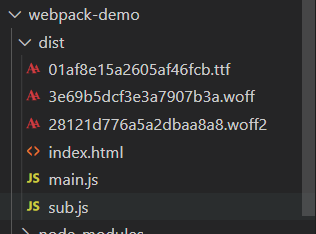
并且在我们的index.html中同时引入这两个文件,
因为我们使用了htmlWebpackPlugin,他发现了现在我们打包要输出两个文件,
这个时候他就会把这两个文件都放到index.html中
还有一种场景,例如我们很多时候希望把index.html文件打包给后端,作为后端的入口文件
但是js文件可能放到其他服务器。
那么index.html中的js文件引入肯定是需要加上绝对地址的。
const path = require('path')const HtmlWebpackPlugin = require('html-webpack-plugin')const { CleanWebpackPlugin } = require("clean-webpack-plugin");module.exports = {mode: 'development',entry: {// 在entry对象中,创建两个入口文件main: './src/index.js',sub: './src/index.js'},module: {rules:[{test: /\.(jpg|png|gif)$/,use:{loader: 'url-loader',options: {name:'[name]_[hash].[ext]',outputPath: 'images/',limit: 2048 // 2kb}}},{test: /\.scss$/,use:['style-loader',{loader:'css-loader',options: {importLoaders: 2}},'sass-loader','postcss-loader']}]},plugins:[new HtmlWebpackPlugin({template: 'src/index.html'}), new CleanWebpackPlugin()],output: {// 加上前缀publicPath:'http://cdn.com.cn',filename: '[name].js',path: path.resolve(__dirname, 'dist')}}
我们会发现,当前的js都加上了刚刚的地址
知识补充

若有收获,就点个赞吧
0 人点赞


