1.创建Spring Boot应用


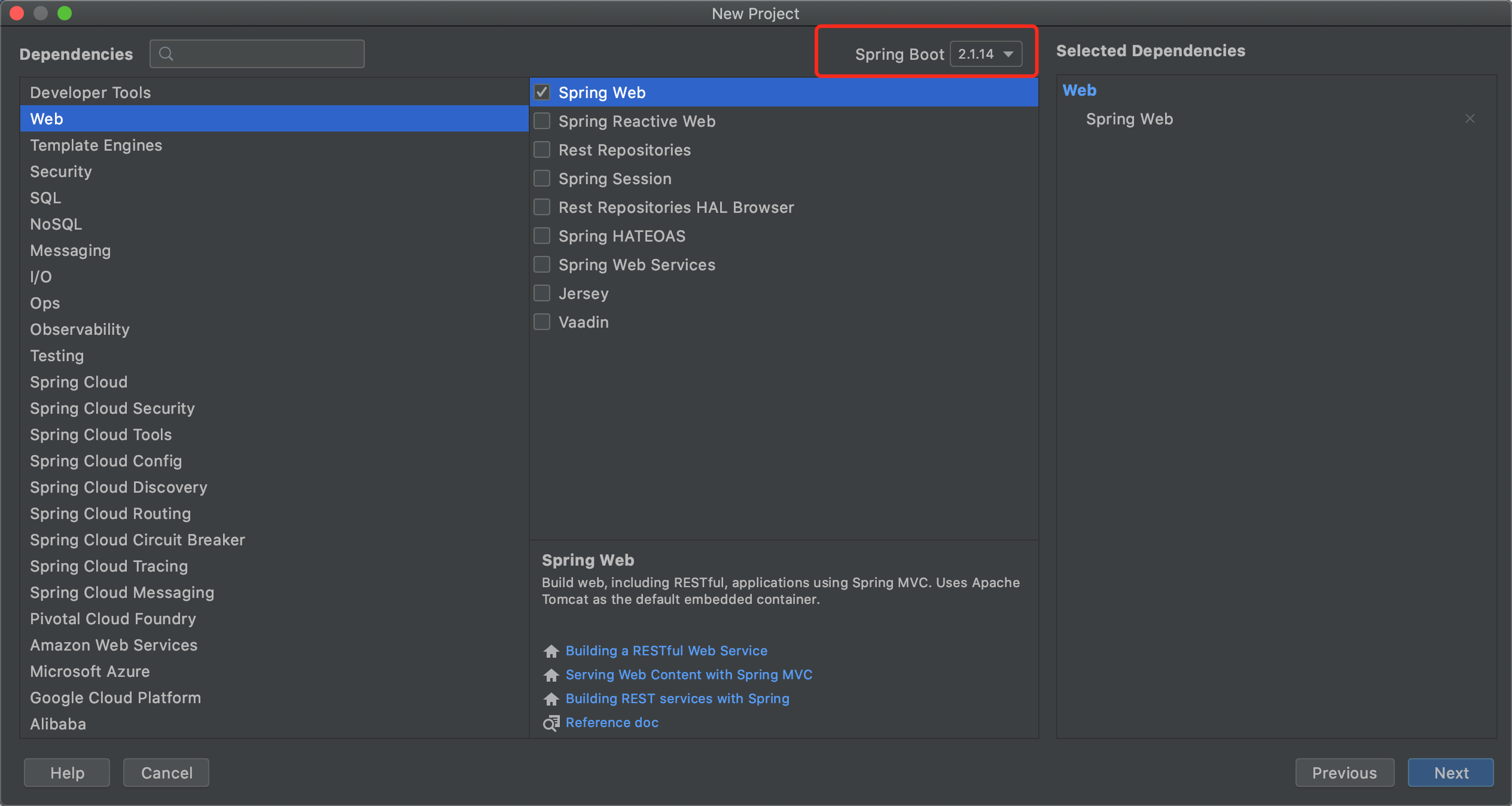
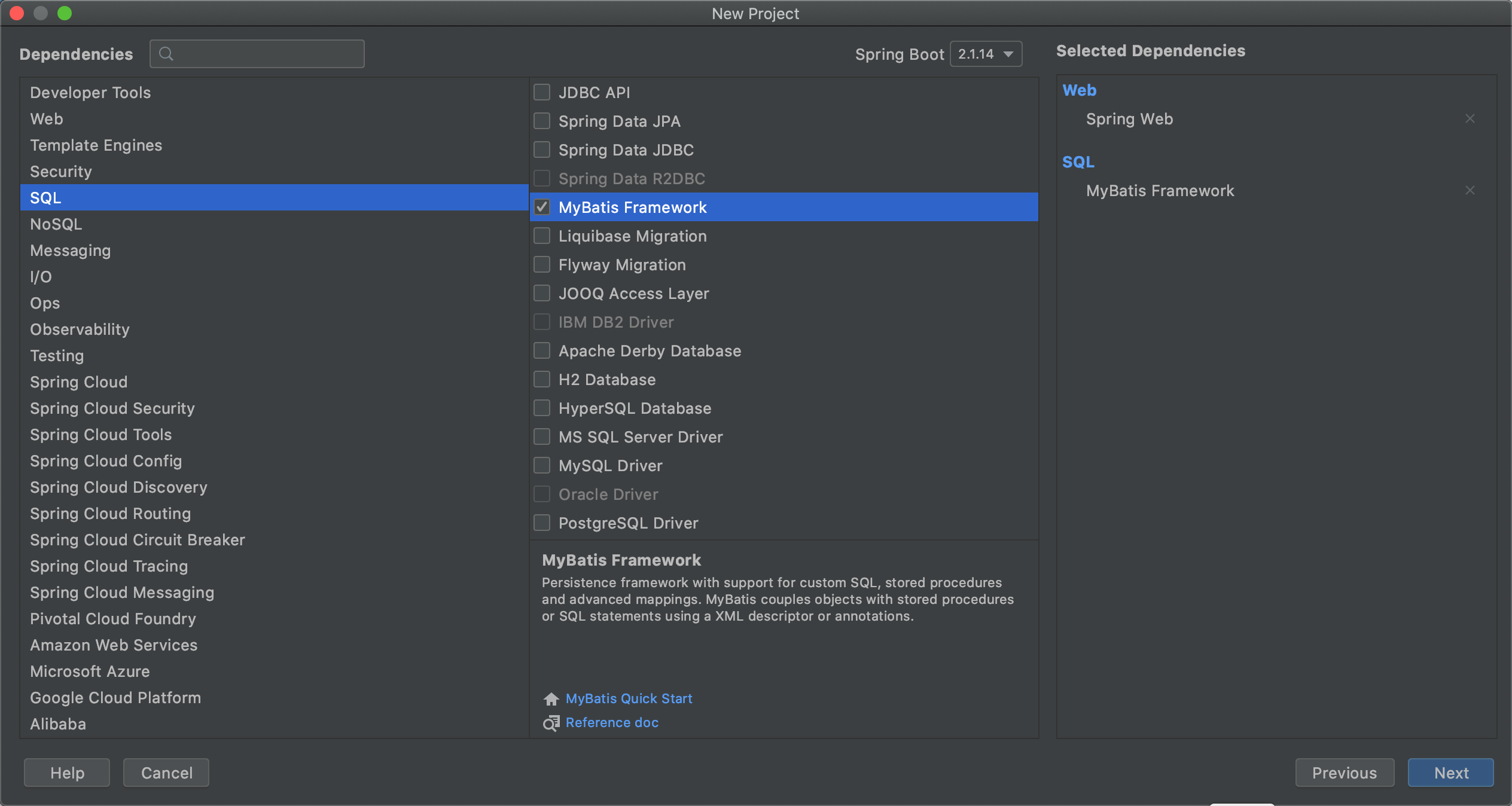


2.配置pom
+ <dependency>+ <groupId>mysql</groupId>+ <artifactId>mysql-connector-java</artifactId>+ </dependency>+ <dependency>+ <groupId>com.mchange</groupId>+ <artifactId>c3p0</artifactId>+ <version>0.9.5.4</version>+ </dependency>
3.配置mybatis
mybatis-config.xml
<?xml version="1.0" encoding="UTF-8"?>
<!DOCTYPE configuration
  PUBLIC "-//mybatis.org//DTD Config 3.0//EN"
  "http://mybatis.org/dtd/mybatis-3-config.dtd">
<configuration>
    <!-- 配置全局属性 -->
    <settings>
        <!-- 使用jdbc的getGeneratedKeys获取数据库自增主键值 -->
        <setting name="useGeneratedKeys" value="true" />

        <!-- 使用列标签替换列别名 默认:true -->
        <setting name="useColumnLabel" value="true" />

        <!-- 开启驼峰命名转换:Table{create_time} -> Entity{createTime} -->
        <setting name="mapUnderscoreToCamelCase" value="true" />
    </settings>
</configuration>
4.配置datasource和sessionFactory
src/main/resources/application.properties
#加入/utapi前缀
server.servlet.context-path=/utapi

#DataSource
#数据库驱动
jdbc.driver=com.mysql.cj.jdbc.Driver
#数据库链接
jdbc.url=jdbc:mysql://localhost:3306/ut?useUnicode=true&characterEncoding=utf8&useSSL=false&serverTimezone=UTC&allowPublicKeyRetrieval=true
#数据库用户名
jdbc.username=root
#数据库密码
jdbc.password=你的密码

#Mybatis
mybatis_config_file=mybatis-config.xml
mapper_path=/mapper/**.xml
type_alias_package=com.gxlaoshi.ut.entity
src/main/java/com/gxlaoshi/ut/config/dao/DataSourceConfiguration.java
package com.gxlaoshi.ut.config.dao;

import java.beans.PropertyVetoException;

import com.mchange.v2.c3p0.ComboPooledDataSource;
import org.mybatis.spring.annotation.MapperScan;
import org.springframework.beans.factory.annotation.Value;
import org.springframework.context.annotation.Bean;
import org.springframework.context.annotation.Configuration;

/**
 * 配置datasource到ioc容器里面
 *
 * @author xiangze
 *
 */
@Configuration
// 配置mybatis mapper的扫描路径
@MapperScan("com.gxlaoshi.ut.dao")
public class DataSourceConfiguration {
    @Value("${jdbc.driver}")
    private String jdbcDriver;
    @Value("${jdbc.url}")
    private String jdbcUrl;
    @Value("${jdbc.username}")
    private String jdbcUsername;
    @Value("${jdbc.password}")
    private String jdbcPassword;

    /**
     * 生成与spring-dao.xml对应的bean dataSource
     *
     * @return
     * @throws PropertyVetoException
     */
    @Bean(name = "dataSource")
    public ComboPooledDataSource createDataSource() throws PropertyVetoException {
        // 生成datasource实例
        ComboPooledDataSource dataSource = new ComboPooledDataSource();
        // 跟配置文件一样设置以下信息
        // 驱动
        dataSource.setDriverClass(jdbcDriver);
        // 数据库连接URL
        dataSource.setJdbcUrl(jdbcUrl);
        // 设置用户名
        dataSource.setUser(jdbcUsername);
        // 设置用户密码
        dataSource.setPassword(jdbcPassword);
        // 配置c3p0连接池的私有属性
        // 连接池最大线程数
        dataSource.setMaxPoolSize(30);
        // 连接池最小线程数
        dataSource.setMinPoolSize(10);
        // 关闭连接后不自动commit
        dataSource.setAutoCommitOnClose(false);
        // 连接超时时间
        dataSource.setCheckoutTimeout(10000);
        // 连接失败重试次数
        dataSource.setAcquireRetryAttempts(2);
        return dataSource;
    }

}
src/main/java/com/gxlaoshi/ut/config/dao/SessionFactoryConfiguration.java
package com.gxlaoshi.ut.config.dao;

import java.io.IOException;

import javax.sql.DataSource;

import org.mybatis.spring.SqlSessionFactoryBean;
import org.springframework.beans.factory.annotation.Autowired;
import org.springframework.beans.factory.annotation.Value;
import org.springframework.context.annotation.Bean;
import org.springframework.context.annotation.Configuration;
import org.springframework.core.io.ClassPathResource;
import org.springframework.core.io.support.PathMatchingResourcePatternResolver;
import org.springframework.core.io.support.ResourcePatternResolver;

@Configuration
public class SessionFactoryConfiguration {
    // mybatis-config.xml配置文件的路径
    private static String mybatisConfigFile;

    @Value("${mybatis_config_file}")
    public void setMybatisConfigFile(String mybatisConfigFile) {
        SessionFactoryConfiguration.mybatisConfigFile = mybatisConfigFile;
    }

    // mybatis mapper文件所在路径
    private static String mapperPath;

    @Value("${mapper_path}")
    public void setMapperPath(String mapperPath) {
        SessionFactoryConfiguration.mapperPath = mapperPath;
    }

    // 实体类所在的package
    @Value("${type_alias_package}")
    private String typeAliasPackage;

    @Autowired
    private DataSource dataSource;

    /**
     * 创建sqlSessionFactoryBean 实例 并且设置configtion 设置mapper 映射路径 设置datasource数据源
     *
     * @return
     * @throws IOException
     */
    @Bean(name = "sqlSessionFactory")
    public SqlSessionFactoryBean createSqlSessionFactoryBean() throws IOException {
        SqlSessionFactoryBean sqlSessionFactoryBean = new SqlSessionFactoryBean();
        // 设置mybatis configuration 扫描路径
        sqlSessionFactoryBean.setConfigLocation(new ClassPathResource(mybatisConfigFile));
        // 添加mapper 扫描路径
        PathMatchingResourcePatternResolver pathMatchingResourcePatternResolver = new PathMatchingResourcePatternResolver();
        String packageSearchPath = ResourcePatternResolver.CLASSPATH_ALL_URL_PREFIX + mapperPath;
        sqlSessionFactoryBean.setMapperLocations(pathMatchingResourcePatternResolver.getResources(packageSearchPath));
        // 设置dataSource
        sqlSessionFactoryBean.setDataSource(dataSource);
        // 设置typeAlias 包扫描路径
        sqlSessionFactoryBean.setTypeAliasesPackage(typeAliasPackage);
        return sqlSessionFactoryBean;
    }

}
5.实现DAO
src/main/java/com/gxlaoshi/ut/entity/User.java
#创建实体类
package com.gxlaoshi.ut.entity;

public class User {
    private Integer id;
    private String username;
    private String password;
    private String realname;
    private String school;

    public Integer getId() {
        return id;
    }

    public void setId(Integer id) {
        this.id = id;
    }

    public String getUsername() {
        return username;
    }

    public void setUsername(String username) {
        this.username = username;
    }

    public String getPassword() {
        return password;
    }

    public void setPassword(String password) {
        this.password = password;
    }

    public String getRealname() {
        return realname;
    }

    public void setRealname(String realname) {
        this.realname = realname;
    }

    public String getSchool() {
        return school;
    }

    public void setSchool(String school) {
        this.school = school;
    }
}
src/main/java/com/gxlaoshi/ut/dao/UserDao.java
#创建dao接口
package com.gxlaoshi.ut.dao;

import com.gxlaoshi.ut.entity.User;

import java.util.List;

public interface UserDao {
    List<User> getUserList();
    User getUserById(int id);
    int insertUser(User user);
    int updateUser(User user);
    int deleteUser(int id);
}
src/main/resources/mapper/UserDao.xml
#创建mapper
<?xml version="1.0" encoding="UTF-8"?>
<!DOCTYPE mapper
        PUBLIC "-//mybatis.org//DTD Mapper 3.0//EN"
        "http://mybatis.org/dtd/mybatis-3-mapper.dtd">
<mapper namespace="com.gxlaoshi.ut.dao.UserDao">
    <select id="getUserList" resultType="com.gxlaoshi.ut.entity.User">
        SELECT * FROM user
    </select>
    <select id="getUserById" resultType="com.gxlaoshi.ut.entity.User">
        SELECT * FROM user
        WHERE id = #{id}
    </select>
    <insert id="insertUser" useGeneratedKeys="true" keyProperty="id" keyColumn="id" parameterType="com.gxlaoshi.ut.entity.User">
        INSERT INTO
        user (username,password,realname,school)
        VALUES
        (#{username},#{password},#{realname},#{school})
    </insert>
    <update id="updateUser" parameterType="com.gxlaoshi.ut.entity.User">
        UPDATE user
        <set>
            <if test="username!=null">
                username=#{username}
            </if>
            <if test="password!=null">
                password=#{password}
            </if>
            <if test="realname!=null">
                realname=#{realname}
            </if>
            <if test="school!=null">
                school=#{school}
            </if>
        </set>
        WHERE id=#{id}
    </update>
    <delete id="deleteUser">
        DELETE FROM user
        WHERE id=#{id}
    </delete>
</mapper>
6.测试DAO
技巧:选中DAO接口名,OPT+ENTER键可以自动创建测试方法

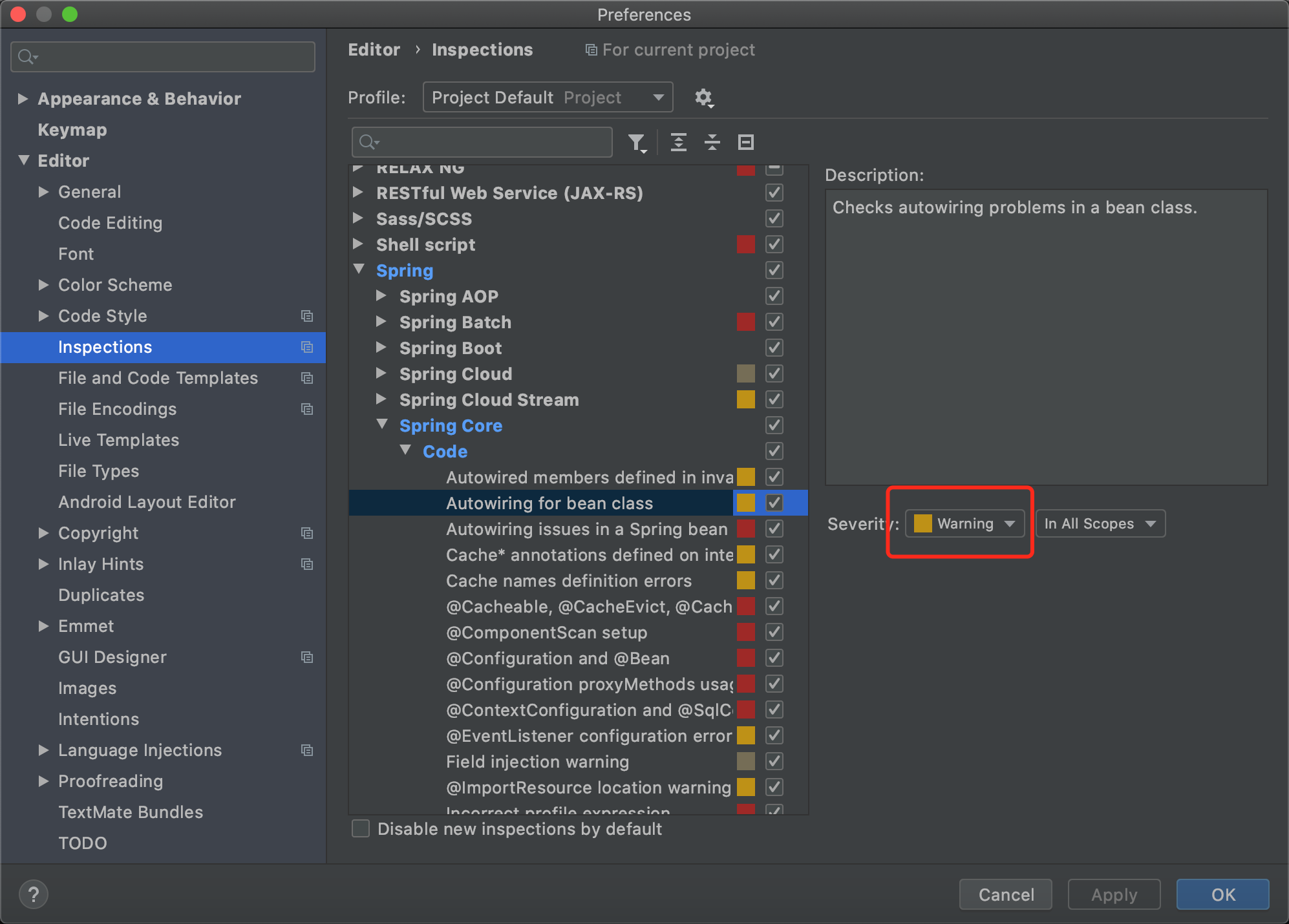
解决测试的时候找不到实现类的问题:
#这个是IDEA的问题,Spring在测试的时候是能够找到对应的实现类的
src/test/java/com/gxlaoshi/ut/dao/UserDaoTest.java
package com.gxlaoshi.ut.dao;

import com.gxlaoshi.ut.entity.User;
import junit.framework.TestCase;
import org.junit.Test;
import org.junit.runner.RunWith;
import org.springframework.beans.factory.annotation.Autowired;
import org.springframework.boot.test.context.SpringBootTest;
import org.springframework.test.context.junit4.SpringRunner;

import java.util.List;

@RunWith(SpringRunner.class)
@SpringBootTest
public class UserDaoTest extends TestCase {
    @Autowired
    private UserDao userDao;

    @Test
    public void testGetUserList() {
        List<User> userList = userDao.getUserList();
        System.out.println(userList.size());
    }

    @Test
    public void testGetUserById() {
        User user = userDao.getUserById(2);
        System.out.println(user.getUsername());
    }

    @Test
    public void testInsertUser() {
        User user = new User();
        user.setUsername("chenyisong");
        user.setPassword("123456");
        user.setRealname("陈裔松");
        user.setSchool("杭州电子科技大学");
        int effectedNum = userDao.insertUser(user);
        System.out.println(effectedNum);
    }

    @Test
    public void testUpdateUser() {
        User user = new User();
        user.setId(3);
        user.setPassword("654321");
        int effectedNum = userDao.updateUser(user);
        System.out.println(effectedNum);
    }

    @Test
    public void testDeleteUser() {
        int effectedNum = userDao.deleteUser(3);
        System.out.println(effectedNum);
    }
}
7.实现service
src/mian/java/com/gxlaoshi.ut/config/service/TransactionManagementConfiguration.java
#这里的目的是可以让service通过Transactional注解保证事务的原子性
package com.gxlaoshi.ut.config.service;

import org.springframework.context.annotation.Configuration;
import org.springframework.jdbc.datasource.DataSourceTransactionManager;
import org.springframework.transaction.PlatformTransactionManager;
import org.springframework.transaction.annotation.EnableTransactionManagement;
import org.springframework.transaction.annotation.TransactionManagementConfigurer;

import javax.annotation.Resource;
import javax.sql.DataSource;

@Configuration
@EnableTransactionManagement
public class TransactionManagementConfiguration implements TransactionManagementConfigurer {
    @Resource
    private DataSource dataSource;

    @Override
    public PlatformTransactionManager annotationDrivenTransactionManager() {
        return new DataSourceTransactionManager(dataSource);
    }
}
src/main/java/com/gxlaoshi/ut/web/UserController.java
package com.gxlaoshi.ut.web;

import com.gxlaoshi.ut.entity.User;
import com.gxlaoshi.ut.service.UserService;
import org.springframework.web.bind.annotation.RequestBody;
import org.springframework.web.bind.annotation.RequestMapping;
import org.springframework.web.bind.annotation.RequestMethod;
import org.springframework.web.bind.annotation.RestController;

import javax.annotation.Resource;
import java.util.HashMap;
import java.util.List;
import java.util.Map;

@RestController
@RequestMapping("/user")
public class UserController {
    @Resource
    private UserService userService;

    @RequestMapping(value = "/listAll")
    private Map<String, Object> listUser() {
        Map<String, Object> modelMap = new HashMap<String, Object>();
        List<User> list = userService.getUserList();
        modelMap.put("userList", list);
        return modelMap;
    }

    @RequestMapping(value = "listOne",method = RequestMethod.POST)
    private User listOne(@RequestBody User user) {
        return userService.getUserById(user.getId());
    }
}
src/main/java/com/gxlaoshi/ut/service/UserService.java
package com.gxlaoshi.ut.service;

import com.gxlaoshi.ut.entity.User;

import java.util.List;

public interface UserService {
    List<User> getUserList();
    User getUserById(int id);
    int insertUser(User user);
    int updateUser(User user);
    int deleteUser(int id);
}
src/main/java/com/gxlaoshi/ut/service/impl/UserServiceImpl.java
package com.gxlaoshi.ut.service.impl;

import com.gxlaoshi.ut.dao.UserDao;
import com.gxlaoshi.ut.entity.User;
import com.gxlaoshi.ut.service.UserService;
import org.springframework.stereotype.Service;
import org.springframework.transaction.annotation.Transactional;

import javax.annotation.Resource;
import java.util.List;

@Service
public class UserServiceImpl implements UserService {
    @Resource
    private UserDao userDao;

    @Override
    public List<User> getUserList() {
        return userDao.getUserList();
    }

    @Override
    public User getUserById(int id) {
        return userDao.getUserById(id);
    }

    @Transactional
    @Override
    public int insertUser(User user) {
        return userDao.insertUser(user);
    }

    @Transactional
    @Override
    public int updateUser(User user) {
        return userDao.updateUser(user);
    }

    @Transactional
    @Override
    public int deleteUser(int id) {
        return userDao.deleteUser(id);
    }
}
8.问题对策
问题:数据库连接超时
### Error querying database. Cause: com.mysql.cj.jdbc.exceptions.CommunicationsException: The last packet successfully received from the server was 80,504,441 milliseconds ago. The last packet sent successfully to the server was 80,504,442 milliseconds ago. is longer than the server configured value of 'wait_timeout'. You should consider either expiring and/or testing connection validity before use in your application, increasing the server configured values for client timeouts, or using the Connector/J connection property 'autoReconnect=true' to avoid this problem. ### The error may exist in file [/usr/local/tomcat/apache-tomcat-9.0.35/webapps/utapi/WEB-INF/classes/mapper/UserDao.xml] ### The error may involve defaultParameterMap ### The error occurred while setting parameters ### SQL: SELECT * FROM user WHERE username = ? ### Cause: com.mysql.cj.jdbc.exceptions.CommunicationsException: The last packet successfully received from the server was 80,504,441 milliseconds ago. The last packet sent successfully to the server was 80,504,442 milliseconds ago. is longer than the server configured value of 'wait_timeout'. You should consider either expiring and/or testing connection validity before use in your application, increasing the server configured values for client timeouts, or using the Connector/J connection property 'autoReconnect=true' to avoid this problem. ; The last packet successfully received from the server was 80,504,441 milliseconds ago. The last packet sent successfully to the server was 80,504,442 milliseconds ago. is longer than the server configured value of 'wait_timeout'. You should consider either expiring and/or testing connection validity before use in your application, increasing the server configured values for client timeouts, or using the Connector/J connection property 'autoReconnect=true' to avoid this problem.; nested exception is com.mysql.cj.jdbc.exceptions.CommunicationsException: The last packet successfully received from the server was 80,504,441 milliseconds ago. The last packet sent successfully to the server was 80,504,442 milliseconds ago. is longer than the server configured value of 'wait_timeout'. You should consider either expiring and/or testing connection validity before use in your application, increasing the server configured values for client timeouts, or using the Connector/J connection property 'autoReconnect=true' to avoid this problem.
对策:https://blog.csdn.net/hui1322157301/article/details/83780353

若有收获,就点个赞吧
0 人点赞


