Create product videos on-the-go
1. What is it?
Alibaba Wood is a smart tool that automatically generates product videos with images and information.
Simply enter the product ID, adjust image effects, keywords, product attributes and other aspects to optimize the video.
2. What are the requirements for use?
If the materials submitted do not meet the following specifications, you will be prompted to make the necessary adjustments.
(a) Identify your main industry in the following categories:
Agriculture, Food & Beverage, Apparel, Textiles & Leather Products, Electrical Equipment & Supplies, Home Appliances, Chemicals, Minerals & Metallurgy, Construction & Real Estate, Home & Garden, Gifts & Crafts, Sports & Entertainment, Office & School Supplies, Packaging & Printing, Toys & Hobbies, Security & Protection, Vehicles & Accessories, Timepieces, Jewelry, Eyewear, Lights & Lighting, Consumer Electronics, Beauty & Personal Care, Rubber & Plastics, Shoes & Accessories, Fashion Accessories, Electronic Components, Accessories & Telecommunications, Tools & Hardware, Furniture, Luggage, Bags & Cases
(b) Submit the following materials:
•At least four product images (length and width exceeding 500 pixels with max. aspect ratio of 4:3)
•At least two images of your company (length and width exceeding 300 pixels with max. aspect ratio of 11:5)
•Images of relevant certifications (length and width exceeding 300 pixels with max. aspect ratio of 5:3)
Note: Overall, there must be a total of at least eight images (including product images, company images and certificates).
3. Creating a product video with Alibaba Wood
Step 1: Go to My Alibaba > Manage Products > Smart video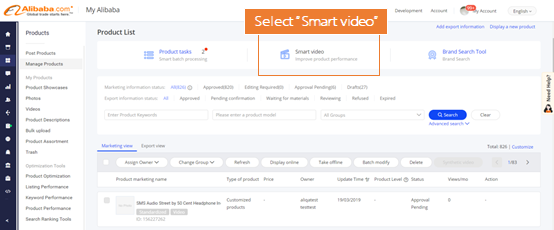
Step 2: Enter your desired product ID on the Alibaba Wood page and click “Generate”
Step 3: Click “Set at Main Product Video” on the preview page
Notes:
1. If there is an existing video for a certain product, confirm if you would like to use this generated video to replace it instead
2. If you are not satisfied with the video on preview, you can choose to adjust the product listing to regenerate a different video
4. Creating multiple product videos with Alibaba Wood
Step 1: Go to My Alibaba > Manage Products. Select the products you wish to generate videos for and click “Synthetic video”.
Step 2: If you would like to generate videos for all the products you selected, click “Generate for all”. If you would like to generate videos only for products that do not have existing videos, click ”Generate for products without videos”.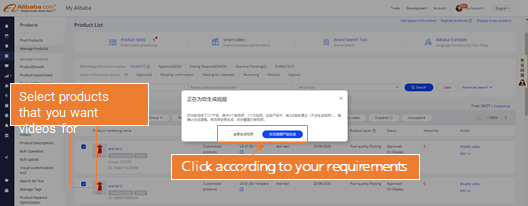
Notes:
1.Videos will be created within 24 hours. Once generated, they will automatically be displayed as the main video of the product. We recommend making a small number of videos first to make sure the results meet your needs.
2.Every supplier can generate up to 100 videos with Alibaba Wood. Make sure to select products with high Product Information Scores (PIS) and without videos for the best results. If you have reached the limit, delete some older files in the video bank.
Step 3:To check the status of your videos or preview them, go to Smart video > Video Library > View More
FAQ:
1. How many smart videos can be generated using Alibaba Wood?
Each supplier can generate up to 100 videos using Alibaba Wood. We recommend selecting products with high Product Information Scores (PIS) to get the best results. Delete videos from the video bank in order to make space for new ones once you have reached the limit.
2. Why can’t I find the final video file generated by Alibaba Wood in the video library?
You need a browser to generate the videos, preferably Google Chrome.
3. Are there any incurring charges if I want to use Alibaba Wood?
No, it is currently free of charge.
4. Do the generated videos come with background music?
No, the videos are pure visuals.
5. If there are changes to a product’s information, will the video automatically reflect these changes?
No, you will need to use Alibaba Wood to create a new video and it will automatically replace the old one.
6. Why can’t I click the“Synthetic video” button to generate videos in bulk?
You need to select the products you wish to generate videos for first before clicking that button.


若有收获,就点个赞吧
0 人点赞


