收集于:
https://zhuanlan.zhihu.com/p/39620591
巧用注释
通过/** */形式的注释可以给 TS 类型做标记,编辑器会有更好的提示:
/** A cool guy. */interface Person {/** A cool name. */name: string,}
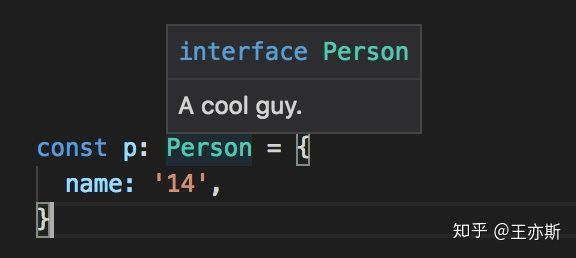
注释有很多规范的字段,在 /** */ 里输入 @ 就可以看到丰富的选择:
巧用typeof
我们一般先写类型,再使用:
interface Opt {timeout: number}const defaultOption: Opt = {timeout: 500}
有时候可以反过来:
const defaultOption = {timeout: 500}type Opt = typeof defaultOption
当一个 interface 总有一个字面量初始值时,可以考虑这种写法以减少重复代码。
巧用联合类型
Dinner 要么有 fish 要么有 bear 。
// 🙁 Not good.interface Dinner1 {fish?: number,bear?: number,}// 🙂 Awesome!type Dinner2 = {fish: number,} | {bear: number,}
一些区别:
let d1: Dinner1 = {} // Oppsd1 = {fish:1, bear:1} // Oppslet d2: Dinner2 = {} // Protected!d2 = {fish:1, bear:1} // Protected!if ('fish' in d2) {// `d2` has `fish` and no `bear` here.} else {// `d2` has `bear` and no `fish` here.}
巧用查找类型
interface Person {addr: {city: string,street: string,num: number,}}
当需要使用 addr 的类型时,除了把类型提出来
interface Address {city: string,street: string,num: number,}interface Person {addr: Address,}
巧用查找类型+泛型+keyof
interface API {'/user': { name: string },'/menu': { foods: Food[] },}const get = <URL extends keyof API>(url: URL): Promise<API[URL]> => {return fetch(url).then(res => res.json())}


巧用显式泛型
$('button') 是个 DOM 元素选择器,可是返回值的类型是运行时才能确定的,除了返回 any,还可以
function $<T extends HTMLElement>(id: string):T {return document.getElementById(id)}// Tell me what element it is.$<HTMLInputElement>('input').value
巧用 DeepReadonly
type DeepReadonly<T> = {readonly [P in keyof T]: DeepReadonly<T[P]>; // 递归}const a = { foo: { bar: 22 } }const b = a as DeepReadonly<typeof a>b.foo.bar = 33 // Hey, stop!
巧用 Omit
import { Button, ButtonProps } from './components/button'type Omit<T, K> = Pick<T, Exclude<keyof T, K>>type BigButtonProps = Omit<ButtonProps, 'size'>function BigButton(props: BigButtonProps) {return Button({ ...props, size: 'big' })}

若有收获,就点个赞吧
0 人点赞


