数据导入
向表中装载数据(Load)
语法
hive> load data [local] inpath '/opt/module/datas/student.txt' [overwrite] into table student [partition (partcol1=val1,…)];
(1)load data:表示加载数据
(2)local:表示从本地加载数据到hive表;否则从HDFS加载数据到hive表
(3)inpath:表示加载数据的路径
(4)overwrite:表示覆盖表中已有数据,否则表示追加
(5)into table:表示加载到哪张表
(6)student:表示具体的表
(7)partition:表示上传到指定分区
实操案例
创建一张表
hive (default)> create table student(id string, name string) row format delimited fields terminated by '\t';
加载本地文件到hive
hive (default)> load data local inpath '/opt/module/datas/student.txt' into table default.student;
加载HDFS文件到hive中
hive (default)> dfs -put /opt/module/datas/student.txt /user/atguigu/hive;
加载HDFS上数据
hive (default)> load data inpath '/user/atguigu/hive/student.txt' into table default.student;
加载数据覆盖表中已有的数据
hive (default)> load data inpath '/user/atguigu/hive/student.txt' overwrite into table default.student;
通过查询语句向表中插入数据(Insert)
创建一张分区表
hive (default)> create table student_par(id int, name string) partitioned by (month string) row format delimited fields terminated by '\t';
基本插入数据
hive (default)> insert into table student_par partition(month='201709') values(1,'wangwu'),(2,'zhaoliu');
基本模式插入(根据单张表查询结果)
hive (default)> insert overwrite table student partition(month='201708') select id, name from student where month='201709';
insert into:以追加数据的方式插入到表或分区,原有数据不会删除
insert overwrite:会覆盖表或分区中已存在的数据
注意:insert不支持插入部分字段
多表(多分区)插入模式(根据多张表查询结果)
hive (default)> from student
              insert overwrite table student partition(month='201707')
              select id, name where month='201709'
              insert overwrite table student partition(month='201706')
              select id, name where month='201709';
查询语句中创建表并加载数据(As Select)
根据查询结果创建表(查询的结果会添加到新创建的表中)
create table if not exists student3 as select id, name from student;
创建表时通过Location指定加载数据路径
上传数据到hdfs上
hive (default)> dfs -mkdir /student;
hive (default)> dfs -put /opt/module/datas/student.txt /student;
创建表,并指定在hdfs上的位置
hive (default)> create external table if not exists student5(
              id int, name string
              )
              row format delimited fields terminated by '\t'
              location '/student;
查询数据
hive (default)> select * from student5;
Import数据到指定Hive表中
注意:先用export导出后,再将数据导入
hive (default)> import table student2 partition(month='201709') from '/user/hive/warehouse/export/student';
数据导出
Insert导出
将查询的结果导出到本地
hive (default)> insert overwrite local directory '/opt/module/datas/export/student'
            select * from student;
将查询的结果格式化导出到本地
hive(default)>insert overwrite local directory '/opt/module/datas/export/student1'
           ROW FORMAT DELIMITED FIELDS TERMINATED BY '\t'             select * from student;
将查询的结果导出到HDFS上(没有local)
hive (default)> insert overwrite directory '/user/atguigu/student2'
             ROW FORMAT DELIMITED FIELDS TERMINATED BY '\t'
             select * from student;
Hadoop命令导出到本地
hive (default)> dfs -get /user/hive/warehouse/student/month=201709/000000_0
/opt/module/datas/export/student3.txt;
Hive Shell 命令导出
基本语法:(hive -f/-e 执行语句或者脚本 > file)
[atguigu@hadoop102 hive]$ bin/hive -e 'select * from default.student;' >
 /opt/module/datas/export/student4.txt;
Export导出到HDFS上
(defahiveult)> export table default.student to
 '/user/hive/warehouse/export/student';
export和import主要用于两个Hadoop平台集群之间Hive表迁移。
清除表中数据(Truncate)
注意:Truncate只能删除管理表,不能删除外部表中数据
hive (default)> truncate table student;
查询
查询语句语法:
[WITH CommonTableExpression (, CommonTableExpression)*]    (Note: Only available
 starting with Hive 0.13.0)
SELECT [ALL | DISTINCT] select_expr, select_expr, ...
  FROM table_reference
  [WHERE where_condition]
  [GROUP BY col_list]
  [ORDER BY col_list]
  [CLUSTER BY col_list
    | [DISTRIBUTE BY col_list] [SORT BY col_list]
  ]
 [LIMIT number]
基本查询(Select…From)
创建部门表
create table if not exists dept(
deptno int,
dname string,
loc int
)
row format delimited fields terminated by '\t';
创建员工表
create table if not exists emp(
empno int,
ename string,
job string,
mgr int,
hiredate string,
sal double,
comm double,
deptno int)
row format delimited fields terminated by '\t';
导入数据
load data local inpath '/opt/module/datas/dept.txt' into table
dept;
load data local inpath '/opt/module/datas/emp.txt' into table emp;
全表查询
hive (default)> select * from emp;
选择特定列查询
hive (default)> select empno, ename from emp;
注意:
(1)SQL 语言大小写不敏感。
(2)SQL 可以写在一行或者多行
(3)关键字不能被缩写也不能分行
(4)各子句一般要分行写。
(5)使用缩进提高语句的可读性。
列别名
查询名称和部门
hive (default)> select ename AS name, deptno dn from emp;
算术运算符
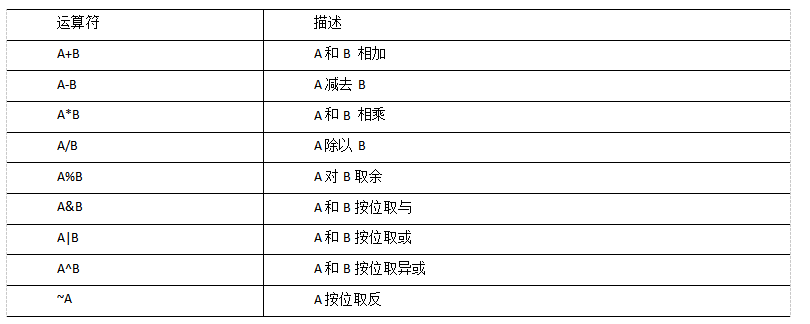
案例实操
查询出所有员工的薪水后加1显示
hive (default)> select sal +1 from emp;
常用函数
求总行数(count)
hive (default)> select count(*) cnt from emp;
求工资的最大值(max)
hive (default)> select max(sal) max_sal from emp;
求工资的最小值(min)
hive (default)> select min(sal) min_sal from emp;
求工资的总和(sum)
hive (default)> select sum(sal) sum_sal from emp;
求工资的平均值(avg)
hive (default)> select avg(sal) avg_sal from emp;
Limit语句
典型的查询会返回多行数据。LIMIT子句用于限制返回的行数。
hive (default)> select * from emp limit 5;
Where语句
查询出薪水大于1000的所有员工
hive (default)> select * from emp where sal >1000;
比较运算符(Between/In/ Is Null)
查询出薪水等于5000的所有员工
hive (default)> select * from emp where sal =5000;
查询工资在500到1000的员工信息
hive (default)> select * from emp where sal between 500 and 1000;
查询comm为空的所有员工信息
hive (default)> select * from emp where comm is null;
查询工资是1500或5000的员工信息
hive (default)> select * from emp where sal IN (1500, 5000);
Like和RLike
1)使用LIKE运算选择类似的值
2)选择条件可以包含字符或数字:
% 代表零个或多个字符(任意个字符)。
_ 代表一个字符。
3)RLIKE子句是Hive中这个功能的一个扩展,其可以通过Java的正则表达式这个更强大的语言来指定匹配条件。
案例实操
查找以2开头薪水的员工信息
hive (default)> select * from emp where sal LIKE '2%';
查找第二个数值为2的薪水的员工信息
hive (default)> select * from emp where sal LIKE '_2%';
查找薪水中含有2的员工信息
hive (default)> select * from emp where sal RLIKE '[2]';
逻辑运算符(And/Or/Not)
案例实操
查询薪水大于1000,部门是30
hive (default)> select * from emp where sal>1000 and deptno=30;
查询薪水大于1000,或者部门是30
hive (default)> select * from emp where sal>1000 or deptno=30;
查询除了20部门和30部门以外的员工信息
hive (default)> select * from emp where deptno not IN(30, 20);
分组
Group By语句
GROUP BY语句通常会和聚合函数一起使用,按照一个或者多个列队结果进行分组,然后对每个组执行聚合操作。
案例实操
计算emp表每个部门的平均工资
hive (default)> select t.deptno, avg(t.sal) avg_sal from emp t group by t.deptno;
计算emp每个部门中每个岗位的最高薪水
hive (default)> select t.deptno, t.job, max(t.sal) max_sal from emp t group by
 t.deptno, t.job;
Having语句
having与where不同点
1)where后面不能写分组函数,而having后面可以使用分组函数。
2)having只用于group by分组统计语句。
案例实操
求每个部门的平均薪水大于2000的部门,求每个部门的平均工资
hive (default)> select deptno, avg(sal) from emp group by deptno;
求每个部门的平均薪水大于2000的部门
hive (default)> select deptno, avg(sal) avg_sal from emp group by deptno having avg_sal > 2000;
等值Join
Hive支持通常的SQL JOIN语句,但是只支持等值连接,不支持非等值连接。
案例实操
根据员工表和部门表中的部门编号相等,查询员工编号、员工名称和部门名称;
hive (default)> select e.empno, e.ename, d.deptno, d.dname from emp e join dept d on e.deptno = d.deptno;
表的别名
好处:
(1)使用别名可以简化查询。
(2)使用表名前缀可以提高执行效率。
案例实操
合并员工表和部门表
hive (default)> select e.empno, e.ename, d.deptno from emp e join dept d on e.deptno
 = d.deptno;
内连接
内连接:只有进行连接的两个表中都存在与连接条件相匹配的数据才会被保留下来。
hive (default)> select e.empno, e.ename, d.deptno from emp e join dept d on e.deptno
 = d.deptno;
左外连接
左外连接:JOIN操作符左边表中符合WHERE子句的所有记录将会被返回。
hive (default)> select e.empno, e.ename, d.deptno from emp e left join dept d on e.deptno = d.deptno;
右外连接
右外连接:JOIN操作符右边表中符合WHERE子句的所有记录将会被返回。
hive (default)> select e.empno, e.ename, d.deptno from emp e right join dept d on e.deptno = d.deptno;
满外连接
满外连接:将会返回所有表中符合WHERE语句条件的所有记录。如果任一表的指定字段没有符合条件的值的话,那么就使用NULL值替代。
hive (default)> select e.empno, e.ename, d.deptno from emp e full join dept d on e.deptno
 = d.deptno;
多表连接
注意:连接 n个表,至少需要n-1个连接条件。例如:连接三个表,至少需要两个连接条件。
hive (default)>SELECT e.ename, d.dname, l.loc_name
FROM   emp e
JOIN   dept d
ON     d.deptno = e.deptno
JOIN   location l
ON     d.loc = l.loc;
大多数情况下,Hive会对每对JOIN连接对象启动一个MapReduce任务。本例中会首先启动一个MapReduce job对表e和表d进行连接操作,然后会再启动一个MapReduce job将第一个MapReduce job的输出和表l;进行连接操作。
注意:为什么不是表d和表l先进行连接操作呢?这是因为Hive总是按照从左到右的顺序执行的。
优化:当对3个或者更多表进行join连接时,如果每个on子句都使用相同的连接键的话,那么只会产生一个MapReduce job。
排序
Order By:全局排序,只有一个Reducer
使用 ORDER BY 子句排序
ASC(ascend): 升序(默认)
DESC(descend): 降序
ORDER BY 子句在SELECT语句的结尾
案例实操
查询员工信息按工资升序排列
hive (default)> select * from emp order by sal;
查询员工信息按工资降序排列
hive (default)> select * from emp order by sal desc;
按照别名排序
按照员工薪水的2倍排序
hive (default)> select ename, sal*2 twosal from emp order by twosal;
多个列排序
按照部门和工资升序排序
hive (default)> select ename, deptno, sal from emp order by deptno, sal ;
每个MapReduce内部排序(Sort By)
Sort By:对于大规模的数据集order by的效率非常低。在很多情况下,并不需要全局排序,此时可以使用sort by。
Sort by为每个reducer产生一个排序文件。每个Reducer内部进行排序,对全局结果集来说不是排序。
设置reduce个数
hive (default)> set mapreduce.job.reduces=3;
查看设置reduce个数
hive (default)> set mapreduce.job.reduces;
根据部门编号降序查看员工信息
hive (default)> select * from emp sort by deptno desc;
将查询结果导入到文件中(按照部门编号降序排序)
hive (default)> insert overwrite local directory '/opt/module/datas/sortby-result'
 select * from emp sort by deptno desc;
分区排序(Distribute By)
Distribute By: 在有些情况下,我们需要控制某个特定行应该到哪个reducer,通常是为了进行后续的聚集操作。distribute by 子句可以做这件事。distribute by类似MR中partition(自定义分区),进行分区,结合sort by使用。 对于distribute by进行测试,一定要分配多reduce进行处理,否则无法看到distribute by的效果。
案例实操:
先按照部门编号分区,再按照员工编号降序排序。
hive (default)> set mapreduce.job.reduces=3;
hive (default)> insert overwrite local directory '/opt/module/datas/distribute-result' select * from emp distribute by deptno sort by empno desc;
注意:
1.distribute by的分区规则是根据分区字段的hash码与reduce的个数进行模除后,余数相同的分到一个区。
2.Hive要求DISTRIBUTE BY语句要写在SORT BY语句之前。
Cluster By
当distribute by和sorts by字段相同时,可以使用cluster by方式。
cluster by除了具有distribute by的功能外还兼具sort by的功能。但是排序只能是升序排序,不能指定排序规则为ASC或者DESC。
以下两种写法等价
hive (default)> select * from emp cluster by deptno;
hive (default)> select * from emp distribute by deptno sort by deptno;
注意:按照部门编号分区,不一定就是固定死的数值,可以是20号和30号部门分到一个分区里面去。
自定义函数
1)Hive 自带了一些函数,比如:max/min等,但是数量有限,自己可以通过自定义UDF来方便的扩展。
2)当Hive提供的内置函数无法满足你的业务处理需要时,此时就可以考虑使用用户自定义函数(UDF:user-defined function)。
3)根据用户自定义函数类别分为以下三种:
(1)UDF(User-Defined-Function)
一进一出
(2)UDAF(User-Defined Aggregation Function)
聚集函数,多进一出
类似于:count/max/min
(3)UDTF(User-Defined Table-Generating Functions)
一进多出
如lateral view explore()
4)官方文档地址
https://cwiki.apache.org/confluence/display/Hive/HivePlugins
5)编程步骤:
(1)继承org.apache.hadoop.hive.ql.exec.UDF
(2)需要实现evaluate函数;evaluate函数支持重载;
(3)在hive的命令行窗口创建函数
a)添加jar
add jar linux_jar_path
b)创建function
create [temporary] function [dbname.]function_name AS class_name;
(4)在hive的命令行窗口删除函数
Drop [temporary] function [if exists] [dbname.]function_name;
6)注意事项
(1)UDF必须要有返回类型,可以返回null,但是返回类型不能为void;
自定义UDF函数
创建一个Maven工程Hive, 导入依赖
<dependencies>
        <!-- https://mvnrepository.com/artifact/org.apache.hive/hive-exec -->
        <dependency>
            <groupId>org.apache.hive</groupId>
            <artifactId>hive-exec</artifactId>
            <version>3.1.2</version>
        </dependency>
</dependencies>
创建一个类
package com.hive.function;
import org.apache.hadoop.hive.ql.exec.UDF;

public class Lower extends UDF {

    public String evaluate (final String s) {

        if (s == null) {
            return null;
        }

        return s.toLowerCase();
    }
}
打成jar包上传到服务器/opt/module/jars/udf.jar
将jar包添加到hive的classpath
hive (default)> add jar /opt/module/datas/udf.jar;
创建临时函数与开发好的java class关联
hive (default)> create temporary function mylower as "com.hive.function.Lower";
即可在hql中使用自定义的函数strip
hive (default)> select ename, mylower(ename) lowername from emp;

若有收获,就点个赞吧
0 人点赞


