Definition: “The process of finding out, analyzing, documenting and checking the services and constraints of a software system is called requirements engineering (RE)”
RE Processes
Key Activities
Elicitation and analysis
Interact with stakeholders(someone who is related to the project), discovering the user and system requirements.
Specification
Convert requirements into standard form.
Validations
Assess feasibility of the project; building prototype if needed; review requirements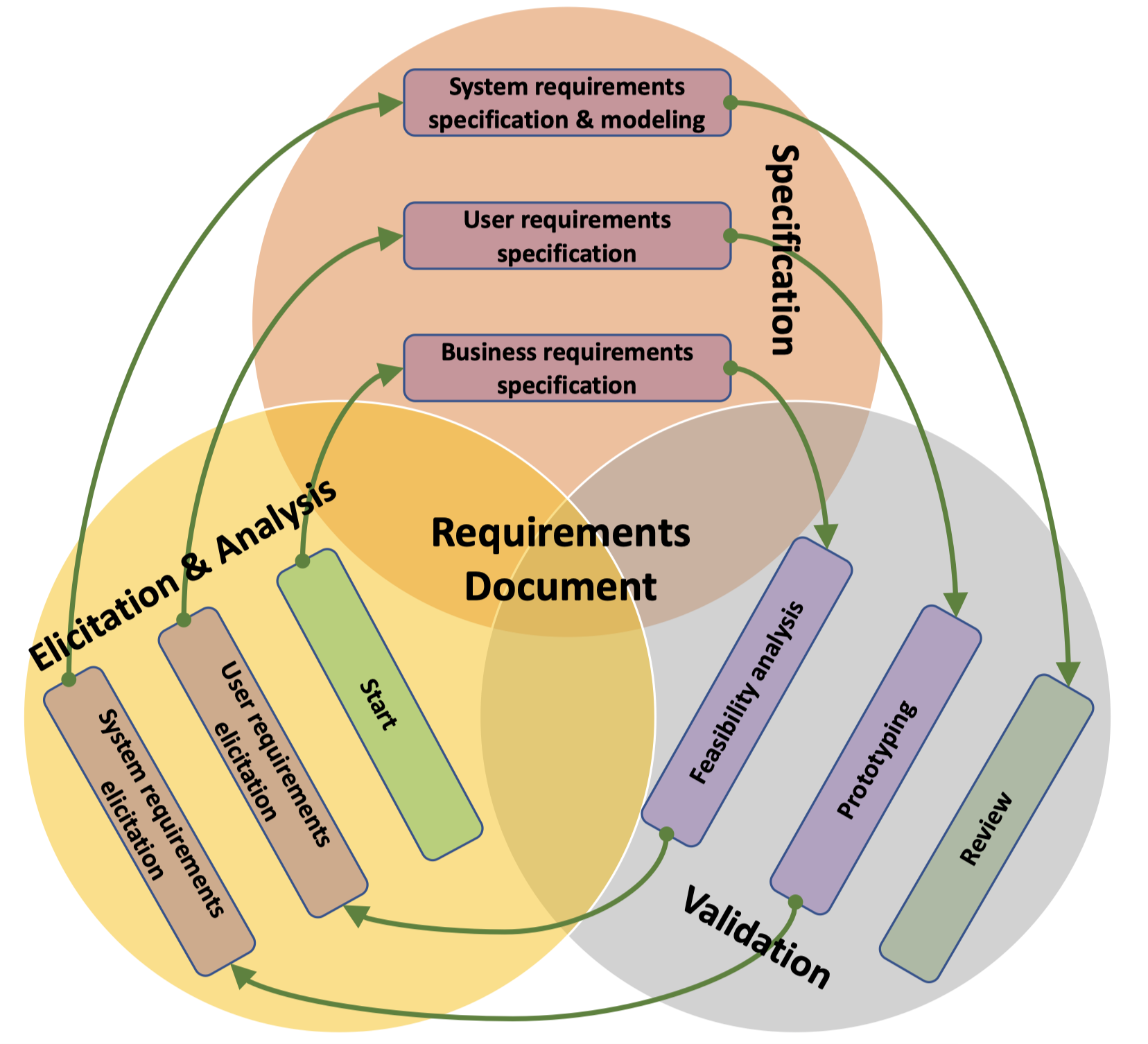
Requirements Elicitation
Objectives
- Understand the application domain
- identify relevant work activities
- identify service components
- identify system features
- identify constraints and environment of the system
- identify How the new system is going to be used and How the new system is going to help the users
(Personal understanding)
There are 4 questions that can help in RE.
- What they want?
- Why they want it?
- What they actually need?
- How to turn it into system requirements?
It’s important for SDE to know that what customer wants is **NOT** what they needs.
Example:
- The Customers want “Questions are grouped based on the types (HR related); each group shall be displayed on a separate page.”
- Because the Customers don’t want the questions in the questionnaire display crowdedly and the related questions can display together.
- What they need is a function to determine the position of question. (Having considered the Expandability)
- (Leave to thinking)
Process Mode
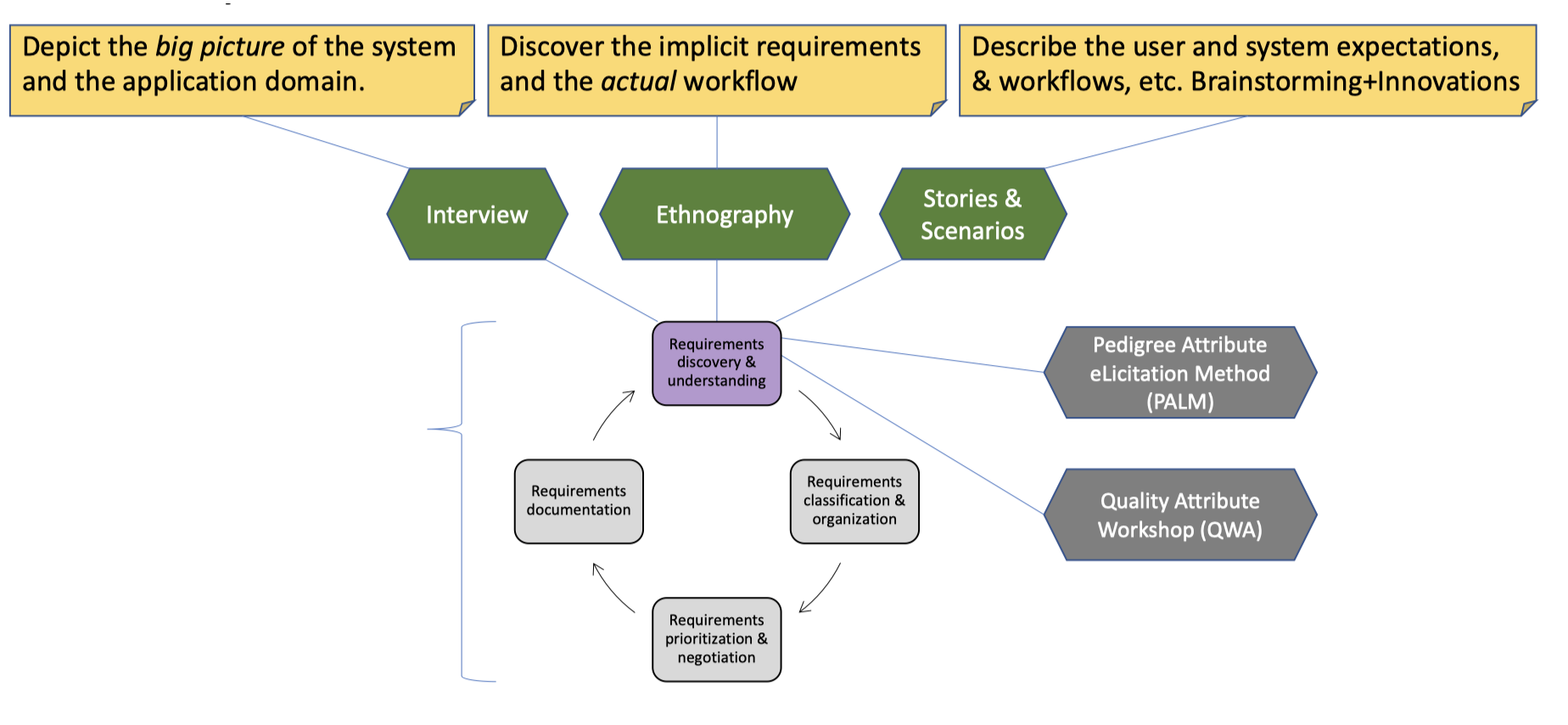
Discovery and understanding
Discover requirements and domain requirements
Domain Requirements
“Domain requirements are derived from the application domain of the system rather than from the specific needs of system users.”
Classification and organization
Take the unstructured collection of requirements, groups related requirements
Prioritization and negotiation
Prioritizing requirements, identify duplicated requirements, and resolving requirements conflicts
Documentation
Requirements maybe formally documented using standard templates or informally maintained on whiteboards, wikis, or other shared spaces
Techniques
Interview
- Closed Interviews
- Open Interviews
Aim to get an overall understanding of what users do, and how they might interact with the new system
Ethnography
Ethnography is an observational technique that can be used to understand operational processes and help derive requirements for software to support these processes.
- Immerse yourself in the working environment
- Observe day-to-day work and taking notes
- Discover how people actually work, rather than the pre-defined (standard) business processes
- Discover implicit requirements of the system
The Importance of the Observation Activity
- Actual work practices are far richer, more complex, and more dynamic than the models assumed
- People often find it very difficulty to clearly articulate details of their work
- People may understand their own work, but may not understand its relationship to other work in the organization
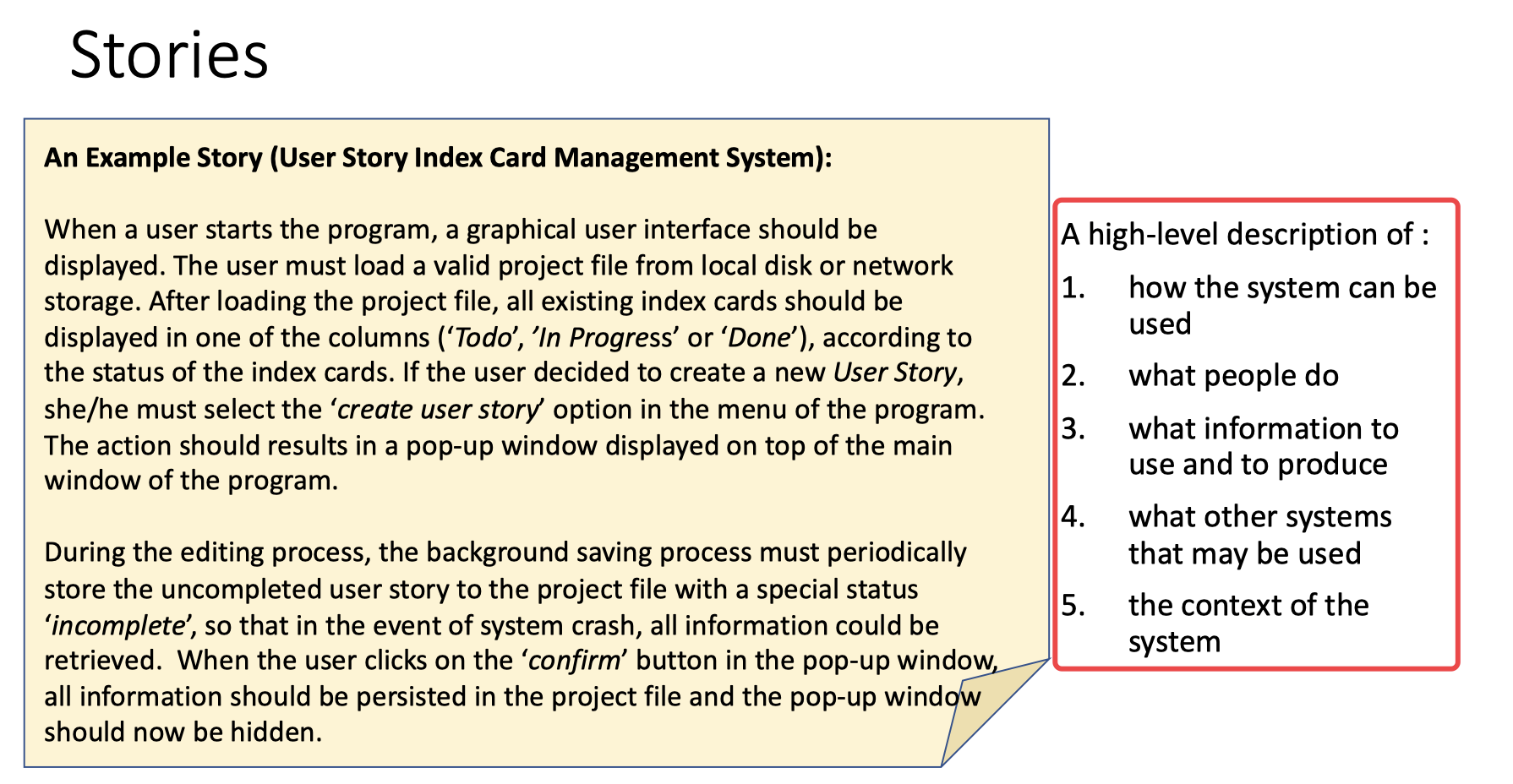
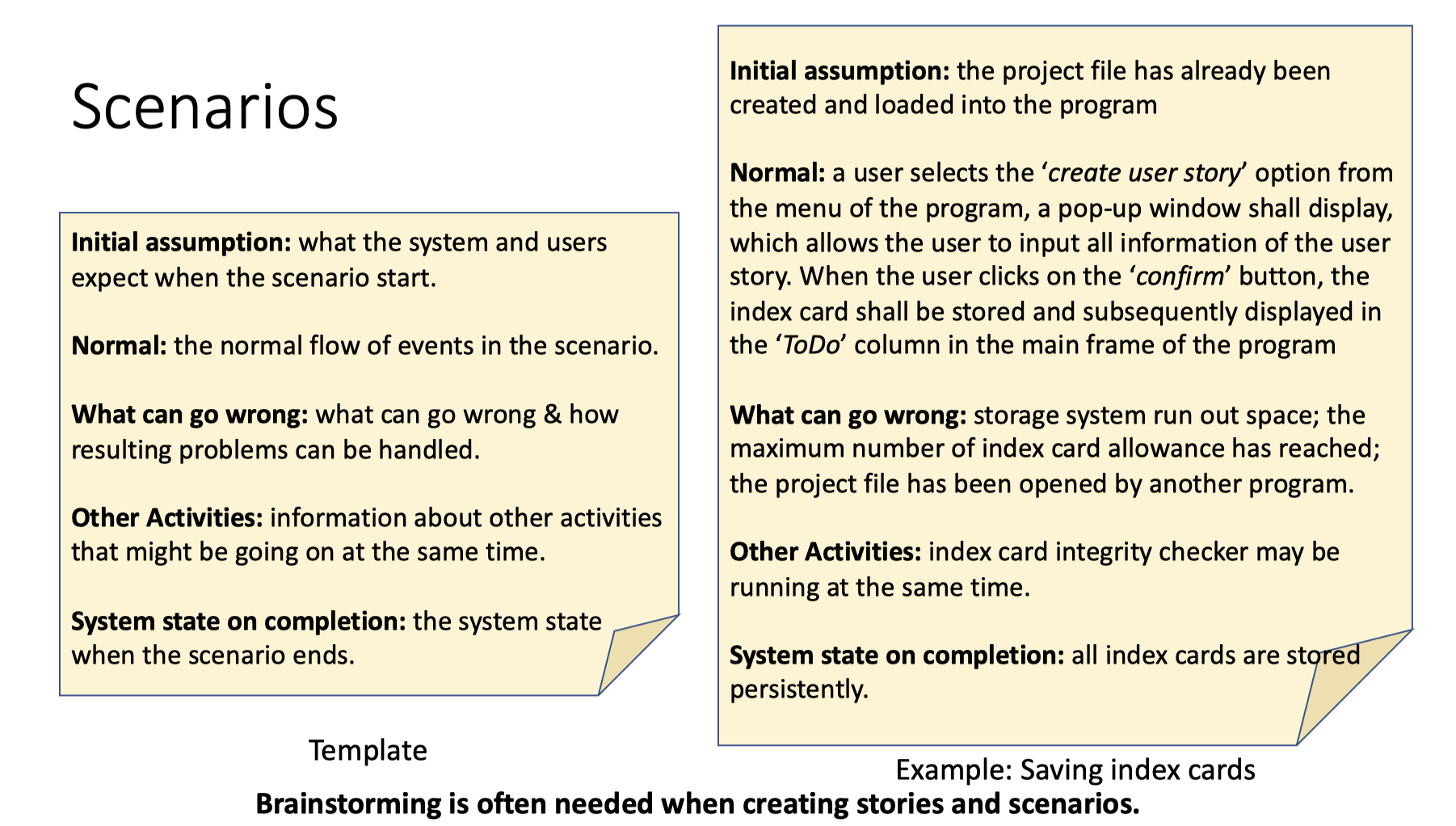
Stories & Scenarios

Summary
Requirements
User/System Requirements
User Requirements
- Often written in natural langue with diagrams
- High-level, abstract statement of a service that a system should provide or a constraint on a system
Usually written for non-technical people
Detailed description of software system’s services and operational constraints
- Define exactly what is to be implemented
- It may be part of the contract between system investors and software developers
Usually written for technical people
Use natural language to write functional requirements
- Functional requirements traditionally focused on what the system should do
Depending on the nature of the system to be developed, the focus may be shifted to other aspects of the system
Non-Functional Requirements
Specify characteristics of the system as a whole.
- Non-functional requirements are more critical than individual functional requirements.
- Non-functional requirements are difficult to implement.
Measurable Non-Functional Requirements
Quality Attribute Scenarios
1. Source of stimulus: entities (a human, a computer system, or any other actuator) that generated the stimulus
2. Stimulus: a condition that requires a response when it arrives at a system
3. Environment: the stimulus occurs under certain conditions. For example, the system is under an overloaded condition or in a normal operation, or some other relevant state
4. Artifact: a collection of systems, the whole system, or some pieces of it.
5. Response: the activity undertaken as the result of the arrival of the stimulus
6. Response measure: when the response occurs, it should be measurable in some ways so that the requirements can be tested.
For System Reliability
The Categories of Non-Functional Requirement

The Boundaries
When documenting requirements, we often need to specify the relationships between functional and non-functional requirements.Summary of Requirements

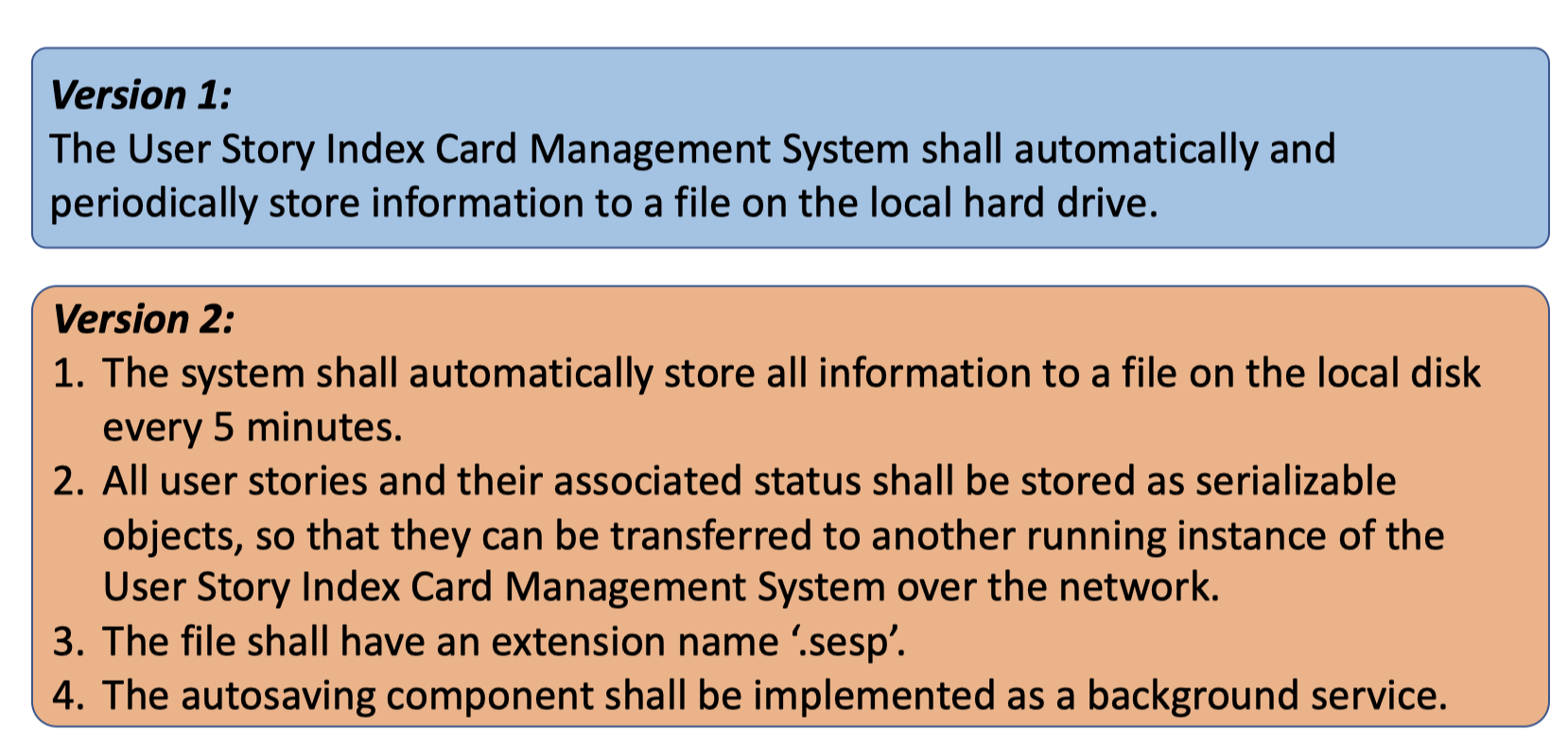
Prioritization and Negotiation
When multiple stakeholders are involved, requirements will conflict. Resolving requirements conflicts through negotiation.
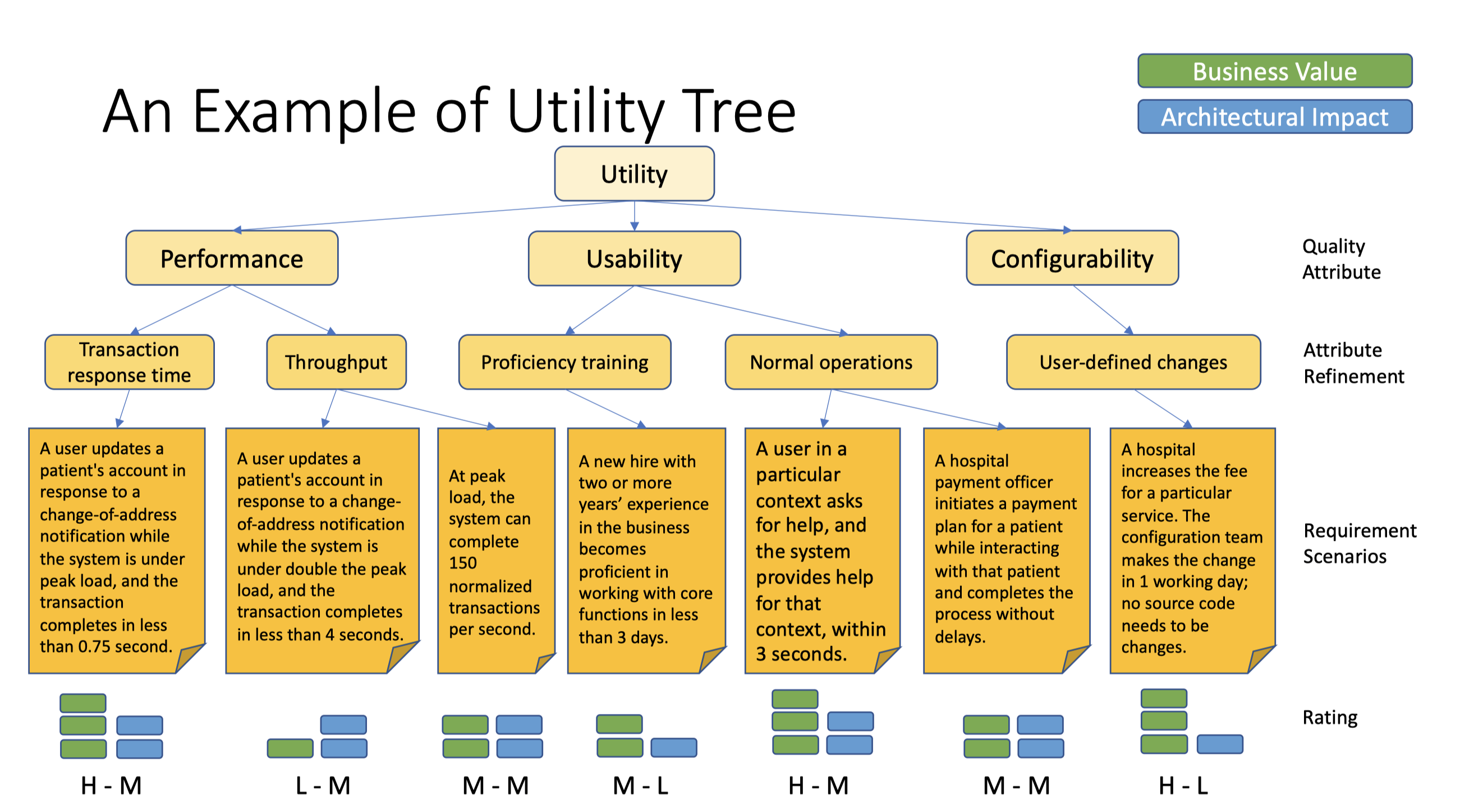
Prioritizing Non-Functional Requirements Using Utility Tree
- A way to record non-functional requirements all in one place
- Establishes priority of each requirement in terms of
- impact on software architecture
- impact on business value
Stakeholders can review the utility tree to make sure their concerns have been addressed
Utility Tree
The root of a utility tree is a placeholder node, labelled as “Utility”
- The second level of the tree contains broad quality attribute categories.
- The third level of the tree refines those categories.
- Requirements are captured as scenarios.
- Each scenario is rated by both system buyers and architects, at level of Low (L), Medium (M) or High (H).
- Scenarios with (H,H) rating are the ones that deserve the most attention.
- Having too many (H, H) might be a cause for concern: Is the system achievable?
Feasibility Study
Business
- Operational feasibility
- How the proposed system will affect organizational structures, working procedures and people
Economic feasibility (cost-benefit analysis)
Technical feasibility
- Assesses the practicality of the proposed technical solution and the availability of technical skills, expertise and resources
- Schedule feasibility
- Assesses the project timetable
Requirements Specification
Structured natural language
- Requirements are written in natural language in standard form or template
- Use language consistently to distinguish between mandatory and desirable requirements.
- Do NOT assume that readers understand technical or software engineering language
Using Standard Form (Template)
- Function:
- Description:
- Inputs:
- Source:
- Outputs:
- Destination:
- Action:
- Requires:
- Precondition:
- Postcondition:
- Side-effects:
Consistency Ambiguity
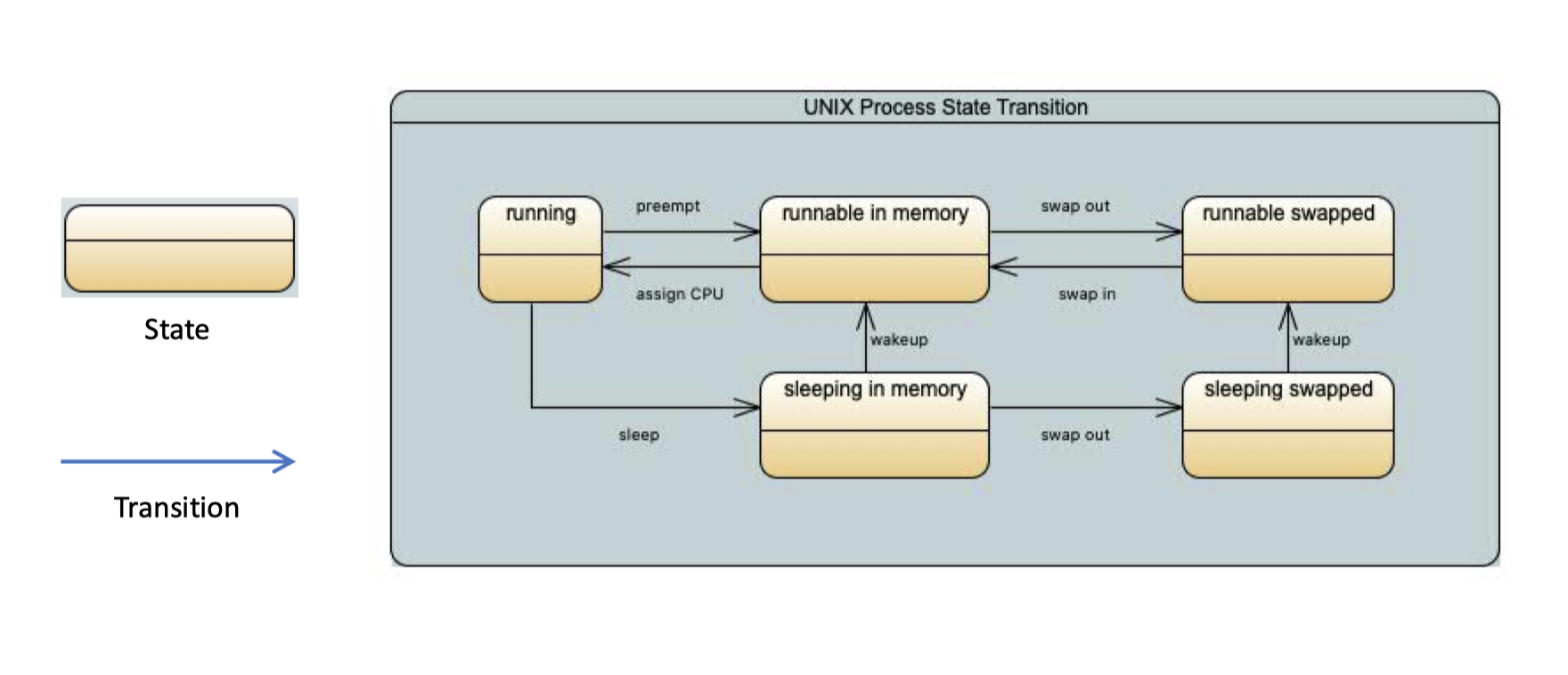
Graphical notations
Unified Modeling Language (UML) diagrams
Using notations based on mathematical concepts
- Finite-state machines or Formal Methods

Requirements Validation
- Validity checks
- Whether the requirements reflect the real needs of system users
- Consistency checks
- Identify conflict & confusion requirements
- Completeness checks
- Whether the documented requirements define all functions and constraints
- Realism checks
- Whether the software system can be implemented within the proposed budget or supported by existing technologies
- Verifiability
- Whether functions and quality attributes are verifiable

若有收获,就点个赞吧
0 人点赞


