- 1 基本介绍
- 2 模块基本构成
- 2.1 LinearGeometry各类基本介绍
- 2.2 GeometryModel各类基本介绍
- 1) ConsensusItem
- 2) ModelEntity
- 3) NamedModelEntity
- 4) Annotation
- 5) AnnotationDefinition
- 6) AnnotationProcessingGroup
- 7) ApplicationObjectSettings
- 8) XSectionNamedBoundary
- 9) ProfileNamedBoundary
- 10) PlanNamedBoundary
- 11) SurveyPoint
- 12) SurveyChain
- 13) StationEquation
- 14) GeometricSpace
- 15) SuperElevationTransition
- 16) FeaturizedModelEntity
- 17) Corridor
- 18) FeatureDefinition
- 19) SuperElevation
- 20) SuperElevationSection
- 21) AnnotationGroup
- 22) AnnotationGroupReference
- 23) GeometryPresentation
- 24) GeometricModel
- 25) LongSectionSpace
- 26) Alignment
- 27) LinearEntity3d
- 28) PointEntity2d
- 29) Profile
- 30) SurfaceEntity
- 31) ScalableMeshSurface
- 32) TerrainSurface
- 33) ConsensusConnection
- 34) StationFormatSettings
- 35) StationingFormatter
- 3 模块使用指南
- 4 GeometryModel模块API参考
- 4.1 Alignment
- 4.2 AnnotationDefinition
- 4.3 AnnotationGroup
- 4.4 AnnotationGroupReference
- 4.5 Annotation
- 4.6 AnnotationProcessingGroup
- 4.7 ApplicationObjectSettings
- 4.8 ConsensusConnection
- 4.9 ConsensusItemCache
- 4.10 CorridorSurface
- 4.11 Corridor
- 4.12 FeatureDefinition
- 4.13 GeometricModel
- 4.14 GeometricSpace
- 4.15 GeometryPresentation
- 4.16 LinearGeometryPresentation
- 4.17 PointGeometryPresentation
- 4.18 LinearEntity3d
- 4.19 LongSectionSpace
- 4.20 ModelEntity
- 4.21 NamedModelEntity
- 4.22 FeaturizedModelEntity
- 4.23 PointEntity2d
- 4.24 Profile
- 4.25 Role
- 4.26 RoleSetOverrides
- 4.27 ScalableMeshSurface
- 4.28 StationEquation
- 4.29 StationFormatSettings
- 4.30 StationingFormatter
- 4.31 Stationing
- 4.32 SuperElevationTransition
- 4.33 SuperElevation
- 4.34 SuperElevationSection
- 4.35 SurfaceEntity
- 4.36 SurveyChain
- 4.37 SurveyPoint
- 4.38 TerrainSurface
- 5 LinearGeometry模块API参考
1 基本介绍
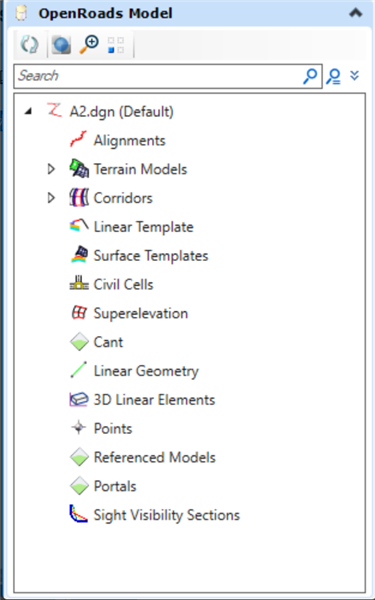
在OpenRoads Designer中,Geometry Model 是CIF平台的根据路线工程领域的专业逻辑对象,任何带有图形表现的实体(Entity)对象中,都嵌入了一个几何体,系统使用此几何体来绘制实体的外观形状。所以,在OpenRoads Designer中,任何这种带有图形表现能力的对象也都称之为几何模型(GeometryModel)。 它以Linear Geometry 项目里的几何运算库为基础,根据专业逻辑划分了路线平面线,路线纵断面线,路线横断面模板,路廊模型等基本道路设计的基本几何内容,另外还有一些工程中常用的桩号系统,标注系统,地模系统等工程方面的几何工具,对应的界面工具如图所示:
在DGN文件中,实体对象集合会按照特定逻辑层次关系被组织到一个图形容器中,从而形成一个相对独立的图形单元,这个图形容器称之为DGN模型(使用DgnModel类表达)。按照现有设计,一个DGN模型可以引用其他DGN模型,而被引用的DGN模型又可以其他DGN模型,从而可以形成以DGN模型为基本节点的树状引用关系图。此外,由于被引用的DGN模型既可以与引用的DGN模型位于同一个DGN文件中,也可以位于不同的DGN文件中,所以,通过建立这种引用关系图,可以实现大规模模型的跨文件装配,从而在很大程度上实现了模型的构件化、轻量化生产,标准化装配,以及DGN文件及其所含DGN模型的有效化管理和重用。
为了有效的提取并使用每个DgnModel中所包含的各类实体信息,OpenRoads Designer提供了面向几何模型(亦即面向DgnModel)的SDK,通过它可以读取DgnModel中任何与几何模型相关的信息,从而为数据抽取、转换、深度使用提供了一条简洁而有效的通道。
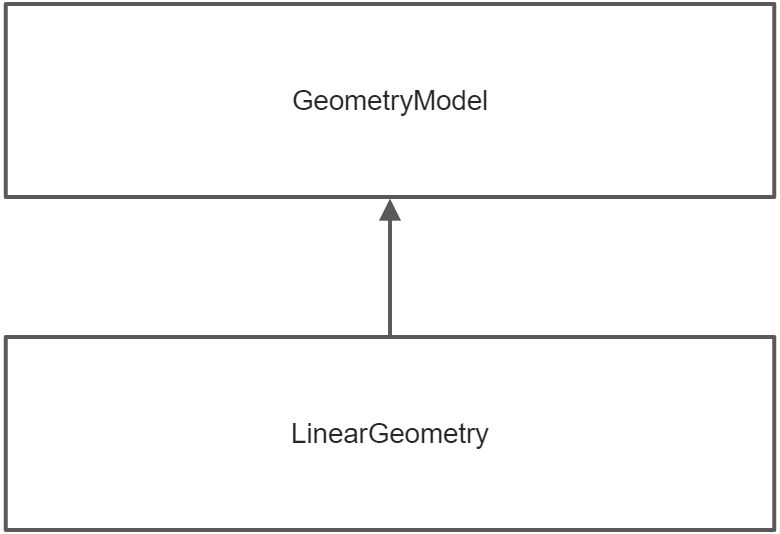
在OpenRoads Designer里工程模型的数据是以树的关系存储的,数据结构关系如下图所示
2 模块基本构成
在OpenRoads Designer中,主要分为几何库和几何逻辑对象两大部分。- 面向几何库的SDK 是Linear Geometry 模块,分为C++ 和C#两种。- 面向几何模型的SDK(GeometryModel.SDK)又分为C++的Bentley.Cif.GeometryModel.SDK 和 C# 的Bentley.CifNET.GeometryModel.SDK两部分,这两者在功能上是等价的,只是面向不同的开发平台;而在实现上,后者是基于前者封装而成的。
2.1 LinearGeometry各类基本介绍
面向路线几何计算的库,包含了路线设计中用到的各种的线性及相关算法,如直线,圆弧,回旋线,B样条曲线,线串及复杂曲线等。
该几何库提供了C#和C++/CLI两种语言的库文件,分别是Bentley.Cif.LinearGeometry.dll 和 Bentley.CifNET.LinearGeometry.dll, 下面将以C#为例来介绍该库的使用。
Linear Geometry 库按照功能可以分为三大类:
- 平面曲线
- 纵断面曲线
- 空间曲线
平面曲线类关系图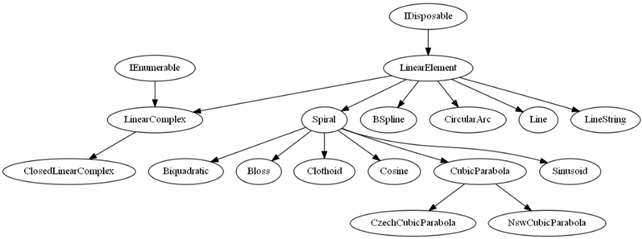
纵断面曲线类关系图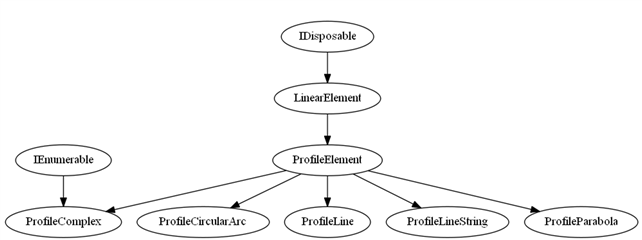
空间曲线类关系图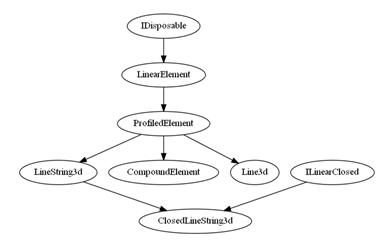
1)LinearElement
是Linear Geometry SDK中所有线性几何类的基类,提供了线性几何的常用操作函数
2)Line
3)CircularArc
4)LineString
5)Spiral
6)BSpline
7)LinearComplex
8)PrifleElement
9)ProfileLine
10)ProfileLineString
11)ProfileParabola
12)ProfileCirculArc
13)ProfileComplex
14)ProfiledElement
15)Line3d
16)LineString3d
2.2 GeometryModel各类基本介绍
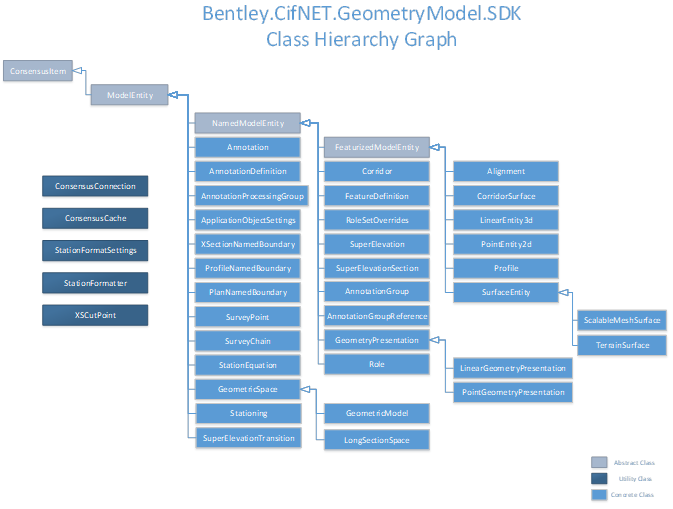
从类层次图我们可以看出,几乎所有的Entity对象均继承自ConsensusItem对象。这个ConsensusItem从最底层代表了OpenRoads Designer中任何可持久化的对象,同时,此类中提供了一些通用性的方法,可用于直接从Dgn中的 Element对象创建实例、从DgnEC实例创建对象、查询所属DgnModel等。
在ConsensusItem基础上,依次派生出了ModelEntity、NamedModelEntity、FeaturizedModelEntity三个层次的抽象基类。其中,ModelEntity在其基类基础上,增加了获取与平台对象对应DgnPlatform::Elements::Element的能力;NamedModelEntity则在其基类基础上,增加了获取对象名称的能力;FeaturizedModelEntity则在其基类基础上,增加了获取与对象关联的FeatureName、FeatureDefinition、GeometryPresentation以及AnnotationProcessingGroup的能力。
在此SDK中由于使用了EC机制,所以SDK中的绝大部分类与CIF中的Entity是一一对应的,亦即CIF中GeometryModel中的Entity与SDK中的Entity拥有相同的内存布局。
1) ConsensusItem
此类是SDK中所有可持久化类的基类,同时也是SDK中类与CIF中GeometryModel中可持久化类的对等连接纽带。其中不仅提供了类实例所属的DgnModel、DgnECInstance,同时还提供了从DgnElementECInstance、InstanceId直接创建SDK对象的能力。
2) ModelEntity
此类为ConsensusItem的子类,主要用于代表系统中任何具有图形表现的对象,它相对父类而言,主要增加了获取对等的DgnPlatformNET.Elements.Element的功能。通过获取Element,就可以调用底层平台完成一些当前层次所不能完成的功能。
3) NamedModelEntity
此类代表可获取名称的图形化实体,以此为基类的所有实体,可以获取实体的名称(如果定义的话)。
4) Annotation
此类代表SDK中的标注对象实体,其中包含此标注对象的定义对象。
5) AnnotationDefinition
此类代表SDK中标注对象的定义,通过它可以获取标注定义中的标注实例数据(XML形式)、保存标注数据的Schema名称以及标注所定义的类名称。此对象的获取,既可以通过标注对象Annotation得到,也可以通过GeometricModel对象获取。
6) AnnotationProcessingGroup
此类代表一组待处理的标注对象,它是个容器对象。通过它可以提取所有标注对象实例以及与标注组相关联的Role对象。此对象可通过其所属的FeaturizedModelEntity获得。
7) ApplicationObjectSettings
此对象主要用于代表系统中FeatureDefinition中面向APP级别的持久化对象,通过它可以获取相关联的所有几何呈现对象(GeometryPresentation)。而它自身则可以通过FeatureDefinition对象得到。
8) XSectionNamedBoundary
此类代表命名的横断面绘图边界对象,通过它可以获取关联的横断面绘制时所需的各种参数设置,主要包括断面的桩号、横向宽度、名称、所属的组名称等等。此对象的获取,既可以通过DgnModel对象显式创建,也可以通过ConsensusConnection直接获取。
9) ProfileNamedBoundary
此类代表命名的纵断面绘图边界对象,通过它可以获取关联的纵断面绘制时所需的各种参数设置,主要包括纵断面的起始/终止位置、长度、关联的Alignment对象、边界名称、边界所属的组名称等等。此对象同样需要使用DgnModel显式创建。
10) PlanNamedBoundary
此类代表命名的平面绘图边界对象,通过它可以获取关联的横断面绘制时所需的起终位置、长度、坐标、关联的Alignment对象、边界名称、边界所属的组名称等等。此对象需要从DgnModel或者DgnPlatformNET::Elements::Element显式创建。
11) SurveyPoint
此类代表路线测绘时确定的单个控制点对象,通过它可以获取此控制点相关的所有信息,如:点的名称、特征名称、大地坐标、高程、确定时间、所属区域、所属数据文件等等。此对象的获取,可以通过所属导线对象SurveyChain获取,也可以通过ConsensusConnection对象获取,还可以通过其关联的DgnPlatformNET::Elements::Element对象创建。
12) SurveyChain
此类代表路线测绘时确定的单根控制线(也称为导线),它是由若干个控制点连接而成,用于控制路线的平面线型。通过它可以获取导线相关的所有信息,例如:导线名称、特征名称、相关的控制点集合、勘定时间、所属数据文件等等。此对象,既可以通过ConsensusConnection对象获取,也可以通过其关联的DgnPlatformNET.Elements.Element对象创建。
13) StationEquation
此类用于代表路线设计中的断链(含短链和长链),通过它可以获取路线中特定断链的信息,这些信息主要包括:断链名称、来向桩号、去向桩号。此对象可通过Stationing对象获取。
14) GeometricSpace
此类代表一个容纳所有几何实体的容器,使用它可以获取容器中包含的所有实体。
13) SuperElevationTransition
此类代表路线横断面超高中的超高过渡,通过它可以获取路线特定段落中的超高过渡信息,如:超高旋转方式、过渡段长度、非线性曲线长度、旋转轴位置等等。此对象可通过SuperElevation对象获取。
15) SuperElevationTransition
此类代表路线横断面超高中的超高过渡,通过它可以获取路线特定段落中的超高过渡信息,如:超高旋转方式、过渡段长度、非线性曲线长度、旋转轴位置等等。此对象可通过SuperElevation对象获取。
16) FeaturizedModelEntity
此类代表具有附加特征属性的图形化实体,也就是说,但凡以此为基类派生的类,其上均可以附加额外的属性信息。通过此对象可以查询到的信息包括:对象的特征名称(FeatureName)、对象的特征定义(FeatureDefinition)、对象的几何呈现对象(GeometryPresentation)以及对象的标注处理组(AnnotationProcessingGroup)。
17) Corridor
此类代表一个路廊对象(实质上,它可以代表任何基于给定横断面模板扫略而成的3D网格表面对象)。通过此对象,可以获取Corridor的创建数据以及Corridor本身的一些数据,主要包括:用于描述Corridor的XML片段、构成Corridor的Surface对象集合以及Corridor关联的Alignment对象,此外,通过此对象还可以在Corridor上提取指定桩号处的正切断面数据。
18) FeatureDefinition
此类代表附加在FeaturizedModelEntity上的附加特征信息定义。其中包含的数据目前主要为ApplicationObjectSettings对象组。此对象主要通过所属的FeaturizedModelEntity对象来获取。
19) SuperElevation
此类代表横断面超高定义。通过它可以获取超高的过渡方式定义(SuperElevationTransition)、正常横坡值以及所属的超高断面(SuperElevationSection)。此外,它还提供了若干方法用于计算特定桩号处的断面超高。此对象主要通过所属的SuperElevationSection对象来获取。
20) SuperElevationSection
此类代表路线横断面中使用了超高的区段。通过它可以获取区段内所使用的超高定义集合、与之关联的Alignment对象。
21) AnnotationGroup
此类代表一个标注组,其中包含有保存标注数据的Schema名称以及匹配的标注类名称。此对象可通过GemetricModel对象获取。
22) AnnotationGroupReference
此类代表一个标注组引用对象(一个用于引用标注组对象对象),其中包含所引用的标注组以及关联的RoleSetOverrides集合。
23) GeometryPresentation
此类代表一个几何呈现对象(主要用于支持属性面板、动态属性显示等UI操作),其中提供的方法可用于从FeaturizedModelEntity获取标注定义对象集合。
24) GeometricModel
此类代表一个几何模型。SDK中的几何模型是个实体集合,充当实体对象总目录的角色;与此同时,它又是一个DgnModel中的一部分。通过此对象,可以获取模型中包含的所有对象实例,继而提取其中的数据。通过此对象可获取的信息包括:
- 模型中的Alignment集合
- 模型中的LinearEntity3d集合
- 模型中的CorridorSurface集合
- 模型中的Corridor集合
- 模型中的SuperElevationSection集合
- 模型中的TerrainSurface对象集合
- 模型中的ScalableMeshSurface对象集合
- 模型中的PointEntity2d集合
- 模型中当前激活的SurfaceEntity对象
- 模型中的FeatureDefinition对象集合
- 模型中的AnnotationGroup对象集合
- 模型中的AnnotationDefinition对象集合
- 查找指定名称的AnnotationDefinition
在实际使用时,通过遍历其中的对象集合,通常都能获得所需的信息。此对象可通过ConsensusConnection直接获得。
25) LongSectionSpace
此类代表一个纵断面空间对象。此类主要用于完成纵断面空间点(X为桩号,Y为高程,Z不使用)与3D世界坐标系点的互转。此对象可通过所属的Alignment对象获取;
26) Alignment
此类代表路线的平面线对象。通过它可以获取如下信息:
- 此平面线的对应的几何对象LinearElement;
- 与此平面线关联的所有竖曲线对象Profile;
- 此平面线当前使用的竖曲线对象Profile;
- 与此平面线关联的纵断面空间对象LongSectionSpace;
- 与此平面线关联的桩号对象Stationing;
- 与此平面线对应的3D线性实体对象LinearEntity3d;
此对象的实例,可直接通过所属的几何模型对象GeometricModel获取。
27) LinearEntity3d
此类代表与路线平面线等价的一条空间3D曲线实体,而且每条此类曲线均与一个Alignment相对应。通过此对象可获取与之关联的CurveVector对象,它是此3D空间曲线的几何表达;此外通过它还可以获取所属的Alignment对象。
28) PointEntity2d
此类代表几何模型中包含的一个2D点实体,通过此对象可获取点的坐标。此对象可通过所属的几何对象GeometricModel来获取。
29) Profile
此类代表Alignment所属的纵断面对象,通过它可以获取纵断面的竖曲线几何对象以及与之关联的地形表面对象(TerrainSurface)。此对象可通过所属的Alignment对象来获取。
30) SurfaceEntity
31) ScalableMeshSurface
32) TerrainSurface
此类代表一个地形表面对象,通过它可以获取与之关联的DTM对象,从而可以实现基于DTM的应用,如:断面剖切、点投影、路径投影、体积/面积计算等等。此对象可通过所属的几何模型(GeometricModel)获取,也可以通过所引用的Profile对象来获取。
33) ConsensusConnection
此类代表SDK与DgnModel的一个连接。SDK中任何对DgnModel的数据查询和提取,都需要直接或间接的透过此连接进行操作。所以,构造此对象始终是顺序遍历和解析DgnModel中数据的第一步。通过建立此对象,可以获取:
Ø DgnModel中当前激活的GeometricModel对象;
Ø DgnModel中所有激活的GeometricModel对象;
Ø DgnModel中所有横断面命名边界对象XSectionNamedBoundary;
Ø DgnModel中所有控制点对象SurveyPoint;
Ø DgnModel中所有控制线对象SurveyChain;
34) StationFormatSettings
此类是个工具类,主要用于提取指定DgnModel中桩号字符串格式化的相关设置,并提供了相关接口供用户直接获取具体的设置项属性。
35) StationingFormatter
此类是个工具类,主要用于按照OpenRoads Designer内部设置将桩号值转换为桩号字符串,同时还提供了桩号字符串反向转换为桩号值的功能。
3 模块使用指南
3.1 基本使用方式介绍
使用本模块中的提供类读取DgnModel中各类实体对象时,可按如下两种方式使用:
1) 直接基于DgnPlatformNET.Elements.Element对象等价创建
在SDK中,有许多类都包含一个名为CreateFromElement的静态函数。凡是拥有这种静态函数的类,都可以使用类型等价的Element来创建SDK中对应类对象的实例,有了类的实例,即可访问其中的属性和方法。但这样做的前提是所传入Element所代表CIF类对象的类型必须与SDK中类的类型相匹配。下表给出CIF中类与SDK中类的对照表:
| SDK类名称 | CIF类名称 | CIF类所在命名空间 |
|---|---|---|
| Alignment | LinearEntity2dInPlan | Bentley.CifNET.GeometryModel |
| PointEntity2d | PointEntity2d | |
| Profile | ProfileEntity | |
| StationEquation | StationEquation | |
| Stationing | StationEntity | |
| LinearEntity3d | LinearEntity3d | |
| LongSectionSpace | LongSectionSpace | |
| SuperElevationSpace | SuperElevationSpace | |
| TerrainSurface | DTMEntity | |
| Surface | SurfaceEntity | |
| CorridorSurface | MeshSurfaceEntity | |
| ScalableMeshSurface | ScalableMeshEntity | |
| Corridor | Corridor | Bentley.CifNET.GeometryModel.RoadwayDesigner |
| SuperElevationSection | SuperElevationSectionNamedEntity | Bentley.CifNET.GeometryModel.SuperElevation |
| SuperElevation | SuperElevationNamedEntity | |
| SuperElevationTransition | SuperTransitionEntity | |
| FeatureDefinition | ObjectSettings | Bentley.CifNET.GeometryModel.ContentManagement |
| ApplicationObjectSettings | ApplicationObjectSettings | |
| GeometryPresentation | GeometryAspect | |
| LinearGeometryPresentation | LinearGeometryAspect | |
| PointGeometryPresentation | PointGeometryAspect | |
| AnnotationDefinition | AnnotationDefinition | |
| Annotation | Annotation | |
| AnnotationProcessingGroup | AnnotationProcessingGroup | |
| RoleSetOverrides | RoleSetOverrides | |
| AnnotationGroupReference | AnnotationGroupReference | |
| Role | Role | |
| AnnotationGroup | AnnotationGroup | |
| SurveyPoint | SurveyPoint | Bentley.SurveyToolsNET |
| SurveyChain | SurveyChain | |
| FeaturizedEntity | FeaturizedEntity | Bentley.CifNET.Model |
| XSectionNamedBoundary | XSectionNamedBoundary | |
| ProfileNamedBoundary | ProfileNamedBoundary | |
| PlanNamedBoundary | PlanNamedBoundary |
例如,假设我们在OpenRoads Designer中选择了一条平面曲线,则可以通过如下代码将其转换为SDK中的Alignment对象(C++/CLI语法):
boolMyAlignmentSelector::OnDataButton(DgnButtonEvent^ ev)
{
// 进入Element定位状态并返回包含所选Element的Path
HitPath^ hitPath = DoLocate(ev, true, 1);
if (hitPath == nullptr)
returnfalse; // 定位失败
// 在返回的Path中获取当前光标下的Element
Element^ el = hitPath->GetCursorElement();
if (el == nullptr || el->ParentElement == nullptr)
returnfalse; // 调用失败
// 尝试使用得到Element创建SDK中的Alignment对象
// 因为从上表可知,任何平面曲线实体(LinearEntityInPlan2d)在SDK中都对应于Alignment对象.
Alignment^ al = Alignment::CreateFromElement(el->ParentElement);
if (al == nullptr)
returnfalse; // 创建失败,说明此Element并不代表一个Alignment
// TODO: 使用得到 al 对象完成其他工作
// […]
returntrue;
}
由此可见,此方式非常适合于使用SDK提供的API现场提取特定Element中的数据。但此方法显而易见的缺点就是:并不是所有SDK都有对应的Element,所以,在这种情况下,可以使用第2种方法顺序扫描。
2) 通过连接到DgnModel的方式进行顺序扫描
此方法的使用流程为:
a. 调用ConsensusConnection::Create()建立一个与给定DgnModel的连接:
ConsensusConnection^ conn = nullptr;
conn = ConsensusConnection::Create(Session::Instance::GetActiveDgnModelRef());
b. 通过建立的连接先获取其下包含的对象,然后依次调用所获取对象的属性或方法,最终得到需要的信息。例如,下面的代码先通过已建立的连接获取激活的GeometricModel,然后从GeometricModel中的Alignments集合中获取首个Alignment,然后从Alignment中分别获取了Alignment中包含的平面曲线LinearElement以及纵断面曲线ProfileElement:
// 提取首条Alignment
Alignment^ align = nullptr;
foreach(Alignment^ alinconn->GetActive()->Alignments)
{
align = al;
break;
}
// 获取Alignment中的平曲线对象
LinearElement^ horzCurve = align->LinearGeometry;
// 获取关联的Profile中的竖曲线对象
ProfileElement^ vertCurve = align->ActiveProfile->ProfileGeometry;
// TODO: 基于所获取对象完成其他工作
// […]
c. 完成对DgnModel的扫描后,关闭连接:
conn->Close();
conn = nullptr;
3.2 SDK代码示例
下面的代码片段完整演示了如何通过SDK中的API提取路线平曲线和竖曲线上的PI信息:<br />// 提取平曲线和竖曲线的PI并写入到指定文件中<br />voidPIReporter::reportPIData(System::String^ fileName)<br />{<br />// 建立与DgnModel的连接<br />ConsensusConnection^ conn = <br />ConsensusConnection::Create(Session::Instance::GetActiveDgnModelRef());
// 提取首条Alignment
Alignment^ alignment = nullptr;
foreach(Alignment^ alinconn->GetActive()->Alignments)
{
alignment = al;
break;
}
if (alignment == nullptr)
return;
try
{
// 创建输出文件
autooutFile = File::CreateText(fileName);
outFile->WriteLine(“Horizontal Alignment PI Data:”);
{
// 提取每条子曲线的PI并将其输出到文件.
autopoints = alignment->LinearGeometry->GetHorizontalControlPoints(
HorizontalControlPointTypes::Curve_PI);
if (points != nullptr && points->Count > 0)
{
for (inti = 0; i < points->Count; i++)
{
autopoint = points->Item(i);
outFile->WriteLine(“No.{0} Coordinate: ({1},{2}), Station: {3}”,
i + 1,
point->Coordinates.X,
point->Coordinates.Y,
GetStation(point) );
}
}
}
outFile->WriteLine();
outFile->WriteLine(“Vertical Alignment PI Data:”);
if (alignment->ActiveProfile != nullptr)
{
// 获取关联的纵断面曲线.
autoprofile = alignment->ActiveProfile->ProfileGeometry;
if (profile != nullptr)
{
// 提取所有圆弧曲线的PI并将其输出到文件.
autopoints = profile->GetVerticalControlPoints(
VerticalControlPointTypes::Curve_PI);
if (points != nullptr && points->Count > 0)
{
for (inti = 0; i < points->Count; i++)
{
autopoint = points->Item(i);
outFile->WriteLine(“No.{0} Station: {1} Elevation: {2} Radius: {3}”,
i + 1,
point->Coordinates.X,
point->Coordinates.Y,
1.0 / point->Curvature);
}
}
}
}
outFile->Close();
// 提示用于已完成操作
NotificationManager::OutputPrompt(“PI Extracted.”);
}
catch (Exception^ e)
{
NotificationManager::OutputPrompt(“Error: “+e->Message);
return;
}
}
// 确定给定点的桩号值
doublePIReporter::GetStation(LinearPoint^ pt)
{
if (pt == nullptr || pt->LinearElement == nullptr)
return 0.0;
// 垂直投影给定点到所关联的曲线上
autoprjPnt = pt->LinearElement->ProjectPointOnPerpendicular(pt->Coordinates);
// 计算点的实际桩号
returnprjPnt->DistanceOnExtension + prjPnt->DistanceAlong;
}
4 GeometryModel模块API参考
4.1 Alignment
§ 功能
此类代表路线的平面线型对象,它与GeometryModel中的LinearEntityInPlan2d相对应,通过此类可以获取路线平面线型相关的所有信息。
§ 构造/获取
Ø 使用CreateFromElement方法,基于对等的Element对象直接构造;
Ø 通过GeometricModel::Alignments属性获取;
Ø 通过GeometricModel::GetAlignmentByName()方法获取;
§ 属性
Ø Geometry:代表当前平面线的CurveVector几何对象;
Ø ActiveProfile:当前激活的且与当前平面线关联的纵断面Profile对象;
Ø LongSectionSpace:与当前平面线对象关联的纵断面空间对象;
Ø ActiveLinearEntity3d:当前激活的且与当前平面线关联的3D线性实体对象;
Ø LinearGeometry:代表当前平面线的LinearElement对象;
Ø Stationing:与当前平面线关联的桩号系统对象;
Ø Profiles:与当前平面线关联的纵断面线集合;
Ø IsFinalElement:当前平面线是否处于已完成状态(亦即可用状态);
Ø IsIntervalAlignment:当前平面线是否为某条平面线上的一段(区间性);
4.2 AnnotationDefinition
§ 功能
此类代表一个标注定义对象,它与GeometryModel中的AnnotationDefinition相对应,通过此类可获取标注定义中所包含的定义数据。
§ 构造/获取
Ø 通过GeometricModel::AnnotationDefinitions属性获取;
Ø 通过Annotation::AnnotationDefinition属性获取;
Ø 通过GeometricModel::GetAnnotationDefinitionByName()方法获取;
§ 属性
Ø AnnotationInstanceXML:用于定义标注的XML字符串;
Ø AnnotationSchemaName:保存标注数据的Schema名称;
Ø AnnotationClassName:保存标注实例的类名称;
4.3 AnnotationGroup
§ 功能
此类代表一个标注组对象,它与GeometryModel中的AnnotationGroup相对应。
§ 构造/获取
Ø 通过GeometricModel::AnnotationGroups属性获取;
Ø 通过AnnotationGroupReference::AnnotationGroup属性获取;
§ 属性
Ø TargetType:标注组的目标类型(Schema名称与类名称配对);
Ø NamedBoundaryTargetType:标注目标的命名边界类型(即None、Plan、Profile、CrossSection);
4.4 AnnotationGroupReference
§ 功能
此类代表一个标注组引用对象,它与GeometryModel中的AnnotationGroupReference相对应;其中包含所关联的RoleSetOverrides对象集以及AnnotationGroup对象。
§ 构造/获取
(暂未知)
§ 属性
Ø AnnotationGroup:与此对象关联的标注组对象AnnotationGroup;
Ø RoleSetOverrides:与此对象关联的RoleSetOverrides集合;
4.5 Annotation
§ 功能
此对象代表一个标注对象,它与GeometryModel中的Annotation相对应;通过它可获取标注的定义对象AnnotationDefinition。
§ 构造/获取
Ø 通过AnnotationProcessingGroup::Annotations属性获取;
§ 属性
Ø AnnotationDefinition:与此标注对象关联的标注定义对象AnnotationDefinition;
4.6 AnnotationProcessingGroup
§ 功能
此对象代表一个与FeaturizedModelEntity关联的标注处理组,它与GeometryModel中的AnnotationProcessingGroup相对应;通过它可以获取处理组中包含的标注对象集合以及关联的Role对象。
§ 构造/获取
Ø 通过FeaturizedModelEntity::GetAnnotationProcessingGroup()方法获取;
§ 属性
Ø Annotations:与此对象关联的标注对象集合;
Ø AssociatedRole:与此对象关联的Role对象;
4.7 ApplicationObjectSettings
§ 功能
此对象代表与GeometricModel关联的应用程序设置对象,它与GeometryModel中的ApplicationObjectSettings相对应。
§ 构造/获取
Ø 通过FeatureDefinition::GetApplicationObjectSettings()方法获取;
§ 属性
Ø Type:此对象类型名称
§ 方法
Ø GetGeometryPresentations():获取对象中包含的几何呈现对象(GeometryPresentation)集合;
4.8 ConsensusConnection
§ 功能
此对象代表DgnModel与SDK之间的一个连接,透过此连接,SDK可以读取DgnModel中所包含的CIF对象信息,它同时也是扫描方式访问对应DgnModel信息的起点。
§ 构造/获取
Ø 使用ConsensusConnection::Create()静态函数来创建对象实例;
§ 方法
Ø Close():关闭此连接并释放相关资源;
Ø GetActive():获取此DgnModel中首个激活的GeometricModel对象;
Ø GetAllActive():获取此DgnModel中所有激活的GeometricModel对象;
Ø GetXSections():获取此DgnModel中所有的XSectionNamedBoundary对象;
Ø GetSurveyPoints():获取此DgnModel中所有的SurveyPoint对象;
Ø GetSurveyChains():获取此DgnModel中所有的SurveyChain对象;
Ø GetElementFromConsensusID():基于给定的ConsensusID,在DgnModel中获取对应的Element;
4.9 ConsensusItemCache
§ 功能
此对象主要用于全局控制Consensus的缓冲状态。
§ 方法
Ø SetCaching():开启或关闭全局缓冲状态。
4.10 CorridorSurface
§ 功能
此类代表Corridor(廊道)对象中的一个表面对象,它与GeometryModel中的MeshSurfaceEntity相对应。
§ 构造/获取
Ø 使用Corridor::CorridorSurfaces属性获取;
Ø 使用其基类FeaturizedModelEntity::CreateFromElement()方法来创建;
Ø 使用GeometricModel::CorridorSurfaces属性获取;
§ 属性
Ø Type:对象的类型名称。
4.11 Corridor
§ 功能
此类代表一个廊道对象,它与GeometryModel中的Corridor相对应,其中包含廊道相关的信息。
§ 构造/获取
Ø 使用GeometricModel::Corridors属性获取;
§ 属性
Ø XmlFragment:代表廊道对象各种属性数据的XML字符串;
Ø CorridorSurfaces:廊道对象中包含的所有CorridorSurface对象;
Ø CorridorAlignment:与廊道关联的平面中线对象;
§ 方法
Ø GetXSCutPoints():在廊道指定桩号处切取横断面数据;
4.12 FeatureDefinition
§ 功能
此类代表一个特征定义对象,它与GeometryModel中的ObjectSettings相对应。
§ 构造/获取
Ø 使用FeatureDefinition::CreateFromElement()静态方法创建;
Ø 使用GeometricModel::FeatureDefinitions属性获取;
§ 属性
Ø IsVisible:此对象的可见性设置
§ 方法
Ø GetApplicationObjectSettings():获取与此特征定义关联的ApplicationObjectSettings集合;
Ø CreateFromElement():使用对等的Element创建此对象;
4.13 GeometricModel
§ 功能
此类代表DgnModel中的一个几何模型,它是个容器对象,其中包含相关的所有视图对象,同时也是访问其中内含对象的一个目录。以扫描方式访问DgnModel中的对象时,通常都需要访问它。
§ 构造/获取
Ø 通过ConsensusConnection::GetActive()方法获取;
Ø 通过ConsensusConnection::GetAllActive()方法获取;
§ 属性
Ø Alignments:模型中包含的所有平面线对象;
Ø LinearEntities3d:模型中包含的所有3D线性实体(LinearEntity3d);
Ø CorridorSurfaces:模型中包含的所有CorridorSurface对象;
Ø Corridors:模型中包含的所有Corridor对象;
Ø SuperElevationSections:模型中包含的所有超高断面SuperElevationSection对象;
Ø TerrainSurfaces:模型中包含的所有地形面TerrainSurface对象;
Ø ScalableMeshSurfaces:模型中包含的所有可伸缩网格面ScalableMeshSurface对象;
Ø PointEntities2d:模型中包含的所有2D点实体PointEntity2d对象;
Ø ActiveSurface:模型中当前激活的面对象,可为TerrainSurface/ScalableMeshSurface;
Ø FeatureDefinitions:模型中包含的所有特征定义FeatureDefinition对象;
Ø AnnotationGroups:模型中包含的所有标注组AnnotationGroup对象;
Ø AnnotationDefinitions:模型中包含的所有标注定义AnnotationDefinition对象;
§ 方法
Ø GetAlignmentByName():在模型中查找指定名称的平面线对象;
Ø GetAnnotationDefinitionByName():在模型中查找指定名称的标注定义对象;
Ø GetPlanModelFromDgnModel():从给定DgnModel中获取PlanModel对象;
4.14 GeometricSpace
§ 功能
此类代表DgnModel中存放几何实体的一个容器对象,通过它可以获取其中所包含的所有实体。
§ 构造/获取
Ø 通过ConsensusConnection::GetActive()以及ConsensusConnection::GetAllActive()获取其子类GeometricModel对象;
§ 属性
Ø FeaturizedModelEntities:获取包含在容器中所有FeaturizedModelEntity类型的实体。
4.15 GeometryPresentation
§ 功能
此类代表所有几何呈现类的基类,主要用于实现几何对象的呈现(静态面板属性、动态面板属性、图形交互显示等),它与GeometryModel中的GeometryAspect相对应。
§ 构造/获取
Ø 通过FeaturizedModelEntity::GeometryPresentation属性获取;
§ 方法
Ø GetAnnotationDefinitions():获取与此几何呈现关联的所有标注定义;
Ø GetRoleSetOverrides():获取与此几何呈现关联的所有RoleSetOverrides的名称;
4.16 LinearGeometryPresentation
§ 功能
此类代表一个线性几何体的呈现对象,它与GeometryModel中的LinearGeometryAspect相对应。
§ 构造/获取
Ø 通过FeaturizedModelEntity::GeometryPresentation属性获取;
§ 属性
Ø PlanElementTemplate:平面Element模板名称;
Ø ProfileElementTemplate:纵断面Element模板名称;
Ø CrossSectionElementTemplate:横断面Element模板名称;
Ø ThreeDElementTemplate:3D Element模板名称;
4.17 PointGeometryPresentation
§ 功能
此类代表一个点的呈现对象,它与GeometryModel中的PointGeometryAspect相对应。
§ 构造/获取
Ø 通过FeaturizedModelEntity::GeometryPresentation属性获取;
4.18 LinearEntity3d
§ 功能
此类代表一个3D线性实体,它与GeometryModel中的LinearEntity3d相对应。
§ 构造/获取
Ø 通过自身静态函数CreateFromElement()直接创建;
Ø 通过GeometricModel::LinearEntities3d属性获取;
§ 属性
Ø Alignment:与此LinearEntity3d关联的平面线对象;
Ø Geometry:与此LinearEntity3d对等的CurveVector对象;
§ 方法
Ø CreateFromElement():基于等价的Element创建对象实例;
4.19 LongSectionSpace
§ 功能
此类代表一个纵断面空间对象,其中包含有所属的FeaturizedEntity集合,它与GeometryModel中的LongSectionSpace相对应。
§ 构造/获取
Ø 通过自身静态函数CreateFromDgnModel()直接创建;
Ø 通过所属的Alignment对象的Alignment::LongSectionSpace属性获取;
§ 属性
Ø Alignment:获取此对象所属的Alignment对象;
§ 方法
Ø CreateFromDgnModel():通过所属的DgnModel来创建对象实例;
4.20 ModelEntity
§ 功能
此类代表一个几何模型实体(即带有几何图形表现的实体),它是一个抽象基类。
§ 属性
Ø SyncId:此模型的ID;
Ø Element:代表此实体对象的MicroStation中的句柄;
4.21 NamedModelEntity
§ 功能
此类代表一个具有名称的几何模型实体,它是一个抽象基类。
§ 属性
Ø Name:此实体的名称;
4.22 FeaturizedModelEntity
§ 功能
此类代表一个有名称、可附加属性(亦称为Feature)的几何模型实体,它是一个抽象基类。
§ 属性
Ø FeatureName:此实体上所附加的特征的名称;
Ø GeometryPresentation:与此实体相关联的几何呈现对象;
Ø FeatureDefinition:与此实体相关联的特征定义对象;
§ 方法
Ø GetAnnotationProcessingGroup():获取与此实体相关联的AnnotationProcessingGroup对象;
Ø CreateFromElement():基于对等的Element创建实体实例;
4.23 PointEntity2d
§ 功能
此类代表GeometricModel中的一个2D点实体,它与GeometryModel中的PointEntity2d。
§ 构造/获取
Ø 通过自身的静态函数CreateFromElement()来创建;
Ø 通过GeometricModel::PointEntities2d属性来获取;
§ 属性
Ø Geometry:此点实体中以CurveVector方式表达的的几何表达部分;
Ø Coordinates:此点实体的3D坐标;
§ 方法
Ø CreateFromElement():基于给定的等价Element对象创建实体实例;
4.24 Profile
§ 功能
此类代表一个纵断面(即竖曲线)对象,它与GeometryModel中的ProfileEntity相对应,其中包含纵断面对象相关的信息。
§ 构造/获取
Ø 通过自身的静态函数CreateFromElement()来创建;
Ø 通过Alignment::ActiveProfile属性获取;
Ø 通过Alignment::Profiles属性来获取;
§ 属性
Ø Alignment:与此纵断面对象关联的Alignment;
Ø ProfileGeometry:代表纵断面几何对象的ProfileElement对象;
Ø IsFinalElement:此纵断面是否为最终的对象;
Ø TerrainSurface:与此对象关联的地形表面对象TerrainSurface;
§ 方法
Ø CreateFromElement():基于等价的Element对象创建此对象实例;
4.25 Role
§ 功能
(待定)
§ 构造/获取
Ø 通过AnnotationProcessingGroup::AssociatedRole属性获取;
§ 属性
(待定)
4.26 RoleSetOverrides
§ 功能
(待定)
§ 构造/获取
Ø 通过AnnotationGroupReference::RoleSetOverrides属性获取;
§ 属性
Ø AnnotationDefinition:与此对象关联的标注定义对象AnnotationDefinition;
§ 方法
Ø GetRoleStrings():获取关联的Role字符串集合;
4.27 ScalableMeshSurface
§ 功能
代表一个可伸缩的网格面对象,它与GeometryModel中的ScalableMeshEntity相对应。
§ 构造/获取
Ø 通过自身的静态函数CreateFromElement()来创建实例;
Ø 通过GeometricModel::ScalableMeshSurfaces属性获取;
4.28 StationEquation
§ 功能
此类代表路线中的断链,用于在路线平面中描述同一个位置有2个桩号的情况,它与GeometryModel中的StationEquation相对应。
§ 构造/获取
Ø 通过Stationing::StationEquations属性获取;
§ 属性
Ø Name:断链的名称;
Ø DistanceAlong:断链的来向桩号;
Ø EquivalentStation:断链的等价桩号(即去向桩号);
4.29 StationFormatSettings
§ 功能
此类是个实用工具类,用于代表桩号值格式化成字符串时所需的设置。
§ 构造/获取
Ø 通过自身的静态函数GetStationFormatSettingsFromModel()来创建实例;
§ 属性
Ø DefaultUnitsToMeters:默认单位向米的转换系数;
Ø Precision:当前精度(小数点后的位数);
Ø StationFormat:当前的桩号格式类型;
Ø EquationValue:当前的断链桩号?
Ø Delimiter:当前桩号中的千分位符号;
Ø OverrideUnitLengthStation:是否重写单位长度的桩号;
Ø UnitLengthStation:单位长度的桩号值;
§ 方法
Ø GetStationFormatSettingsFromModel():基于指定的DgnModel创建此对象的实例;
4.30 StationingFormatter
§ 功能
此类是个实用工具类,用于完成数值型桩号和字符串型桩号间的互相转换。
§ 构造/获取
Ø 基于指定的Alignment对象直接构造;
§ 方法
Ø FormatStation():基于指定的转换设置,将指定桩号值转换为桩号字符串;
Ø ParseStation():基于指定的转换设置,将桩号字符串转换为桩号值;
4.31 Stationing
§ 功能
此类代表一条Alignment的桩号系统,主要用于完成带断链的桩号和DistanceAlong换算,它与GeometryModel中的StationEntity相对应。
§ 构造/获取
Ø 通过Alignment::Stationing属性获取;
§ 属性
Ø IsByName:此桩号系统是否按名称检索;
Ø DistanceAlong:此桩号系统所在曲线距离(亦即绝对桩号);
Ø Alignment:此桩号系统所属的路线平面对象;
Ø StartStation:此桩号系统的起始桩号;
Ø StationEquations:此桩号系统中所包含的断链表;
§ 方法
Ø GetStationRegionFromDistanceAlong():将给定桩号区域转换为绝对桩号;
Ø GetDistanceAlongFromStationRegion():将给定绝对桩号转换为桩号区域;
4.32 SuperElevationTransition
§ 功能
此类代表一个超高过渡描述对象,用于描述超高过渡方式、旋转轴等,它与GeometryModel中的SuperTransitionEntity相对应。
§ 构造/获取
Ø 通过SuperElevation::SuperElevationTransitions属性获取;
§ 属性
Ø CrossSlope:超高横坡坡度;
Ø Distance:超高过渡距离;
Ø NonLinearCurveLength:非线性曲线长度;
Ø TransitionType:超高过渡类型(线性、三次抛物线…);
Ø PivotEdge:超高旋转轴的位置;
4.33 SuperElevation
§ 功能
此类代表一个超高段信息,它与GeometryModel中的SuperElevationNamedEntity相对应。
§ 构造/获取
Ø 通过自身静态函数CreateFromElement()直接创建;
Ø 通过SuperElevationSection::SuperElevations属性获取;
§ 属性
Ø NormalCrossSlope:正常横坡坡度;
Ø SuperElevationTransitons:超高过渡描述集合;
Ø Parent:所属的超高断面对象;
§ 方法
Ø Initialize():初始化一个超高计算;
Ø ComputeElevationAtStation():计算给定桩号处超高值;
4.34 SuperElevationSection
§ 功能
此类代表一个超高断面,它与GeometryModel中的SuperElevationSectionNamedEntity相对应。
§ 构造/获取
Ø 通过GeometricModel::SuperElevationSections属性获取;
§ 属性
Ø SuperElevations:与断面关联的超高对象集合;
Ø Alignment:与断面关联的平面线对象;
4.35 SurfaceEntity
§ 功能
此类代表一个表面实体,它是TerrainSurface以及ScalableMeshSurface的基类,它与GeometryModel中的SurfaceEntity相对应。
§ 构造/获取
Ø 通过自身静态函数CreateFromElement()创建;
4.36 SurveyChain
§ 功能
此类代表一个测量控制线对象,其中包含各控制点数据,它与SurveyToolsNET中的SurveyChain相对应。
§ 构造/获取
Ø 通过自身静态函数CreateFromElement()创建;
Ø 通过ConsensusConnection::GetSurveyChains()函数获取;
§ 属性
Ø Name:控制线的名称;
Ø SurveyPoints:控制线中的控制点集合;
Ø Feature:控制线上的特征数据;
Ø SurveyObjectSettingsName:控制线上设置对象的名称;
Ø Zone:控制线所属的区域ID;
Ø Description:控制线的描述信息;
Ø TerrainModelAttribute:控制线关联的地形模型属性;
Ø AttributesPair:控制线上的属性对集合;
Ø Length:控制线的长度;
Ø DatafileName:关联的数据文件名称;
Ø VBAMacro:关联的VB宏;
Ø FieldbookName:关联的字段名称;
Ø TimeStamp:时间戳;
§ 方法
Ø CreateFromElement():基于等价的Element对象创建此对象实例;
4.37 SurveyPoint
§ 功能
此类代表一个测量控制点,其中包含控制点的各种信息数据,它与SurveyToolsNET中的SurveyPoint相对应。
§ 构造/获取
Ø 通过自身静态函数CreateFromElement()创建;
Ø 通过SurveyChain::SurveyPoints属性获取;
Ø 通过ConsensusConnection::GetSurveyPoints()方法获取;
§ 属性
Ø Name:控制点的名称;
Ø Feature:控制点的特征数据;
Ø SurveyObjectSettingsName:控制点上对象设置名称;
Ø LinkCode:链接代码;
Ø Zone:所属区域ID;
Ø Description:控制点的描述字符串;
Ø TerrainModelAttribute:关联的地形模型属性;
Ø AttributesPair:关联的属性配对集合;
Ø Easting:点的东坐标;
Ø Northing:点的北坐标;
Ø Elevation:点的高程值;
Ø DatafileName:关联的数据文件名;
Ø VBAMacro:关联的VBA宏;
Ø FieldbookName:关联的字段名称;
Ø TimeStamp:时间戳;
§ 方法
Ø CreateFromElement():基于等价的Element对象创建对象实例;
4.38 TerrainSurface
§ 功能
此类代表DTM对象,它与GeometryModel中的DTMEntity相对应。
§ 构造/获取
Ø 通过Profile::TerrainSurface属性获取;
Ø 通过GeometricModel::TerrainSurfaces属性获取;
Ø 通过GeometricModel::ActiveSurface属性获取;
§ 属性
Ø DTM:与此对象关联的DTM对象。
5 LinearGeometry模块API参考
LinearElement
LinearElement 是Linear Geometry SDK中所有线性几何类的基类,提供了线性几何的常用操作函数,集体内容如下:
1.修剪和延长类函数:ExtendXXX 和 ExtendOrTrimXXX
ExtendBeginByLineOrTrim :通过直线修补方式延长或修剪曲线的起始端;
代码如下:
LinearElement ExtendBeginByLineOrTrim_Demo(LinearElement sourceLinear)
{
LinearElement resultLinear = null;
double extTrimLength = 100;
resultLinear = sourceLinear.ExtendBeginByLineOrTrim(extTrimLength);
return resultLinear;
}
参数含义:变量extTrimLength 如果为正,对路线起始位置进行延长,变量extTrimLength 为负值,则对路线起始位置进行剪切。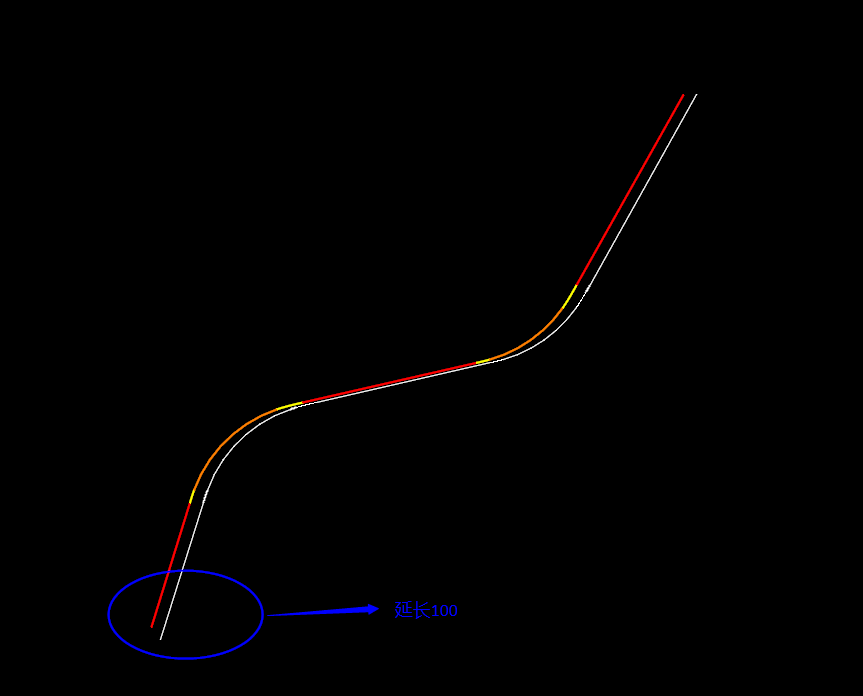
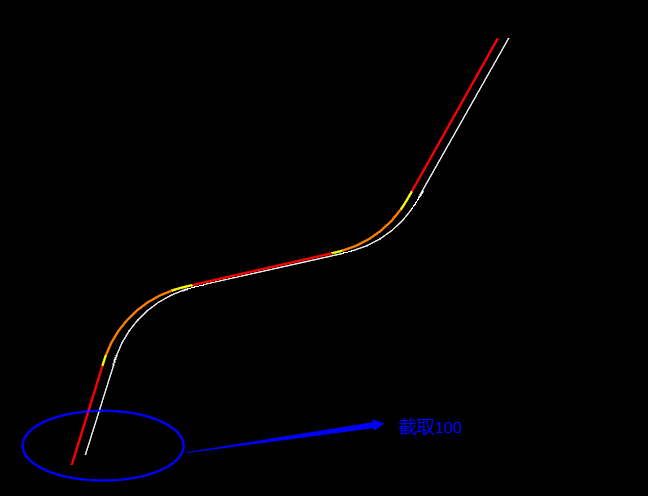
ExtendOrTrimBegin:按长度延长或修剪曲线的起始端;
代码如下:
LinearElement ExtendOrTrimBegin_Demo(LinearElement sourceLinear)
{
LinearElement resultLinear = null;
double extTrimLength = -100;
resultLinear = sourceLinear.ExtendOrTrimBegin(extTrimLength);
return resultLinear;
}
参数含义:extTrimLength 如果为正,对路线起始位置进行延长,变量extTrimLength 为负值,则对路线起始位置进行剪切。
ExtendOrTrimBeginByParameter :通过沿路线参数(系数)延长或修剪曲线的起始端;
代码如下:
LinearElement ExtendOrTrimBeginByParameter_Demo(LinearElement sourceLinear)
{
LinearElement resultLinear = null;
double parameter = 100;
resultLinear = sourceLinear.ExtendOrTrimBeginByParameter(parameter);
return resultLinear;
}
参数含义:extTrimLength 如果为正,对路线起始位置进行延长,变量extTrimLength 为负值,则对路线起始位置进行剪切。
ExtendOrTrimBeginByPoint:将曲线起始端延长或修剪到指定的点;
代码如下:
LinearElement ExtendOrTrimBeginByPoint_Demo(LinearElement sourceLinear)
{
LinearElement resultLinear = null;
//DPoint3d extPoint = new DPoint3d(11094.0, 4358.0);
DPoint3d extPoint = new DPoint3d(8649.0, 1545.0);
resultLinear = sourceLinear.ExtendOrTrimBeginByPoint(extPoint);
return resultLinear;
}
参数含义:extPoint为剪切点,如果点与路线的垂足在路线范围内,则对路线起始位置进行剪切,如果点与路线的垂足在路线范围外,则对路线起始位置进行延长。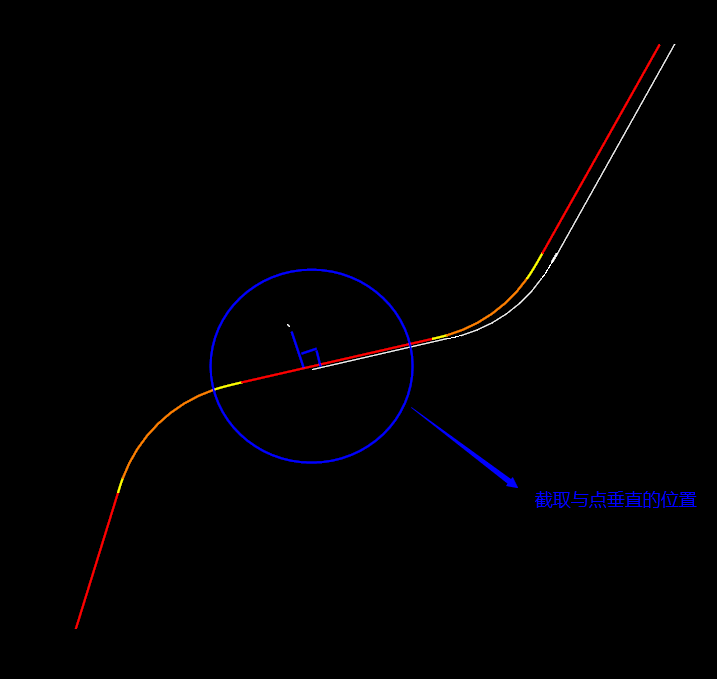
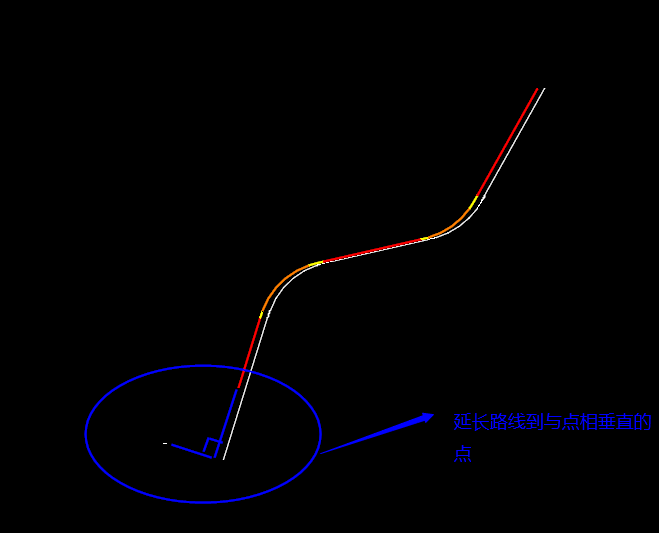
ExtendEndByLineOrTrim:通过直线修补方式延长或修剪曲线的终止端;
代码如下:
LinearElement ExtendEndByLineOrTrim_Demo(LinearElement sourceLinear)
{
LinearElement resultLinear = null;
double extTrimLength = 100;
resultLinear = sourceLinear.ExtendEndByLineOrTrim(extTrimLength);
return resultLinear;
}
参数含义:extTrimLength 如果为正,对直线终止位置进行延长,变量extTrimLength 为负值,则对直线起始位置进行剪切。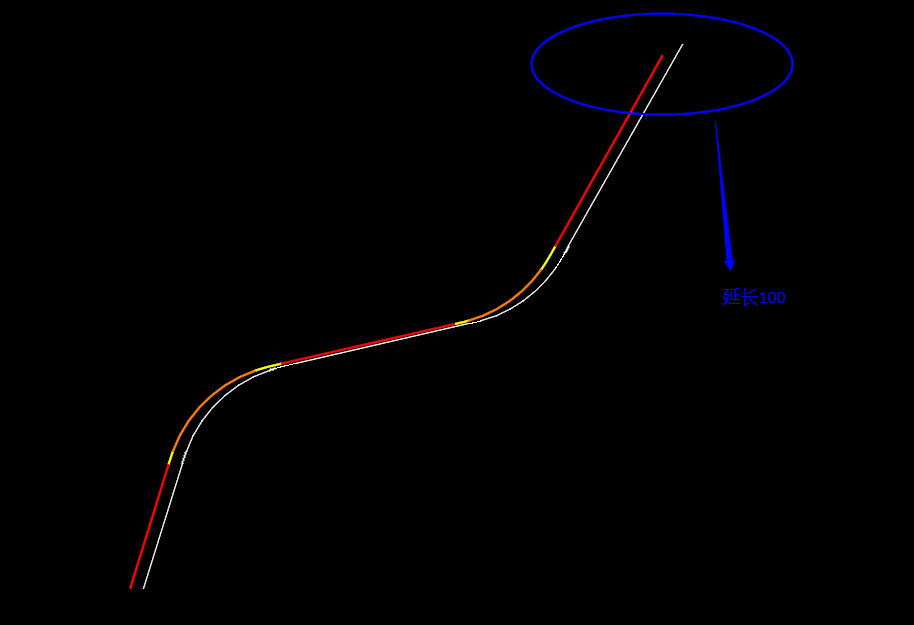
ExtendOrTrimEnd:按长度延长或修剪曲线的终止端;
代码如下:
LinearElement ExtendOrTrimEnd_Demo(LinearElement sourceLinear)
{
LinearElement resultLinear = null;
double extTrimLength = -100;
resultLinear = sourceLinear.ExtendOrTrimEnd(extTrimLength);
return resultLinear;
}
参数含义:extTrimLength 如果为正,对路线终止位置进行延长,变量extTrimLength 为负值,则对路线终止始位置进行剪切。
ExtendOrTrimEndByParameter:通过沿路线参数(系数)延长或修剪曲线的终止端;
代码如下:
LinearElement ExtendOrTrimEnd_Demo(LinearElement sourceLinear)
{
LinearElement resultLinear = null;
double extTrimLength = -100;
resultLinear = sourceLinear.ExtendOrTrimEnd(extTrimLength);
return resultLinear;
}
参数含义:变量extTrimLength 如果为正,对路线终止位置进行延长,变量extTrimLength 为负值,则对路线终止始位置进行剪切。
ExtendOrTrimEndByPoint:将曲线终止端延长或修剪到指定的点;
代码如下:
LinearElement ExtendOrTrimEndByPoint_Demo(LinearElement sourceLinear)
{
LinearElement resultLinear = null;
//DPoint3d extPoint = new DPoint3d(11094.0, 4358.0);
DPoint3d extPoint = new DPoint3d(13419.0, 6691.0);
resultLinear = sourceLinear.ExtendOrTrimEndByPoint(extPoint);
return resultLinear;
}
参数含义:extPoint为剪切点,如果点与路线的垂足在路线范围内,则对路线终止位置进行剪切,如果点与路线的垂足在路线范围外,则对路线终止位置进行延长。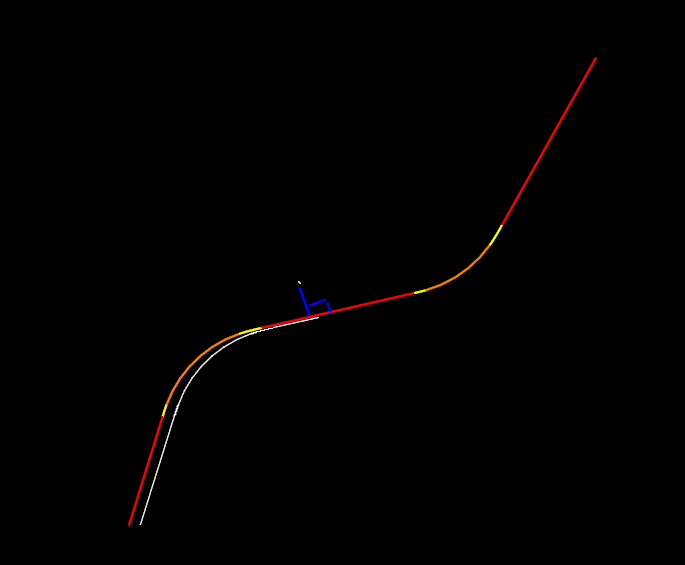
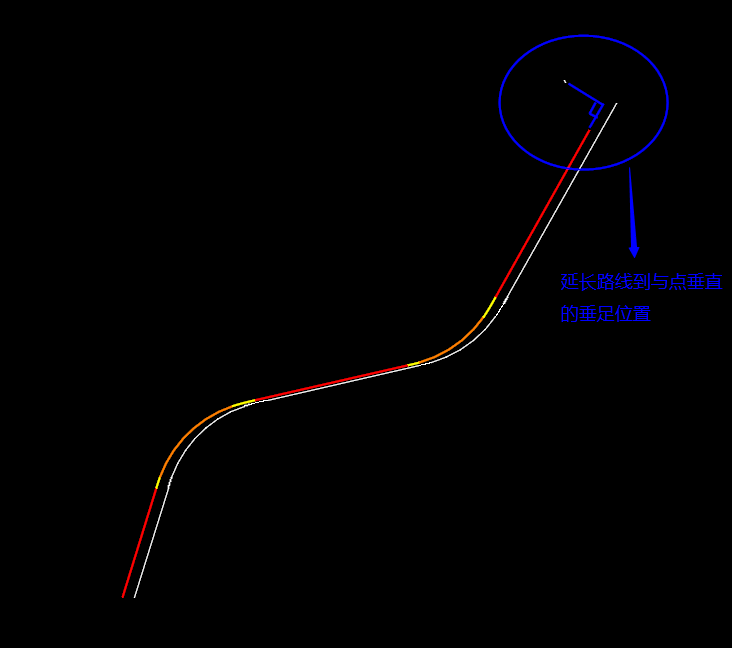
注:红色路线为原始线形,白色为红色路线水平方向平移100主单位(米)并且延长/截取后的线形。具体代码如下:
DTransform3d tra3d = new DTransform3d(1, 0, 0, 100, 0, 1, 0, 0, 0, 0, 1, 0);
resultLinear = resultLinear.Transform(tra3d);
2.距离计算和转换函数:GetChordXXX , GetDistanceAlongXXX ,
GetChordDistanceFromDistanceAlong:将曲线距离值转换为弦距离值;
代码如下:
public static double GetChordDistanceFromDistanceAlong_Demo(LinearElement sourceLinear)
{
double distance = 100;
double chordDistance = 0;
chordDistance = sourceLinear.GetChordDistanceFromDistanceAlong(distance);
return chordDistance;
}
参数含义:distance变量代表需要转换的距离值。
GetChordDistanceFromParameter:将参数值转换为弦距离值;
代码如下:
public static double GetChordDistanceFromParameter_Demo(LinearElement sourceLinear)
{
double parameter = 0.1;
double chordDistance = 0;
chordDistance = sourceLinear.GetChordDistanceFromParameter(parameter);
return chordDistance;
}
参数含义:parameter,[0-1]之间的值,代码所要获取点距起始点的距离与整条线形长度的比值。
GetDistanceAlongFromChordDistance:将曲线弦距离距离值转换为距离值;
代码如下:
public static double GetDistanceAlongFromChordDistance_Demo(LinearElement sourceLinear)
{
double chordDistance = 100;
double distanceAlong = 0;
distanceAlong = sourceLinear.GetDistanceAlongFromChordDistance(chordDistance);
return distanceAlong;
}
参数含义:chordDistance变量代表需要转换的弦距离值。
GetLength:获取曲线长度。
代码如下:
public static double GetLength_Demo(LinearElement sourceLinear)
{
double ptToPtTolerance = 0.001;
double length = 0;
length = sourceLinear.GetLength(ptToPtTolerance);
return length;
}
参数含义: ptToPtTolerance为最小精度的设置值。
3.点的计算函数:GetPointXXX ,StrokeXXX, ProjectPointXXX
GetPointAtDistanceOffset:根据距离值和偏移值获取点;
代码如下:
LinearPoint GetPointAtDistanceOffset_Demo(LinearElement sourceLinear)
{
LinearPoint resultPoint = null;
double distance = 100;
double offset = 100;
resultPoint = sourceLinear.GetPointAtDistanceOffset(distance, offset);
CreateElement.BuildPoint(resultPoint.Coordinates);
return resultPoint;
}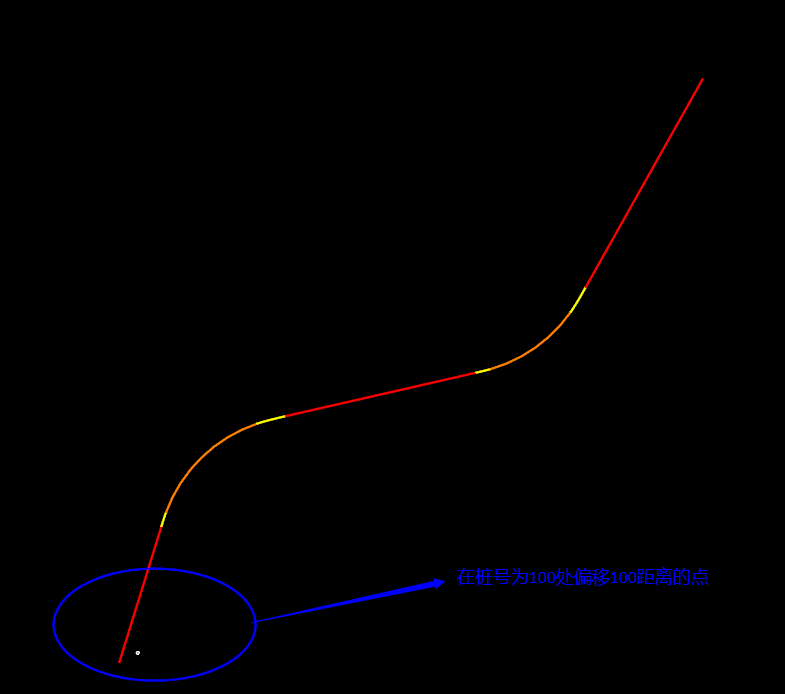
参数含义:distance,所要计算的点与线形的起始点的距离,offset 的值为正值时向右偏移,为负值时向左偏移。
GetPointAtParameterOffset:根据参数值和偏移值获取点;
代码如下:
LinearPoint GetPointAtParameterOffset_Demo(LinearElement sourceLinear)
{
LinearPoint resultPoint = null;
double parameter = 0.1;
double offset = 100;
resultPoint = sourceLinear.GetPointAtParameterOffset(parameter, offset);
CreateElement.BuildPoint(resultPoint.Coordinates);
return resultPoint;
}
参数含义:parameter,[0-1]之间的值,代码所要获取点距起始点的距离与整条线形长度的比值,offset 的值为正值时向右偏移,为负值时向左偏移。
ProjectPointOnPerpendicular:根据已知点计算到路线的铅直投影点;
代码如下:
LinearPoint ProjectPointOnPerpendicular_Demo(LinearElement sourceLinear)
{
LinearPoint resultPoint = null;
DPoint3d point = new DPoint3d(0, 0, 0);
resultPoint = sourceLinear.ProjectPointOnPerpendicular(point);
CreateElement.BuildPoint(resultPoint.Coordinates);
return resultPoint;
}
参数含义:point为已知点。
ProjectPointOnSkew:根据已知点,倾角及偏移值计算投影点
代码如下:
LinearPoint ProjectPointOnSkew_Demo(LinearElement sourceLinear)
{
LinearPoint resultPoint = null;
DPoint3d point = new DPoint3d(0, 0, 0);
double skewAngle = 3.14 / 2;
double offset = 100;
resultPoint = sourceLinear.ProjectPointOnSkew(point, skewAngle, offset);
CreateElement.BuildPoint(resultPoint.Coordinates);
return resultPoint;
}
参数含义:point为已知点,skewAngle 为斜交角度,offset为偏移距离当为正值时向右偏移,为负值时向左偏移。
ProjectPointOnTangent:根据已知点计算切点;
代码如下:
LinearPoint ProjectPointOnTangent_Demo(LinearElement sourceLinear)
{
LinearPoint resultPoint = null;
DPoint3d point = new DPoint3d(0, 0, 0);
resultPoint = sourceLinear.ProjectPointOnTangent(point);
CreateElement.BuildPoint(resultPoint.Coordinates);
return resultPoint;
}
参数含义:point为已知点,
StrokeByChord:根据弦距离获取点集;
代码如下:
LinearPointCollection StrokeByChord_Demo(LinearElement sourceLinear)
{
LinearPointCollection resultPoints = null;
double chordTolerance = 100;
resultPoints = sourceLinear.StrokeByChord(chordTolerance);
foreach(LinearPoint resultPoint in resultPoints)
{
CreateElement.BuildPoint(resultPoint.Coordinates);
}
return resultPoints;
}
参数含义:chordTolerance为弦距离,resultPoints为返回点集。
StrokeByConnectionPoints:根据连接点类型获取点集;
代码如下:
LinearPointCollection StrokeByConnectionPoints_Demo(LinearElement sourceLinear)
{
LinearPointCollection resultPoints = null;
ConnectionPointTypes types = ConnectionPointTypes.Spiral_Line;
resultPoints = sourceLinear.StrokeByConnectionPoints(types);
foreach (LinearPoint resultPoint in resultPoints)
{
CreateElement.BuildPoint(resultPoint.Coordinates);
}
return resultPoints;
}
参数含义:types为弦连接点类型,resultPoints为返回点集。
StrokeByDistances:根据距离获取点集;
代码如下:
LinearPointCollection StrokeByDistances_Demo(LinearElement sourceLinear)
{
LinearPointCollection resultPoints = null;
double[] distances = { 0.0, 100.0, 1000.0 };
resultPoints = sourceLinear.StrokeByDistances(distances);
foreach (LinearPoint resultPoint in resultPoints)
{
CreateElement.BuildPoint(resultPoint.Coordinates);
}
return resultPoints;
}
参数含义:distances为点与线形的起始点之间的距离,resultPoints为返回点集。
StrokeByEndPoints:获取路线的起终点集合;
代码如下:
LinearPointCollection StrokeByEndPoints_Demo(LinearElement sourceLinear)
{
LinearPointCollection resultPoints = null;
resultPoints = sourceLinear.StrokeByEndPoints();
foreach (LinearPoint resultPoint in resultPoints)
{
CreateElement.BuildPoint(resultPoint.Coordinates);
}
return resultPoints;
}
参数含义:resultPoints为返回点集。
StrokeByStep:根据增加值或者等距离值获取点集;
代码如下:
LinearPointCollection StrokeByStep_Demo(LinearElement sourceLinear)
{
LinearPointCollection resultPoints = null;
DPoint3d extPoint = new DPoint3d(0, 0);
double stepValue = 0;
StrokingByStepMethod stepMetho = StrokingByStepMethod.EqualDistance;
resultPoints = sourceLinear.StrokeByStep(stepValue, stepMetho);
foreach (LinearPoint resultPoint in resultPoints)
{
CreateElement.BuildPoint(resultPoint.Coordinates);
}
return resultPoints;
}
参数含义:resultPoints为返回点集。
4.求交和偏移函数:Intersect ,XXXOffsetElement,
Intersect:获取当前曲线与其它线的交点集;
代码如下:
LinearIntersectionCollection Intersect_Demo(LinearElement sourceLinear)
{
LinearIntersectionCollection resultPoints = null;
DPoint3d origin = new DPoint3d(12419.0, 0, 0);
DVector3d vect = new DVector3d(0, 100000, 0);
resultPoints = sourceLinear.Intersect(origin, vect);
foreach (LinearPoint resultPoint in resultPoints)
{
CreateElement.BuildPoint(resultPoint.Coordinates);
}
return resultPoints;
}
参数含义:origin为与当前曲线相交直线的起始点,vect为向量。
GetOffsetElement:获取当前曲线的偏移线;
代码如下:
LinearElement GetOffsetElement_Demo(LinearElement sourceLinear)
{
LinearElement resultLinear = null;
double offset = 100;
resultLinear = sourceLinear.GetOffsetElement(offset);
return resultLinear;
}
参数含义:offset为偏移值,返回值为LinearElement 。
GetPartialByDistances:从曲线上截取指定参数区间内的子曲线段;
代码如下:
LinearElement GetPartialByDistances_Demo(LinearElement sourceLinear)
{
LinearElement resultLinear = null;
double startDistance = 500;
double endDistance = 3000;
resultLinear = sourceLinear.GetPartialByDistances(startDistance, endDistance);
return resultLinear;
}
参数含义:startDistance为起始距离,endDistance为终止距离。
5.其他
CreateFromCurveVector:通过MS的曲线类创建;
代码如下:
protected LinearElement CreateFromCurveVector_Demo(LinearElement sourceLinear)
{
LinearElement resultLinear = null;
CurveVector curveVector;
curveVector = sourceLinear.GetCurveVector();
bool is3d = false;
resultLinear = LinearElement.CreateFromCurveVector(curveVector, is3d);
return resultLinear;
}
参数含义:curveVector为MS的曲线描述,is3d是否为三维曲线。
GetCurveVector:转换为MS的曲线类;
代码如下:
protected CurveVector GetCurveVector_Demo(LinearElement sourceLinear)
{
CurveVector cV;
cV = sourceLinear.GetCurveVector();
return cV;
}
参数含义:返回值cV为MS的曲线描述,
GetNativeElement:获得C++/CLI的对象;
GetCentroid:计算曲线所围成的区域的质心坐标;
代码如下:
protected DPoint3d GetCentroid_Demo(LinearElement sourceLinear)
{
DPoint3d resultPt;
double strokingTo = 0.01;
resultPt = sourceLinear.GetCentroid(strokingTo);
return resultPt;
}
参数含义:strokingTo为允许偏差,返回值resultPt 为质心坐标。
IsClosed:是否是封闭曲线;
代码如下:
protected bool IsClosed_Demo(LinearElement sourceLinear)
{
bool iIsClosed = false;
iIsClosed = sourceLinear.IsClosed();
return iIsClosed;
}
参数含义:返回值iIsClosed为bool变量。
ShallowCopy:浅拷贝;
代码如下:
protected LinearElement ShallowCopy_Demo(LinearElement sourceLinear)
{
LinearElement resultLinear = null;
resultLinear = sourceLinear.ShallowCopy();
return resultLinear;
}
参数含义:返回值为LinearElement 对象。
Transform:坐标变换;
代码如下:
protected LinearElement Transform_Demo(LinearElement sourceLinear)
{
LinearElement resultLinear = null;
//沿X轴正方向和Y轴负方向平移1000
DTransform3d tra3d = new DTransform3d(1, 0, 0, 1000, 0, 1, 0, -1000, 0, 0, 1, 0);
resultLinear = sourceLinear.Transform(tra3d);
CreateElement.DrawElementFromLinearElement(resultLinear);
return resultLinear;
}
参数含义:tra3d 为MS的DTransform3d 对象,
Line
此对象主要用于代表平面直线段,其主要功能位于基类LinearElement中。此外,它还包含一些专有功能,具体如下:
Create1:直接基于两点构造一个线段;
///
/// 直接基于两点构造一个线段;
///
/// 第一点
/// 第二点
///
public static Line Create1(DPoint3d point1, DPoint3d point2)
{
Line pLine = null;
pLine = Line.Create1(point1, point2);
return pLine;
}
Create2:基于起点、方向以及长度构造一个线段;
///
/// 基于起点、方向以及长度构造一个线段;
///
/// 路线起点
/// 路线方向
/// 路线程序
///
public static Line Create2(DPoint3d startPoint, double direction, double distance)
{
Line pLine = null;
pLine = Line.Create2(startPoint, direction, distance);
return pLine;
}
Create3:基于终点、方向以及长度构造一个线段;
///
/// 基于终点、方向以及长度构造一个线段;
///
/// 路线终点
/// 路线方向
/// 路线长度
///
public static Line Create3(DPoint3d endPoint, double direction, double distance)
{
Line pLine = null;
pLine = Line.Create3(endPoint, direction, distance);
return pLine;
}
Create4:基于起点、方向构造一个固定长度为200000000的线段;
///
/// 基于起点、方向构造一个固定长度为200000000的线段;
///
/// 路线起点
/// 路线方向
///
public static Line Create4(DPoint3d point, double direction)
{
Line pLine = null;
pLine = Line.Create4(point, direction);
return pLine;
}
Create5:基于起点、向量以及长度构造一个线段;
///
/// 基于起点、向量以及长度构造一个线段;
///
/// 路线起点
/// 路线向量
/// 路线长度
///
public static Line Create5(DPoint3d startPoint, DPoint3d tangent, double distance)
{
Line pLine = null;
pLine = Line.Create5(startPoint, tangent, distance);
return pLine;
}
Create6:基于终点、向量以及长度构造一个线段;
///
/// 基于终点、向量以及长度构造一个线段;
///
/// 路线终点
/// 路线向量
/// 路线长度
///
public static Line Create6(DPoint3d endPoint, DPoint3d tangent, double distance)
{
Line pLine = null;
pLine = Line.Create6(endPoint, tangent, distance);
return pLine;
}
Create7:基于起点、向量构造一个固定长度为200000000的线段;
///
/// 基于起点、向量构造一个固定长度为200000000的线段;
///
/// 路线起点
/// 路线向量
///
public static Line Create7(DPoint3d point, DPoint3d tangent)
{
Line pLine = null;
pLine = Line.Create7(point, tangent);
return pLine;
}
Create8:直接基于两点构造一个线段,线段的长度小于tol值返回null;
///
/// 直接基于两点构造一个线段,线段的长度小于tol值返回null;;
///
/// 第一点
/// 第二点
/// 最小误差值
///
public static Line Create8(DPoint3d point1, DPoint3d point2, double tol)
{
Line pLine = null;
pLine = Line.Create8(point1, point2, tol);
return pLine;
}
CreateTangentToTwoElements:创建一个与给定两曲线均相切的线段;
///
/// 创建一个与给定两曲线均相切的线段;
///
/// 后面的曲线
/// 前面的曲线
/// 与后面曲线的偏移距离
/// 与后面曲线的角度
/// 与前面曲线的偏移距离
/// 与前面曲线的角度
///
public static Line[] CreateTangentToTwoElements(LinearElement backElement, LinearElement aheadElement, double offsetToBack, double angleToBack, double offsetToAhead, double angleToAhead)
{
Line[] pLines = null;
pLines = Line.CreateTangentToTwoElements(backElement, aheadElement, offsetToBack, angleToBack, offsetToAhead, angleToAhead);
return pLines;
}
Reverse:对一个线段进行反向;
Direction:获取直线的方向角(与X轴的逆时针夹角);
CircularArc
此对象代表平面上一个圆弧曲线,其主要功能位于基类LinearElement中。此类包含的专有功能如下:
Create1:给定圆心、半径、弧的起始点向量以及圆弧的扫略角,构造圆弧;
///
/// 给定圆心、半径、弧的起始点向量以及圆弧的扫略角,构造圆弧;
///
/// 圆心
/// 半径
/// 弧的起始点方向
/// 扫略角
///
public static CircularArc Create1(DPoint3d center, double radius, double startDirection, double sweepAngle)
{
CircularArc pCircularArc = null;
pCircularArc = CircularArc.Create1(center, radius, startDirection, sweepAngle);
return pCircularArc;
}
Create2:给定圆弧起始点、终点、半径以及圆弧的扫略角构造圆弧;
///
/// 给定圆弧起始点、终点、半径以及圆弧的扫略角构造圆弧;
///
/// 起始点
/// 终点
/// 半径
/// 扫略角
///
public static CircularArc Create2(DPoint3d startPoint, DPoint3d endPoint, double radius, double sweepAngle)
{
CircularArc pCircularArc = null;
pCircularArc = CircularArc.Create2(startPoint, endPoint, radius, sweepAngle);
return pCircularArc;
}
Create3:给定圆弧起始点、终点以及圆弧的第三点构造圆弧;
///
/// 给定圆弧起始点、终点以及圆弧的第三点构造圆弧;
///
/// 起始点
/// 终点
/// 第三点构
///
public static CircularArc Create3(DPoint3d startPoint, DPoint3d endPoint, DPoint3d thruPoint)
{
CircularArc pCircularArc = null;
pCircularArc = CircularArc.Create3(startPoint, endPoint, thruPoint);
return pCircularArc;
}
Create4:给定圆弧起始点、终点、半径以及圆弧的方向构造圆弧;
///
/// 给定圆弧起始点、终点、半径以及圆弧的方向构造圆弧;
///
/// 起始点
/// 终点
/// 半径
/// 圆弧的方向
///
public static CircularArc Create4(DPoint3d startPoint, DPoint3d endPoint, double radius, Hand hand)
{
CircularArc pCircularArc = null;
pCircularArc = CircularArc.Create4(startPoint, endPoint, radius, hand);
return pCircularArc;
}
Create5:给定圆弧起始点、终点、弧的起始点向量以及方向构造圆弧;
///
/// 给定圆弧起始点、终点、弧的起始点向量以及方向构造圆弧;
///
/// 起始点
/// 终点
/// 弧的起始点方向
/// 方向
///
public static CircularArc Create5(DPoint3d startPoint, DPoint3d endPoint, double startDirection, Hand hand)
{
CircularArc pCircularArc = null;
pCircularArc = Create5(startPoint, endPoint, startDirection, hand);
return pCircularArc;
}
Create6:给定圆弧起始点、终点、弧的终止点向量以及方向构造圆弧;
///
/// 给定圆弧起始点、终点、弧的终止点向量以及方向构造圆弧;
///
/// 始点
/// 终点
/// 弧的终止点方向
/// 方向
///
public static CircularArc Create6(DPoint3d startPoint, DPoint3d endPoint, double endDirection, Hand hand)
{
CircularArc pCircularArc = null;
pCircularArc = CircularArc.Create6(startPoint, endPoint, endDirection, hand);
return pCircularArc;
}
Create7:给定圆心、起始点、终点以及圆弧的方向构造圆弧;
///
/// 给定圆心、起始点、终点以及圆弧的方向构造圆弧;
///
/// 圆心
/// 起始点
/// 终点
/// 方向
///
public static CircularArc Create7(DPoint3d center, DPoint3d startPoint, DPoint3d endPoint, Hand hand)
{
CircularArc pCircularArc = null;
pCircularArc = CircularArc.Create7(center, startPoint, endPoint, hand);
return pCircularArc;
}
Create8:给定圆心、半径、起始点向量、终点向量以及方向构造圆弧;
///
/// 给定圆心、半径、起始点、终点点向量以及方向构造圆弧;
///
/// 圆心
/// 半径
/// 起始点方向
/// 终点方向
///
///
public static CircularArc Create8(DPoint3d center, double radius, double startDirection, double endDirection, Hand hand)
{
CircularArc pCircularArc = null;
pCircularArc = CircularArc.Create8(center, radius, startDirection, endDirection, hand);
return pCircularArc;
}
Create9:给定圆心、半径、起始点向量、弧度以及方向构造圆弧;
///
/// 给定圆心、半径、起始点向量、终点向量以及方向构造圆弧;
///
/// 圆心
/// 半径
/// 起始点方向
/// 扫略角
/// 方向
///
public static CircularArc Create9(DPoint3d center, double radius, double startDirection, double sweepAngle, Hand hand)
{
CircularArc pCircularArc = null;
pCircularArc = CircularArc.Create9(center, radius, startDirection, sweepAngle, hand);
return pCircularArc;
}
Create10:给定圆心、半径、终点向量、弧度以及方向构造圆弧;
///
/// 给定圆心、半径、起始点向量、弧度以及方向构造圆弧;
///
/// 圆心
/// 半径
/// 起始点方向
/// 扫略角
/// 方向
///
public static CircularArc Create10(DPoint3d center, double radius, double endDirection, double sweepAngle, Hand hand)
{
CircularArc pCircularArc = null;
pCircularArc = CircularArc.Create10(center, radius, endDirection, sweepAngle, hand);
return pCircularArc;
}
Create11:给定终点、半径、终点向量、弧度以及方向构造圆弧;
///
/// 给定终点、半径、终点向量、弧度以及方向构造圆弧;
///
/// 终点
/// 半径
/// 终点方向
/// 扫略角
/// 方向
///
public static CircularArc Create11(DPoint3d endPoint, double radius, double endDirection, double sweepAngle, Hand hand)
{
CircularArc pCircularArc = null;
pCircularArc = CircularArc.Create11(endPoint, radius, endDirection, sweepAngle, hand);
return pCircularArc;
}
Create12:给定起始点、半径、起始点向量、弧度以及方向构造圆弧;
///
/// 给定起始点、半径、起始点向量、弧度以及方向构造圆弧;
///
/// 始点
/// 半径
/// 起始点向量
/// 扫略角
/// 方向
///
public static CircularArc Create12(DPoint3d startPoint, double radius, double startDirection, double sweepAngle, Hand hand)
{
CircularArc pCircularArc = null;
pCircularArc = CircularArc.Create12(startPoint, radius, startDirection, sweepAngle, hand);
return pCircularArc;
}
Create13:给定起始点、交点以及终点构造圆弧;
///
/// 给定起始点、交点以及终点构造圆弧;
///
/// 起始点
/// pi交点
/// 终点
///
public static CircularArc Create13(DPoint3d startPoint, DPoint3d piPoint, DPoint3d endPoint)
{
CircularArc pCircularArc = null;
pCircularArc = CircularArc.Create13(startPoint, piPoint, endPoint);
return pCircularArc;
}
Create14:给定起始点、终点以及终点的切向向量构造圆弧;
///
/// 给定起始点、终点以及终点的切向向量构造圆弧;
///
/// 始点
/// 终点
/// 终点的切向方向
///
public static CircularArc Create14(DPoint3d startPoint, DPoint3d endPoint, double endTangentDirection)
{
CircularArc pCircularArc = null;
pCircularArc = CircularArc.Create14(startPoint, endPoint, endTangentDirection);
return pCircularArc;
}
Create15:给定起始点、终点以及起始点的切向向量构造圆弧;
///
/// 给定起始点、终点以及起始点的切向向量构造圆弧;
///
/// 起始点
/// 终点
/// 切向向量
///
public static CircularArc Create15(DPoint3d startPoint, DPoint3d endPoint, double startTangentDirection)
{
CircularArc pCircularArc = null;
pCircularArc = CircularArc.Create15(startPoint, endPoint, startTangentDirection);
return pCircularArc;
}
Create16:给定圆心、半径、起始点的法向向量以及弧长构造圆弧;
///
/// 给定圆心、半径、起始点的法向向量以及弧长构造圆弧;
///
/// 圆心
/// 半径
/// 起始点的法向方向
/// 弧长
///
public static CircularArc Create16(DPoint3d center, double radius, double startDirection, double arcLength)
{
CircularArc pCircularArc = null;
pCircularArc = CircularArc.Create16(center, radius, startDirection, arcLength);
return pCircularArc;
}
Spiral
此类代表平面上一条回旋线,其功能主要位于基类LinearElement类中。此类的专有方法介绍如下:
Constant:获取回旋线的回旋常数;
///
/// 获取回旋线的回旋常数;
///
///
public double GetConstant(Spiral spirl)
{
return spirl.Constant;
}
Deflection:获取偏转值;
///
/// 获取偏转值;
///
///
public double GetDeflection(Spiral spirl)
{
return spirl.Deflection;
}
DeltaR:获取起终半径差;
///
/// 获取起终半径差;
///
///
public double GetDeltaR(Spiral spirl)
{
return spirl.DeltaR;
}
Direction:获取起始方向角;
///
/// 获取起始方向角;
///
///
public double GetDirection(Spiral spirl)
{
return spirl.Direction;
}
EndArcCenterPoint:获取终点圆弧的圆心点;
///
/// 获取终点圆弧的圆心点;
///
///
public DPoint3d GetEndArcCenterPoint(Spiral spirl)
{
return spirl.EndArcCenterPoint;
}
EndRadius:获取终点圆弧的径;
///
/// 获取终点圆弧的半径;
///
///
public double GetEndRadius(Spiral spirl)
{
return spirl.EndRadius;
}
Hand:获取缓和曲线的转向方向;
///
/// 获取终点圆弧的径;
///
///
public Hand GetHand(Spiral spirl)
{
return spirl.Hand;
}
IntrinsicPoint:获取缓和曲线的控制点;
IsOutgoing:确定回旋线方向是否为驶出(即大曲率向小曲率过渡的方向);
///
/// 确定回旋线方向是否为驶出(即大曲率向小曲率过渡的方向);
///
///
public bool GetIsOutgoing(Spiral spirl)
{
return spirl.IsOutgoing;
}
IsSimple:确定回旋线是否为简单回旋线;
///
/// 确定回旋线是否为简单回旋线;
///
///
public bool GetIsSimple(Spiral spirl)
{
return spirl.IsSimple;
}
KValue:获取回旋线的K值;
///
/// 获取回旋线的K值;
///
///
public double GetKValue(Spiral spirl)
{
return spirl.KValue;
}
LongChord:获取缓和曲线弦长;
///
/// 获取缓和曲线弦长;
///
///
public double GetLongChord(Spiral spirl)
{
return spirl.LongChord;
}
LongTangent:获取缓和曲线最大切线角;
///
/// 获取缓和曲线最大切线角;
///
///
public double GetLongTangent(Spiral spirl)
{
return spirl.LongTangent;
}
PValue:获取回旋线的P值;
///
/// 获取回旋线的P值;
///
///
public double GetPValue(Spiral spirl)
{
return spirl.PValue;
}
ShortTangent:获取缓和曲线最小切线角;
///
/// 获取缓和曲线最小切线角;
///
///
public double GetShortTangent(Spiral spirl)
{
return spirl.ShortTangent;
}
SpiralType:获取回旋线的类型;
///
/// 获取回旋线的类型;
///
///
public SpiralType GetSpiralType(Spiral spirl)
{
return spirl.SpiralType;
}
StartArcCenterPoint:获取起点圆弧的圆心点;
///
/// 获取起点圆弧的圆心点;
///
///
public DPoint3d GetStartArcCenterPoint(Spiral spirl)
{
return spirl.StartArcCenterPoint;
}
StartDirection:获取起始方向角;
///
/// 获取起始方向角;
///
///
public double GetStartDirection(Spiral spirl)
{
return spirl.StartDirection;
}
StartRadius:获取起点圆弧的半径;
///
/// 获取起点圆弧的半径;
///
///
public double GetStartRadius(Spiral spirl)
{
return spirl.StartRadius;
}
SweepAngle:获取回旋线的转角;
///
/// 获取回旋线的转角;
///
///
public double GetSweepAngle(Spiral spirl)
{
return spirl.SweepAngle;
}
Xs:获取回旋线的Xs值;
///
/// 获取回旋线的Xs值;
///
///
public double GetXs(Spiral spirl)
{
return spirl.Xs;
}
Ys:获取回旋线的Ys值;
///
/// 获取回旋线的Ys值;
///
///
public double GetYs(Spiral spirl)
{
return spirl.Ys;
}
4.BSpline
此类代表平面上的一条B样条曲线,其基本功能位于基类LinearElement中。其专有方法介绍如下:
IsRational:确定曲线是否为有理B样条曲线;
///
/// 确定曲线是否为有理B样条曲线;
///
///
public bool GetIsRational(BSpline bspline)
{
return bspline.IsRational;
}
Knots:获取节点数值表;
///
/// 获取节点数值表;
///
///
public double[] GetKnots(BSpline bspline)
{
return bspline.Knots;
}
KnotsCount:获取节点个数;
///
/// 获取节点个数;
///
///
public int GetKnotsCount(BSpline bspline)
{
return bspline.KnotsCount;
}
PoleCollection:获取极点个数及极点坐标表等信息;
///
/// 获取极点个数及极点坐标表等信息;
///
///
public BSplinePoleCollection GetPoleCollection(BSpline bspline)
{
return bspline.PoleCollection;
}
LineString
此对象代表平面上一根由多段直线连接而成的折线,其主要功能位于基类LinearElement中。此外,它还包含如下专有功能:
VerticesCount :获取折线顶点个数;
///
/// 获取折线顶点个数;
///
///
public int GetVerticesCount(LineString lineString)
{
return lineString.VerticesCount;
}
Create1:由一组点构造对象;
///
/// 由一组点构造对象;
///
///
public static LineString Create1(DPoint3d[] points)
{
LineString pLineString = null;
pLineString = LineString.Create1(points);
return pLineString;
}
Create2:由点数组句柄构造对象;
GetVertices:获取所有的顶点;
///
/// 获取所有的顶点;
///
///
public DPoint3d[] GetVertices(LineString lineString)
{
return lineString.GetVertices();
}
Vertex:由索引号获取对应的点;
///
/// 由索引号获取对应的点;
///
/// 索引号
///
public DPoint3d Vertex(LineString lineString,int index)
{
return lineString.Vertex(index);
}
LinearComplex
此类代表一条由若干段基本曲线组合而成的复杂曲线,由于它派生于LinearElement,所以绝大部分基本操作(如曲线公共操作、纵断面曲线公共操作以及复杂曲线公共操作)均位于基类中,具体内容可参照相关类的介绍。此类专有的方法介绍如下:
Create1:由一组LinearElement创建复杂线形;
///
/// 由一组LinearElement创建复杂线形;
///
/// LinearElement对象数组
/// 是否检查连接
/// 允许有间隔
/// 允许误差
///
public static LinearComplex Create1(LinearElement[] components, bool checkConnection, bool allowGap, double tolerance)
{
LinearComplex pLinearComplex = null;
pLinearComplex = LinearComplex.Create1(components, checkConnection, allowGap, tolerance);
return pLinearComplex;
}
GetEnumerator:获取LinearComplex中包含的所有LinearElement集合;
///
/// 获取LinearComplex中包含的所有LinearElement集合;
///
///
public IEnumerator GetEnumerator(LinearComplex pLinearComplex)
{
return pLinearComplex.GetEnumerator();
}
GetNestedSubLinearElements:获取组成LinearComplex的所有子LinearElement;
///
/// 获取组成LinearComplex的所有子LinearElement;
///
///
public LinearElement[] GetNestedSubLinearElements(LinearComplex pLinearComplex)
{
return pLinearComplex.GetNestedSubLinearElements();
}
GetOffsetElement:获取偏移的LinearElement,参数spiralized为true时,偏移后的缓和曲线保持螺旋线形,不会变为B样条;
///
/// 获取偏移的LinearElement,参数spiralized为true时,偏移后的缓和曲线保持螺旋线形,不会变为B样条;
///
/// 偏移值
/// 是否保持螺旋线形
///
public LinearElement GetOffsetElement(LinearComplex pLinearComplex, double offset, bool spiralized)
{
return pLinearComplex.GetOffsetElement(offset, spiralized);
}
GetSubLinearElementAtIndex:根据索引号获取LinearElement;
///
/// 据索引号获取LinearElement;
///
/// 索引号
///
public LinearElement GetSubLinearElementAtIndex(LinearComplex pLinearComplex, int index)
{
return pLinearComplex.GetSubLinearElementAtIndex(index);
}
GetSubLinearElementAtParameter:根据参数根据索引号获取LinearElement;
///
/// 根据参数获取LinearElement;
///
/// 参数[0-1]
///
public LinearElement GetSubLinearElementAtParameter(LinearComplex pLinearComplex, double parameter)
{
return pLinearComplex.GetSubLinearElementAtParameter(parameter);
}
GetSubLinearElementIsReversed:根据索引号获取LinearElement是否是反向的;
///
/// 根据索引号获取LinearElement是否是反向的;
///
/// 索引号
///
public bool GetSubLinearElementIsReversed(LinearComplex pLinearComplex, int index)
{
return pLinearComplex.GetSubLinearElementIsReversed(index);
}
GetSubLinearElements:获取组成LinearComplex的所有子LinearElement;
///
/// 获取组成LinearComplex的所有子LinearElement;
///
///
public LinearElement[] GetSubLinearElements(LinearComplex pLinearComplex)
{
return pLinearComplex.GetSubLinearElements();
}
IsByPIConvertible:是否可转换为PI点表示;
///
/// 是否可转换为PI点表示;
///
///
public bool IsByPIConvertible(LinearComplex pLinearComplex)
{
return pLinearComplex.IsByPIConvertible();
}
StrokeByComponent:按照指定的抽取方式在曲线上抽取点集;
///
/// 按照指定的抽取方式在曲线上抽取点集;
///
/// 抽取方式
/// 抽取到的点集
///
public LinearPointCollection StrokeByComponent(LinearComplex pLinearComplex, GetStrokeByComponentParameter getParameterHandler, LinearPointCollection linearPoints)
{
return pLinearComplex.StrokeByComponent(getParameterHandler, linearPoints);
}
ClosedLinearComplex
此类代表平面上一条闭合的复杂曲线,其基本功能位于基类LinearElement中。其专有方法介绍如下:
IsClockWise:是否顺时针;
///
/// 是否顺时针;
///
///
public bool GetIsClockWise(ClosedLinearComplex pClosedLinearComplex)
{
return pClosedLinearComplex.IsClockWise;
}
GetArea:获取封闭区域的面积;
///
/// 获取封闭区域的面积;
///
/// 允许差值
///
public double GetArea(ClosedLinearComplex pClosedLinearComplex, double strokingTolerance)
{
return pClosedLinearComplex.GetArea(strokingTolerance);
}
IsClosed:判断是否封闭线形;
///
/// 判断是否封闭线形;
///
///
public bool IsClosed(ClosedLinearComplex pClosedLinearComplex)
{
return pClosedLinearComplex.IsClosed();
}
ProfileElement
此类代表一条纵断面上的2D曲线,它是所有类型的纵断面曲线的基类,并且直接继承与曲线类的根类IBcLinearEl,所以,其绝大部分基本属性和方法均位于基类LinearElement中;在此类曲线中,曲线上任意一点的X坐标即为。下面介绍一下此类中所包含的专有方法:
DeltaX:获取曲线在X轴上插值;
///
/// 获取曲线在X轴上插值
///
///
public double GetDeltaX(ProfileElement profileElement)
{
return profileElement.DeltaX;
}
ProjectedLength:获取曲线在X轴上的投影长度;
///
/// 获取曲线在X轴上的投影长度;
///
///
public double GetProjectedLength(ProfileElement profileElement)
{
return profileElement.ProjectedLength;
}
Create1:构建纵断面线;
///
/// 构建纵断面线;
///
/// 起始桩号
/// 终点桩号
/// 定位点
///
public static ProfileElement Create1(double startStation, double endStation, DPoint3d[] tSZPoint)
{
return ProfileElement.Create1(startStation, endStation, tSZPoint);
}
Create2:构建含有抛物线的纵断面线;
///
/// 构建含有抛物线的纵断面线;
///
/// 起始桩号
/// 终点桩号
/// 定位点
///
public static ProfileElement Create2(double startStation, double endStation, DPoint3d[] tSZPoint)
{
return ProfileElement.Create2(startStation, endStation, tSZPoint);
}
ExtendOrTrimBeginByPointByVerticalProjection:通过竖向投影延长或修剪曲线起点到指定点;
///
/// 通过竖向投影延长或修剪曲线起点到指定点
///
/// 延长点/剪切点
///
public ProfileElement ExtendOrTrimBeginByPointByVerticalProjection(ProfileElement profileElement, DPoint3d extPoint)
{
return profileElement.ExtendOrTrimBeginByPointByVerticalProjection(extPoint);
}
ExtendOrTrimEndByPointByVerticalProjection:通过竖向投影延长或修剪曲线终点到指定点;
///
/// 通过竖向投影延长或修剪曲线终点到指定点;
///
/// 延长点/剪切点
///
public ProfileElement ExtendOrTrimEndByPointByVerticalProjection(ProfileElement profileElement, DPoint3d extPoint)
{
return profileElement.ExtendOrTrimEndByPointByVerticalProjection(extPoint);
}
GetCurvatureAtX:获取指定参数位置处的曲率值;
///
/// 获取指定参数位置处的曲率值;
///
/// 桩号值
///
public double GetCurvatureAtX(ProfileElement profileElement, double x)
{
return profileElement.GetCurvatureAtX(x);
}
GetHighLowPoints:获取所有拥有最大或最小高程值的点;
///
/// 获取所有拥有最大或最小高程值的点;
///
/// 最大/最小高程
/// 用于计算点的公差
///
public LinearPointCollection GetHighLowPoints(ProfileElement profileElement, ProfileHighLowPointMode mode, bool endPoints)
{
return profileElement.GetHighLowPoints(mode, endPoints);
}
GetInReverseDirection:获取反向的纵断面线;
///
/// 获取反向的纵断面线
///
/// 反向时的镜像位置
///
public ProfileElement GetInReverseDirection(ProfileElement profileElement, double profileSpacerange)
{
return profileElement.GetInReverseDirection(profileSpacerange);
}
GetNativeVElement:获取非托管指针;
GetOffsetProfile:获取偏移后的纵断面曲线;
///
/// 获取偏移后的纵断面曲线;
///
/// 偏移距离
///
public ProfileElement GetOffsetProfile(ProfileElement profileElement, double offsetValue)
{
return profileElement.GetOffsetProfile(offsetValue);
}
GetPointAtX:在曲线上获取与投影距离相对应的点坐标;
///
/// 在曲线上获取与投影距离相对应的点坐标;
///
/// 投影处的桩号
///
public LinearPoint GetPointAtX(ProfileElement profileElement, double projectedDistance)
{
return profileElement.GetPointAtX(projectedDistance);
}
GetPointsAtY: 获取用于指定高程值的点集合;
///
/// 获取用于指定高程值的点集合;
///
/// 高程值
///
public LinearPointCollection GetPointsAtY(ProfileElement profileElement, double y)
{
return profileElement.GetPointsAtY(y);
}
GetShiftedProfileAlongX:获取沿X方向偏移后的纵断面曲线;
///
/// 获取沿X方向偏移后的纵断面曲线
///
/// X轴方向偏移距离
///
public ProfileElement GetShiftedProfileAlongX(ProfileElement profileElement, double xShift)
{
return profileElement.GetShiftedProfileAlongX(xShift);
}
GetSlopeAtX:在曲线上获取与投影距离相对应的曲线坡度值;
///
/// 在曲线上获取与投影距离相对应的曲线坡度值;
///
/// 桩号值
///
public double GetSlopeAtX(ProfileElement profileElement, double x)
{
return profileElement.GetSlopeAtX(x);
}
GetYAtX:在曲线上获取与投影距离相对应点的高程值;
///
/// 在曲线上获取与投影距离相对应点的高程值;
///
/// 桩号值
///
public double GetYAtX(ProfileElement profileElement, double x)
{
return profileElement.GetYAtX(x);
}
IsDefinedAtX:判断X值是否在纵断面曲线的范围里;
///
/// 判断X值是否在纵断面曲线的范围里;
///
/// 桩号值
///
public bool IsDefinedAtX(ProfileElement profileElement, double x)
{
return profileElement.IsDefinedAtX(x);
}
ProfileComplex
此类代表一条由若干段基本曲线组合而成的复杂曲线,所以绝大部分基本操作(如曲线公共操作、纵断面曲线公共操作以及复杂曲线公共操作)均位于基类中,具体内容可参照相关类的介绍。此类专有的方法介绍如下:
GetEnumerator:获取所有子元素的集合;
///
/// 获取所有子元素的集合
///
///
public IEnumerator GetEnumerator(ProfileComplex profileComplex)
{
return profileComplex.GetEnumerator();
}
GetNestedSubProfileElements:获取内嵌的所有子元素;
///
/// 获取内嵌的所有子元素;
///
///
public ProfileElement[] GetNestedSubProfileElements(ProfileComplex profileComplex)
{
return profileComplex.GetNestedSubProfileElements();
}
GetSubProfileElements:获取所有子元素;
///
/// 获取所有子元素;
///
///
public ProfileElement[] GetSubProfileElements(ProfileComplex profileComplex)
{
return profileComplex.GetSubProfileElements();
}
IsDefinedAtX:判断X值是否在纵断面曲线的范围中;
///
/// 判断X值是否在纵断面曲线的范围中;
///
/// 桩号值
///
public bool IsDefinedAtX(ProfileComplex profileElement, double x)
{
return profileElement.IsDefinedAtX(x);
}
ProfileCircularArc
此类代表一条纵断面上的圆弧曲线。其中包含的专有方法介绍如下:
CenterPoint:获取圆心点;
///
/// 获取圆心点;
///
///
public DPoint3d GetCenterPoint(ProfileCircularArc profileCircularArc)
{
return profileCircularArc.CenterPoint;
}
EndLocalAbscissa:获取圆弧的终点参数;
///
/// 获取圆弧的终点参数;
///
///
public double GetEndLocalAbscissa(ProfileCircularArc profileCircularArc)
{
return profileCircularArc.EndLocalAbscissa;
}
EndSlope:获取终点的坡度;
///
/// 获取终点的坡度;
///
///
public double GetEndSlope(ProfileCircularArc profileCircularArc)
{
return profileCircularArc.EndSlope;
}
LeftLength:获取变坡点左侧的曲线投影长度;
///
/// 获取变坡点左侧的曲线投影长度;
///
///
public double GetLeftLength(ProfileCircularArc profileCircularArc)
{
return profileCircularArc.LeftLength;
}
LeftTangent:获取左侧切线;
///
/// 获取左侧切线;
///
///
public DPoint3d GetLeftTangent(ProfileCircularArc profileCircularArc)
{
return profileCircularArc.LeftTangent;
}
ProjectedLength:获取投影长度;
///
/// 获取投影长度;
///
///
public double GetProjectedLength(ProfileCircularArc profileCircularArc)
{
return profileCircularArc.ProjectedLength;
}
Radius:获取半径;
///
/// 获取半径;
///
///
public double GetRadius(ProfileCircularArc profileCircularArc)
{
return profileCircularArc.Radius;
}
RightLength:获取变坡点右侧的曲线投影长度;
///
/// 获取变坡点右侧的曲线投影长度;
///
///
public double GetRightLength(ProfileCircularArc profileCircularArc)
{
return profileCircularArc.RightLength;
}
RightTangent:获取左侧切线;
///
/// 获取左侧切线;
///
///
public DPoint3d GetRightTangent(ProfileCircularArc profileCircularArc)
{
return profileCircularArc.RightTangent;
}
StartDirection:获取圆弧的起始方向
///
/// 获取圆弧的起始方向
///
///
public double GetStartDirection(ProfileCircularArc profileCircularArc)
{
return profileCircularArc.StartDirection;
}
StartLocalAbscissa:获取圆弧的起点参数;
///
/// 获取圆弧的起点参数;
///
///
public double GetStartLocalAbscissa(ProfileCircularArc profileCircularArc)
{
return profileCircularArc.StartLocalAbscissa;
}
StartSlope:获取起点的坡度;
///
/// 获取起点的坡度;
///
///
public double GetStartSlope(ProfileCircularArc profileCircularArc)
{
return profileCircularArc.StartSlope;
}
SweepAngle:获取扫略角;
///
/// 获取扫略角(弧度);
///
///
public double GetSweepAngle(ProfileCircularArc profileCircularArc)
{
return profileCircularArc.SweepAngle;
}
VPIPoint:获取虚交点;
///
/// 获取虚交点(PI点);
///
///
public DPoint3d GetVPIPoint(ProfileCircularArc profileCircularArc)
{
return profileCircularArc.VPIPoint;
}
Create1:基于起始点、终点、半径、扫略角来构造曲线;
///
/// 基于起始点、终点、半径、扫略角来构造曲线;
///
/// 起始点
/// 终点
/// 半径
/// 扫略角
///
public static ProfileCircularArc Create1(DPoint3d startPoint, DPoint3d endPoint, double radius, double sweepAngle)
{
return ProfileCircularArc.Create1(startPoint, endPoint, radius, sweepAngle);
}
Create2:基于起始点、起点切线方向来构造曲线;
///
/// 基于起始点、终点、起点切线方向来构造曲线;
///
/// 起始点
/// 终点
/// 起点切线方向
///
public static ProfileCircularArc Create2(DPoint3d startPoint, DPoint3d endPoint, double startTangentDirection)
{
return ProfileCircularArc.Create2(startPoint, endPoint, startTangentDirection);
}
Create3:基于圆心、半径、起点切线方向、扫略角来构造曲线;
///
/// 基于圆心、半径、起点切线方向、扫略角来构造曲线;
///
/// 圆心
/// 半径
/// 起点切线方向
/// 扫略角
///
public static ProfileCircularArc Create3(DPoint3d center, double radius, double startDirection, double sweepAngle)
{
return ProfileCircularArc.Create3(center, radius, startDirection, sweepAngle);
}
GetPointAtSlope:根据坡度获取纵断面曲线上的点;
///
/// 根据坡度获取纵断面曲线上的点;
///
/// 坡度
///
public LinearPoint GetPointAtSlope(ProfileCircularArc profileCircularArc, double slope)
{
return profileCircularArc.GetPointAtSlope(slope);
}
GetSightDistance:获取圆弧的视距;
///
/// 根据桩号获取圆弧的视距
///
/// 常数(120m)
/// 眼睛高度
/// 物体高度
/// 桩号
///
public double GetSightDistance(ProfileCircularArc profileCircularArc, double constant, double eyeHeight, double objectHeight, double length)
{
return profileCircularArc.GetSightDistance(constant, eyeHeight, objectHeight, length);
}
ProfileLine
此类代表一条纵断面上的直线段,它派生于ProfileElement类。其中包含的专有方法介绍如下:
ProfileLine:使用两点构造曲线;
///
/// 使用两点构造直线
///
/// 第一点
/// 第二点
///
public static ProfileLine CreatProfileLine(DPoint3d pt1, DPoint3d pt2)
{
ProfileLine profileLine = new ProfileLine(pt1, pt2);
return profileLine;
}
///
/// 构造直线
///
/// 原点
/// 坡度
/// X方向距离
///
public static ProfileLine CreatProfileLine(DPoint3d origin, double slope, double deltaX)
{
ProfileLine profileLine = new ProfileLine(origin, slope, deltaX);
return profileLine;
}
///
/// 构造直线
///
/// 原点
/// 角度
/// 起始位置距离
/// 终止位置距离
///
public static ProfileLine CreatProfileLine(DPoint3d origin, DVector3d tangent, double startDist, double endDist)
{
ProfileLine profileLine = new ProfileLine(origin, tangent, startDist, endDist);
return profileLine;
}
Slope:获取坡度值;
///
/// 获取坡度值;
///
///
public double GetSlope(ProfileLine profileLine)
{
return profileLine.Slope;
}
ProfileLineString
此类代表一条纵断面去上的折线,它派生于ProfileElement类。其中包含的专有方法介绍如下:
VerticesCount:顶点个数;
///
/// 顶点个数;
///
///
public int GetVerticesCount(ProfileLineString profileLineString)
{
return profileLineString.VerticesCount;
}
Create1:由点创建折线;
///
/// 由点创建折线;
///
/// 创建折线的点集
///
public static ProfileLineString Create1(DPoint3d[] points)
{
return ProfileLineString.Create1(points);
}
GetVertices:获取所有顶点;
///
/// 获取所有顶点;
///
///
public DPoint3d[] GetVertices(ProfileLineString profileLineString)
{
return profileLineString.GetVertices();
}
Vertex:根据索引获取所有顶点;
///
/// 根据索引获取所有顶点;
///
/// 索引号
///
public DPoint3d Vertex(ProfileLineString profileLineString, int Index)
{
return profileLineString.Vertex(Index);
}
ProfileParabola
此类代表平面上的一条抛物线,其主要功能位于基类ProfileElement中。此类的专有方法介绍如下:
Create1:根据三点构建一个抛物线;
///
/// 根据三点构建一个抛物线;
///
/// 起点
/// 终点
/// 第三点
///
public static ProfileParabola Create1(DPoint3d startPoint, DPoint3d endPoint, DPoint3d thruPoint)
{
return ProfileParabola.Create1(startPoint, endPoint, thruPoint);
}
ExtendOrTrimBeginByPointByVerticalProjection:通过竖向投影延长或修剪曲线起点到指定点;
///
/// 通过竖向投影延长或修剪曲线起点到指定点;
///
/// 延长/修剪点
///
public LinearElement ExtendOrTrimBeginByPointByVerticalProjection(ProfileParabola profileParabola, DPoint3d extPoint)
{
return profileParabola.ExtendOrTrimBeginByPointByVerticalProjection(extPoint);
}
ExtendOrTrimEndByPointByVerticalProjection:通过竖向投影延长或修剪曲线终点到指定点;
///
/// 通过竖向投影延长或修剪曲线终点到指定点;
///
/// 延长/修剪点
///
public LinearElement ExtendOrTrimEndByPointByVerticalProjection(ProfileParabola profileParabola, DPoint3d extPoint)
{
return profileParabola.ExtendOrTrimEndByPointByVerticalProjection(extPoint);
}
GetLocalCoordinatesAtParameter:根据参数获取抛物线上的点;
///
/// 根据参数获取抛物线上的点;
///
/// 参数
///
public DPoint3d GetLocalCoordinatesAtParameter(ProfileParabola profileParabola, double t)
{
return profileParabola.GetLocalCoordinatesAtParameter(t);
}
GetPointAtSlope:根据坡度获取抛物线上的点;
///
/// 根据坡度获取抛物线上的点;
///
/// 坡度
///
public LinearPoint GetPointAtSlope(ProfileParabola profileParabola, double slope)
{
return profileParabola.GetPointAtSlope(slope);
}
GetSightDistance:根据桩号获取抛物线上的视距;
///
/// 根据桩号获取抛物线上的视距;
///
/// 常数(120m)
/// 眼睛高度
/// 物体高度
/// 桩号
///
public double GetSightDistance(ProfileParabola profileParabola, double constant, double eyeHeight, double objectHeight, double length)
{
return profileParabola.GetSightDistance(constant, eyeHeight, objectHeight, length);
}
Coefficient:根据抛物线参数;
///
/// 获取抛物线参数;
///
///
public double GetCoefficient(ProfileParabola profileParabola)
{
return profileParabola.Coefficient;
}
EndParameter:获取终点参数;
///
/// 获取终点参数;
///
///
public double GetEndParameter(ProfileParabola profileParabola)
{
return profileParabola.EndParameter;
}
EndSlope:获取终点坡度;
///
/// 获取终点坡度;
///
///
public double GetEndSlope(ProfileParabola profileParabola)
{
return profileParabola.EndSlope;
}
KValue:获取K值;
///
/// 获取K值;
///
///
public double GetKValue(ProfileParabola profileParabola)
{
return profileParabola.KValue;
}
LeftLength:获取左侧投影长;
///
/// 获取左侧投影长;
///
///
public double GetLeftLength(ProfileParabola profileParabola)
{
return profileParabola.LeftLength;
}
LeftTangent:获取左侧切线向量;
///
/// 获取左侧切线向量;
///
///
public DPoint3d GetLeftTangent(ProfileParabola profileParabola)
{
return profileParabola.LeftTangent;
}
ProjectedLength:获取投影长;
///
/// 获取投影长;
///
///
public double GetProjectedLength(ProfileParabola profileParabola)
{
return profileParabola.ProjectedLength;
}
RightLength:获取右侧投影长;
///
/// 获取右侧投影长;
///
///
public double GetRightLength(ProfileParabola profileParabola)
{
return profileParabola.RightLength;
}
RightTangent:获取右侧切线向量;
///
/// 获取右侧切线向量;
///
///
public DPoint3d GetRightTangent(ProfileParabola profileParabola)
{
return profileParabola.RightTangent;
}
StartParameter:获取起点参数;
///
/// 获取起点参数;
///
///
public double GetStartParameter(ProfileParabola profileParabola)
{
return profileParabola.StartParameter;
}
StartSlope:获取起点坡度;
///
/// 获取起点坡度;
///
///
public double GetStartSlope(ProfileParabola profileParabola)
{
return profileParabola.StartSlope;
}
SummitPoint:获取抛物线顶点;
///
/// 获取抛物线顶点;
///
///
public LinearPoint GetSummitPoint(ProfileParabola profileParabola)
{
return profileParabola.SummitPoint;
}
VPIPoint:获取虚交点;
///
/// 获取虚交点;
///
///
public DPoint3d GetVPIPoint(ProfileParabola profileParabola)
{
return profileParabola.VPIPoint;
}
ProfiledElement
此类主要用于耦合平面曲线对象和对应的纵断面曲线对象,从而形成一个3D曲线。这个曲线上任意位置处坐标的(x,y)坐标分量使用其中的平面曲线对象计算得到,而z坐标分量则使用其中的纵断面曲线对象计算得到,故这种计算方法适合于路线线型计算。由于此类基于LinearElement派生,所以其基本计算功能均实现在基类中,所以,这里介绍一下它的专有方法:
PlanDefinition:获取3D曲线的平面线几何信息;
///
/// 获取3D曲线的平面线几何信息
///
///
public LinearElement GetPlanDefinition(ProfiledElement profiledElement)
{
return profiledElement.PlanDefinition;
}
ProfileDefinition:获取3D曲线的纵断面线几何信息;
///
/// 获取3D曲线的纵断面线几何信息
///
///
public ProfileElement GetProfileDefinition(ProfiledElement profiledElement)
{
return profiledElement.ProfileDefinition;
}
GetHighLowPoints:获取3D曲线的高程最高点、最低点的点集;
///
/// 获取3D曲线的高程最高点、最低点的点集
///
/// 最高点/最低点枚举
/// 是否计算点的公差
///
public LinearPointCollection GetHighLowPoints(ProfiledElement profiledElemen, ProfileHighLowPointMode mode, bool endPoints)
{
return profiledElemen.GetHighLowPoints(mode, endPoints);
}
GetPointsAtZ:获取3D曲线的高程为某数值的所有的点;
///
/// 获取3D曲线的高程为某数值的所有的点;
///
/// 高程值
///
public LinearPointCollection GetPointsAtZ(ProfiledElement profiledElemen, double z)
{
return profiledElemen.GetPointsAtZ(z);
}
GetSlopeAtDistance:获取3D曲线给定桩号处的坡度;
///
/// 获取3D曲线给定桩号处的坡度;
///
/// 桩号
///
public double GetSlopeAtDistance(ProfiledElement profiledElemen, double distance)
{
return profiledElemen.GetSlopeAtDistance(distance);
}
GetZAtDistance:获取3D曲线给定桩号处的高程;
///
/// 获取3D曲线给定桩号处的高程;
///
/// 桩号
///
public double GetZAtDistance(ProfiledElement profiledElemen, double distance)
{
return profiledElemen.GetZAtDistance(distance);
}
GetZAtParameter:获取3D曲线给定参数【0-1】处的高程;
///
/// 获取3D曲线给定参数处的高程;
///
/// 参数【0-1】
///
public double GetZAtParameter(ProfiledElement profiledElemen, double parameter)
{
return profiledElemen.GetZAtParameter(parameter);
}
IsZDefinedAtDistance:确定在给定距离参数处高程值是否定义;
///
/// 确定在给定桩号参数处高程值是否定义;
///
/// 桩号
///
public bool IsZDefinedAtDistance(ProfiledElement profiledElemen, double distance)
{
return profiledElemen.IsZDefinedAtDistance(distance);
}
SetPointsZ:设置指定点位处的高程值;
///
/// 设置指定点位处的高程值;
///
/// 设置的点集
public void SetPointsZ(ProfiledElement profiledElemen, LinearPointCollection points)
{
profiledElemen.SetPointsZ(points);
}
StrokeByProfileChord:在其纵断面曲线上按指定方式抽取点集合;
///
/// 在其纵断面曲线上按指定方式抽取点集合
///
/// 抽取点集所用的弦长
///
public LinearPointCollection StrokeByProfileChord(ProfiledElement profiledElemen, double chord)
{
return profiledElemen.StrokeByProfileChord(chord);
}
LineString3d
此类代表一条空间的3D折线,其基本属性和方法可参照ProfiledElement,这里介绍一下它的专有方法:
Vertices:获取3D折线所有折线对应的顶点(每两个相邻折线有重复点);
///
/// 获取3D折线所有折线对应的顶点(每两个相邻折线有重复点);
///
///
public DPoint3d[] Vertices(LineString3d lineString3d)
{
return lineString3d.Vertices;
}
Vertices2d:获取3D折线所有折线对应的顶点(剔除重复点);
///
/// 获取3D折线所有折线对应的顶点(剔除重复点);
///
///
public DPoint3d[] GetVertices2d(LineString3d lineString3d)
{
return lineString3d.Vertices2d;
}
VerticesCount:获取顶点的个数;
///
/// 获取顶点的个数;
///
///
public int GetVerticesCount(LineString3d lineString3d)
{
return lineString3d.VerticesCount;
}
Create1:通过空间点集创建一条空间的3D折线;
///
/// 通过空间点集创建一条空间的3D折线;
///
/// 空间点集
///
public static LineString3d Create1(DPoint3d[] points)
{
return LineString3d.Create1(points);
}
GetVertices:获取3D折线所有折线对应的顶点(每两个相邻折线有重复点);
///
/// 获取3D折线所有折线对应的顶点(每两个相邻折线有重复点);
///
///
public DPoint3d[] GetVertices(LineString3d lineString3d)
{
return lineString3d.GetVertices();
}
Vertex:根据索引号获取顶点;
///
/// 根据索引号获取顶点;
///
/// 索引号
///
public DPoint3d Vertex(LineString3d lineString3d, int index)
{
return lineString3d.Vertex(index);
}
ClosedLineString3d
此类代表一条闭合的空间3D折线,其基本属性和方法可参照ProfiledElement,这里介绍一下它的专有方法:
IsClockWise:获取闭合3d折线的方向;
///
/// 获取闭合3d折线的方向;
///
///
public bool IsClockWise(ClosedLineString3d closedLineString3d)
{
return closedLineString3d.IsClockWise;
}
GetArea:计算曲线所围成区域的面积。
///
/// 计算曲线所围成区域的面积。
///
/// 精度
///
public double GetArea(ClosedLineString3d closedLineString3d, double strokingTolerance)
{
return closedLineString3d.GetArea(strokingTolerance);
}
IsClosed:判断是否是闭合折线;
///
/// 判断是否是闭合折线;
///
///
public bool IsClosed(ClosedLineString3d closedLineString3d)
{
return closedLineString3d.IsClosed();
}
CompoundElement
此类代表一条空间复合曲线,其基本属性和方法可参照ProfiledElement,这里介绍一下它的专有方法:
GetProfileDefinedEndDistance:获取Profile终点位置处的桩号;
///
/// 获取Profile终点位置处的桩号;
///
///
public double GetProfileDefinedEndDistance(CompoundElement compoundElement)
{
return compoundElement.GetProfileDefinedEndDistance();
}
GetProfileDefinedStartDistance:获取Profile起点位置处的桩号;
///
/// 获取Profile起点位置处的桩号;
///
///
public double GetProfileDefinedStartDistance(CompoundElement compoundElement)
{
return compoundElement.GetProfileDefinedStartDistance();
}
Line3d
此类代表一条空间的3D直线。其基本属性和方法可参照ProfiledElement,这里介绍一下它的专有方法:
Direction:空间3D直线在平面投影上的方向;
///
/// 空间3D直线在平面投影上的方向;
///
///
public double GetDirection(Line3d line3d)
{
return line3d.Direction;
}

若有收获,就点个赞吧
0 人点赞


