添加基础表单控件
首先导入在module中导入ReactiveFormsModule模块
import { ReactiveFormsModule } from '@angular/forms';@NgModule({imports: [//......ReactiveFormsModule],})
生成一个新组件:ng generate component NameEditor
导入 FormControl 类并创建一个 FormControl 的新实例,将其保存为类的属性
//name-editor.component.tsimport { FormControl } from '@angular/forms';export class NameEditorComponent {name = new FormControl('');}
将控件在模板和组件类中关联起来,通过name.value可以访问控件的值
{{name.value}}<input type="text" [formControl]="name">
使用setValue可以设置控件的value
this.name.setValue('string');
控件分组
// 导入所需类import { FormGroup, FormControl } from '@angular/forms';export class ProfileEditorComponent {// 将独立的控件收集到一个控件组中profileForm = new FormGroup({firstName: new FormControl(''),lastName: new FormControl(''),});onClick(): void{// 获取组中某个控件的值console.log(this.profileForm.value.firstName);// 设置组中控件的valuethis.profileForm.setValue({ firstName: 'sheng' , lastName: 'chang'});}}
<form [formGroup]="profileForm"><!--把FormGroup模型关联到视图--><label>First Name:<input type="text" formControlName="firstName"></label><label>Last Name:<input type="text" formControlName="lastName"></label><button (click)="onClick()"></button></form>
更新部分数据模型
setValue()
- 使用
setValue()方法来为单个控件设置新值。setValue()方法会严格遵循表单组的结构,并整体性替换控件的值。 FormGroup.setValue({ firstName: 'sheng' , lastName: 'chang'});patchValue()
使用
patchValue()方法可以用对象中所定义的任何属性为表单模型进行替换。updateProfile() {this.profileForm.patchValue({firstName: 'Nancy',address: {street: '123 Drew Street'}});}
区别
setValue()方法的严格检查可以帮助你捕获复杂表单嵌套中的错误patchValue()在遇到那些错误时可能会默默的失败。使用 FormBuilder 服务生成控件
import { FormBuilder } from '@angular/forms';export class ProfileEditorComponent {profileForm = this.fb.group({firstName: [''],lastName: [''],address: this.fb.group({street: [''],city: [''],state: [''],zip: ['']}),});constructor(private fb: FormBuilder) { }}
创建动态表单
定义FormArray控件
```typescript import { FormArray } from ‘@angular/forms’; export class ProfileEditorComponent { profileForm = this.fb.group({ firstName: [‘’, Validators.required], lastName: [‘’], address: this.fb.group({ street: [‘’], city: [‘’], state: [‘’], zip: [‘’], }), aliases: this.fb.array([this.fb.control(‘’)]), }); }
<a name="jnw49"></a>## 访问FormArray控件,向其中动态增加控件```typescriptget aliases() {return this.profileForm.get('aliases') as FormArray;}addAlias() {this.aliases.push(this.fb.control(''));}
在模板中显示表达数组
<div formArrayName="aliases"><h3>Aliases</h3><button (click)="addAlias()">Add Alias</button><div *ngFor="let alias of aliases.controls; let i = index"><!-- The repeated alias template --><label>Alias:<input type="text" [formControlName]="i" /></label></div></div>
demo
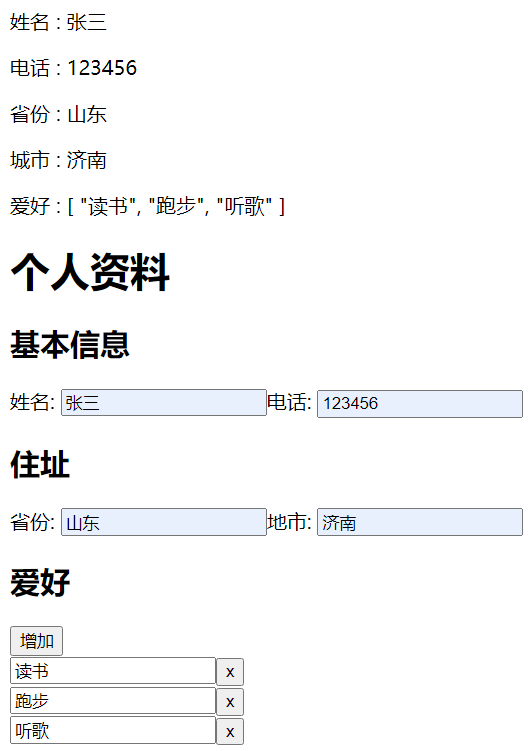
<p>姓名 : {{ profileForm.get("name").value }}</p><p>电话 : {{ profileForm.get("tel").value }}</p><p>省份 : {{ profileForm.get("address").get("province").value }}</p><p>城市 : {{ profileForm.get("address").get("citys").value }}</p><p>爱好 : {{ profileForm.get("hobbys").value | json }}</p><h1>个人资料</h1><form [formGroup]="profileForm"><h2>基本信息</h2><label>姓名:<input type="text" formControlName="name" /></label><label>电话:<input type="text" formControlName="tel" /></label><div formGroupName="address"><h2>住址</h2><label>省份:<input type="text" formControlName="province" /></label><label>地市:<input type="text" formControlName="citys" /></label></div><div formArrayName="hobbys"><h2>爱好</h2><button (click)="addHobbys()">增加</button><br /><label *ngFor="let hobby of hobbys.controls; let i = index"><!-- <span>爱好 {{i+1}} : </span> --><input type="text" [formControlName]="i" /><button (click)="delHobby(i)">x</button><br /></label></div></form>
import { Component, OnInit } from '@angular/core';import { FormArray, FormBuilder, FormControl, FormGroup } from '@angular/forms';@Component({selector: 'app-demo2',templateUrl: './demo2.component.html',styleUrls: ['./demo2.component.css'],})export class Demo2Component implements OnInit {profileForm = this.fb.group({name: [''],tel: [''],address: this.fb.group({province: [''],citys: [''],}),hobbys: this.fb.array([this.fb.control(''),this.fb.control('')]),});get hobbys(): FormArray {return this.profileForm.get('hobbys') as FormArray;}addHobbys(): void {this.hobbys.push(this.fb.control(''));}delHobby(i: number): void {this.hobbys.removeAt(i);}constructor(private fb: FormBuilder) {}ngOnInit(): void {}}

若有收获,就点个赞吧
0 人点赞


