概览
绑定类型表格一览
| 绑定类型 | 语法 | 分类 |
|---|---|---|
| 插值 属性 Attribute CSS 类 Style样式 |
{{expression}}[target]="expression"bind-target="expression" |
单向 从数据源到视图 |
| 事件 | (target)="statement"on-target="statement" |
单向 从视图到数据源 |
| 双向 | [(target)]="expression"bindon-target="expression" |
双向 |
HTML attribute 与 DOM property 的对比
- Attribute 是由 HTML 定义的。Property 是从 DOM(文档对象模型)节点访问的。
- HTML Attribute 和 DOM Property 是不同的,就算它们具有相同的名称也是如此。
- 在 Angular 中,HTML Attribute 的唯一作用是初始化元素和指令的状态。
- 模板绑定使用的是 Property 和事件,而不是 Attribute。
- 编写数据绑定时,你只是在和目标对象的 DOM Property 和事件打交道。
绑定类型与绑定目标
| 绑定类型 | 目标 | 范例 |
|---|---|---|
| 属性 | 元素的 property 组件的 property 指令的 property |
src, hero, 和 ngClass 如下所示:<img [src]="heroImageUrl"><app-hero-detail [hero]="currentHero"></app-hero-detail><div [ngClass]="{'special': isSpecial}"></div> |
| 事件 | 元素的事件 组件的事件 指令的事件 |
click, deleteRequest, 和 myClick 如下所示:content_copy <button (click)="onSave()">Save</button><app-hero-detail (deleteRequest)="deleteHero()"></app-hero-detail><div (myClick)="clicked=$event" clickable>click me</div> |
| 双向 | 事件与 property | <input [(ngModel)]="name"> |
| Attribute | attribute(例外情况) | <button [attr.aria-label]="help">help</button> |
| CSS类 | class property | <div [class.special]="isSpecial">Special</div> |
| Style样式 | style property | <button [style.color]="isSpecial ? 'red' : 'green'"> |
attribute、class 和 style 绑定
attribute绑定
Attribute 绑定的语法是由前缀 attr、点( . )和 Attribute 名称组成<button [attr.aria-label]="actionName">确定</button>
class绑定
| 绑定类型 | 语法 | 输入类型 | 输入值范例 |
|---|---|---|---|
| 单个类 | [class.foo]="hasFoo" |
boolean | undefined | null | true, false |
| 多个类 | [class]="classExpr" |
string | “class-1 class-2 class-3” |
| {[key: string]: boolean | undefined | null} | {foo: true, bar: false} | ||
| Array |
[‘foo’, ‘bar’] |
style绑定
| 绑定类型 | 语法 | 输入类型 | 输入值范例 |
|---|---|---|---|
| 单一样式 | [style.width]="width" |
boolean | undefined | null | “100px” |
| 带单位的单一样式 | [style.width.px]="width" |
number | undefined | null | 100 |
| 多个样式 | [style]="styleExpr" |
string | “width: 100px; height: 100px” |
| {[key: string]: string | undefined | null} | {width: ‘100px’, height: ‘100px’} |
||
| Array |
[‘width’, ‘100px’] |
样式的优先级规则(从高到低)
- 模板绑定
- 属性绑定(例如
或)
- Map 绑定(例如,
或)- 静态值(例如
或)- 指令宿主绑定
属性绑定(例如,host: {‘[class.foo]’: ‘hasFoo’} 或 host: {‘[style.color]’: ‘color’}
- Map 绑定(例如,host: {‘[class]’: ‘classExpr’} 或者 host: {‘[style]’: ‘styleExpr’} )
- 静态值(例如,host: {‘class’: ‘foo’} 或 host: {‘style’: ‘color: blue’} )
组件宿主绑定
属性绑定(例如,host: {‘[class.foo]’: ‘hasFoo’} 或 host: {‘[style.color]’: ‘color’} )
- Map 绑定(例如,host: {‘[class]’: ‘classExpr’} 或者 host: {‘[style]’: ‘styleExpr’} )
- 静态值(例如,host: {‘class’: ‘foo’} 或 host: {‘style’: ‘color: blue’} )
事件绑定
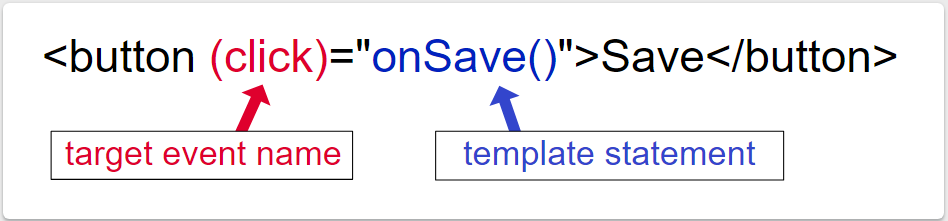
$event和事件处理语句
// ts文件中定义了str变量str: any;// 点击按钮时,将组件的str变量赋值为$event的坐标,并且执行onClick(方法)<button (click)="str={X: $event.screenX, Y: $event.screenY}; onClick($event)">按钮1</button>onClick(event: MouseEvent): void {console.log(event);}// 为input输入框添加input事件,事件触发时执行组件中的onInput()方法,// 并将DOM事件对象$event传到方法中<input type="text" (input)="onInput($event)"/>// 将str赋值为$event,并且打印$event的data值,即按键的值onInput(event: InputEvent): void {this.str = event.data;console.log(event);}// 通过json管道将str在模板中输出<span>str:<br>{{str | json}}</span>
自定义事件
双向绑定
要先导入FormsModule
import { FormsModule } from '@angular/forms';

若有收获,就点个赞吧
0 人点赞


