10.3 各类操作符的示例
基本操作符. 成员访问操作符
- 访问外层名称空间中的子名称空间
- 访问名称空间中的类型
- 访问类型的静态成员(声明静态成员用static关键字)
- 访问对象中的实例成员
System.IO.File.Create("D:\\HelloWorld.txt");1 2 3var myForm = new Form();myForm.Text = "Hello, World";4myForm.ShowDialog();4
f()方法调用操作符
- C# 里方法调用都要用到
() Action 是委托,委托在创建时只需要知道方法的名称,不调用方法,所以只会用到方法名(不加
())。当然最终myAction();也用到了方法调用操作符()class Program{static void Main(string[] args){Calculator c = new Calculator();double x = c.Add(3.0, 4.6);Console.WriteLine(x);Action myAction = new Action(c.PrintHello); //委托的示例myAction();}}class Calculator{public double Add(double a,double b) //“double"表示返回值类型是double{return a + b;}public void PrintHello() //”void“表示没有返回值{Console.WriteLine("Hello");}}
a[x]元素访问操作符访问数组元素:
[]里放的是集合的索引,索引不一定是整数int[] myIntArray = new int[10] //创建一个长度为10的数组,每个数组元素都被初始化为初始值int[] myIntArray = new int[] { 1, 2, 3, 4, 5 };Console.WriteLine(myIntArray[0]); //访问数组里的元素,方括号里为0代表访问第一个元素(偏移量为0)Console.WriteLine(myIntArray[myIntArray.Length - 1]); //访问数组里最后一个元素
索引字典中的元素:
- 像
Dictionary<>这样后面跟<>的类为泛型类,泛型类需要跟其他类组合成一个完整的类class Program{static void Main(string[] args){Dictionary<string, Student> stuDic = new Dictionary<string, Student>();for (int i = 0; i < 100; i++){var stu = new Student() //Student stu = new Student();{ //stu.Name = "s_" + i.ToString();Name = "s_" + i.ToString(), //stu.Score = 100 + i;Score = 100 + i //stuDic.Add(stu.Name, stu);}; //另一种写法stuDic.Add(stu.Name, stu); //}Console.WriteLine(stuDic["s_6"].Score);}}class Student{public string Name;public int Score;}
x++ x--后置自增、自减操作符
- 像
先赋值,再自增
int x = 100;int y = x++;Console.WriteLine(x); //输出101Console.WriteLine(y); //输出100
typeof操作符用于查看一个类型的内部结构(元数据,也称Metadata) ```csharp Type t = typeof(int); Console.WriteLine(t.Namespace); //输出System Console.WriteLine(t.FullName); //输出System.Int32 Console.WriteLine(t.Name); //输出Int32
int c = t.GetMethods().Length; //检视一个类型的所有方法 foreach (var m in t.GetMethods()) { Console.WriteLine(m.Name); } Console.WriteLine(c);
`default` 操作符- 用于获取一个类型的默认值(值类型(结构体类型,枚举类型),引用类型)```csharpclass Program{static void Main(string[] args){int x = default(int); //此时值类型内存块都刷成 0,值就是 0Console.WriteLine(x); //此时输出为0Form myForm = default(Form); // 引用类型内存块刷成 0,没有引用,default值是 nullConsole.WriteLine(myForm == null); //此时输出为TrueLevel level = default(Level);Console.WriteLine(level); //此时输出为High/*枚举类型映射到整型上,默认枚举值是对应值为 0 的那个,可能是你手动指定的,也可能是系统默认赋值的。这就牵扯到我们使用枚举时,要注意枚举中是否有对应 0 的;创建枚举类型时,最好有一个对应 0 的,以免他人查找我们枚举的 default 值时报错。*/}}enum Level{Low = 1,Mid = 2,High = 0}
new 操作符
- new 操作符基本功能:在内存中创建类型实例,并且立刻调用实例的实例构造器
var关键字:用于声明隐式类型的变量,变量类型一旦确定,就无法更改了
static void Main(string[] args){Form myForm = new Form(); //把实例地址通过赋值操作符交给访问它的变量myForm.Text = "Hello"; //此处通过变量访问了这个实例Form myForm2 = new Form() { Text = "Hello" };myForm2.ShowDialog(); //new操作符可以调用实例的初始化器new Form() { Text = "Hello" }.ShowDialog();//new一次性实例:new并设置初始化器后马上访问这个实例的方法,然后就不管它了}
C# 的语法糖衣(Syntactic sugar):声明常用类型的变量时不需要 new 操作符 ```csharp string name1 = new string(new char[]{ ‘T’, ‘i’, ‘m’ }); string name2 = “Tim”; //这里隐藏了new操作符
int[] myArray1 = new int[4]; int[] myArray2 = { 1, 2, 3, 4 }; //这里隐藏了new操作符
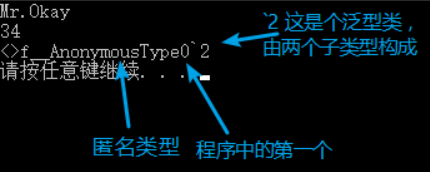
- 为匿名类型创建对象- new 为匿名类型创建对象,并且用隐式类型变量`var`来引用这个实例- new 操作符功能强大,但会导致依赖紧耦合:new 出 myForm 后,Program class 就依赖到 myForm 上了, 一旦 myForm 运行出错,Program 类也会出问题。通过设计模式中的依赖注入模式来将紧耦合变成相对松的耦合```csharpForm myForm = new Form() { Text = "Hello" }; //这个是非匿名类型var person = new { Name = "Mr.Okay", Age = 34 }; //这个是匿名类型,此处建议使用var来引用实例Console.WriteLine(person.Name);Console.WriteLine(person.Age);Console.WriteLine(person.GetType().Name);
- 输出:
- new 作为关键字
- 用于继承/派生 ```csharp class Program { static void Main(string[] args) { Student stu = new Student(); stu.Report(); CsStudent csStu = new CsStudent(); csStu.Report(); } }
class Student { public void Report() { Console.WriteLine(“I’m a student.”); } }
class CsStudent:Student //此处CsStudent类继承了Student类的所有内容 { // new 修饰符 new public void Report() //new作为修饰符隐藏了Student类的方法 { Console.WriteLine(“I’m CS student.”); } }
`checked & unchecked` 操作符- 检查一个值在内存中是否有溢出```csharpuint x = uint.MaxValue; //uint 无符号整型,占用4个字节Console.WriteLine(x);string binStr = Convert.ToString(x, 2); //创建变量binStr,值为x的二进制形式Console.WriteLine(binStr);uint y = x + 1;Console.WriteLine(y); //y超出了uint类型的最大值,此时输出为0
checked:
uint x = uint.MaxValue;Console.WriteLine(x);string binStr = Convert.ToString(x, 2);Console.WriteLine(binStr);try{uint y = checked(x + 1);Console.WriteLine(y); //此时输出There's overflow!}catch(OverflowException ex){Console.WriteLine("There's overflow!");}
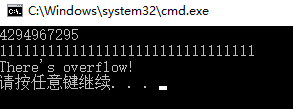
unchecked:
- C# 默认采用的就是 unchecked 模式
try{uint y = unchecked(x + 1);Console.WriteLine(y); //此时输出0}catch(OverflowException ex){Console.WriteLine("There's overflow!");}
- C# 默认采用的就是 unchecked 模式
checked 与 unchecked 的另一种用法(作为关键字)
uint x = uint.MaxValue;Console.WriteLine(x);string binStr = Convert.ToString(x, 2);Console.WriteLine(binStr);checked //这里也可以使用unchecked{try{uint y = x + 1;Console.WriteLine(y);}catch (OverflowException ex){Console.WriteLine("There's overflow!");}}
delegate操作符delegate关键字常被用于声明委托(一种数据类型)
delegate 也可以作为操作符使用,现在已经被Lambda 表达式取代
//WPFpublic partial class MainWindow : Window{public MainWindow(){InitializeComponent();// 方法封装提高了复用性,但如果我这个方法在别的地方不太可能用到,我就可以使用匿名方法// 下面就是使用 delegate 来声明匿名方法//this.myButton.Click += delegate (object sender, RoutedEventArgs e)//{// this.myTextBox.Text = "Hello, World!";//};// 现在推荐使用的是 Lambda 表达式this.myButton.Click += (sender, e) =>{this.myTextBox.Text = "Hello, World!";};}}
sizeof操作符用于获取对象在内存中所占字节数
- 默认情况下 sizeof 只能获取结构体类型的实例在内存中的字节数
• int、uint、double 可以
• string、object 不行 - 非默认情况下,可以使用 sizeof 获取自定义结构体类型的大小,但需要把它放在不安全的上下文中
- 需要在“项目属性”里面开启“允许不安全代码”
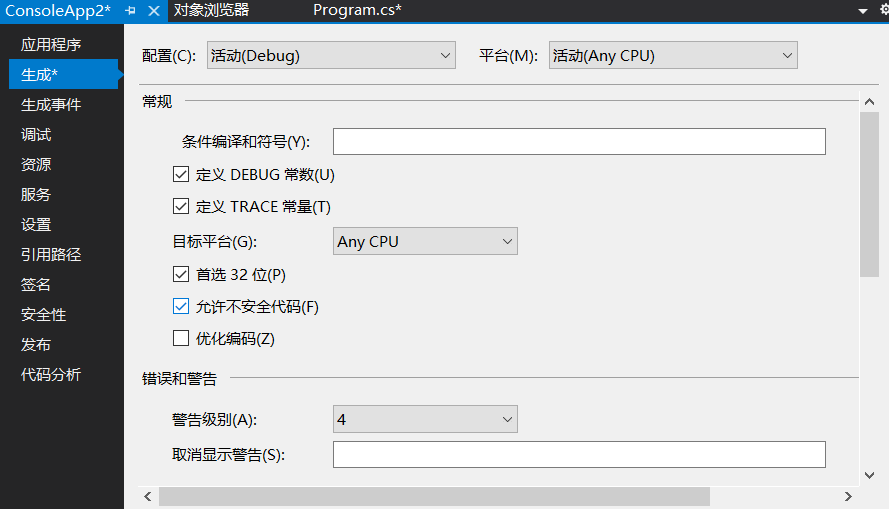
class Program{static void Main(string[] args){int x = sizeof(int);Console.WriteLine(x); //输出4//int x = sizeof(decimal);//Console.WriteLine(x); //输出16unsafe{int y = sizeof(Student);Console.WriteLine(y); //输出16}}}struct Student{int ID;long Score;}
注:int 字节数为 4,long 字节数为 8。但 sizeof(Student) 结果是 16。这涉及到了 .NET 对内存的管理,超出了现在所学内容
-> 操作符
- -> 操作符也必须放在不安全的上下文中才能使用
C# 中指针操作、取地址操作、用指针访问成员的操作,只能用来操作结构体类型,不能用来操作引用类型
class Program{static void Main(string[] args){unsafe{Student stu;stu.ID = 1;stu.Score = 99; //用 . 直接访问Student* pStu = &stu; //用 & 取地址pStu->Score = 100; //用 -> 间接访问Console.WriteLine(stu.Score);}}}struct Student{public int ID;public long Score;}
一元操作符
&x*x操作符也需要在不安全的上下文中
现实工作中用得很少,当做知识了解一下即可
class Program{static void Main(string[] args){unsafe{Student stu;stu.ID = 1;stu.Score = 99;Student* pStu = &stu; //用 & 取地址,pstu在这里就是指针pStu->Score = 100; //用 -> 间接访问(*pStu).Score = 1000; //用 * 取引用,(*是解引用,对后面的指针解引用)Console.WriteLine(stu.Score);}}}struct Student{public int ID;public long Score;}
+-正负操作符
正负操作符使用不当,可能导致溢出var x = int.MinValue;int y = checked(-x);Console.WriteLine("x = " + x);Console.WriteLine("y = " + y);
C# 求相反数是按位取反再加一
-4 100
-3 101
-2 110
-1 111
0 000
1 001
2 010
3 011 ```csharp int x = int.MinValue; int y = -x; Console.WriteLine(x); //输出-2147483648 Console.WriteLine(y); //输出-2147483648
//C#求相反数是按位取反再加一 string xStr = Convert.ToString(x, 2).PadLeft(32, ‘0’); string yStr = Convert.ToString(y, 2).PadLeft(32, ‘0’); Console.WriteLine(xStr); //输出10000000000000000000000000000000 Console.WriteLine(yStr); //输出10000000000000000000000000000000
`~`求反操作符```csharpint x = 12345678;int y = ~x;Console.WriteLine(y); //输出-12345679string xStr = Convert.ToString(x, 2).PadLeft(32, '0');string yStr = Convert.ToString(y, 2).PadLeft(32, '0');Console.WriteLine(xStr); //输出00000000101111000110000101001110Console.WriteLine(yStr); //输出11111111010000111001111010110001
!取非操作符
用于布尔类型的值
bool b1 = true;bool b2 = !b1;Console.WriteLine(b2); //输出false
!操作符在现实工作中的应用 ```csharp class Program { static void Main(string[] args) {var stu = new Student(null);Console.WriteLine(stu.Name);
} }
class Student { public Student(string initName) { if (!string.IsNullOrEmpty(initName)) { this.Name = initName; } else { throw new ArgumentException(“initName cannot be null or empty.”); } } public string Name; }
`++x` `--x` 前置自增和自减操作符- 无论前置、后置,在实际工作中,尽量单独使用它们,不要把它们和别的语句混在一起,那样会降低可读性```csharpint x = 100;++x; //单独使用时,与x++效果相同Console.WriteLine(x); //输出101
int x1 = 100;int y = ++x1; //先自增,后赋值Console.WriteLine(y); //输出101int x2 = 100;int z = x2++; //先赋值,后自增Console.WriteLine(z); //输出100

若有收获,就点个赞吧
0 人点赞


