介绍
| sql | mongo |
|---|---|
| database | database |
| table | collection |
| row | document |
| column | field |
| index | index |
| join | |
| primary key | primary key |
安装
Docker
docker run -d -p 27017:27017 \-e TZ=Asia/Beijing \-v /mongo:/data \--name mongo \mongo:latest
单机
下载mongo-5.0.1上传至服务器/usr/local/目录下,并解压,然后重命名为mongo-5.0.1
cd /usr/localtar -zxvf mongodb-linux-x86_64-rhel70-5.0.1.tgzmv mongodb-linux-x86_64-rhel70-5.0.1 mongo-5.0.1
在解压目录中的bin目录下新建data、log文件夹
cd ./mongo-5.0.1/bin/mkdir data log
继续在该目录下创建mongo.conf配置文件,并编写相关配置
vi /usr/local/mongo-5.0.1/bin/mongo.conf
systemLog:destination: filelogAppend: true# 日志文件存储路径path: /usr/local/mongo-5.0.1/bin/log/mongod.logstorage:# 数据存储位置dbPath: /usr/local/mongo-5.0.1/bin/datajournal:enabled: trueprocessManagement:# 后台运行fork: true# 要事先创建/var/run/mongo文件夹pidFilePath: /var/run/mongo/mongod.pidtimeZoneInfo: /usr/share/zoneinfonet:port: 27017# 允许任何ip访问bindIp: 0.0.0.0security:# 用户授权默认关闭authorization: disabled
基于配置文件启动mongo服务实例 ```bash ./mongod -f ./mongo.conf
或者用这个
./mongod —config ./mongo.conf
安全关闭
./mongod —shutdown -f ./mongo.conf
- 如果不用配置,直接使用指令启动也是可以的```bash# 如果开启权限需加上 --auth 参数./mongod --bind_ip 0.0.0.0 --port 27017 --fork \--dbpath /usr/local/mongo-5.0.1/bin/data \--logpath /usr/local/mongo-5.0.1/bin/log/mongod.log \# 安全关闭./mongod shutdown --bind_ip 0.0.0.0 --port 27017 --fork \--dbpath /usr/local/mongo-5.0.1/bin/data \--logpath /usr/local/mongo-5.0.1/bin/log/mongod.log \
- 开启远程访问权限
# 开放防火墙端口,重启,查看开放端口sudo firewall-cmd --zone=public --add-port=27017/tcp --permanentsudo firewall-cmd --reloadsudo firewall-cmd --list-ports
用户授权:MongoDB用户权限管理
复制集
副本集介绍
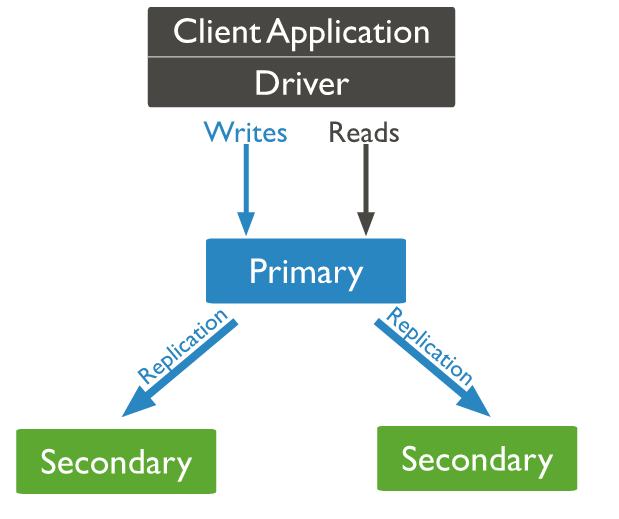
副本集:MongoDB副本集是将数据同步在多个服务器的过程,复制提供了数据的冗余备份,并在多个服务器上存储数据副本,提高了数据的可用性, 并可以保证数据的安全性,同时还允许从硬件故障和服务中断中恢复数据。Oplog:Oplog是MongoDB Primary(主节点)和Secondary(从节点)在副本集建立期间和建立完成之后的复制介质。Primary中所有的写入操作都会记录到Oplog中,然后从节点会来主节点拉取Oplog并应用到自己的节点上。这里的Oplog是MongoDB local数据库的一个集合,它是Capped collection,通俗意思就是它是固定大小,循环使用的。使用场景:
- 数据冗余,用做故障恢复使用,当发生硬件故障或者其它原因造成的宕机时,可以使用副本进行恢复。
- 读写分离,读的请求分流到副本上,减轻主节点的读压力。
副本集的原理: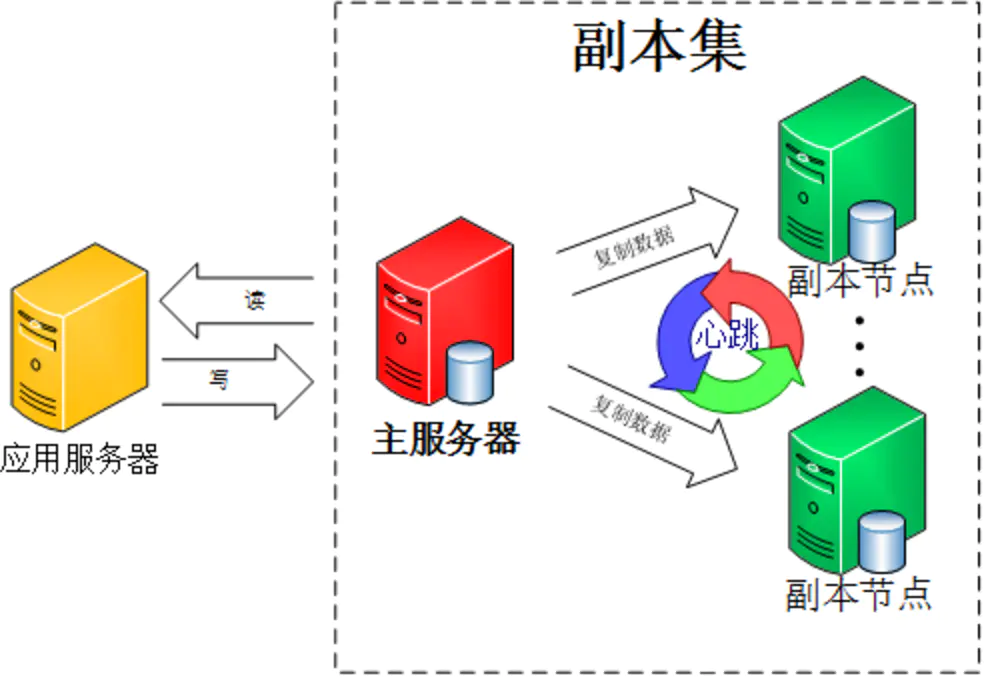
集群中的各节点还会通过传递心跳信息来检测各自的健康状况。当主节点故障时,多个从节点会触发一次新的选举操作,并选举其中的一个成为新的主节点(通常谁的优先级更高,谁就是新的主节点),心跳信息默认每2秒传递一次。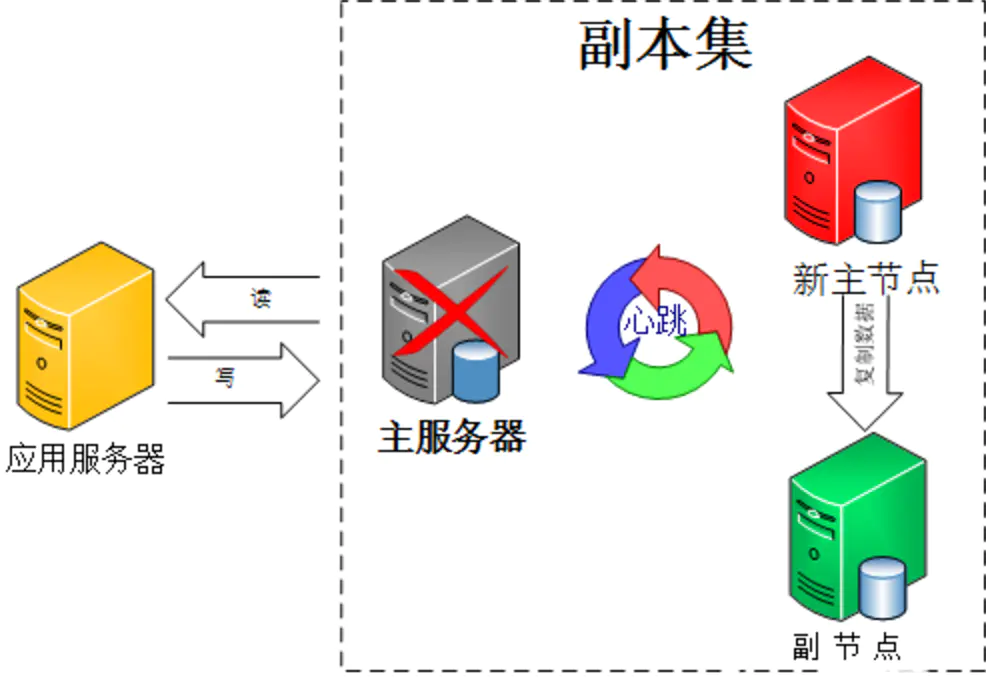
客户端连接到副本集后,不关心具体哪一台机器是否挂掉。主服务器负责整个副本集的读写,副本集定期同步数据备份。一旦主节点挂掉,副本节点就会选举一个新的主服务器。这一切对于应用服务器不需要关心。
副本集中的副本节点在主节点挂掉后通过心跳机制检测到后,就会在集群内发起主节点的选举机制,自动选举出一位新的主服务器。
副本集角色
主节点(Primary):接收所有的写请求,然后把修改同步到所有Secondary。一个Replica Set只能有一个Primary节点,当Primary挂掉后,其他Secondary或者Arbiter节点会重新选举出来一个主节点。 默认读请求也是发到Primary节点处理的,可以通过修改客户端连接配置以支持读取 Secondary节点。 副本节点(Secondary):与主节点保持同样的数据集。当主节点挂掉的时候,参与选主。 仲裁者(Arbiter):不保存数据,不参与选主,只进行选主投票。使用Arbiter可以减轻数据存储的 硬件需求,Arbiter几乎没什么大的硬件资源需求,但重要的一点是,在生产环境下它和其他数据节点不要部署在同一台机器上。
两种架构模式
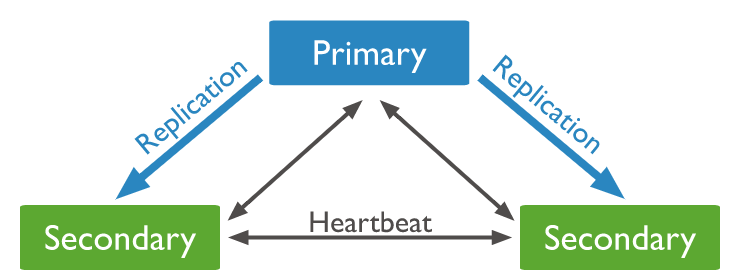
PSS:Primary + Secondary + Secondary模式,通过Primary和Secondary搭建的Replica Set。该模式下Replica Set节点数必须为奇数,目的是选主投票的时候要出现大多数(过半)才能进行选主决策。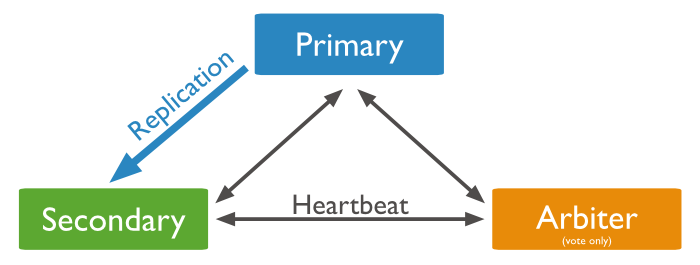
PSA:Primary + Secondary + Arbiter模式,使用Arbiter搭建Replica Set。偶数个数据节点,加一个Arbiter构成的Replica Set。
选举机制
复制集通过replSetInitiate命令或rs.initiate()命令进行初始化。 初始化后各个成员间开始发送心跳消息,并发起Primary选举操作,获得大多数成员投票支持的节点,会成为Primary,其余节点成为Secondary。
大多数: 假设复制集内投票成员数量为N,则大多数为N/2 + 1,当复制集内存活成员数量不足大多数时,整个复制集将无法选举出Primary,复制集将无法提供写服务,处于只读状态。 关于大多数的计算如下表所示:
| 投票成员数 | 大多数 | 容忍失效数 |
|---|---|---|
| 1 | 1 | 0 |
| 2 | 2 | 0 |
| 3 | 2 | 1 |
| 4 | 3 | 1 |
| 5 | 3 | 2 |
Mongodb副本集的选举基于Bully算法,这是一种协调者竞选算法Primary的选举受节点间心跳、优先级、最新的oplog时间等多种因素影响。
特殊角色Arbiter:Arbiter节点只参与投票,不能被选为 Primary,并且不从Primary同步数据。 当节点宕机导致复制集无法选出Primary时,可以给复制集添加一个Arbiter节点,即使有节点宕机,仍能选出Primary。Arbiter 本身不存储数据,是非常轻量级的服务,当复制集成员为偶数时,最好加入一个 Arbiter 节点,以提升复制集可用性。Priority0:Priority0节点的选举优先级为0,不会被选举为Primary。 比如你跨机房A、B 部署了一个复制集,并且想指定Primary必须在A机房,这时可以将B机房的复制集成员Priorit 设置为0,这样Primary就一定会是A机房的成员。(注意:如果这样部署,最好将大多数节点部署在 A 机房, 否则网络分区时可能无法选出 Primary)。Vote0:Mongodb 3.0里,复制集成员最多50个,参与Primary选举投票的成员最多7个,其他成员(Vote0)的 vote属性必须设置为0,即不参与投票。Hidden:Hidden节点不能被选为主(Priority 为0),并且对Driver不可见。 因Hidden节点不会接受Driver的请求,可使用Hidden节点做一些数据备份、离线计算的任务,不会影响复制集的服务。Delayed:Delayed节点必须是Hidden节点,并且其数据落后与Primary一段时间(可配置,比如1个 小时)。因 Delayed节点的数据比Primary落后一段时间,当错误或者无效的数据写入Primary时,可通过Delayed节点的数据来恢复到之前的时间点。
触发选举条件
- 初始化一个副本集时。
- 从库不能连接到主库(默认超过10s,可通过heartbeatTimeoutSecs参数控)),由从库发起选举。
- 主库放弃Primary角色,比如执行rs.shutdown命令。
故障转移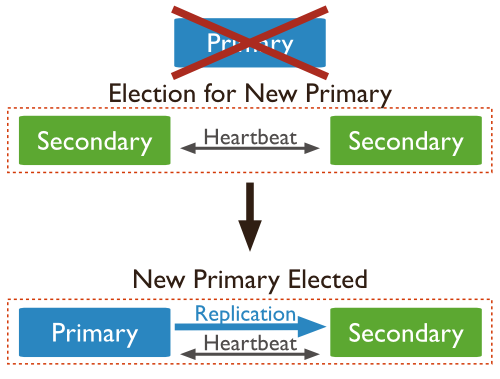
Mongodb副本集通过心跳检测实现自动failover机制,进而实现高可用。
数据同步
Primary与Secondary之间通过oplog来同步数据,Primary 上的写操作完成后,会向特殊的local.oplog.rs特殊集合写入一条oplog,Secondary不断的从Primary取新的oplog并应用。 因oplog的数据会不断增加,local.oplog.rs被设置成为一个capped集合,当容量达到配置上限时,会将最旧的数据删除掉。
Secondary初次同步数据时,会先执行init sync,从Primary(或其他数据更新的Secondary)同步全量数据, 然后不断通过执行tailable cursor从Primary的local.oplog.rs集合里查询最新的oplog并应用到自身。考虑到oplog在Secondary上可能重复应用,oplog必须具有幂等性,即重复应用也会得到相同的结果。即将oplog的同一个操作执行多次,与执行一次的效果是一样的。简单的说就是:
当Primary节点完成数据操作后,Secondary会做出一系列的动作保证数据的同步:
- 检查自己local库的oplog.rs集合找出最近的时间戳。
- 检查Primary节点local库oplog.rs集合,找出大于此时间戳的记录。
- 将找到的记录插入到自己的oplog.rs集合中,并执行这些操作。
异常回滚
当Primary宕机时,如果有数据未同步到Secondary,当Primary重新加入时,如果新的Primary上已经发生了写操作,则旧Primary需要回滚部分操作,以保证数据集与新的Primary一致。 旧Primary将回滚的数据写到单独的rollback目录下,数据库管理员可根据需要使用mongorestore进行恢复。
读写配置
Read Preference默认情况下,复制集的所有读请求都发到Primary,Driver可通过设置Read Preference来将读请求路由到其他的节点。
- primary:默认规则,所有读请求发到Primary;
- primaryPreferred:Primary优先,如果Primary不可达,请求Secondary;
- secondary:所有的读请求都发到Secondary;
- secondaryPreferred:Secondary优先,当所有Secondary不可达时,请求Primary;
- nearest:读请求发送到最近的可达节点上(通过ping探测得出最近的节点)。
Write Concern默认情况下,Primary 完成写操作即返回,Driver 可通过设置Write Concern来设置写成功的规则。
搭建过程
一主两从:
主机:192.168.73.133
主节点:27017
从节点:27018、27019
创建rs文件夹,然后在其下创建3个用于存放节点信息及配置的节点文件夹
cd /usr/local/mongo-5.0.1/bin/mkdir rscd ./rsmkdir 27017 27018 27019
以27017为例,其余两个节点文件夹也按如下操作
cd ./27017# 创建用于存储数据和日志的文件夹mkdir data log# 创建mongo.conf配置文件,并编写相关配置vi mongo.conf
systemLog:destination: filelogAppend: true# 日志文件存储路径path: /usr/local/mongo-5.0.1/bin/rs/27017/log/mongod.logstorage:# 数据存储位置dbPath: /usr/local/mongo-5.0.1/bin/rs/27017/datajournal:enabled: trueprocessManagement:# 后台运行fork: true# 要事先创建/var/run/mongo文件夹pidFilePath: /var/run/mongo/mongod_27017.pidtimeZoneInfo: /usr/share/zoneinfonet:port: 27017# 允许任何ip访问bindIp: 0.0.0.0replication:# 复制集的名称,可为任意名称replSetName: rs
如果不想一个一个改,可以先复制27017文件夹中的内容,然后批量替换文件中的内容,以27018为例 ```bash cd ../ cp -r ./27017/* ./27018/
sed -i “s/查找字段/替换字段/g” grep 查找字段 -rl 路径
sed -i “s/27017/27018/g” grep 27017 -rl /usr/local/mongo-5.0.1/bin/rs/27018/mongo.conf
ps:记得也要检查一下,防止不小心出错哦
- 启动3个mongo服务实例节点```bashcd .././mongod -f ./rs/27017/mongo.conf./mongod -f ./rs/27018/mongo.conf./mongod -f ./rs/27019/mongo.conf
- 连接到任意节点,进行复制集的初始化和配置
```bash
第一种方式
./mongo 192.168.73.133:27017 rs.initiate({ _id:”rs”, members:[ {_id:0, host:”192.168.73.133:27017”}, {_id:1, host:”192.168.73.133:27018”}, {_id:2, host:”192.168.73.133:27019”}] })
第二种方式
./mongo 192.168.73.133:27017 rs.initiate() rs.add(“192.168.73.133:27018”) rs.add(“192.168.73.133:27019”)
查看副本集的配置
rs.conf()
查看副本集状态
rs.status()
查看该主机节点是否为副本集主节点
rs.isMaster()
- 设置从节点可读```bashrs:SECONDARY> db.setSecondaryOk()
- 默认读请求发送到主节点处理,可以设置从节点读写策略
分片集群
原理介绍
搭建过程
三主六从、三配置服务实例、三路由服务实例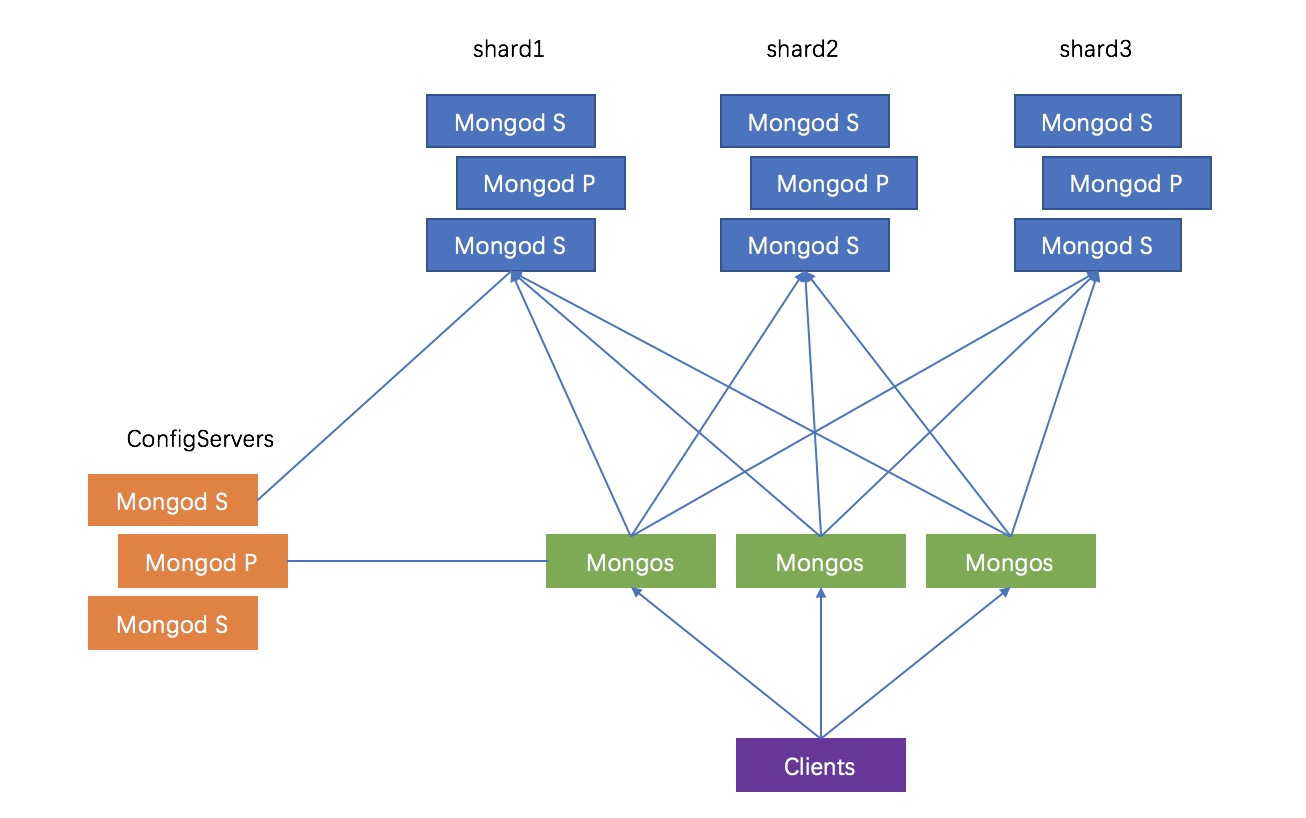
| 角色 | 主机 | 端口 |
|---|---|---|
| shard1 | 192.168.73.133 | 27017、27018、27019 |
| shard2 | 192.168.73.133 | 27020、27021、27022 |
| shard3 | 192.168.73.133 | 27023、27024、27025 |
| config-servers | 192.168.73.133 | 27026、27027、27028 |
| route-servers | 192.168.73.133 | 27029、27030、27031 |
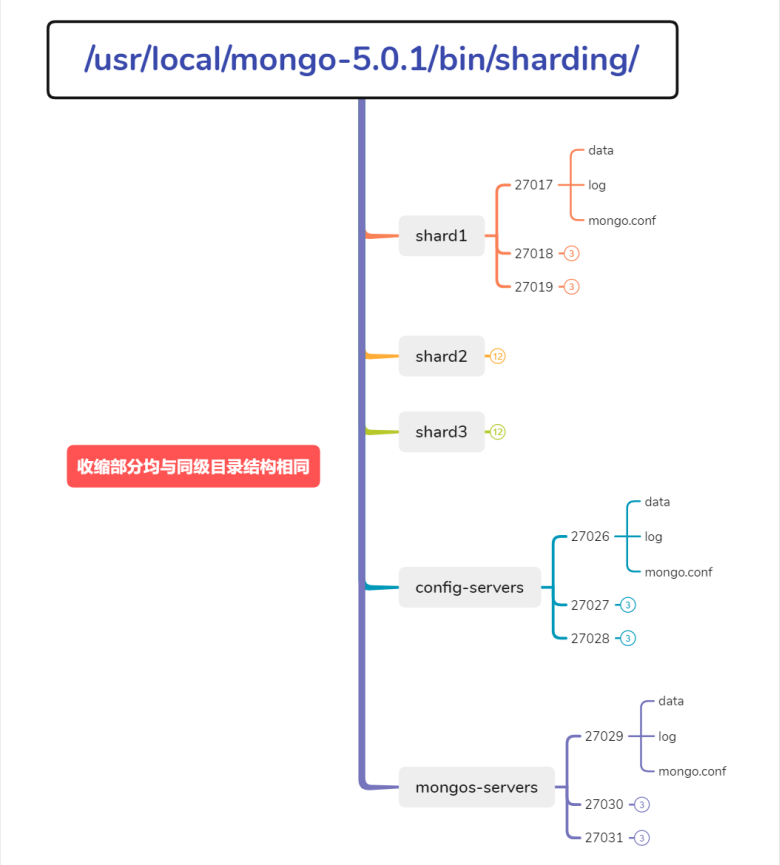
- 按照上图所示,在 /usr/local/mongo-5.0.1/bin/sharding/ 目录下创建相应的目录及文件
分片服务节点 mongo.conf 的配置,以27017为例,分片中的节点按如下方式做相应修改即可
systemLog:destination: filelogAppend: truepath: /usr/local/mongo-5.0.1/bin/sharding/shard1/27017/log/mongod.logstorage:dbPath: /usr/local/mongo-5.0.1/bin/sharding/shard1/27017/datajournal:enabled: trueprocessManagement:fork: truepidFilePath: /var/run/mongo/mongod_27017.pidnet:bindIp: 0.0.0.0port: 27017replication:# mongo服务实例的复制集名称replSetName: rs1sharding:clusterRole: shardsvr
配置服务节点 mongo.conf 的配置,以27026为例,其它两个配置节点按如下方式做相应修改即可
systemLog:destination: filelogAppend: truepath: /usr/local/mongo-5.0.1/bin/sharding/config-servers/27026/log/mongod.logstorage:dbPath: /usr/local/mongo-5.0.1/bin/sharding/config-servers/27026/datajournal:enabled: trueprocessManagement:fork: truepidFilePath: /var/run/mongo/mongod_27026.pidtimeZoneInfo: /usr/share/zoneinfonet:bindIp: 0.0.0.0port: 27026replication:# 配置服务实例的复制集名称replSetName: configsharding:clusterRole: configsvr
路由服务节点 mongo.conf 的配置,以27029为例,其它两个路由节点按如下方式做相应修改即可
systemLog:destination: filelogAppend: truepath: /usr/local/mongo-5.0.1/bin/sharding/mongos-servers/27029/log/mongos.logprocessManagement:fork: truepidFilePath: /var/run/mongo/mongos_27029.pidnet:bindIp: 0.0.0.0port: 27029sharding:# 这里写的是配置服务复制集名称configDB: config/192.168.73.133:27026,192.168.73.133:27027,192.168.73.133:27028
启动三个分片中的服务实例节点,并初始化复制集 ```bash cd /usr/local/mongo-5.0.1/bin/
shard1
./mongod -f ./sharding/shard1/27017/mongo.conf ./mongod -f ./sharding/shard1/27018/mongo.conf ./mongod -f ./sharding/shard1/27019/mongo.conf
./mongo 192.168.73.133:27017 rs.initiate({ _id:”rs1”, members:[ {_id:0, host:”192.168.73.133:27017”}, {_id:1, host:”192.168.73.133:27018”}, {_id:2, host:”192.168.73.133:27019”}] })
shard2
./mongod -f ./sharding/shard2/27020/mongo.conf ./mongod -f ./sharding/shard2/27021/mongo.conf ./mongod -f ./sharding/shard2/27022/mongo.conf
./mongo 192.168.73.133:27020 rs.initiate({ _id:”rs2”, members:[ {_id:0, host:”192.168.73.133:27020”}, {_id:1, host:”192.168.73.133:27021”}, {_id:2, host:”192.168.73.133:27022”}] })
shard3
./mongod -f ./sharding/shard3/27023/mongo.conf ./mongod -f ./sharding/shard3/27024/mongo.conf ./mongod -f ./sharding/shard3/27025/mongo.conf
./mongo 192.168.73.133:27023 rs.initiate({ _id:”rs3”, members:[ {_id:0, host:”192.168.73.133:27023”}, {_id:1, host:”192.168.73.133:27024”}, {_id:2, host:”192.168.73.133:27025”}] })
- 启动配置中的服务实例节点,并初始化复制集```bash./mongod -f ./sharding/config-servers/27026/mongo.conf./mongod -f ./sharding/config-servers/27027/mongo.conf./mongod -f ./sharding/config-servers/27028/mongo.conf./mongo 192.168.73.133:27026rs.initiate({ _id:"config", members:[{_id:0, host:"192.168.73.133:27026"},{_id:1, host:"192.168.73.133:27027"},{_id:2, host:"192.168.73.133:27028"}]})
启动路由服务实例节点
./mongos -f ./sharding/mongos-servers/27029/mongo.conf./mongos -f ./sharding/mongos-servers/27030/mongo.conf./mongos -f ./sharding/mongos-servers/27031/mongo.conf
连接任意路由节点,添加分片 ```bash ./mongo —host 192.168.73.133 —port 27029
命令方式
sh.addShard(“rs1/192.168.73.133:27017,192.168.73.133:27018,192.168.73.133:27019”) sh.addShard(“rs2/192.168.73.133:27020,192.168.73.133:27021,192.168.73.133:27022”) sh.addShard(“rs3/192.168.73.133:27023,192.168.73.133:27024,192.168.73.133:27025”)
api方式
db.runCommand({addshard:”rs1/192.168.73.133:27017,192.168.73.133:27018,192.168.73.133:27019”,name:”shard1”}) db.runCommand({addshard:”rs2/192.168.73.133:27020,192.168.73.133:27021,192.168.73.133:27022”,name:”shard2”}) db.runCommand({addshard:”rs3/192.168.73.133:27023,192.168.73.133:27024,192.168.73.133:27025”,name:”shard3”})
查看集群状态
sh.status()
- 对数据库进行分片```bash# 命令方式sh.enableSharding("db_student")sh.shardCollection("db_student.student",{"id":"hashed"})# api方式db.runCommand({enablesharding:"db_student")db.runCommand({shardcollection:"db_student.student",key:{id:1}})# 写入数据use db_studentfor(i=1;i<=5000;i++){db.student.insert({"id":i,"name":"ble"+i})}
.NET集成
.NET6WebAPIMongo
前提
- 引入Nuget包
- MongoDB.Driver
在
appsettings.json文件中,配置Mongo的相关参数{"Logging": {"LogLevel": {"Default": "Information","Microsoft.AspNetCore": "Warning"}},"AllowedHosts": "*","Mongo": {"Host": "localhost","Port": 27017,"Database": "your database name"}}
接下来,我们简单定义一个
MongoOptions配置类,用于接收配置public class MongoOptions{public string Host { get; set; } = null!;public int Port { get; set; }public string? Database { get; set; }public string ConnectionString => $"mongodb://{Host}:{Port}/{Database}";}
自定义
ServiceCollectionExtensions扩展类自定义
AddMongo扩展方法,在这里对Mongo进行引入public static partial class ServiceCollectionExtensions{public static void AddMongo(this IServiceCollection? services, Action<MongoOptions> configure){MongoOptions mongoOptions = new();configure?.Invoke(mongoOptions);IMongoClient mongoClient = new MongoClient(mongoOptions.ConnectionString);services!.AddScoped(serviceProvider => mongoClient);IMongoDatabase mongoDatabase = mongoClient.GetDatabase(mongoOptions.Database);services!.AddScoped(serviceProvider => mongoDatabase);}}
在
Program类中,使用我们刚才定义的扩展方法 ```csharp var builder = WebApplication.CreateBuilder(args); var services = builder.Services; var configuration = builder.Configuration;
services.AddControllers(); services.AddEndpointsApiExplorer(); services.AddSwaggerGen();
// here services.AddMongo(opt => { opt.Host = configuration[“Mongo:Host”]; opt.Port = int.TryParse(configuration[“Mongo:Port”], out int port) ? port : default; opt.Database = configuration[“Mongo:Database”]; });
var app = builder.Build();
if (app.Environment.IsDevelopment()) { app.UseSwagger(); app.UseSwaggerUI(); }
app.UseAuthorization();
app.MapControllers();
app.Run();
- 因为每个集合中都会有一个`ObjectId`类型的主键,所以我们给每个集合定义一个基类```csharppublic class MongoCollection{[BsonId]public ObjectId Id { get; set; }}
接下来,是我简单为
IMongoDatabase和IMongoCollection扩展的一些功能,你可以直接拿去用呢😀public static class MongoExtensions{/// <summary>/// 集合是否存在/// </summary>public static async Task<bool> CollectionExistsAsync<TCollection>(this IMongoDatabase mongoDatabase, CancellationToken cancellationToken = default)where TCollection : MongoCollection{string collectionName = typeof(TCollection).Name;BsonDocument filter = new("name", BsonValue.Create(collectionName));ListCollectionsOptions options = new(){Filter = filter};using IAsyncCursor<BsonDocument> cursor = await mongoDatabase.ListCollectionsAsync(options, cancellationToken);bool collectionIsExists = await cursor.AnyAsync(cancellationToken);return collectionIsExists;}/// <summary>/// 获取所有集合名称/// </summary>public static async Task<List<string>> GetCollectionNamesAsync(this IMongoDatabase mongoDatabase, ListCollectionNamesOptions? options = null, CancellationToken cancellationToken = default){using IAsyncCursor<string> cursor = await mongoDatabase.ListCollectionNamesAsync(options, cancellationToken);List<string> collectionNames = await cursor.ToListAsync(cancellationToken);return collectionNames;}/// <summary>/// 创建集合/// </summary>public static async Task CreateCollectionAsync<TCollection>(this IMongoDatabase mongoDatabase, CreateCollectionOptions? collectionOptions = null, CancellationToken cancellationToken = default)where TCollection : MongoCollection{string collectionName = typeof(TCollection).Name;await mongoDatabase.CreateCollectionAsync(collectionName, collectionOptions, cancellationToken);}/// <summary>/// 获取集合对象/// </summary>public static IMongoCollection<TDocument> GetCollection<TDocument>(this IMongoDatabase mongoDatabase, MongoCollectionSettings? settings = null)where TDocument : MongoCollection{string collectionName = typeof(TDocument).Name;IMongoCollection<TDocument> mongoCollection = mongoDatabase.GetCollection<TDocument>(collectionName, settings);return mongoCollection;}/// <summary>/// 获取集合对象/// </summary>public static IMongoCollection<BsonDocument> GetCollection(this IMongoDatabase mongoDatabase, string collectionName, MongoCollectionSettings? settings = null){IMongoCollection<BsonDocument> mongoCollection = mongoDatabase.GetCollection<BsonDocument>(collectionName, settings);return mongoCollection;}/// <summary>/// 插入一条文档/// </summary>public static async Task<TDocument> InsertAsync<TDocument>(this IMongoCollection<TDocument> mongoCollection, TDocument document, InsertOneOptions? options = null, CancellationToken cancellationToken = default)where TDocument : MongoCollection{await mongoCollection.InsertOneAsync(document, options, cancellationToken);return document;}/// <summary>/// 插入多条文档/// </summary>public static async Task<List<TDocument>> InsertAsync<TDocument>(this IMongoCollection<TDocument> mongoCollection, List<TDocument> documents, InsertManyOptions? options = null, CancellationToken cancellationToken = default)where TDocument : MongoCollection{await mongoCollection.InsertManyAsync(documents, options, cancellationToken);List<TDocument> documentsInserted = documents.ToList();return documentsInserted;}/// <summary>/// 根据 _id 查询文档,并将查询结果投影为 TProjection 类型/// </summary>public static async Task<TProjection> FindByIdAsync<TDocument, TProjection>(this IMongoCollection<TDocument> mongoCollection, string _id, CancellationToken cancellationToken = default)where TDocument : MongoCollectionwhere TProjection : class{FilterDefinition<TDocument> filter = Builders<TDocument>.Filter.Eq("_id", new ObjectId(_id));FindOptions<TDocument, TProjection> options = new(){Projection = Builders<TDocument>.Projection.As<TProjection>()};using IAsyncCursor<TProjection> cursor = await mongoCollection.FindAsync(filter, options, cancellationToken);TProjection projection = await cursor.FirstOrDefaultAsync(cancellationToken);return projection;}/// <summary>/// 根据 _id 查询文档/// </summary>public static async Task<TDocument> FindByIdAsync<TDocument>(this IMongoCollection<TDocument> mongoCollection, string _id, CancellationToken cancellationToken = default)where TDocument : MongoCollection{FilterDefinition<TDocument> filter = Builders<TDocument>.Filter.Eq("_id", new ObjectId(_id));using IAsyncCursor<TDocument> cursor = await mongoCollection.FindAsync(filter, cancellationToken: cancellationToken);TDocument document = await cursor.FirstOrDefaultAsync(cancellationToken);return document;}/// <summary>/// 查询符合条件的第一条文档,并将查询结果投影为 TProjection 类型/// </summary>public static async Task<TProjection> FindOneAsync<TDocument, TProjection>(this IMongoCollection<TDocument> mongoCollection, FilterDefinition<TDocument> filter, SortDefinition<TDocument>? sort = null, CancellationToken cancellationToken = default)where TDocument : MongoCollectionwhere TProjection : class{FindOptions<TDocument, TProjection> options = new(){Sort = sort,Projection = Builders<TDocument>.Projection.As<TProjection>()};using IAsyncCursor<TProjection> cursor = await mongoCollection.FindAsync(filter, options, cancellationToken);TProjection projection = await cursor.FirstOrDefaultAsync(cancellationToken);return projection;}/// <summary>/// 查询符合条件的第一条文档/// </summary>public static async Task<TDocument> FindOneAsync<TDocument>(this IMongoCollection<TDocument> mongoCollection, FilterDefinition<TDocument> filter, SortDefinition<TDocument>? sort = null, CancellationToken cancellationToken = default)where TDocument : MongoCollection{FindOptions<TDocument> options = new(){Sort = sort};using IAsyncCursor<TDocument> cursor = await mongoCollection.FindAsync(filter, options, cancellationToken);TDocument document = await cursor.FirstOrDefaultAsync(cancellationToken);return document;}/// <summary>/// 查询符合条件的多条文档,并将查询结果投影为 TProjection 类型/// </summary>public static async Task<List<TProjection>> FindManyAsync<TDocument, TProjection>(this IMongoCollection<TDocument> mongoCollection, FilterDefinition<TDocument> filter, SortDefinition<TDocument>? sort = null, int? pageIndex = null, int? pageSize = null, CancellationToken cancellationToken = default)where TDocument : MongoCollectionwhere TProjection : class{FindOptions<TDocument, TProjection> options = new(){Sort = sort,Projection = Builders<TDocument>.Projection.As<TProjection>(),Skip = pageSize * (pageIndex - 1),Limit = pageSize};using IAsyncCursor<TProjection> cursor = await mongoCollection.FindAsync(filter, options, cancellationToken);List<TProjection> projections = await cursor.ToListAsync(cancellationToken);return projections;}/// <summary>/// 查询符合条件的多条文档/// </summary>public static async Task<List<TDocument>> FindManyAsync<TDocument>(this IMongoCollection<TDocument> mongoCollection, FilterDefinition<TDocument> filter, SortDefinition<TDocument>? sort = null, int? pageIndex = null, int? pageSize = null, CancellationToken cancellationToken = default)where TDocument : MongoCollection{FindOptions<TDocument> options = new(){Sort = sort,Skip = pageSize * (pageIndex - 1),Limit = pageSize};using IAsyncCursor<TDocument> cursor = await mongoCollection.FindAsync(filter, options, cancellationToken);List<TDocument> documents = await cursor.ToListAsync(cancellationToken);return documents;}/// <summary>/// 查询所有文档,并将查询结果投影为 TProjection 类型/// </summary>public static async Task<List<TProjection>> FindAllAsync<TDocument, TProjection>(this IMongoCollection<TDocument> mongoCollection, SortDefinition<TDocument>? sort = null, int? pageIndex = null, int? pageSize = null, CancellationToken cancellationToken = default)where TDocument : MongoCollectionwhere TProjection : class{FilterDefinition<TDocument> emptyFilter = Builders<TDocument>.Filter.Empty;FindOptions<TDocument, TProjection> options = new(){Sort = sort,Projection = Builders<TDocument>.Projection.As<TProjection>(),Skip = pageSize * (pageIndex - 1),Limit = pageSize};using IAsyncCursor<TProjection> cursor = await mongoCollection.FindAsync(emptyFilter, options, cancellationToken);List<TProjection> projections = await cursor.ToListAsync(cancellationToken);return projections;}/// <summary>/// 查询所有文档/// </summary>public static async Task<List<TDocument>> FindAllAsync<TDocument>(this IMongoCollection<TDocument> mongoCollection, SortDefinition<TDocument>? sort = null, int? pageIndex = null, int? pageSize = null, CancellationToken cancellationToken = default)where TDocument : MongoCollection{FilterDefinition<TDocument> emptyFilter = Builders<TDocument>.Filter.Empty;FindOptions<TDocument> options = new(){Sort = sort,Skip = pageSize * (pageIndex - 1),Limit = pageSize};using IAsyncCursor<TDocument> cursor = await mongoCollection.FindAsync(emptyFilter, options, cancellationToken);List<TDocument> documents = await cursor.ToListAsync(cancellationToken);return documents;}/// <summary>/// 更新查询到的第一个文档/// </summary>public static async Task<UpdateResult> UpdateFirstAsync<TDocument>(this IMongoCollection<TDocument> mongoCollection, FilterDefinition<TDocument> filter, UpdateDefinition<TDocument> update, CancellationToken cancellationToken = default)where TDocument : MongoCollection{UpdateResult updateResult = await mongoCollection.UpdateOneAsync(filter, update, null, cancellationToken);return updateResult;}/// <summary>/// 更新查询到的第一个文档,如果没有找到就创建并插入一个新文档/// </summary>public static async Task<UpdateResult> UpsertAsync<TDocument>(this IMongoCollection<TDocument> mongoCollection, FilterDefinition<TDocument> filter, UpdateDefinition<TDocument> update, CancellationToken cancellationToken = default)where TDocument : MongoCollection{UpdateOptions options = new(){IsUpsert = true};UpdateResult updateResult = await mongoCollection.UpdateOneAsync(filter, update, options, cancellationToken);return updateResult;}}
再来两个模型类用来测试吧~ ```csharp public class Student : MongoCollection { public string Name { get; set; } = null!;
public StudentClass? StudentClass { get; set; } }
public class StudentClass : MongoCollection { public int ClassId { get; set; }
public string ClassName { get; set; } = null!;
}
- 至此,准备工作就完成了。我们可以在需要使用的地方注入`IMongoClient`或`IMongoDatabase`即可🤗<a name="Krst6"></a>## 集合操作- 创建一个没有大小限制的集合,也是默认集合创建方式```csharpif (!await MongoDatabase.CollectionExistsAsync<Student>()){await MongoDatabase.CreateCollectionAsync<Student>();}List<string> collectionNames = await MongoDatabase.GetCollectionNamesAsync();
创建固定集合。固定集合是指有着固定大小的集合,当达到最大值时,它会自动覆盖最早的文档
if (!await MongoDatabase.CollectionExistsAsync<Student>()){CreateCollectionOptions collectionOptions = new(){// 固定集合Capped = true,// 固定集合指定一个最大值(单位: kb)MaxSize = 1024,// 指定固定集合中包含文档的最大数量MaxDocuments = 100};await MongoDatabase.CreateCollectionAsync<Student>(collectionOptions);}
创建带数据校验的集合,在文件进行插入与更新时进行数据校验
if (!await MongoDatabase.CollectionExistsAsync<Student>()){FilterDefinition<Student> validator = Builders<Student>.Filter.Where(student => student.Name.Length == 3);CreateCollectionOptions<Student> collectionOptions = new(){Validator = validator,// 设置效验级别ValidationLevel = DocumentValidationLevel.Strict,// 设置效验不通过后执行的动作ValidationAction = DocumentValidationAction.Error};await MongoDatabase.CreateCollectionAsync<Student>(collectionOptions);}
文档操作
插入
若新增数据的主键已经存在,则会抛异常提示主键重复,不保存当前数据
StudentClass studentClass = new(){ClassId = 2,ClassName = "向日葵班"};Student student = new(){Name = "ble",StudentClass = studentClass};IMongoCollection<Student> collection = MongoDatabase.GetCollection<Student>();student = await collection.InsertAsync(student);
批量新增 ```csharp List
students = new(); StudentClass studentClass = new() { ClassId = 1, ClassName = “玫瑰班” }; for (int i = 0; i < 10; i++) { Student student = new() { Name = $"name{i + 1}",StudentClass = studentClass
}; students.Add(student); }
IMongoCollection
<a name="WvudM"></a>### 查询- 查询全部```csharpIMongoCollection<Student> collection = MongoDatabase.GetCollection<Student>();List<Student> students = await collection.FindAllAsync();
根据文档Id查询
string id = "6236adfd92548cce8ac61482";IMongoCollection<Student> collection = MongoDatabase.GetCollection<Student>();Student? student = await collection.FindByIdAsync(id);
查询集合中,存在指定字段的文档数据
// 查询所有存在"ClassId"字段且值为1的文档int classId = 2;FilterDefinition<Student> filter1 = Builders<Student>.Filter.Exists(student => student.StudentClass!.ClassId, true);FilterDefinition<Student> filter2 = Builders<Student>.Filter.Eq(student => student.StudentClass!.ClassId, classId);FilterDefinition<Student> filter = Builders<Student>.Filter.And(filter1, filter2);IMongoCollection<Student> collection = MongoDatabase.GetCollection<Student>();List<Student> students = await collection.FindManyAsync(filter);
模糊查询
string name = "bl";FilterDefinition<Student> filter1 = Builders<Student>.Filter.Gte(student => student.StudentClass!.ClassId, 2);FilterDefinition<Student> filter2 = Builders<Student>.Filter.Lte(student => student.StudentClass!.ClassId, 2);FilterDefinition<Student> filter3 = Builders<Student>.Filter.Regex(student => student.Name, $"^.*{name}.*$");FilterDefinition<Student> filter = Builders<Student>.Filter.And(filter1, filter2, filter3);IMongoCollection<Student> collection = MongoDatabase.GetCollection<Student>();List<Student> students = await collection.FindManyAsync(filter);
排序
FilterDefinition<Student> emptyFilter = Builders<Student>.Filter.Empty;SortDefinition<Student> sort = Builders<Student>.Sort.Descending(student => student.StudentClass!.ClassId).Ascending(student => student.Name);IMongoCollection<Student> collection = MongoDatabase.GetCollection<Student>();List<Student> students = await collection.FindManyAsync(emptyFilter, sort);
IN查询
List<int> classIds = new() { 2, 3 };// In查询FilterDefinition<Student> filter = Builders<Student>.Filter.In(student => student.StudentClass!.ClassId, classIds);IMongoCollection<Student> collection = MongoDatabase.GetCollection<Student>();List<Student> students = await collection.FindManyAsync(filter);
查询符合条件的文档数量
FilterDefinition<Student> filter = Builders<Student>.Filter.Empty;IMongoCollection<Student> collection = MongoDatabase.GetCollection<Student>();long count = await collection.CountDocumentsAsync(filter);
更新
更新查询到的第一个文档,如果没有找到就创建并插入一个新文档
IMongoCollection<Student> collection = MongoDatabase.GetCollection<Student>();FilterDefinition<Student> filter = Builders<Student>.Filter.Regex(student => student.Name, "name that does not exist.");UpdateDefinition<Student> updateDefinition = Builders<Student>.Update.Set(student => student.Name, "nini").Set(student => student.StudentClass!.ClassId, 2);UpdateResult updateResult = await collection.UpsertAsync(filter, updateDefinition);
更新查询到的第一个文档
IMongoCollection<Student> collection = MongoDatabase.GetCollection<Student>();FilterDefinition<Student> filter = Builders<Student>.Filter.Regex(student => student.Name, "^.*name.*$");UpdateDefinition<Student> updateDefinition = Builders<Student>.Update.Set(student => student.Name, "fengjian").Set(student => student.StudentClass!.ClassId, 2);UpdateResult updateResult = await collection.UpdateFirstAsync(filter, updateDefinition);
更新查询到的所有文档
IMongoCollection<Student> collection = MongoDatabase.GetCollection<Student>();FilterDefinition<Student> filter = Builders<Student>.Filter.Eq(student => student.StudentClass!.ClassId, 1);UpdateDefinition<Student> updateDefinition = Builders<Student>.Update.Set(student => student.Name, "rose");UpdateResult updateResult = await collection.UpdateManyAsync(filter, updateDefinition);
删除
删除符合条件的第一个文档
IMongoCollection<Student> collection = MongoDatabase.GetCollection<Student>();FilterDefinition<Student> filter = Builders<Student>.Filter.Eq(student => student.Name, "rose7");DeleteResult deleteResult = await collection.DeleteOneAsync(filter);
删除符合条件的全部文档,并返回删除的文档
IMongoCollection<Student> collection = MongoDatabase.GetCollection<Student>();FilterDefinition<Student> filter = Builders<Student>.Filter.Eq(student => student.Name, "rose6");DeleteResult deleteResult = await collection.DeleteManyAsync(filter);
管道操作
$group
db.createCollection("student")db.student.insert([{"name": "mike","sex": "男","age": 20}, {"name": "Marry","sex": "女","age": 25}, {"name": "Tom","sex": "女","age": 35}, {"name": "Joe","sex": "女","age": 35}, {"name": "Joe","sex": "女","age": 45}, {"name": "John","sex": "男","age": 45}])
IMongoCollection<BsonDocument> collection = MongoDatabase.GetCollection(collectionName: "student");// 数据匹配过滤BsonDocument match = new(){{ "age", new BsonDocument("$eq", 45) }};// 聚合函数相关BsonDocument group = new(){// 分组key{ "_id", "$sex" },// 每组男女数量{ "count", new BsonDocument("$sum", 1) },{ "totalAge", new BsonDocument("$sum", "$age") },{ "avgAge", new BsonDocument("$avg", "$age") },{ "maxAge", new BsonDocument("$max", "$age") },{ "minAge", new BsonDocument("$min", "$age") }};IAggregateFluent<BsonDocument> aggregate = collection.Aggregate().Match(match).Group(group);List<BsonDocument> bsons = await aggregate.ToListAsync();
$sort
IMongoCollection<BsonDocument> collection = MongoDatabase.GetCollection(collectionName: "student");BsonDocument group = new(){{ "_id", "$age" },{ "count", new BsonDocument("$sum", 1) }};BsonDocument sort = new(){{ "count", -1 }};// 分组后根据某字段排序IAggregateFluent<BsonDocument> aggregate = collection.Aggregate().Group(group).SortBy(bson => bson["_id"]).ThenByDescending(bson => bson["count"]);List<BsonDocument> bsons = await aggregate.ToListAsync();
$skip - $limit
IMongoCollection<BsonDocument> collection = MongoDatabase.GetCollection(collectionName: "student");BsonDocument group = new(){{ "_id", "$age" },{ "count", new BsonDocument("$sum", 1) }};// 将分组结果进行分页操作IAggregateFluent<BsonDocument> aggregate = collection.Aggregate().Group(group).Skip(1).Limit(1);List<BsonDocument> bsons = await aggregate.ToListAsync();
$project
IMongoCollection<BsonDocument> collection = MongoDatabase.GetCollection(collectionName: "student");BsonDocument group = new(){{ "_id", "$sex" },{ "count", new BsonDocument("$sum", 1) },{ "totalAge", new BsonDocument("$sum", "$age") },{ "avgAge", new BsonDocument("$avg", "$age") },{ "maxAge", new BsonDocument("$max", "$age") },{ "minAge", new BsonDocument("$min", "$age") }};// 投影,控制需要显示的字段IAggregateFluent<BsonDocument> aggregate = collection.Aggregate().Group(group).Project<BsonDocument>(Builders<BsonDocument>.Projection.Include("maxAge").Include("minAge"));List<BsonDocument> bsons = await aggregate.ToListAsync();
$match
IMongoCollection<BsonDocument> collection = MongoDatabase.GetCollection(collectionName: "student");BsonDocument group = new(){{ "_id", "$sex" },{ "count", new BsonDocument("$sum", 1) },{ "avgAge", new BsonDocument("$avg", "$age") }};BsonDocument match = new(){{ "avgAge", new BsonDocument("$gte", 20) }};// 分组后,平均年龄大于等于20的第一条数据BsonDocument bson = await collection.Aggregate().Group(group).Match(match).FirstOrDefaultAsync();
$push
db.createCollection("sales")db.sales.insert([{"item": "abc","price": 10,"quantity": 2,"date": ISODate("2014-01-01T08:00:00Z")}, {"item": "jkl","price": 20,"quantity": 1,"date": ISODate("2014-02-03T09:00:00Z")}, {"item": "xyz","price": 5,"quantity": 5,"date": ISODate("2014-02-03T09:05:00Z")}, {"item": "abc","price": 10,"quantity": 10,"date": ISODate("2014-02-15T08:00:00Z")}, {"item": "xyz","price": 5,"quantity": 10,"date": ISODate("2014-02-15T09:05:00Z")}, {"item": "xyz","price": 5,"quantity": 5,"date": ISODate("2014-02-15T12:05:10Z")}, {"item": "xyz","price": 5,"quantity": 10,"date": ISODate("2014-02-15T14:12:12Z")}])
IMongoCollection<BsonDocument> collection = MongoDatabase.GetCollection(collectionName: "sales");BsonDocument group = new(){{"_id",new BsonDocument{{ "day", new BsonDocument("$dayOfYear", "$date") },{ "year", new BsonDocument("$year", "$date") }}},{"itemsSold",new BsonDocument{{"$push", new BsonDocument{{ "item", "$item" },{ "quantity", "$quantity" }}}}}};IAggregateFluent<BsonDocument> aggregate = collection.Aggregate().Group(group);List<BsonDocument> bsons = await aggregate.ToListAsync();
$unwind
db.createCollection("inventory")db.inventory.insert([{"item": "ABC",price: NumberDecimal("80"),"sizes": ["B", "L", "E"]}, {"item": "EFG",price: NumberDecimal("120"),"sizes": []}, {"item": "IJK",price: NumberDecimal("160"),"sizes": "L"}, {"item": "LMN",price: NumberDecimal("10")}, {"item": "XYZ",price: NumberDecimal("5.75"),"sizes": null}])
IMongoCollection<BsonDocument> collection = MongoDatabase.GetCollection(collectionName: "inventory");IAggregateFluent<BsonDocument> aggregate = collection.Aggregate().Unwind("sizes", new AggregateUnwindOptions<BsonDocument>{IncludeArrayIndex = "index",PreserveNullAndEmptyArrays = false});List<BsonDocument> bsons = await aggregate.ToListAsync();
$bucket
db.createCollection("artists")db.artists.insert([{"last_name": "Bernard","first_name": "Emil","year_born": 1868,"year_died": 1941,"nationality": "France"}, {"last_name": "Rippl-Ronai","first_name": "Joszef","year_born": 1861,"year_died": 1927,"nationality": "Hungary"}, {"last_name": "Ostroumova","first_name": "Anna","year_born": 1871,"year_died": 1955,"nationality": "Russia"}, {"last_name": "Van Gogh","first_name": "Vincent","year_born": 1853,"year_died": 1890,"nationality": "Holland"}, {"last_name": "Maurer","first_name": "Alfred","year_born": 1868,"year_died": 1932,"nationality": "USA"}, {"last_name": "Munch","first_name": "Edvard","year_born": 1863,"year_died": 1944,"nationality": "Norway"}, {"last_name": "Redon","first_name": "Odilon","year_born": 1840,"year_died": 1916,"nationality": "France"}, {"last_name": "Diriks","first_name": "Edvard","year_born": 1855,"year_died": 1930,"nationality": "Norway"}])
IMongoCollection<BsonDocument> collection = MongoDatabase.GetCollection(collectionName: "artists");List<BsonDocument> stages = new(){new BsonDocument("$bucket", new BsonDocument{{ "groupBy", "$year_born" },{ "boundaries", BsonArray.Create(new int[]{ 1840, 1850, 1860, 1870, 1880 }) },{ "default", "Other" },{ "output", new BsonDocument{{ "count", new BsonDocument("$sum", 1) },{"artists", new BsonDocument("$push", new BsonDocument{{ "name", new BsonDocument("$concat", "['$first_name', '$last_name']") },{ "year_born", "$year_born" }})}}}}),new BsonDocument("$sort", new BsonDocument("count", -1))};PipelineDefinition<BsonDocument, BsonDocument> pipeline = PipelineDefinition<BsonDocument, BsonDocument>.Create(stages);using IAsyncCursor<BsonDocument> cursor = collection.Aggregate(pipeline);List<BsonDocument> bsons = await cursor.ToListAsync();
$lookup
db.createCollection("orders")db.orders.insert([{"item": "almonds","price": 12,"quantity": 2}, {"item": "pecans","price": 20,"quantity": 1}, {}])db.createCollection("inventory")db.inventory.insert([{"sku": "almonds","description": "product 1","instock": 120}, {"sku": "bread","description": "product 2","instock": 80}, {"sku": "cashews","description": "product 3","instock": 60}, {"sku": "pecans","description": "product 4","instock": 70}, {"sku": null,"description": "Incomplete"}, {}])
IMongoCollection<BsonDocument> collection = MongoDatabase.GetCollection(collectionName: "orders");IAggregateFluent<BsonDocument> aggregate = collection.Aggregate().Lookup(foreignCollectionName: "inventory",localField: "item",foreignField: "sku",@as: "inventory_docs");List<BsonDocument> bsons = await aggregate.ToListAsync();
List<BsonDocument> stages = new(){new BsonDocument("$lookup", new BsonDocument{{ "from", "inventory" },{ "localField", "item" },{ "foreignField", "sku" },{ "as", "inventory_docs" }})};PipelineDefinition<BsonDocument, BsonDocument> pipeline = PipelineDefinition<BsonDocument, BsonDocument>.Create(stages);using IAsyncCursor<BsonDocument> cursor = collection.Aggregate(pipeline);List<BsonDocument> bsons = await cursor.ToListAsync();
$facet
db.createCollection("artwork")db.artwork.insert([{"title": "The Pillars of Society","artist": "Grosz","year": 1926,"price": NumberDecimal("199.99"),"tags": ["painting", "satire", "Expressionism", "caricature"]}, {"title": "Melancholy III","artist": "Munch","year": 1902,"price": NumberDecimal("280.00"),"tags": ["woodcut", "Expressionism"]}, {"title": "Dancer","artist": "Miro","year": 1925,"price": NumberDecimal("76.04"),"tags": ["oil", "Surrealism", "painting"]}, {"title": "The Great Wave off Kanagawa","artist": "Hokusai","price": NumberDecimal("167.30"),"tags": ["woodblock", "ukiyo-e"]}, {"title": "The Persistence of Memory","artist": "Dali","year": 1931,"price": NumberDecimal("483.00"),"tags": ["Surrealism", "painting", "oil"]}, {"title": "Composition VII","artist": "Kandinsky","year": 1913,"price": NumberDecimal("385.00"),"tags": ["oil", "painting", "abstract"]}, {"title": "The Scream","artist": "Munch","year": 1893,"tags": ["Expressionism", "painting", "oil"]}, {"title": "Blue Flower","artist": "O'Keefe","year": 1918,"price": NumberDecimal("118.42"),"tags": ["abstract", "painting"]}])
IMongoCollection<BsonDocument> collection = MongoDatabase.GetCollection(collectionName: "artwork");

List<BsonDocument> stages1 = new()
{
    new BsonDocument("$unwind", "$tags"),
    new BsonDocument("$sortByCount", "$tags")
};
PipelineDefinition<BsonDocument, BsonDocument> pipeline1 = PipelineDefinition<BsonDocument, BsonDocument>.Create(stages1);
AggregateFacet<BsonDocument, BsonDocument> aggregateFacet1 = AggregateFacet.Create("categorizedByTags", pipeline1);

List<BsonDocument> stages2 = new()
{
    new BsonDocument("$match", new BsonDocument
    {
        { "price", new BsonDocument("$exists", 1) }
    }),
    new BsonDocument("$bucket", new BsonDocument
    {
        { "groupBy", "$price" },
        { "boundaries", BsonArray.Create(new int[]{ 0, 150, 200, 300, 400 }) },
        { "default", "Other" },
        { "output", new BsonDocument
            {
                { "count", new BsonDocument("$sum", 1) },
                { "titles", new BsonDocument("$push", "$title") }
            }
        }
    })
};
PipelineDefinition<BsonDocument, BsonDocument> pipeline2 = PipelineDefinition<BsonDocument, BsonDocument>.Create(stages2);
AggregateFacet<BsonDocument, BsonDocument> aggregateFacet2 = AggregateFacet.Create("categorizedByPrice", pipeline2);

List<BsonDocument> stages3 = new()
{
    new BsonDocument("$bucketAuto", new BsonDocument
    {
        { "groupBy", "$year" },
        { "buckets", 4 }
    }),
};
PipelineDefinition<BsonDocument, BsonDocument> pipeline3 = PipelineDefinition<BsonDocument, BsonDocument>.Create(stages3);
AggregateFacet<BsonDocument, BsonDocument> aggregateFacet3 = AggregateFacet.Create("categorizedByYears(Auto)", pipeline3);

IAggregateFluent<AggregateFacetResults> aggregate = collection.Aggregate()
    .Facet(aggregateFacet1, aggregateFacet2, aggregateFacet3);

List<AggregateFacetResults> facetBsons = await aggregate.ToListAsync();
索引操作
创建索引
IMongoCollection<Student> collection = MongoDatabase.GetCollection<Student>();
IndexKeysDefinition<Student> keys = Builders<Student>.IndexKeys.Ascending(student => student.Name);
// 文字索引
//IndexKeysDefinition<Student> keys = Builders<Student>.IndexKeys.Text(student => student.Name);
// 哈希索引
//IndexKeysDefinition<Student> keys = Builders<Student>.IndexKeys.Hashed(student => student.Name);
CreateIndexOptions options = new()
{
  Name = "Index_Name_ASC",
  // 是否是唯一索引
  //Unique = true,
};
CreateIndexModel<Student> createIndexModel = new(keys, options);
string indexName = await collection.Indexes.CreateOneAsync(createIndexModel);
创建复合索引
IMongoCollection<Student> collection = MongoDatabase.GetCollection<Student>();
IndexKeysDefinition<Student> studentClassIndex = Builders<Student>.IndexKeys.Ascending(student => student.StudentClass!.ClassId);
IndexKeysDefinition<Student> studentNameIndex = Builders<Student>.IndexKeys.Ascending(student => student.Name);
IndexKeysDefinition<Student> keys = Builders<Student>.IndexKeys.Combine(studentClassIndex, studentNameIndex);
CreateIndexOptions options = new()
{
  Name = "Index_ClassId_ASC_Name_ASC"
};
CreateIndexModel<Student> createIndexModel = new(keys, options);
string indexName = await collection.Indexes.CreateOneAsync(createIndexModel);
查询索引信息
IMongoCollection<Student> collection = MongoDatabase.GetCollection<Student>();
using IAsyncCursor<BsonDocument> cursor = await collection.Indexes.ListAsync();
List<BsonDocument> bsons = await cursor.ToListAsync();
删除指定索引或删除该集合全部索引
IMongoCollection<Student> collection = MongoDatabase.GetCollection<Student>();
// 删除指定名称的索引
await collection.Indexes.DropOneAsync(name: "Index_Name_ASC");
// 删除全部索引
await collection.Indexes.DropAllAsync();
视图操作
创建视图
List<BsonDocument> stages = new();
PipelineDefinition<BsonDocument, BsonDocument> pipeline = PipelineDefinition<BsonDocument, BsonDocument>.Create(stages);
await MongoDatabase.CreateViewAsync(viewName: "StudentView", viewOn: "Student", pipeline);
删除视图
await MongoDatabase.DropCollectionAsync(name: "StudentView");
Spring Boot集成
emmm… Java随便应付一下得了😬
前提
- 引入maven依赖
- spring-boot-starter-data-mongodb
application.yml配置spring: data: mongodb: host: 192.168.73.133 port: 27017 database: db_student # authentication-database: # username: # password:每个实体需用
@MongoId注解标记为主键。- 装配事务管理器,单节点不支持事务,需搭建复制集。在需要使用的地方标记
@Transactional注解即可。@Configuration public class MongoTran { @Bean public MongoTransactionManager transactionManager(MongoDatabaseFactory dbFactory) { return new MongoTransactionManager(dbFactory); } }
集合操作
创建一个没有大小限制的集合,也是默认集合创建方式
String collectionName = "student";
if (!this.mongoTemplate.collectionExists(collectionName)) {
  MongoCollection<Document> collection =
          this.mongoTemplate.createCollection(collectionName);
}
// 获取集合名称列表
Set<String> collectionNames = this.mongoTemplate.getCollectionNames();
System.out.println(collectionNames);
创建固定集合。固定集合是指有着固定大小的集合,当达到最大值时,它会自动覆盖最早的文档
String collectionName = "student";
if (!this.mongoTemplate.collectionExists(collectionName)) {
  CollectionOptions collectionOptions =
          CollectionOptions.empty()
                  .capped()
                  // 固定集合指定一个最大值(单位: kb)
                  .size(1024)
                  // 指定固定集合中包含文档的最大数量
                  .maxDocuments(100);
  MongoCollection<Document> collection =
          this.mongoTemplate.createCollection(collectionName, collectionOptions);
}
创建带数据校验的集合,在文件进行插入与更新时进行数据校验
String collectionName = "student";
if (!this.mongoTemplate.collectionExists(collectionName)) {
  // 设置验证条件,班级编号 0 < classId <= 20
  CriteriaDefinition criteria = Criteria.where("classId").gt(0).lte(20);
  // 设置集合选项验证对象
  CollectionOptions collectionOptions =
          CollectionOptions.empty()
                  .validator(Validator.criteria(criteria))
                  // 设置效验级别
                  .strictValidation()
                  // 设置效验不通过后执行的动作
                  .failOnValidationError();
  this.mongoTemplate.createCollection(collectionName, collectionOptions);
}
文档操作
插入
若新增数据的主键已经存在,则会抛异常提示主键重复,不保存当前数据
StudentClass studentClass = new StudentClass();
studentClass.setClassId(1).setClassName("向日葵班");
Student student = new Student();
student.setStudentId("064418118")
      .setStudentName("ble")
      .setBirthday(new Date())
      .setClassId(1)
      .setStudentClass(studentClass);
String collectionName = "student";
student = this.mongoTemplate.insert(student, collectionName);
System.out.println(student);
若新增数据的主键已经存在,则会对当前已经存在的数据进行修改操作
StudentClass studentClass = new StudentClass();
studentClass.setClassId(1).setClassName("向日葵班");
Student student = new Student();
student.setStudentId("064418118")
      .setStudentName("ble")
      .setBirthday(new Date())
      .setClassId(1)
      .setStudentClass(studentClass);
String collectionName = "student";
student = this.mongoTemplate.save(student, collectionName);
System.out.println(student);
批量新增
StudentClass studentClass = new StudentClass();
studentClass.setClassId(1).setClassName("向日葵班");
List<Student> studentList = new ArrayList<>();
for (int i = 1; i < 10; i++) {
  Student student = new Student();
  student.setStudentId("06441810" + i)
          .setStudentName(UUID.randomUUID().toString())
          .setBirthday(new Date())
          .setClassId(1)
          .setStudentClass(studentClass);
  studentList.add(student);
}
String collectionName = "student";
Collection<Student> students = this.mongoTemplate.insert(studentList, collectionName);
System.out.println(students);
查询
查询全部
String collectionName = "student";
List<Student> students = this.mongoTemplate.findAll(Student.class, collectionName);
System.out.println(students);
根据文档Id查询
String collectionName = "student";
String _id = "613395410deef60c763115c0";
Student student = this.mongoTemplate.findById(_id, Student.class, collectionName);
System.out.println(student);
查询集合中,存在指定字段的文档数据
String collectionName = "student";
// 查询存在指定字段名称且值为1的文档数据
Criteria criteria = Criteria.where("classId").exists(true).is(1);
Query query = new Query(criteria);
Student student = this.mongoTemplate.findOne(query, Student.class, collectionName);
System.out.println(student);
模糊查询
String collectionName = "student";
String input = "0644181";
Criteria criteria = Criteria.where("classId").gte(1).lte(1);
criteria.and("studentId").regex("^.*" + input + ".*$");
Query query = new Query(criteria);
List<Student> students = this.mongoTemplate.find(query, Student.class, collectionName);
System.out.println(students);
排序
String collectionName = "student";
Criteria criteria = Criteria.where("classId").is(1);
Query query = new Query(criteria).with(Sort.by("birthday").descending());
List<Student> students = this.mongoTemplate.find(query, Student.class, collectionName);
System.out.println(students);
分页
String collectionName = "student";
Criteria criteria = Criteria.where("classId").is(1);
Query query = new Query(criteria).skip(0).limit(1);
List<Student> students = this.mongoTemplate.find(query, Student.class, collectionName);
System.out.println(students);
and关联多个条件
String collectionName = "student";
Criteria criteriaStudentName = Criteria.where("studentName").is("ble");
Criteria criteriaClassId = Criteria.where("classId").is(1);
Criteria criteria = new Criteria().andOperator(criteriaStudentName, criteriaClassId);
Query query = new Query(criteria);
List<Student> students = this.mongoTemplate.find(query, Student.class, collectionName);
System.out.println(students);
or关联多个条件
String collectionName = "student";
Criteria criteriaStudentName = Criteria.where("studentName").is("ble");
Criteria criteriaClassId = Criteria.where("classId").is(1);
Criteria criteria = new Criteria().orOperator(criteriaStudentName, criteriaClassId);
Query query = new Query(criteria);
List<Student> students = this.mongoTemplate.find(query, Student.class, collectionName);
System.out.println(students);
in查询
String collectionName = "student";
List<Integer> classIds = Arrays.asList(1, 2, 3);
Criteria criteria = Criteria.where("classId").in(classIds);
Query query = new Query(criteria);
List<Student> students = this.mongoTemplate.find(query, Student.class, collectionName);
System.out.println(students);
查询符合条件的文档数量
String collectionName = "student";
Criteria criteria = Criteria.where("classId").is(1);
Query query = new Query(criteria);
long count = this.mongoTemplate.count(query, Student.class, collectionName);
System.out.println(count);
更新
更新查询到的第一个文档,如果没有找到就创建并插入一个新文档
String collectionName = "student";
Criteria criteria = Criteria.where("studentId").is("064418119");
Query query = new Query(criteria);
Update update = new Update().set("studentName", "xzz");
UpdateResult upsert =
      this.mongoTemplate.upsert(query, update, Student.class, collectionName);
System.out.println(upsert.getMatchedCount());
更新查询到的第一个文档
String collectionName = "student";
Criteria criteria = Criteria.where("studentId").is("064418119");
Query query = new Query(criteria);
Update update = new Update().set("studentName", "qw");
UpdateResult updateResult =
      this.mongoTemplate.updateFirst(query, update, Student.class, collectionName);
System.out.println(updateResult.getMatchedCount());
更新查询到的所有文档
String collectionName = "student";
Criteria criteria = Criteria.where("studentId").is("064418119");
Query query = new Query(criteria);
Update update = new Update().set("studentName", "ble");
UpdateResult updateResult =
      this.mongoTemplate.updateMulti(query, update, Student.class, collectionName);
System.out.println(updateResult.getMatchedCount());
删除
删除集合中符合条件的一个或多个文档
String collectionName = "student";
Criteria criteria = Criteria.where("studentId").is("064418119");
Query query = new Query(criteria);
DeleteResult res = this.mongoTemplate.remove(query, collectionName);
System.out.println(res.getDeletedCount());
删除符合条件的第一个文档,并返回删除的文档
String collectionName = "student";
Criteria criteria = Criteria.where("studentId").is("064418119");
Query query = new Query(criteria);
Student delStudent = this.mongoTemplate.findAndRemove(query, Student.class, collectionName);
System.out.println(delStudent);
删除符合条件的全部文档,并返回删除的文档
String collectionName = "student";
Criteria criteria = Criteria.where("studentId").is("064418119");
Query query = new Query(criteria);
List<Student> delStudents =
      this.mongoTemplate.findAllAndRemove(query, Student.class, collectionName);
System.out.println(delStudents);
管道操作
| 聚合管道操作符 | 含义 |
|---|---|
| $project | 可以从文档中选择想要的字段,和不想要的字段(指定的字段可以是来自输入文档或新计算字段的现有字段,也可以通过管道表达式进行一些复杂的操作,例如数学操作,日期操作,字符串操作,逻辑操作。 |
| $match | 用于过滤数据,只输出符合条件的文档。$match使用MongoDB的标准查询操作。 |
| $limit | 用来限制MongoDB聚合管道返回的文档数。 |
| $skip | 在聚合管道中跳过指定数量的文档,并返回余下的文档。 |
| $unwind | 将文档中的某一个数组类型字段拆分成多条,每条包含数组中的一个值。 |
| $group | 将集合中的文档分组,可用于统计结果。 |
| $sort | 将输入文档排序后输出。 |
聚合函数相关
String collectionName = "student";
AggregationOperation group =
      // 根据班级编号分组
      Aggregation.group("classId")
              // 班级中年龄最大的
              .max("age")
              .as("maxAge")
              // 班级中年龄最小的
              .min("age")
              .as("minAge")
              // 班级中学生的平均年龄
              .avg("age")
              .as("avgAge")
              // 班级中所有学生的年龄总和
              .sum("age")
              .as("sumAge")
              // 一共有多少个班级
              .count()
              .as("studentCount");
Aggregation aggregation = Aggregation.newAggregation(group);
AggregationResults<Map> results =
      this.mongoTemplate.aggregate(aggregation, collectionName, Map.class);
results.getMappedResults().forEach(System.out::println);
数据匹配过滤后进行聚合统计
String collectionName = "student";
AggregationOperation match = Aggregation.match(Criteria.where("classId").gt(0));
AggregationOperation group = Aggregation.group("studentName").max("classId").as("max");
Aggregation aggregation = Aggregation.newAggregation(match, group);
AggregationResults<Map> results =
      this.mongoTemplate.aggregate(aggregation, collectionName, Map.class);
results.getMappedResults().forEach(System.out::println);
分组后排序
String collectionName = "student";
AggregationOperation sort = Aggregation.sort(Sort.by("classId").ascending());
AggregationOperation group = Aggregation.group("studentName").min("classId").as("min");
Aggregation aggregation = Aggregation.newAggregation(sort, group);
AggregationResults<Map> results =
      this.mongoTemplate.aggregate(aggregation, collectionName, Map.class);
results.getMappedResults().forEach(System.out::println);
根据分组后的结果分页
String collectionName = "student";
AggregationOperation group = Aggregation.group("studentId");
AggregationOperation skip = Aggregation.skip(1L);
AggregationOperation limit = Aggregation.limit(1);
Aggregation aggregation = Aggregation.newAggregation(group, skip, limit);
AggregationResults<Map> results =
      this.mongoTemplate.aggregate(aggregation, collectionName, Map.class);
results.getMappedResults().forEach(System.out::println);
投影,控制需要显示的字段
String collectionName = "student";
AggregationOperation group =
      Aggregation.group("classId")
              .max("age")
              .as("maxAge")
              .min("age")
              .as("minAge")
              .count()
              .as("studentCount");
AggregationOperation project = Aggregation.project("minAge", "studentCount");
Aggregation aggregation = Aggregation.newAggregation(group, project);
AggregationResults<Map> results =
      this.mongoTemplate.aggregate(aggregation, collectionName, Map.class);
results.getMappedResults().forEach(System.out::println);
获取每个组的包含某字段的文档的第一条或最后一条数据
// 按照学生名称分组,查询每组每条文档包含classId字段的第一条文档
String collectionName = "student";
AggregationOperation group =
      Aggregation.group("studentName").first("classId").as("classIdFirst");
Aggregation aggregation = Aggregation.newAggregation(group);
AggregationResults<Map> results =
      this.mongoTemplate.aggregate(aggregation, collectionName, Map.class);
results.getMappedResults().forEach(System.out::println);
获取每组的某字段列表
// 按照学生名称分组,获取每组的classId字段列表
String collectionName = "student";
AggregationOperation group =
      Aggregation.group("studentName").push("classId").as("classIdList");
Aggregation aggregation = Aggregation.newAggregation(group);
AggregationResults<Map> results =
      this.mongoTemplate.aggregate(aggregation, collectionName, Map.class);
results.getMappedResults().forEach(System.out::println);
将文档中的某一个数组类型字段拆分成多条,每组包含数组中的一个值
String collectionName = "student";
AggregationOperation group = Aggregation.project("studentName", "hobby");
AggregationOperation unwind = Aggregation.unwind("hobby");
Aggregation aggregation = Aggregation.newAggregation(group, unwind);
AggregationResults<Map> results =
      this.mongoTemplate.aggregate(aggregation, collectionName, Map.class);
results.getMappedResults().forEach(System.out::println);
索引操作
创建升序索引
String collectionName = "student";
String indexName = "studentId";
this.mongoTemplate.getCollection(collectionName).createIndex(Indexes.ascending(indexName));
创建复合索引
String collectionName = "student";
String studentNameIndexName = "studentName";
String classIdIndexName = "classId";
this.mongoTemplate
      .getCollection(collectionName)
      .createIndex(Indexes.ascending(studentNameIndexName, classIdIndexName));
创建文字索引
String collectionName = "student";
String indexName = "studentName";
this.mongoTemplate.getCollection(collectionName).createIndex(Indexes.text(indexName));
创建哈希索引
String collectionName = "student";
String indexName = "classId";
this.mongoTemplate.getCollection(collectionName).createIndex(Indexes.hashed(indexName));
创建唯一索引
String collectionName = "student";
String indexName = "birthday";
IndexOptions options = new IndexOptions();
options.unique(true);
this.mongoTemplate
      .getCollection(collectionName)
      .createIndex(Indexes.ascending(indexName), options);
创建局部索引
String collectionName = "student";
String indexName = "birthday";
IndexOptions options = new IndexOptions();
options.partialFilterExpression(Filters.exists(indexName, true));
this.mongoTemplate
      .getCollection(collectionName)
      .createIndex(Indexes.ascending(indexName), options);
获取所有索引信息
String collectionName = "student";
List<IndexInfo> indexInfo = this.mongoTemplate.indexOps(collectionName).getIndexInfo();
System.out.println(indexInfo);
删除指定索引
String collectionName = "student";
String indexName = "studentId";
this.mongoTemplate.getCollection(collectionName).dropIndex(indexName);
删除全部索引
String collectionName = "student";
this.mongoTemplate.getCollection(collectionName).dropIndexes();
视图操作
创建视图
String viewName = "studentView";
String collectionName = "student";
if (!this.mongoTemplate.collectionExists(viewName)) {
  // 定义视图的管道,可设置视图显示的内容多个筛选条件
  List<Bson> pipeline = new ArrayList<>();
  // 设置条件,用于筛选集合中的文档数据,只有符合条件的才会映射到视图中
  pipeline.add(Document.parse("{'$match':{'classId':1}}"));
  this.mongoTemplate.getDb().createView(viewName, collectionName, pipeline);
}
删除视图
String viewName = "studentView";
if (this.mongoTemplate.collectionExists(viewName)) {
  this.mongoTemplate.getDb().getCollection(viewName).drop();
}

若有收获,就点个赞吧
0 人点赞


