在开发中,有时会遇到批量处理的业务。如果单线程处理,速度会非常慢,可能会导致上游超时。这是就需要使用多线程开发。
可以使用J.U.C提供的线程池:ThreadPoolExecutor类。在Spring框架中,也可以使用ThreadPoolTaskExecutor类。ThreadPoolTaskExecutor其实是对ThreadPoolExecutor的一种封装。
一、线程池
使用线程池可以带来一系列好处:
- 降低资源消耗:通过池化技术重复利用已创建的线程,降低线程创建和销毁造成的损耗。
- 提高响应速度:任务到达时,无需等待线程创建即可立即执行。
- 提高线程的可管理性:线程是稀缺资源,如果无限制创建,不仅会消耗系统资源,还会因为线程的不合理分布导致资源调度失衡,降低系统的稳定性。使用线程池可以进行统一的分配、调优和监控。
- 提供更多更强大的功能:线程池具备可拓展性,允许开发人员向其中增加更多的功能。比如延时定时线程池ScheduledThreadPoolExecutor,就允许任务延期执行或定期执行。
1、线程池生命周期
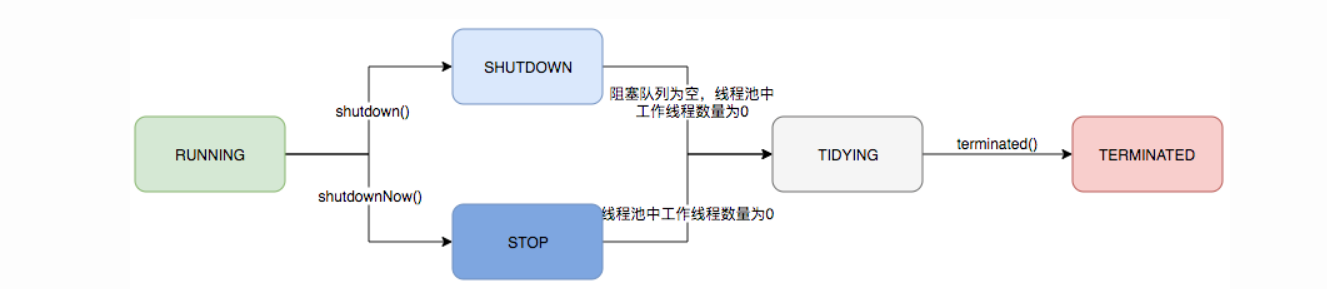
2、任务调度
任务调度是线程池的主要入口,当用户提交了一个任务,接下来这个任务将如何执行都是由这个阶段决定的。了解这部分就相当于了解了线程池的核心运行机制。
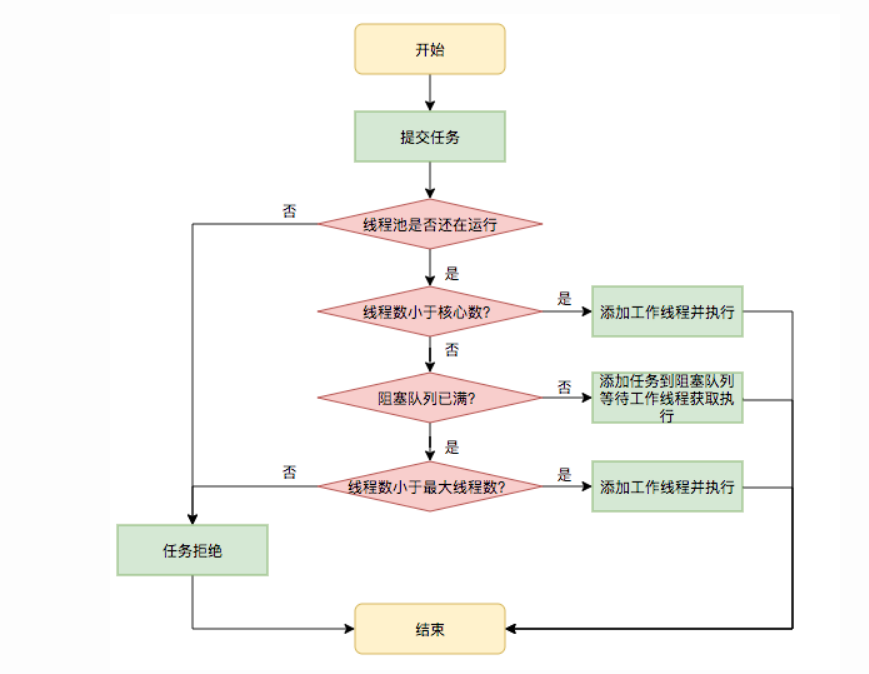
首先,所有任务的调度都是由execute方法完成的,这部分完成的工作是:检查现在线程池的运行状态、运行线程数、运行策略,决定接下来执行的流程,是直接申请线程执行,或是缓冲到队列中执行,亦或是直接拒绝该任务。其执行过程如下:
- 首先检测线程池运行状态,如果不是RUNNING,则直接拒绝,线程池要保证在RUNNING的状态下执行任务。
- 如果workerCount < corePoolSize,则创建并启动一个线程来执行新提交的任务。
- 如果workerCount >= corePoolSize,且线程池内的阻塞队列未满,则将任务添加到该阻塞队列中。
- 如果workerCount >= corePoolSize && workerCount < maximumPoolSize,且线程池内的阻塞队列已满,则创建并启动一个线程来执行新提交的任务。
- 如果workerCount >= maximumPoolSize,并且线程池内的阻塞队列已满, 则根据拒绝策略来处理该任务, 默认的处理方式是直接抛异常。
二、在Spring框架中使用ThreadPoolTaskExecutor类
为了应对大多数业务场景,配合Spring Boot框架,我们可以使用ThreadPoolTaskExecutor创建线程池,并把它注入到ioc容器中,全局都可以使用
1、首先,配置线程池参数
配置文件
thread-pool:core-pool-size: 4max-pool-size: 16queue-capacity: 80keep-alive-seconds: 120
线程池实体类
@Data@Component@ConfigurationProperties(prefix = "thread-pool")public class ThreadPoolProperties {private int corePoolSize;private int maxPoolSize;private int queueCapacity;private int keepAliveSeconds;}
配置类
这里@EnableAsync是与@Async配合使用,用于执行异步任务
@EnableAsync@Configurationpublic class ThreadPoolConfig {private final ThreadPoolProperties threadPoolProperties;@Autowiredpublic ThreadPoolConfig(ThreadPoolProperties threadPoolProperties) {this.threadPoolProperties = threadPoolProperties;}@Bean(name = "threadPoolTaskExecutor")public ThreadPoolTaskExecutor threadPoolTaskExecutor() {ThreadPoolTaskExecutor executor = new ThreadPoolTaskExecutor();executor.setCorePoolSize(threadPoolProperties.getCorePoolSize());executor.setMaxPoolSize(threadPoolProperties.getMaxPoolSize());executor.setQueueCapacity(threadPoolProperties.getQueueCapacity());executor.setKeepAliveSeconds(threadPoolProperties.getKeepAliveSeconds());executor.setThreadNamePrefix("thread-pool-");return executor;}}
在业务类中通过自定义SpringUtils类获取bean或使用@Async,来使用线程池。
使用情况
@Overridepublic String singleProcess(String input) {log.info("Processing...");int i = Integer.parseInt(input) * 1000 / 24 + 3;return "success" + i;}/*** 批量处理** @param inputList 输入对象列表* @return 输出对象列表*/@Overridepublic List<String> multiProcess(List<String> inputList) {//创建线程池ThreadPoolTaskExecutor executor = SpringUtils.getBean("threadPoolTaskExecutor", ThreadPoolTaskExecutor.class);//创建并使用CountDownLatch等待所有线程执行结束:CountDownLatch latch = new CountDownLatch(inputList.size());//每个线程把执行结果添加到线程安全的List中。这里List应当使用SynchronizedListList<String> outputList = Collections.synchronizedList(new ArrayList<>(inputList.size()));for (String input : inputList) {//分配线程进行执行executor.execute(() -> {try {//执行单个线程方法进行执行String output = singleProcess(input);outputList.add(output);} catch (Exception e) {e.printStackTrace();} finally {latch.countDown();}});}try {//等待所有线程执行完毕latch.await();} catch (InterruptedException e) {e.printStackTrace();}return outputList;}/*** 异步处理** @param input 输入对象* @return 输出Future对象*/@Async("threadPoolTaskExecutor")@Overridepublic Future<String> asyncProcess(String input) {return new AsyncResult<>(singleProcess(input));}
当数据量较小时,单线程的执行效率远远高于多线程
附录:
连接数 = ((核心数 * 2) + 有效磁盘数)
异步线程
异步线程的调度,主线程执行结束就结束,异步线程不干扰主线程的执行过程
案例:
@RestController
@RequestMapping("async")
@Slf4j
public class AsyncController {

    @Autowired
    IAsyncService asyncService;

    @GetMapping
    public String test(String msg) {
        log.info("主线程start*****************");
        asyncService.sentMsg(msg);
        log.info("主线程end*****************");
        return "success";
    }
}
public interface IAsyncService {
    void sentMsg(String msg);
}


@Service
@Slf4j
public class AsyncServiceImpl implements IAsyncService{

    @Override
    @Async
    public void sentMsg(String msg) {
    @Override
    @Async
    public void sentMsg(String msg) {
        log.info("子线程发送短信");
        int i = 0;
        while (i<10) {
            i++;
            System.out.println("短信发送"+i);
        }
        log.info("子线程发送完毕");
    }
}
执行结果: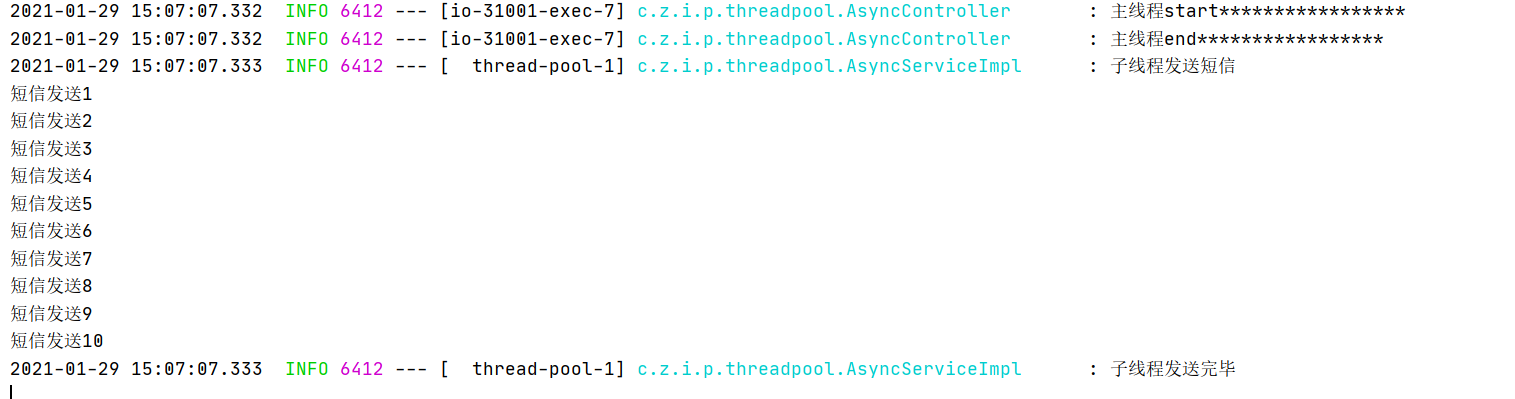

若有收获,就点个赞吧
0 人点赞


