1. 搭建 Eureka 服务注册与调用 Hello World
1.1 创建 Eureka Server 模块
<?xml version="1.0" encoding="UTF-8"?><project xmlns="http://maven.apache.org/POM/4.0.0" xmlns:xsi="http://www.w3.org/2001/XMLSchema-instance"xsi:schemaLocation="http://maven.apache.org/POM/4.0.0 http://maven.apache.org/xsd/maven-4.0.0.xsd"><modelVersion>4.0.0</modelVersion><groupId>com.example</groupId><artifactId>eureka-server</artifactId><version>0.0.1-SNAPSHOT</version><name>eureka-server</name><packaging>jar</packaging><parent><groupId>org.springframework.boot</groupId><artifactId>spring-boot-starter-parent</artifactId><version>1.5.13.RELEASE</version></parent><properties><project.build.sourceEncoding>UTF-8</project.build.sourceEncoding></properties><dependencyManagement><dependencies><dependency><groupId>org.springframework.cloud</groupId><artifactId>spring-cloud-dependencies</artifactId><version>Edgware.SR3</version><type>pom</type><scope>import</scope></dependency></dependencies></dependencyManagement><dependencies><dependency><groupId>org.springframework.cloud</groupId><artifactId>spring-cloud-starter-eureka</artifactId></dependency><dependency><groupId>org.springframework.cloud</groupId><artifactId>spring-cloud-starter-eureka-server</artifactId></dependency></dependencies></project>
server:
  port: 8761
spring:
  application:
    name: Eureka-Server
eureka:
  client:
    register-with-eureka: false
    fetch-registry: false
- register-with-eureka:是否将该服务注册到 eureka 服务端,默认为 true,集群环境下使用;
- fetch-registry:是否从 eureka 服务端获取其他服务实例,默认为 true,集群环境下使用;
```java
@SpringBootApplication
@EnableEurekaServer
public class EurekaServer {
public static void main(String[] args) {
} }SpringApplication.run(EurekaServer.class, args);
- 启动后,访问 http://localhost:8761
<a name="auzi5"></a>
## 1.2 创建 Eureka Client 模块
<a name="gN40y"></a>
### 1.2.1 服务提供者 Service Producer
```xml
<?xml version="1.0" encoding="UTF-8"?>

<project xmlns="http://maven.apache.org/POM/4.0.0" xmlns:xsi="http://www.w3.org/2001/XMLSchema-instance"
         xsi:schemaLocation="http://maven.apache.org/POM/4.0.0 http://maven.apache.org/xsd/maven-4.0.0.xsd">
  <modelVersion>4.0.0</modelVersion>

  <groupId>org.example</groupId>
  <artifactId>service-producer</artifactId>
  <version>1.0-SNAPSHOT</version>

  <name>service-producer</name>

  <properties>
    <project.build.sourceEncoding>UTF-8</project.build.sourceEncoding>
    <maven.compiler.source>1.8</maven.compiler.source>
    <maven.compiler.target>1.8</maven.compiler.target>
  </properties>

  <parent>
    <groupId>org.springframework.boot</groupId>
    <artifactId>spring-boot-starter-parent</artifactId>
    <version>1.5.13.RELEASE</version>
  </parent>

  <dependencyManagement>
    <dependencies>
      <dependency>
        <groupId>org.springframework.cloud</groupId>
        <artifactId>spring-cloud-dependencies</artifactId>
        <version>Edgware.SR3</version>
        <type>pom</type>
        <scope>import</scope>
      </dependency>
    </dependencies>
  </dependencyManagement>

  <dependencies>
    <dependency>
      <groupId>org.springframework.cloud</groupId>
      <artifactId>spring-cloud-starter-eureka</artifactId>
    </dependency>
  </dependencies>
</project>
server:
  port: 8080
spring:
  application:
    name: Service-Producer
eureka:
  instance:
    hostname: localhost
  client:
    service-url:
      defaultZone: http://localhost:8761/eureka
@RestController
public class ServiceProducerController {
    @GetMapping("/sayHello/{name}")
    public String sayHello(@PathVariable("name") String name){
        return "{'msg': 'hello, " + name + "'}";
    }
}
@SpringBootApplication
@EnableEurekaClient
public class ServiceProducer {
    public static void main(String[] args) {
        SpringApplication.run(ServiceProducer.class, args);
    }
}
1.2.2 服务调用者 Service Consumer
<?xml version="1.0" encoding="UTF-8"?>

<project xmlns="http://maven.apache.org/POM/4.0.0" xmlns:xsi="http://www.w3.org/2001/XMLSchema-instance"
         xsi:schemaLocation="http://maven.apache.org/POM/4.0.0 http://maven.apache.org/xsd/maven-4.0.0.xsd">
  <modelVersion>4.0.0</modelVersion>

  <groupId>org.example</groupId>
  <artifactId>service-consumer</artifactId>
  <version>1.0-SNAPSHOT</version>

  <name>service-consumer</name>

  <properties>
    <project.build.sourceEncoding>UTF-8</project.build.sourceEncoding>
    <maven.compiler.source>1.8</maven.compiler.source>
    <maven.compiler.target>1.8</maven.compiler.target>
  </properties>

  <parent>
    <groupId>org.springframework.boot</groupId>
    <artifactId>spring-boot-starter-parent</artifactId>
    <version>1.5.13.RELEASE</version>
  </parent>

  <dependencyManagement>
    <dependencies>
      <dependency>
        <groupId>org.springframework.cloud</groupId>
        <artifactId>spring-cloud-dependencies</artifactId>
        <version>Edgware.SR3</version>
        <type>pom</type>
        <scope>import</scope>
      </dependency>
    </dependencies>
  </dependencyManagement>

  <dependencies>
    <dependency>
      <groupId>org.springframework.cloud</groupId>
      <artifactId>spring-cloud-starter-eureka</artifactId>
    </dependency>
    <dependency>
      <groupId>org.springframework.cloud</groupId>
      <artifactId>spring-cloud-starter-ribbon</artifactId>
    </dependency>
  </dependencies>


</project>
server:
  port: 9090
spring:
  application:
    name: Service-Consumer
eureka:
  instance:
    hostname: localhost
  client:
    service-url:
      defaultZone: http://localhost:8761/eureka
@RestController
@Configuration
public class ServiceConsumerController {
    @Bean
    @LoadBalanced
    public RestTemplate getRestTemplate(){
        return new RestTemplate();
    }

    @GetMapping("greeting/{name}")
    public String greeting(@PathVariable("name") String name){
        RestTemplate restTemplate = getRestTemplate();
        return restTemplate.getForObject("http://Service-Producer/sayHello/" + name, String.class);
    }
}
RestTemplate,用于访问单个 http 接口的,加了 @LoadBalanced 以后就可以通过 Ribbon 的支持,实现负载均衡,加入 Service-Producer 部署了几台机器,那么可以自动负载均衡,轮询调用每一个实例。
@SpringBootApplication
@EnableEurekaClient
public class ServiceConsumer {
  public static void main(String[] args) {
      SpringApplication.run(ServiceConsumer.class, args);
  }
}
启动后,访问 http://localhost:9090/greeting/shawn,结果可以看到调用了 Service Producer 的 API;
2. 搭建 Eureka 集群及应用集群的注册发现
2.1 创建两个 Eureka 实例
2.1.1 eureka-server-01
server:
port: 8761
spring:
application:
  name: eureka-server-01
eureka:
client:
  register-with-eureka: true
  fetch-registry: true
  serviceUrl:
    defaultZone: http://localhost:8762/eureka/
instance:
  hostname: localhost
2.1.2 eureka-server-02
server: port: 8762 spring: application: name: eureka-server-02 eureka: client: register-with-eureka: true fetch-registry: true serviceUrl: defaultZone: http://localhost:8761/eureka/ instance: hostname: localhost2.2 创建两个 Service Producer 实例
server:
port: 8080
spring:
application:
  name: Service-Producer
eureka:
instance:
  hostname: localhost
client:
  service-url:
    defaultZone: http://localhost:8761/eureka,http://localhost:8762/eureka
server: port: 8088 spring: application: name: Service-Producer eureka: instance: hostname: localhost client: service-url: defaultZone: http://localhost:8761/eureka,http://localhost:8762/eureka同一个工程同时运行两个 service producer 实例。
2.3 创建一个 Service Consumer 实例
server:
port: 9090
spring:
application:
  name: Service-Consumer
eureka:
instance:
  hostname: localhost
client:
  service-url:
    defaultZone: http://localhost:8761/eureka,http://localhost:8762/eureka
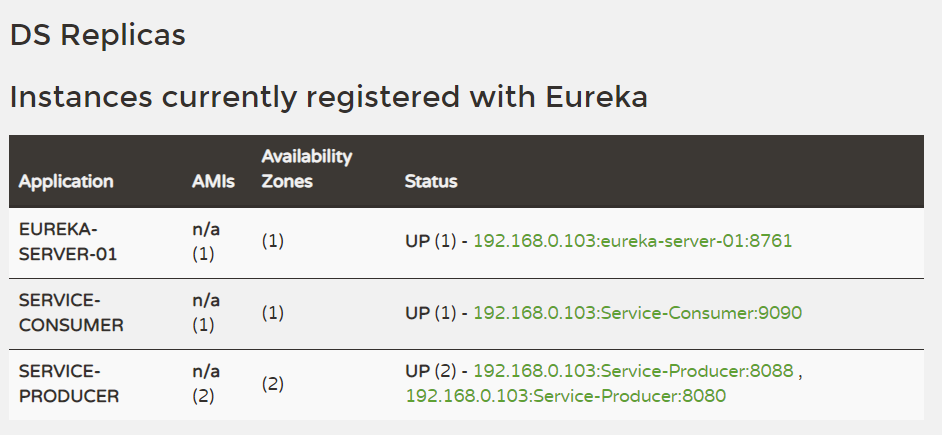
运行结果:

若有收获,就点个赞吧
0 人点赞


