
什么 mybatis: 是一个持久层框架, 原名是ibatis, 2013改名为 MyBatis. MyBatis可以操作数据库,对数据执行增删改查。 看做是高级的jdbc。 解决jdbc的缺点。
mybatis能做什么?
1) 注册驱动 。
2) 创建jdbc中使用的Connection, Statement,ResultSet
3) 执行sql语句, 得到ResultSet
4) 处理ResultSet, 把记录集中的数据转为java对象, 同时还能把java对象放入到List集合。
5)关闭资源
6)实现sql语句和java代码的解耦合。
mybatis的文档: https://mybatis.org/mybatis-3/zh/index.html
MyBatis入门
基本操作
实现步骤:
0.创建student表(id,name,email,age)1.新建maven项目2.修改pom.xml1)加入依赖 mybatis依赖, mysql驱动, junit2)在<build>加入资源插件3.创建实体类Student。定义属性, 属性名和列名保持一致4.创建Dao接口, 定义操作数据库的方法。5.创建xml文件(mapper文件), 写sql语句。mybatis框架推荐是把sql语句和java代码分开mapper文件:定义和dao接口在同一目录, 一个表一个mapper文件。6.创建mybatis的主配置文件(xml文件):有一个, 放在resources目录下1)定义创建连接实例的数据源(DataSource)对象2) 指定其他mapper文件的位置7.创建测试的内容。使用main方法,测试mybatis访问数据库也可以使用junit 访问数据库
目录结构如下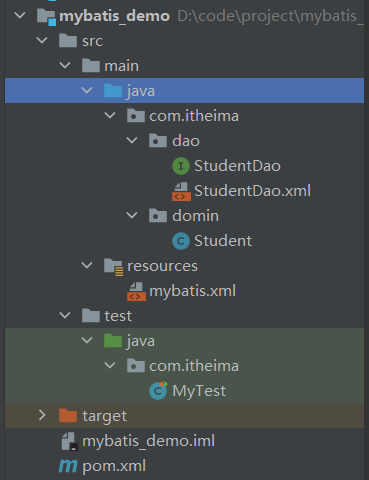
pom.xml
<?xml version="1.0" encoding="UTF-8"?><project xmlns="http://maven.apache.org/POM/4.0.0" xmlns:xsi="http://www.w3.org/2001/XMLSchema-instance"xsi:schemaLocation="http://maven.apache.org/POM/4.0.0 http://maven.apache.org/xsd/maven-4.0.0.xsd"><modelVersion>4.0.0</modelVersion><!-- 当前项目的坐标--><groupId>com.itheima</groupId><artifactId>mybatis_demo</artifactId><version>1.0-SNAPSHOT</version><properties><project.build.sourceEncoding>UTF-8</project.build.sourceEncoding><maven.compiler.source>1.8</maven.compiler.source><maven.compiler.target>1.8</maven.compiler.target></properties><dependencies><dependency><groupId>junit</groupId><artifactId>junit</artifactId><version>4.11</version><scope>test</scope></dependency><dependency><groupId>org.mybatis</groupId><artifactId>mybatis</artifactId><version>3.5.1</version></dependency><dependency><groupId>mysql</groupId><artifactId>mysql-connector-java</artifactId><version>5.1.9</version></dependency></dependencies><build><!-- 资源插件:处理src/main/java目录中的xml--><resources><resource><directory>src/main/java</directory><includes><!--包括目录下的.properties,.xml文件都会扫描到--><include>**/*.properties</include><include>**/*.xml</include></includes><filtering>false</filtering></resource></resources></build></project>
mybatis.xml
<?xml version="1.0" encoding="UTF-8" ?><!DOCTYPE configurationPUBLIC "-//mybatis.org//DTD Config 3.0//EN""http://mybatis.org/dtd/mybatis-3-config.dtd"><configuration><environments default="development"><environment id="development"><transactionManager type="JDBC"/><!--配置数据源--><dataSource type="POOLED"><property name="driver" value="com.mysql.jdbc.Driver"/><property name="url" value="jdbc:mysql:///test"/><property name="username" value="root"/><property name="password" value="liuhuande123"/></dataSource></environment></environments><!--指定其他mapper文件的位置:其他mapper文件目的是找到其他文件的sql语句--><mappers><!--使用mapper的resource属性指定mapper文件的路径这个路径是从target/classes路径开启的使用注意:resource=“mapper文件的路径,使用/分割路径”一个mapper resource指定一个mapper文件--><mapper resource="com/itheima/dao/StudentDao.xml"/></mappers></configuration>
StudentDao.xml
<?xml version="1.0" encoding="UTF-8" ?><!DOCTYPE mapperPUBLIC "-//mybatis.org//DTD Mapper 3.0//EN""http://mybatis.org/dtd/mybatis-3-mapper.dtd"><mapper namespace="com.itheima.dao.StudentDao"><!--查询一个学生id:要执行的sql语句的唯一标识,推荐和方法名一样resultType:告诉mybatis,执行sql语句,把数据赋值给哪个类型的java对象使用java对象的全限定名称--><select id="selectStudentById" resultType="com.itheima.domin.Student">select * from tbl_employee where id=1</select></mapper><!--1.约束文件"http://mybatis.org/dtd/mybatis-3-mapper.dtd"约束文件的作用:定义和限制当前文件中可以使用的标签和属性,以及标签出现的顺序2.mapper是根标签namespace:命名空间,必须有值,不能为空。唯一值推荐使用Dao接口的全限定名称作用:参与识别sql语句的作用3.在mapper里面可以写<insert>,<update>,<delete>,<select>-->
Student.java
package com.itheima.domin;import com.sun.org.apache.xpath.internal.objects.XString;public class Student {private Integer id;private String last_name;private String gender;private String email;@Overridepublic String toString() {return "Student{" +"id=" + id +", last_name='" + last_name + '\'' +", gender='" + gender + '\'' +", email='" + email + '\'' +'}';}public Integer getId() {return id;}public void setId(Integer id) {this.id = id;}public String getLast_name() {return last_name;}public void setLast_name(String last_name) {this.last_name = last_name;}public String getGender() {return gender;}public void setGender(String gender) {this.gender = gender;}public String getEmail() {return email;}public void setEmail(String email) {this.email = email;}}
StudentDao.java
package com.itheima.dao;import com.itheima.domin.Student;public interface StudentDao {//查询一个学生Student selectStudentById(Integer id);}
使用占位符
mybatis中使用#{}作占位符
<select id="selectStudentById" resultType="com.itheima.domin.Student">select * from tbl_employee where id=#{id}</select>
插入数据
- mybatis默认执行的sql语句是手工提交事务模式,在做insert,update,delete后需提交事务 ```java SqlSession sqlSession = sqlSessionFactory.openSession(true);//设置自动提交
sqlSession.commit();//或者手动提交
- 在插入的时候如果传入的参数是一个对象,则在sql语句中占位符的名字可以写属性值,将会默认执行get方法```java<insert id="insertStudent">insert into tbl_employee values(#{id},#{last_name},#{gender},#{email})</insert>
@Testpublic void testInsertStudent() throws IOException {//调用mybatis某个对象的方法,执行mapper文件中的sql语句//mybatis核心类:SqlSessionFactory//1.定义mybatis主配置文件的位置,从类路径开始的相对路径String resource = "mybatis.xml";//2.读取主配置文件。使用mybatis框架中的Resources类InputStream inputStream = Resources.getResourceAsStream(resource);//3.创建SqlSessionFactory对象。使用SqlSessionFactoryBuilder类SqlSessionFactory sqlSessionFactory = new SqlSessionFactoryBuilder().build(inputStream);//4.获取SqlSession对象SqlSession sqlSession = sqlSessionFactory.openSession();//5.指定要执行的sql语句的id//sql的id=namespace+"."+标签的id属性值String sqlId="com.itheima.dao.StudentDao"+"."+"insertStudent";//6.通过SqlSession的方法执行sql语句Student student1 = new Student(3, "amy", "0", "amy.com");int len = sqlSession.update(sqlId, student1);System.out.println(len);sqlSession.commit();//7.关闭SqlSession对象sqlSession.close();}
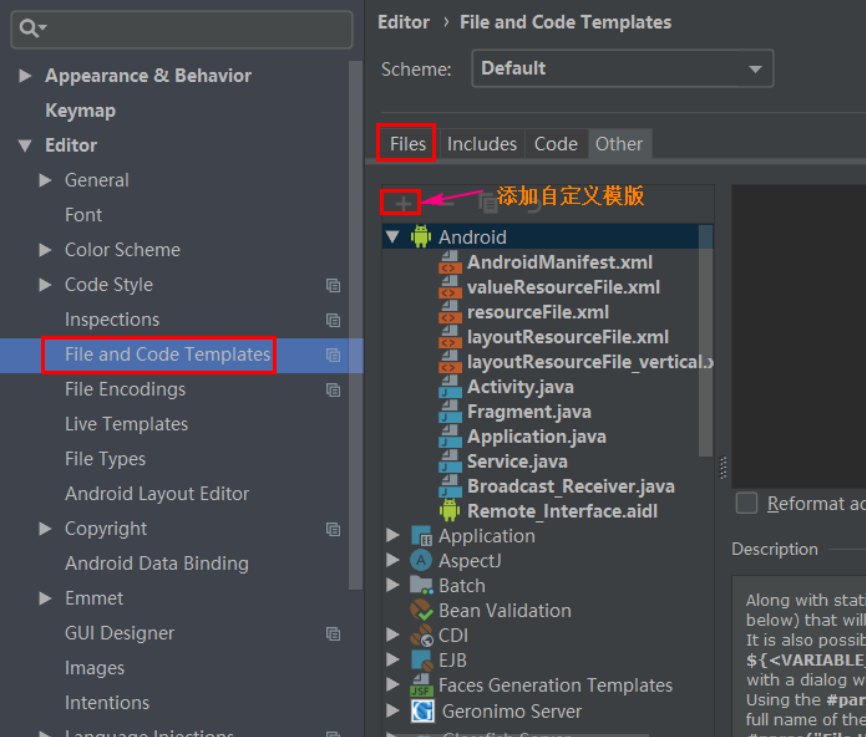
创建模板文件

MyBatis的一些重要对象
1) Resources : mybatis框架中的对象, 一个作用读取 主配置信息。
InputStream inputStream = Resources.getResourceAsStream("mybatis.xml");
2)SqlSessionFactoryBuilder:负责创建SqlSessionFactory对象
SqlSessionFactory factory = new SqlSessionFactoryBuilder().build(inputStream);
3)SqlSessionFactory: 重要对象
SqlSessionFactory是重量级对象:创建此对象需要使用更多的资源和时间。 在项目中有一个就可以了。
SqlSessionFactory接口:作用是SqlSession的工厂, 就是创建SqlSession对象。
DefaultSqlSessionFactory实现类
public class DefaultSqlSessionFactory implements SqlSessionFactory { }
SqlSessionFactory接口中的方法
openSession(): 获取一个默认的SqlSession对象, 默认是需要手工提交事务的。
openSession(boolean): boolean参数表示是否自动提交事务。
true: 创建一个自动提交事务的SqlSession
false: 等同于没有参数的openSession
4)SqlSession对象
SqlSession对象是通过SqlSessionFactory获取的。 SqlSession本身是接口
DefaultSqlSession: 实现类
public class DefaultSqlSession implements SqlSession { }
SqlSession作用是提供了大量的执行sql语句的方法:
selectOne:执行sql语句,最多得到一行记录,多余1行是错误。selectList:执行sql语句,返回多行数据selectMap:执行sql语句的,得到一个Map结果insert:执行insert语句update:执行update语句delete:执行delete语句commit:提交事务rollback:回顾事务
注意SqlSession对象不是线程安全的, 使用的步骤:
①:在方法的内部,执行sql语句之前,先获取SqlSession对象
②:调用SqlSession的方法,执行sql语句
③:关闭SqlSession对象,执行SqlSession.close()
创建MyBatis工具类
package com.itheima.utils;import org.apache.ibatis.io.Resources;import org.apache.ibatis.session.SqlSession;import org.apache.ibatis.session.SqlSessionFactory;import org.apache.ibatis.session.SqlSessionFactoryBuilder;import java.io.IOException;import java.io.InputStream;public class MyBatisUtil {private static SqlSessionFactory factory=null;static {String config="mybatis.xml";InputStream inputStream = null;try {inputStream = Resources.getResourceAsStream(config);factory= new SqlSessionFactoryBuilder().build(inputStream);} catch (IOException e) {e.printStackTrace();}}//创建方法,获取SqlSession对象public static SqlSession getSqlSession(){SqlSession session=null;if (factory!=null){session = factory.openSession();}return session;}}
MyBatis的Dao代理
dao代理
mybatis提供代理:
mybatis创建Dao接口的实现类对象, 完成对sql语句的执行。 mybatis创建一个对象代替你的 dao实现类功能。
使用mybatis代理要求
1)mapper文件中的namespace 一定dao接口的全限定名称
2)mapper文件中 标签的id是dao接口方法名称
mybatis代理实现方式
使用SqlSession对象的方法 getMapper(dao.class)
例如: 现在有 StudentDao接口。
SqlSession session = MyBatisUtils.getSqlSession();StudentDao dao = session.getMapper(StudentDao.class);Student student = dao.selectById(1001);//上面代码中StudentDao dao = session.getMapper(StudentDao.class);等同于StudentDao dao = new StudentDaoImpl();
理解参数
理解参数是: 通过java程序把数据传入到mapper文件中的sql语句。 参数主要是指dao接口方法的形参
parameterType
parameterType:表示参数的类型, 指定dao方法的形参数据类型。 这个形参的数据类型是给mybatis使用。 mybatis在给sql语句的参数赋值时使用。 PreparedStatement.setXXX( 位置, 值)
第一个用法: java类型的全限定类型名称 parameterType="java.lang.Integer"第二个用法: mybatis定义的java类型的别名 parameterType="int"parameterType:mybatis通过反射机制可以获取 dao接口方法参数的类型, 可以不写<select id="selectById" parameterType="integer" resultType="com.bjpowernode.domain.Student">select id,name,email,age from student where id=#{studentId}</select>
传递单个参数
//dao接口的方法形参是一个简单类型的
//简单类型: java基本数据类型和String
Student selectByEmail(String email);
<!--
   dao接口是一个简单类型的参数
   mapper文件,获取这个参数值,使用#{任意字符}
-->
<select id="selectByEmail" resultType="com.bjpowernode.domain.Student">
    select id,name,email,age from student where email=#{studentEmail}
</select>
使用注解传递参数
@Param: 命名参数, 在方法的形参前面使用的, 定义参数名。 这个名称可以用在mapper文件中。如果有多个参数的话必须使用该注解
dao接口,方法的定义
/*
  多个简单类型的参数
  使用@Param命名参数, 注解是mybatis提供的
  位置:在形参定义的前面
  属性:value 自定义的参数名称
 */
List<Student> selectByNameOrAge(@Param("myname") String name,
                                @Param("myage") Integer age);
mapper文件
<!--
   多个简单类型的参数.
   当使用了@Param命名后,例如@Param("myname").
   在mapper中,使用#{命名的参数}, 例如 #{myname}
-->
<select id="selectByNameOrAge" resultType="com.bjpowernode.domain.Student">
    select id,name,email,age from student where name=#{myname} or age=#{myage}
</select>
按对象传递参数
方法的形参是一个java对象。这个java对象表示多个参数。使用对象的属性值作为参数使用
java对象
public class Student {
    private Integer id;
    private String name;
    private String email;
    private Integer age;
    //set|get方法
}

public class QueryParam {
    private Object p1;
    private Object p2;
    //set|get方法
}
dao接口中的方法定义
/*
 * 一个java对象作为参数( 对象由属性, 每个属性有set,get方法)
 */
List<Student> selectByObject(Student student);
List<Student> selectByQueryParam(QueryParam param);
mapper文件
<!--
   一个java对象作为方法的参数,使用对象的属性作为参数值使用
   简单的语法: #{属性名} , mybatis调用此属性的getXXX()方法获取属性值
-->
<select id="selectByObject" resultType="com.bjpowernode.domain.Student">
    select id,name,email,age from student where name=#{name} or age=#{age}
</select>

<select id="selectByQueryParam" resultType="com.bjpowernode.domain.Student">
     select id,name,email,age from student where name=#{p1} or age=#{p2}
</select>

<!--负责的语法格式: #{属性名,javaType=java类型的全限定名称,jdbcType=mybatis中定义列的数据类型}-->
<select id="selectByObject" resultType="com.bjpowernode.domain.Student">
        select id,name,email,age from student where
        name=#{name,javaType=java.lang.String,jdbcType=VARCHAR}
        or
        age=#{age,javaType=java.lang.Integer,jdbcType=INTEGER}
</select>
按位置传递参数
参数位置: dao接口中方法的形参列表,从左往右,参数位置是 0 ,1,2……
语法格式:#{arg0} ,#{arg1}
dao接口的方法
/*
   使用位置,获取参数
 */
List<Student> selectByPosition(String name,Integer age);
<!--
   mybatis版本是 3.5.1
   使用位置获取参数值, dao接口方法是多个简单类型的参数
   语法: #{arg0}, #{arg1}....
-->
<select id="selectByPosition" resultType="com.bjpowernode.domain.Student">
    select id,name,email,age from student where name=#{arg0} or age=#{arg1}
</select>
使用Map传递参数
map作为dao接口的参数, 使用 key 获取参数值,mapper文件中,语法格式 #{key}
/*
   使用Map作为参数
 */
List<Student> selectStudentByMap(Map<String,Object> map);
mapper文件
<!--
   使用Map传递参数,
   在mapper文件中,获取map的值,是通过key获取的,语法:#{key}
-->
<select id="selectStudentByMap" resultType="com.bjpowernode.domain.Student">
     select id,name,email,age from student where name=#{myname} or age=#{myage}
</select>
测试,调用方法的位置
@Test
public void testSelectByMap(){
    SqlSession sqlSession = MyBatisUtil.getSqlSession();
    StudentDao dao  = sqlSession.getMapper(StudentDao.class);

    //使用map传递参数
    Map<String,Object> data = new HashMap<>();
    data.put("myname", "李思思");
    data.put("myage", 20);
    List<Student> students = dao.selectStudentByMap(data);

    students.forEach( stu-> System.out.println("stu="+stu));
    sqlSession.close();

}
获取自增主键
 <!--
        mysql支持自增主键,自增主键值的获取,mybatis也是利用statement.getGenreatedKeys()
        useGeneratedKeys="true";使用自增主键获取主键值策略
        keyProperty:指定对应的主键属性,也就是mybatis获取到主键值后,将这个值封装给javaBean的哪个属性
    -->
    <insert id="insertStudent" parameterType="com.itheima.domin.Student"
            useGeneratedKeys="true" keyProperty="id">
        insert into tbl_employee values(#{id},#{last_name},#{gender},#{email})
    </insert>
//6.通过SqlSession的方法执行sql语句
 Student student1 = new Student(null, "zh", "1", "amy.com");
 int len = sqlSession.update(sqlId, student1);
 sqlSession.commit();
 System.out.println(student1.getId());
#和$的区别
# 占位符
语法: #{字符}
mybatis处理#{} 使用jdbc对象是 PrepareStatment对象
<select id="selectById"  parameterType="integer"
             resultType="com.bjpowernode.domain.Student">
    select id,name,email,age from student where id=#{studentId}
</select>

mybatis去创建PrepareStatement对象,执行sql语句
String sql=" select id,name,email,age from student where id=?";
PrepareStatement pst = conn.prepareStatement(sql);
pst.setInt(1,1001);  //传递参数
ResultSet rs  = pst.executeQuery(); //执行sql语句
{}特点:
1)使用的PrepareStatement对象,执行sql语句,效率高。
2)使用的PrepareStatement对象,能避免sql语句, sql语句执行更安全。
3) #{} 常常作为 列值使用的, 位于等号的右侧, #{}位置的值和数据类型有关的。
$ 占位符
语法 : ${字符}
mybatis执行${}占位符的sql语句
<select id="selectById"  parameterType="integer"
             resultType="com.bjpowernode.domain.Student">
    select id,name,email,age from student where id=${studentId}
</select>

${} 表示字符串连接, 把sql语句的其他内容和 ${}内容使用 字符串(+) 连接的方式连在一起
String sql="select id,name,email,age from student where id=" + "1001";

mybatis创建Statement对象, 执行sql语句。
Statement stmt  = conn.createStatement(sql);
ResultSet rs  = stmt.executeQuery();
${} 的特点
1)使用Statement对象,执行sql语句,效率低
2)${}占位符的值,使用的字符串连接方式, 有sql注入的风险。 有代码安全的问题
3)${} 数据是原样使用的, 不会区分数据类型。
4)${} 常用作 表名或者列名, 在能保证数据安全的情况下使用 ${}
封装MyBatis输出结果
封装输出结果: MyBatis执行sql语句,得到ResultSet, 转为java对象。
讲两个 resultType, resultMap
resultType
resultType属性: 在执行select时使用, 作为标签的属性出现的。
resultType:表示结果类型 , mysql执行sql语句,得到java对象的类型。 它的值有两种
1) java类型的全限定名称 。 2)使用别名
把返回数据封装为自定义类
Student selectById(Integer id);

<select id="selectById"  parameterType="integer"
             resultType="com.bjpowernode.domain.Student">
    select id,name,email,age from student where id=#{studentId}
</select>

resultType:现在使用java类型的全限定名称。 表示的意思 mybatis执行sql,把ResultSet中的数据转为Student类型的对象。  mybatis会做以下操作:
1. 调用com.bjpowernode.domain.Student的无参数构造方法,创建对象。
    Student student = new Student(); //使用反射创建对象
2. 同名的列赋值给同名的属性。
    student.setId( rs.getInt("id"));
    student.setName(rs.getString("name"));
3. 得到java对象, 如果dao接口返回值是List集合, mybatis把student对象放入到List集合。


所以执行 Student mystudent = dao.selectById(1001); 得到 数据库中 id=1001这行数据,
这行数据的列值, 付给了mystudent对象的属性。 你能得到mystudent对象。 就相当于是 id=1001这行数据。
返回数据封装为简单类型
dao方法
long countStudent();
mapper文件
<!--
  执行sql语句,得到是一个值(一行一列)
-->
<select id="countStudent" resultType="java.lang.Long">
    select count(*) from student
</select>
返回数据封装为Map集合
//查询结果返回是一个Map
Map<Object,Object> selectMap(@Param("stuid") Integer id);
<!--
   执行sql得到一个Map结构数据, mybatis执行sql,把ResultSet转为map
   sql执行结果, 列名做map的key , 列值作为value
   sql执行得到是一行记录,转为map结构是正确的。

   dao接口返回是一个map, sql语句最多能获取一行记录,多余一行是错误

-->
<select id="selectMap" resultType="java.util.HashMap">
    select id,name,email from student where id = #{stuid}
</select>
当需要返回多条map时需要加上注解@MapKey告诉Map集合主键
@MapKey("id")
Map<Object,Object> selectMap(@Param("stuid") Integer id);
resultMap
resultMap: 结果映射。 自定义列名和java对象属性的对应关系。 常用在列名和属性名不同的情况。
用法:
1.先定义 resultMap标签, 指定列名和属性名称对应关系
2.在select标签使用resultMap属性,指定上面定义的resultMap的id值
<!--使用resultMap定义列和属性的关系-->
<!--定义resultMap
    id:给resultMap的映射关系起个名称,唯一值
    type:java类型的全限定名称
-->
<resultMap id="customMap" type="com.bjpowernode.vo.CustomObject">

    <!--定义列名和属性名的对应-->
    <!--主键类型使用id标签
                columns:指定哪一列
                property:指定javaBean属性
        -->

    <id column="id" property="cid" />
    <!--非主键类型使用result标签-->
    <result column="name" property="cname" />
    <!--列名和属性名相同不用定义-->
    <result column="email" property="email" />
    <result column="age" property="age" />
</resultMap>

<!--使用resultMap属性,指定映射关系的id
    resultMap和resultType 不能同时使用, 二选一。
-->
<select id="selectById2" resultMap="customMap">
  select id,name,email,age from student where id=#{stuid}
</select>
<resultMap id="MySimEmp" type="com.itheima.domin.Student">
        <id column="id" property="id"/>
        <result column="last_name" property="last_name"/>
        <result column="gender" property="gender"/>
        <result column="email" property="email"/>
    </resultMap>
    <select id="getStuById" resultMap="MySimEmp">
        select * from tbl_employee where id =#{id}
    </select>


    <resultMap id="MyDifEmp" type="com.itheima.domin.Student">
        <id column="id" property="id"/>
        <result column="last_name" property="last_name"/>
        <result column="gender" property="gender"/>
        <result column="email" property="email"/>
        <result column="did" property="dept.id"/>
        <result column="dept_name" property="dept.department"/>
    </resultMap>
    <select id="getEmpAndDept" resultMap="MyDifEmp">
        SELECT e.id,last_name,gender,email,d.id did ,dept_name FROM tbl_employee e, tbl_dept d WHERE e.`d_id`=d.`id` AND e.id=#{id}
    </select>
<resultMap id="MyDifEmp" type="com.itheima.domin.Student">
        <id column="id" property="id"/>
        <result column="last_name" property="last_name"/>
        <result column="gender" property="gender"/>
        <result column="email" property="email"/>
        <!--
        association可以指定联合的JavaBean对象
        property="dept" 指定这个属性对象的类型(不能省略)
        -->
        <association property="dept" javaType="com.itheima.domin.Department">
            <id column="did" property="id"/>
            <result column="dept_name" property="department"/>
        </association>
</resultMap>
分步查询
1.分布查询能提高查询的效率,会在需要用到子查询的时候再调用子查询的sql语句
延迟加载

Collection-集合类型&嵌套结果集
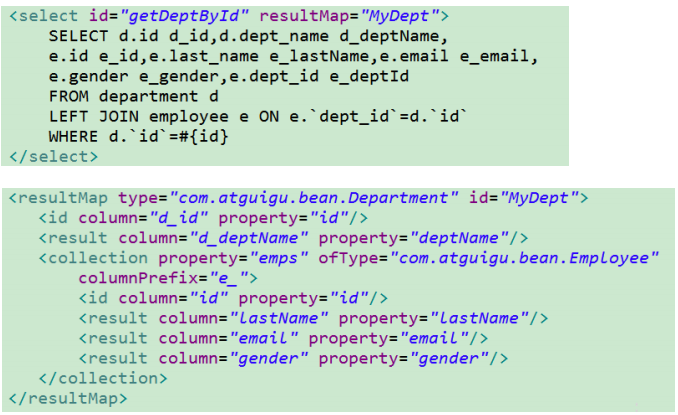
Collection-分步查询&延迟加载
1.首先查询根据本门id进行查询,再将该部门id传到另一个sql语句中查询员工
鉴别器
可以根据某一列不同的取值进行查询
<discriminator javaType="string" column="gender>
    <case value="0" resultType="">
        <association property="" select="" column="">
        </association>
    </case>

    <case value="1" resultType="">
        <association property="" select="" column="">
        </association>
    </case>
</discriminator>
like
第一种方式: 在java程序中,把like的内容组装好。 把这个内容传入到sql语句
//like第一种方式
List<Student> selectLikeOne(@Param("name") String name);
mapper
<!--like第一种方式-->
<select id="selectLikeOne" resultType="com.bjpowernode.domain.Student">
    select * from student where name like #{name}
</select>
执行like
@Test
public void testLikeOne(){
    SqlSession sqlSession = MyBatisUtil.getSqlSession();
    StudentDao dao  = sqlSession.getMapper(StudentDao.class);

    String name="%李%";
    List<Student> students = dao.selectLikeOne(name);

    sqlSession.close();

    students.forEach( stu-> System.out.println(stu));
}
第二种方式: 在sql语句,组织like的内容。
sql语句like的格式: where name like “%”空格#{name}空格”%”
//like第二种方式
List<Student> selectLikeTwo(@Param("name") String name);
<!--like第二种方式-->
<select id="selectLikeTwo" resultType="com.bjpowernode.domain.Student">
    select * from student where name like "%" #{name} "%"
</select>
@Test
public void testLikeTwo(){
    SqlSession sqlSession = MyBatisUtil.getSqlSession();
    StudentDao dao  = sqlSession.getMapper(StudentDao.class);

    String name="李";
    List<Student> students = dao.selectLikeTwo(name);

    sqlSession.close();

    students.forEach( stu-> System.out.println(stu));
}
动态sql
什么是动态sql: 同一个dao的方法, 根据不同的条件可以表示不同的sql语句, 主要是where部分有变化
使用mybatis提供的标签,实现动态sql的能力, 主要讲 if ,where ,foreach, sql。
使用动态sql的时候, dao方法的形参使用java对象。
if 标签
语法:
<if test="boolean判断结果">
   sql 代码
</if>


在mapper文件中
<select id="selectStudent" resultType="com.bjpwoernode.domain.Student">
      select *from student
      <if test="条件">
          sql语句
      </if>
      <if test="条件">
          sql语句
      </if>
</select>
例子:
List<Student> selectIf(Student student);
<!--if
test: 使用对象的属性值作为条件
-->
<select id="selectIf" resultType="com.bjpowernode.domain.Student">
select * from student
where id=-1
<if test="name !=null and name!=''">
or name = #{name}
</if>
<if test="age >0">
or age < #{age}
</if>
</select>
where 标签
使用if标签时,容易引起sql语句语法错误。 使用where标签解决if产生的语法问题。
使用时 where ,里面是一个或多个if 标签, 当有一个if标签 判断条件为true, where标签会转为 WHERE 关键字附加到sql语句的后面。 如果 if 没有一个条件为true , 忽略where和里面的if。
where标签删除 和他最近的or 或者 and。
语法:
<where>
    <if test="条件1">sql语句1</if>
    <if test="条件2">sql语句2</if>
</where>
例子:
//where
List<Student> selectWhere(Student student);
<!--where-->
<select id="selectWhere" resultType="com.bjpowernode.domain.Student">
select * from student
<where>
<if test="name !=null and name!=''">
or name = #{name}
</if>
<if test="age >0">
or age < #{age}
</if>
</where>
</select>
trim标签
自定义字符串截取规则
<!--
后面多出的and或者orwhere标签不能解决
prefix="":前缀,trim标签体中是整个字符串拼接后的结果 prefix给拼串后的整个字符串加一个前缀
prefixOverrides前缀覆盖,去掉整个字符串前面多余的字符
suffix 后缀,trim标签体中是整个字符串拼接后的结果 prefix给拼串后的整个字符串加一个后缀
suffixOverrides后缀覆盖,去掉整个字符串后面多余的字符
-->
<select id="getSQl" resultType="com.itheima.domin.Student">
select * from tbl_employee
<trim prefix="where" suffixOverrides="and">
<if test="id!=null">
id=#{id} and
</if>
<if test="last_name!=null and last_name!=""" >
last_name=#{last_name} and
</if>
</trim>
</select>
choose标签
<select id="getSQl" resultType="com.itheima.domin.Student">
select * from tbl_employee
<where >
<choose>
<when test="id!=null">
id=#{id}
</when>
<when test="last_name!=null and last_name!=""" >
last_name=#{last_name}
</when>
<otherwise>
1=1
</otherwise>
</choose>
</where>
</select>
foreach 循环
使用foreach可以循环数组,list集合, 一般使用在in语句中。
语法:
< foreach collection="集合类型" open="开始的字符" close="结束的字符"
          item="集合中的成员" separator="集合成员之间的分隔符">
              #{item 的值}
</ foreach>

标签属性:
collection: 表示,循环的对象是 数组, 还是list集合。  如果dao接口方法的形参是 数组,
             collection="array" ,如果dao接口形参是List, collection="list"

open:循环开始时的字符。  sql.append("(");
close:循环结束时字符。  sql.append(")");
item:集合成员, 自定义的变量。   Integer item  = idlist.get(i);// item是集合成员
separator:集合成员之间的分隔符。  sql.append(","); //集合成员之间的分隔符
#{item 的值}:获取集合成员的值。
第一种方式:
//foreach-1
List<Student> selectForeachOne(List<Integer> idlist);


<!--foreach第一种方式, 循环简单类型的List-->
<select id="selectForeachOne" resultType="com.bjpowernode.domain.Student">
      select * from student
        <if test="list !=null and list.size>0">
            where id in
            <foreach collection="list" open="(" close=")" separator="," item="myid">
                  #{myid}
            </foreach>
        </if>
</select>

@Test
public void testSelectForeachOne(){
        //1.获取SqlSession
        SqlSession session = MyBatisUtil.getSqlSession();
        //2.获取dao的代理
        StudentDao dao = session.getMapper(StudentDao.class);


        List<Integer> idlist = new ArrayList<>();
        idlist.add(1001);
        idlist.add(1002);
        idlist.add(1003);


        List<Student> students  = dao.selectForeachOne(idlist);

        students.forEach( stu-> System.out.println("stu=="+stu));
        //3.关闭SqlSession对象
        session.close();
    }
第二种方式:
//foreach-2
List<Student> selectForeachTwo(List<Student> studentList);

<!--foreach第二种方式, 循环的List<Student>-->
<select id="selectForeachTwo" resultType="com.bjpowernode.domain.Student">
        select * from student
        <if test="list != null and list.size>0">
            where id in
            <foreach collection="list" open="(" close=")" separator="," item="stu">
                  #{stu.id}
            </foreach>
        </if>
</select>

 @Test
 public void testSelectForeachTwo(){
        //1.获取SqlSession
        SqlSession session = MyBatisUtil.getSqlSession();
        //2.获取dao的代理
        StudentDao dao = session.getMapper(StudentDao.class);


        List<Student> list  = new ArrayList<>();
        Student s1 = new Student();
        s1.setId(1001);

        Student s2 = new Student();
        s2.setId(1002);

        list.add(s1);
        list.add(s2);


        List<Student> students  = dao.selectForeachTwo(list);

        students.forEach( stu-> System.out.println("stu=="+stu));
        //3.关闭SqlSession对象
        session.close();
    }
sql标签
sql标签标示 一段sql代码, 可以是表名,几个字段, where条件都可以, 可以在其他地方复用sql标签的内容。
使用方式:
1) 在mapper文件中定义 sql代码片段 <sql id="唯一字符串">  部分sql语句  </sql>
2)在其他的位置,使用include标签引用某个代码片段
例如:
<!--定义代码片段-->
<sql id="selectStudent">
select * from student
</sql>
<sql id="studentFieldList">
id,name,email
</sql>
<select id="selectIf" resultType="com.bjpowernode.domain.Student">
<include refid="selectStudent" />
where id=-1
<if test="name !=null and name!=''">
or name = #{name}
</if>
<if test="age >0">
or age < #{age}
</if>
</select>
<!--where-->
<select id="selectWhere" resultType="com.bjpowernode.domain.Student">
select <include refid="studentFieldList"/> from student
<where>
<if test="name !=null and name!=''">
or name = #{name}
</if>
<if test="age >0">
or age < #{age}
</if>
</where>
</select>
两个内置参数
mybatis默认有两个内置参数:
_parameter:代表整个参数
单个参数_parameter就是这个参数
多个参数_parameter被封装成为一个map,_parameter就是代表这个map
_databaseId:如果配置了databaseIdProvider标签
_databaseId就是代表当前数据库的别名
<if test="_databaseId=='mysql'">
执行的sql语句
</if>

<if test="_databaseId=='oracle'">
执行的oracle语句
</if>
bind 标签
bind标签可以讲OFNL鸟大师的值绑定到一个变量中,方便后来引用这个变量的值
<select id="getSQl" resultType="com.itheima.domin.Student">
select * from tbl_employee
<bind name="_last_name" value="'%'+last_name+'%'"/>
<where >
<choose>
<when test="id!=null">
id=#{id}
</when>
<when test="last_name!=null and last_name!=""" >
last_name like #{_last_name}
</when>
<otherwise>
1=1
</otherwise>
</choose>
</where>
</select>
MyBatis配置文件
mybatis配置文件两大类: 1 mybatis主配置文件; 2 mybatis的mapper文件
- mybatis主配置文件,提供mybatis全局设置的。包含的内容 日志, 数据源,mapper文件位置
- mapper文件: 写sql语句的。 一个表一个mapper文件
settings部分
settings是mybatis的全局设置,影响整个mybatis的运行。 这个设置一般使用默认值就可以了。<settings> <setting name="cacheEnabled" value="true"/> <setting name="lazyLoadingEnabled" value="true"/> <setting name="multipleResultSetsEnabled" value="true"/> <setting name="useColumnLabel" value="true"/> <setting name="useGeneratedKeys" value="false"/> <setting name="autoMappingBehavior" value="PARTIAL"/> <setting name="autoMappingUnknownColumnBehavior" value="WARNING"/> <setting name="defaultExecutorType" value="SIMPLE"/> <setting name="defaultStatementTimeout" value="25"/> <setting name="defaultFetchSize" value="100"/> <setting name="safeRowBoundsEnabled" value="false"/> <setting name="mapUnderscoreToCamelCase" value="false"/> <setting name="localCacheScope" value="SESSION"/> <setting name="jdbcTypeForNull" value="OTHER"/> <setting name="lazyLoadTriggerMethods" value="equals,clone,hashCode,toString"/> </settings>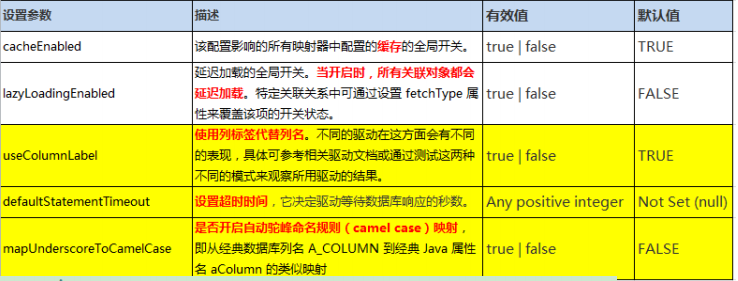
配置环境
```xml environments: 环境标签, 在他里面可以配置多个environment
environment: 表示一个数据库的连接信息。属性: default ,必须是某个environment的id属性值。 表示mybatis默认连接的数据库
transactionManager:事务管理器属性: id 自定义的环境的标识。 唯一值。
dataSource: 数据源,创建的Connection对象,连接数据库。属性: type 表示事务管理器的类型。 属性值:1)JDBC: 使用Connection对象, 由mybatis自己完成事务的处理。 2) MANAGED: 管理,表示把事务的处理交给容器实现(由其他软件完成事务的提交,回滚)属性: type 数据源的类型 属性值:1) POOLED, mybatis会在内存中创建PooledDataSource类,管理多个Connection连接对象,使 用的连接池 2) UNPOOLED ,不使用连接池, mybatis创建一个UnPooledDataSource这个类, 每次执行sql 语句先创建Connection对象,再执行sql语句,最后关闭Connection 3) JNDI : java的命名和目录服务。
<a name="iCJKa"></a>
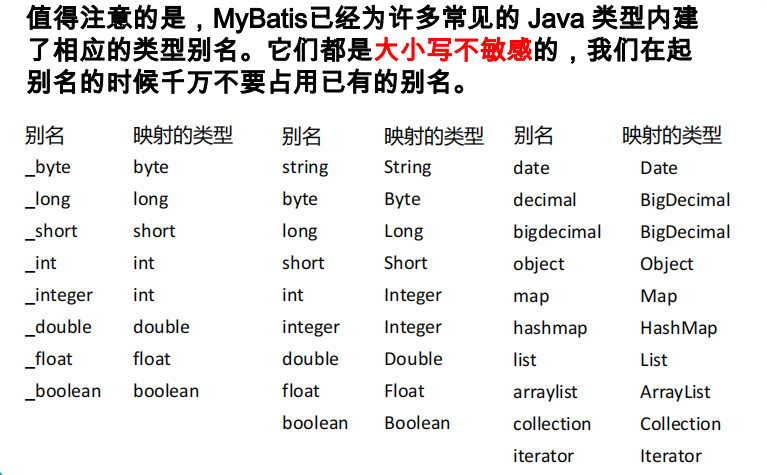
## TypeAliases别名
mybatis提供的对java类型定义简短,好记名称。<br />自定义别名的步骤:<br />1)在mybatis主配置文件,使用 typeAliases标签声明别名<br />2)在mapper文件中, resultType="别名"<br />声明别名(mybatis主配置文件)
xml
mapper文件中使用xml
resultType=”别名”
<a name="dzC4K"></a>
## 使用数据库属性配置文件
需要把数据库的配置信息放到一个单独文件中, 独立管理。 这个文件扩展名是 properties. 在这个文件中,使用自定义的key=value的格式表示数据<br />使用步骤:<br />1.在resources目录中,创建xxxx.properties<br />2.在文件中,使用 key=value的格式定义数据。<br />例如 jdbc.url=jdbc:mysq://localhost:3306/springdb<br />3.在mybatis主配置文件, 使用properties标签引用外部的属性配置文件<br />4.在使用值的位置, 使用${key}获取key对应的value(等号右侧的值)<br />例子:<br />jdbc.propertiesxml
jdbc.driver=com.mysql.jdbc.Driver
jdbc.url=jdbc:mysql://localhost:3306/springdb?useUnicode=true&characterEncoding=utf-8
jdbc.username=root
jdbc.password=123
mybatis主配置文件xml
<a name="rRW2W"></a>
## enviroments环境

- MyBatis可以配置多种环境,比如开发、测试和生 产环境需要有不同的配置。
- 每种环境使用一个environment标签进行配置并指 定唯一标识符
- **可以通过environments标签中的default属性指定 一个环境的标识符来快速的切换环境**
- id:指定当前环境的唯一标识,transactionManager、和dataSource都必须有
<a name="rQJQ6"></a>
### transactionManager
type: JDBC | MANAGED | 自定义

- JDBC:使用了 JDBC 的提交和回滚设置,依赖于从数 据源得到的连接来管理事务范围。 JdbcTransactionFactory
- MANAGED:不提交或回滚一个连接、让容器来管理事务的整个生命周期(比如 JEE 应用服务器的上下 文)。 ManagedTransactionFactory
- 自定义:实现TransactionFactory接口,type=全类名/ 别名
<a name="TgIUa"></a>
### dataSource
type: UNPOOLED | POOLED | JNDI | 自定义

- UNPOOLED:不使用连接池, UnpooledDataSourceFactory
- POOLED:使用连接池, PooledDataSourceFactory
- JNDI: 在EJB 或应用服务器这类容器中查找指定的数据源
- 自定义:实现DataSourceFactory接口,定义数据源的获取方式。

实际开发中我们使用Spring管理数据源,并进行事务控制的配置来覆盖上述配置
java
<a name="PjZ2B"></a>
## databaseIdProvider环境

- MyBatis可以根据不同的数据库厂商执行不同的语句
```java
<databaseIdProvider type="DB_VENDOR">
    <property name="MySQL" value="mysql"/>
    <property name="Oracel" value="oracel"/>
</databaseIdProvider>
Type: DB_VENDOR 使用MyBatis提供的VendorDatabaseIdProvider解析数据库 厂商标识。也可以实现DatabaseIdProvider接口来自定义。
- Property-name:数据库厂商标识
- Property-value:为标识起一个别名,方便SQL语句使用databaseId属性引用

mapper 映射
使用mapper指定其他mapper文件的位置,
mapper标签使用的格式有两个常用的方式:
<mappers>
    <!--第一种方式, resources="mapper文件的路径"
        优点:文件清晰。 加载的文件是明确的。
              文件的位置比较灵活。
        缺点:文件比较多, 代码量会比较大, 管理难度大
    -->
    <mapper resource="com/bjpowernode/dao/StudentDao.xml"/>
    <mapper resource="com/bjpowernode/dao/OrderDao.xml"/>
    <!--
       第二种方式,使用<package>
       name:包名, mapper文件所在的包名。
       特点: 把这个包中的所有mapper文件,一次加载。

       使用要求:
        1. mapper文件和dao接口在同一目录
        2. mapper文件和dao接口名称完全一样。
    -->
    <package name="com.bjpowernode.dao" />
    <package name="com.bjpowernode.dao1" />
</mappers>

缓存
MyBatis 包含一个非常强大的查询缓存特性,它可以非常方便地配置和定制。缓存可以极大的提升查询效率。MyBatis系统中默认定义了两级缓存。
一级缓存和二级缓存
- 1、默认情况下,只有一级缓存(SqlSession级别的缓存,也称为本地缓存)开启。
- 2、二级缓存需要手动开启和配置,他是基于namespace级别的缓存。
- 3、为了提高扩展性。MyBatis定义了缓存接口Cache。我们可以通过实现Cache接口来自定义二级缓存
一级缓存:本地缓存,与数据库同一次会话期间查询到的数据会放在本地缓存中。以后如果需要获取相同的数据,直接从缓存中拿,没必要再去查询数据库。
二级缓存:全局缓存
一级缓存
一级缓存(local cache), 即本地缓存, 作用域默认为sqlSession。当 Session flush 或 close 后, 该Session 中的所有 Cache 将被清空。
本地缓存不能被关闭, 但可以调用 clearCache() 来清空本地缓存, 或者改变缓存的作用域.
在mybatis3.1之后, 可以配置本地缓存的作用域. 在 mybatis.xml 中配置
一级缓存失效的四种情况
1、不同的SqlSession对应不同的一级缓存
2、同一个SqlSession但是查询条件不同
3、同一个SqlSession两次查询期间执行了任何一次增删改操作
4、同一个SqlSession两次查询期间手动清空了缓存
二级缓存
基于namespace级别的缓存,一个namespace对应一个二级缓存
工作机制
1.一个会话,查询一条数据,这个数据就会被放在当前会话的一级缓存中
2.如果会话关闭,一级缓存的数据会被保存到二级缓存中;新的会话查询信息,就可以参照二级缓存
3.不同的namespace查出的数据会放在自己对应的缓存中(map)
使用
1.开启全局二级缓存的配置
2.去mapper.xml中配置二级缓存
- eviction:缓存回收策略
LRU:最近最少使用的,移除最长时间不被使用的对象
FIFO:先进先出,按对象进入缓存的顺序来移除他们
SOFT:软引用,移除基于垃圾回收器状态和软引用规则的对象
WEAK:弱引用,更积极的移除基于垃圾收集器状态和弱引用规则的对象
默认是LRU
- flushInterval:缓存刷新时间间隔
- 缓存多长时间清空一次,默认不清空,设置一个毫秒值
- readOnly:是否只读
- true:只读,mybatis会认为所有从缓存中获取数据的操作都是只读操作,不会修改数据。mybatis为了加快获取速度,直接就会将数据在缓存中的引用交给用户。不安全,速度快
- false:非只读,mybatis觉得获取的数据可能会被修改。mybatis会利用序列化和反序列化的技术克隆一份新的数据给你。安全,速度慢
- size:缓存存放多少元素
- type:指定自定义缓存的全类名,实现Cache接口即可
- POJO需要实现序列化接口
缓存使用细节
- 每个select标签中都会userCache=”true”属性,表示是否使用缓存
- 每个增删改标签都会有flushChche=”true”,增删改完成会就会清除缓存
- sqlSession.clearCache(),只是清楚当前Session的一级缓存
- localCacheScope:本地缓存作用域:(一级缓存Session),当前会话的所有数据保存在会话缓存中
MyBatis逆向工程
是一个专门为MyBatis框架使用者定制的代码生成器,可以快速的根据表生成对应的映射文件,接口,以及bean类。支持基本的增删改查,以及QBC风格的条件查询。但是表连接、存储过程等这些复杂sql的定义需要我们手工编写。
官方地址
添加mbg.xml配置文件
<?xml version="1.0" encoding="UTF-8"?>
<!DOCTYPE generatorConfiguration
  PUBLIC "-//mybatis.org//DTD MyBatis Generator Configuration 1.0//EN"
  "http://mybatis.org/dtd/mybatis-generator-config_1_0.dtd">
<generatorConfiguration>

    <!--
        targetRuntime="MyBatis3Simple":生成简单版的CRUD
        MyBatis3:豪华版

     -->
  <context id="DB2Tables" targetRuntime="MyBatis3">
      <!-- jdbcConnection:指定如何连接到目标数据库 -->
    <jdbcConnection driverClass="com.mysql.jdbc.Driver"
        connectionURL="jdbc:mysql://localhost:3306/test?allowMultiQueries=true"
        userId="root"
        password="liuhuande123">
    </jdbcConnection>

    <!-- 类型解析器 -->
    <javaTypeResolver >
      <property name="forceBigDecimals" value="false" />
    </javaTypeResolver>

    <!-- javaModelGenerator:指定javaBean的生成策略
    targetPackage="test.model":目标包名
    targetProject="\MBGTestProject\src":目标工程
    -->
    <javaModelGenerator targetPackage="main.java.cn.itcast.domain"
            targetProject=".\src">
      <property name="enableSubPackages" value="true" />
      <property name="trimStrings" value="true" />
    </javaModelGenerator>

    <!-- sqlMapGenerator:sql映射生成策略: -->
    <sqlMapGenerator targetPackage="main.java.cn.itcast.dao"
        targetProject=".\src">
      <property name="enableSubPackages" value="true" />
    </sqlMapGenerator>

    <!-- javaClientGenerator:指定mapper接口所在的位置 -->
    <javaClientGenerator type="XMLMAPPER" targetPackage="main.java.cn.itcast.dao"
        targetProject=".\src">
      <property name="enableSubPackages" value="true" />
    </javaClientGenerator>

    <!-- 指定要逆向分析哪些表:根据表要创建javaBean -->
    <table tableName="tbl_dept" domainObjectName="Department"></table>
    <table tableName="tbl_employee" domainObjectName="Employee"></table>
  </context>
</generatorConfiguration>
运行生成代码
@Test
    public void  testMbg() throws Exception {
        List<String> warnings = new ArrayList<String>();
        boolean overwrite = true;
        File configFile = new File("mbg.xml");
        ConfigurationParser cp = new ConfigurationParser(warnings);
        Configuration config = cp.parseConfiguration(configFile);
        DefaultShellCallback callback = new DefaultShellCallback(overwrite);
        MyBatisGenerator myBatisGenerator = new MyBatisGenerator(config, callback, warnings);
        myBatisGenerator.generate(null);
    }
运行原理
插件
拓展
PageHelper
PageHelper做数据分页。 在你的select语句后面加入 分页的 sql 内容, 如果你使用的mysql数据库, 它就是在select * from student 后面加入 limit 语句。
使用步骤:
1.加入依赖pagehelper依赖
<dependency>
<groupId>com.github.pagehelper</groupId>
<artifactId>pagehelper</artifactId>
<version>5.1.10</version>
</dependency>
2.在mybatis主配置文件, 加入plugin声明
在<environments> 之前加入
<plugins>
   <plugin interceptor ="com.github.pagehelper.PageInterceptor" />
</plugins>
3.在select语句之前,调用PageHelper.startPage(页码, 每页大小)
对比:
没有使用PageHelper
select from student order by id
使用PageHelper
SELECT count(0) FROM student
select from student order by id LIMIT ?

若有收获,就点个赞吧
0 人点赞


