手动配置
@babel/core @babel/cli
安装 @babel/core @babel/cli
执行 :npx babel src/xx | src --out-dir babelbuild
发现生成的文件代码没变化,因为 @babel/core 只是起到了转换的作用,但是如果在转换的过程中想要改变就需要另外的插件
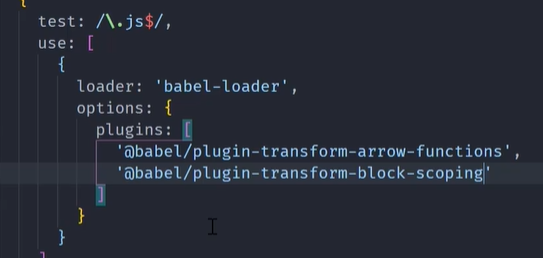
处理箭头函数
@babel/plugin-transform-arrow-finctions
安装 @babel/plugin-transform-arrow-finctions // 转换箭头函数为 普通函数
执行:npx babel src --out-dir babelbuild --plugins=@babel/plugin-transform-arrow-functions
处理 const
@babel/plugin-transform-block-scoping

这玩意儿不会打包这里面的const
用逗号隔开
预设配置(preset-env)
| 可编译 | 不可编译 |
|---|---|
| class | |
| ()=> |
@babel/preset-env (@babel/preset-env-es2015)
安装 @babel/preset-env
执行 npx babel src --out-dir babelbuild --plugins=@babel/preset-env
- 严格模式
- 箭头函数可以转换
- const可以转换
babel-loader
预设:能够完成绝大多数兼容转换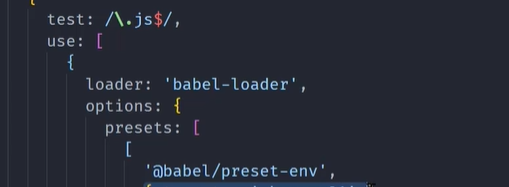
或者 .babelrc ```javascript { “presets”: [ [
] ] }"@babel/preset-env",{"useBuiltIns": "usage", // 处理promise 等高级语法"corejs": 3}
<a name="O4dM3"></a>
# polyfill & core-js regenerator-runtime
wp5 中默认没有 ,减少打包体积, wp4中有

**BILIBILI**: [https://www.bilibili.com/video/BV1iv411N7jg?p=21&spm_id_from=pageDriver](https://www.bilibili.com/video/BV1iv411N7jg?p=21&spm_id_from=pageDriver)

<a name="PiHjW"></a>
####  安装【不推荐】
 `@babel/polyfill` 为生产环境 --save 或者不写

polyfill 被 拆为两个部分 core-js & regenerator-runtime

<a name="AL1jH"></a>
#### 安装 【推荐】
 `yarn add core-js regenerator-runtime`

<a name="SY14o"></a>
#### 使用 .babelrc 配置

```javascript
{
  "presets": [
    [
      "@babel/preset-env",
      {
        // false 不做处理
        // usage 用到哪个处理哪个,没用到的就不处理
        // entry 根据你提供的需要兼容的浏览器来确定处理那些
        "useBuiltIns": "usage",
        "corejs": 3
      }
    ]
  ]
}
useBuildIns: ‘entry’
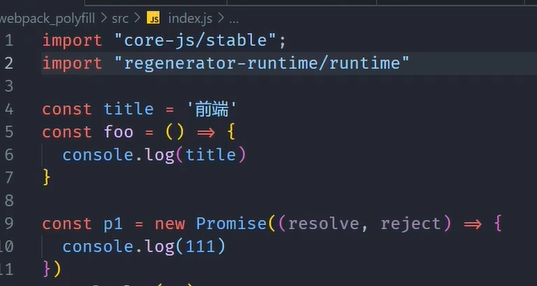
额外提及
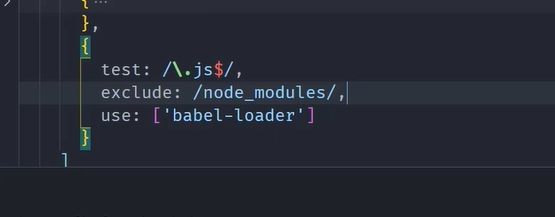
不处理 node_modules 下的代码

若有收获,就点个赞吧
0 人点赞


