- nearly all parameters can be overridden in ansible-playbook
# or with command line flags. ansible will read ANSIBLE_CONFIG,
# ansible.cfg in the current working directory, .ansible.cfg in
# the home directory or /etc/ansible/ansible.cfg, whichever it
# finds first - some basic default values…
- plays will gather facts by default, which contain information about
# the remote system.
#
# smart - gather by default, but don’t regather if already gathered
# implicit - gather by default, turn off with gather_facts: False
# explicit - do not gather by default, must say gather_facts: True
gathering = implicit 控制默认facts收集(远程系统变量). 默认值为’implicit’, 每一次play,facts都会被收集 - additional paths to search for roles in, colon separated
#roles_path = /etc/ansible/roles roles 路径指的是’roles/’下的额外目录,用于playbook搜索Ansible roles - uncomment this to disable SSH key host checking
#host_key_checking = False 检查主机密钥 - change this for alternative sudo implementations
sudo_exe = sudo 如果在其他远程主机上使用另一种方式执sudu操作.可以使用该参数进行更换 - what flags to pass to sudo 传递sudo之外的参数
#sudo_flags = -H - SSH timeout SSH超时时间
timeout = 10 - default user to use for playbooks if user is not specified
# (/usr/bin/ansible will use current user as default)
#remote_user = root 使用/usr/bin/ansible-playbook链接的默认用户名,如果不指定,会使用当前登录的用户名 - logging is off by default unless this path is defined
# if so defined, consider logrotate
#log_path = /var/log/ansible.log 日志文件存放路径 - default module name for /usr/bin/ansible
#module_name = command ansible命令执行默认的模块 - use this shell for commands executed under sudo
# you may need to change this to bin/bash in rare instances
# if sudo is constrained
#executable = /bin/sh 在sudo环境下产生一个shell交互接口. 用户只在/bin/bash的或者sudo限制的一些场景中需要修改 - if inventory variables overlap, does the higher precedence one win
# or are hash values merged together? The default is ‘replace’ but
# this can also be set to ‘merge’.
#hash_behaviour = replace 特定的优先级覆盖变量 - list any Jinja2 extensions to enable here:
#jinja2_extensions = jinja2.ext.do,jinja2.ext.i18n 允许开启Jinja2拓展模块 - if set, always use this private key file for authentication, same as
# if passing —private-key to ansible or ansible-playbook
#private_key_file = /path/to/file 私钥文件存储位置 - format of string {{ ansible_managed }} available within Jinja2
# templates indicates to users editing templates files will be replaced.
# replacing {file}, {host} and {uid} and strftime codes with proper values.
ansible_managed = Ansible managed: {file} modified on %Y-%m-%d %H:%M:%S by {uid} on {host} 这个设置可以告知用户,Ansible修改了一个文件,并且手动写入的内容可能已经被覆盖. - by default, ansible-playbook will display “Skipping [host]” if it determines a task
# should not be run on a host. Set this to “False” if you don’t want to see these “Skipping”
# messages. NOTE: the task header will still be shown regardless of whether or not the
# task is skipped.
#display_skipped_hosts = True 显示任何跳过任务的状态 ,默认是显示 - by default (as of 1.3), Ansible will raise errors when attempting to dereference
# Jinja2 variables that are not set in templates or action lines. Uncomment this line
# to revert the behavior to pre-1.3.
#error_on_undefined_vars = False 如果所引用的变量名称错误的话, 将会导致ansible在执行步骤上失败 - by default (as of 1.6), Ansible may display warnings based on the configuration of the
# system running ansible itself. This may include warnings about 3rd party packages or
# other conditions that should be resolved if possible.
# to disable these warnings, set the following value to False:
#system_warnings = True 允许禁用系统运行ansible相关的潜在问题警告 - by default (as of 1.4), Ansible may display deprecation warnings for language
# features that should no longer be used and will be removed in future versions.
# to disable these warnings, set the following value to False:
#deprecation_warnings = True 允许在ansible-playbook输出结果中禁用“不建议使用”警告 - (as of 1.8), Ansible can optionally warn when usage of the shell and
# command module appear to be simplified by using a default Ansible module
# instead. These warnings can be silenced by adjusting the following
# setting or adding warn=yes or warn=no to the end of the command line
# parameter string. This will for example suggest using the git module
# instead of shelling out to the git command.
# command_warnings = False 当shell和命令行模块被默认模块简化的时,Ansible 将默认发出警告 - set plugin path directories here, separate with colons
action_plugins = /usr/share/ansible_plugins/action_plugins
callback_plugins = /usr/share/ansible_plugins/callback_plugins
connection_plugins = /usr/share/ansible_plugins/connection_plugins
lookup_plugins = /usr/share/ansible_plugins/lookup_plugins
vars_plugins = /usr/share/ansible_plugins/vars_plugins
filter_plugins = /usr/share/ansible_plugins/filter_plugins - by default callbacks are not loaded for /bin/ansible, enable this if you
# want, for example, a notification or logging callback to also apply to
# /bin/ansible runs
#bin_ansible_callbacks = False 用来控制callback插件是否在运行 /usr/bin/ansible 的时候被加载. 这个模块将用于命令行的日志系统,发出通知等特性 - don’t like cows? that’s unfortunate.
# set to 1 if you don’t want cowsay support or export ANSIBLE_NOCOWS=1
#nocows = 1 默认ansible可以调用一些cowsay的特性 开启/禁用:0/1 - don’t like colors either?
# set to 1 if you don’t want colors, or export ANSIBLE_NOCOLOR=1
#nocolor = 1 输出带上颜色区别, 开启/关闭:0/1 - the CA certificate path used for validating SSL certs. This path
# should exist on the controlling node, not the target nodes
# common locations:
# RHEL/CentOS: /etc/pki/tls/certs/ca-bundle.crt
# Fedora : /etc/pki/ca-trust/extracted/pem/tls-ca-bundle.pem
# Ubuntu : /usr/share/ca-certificates/cacert.org/cacert.org.crt
#ca_file_path = - the http user-agent string to use when fetching urls. Some web server
# operators block the default urllib user agent as it is frequently used
# by malicious attacks/scripts, so we set it to something unique to
# avoid issues.
#http_user_agent = ansible-agent - if set to a persistent type (not ‘memory’, for example ‘redis’) fact values
# from previous runs in Ansible will be stored. This may be useful when
# wanting to use, for example, IP information from one group of servers
# without having to talk to them in the same playbook run to get their
# current IP information.
fact_caching = memory - retry files
#retry_files_enabled = False
#retry_files_save_path = ~/.ansible-retry - uncomment this line to cause the paramiko connection plugin to not record new host
# keys encountered. Increases performance on new host additions. Setting works independently of the
# host key checking setting above.
#record_host_keys=False - by default, Ansible requests a pseudo-terminal for commands executed under sudo. Uncomment this
# line to disable this behaviour.
#pty=False - ssh arguments to use
# Leaving off ControlPersist will result in poor performance, so use
# paramiko on older platforms rather than removing it
#ssh_args = -o ControlMaster=auto -o ControlPersist=60s - The path to use for the ControlPath sockets. This defaults to
# “%(directory)s/ansible-ssh-%%h-%%p-%%r”, however on some systems with
# very long hostnames or very long path names (caused by long user names or
# deeply nested home directories) this can exceed the character limit on
# file socket names (108 characters for most platforms). In that case, you
# may wish to shorten the string below.
#
# Example:
# control_path = %(directory)s/%%h-%%r
#control_path = %(directory)s/ansible-ssh-%%h-%%p-%%r - Enabling pipelining reduces the number of SSH operations required to
# execute a module on the remote server. This can result in a significant
# performance improvement when enabled, however when using “sudo:” you must
# first disable ‘requiretty’ in /etc/sudoers
#
# By default, this option is disabled to preserve compatibility with
# sudoers configurations that have requiretty (the default on many distros).
#
#pipelining = False - if True, make ansible use scp if the connection type is ssh
# (default is sftp)
#scp_if_ssh = True - The daemon timeout is measured in minutes. This time is measured
# from the last activity to the accelerate daemon.
accelerate_daemon_timeout = 30 - If set to yes, accelerate_multi_key will allow multiple
# private keys to be uploaded to it, though each user must
# have access to the system via SSH to add a new key. The default
# is “no”.
#accelerate_multi_key = yes - This is the default ansible ‘hosts’ file.
#
# It should live in /etc/ansible/hosts
#
# - Comments begin with the ‘#’ character
# - Blank lines are ignored
# - Groups of hosts are delimited by [header] elements
# - You can enter hostnames or ip addresses
# - A hostname/ip can be a member of multiple groups - Ex 1: Ungrouped hosts, specify before any group headers.
- Ex 2: A collection of hosts belonging to the ‘webservers’ group
- If you have multiple hosts following a pattern you can specify
# them like this: - Ex 3: A collection of database servers in the ‘dbservers’ group
- Here’s another example of host ranges, this time there are no
# leading 0s:
1、安装epel源和ansible
yum install epel-release
yum install ansible
2、秘钥认证
2.1、生产公钥私钥(此操作在ansible控制服务器上执行)
#本次使用weihu 账号,方便日后运维
#本次使用weihu 账号,方便日后运维
# ssh-keygen
# ssh-copy-id -i ~/.ssh/id_rsa.pub weihu@10.163.89.211 (把公钥拷贝到需要受控的客户机)
3、配置受管理的主机清单
默认路径: /etc/ansible/hosts (该文件名或者路径其实可以自定义,在执行的时候指定即可)
使用方式:
a. 分组,通过分组可以直接指定组名,ansible所有动作会在该组下的所有主机下执行
[group1]
10.163.89.211
b.指定别名
alias ansible_ssh_host=10.163.89.212 #设置该主机的别名为 alias 在执行时,指定别名即可,无需输入完整IP。 注意:使用了别名后不能使用IP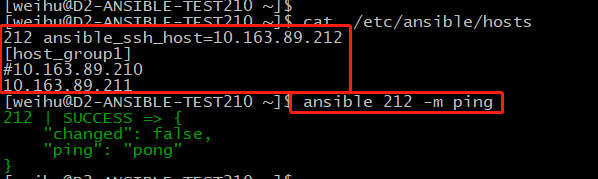
4、配置文件/etc/ansible/ansible.cfg –配置文件(如果存在)~/.ansible.cfg –用户配置文件,覆盖默认配置(如果存在)
ansible.cfg配置文件详细说明
=====================================================================
# config file for ansible — http://ansible.com/
# ==============================================
nearly all parameters can be overridden in ansible-playbook
# or with command line flags. ansible will read ANSIBLE_CONFIG,
# ansible.cfg in the current working directory, .ansible.cfg in
# the home directory or /etc/ansible/ansible.cfg, whichever it
# finds first
[defaults] —->通用默认配置
some basic default values…
inventory = /etc/ansible/hosts 这个是默认库文件位置,脚本,或者存放可通信主机的目录
#library = /usr/share/my_modules/ Ansible默认搜寻模块的位置
remote_tmp = $HOME/.ansible/tmp Ansible 通过远程传输模块到远程主机,然后远程执行,执行后在清理现场.在有些场景下,你也许想使用默认路径希望像更换补丁一样使用
pattern = * 如果没有提供“hosts”节点,这是playbook要通信的默认主机组.默认值是对所有主机通信
forks = 5 在与主机通信时的默认并行进程数 ,默认是5d
poll_interval = 15 当具体的poll interval 没有定义时,多少时间回查一下这些任务的状态, 默认值是5秒
sudo_user = root sudo使用的默认用户 ,默认是root
#ask_sudo_pass = True 用来控制Ansible playbook 在执行sudo之前是否询问sudo密码.默认为no
#ask_pass = True 控制Ansible playbook 是否会自动默认弹出密码
transport = smart 通信机制.默认 值为’smart’。如果本地系统支持 ControlPersist技术的话,将会使用(基于OpenSSH)‘ssh’,如果不支持讲使用‘paramiko’.其他传输选项包括‘local’, ‘chroot’,’jail’等等
#remote_port = 22 远程SSH端口。 默认是22
module_lang = C 模块和系统之间通信的计算机语言,默认是C语言
plays will gather facts by default, which contain information about
# the remote system.
#
# smart - gather by default, but don’t regather if already gathered
# implicit - gather by default, turn off with gather_facts: False
# explicit - do not gather by default, must say gather_facts: True
gathering = implicit 控制默认facts收集(远程系统变量). 默认值为’implicit’, 每一次play,facts都会被收集
additional paths to search for roles in, colon separated
#roles_path = /etc/ansible/roles roles 路径指的是’roles/’下的额外目录,用于playbook搜索Ansible roles
uncomment this to disable SSH key host checking
#host_key_checking = False 检查主机密钥
change this for alternative sudo implementations
sudo_exe = sudo 如果在其他远程主机上使用另一种方式执sudu操作.可以使用该参数进行更换
what flags to pass to sudo 传递sudo之外的参数
#sudo_flags = -H
SSH timeout SSH超时时间
timeout = 10
default user to use for playbooks if user is not specified
# (/usr/bin/ansible will use current user as default)
#remote_user = root 使用/usr/bin/ansible-playbook链接的默认用户名,如果不指定,会使用当前登录的用户名
logging is off by default unless this path is defined
# if so defined, consider logrotate
#log_path = /var/log/ansible.log 日志文件存放路径
default module name for /usr/bin/ansible
#module_name = command ansible命令执行默认的模块
use this shell for commands executed under sudo
# you may need to change this to bin/bash in rare instances
# if sudo is constrained
#executable = /bin/sh 在sudo环境下产生一个shell交互接口. 用户只在/bin/bash的或者sudo限制的一些场景中需要修改
if inventory variables overlap, does the higher precedence one win
# or are hash values merged together? The default is ‘replace’ but
# this can also be set to ‘merge’.
#hash_behaviour = replace 特定的优先级覆盖变量
list any Jinja2 extensions to enable here:
#jinja2_extensions = jinja2.ext.do,jinja2.ext.i18n 允许开启Jinja2拓展模块
if set, always use this private key file for authentication, same as
# if passing —private-key to ansible or ansible-playbook
#private_key_file = /path/to/file 私钥文件存储位置
format of string {{ ansible_managed }} available within Jinja2
# templates indicates to users editing templates files will be replaced.
# replacing {file}, {host} and {uid} and strftime codes with proper values.
ansible_managed = Ansible managed: {file} modified on %Y-%m-%d %H:%M:%S by {uid} on {host} 这个设置可以告知用户,Ansible修改了一个文件,并且手动写入的内容可能已经被覆盖.
by default, ansible-playbook will display “Skipping [host]” if it determines a task
# should not be run on a host. Set this to “False” if you don’t want to see these “Skipping”
# messages. NOTE: the task header will still be shown regardless of whether or not the
# task is skipped.
#display_skipped_hosts = True 显示任何跳过任务的状态 ,默认是显示
by default (as of 1.3), Ansible will raise errors when attempting to dereference
# Jinja2 variables that are not set in templates or action lines. Uncomment this line
# to revert the behavior to pre-1.3.
#error_on_undefined_vars = False 如果所引用的变量名称错误的话, 将会导致ansible在执行步骤上失败
by default (as of 1.6), Ansible may display warnings based on the configuration of the
# system running ansible itself. This may include warnings about 3rd party packages or
# other conditions that should be resolved if possible.
# to disable these warnings, set the following value to False:
#system_warnings = True 允许禁用系统运行ansible相关的潜在问题警告
by default (as of 1.4), Ansible may display deprecation warnings for language
# features that should no longer be used and will be removed in future versions.
# to disable these warnings, set the following value to False:
#deprecation_warnings = True 允许在ansible-playbook输出结果中禁用“不建议使用”警告
(as of 1.8), Ansible can optionally warn when usage of the shell and
# command module appear to be simplified by using a default Ansible module
# instead. These warnings can be silenced by adjusting the following
# setting or adding warn=yes or warn=no to the end of the command line
# parameter string. This will for example suggest using the git module
# instead of shelling out to the git command.
# command_warnings = False 当shell和命令行模块被默认模块简化的时,Ansible 将默认发出警告
set plugin path directories here, separate with colons
action_plugins = /usr/share/ansible_plugins/action_plugins
callback_plugins = /usr/share/ansible_plugins/callback_plugins
connection_plugins = /usr/share/ansible_plugins/connection_plugins
lookup_plugins = /usr/share/ansible_plugins/lookup_plugins
vars_plugins = /usr/share/ansible_plugins/vars_plugins
filter_plugins = /usr/share/ansible_plugins/filter_plugins
by default callbacks are not loaded for /bin/ansible, enable this if you
# want, for example, a notification or logging callback to also apply to
# /bin/ansible runs
#bin_ansible_callbacks = False 用来控制callback插件是否在运行 /usr/bin/ansible 的时候被加载. 这个模块将用于命令行的日志系统,发出通知等特性
don’t like cows? that’s unfortunate.
# set to 1 if you don’t want cowsay support or export ANSIBLE_NOCOWS=1
#nocows = 1 默认ansible可以调用一些cowsay的特性 开启/禁用:0/1
don’t like colors either?
# set to 1 if you don’t want colors, or export ANSIBLE_NOCOLOR=1
#nocolor = 1 输出带上颜色区别, 开启/关闭:0/1
the CA certificate path used for validating SSL certs. This path
# should exist on the controlling node, not the target nodes
# common locations:
# RHEL/CentOS: /etc/pki/tls/certs/ca-bundle.crt
# Fedora : /etc/pki/ca-trust/extracted/pem/tls-ca-bundle.pem
# Ubuntu : /usr/share/ca-certificates/cacert.org/cacert.org.crt
#ca_file_path =
the http user-agent string to use when fetching urls. Some web server
# operators block the default urllib user agent as it is frequently used
# by malicious attacks/scripts, so we set it to something unique to
# avoid issues.
#http_user_agent = ansible-agent
if set to a persistent type (not ‘memory’, for example ‘redis’) fact values
# from previous runs in Ansible will be stored. This may be useful when
# wanting to use, for example, IP information from one group of servers
# without having to talk to them in the same playbook run to get their
# current IP information.
fact_caching = memory
retry files
#retry_files_enabled = False
#retry_files_save_path = ~/.ansible-retry
[privilege_escalation]
#become=True
#become_method=sudo
#become_user=root
#become_ask_pass=False
[paramiko_connection]
uncomment this line to cause the paramiko connection plugin to not record new host
# keys encountered. Increases performance on new host additions. Setting works independently of the
# host key checking setting above.
#record_host_keys=False
by default, Ansible requests a pseudo-terminal for commands executed under sudo. Uncomment this
# line to disable this behaviour.
#pty=False
[ssh_connection]
ssh arguments to use
# Leaving off ControlPersist will result in poor performance, so use
# paramiko on older platforms rather than removing it
#ssh_args = -o ControlMaster=auto -o ControlPersist=60s
The path to use for the ControlPath sockets. This defaults to
# “%(directory)s/ansible-ssh-%%h-%%p-%%r”, however on some systems with
# very long hostnames or very long path names (caused by long user names or
# deeply nested home directories) this can exceed the character limit on
# file socket names (108 characters for most platforms). In that case, you
# may wish to shorten the string below.
#
# Example:
# control_path = %(directory)s/%%h-%%r
#control_path = %(directory)s/ansible-ssh-%%h-%%p-%%r
Enabling pipelining reduces the number of SSH operations required to
# execute a module on the remote server. This can result in a significant
# performance improvement when enabled, however when using “sudo:” you must
# first disable ‘requiretty’ in /etc/sudoers
#
# By default, this option is disabled to preserve compatibility with
# sudoers configurations that have requiretty (the default on many distros).
#
#pipelining = False
if True, make ansible use scp if the connection type is ssh
# (default is sftp)
#scp_if_ssh = True
[accelerate]
accelerate_port = 5099
accelerate_timeout = 30
accelerate_connect_timeout = 5.0
The daemon timeout is measured in minutes. This time is measured
# from the last activity to the accelerate daemon.
accelerate_daemon_timeout = 30
If set to yes, accelerate_multi_key will allow multiple
# private keys to be uploaded to it, though each user must
# have access to the system via SSH to add a new key. The default
# is “no”.
#accelerate_multi_key = yes
[selinux]
# file systems that require special treatment when dealing with security context
# the default behaviour that copies the existing context or uses the user default
# needs to be changed to use the file system dependant context.
#special_context_filesystems=nfs,vboxsf,fuse
简易配置:
[defaults]
inventory = /etc/ansible/hosts
sudo_user=root
remote_port=22
host_key_checking=False
remote_user=root
log_path=/var/log/ansible.log
module_name=command
private_key_file=/root/.ssh/id_rsa
no_log:True
2.hosts
This is the default ansible ‘hosts’ file.
#
# It should live in /etc/ansible/hosts
#
# - Comments begin with the ‘#’ character
# - Blank lines are ignored
# - Groups of hosts are delimited by [header] elements
# - You can enter hostnames or ip addresses
# - A hostname/ip can be a member of multiple groups
Ex 1: Ungrouped hosts, specify before any group headers.
green.example.com
blue.example.com
192.168.100.1
192.168.100.10
Ex 2: A collection of hosts belonging to the ‘webservers’ group
[webservers]
alpha.example.org
beta.example.org
192.168.1.100
192.168.1.110
If you have multiple hosts following a pattern you can specify
# them like this:
www[001:006].example.com
Ex 3: A collection of database servers in the ‘dbservers’ group
[dbservers]
db01.intranet.mydomain.net
db02.intranet.mydomain.net
10.25.1.56
10.25.1.57
Here’s another example of host ranges, this time there are no
# leading 0s:
db-[99:101]-node.example.com
=====================================================================
5、参数
执行如下命令,如返回如下结果则正常
#ansible all -m ping
[root@localhost ~]# ansible all -m ping
192.168.1.98 | SUCCESS => {
“changed”: false,
“failed”: false,
“ping”: “pong”
}

若有收获,就点个赞吧
0 人点赞


