本文记录将极客时间,杨波,Spring Boot 与 Kubernetes 云原生微服务实践 专栏的示例项目 Staffjoy, 部署到本地 Docker Compose 环境的过程。
环境:
CPU: Intel(R) Core(TM) i5-10400 CPU @ 2.90GHz 2.90 GHz
内存: 16.0 GB
操作系统: Windows 10 专业版,21H2,19044.1645
Docker Desktop For Windows: 4.8.1 (78998)
1 准备
1.1 下载 Staffjoy 源码
Staffjoy 源码地址: https://gitee.com/geektime-geekbang/staffjoy
下载后解压
1.2 安装 SwitchHosts
为了使用域名访问 Staffjoy,需要配置域名与IP映射,SwitchHosts 能简化该工作。
下载地址: https://github.com/oldj/SwitchHosts/releases
2 用 IntelliJ IDEA 打开项目,等待项目导入完成
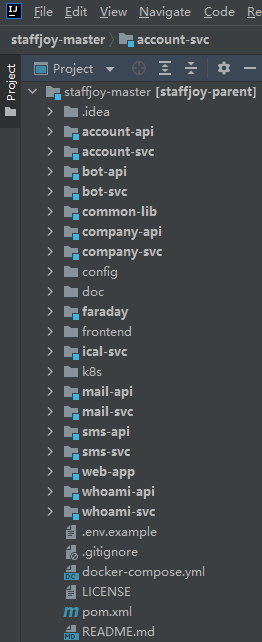
3 配置 .env 文件
复制 .env.example 文件为 .env 文件。然后修改 .env 文件中的属性,如下所示:
SPRING_PROFILES_ACTIVE=testSERVER_PORT=80EMAIL_SERVICE_ENDPOINT=http://email-serviceCOMPANY_SERVICE_ENDPOINT=http://company-serviceACCOUNT_SERVICE_ENDPOINT=http://account-serviceBOT_SERVICE_ENDPOINT=http://bot-serviceSMS_SERVICE_ENDPOINT=http://sms-serviceSENTRY_DSN=https://80aaf4ae889b414f9fe72e3904cd5246@sentry.io/1380198SIGNING_SECRET=your_signing_secretINTERCOM_ACCESS_TOKEN=YOUR_INTERCOM_ACCESS_TOKENINTERCOM_APP_ID=TBDINTERCOM_SIGNING_SECRET=TBDALIYUN_ACCESS_KEY=YOUR_ALIYUN_ACCESS_KEYALIYUN_ACCESS_SECRET=YOUR_ALIYUN_ACCESS_SECRETRECAPTCHA_PUBLIC=test-recaptcha-publicRECAPTCHA_PRIVATE=test-recaptcha-privateACCOUNT_DATASOURCE_URL=jdbc:mysql://host.docker.internal:3306/staffjoy_account?useUnicode=true&characterEncoding=utf-8&serverTimezone=GMT%2B8ACCOUNT_DATASOURCE_USERNAME=rootACCOUNT_DATASOURCE_PASSWORD=12345678COMPANY_DATASOURCE_URL=jdbc:mysql://host.docker.internal:3306/staffjoy_company?useUnicode=true&characterEncoding=utf-8&serverTimezone=GMT%2B8COMPANY_DATASOURCE_USERNAME=rootCOMPANY_DATASOURCE_PASSWORD=12345678
4 构建 Docker 镜像
4.1 构建 jar 包
命令: mvn clean package -DskipTests
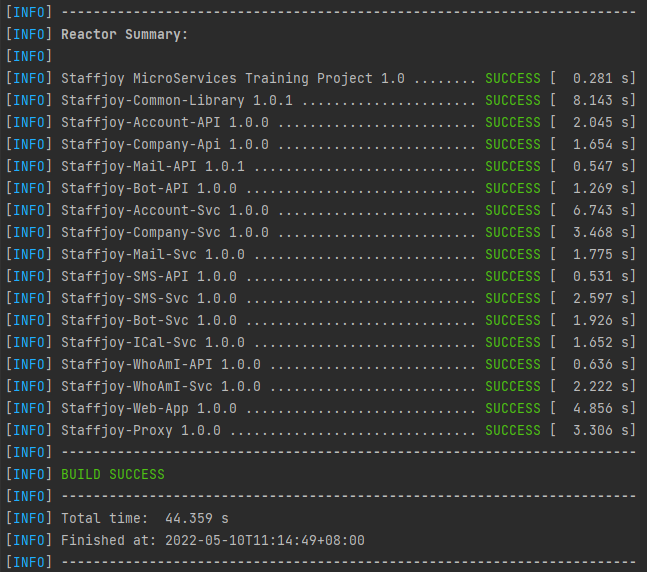
4.2 构建 Docker 镜像
命令: docker-compose build
执行结果:myaccount-service 构建失败
Building myaccount-service[+] Building 49.0s (13/17)=> [internal] load build definition from Dockerfile 0.0s=> => transferring dockerfile: 32B 0.0s=> [internal] load .dockerignore 0.0s=> => transferring context: 2B 0.0s=> [internal] load metadata for docker.io/library/nginx:latest 3.7s=> [internal] load metadata for docker.io/library/node:alpine 3.9s=> CACHED [stage-1 1/2] FROM docker.io/library/nginx@sha256:859ab6768a6f26a79bc42b231664111317d095a4f04e4b6fe79ce37b3d199097 0.0s=> [builder 1/10] FROM docker.io/library/node:alpine@sha256:f4d6916c5625853e81994b5cb53ad3eb27e5fec9451c579d298fee0c508fe621 0.0s=> [internal] load build context 0.0s=> => transferring context: 32.24kB 0.0s=> CACHED [builder 2/10] WORKDIR /build 0.0s=> CACHED [builder 3/10] COPY myaccount ./myaccount 0.0s=> CACHED [builder 4/10] COPY resources ./resources 0.0s=> CACHED [builder 5/10] COPY third_party ./third_party 0.0s=> CACHED [builder 6/10] WORKDIR /build/myaccount 0.0s=> ERROR [builder 7/10] RUN npm install 45.0s------> [builder 7/10] RUN npm install:#13 1.481 npm WARN old lockfile#13 1.482 npm WARN old lockfile The package-lock.json file was created with an old version of npm,#13 1.482 npm WARN old lockfile so supplemental metadata must be fetched from the registry.#13 1.482 npm WARN old lockfile#13 1.483 npm WARN old lockfile This is a one-time fix-up, please be patient...#13 1.483 npm WARN old lockfile#13 20.73 npm WARN deprecated urix@0.1.0: Please see https://github.com/lydell/urix#deprecated#13 20.81 npm WARN deprecated uuid@3.3.2: Please upgrade to version 7 or higher. Older versions may use Math.random() in certain circumstances, which is known to be problematic. See https://v8.dev/blog/math-random for details.#13 20.95 npm WARN deprecated to-iso-string@0.0.2: to-iso-string has been deprecated, use @segment/to-iso-string instead.#13 21.64 npm WARN deprecated set-value@2.0.0: Critical bug fixed in v3.0.1, please upgrade to the latest version.#13 21.77 npm WARN deprecated source-map-resolve@0.5.2: See https://github.com/lydell/source-map-resolve#deprecated#13 21.91 npm WARN deprecated source-map-url@0.4.0: See https://github.com/lydell/source-map-url#deprecated#13 21.95 npm WARN deprecated resolve-url@0.2.1: https://github.com/lydell/resolve-url#deprecated#13 22.49 npm WARN deprecated querystring@0.2.0: The querystring API is considered Legacy. new code should use the URLSearchParams API instead.#13 22.63 npm WARN deprecated request@2.88.0: request has been deprecated, see https://github.com/request/request/issues/3142#13 24.00 npm WARN deprecated phantomjs-prebuilt@2.1.16: this package is now deprecated#13 24.25 npm WARN deprecated svgo@0.7.2: This SVGO version is no longer supported. Upgrade to v2.x.x.#13 24.49 npm WARN deprecated mkdirp@0.5.1: Legacy versions of mkdirp are no longer supported. Please update to mkdirp 1.x. (Note that the API surface has changed to use Promises in 1.x.)#13 24.88 npm WARN deprecated json3@3.3.2: Please use the native JSON object instead of JSON 3#13 25.53 npm WARN deprecated har-validator@5.1.3: this library is no longer supported#13 25.82 npm WARN deprecated flatten@1.0.2: flatten is deprecated in favor of utility frameworks such as lodash.#13 25.99 npm WARN deprecated favicons-webpack-plugin@0.0.7: out of support - please update#13 26.09 npm WARN deprecated html-webpack-plugin@2.30.1: out of support#13 26.23 npm WARN deprecated eslint-loader@1.9.0: This loader has been deprecated. Please use eslint-webpack-plugin#13 26.71 npm WARN deprecated jade@0.26.3: Jade has been renamed to pug, please install the latest version of pug instead of jade#13 27.51 npm WARN deprecated circular-json@0.3.3: CircularJSON is in maintenance only, flatted is its successor.#13 27.68 npm WARN deprecated browserslist@1.7.7: Browserslist 2 could fail on reading Browserslist >3.0 config used in other tools.#13 27.93 npm WARN deprecated chokidar@1.7.0: Chokidar 2 will break on node v14+. Upgrade to chokidar 3 with 15x less dependencies.#13 27.94 npm WARN deprecated babel-preset-es2015@6.24.1: � Thanks for using Babel: we recommend using babel-preset-env now: please read https://babeljs.io/env to update!#13 28.55 npm WARN deprecated tar@2.2.2: This version of tar is no longer supported, and will not receive security updates. Please upgrade asap.#13 28.60 npm WARN deprecated babel-eslint@6.1.2: babel-eslint is now @babel/eslint-parser. This package will no longer receive updates.#13 29.19 npm WARN deprecated set-value@0.4.3: Critical bug fixed in v3.0.1, please upgrade to the latest version.#13 30.06 npm WARN deprecated buffer@4.9.1: This version of 'buffer' is out-of-date. You must update to v4.9.2 or newer#13 30.21 npm WARN deprecated debug@3.2.6: Debug versions >=3.2.0 <3.2.7 || >=4 <4.3.1 have a low-severity ReDos regression when used in a Node.js environment. It is recommended you upgrade to 3.2.7 or 4.3.1. (https://github.com/visionmedia/debug/issues/797)#13 30.96 npm WARN deprecated mkdirp@0.3.0: Legacy versions of mkdirp are no longer supported. Please update to mkdirp 1.x. (Note that the API surface has changed to use Promises in 1.x.)#13 31.03 npm WARN deprecated minimatch@0.3.0: Please update to minimatch 3.0.2 or higher to avoid a RegExp DoS issue#13 31.21 npm WARN deprecated debug@3.2.6: Debug versions >=3.2.0 <3.2.7 || >=4 <4.3.1 have a low-severity ReDos regression when used in a Node.js environment. It is recommended you upgrade to 3.2.7 or 4.3.1. (https://github.com/visionmedia/debug/issues/797)#13 33.69 npm WARN deprecated core-js@1.2.7: core-js@<3.4 is no longer maintained and not recommended for usage due to the number of issues. Because of the V8 engine whims, feature detection in old core-jsversions could cause a slowdown up to 100x even if nothing is polyfilled. Please, upgrade your dependencies to the actual version of core-js.#13 34.93 npm WARN deprecated core-js@2.6.5: core-js@<3.4 is no longer maintained and not recommended for usage due to the number of issues. Because of the V8 engine whims, feature detection in old core-jsversions could cause a slowdown up to 100x even if nothing is polyfilled. Please, upgrade your dependencies to the actual version of core-js.#13 34.93 npm WARN deprecated core-js@2.6.5: core-js@<3.4 is no longer maintained and not recommended for usage due to the number of issues. Because of the V8 engine whims, feature detection in old core-jsversions could cause a slowdown up to 100x even if nothing is polyfilled. Please, upgrade your dependencies to the actual version of core-js.#13 44.76 npm notice#13 44.76 npm notice New minor version of npm available! 8.8.0 -> 8.9.0#13 44.76 npm notice Changelog: <https://github.com/npm/cli/releases/tag/v8.9.0>#13 44.76 npm notice Run `npm install -g npm@8.9.0` to update!#13 44.76 npm notice#13 44.76 npm ERR! code 1#13 44.76 npm ERR! path /build/myaccount/node_modules/node-sass#13 44.76 npm ERR! command failed#13 44.76 npm ERR! command sh -c node scripts/build.js#13 44.76 npm ERR! Building: /usr/local/bin/node /build/myaccount/node_modules/node-gyp/bin/node-gyp.js rebuild --verbose --libsass_ext= --libsass_cflags= --libsass_ldflags= --libsass_library=#13 44.76 npm ERR! gyp info it worked if it ends with ok#13 44.76 npm ERR! gyp verb cli [#13 44.76 npm ERR! gyp verb cli '/usr/local/bin/node',#13 44.76 npm ERR! gyp verb cli '/build/myaccount/node_modules/node-gyp/bin/node-gyp.js',#13 44.76 npm ERR! gyp verb cli 'rebuild',#13 44.76 npm ERR! gyp verb cli '--verbose',#13 44.76 npm ERR! gyp verb cli '--libsass_ext=',#13 44.76 npm ERR! gyp verb cli '--libsass_cflags=',#13 44.76 npm ERR! gyp verb cli '--libsass_ldflags=',#13 44.76 npm ERR! gyp verb cli '--libsass_library='#13 44.76 npm ERR! gyp verb cli ]#13 44.76 npm ERR! gyp info using node-gyp@3.8.0#13 44.76 npm ERR! gyp info using node@18.1.0 | linux | x64#13 44.76 npm ERR! gyp verb command rebuild []#13 44.76 npm ERR! gyp verb command clean []#13 44.76 npm ERR! gyp verb clean removing "build" directory#13 44.76 npm ERR! gyp verb command configure []#13 44.76 npm ERR! gyp verb check python checking for Python executable "python2" in the PATH#13 44.76 npm ERR! gyp verb `which` failed Error: not found: python2#13 44.76 npm ERR! gyp verb `which` failed at getNotFoundError (/build/myaccount/node_modules/which/which.js:13:12)#13 44.76 npm ERR! gyp verb `which` failed at F (/build/myaccount/node_modules/which/which.js:68:19)#13 44.76 npm ERR! gyp verb `which` failed at E (/build/myaccount/node_modules/which/which.js:80:29)#13 44.76 npm ERR! gyp verb `which` failed at /build/myaccount/node_modules/which/which.js:89:16#13 44.76 npm ERR! gyp verb `which` failed at /build/myaccount/node_modules/isexe/index.js:42:5#13 44.76 npm ERR! gyp verb `which` failed at /build/myaccount/node_modules/isexe/mode.js:8:5#13 44.76 npm ERR! gyp verb `which` failed at FSReqCallback.oncomplete (node:fs:203:21)#13 44.76 npm ERR! gyp verb `which` failed python2 Error: not found: python2#13 44.76 npm ERR! gyp verb `which` failed at getNotFoundError (/build/myaccount/node_modules/which/which.js:13:12)#13 44.76 npm ERR! gyp verb `which` failed at F (/build/myaccount/node_modules/which/which.js:68:19)#13 44.76 npm ERR! gyp verb `which` failed at E (/build/myaccount/node_modules/which/which.js:80:29)#13 44.76 npm ERR! gyp verb `which` failed at /build/myaccount/node_modules/which/which.js:89:16#13 44.76 npm ERR! gyp verb `which` failed at /build/myaccount/node_modules/isexe/index.js:42:5#13 44.76 npm ERR! gyp verb `which` failed at /build/myaccount/node_modules/isexe/mode.js:8:5#13 44.76 npm ERR! gyp verb `which` failed at FSReqCallback.oncomplete (node:fs:203:21) {#13 44.76 npm ERR! gyp verb `which` failed code: 'ENOENT'#13 44.76 npm ERR! gyp verb `which` failed }#13 44.76 npm ERR! gyp verb check python checking for Python executable "python" in the PATH#13 44.76 npm ERR! gyp verb `which` failed Error: not found: python#13 44.76 npm ERR! gyp verb `which` failed at getNotFoundError (/build/myaccount/node_modules/which/which.js:13:12)#13 44.76 npm ERR! gyp verb `which` failed at F (/build/myaccount/node_modules/which/which.js:68:19)#13 44.76 npm ERR! gyp verb `which` failed at E (/build/myaccount/node_modules/which/which.js:80:29)#13 44.76 npm ERR! gyp verb `which` failed at /build/myaccount/node_modules/which/which.js:89:16#13 44.76 npm ERR! gyp verb `which` failed at /build/myaccount/node_modules/isexe/index.js:42:5#13 44.76 npm ERR! gyp verb `which` failed at /build/myaccount/node_modules/isexe/mode.js:8:5#13 44.76 npm ERR! gyp verb `which` failed at FSReqCallback.oncomplete (node:fs:203:21)#13 44.76 npm ERR! gyp verb `which` failed python Error: not found: python#13 44.76 npm ERR! gyp verb `which` failed at getNotFoundError (/build/myaccount/node_modules/which/which.js:13:12)#13 44.76 npm ERR! gyp verb `which` failed at F (/build/myaccount/node_modules/which/which.js:68:19)#13 44.76 npm ERR! gyp verb `which` failed at E (/build/myaccount/node_modules/which/which.js:80:29)#13 44.76 npm ERR! gyp verb `which` failed at /build/myaccount/node_modules/which/which.js:89:16#13 44.76 npm ERR! gyp verb `which` failed at /build/myaccount/node_modules/isexe/index.js:42:5#13 44.76 npm ERR! gyp verb `which` failed at /build/myaccount/node_modules/isexe/mode.js:8:5#13 44.76 npm ERR! gyp verb `which` failed at FSReqCallback.oncomplete (node:fs:203:21) {#13 44.76 npm ERR! gyp verb `which` failed code: 'ENOENT'#13 44.76 npm ERR! gyp verb `which` failed }#13 44.76 npm ERR! gyp ERR! configure error#13 44.76 npm ERR! gyp ERR! stack Error: Can't find Python executable "python", you can set the PYTHON env variable.#13 44.76 npm ERR! gyp ERR! stack at PythonFinder.failNoPython (/build/myaccount/node_modules/node-gyp/lib/configure.js:484:19)#13 44.76 npm ERR! gyp ERR! stack at PythonFinder.<anonymous> (/build/myaccount/node_modules/node-gyp/lib/configure.js:406:16)#13 44.76 npm ERR! gyp ERR! stack at F (/build/myaccount/node_modules/which/which.js:68:16)#13 44.76 npm ERR! gyp ERR! stack at E (/build/myaccount/node_modules/which/which.js:80:29)#13 44.76 npm ERR! gyp ERR! stack at /build/myaccount/node_modules/which/which.js:89:16#13 44.76 npm ERR! gyp ERR! stack at /build/myaccount/node_modules/isexe/index.js:42:5#13 44.76 npm ERR! gyp ERR! stack at /build/myaccount/node_modules/isexe/mode.js:8:5#13 44.77 npm ERR! gyp ERR! stack at FSReqCallback.oncomplete (node:fs:203:21)#13 44.77 npm ERR! gyp ERR! System Linux 5.10.16.3-microsoft-standard-WSL2#13 44.77 npm ERR! gyp ERR! command "/usr/local/bin/node" "/build/myaccount/node_modules/node-gyp/bin/node-gyp.js" "rebuild" "--verbose" "--libsass_ext=" "--libsass_cflags=" "--libsass_ldflags=" "--libsass_library="#13 44.77 npm ERR! gyp ERR! cwd /build/myaccount/node_modules/node-sass#13 44.77 npm ERR! gyp ERR! node -v v18.1.0#13 44.77 npm ERR! gyp ERR! node-gyp -v v3.8.0#13 44.77 npm ERR! gyp ERR! not ok#13 44.77 npm ERR! Build failed with error code: 1#13 44.77#13 44.77 npm ERR! A complete log of this run can be found in:#13 44.77 npm ERR! /root/.npm/_logs/2022-05-10T09_13_55_725Z-debug-0.log------executor failed running [/bin/sh -c npm install]: exit code: 1ERROR: Service 'myaccount-service' failed to build : Build failed
因 myaccount-service 和 app-service 构建失败,暂时注释掉 docker-compose.yml 中与这 2 个服务相关的内容
faraday-service:build: ./faradayimage: boboweike/faraday-svcports:- 80:80environment:- SPRING_PROFILES_ACTIVE- SERVER_PORT- SENTRY_DSN- SIGNING_SECRETdepends_on:- account-service- company-service- www-service- whoami-service# - ical-service # commented for demo# - myaccount-service# - app-servicenetworks:- internal_access- external_access# myaccount-service:# build:# context: ./frontend# dockerfile: myaccount/Dockerfile# image: boboweike/myaccount-spa# networks:# - internal_access## app-service:# build:# context: ./frontend# dockerfile: app/Dockerfile# image: boboweike/app-spa# networks:# - internal_accessnetworks:internal_access:internal: trueexternal_access:
再执行命令:docker-compose build,构建成功
4.3 查看 Docker 镜像
命令: docker images
执行结果:
REPOSITORY              TAG       IMAGE ID       CREATED         SIZE
boboweike/faraday-svc   latest    5b976f123751   7 minutes ago   227MB
boboweike/www-svc       latest    f4a1a5335255   3 hours ago     249MB
boboweike/whoami-svc    latest    769968742335   3 hours ago     220MB
boboweike/account-svc   latest    1ea24e9c258a   3 hours ago     263MB
boboweike/company-svc   latest    c7c8f83524e9   3 hours ago     262MB
boboweike/bot-svc       latest    4735b4cb2cae   3 hours ago     220MB
boboweike/mail-svc      latest    27aba56e4958   3 hours ago     220MB
docker101tutorial       latest    9c846a964988   23 hours ago    28.8MB
alpine/git              latest    3356396f045f   11 days ago     38.2MB
5 部署 MySQL 数据库
创建数据库 staffjoy_account:
CREATE SCHEMA staffjoy_account DEFAULT CHARACTER SET utf8mb4 COLLATE utf8mb4_bin
在 staffjoy_account数据库上执行 sql 脚本: account-svc\src\main\resources\db\schema.sql
创建数据库 staffjoy_company:
CREATE SCHEMA staffjoy_company DEFAULT CHARACTER SET utf8mb4 COLLATE utf8mb4_bin
在 staffjoy_company 数据库上执行 sql 脚本:company-svc\src\main\resources\db\schema.sql
6 部署 Staffjoy
7 启用 SwitchHosts
注意:
1)要以管理员身份运行 SwitchHosts
2)确保 Windows hosts 文件的可编辑,即没有开启只读属性
8 校验 Staffjoy
浏览器访问:http://www.staffjoy-v2.local/,用后缀为 @jskillcloud.com 的邮箱(不必是真实邮箱)注册账号,到应用日志里找账号激活链接,在浏览器中打开这个链接,激活账号。
9 清理
10 除障记录
10.1 MySQL server time zone value ‘Öйú±ê׼ʱ¼ä’ is unrecognized
10.1.1 问题描述
account-service 和 company-service 启动失败,报错如下:
company-service_1  | 10-05-2022 12:24:05.121 [main] ERROR com.zaxxer.hikari.pool.HikariPool.throwPoolInitializationException - HikariPool-1 - Exception during pool initialization.
company-service_1  | java.sql.SQLException: The server time zone value 'Öйú±ê׼ʱ¼ä' is unrecognized or represents more than one time zone. You must configure either the server or JDBC driver (via the
serverTimezone configuration property) to use a more specifc time zone value if you want to utilize time zone support.
company-service_1  |    at com.mysql.cj.jdbc.exceptions.SQLError.createSQLException(SQLError.java:129)
company-service_1  |    at com.mysql.cj.jdbc.exceptions.SQLError.createSQLException(SQLError.java:97)
company-service_1  |    at com.mysql.cj.jdbc.exceptions.SQLError.createSQLException(SQLError.java:89)
company-service_1  |    at com.mysql.cj.jdbc.exceptions.SQLError.createSQLException(SQLError.java:63)
company-service_1  |    at com.mysql.cj.jdbc.exceptions.SQLError.createSQLException(SQLError.java:73)
company-service_1  |    at com.mysql.cj.jdbc.exceptions.SQLExceptionsMapping.translateException(SQLExceptionsMapping.java:76)
company-service_1  |    at com.mysql.cj.jdbc.ConnectionImpl.createNewIO(ConnectionImpl.java:835)
company-service_1  |    at com.mysql.cj.jdbc.ConnectionImpl.<init>(ConnectionImpl.java:455)
company-service_1  |    at com.mysql.cj.jdbc.ConnectionImpl.getInstance(ConnectionImpl.java:240)
company-service_1  |    at com.mysql.cj.jdbc.NonRegisteringDriver.connect(NonRegisteringDriver.java:207)
company-service_1  |    at com.zaxxer.hikari.util.DriverDataSource.getConnection(DriverDataSource.java:136)
company-service_1  |    at com.zaxxer.hikari.pool.PoolBase.newConnection(PoolBase.java:369)
company-service_1  |    at com.zaxxer.hikari.pool.PoolBase.newPoolEntry(PoolBase.java:198)
company-service_1  |    at com.zaxxer.hikari.pool.HikariPool.createPoolEntry(HikariPool.java:467)
company-service_1  |    at com.zaxxer.hikari.pool.HikariPool.checkFailFast(HikariPool.java:541)
company-service_1  |    at com.zaxxer.hikari.pool.HikariPool.<init>(HikariPool.java:115)
company-service_1  |    at com.zaxxer.hikari.HikariDataSource.getConnection(HikariDataSource.java:112)
company-service_1  |    at com.zaxxer.hikari.HikariDataSource$$FastClassBySpringCGLIB$$eeb1ae86.invoke(<generated>)
company-service_1  |    at org.springframework.cglib.proxy.MethodProxy.invoke(MethodProxy.java:218)
company-service_1  |    at org.springframework.aop.framework.CglibAopProxy$CglibMethodInvocation.invokeJoinpoint(CglibAopProxy.java:749)
company-service_1  |    at org.springframework.aop.framework.ReflectiveMethodInvocation.proceed(ReflectiveMethodInvocation.java:163)
company-service_1  |    at org.springframework.aop.support.DelegatingIntroductionInterceptor.doProceed(DelegatingIntroductionInterceptor.java:136)
company-service_1  |    at org.springframework.aop.support.DelegatingIntroductionInterceptor.invoke(DelegatingIntroductionInterceptor.java:124)
company-service_1  |    at org.springframework.aop.framework.ReflectiveMethodInvocation.proceed(ReflectiveMethodInvocation.java:186)
company-service_1  |    at org.springframework.aop.framework.CglibAopProxy$DynamicAdvisedInterceptor.intercept(CglibAopProxy.java:688)
company-service_1  |    at com.zaxxer.hikari.HikariDataSource$$EnhancerBySpringCGLIB$$927e3fa5.getConnection(<generated>)
company-service_1  |    at org.hibernate.engine.jdbc.connections.internal.DatasourceConnectionProviderImpl.getConnection(DatasourceConnectionProviderImpl.java:122)
company-service_1  |    at org.hibernate.engine.jdbc.env.internal.JdbcEnvironmentInitiator$ConnectionProviderJdbcConnectionAccess.obtainConnection(JdbcEnvironmentInitiator.java:180)
company-service_1  |    at org.hibernate.engine.jdbc.env.internal.JdbcEnvironmentInitiator.initiateService(JdbcEnvironmentInitiator.java:68)
company-service_1  |    at org.hibernate.engine.jdbc.env.internal.JdbcEnvironmentInitiator.initiateService(JdbcEnvironmentInitiator.java:35)
company-service_1  |    at org.hibernate.boot.registry.internal.StandardServiceRegistryImpl.initiateService(StandardServiceRegistryImpl.java:94)
company-service_1  |    at org.hibernate.service.internal.AbstractServiceRegistryImpl.createService(AbstractServiceRegistryImpl.java:263)
company-service_1  |    at org.hibernate.service.internal.AbstractServiceRegistryImpl.initializeService(AbstractServiceRegistryImpl.java:237)
company-service_1  |    at org.hibernate.service.internal.AbstractServiceRegistryImpl.getService(AbstractServiceRegistryImpl.java:214)
company-service_1  |    at org.hibernate.id.factory.internal.DefaultIdentifierGeneratorFactory.injectServices(DefaultIdentifierGeneratorFactory.java:152)
company-service_1  |    at org.hibernate.service.internal.AbstractServiceRegistryImpl.injectDependencies(AbstractServiceRegistryImpl.java:286)
company-service_1  |    at org.hibernate.service.internal.AbstractServiceRegistryImpl.initializeService(AbstractServiceRegistryImpl.java:243)
company-service_1  |    at org.hibernate.service.internal.AbstractServiceRegistryImpl.getService(AbstractServiceRegistryImpl.java:214)
company-service_1  |    at org.hibernate.boot.internal.InFlightMetadataCollectorImpl.<init>(InFlightMetadataCollectorImpl.java:179)
company-service_1  |    at org.hibernate.boot.model.process.spi.MetadataBuildingProcess.complete(MetadataBuildingProcess.java:119)
company-service_1  |    at org.hibernate.jpa.boot.internal.EntityManagerFactoryBuilderImpl.metadata(EntityManagerFactoryBuilderImpl.java:904)
company-service_1  |    at org.hibernate.jpa.boot.internal.EntityManagerFactoryBuilderImpl.build(EntityManagerFactoryBuilderImpl.java:935)
company-service_1  |    at org.springframework.orm.jpa.vendor.SpringHibernateJpaPersistenceProvider.createContainerEntityManagerFactory(SpringHibernateJpaPersistenceProvider.java:57)
company-service_1  |    at org.springframework.orm.jpa.LocalContainerEntityManagerFactoryBean.createNativeEntityManagerFactory(LocalContainerEntityManagerFactoryBean.java:365)
company-service_1  |    at org.springframework.orm.jpa.AbstractEntityManagerFactoryBean.buildNativeEntityManagerFactory(AbstractEntityManagerFactoryBean.java:390)
company-service_1  |    at org.springframework.orm.jpa.AbstractEntityManagerFactoryBean.afterPropertiesSet(AbstractEntityManagerFactoryBean.java:377)
company-service_1  |    at org.springframework.orm.jpa.LocalContainerEntityManagerFactoryBean.afterPropertiesSet(LocalContainerEntityManagerFactoryBean.java:341)
company-service_1  |    at org.springframework.beans.factory.support.AbstractAutowireCapableBeanFactory.invokeInitMethods(AbstractAutowireCapableBeanFactory.java:1804)
company-service_1  |    at org.springframework.beans.factory.support.AbstractAutowireCapableBeanFactory.initializeBean(AbstractAutowireCapableBeanFactory.java:1741)
company-service_1  |    at org.springframework.beans.factory.support.AbstractAutowireCapableBeanFactory.doCreateBean(AbstractAutowireCapableBeanFactory.java:576)
company-service_1  |    at org.springframework.beans.factory.support.AbstractAutowireCapableBeanFactory.createBean(AbstractAutowireCapableBeanFactory.java:498)
company-service_1  |    at org.springframework.beans.factory.support.AbstractBeanFactory.lambda$doGetBean$0(AbstractBeanFactory.java:320)
company-service_1  |    at org.springframework.beans.factory.support.DefaultSingletonBeanRegistry.getSingleton(DefaultSingletonBeanRegistry.java:222)
company-service_1  |    at org.springframework.beans.factory.support.AbstractBeanFactory.doGetBean(AbstractBeanFactory.java:318)
company-service_1  |    at org.springframework.beans.factory.support.AbstractBeanFactory.getBean(AbstractBeanFactory.java:199)
company-service_1  |    at org.springframework.context.support.AbstractApplicationContext.getBean(AbstractApplicationContext.java:1083)
company-service_1  |    at org.springframework.context.support.AbstractApplicationContext.finishBeanFactoryInitialization(AbstractApplicationContext.java:853)
company-service_1  |    at org.springframework.context.support.AbstractApplicationContext.refresh(AbstractApplicationContext.java:546)
company-service_1  |    at org.springframework.boot.web.servlet.context.ServletWebServerApplicationContext.refresh(ServletWebServerApplicationContext.java:142)
company-service_1  |    at org.springframework.boot.SpringApplication.refresh(SpringApplication.java:775)
company-service_1  |    at org.springframework.boot.SpringApplication.refreshContext(SpringApplication.java:397)
company-service_1  |    at org.springframework.boot.SpringApplication.run(SpringApplication.java:316)
company-service_1  |    at org.springframework.boot.SpringApplication.run(SpringApplication.java:1260)
company-service_1  |    at org.springframework.boot.SpringApplication.run(SpringApplication.java:1248)
company-service_1  |    at xyz.staffjoy.company.CompanyApplication.main(CompanyApplication.java:13)
company-service_1  |    at sun.reflect.NativeMethodAccessorImpl.invoke0(Native Method)
company-service_1  |    at sun.reflect.NativeMethodAccessorImpl.invoke(NativeMethodAccessorImpl.java:62)
company-service_1  |    at sun.reflect.DelegatingMethodAccessorImpl.invoke(DelegatingMethodAccessorImpl.java:43)
company-service_1  |    at java.lang.reflect.Method.invoke(Method.java:498)
company-service_1  |    at org.springframework.boot.loader.MainMethodRunner.run(MainMethodRunner.java:48)
company-service_1  |    at org.springframework.boot.loader.Launcher.launch(Launcher.java:87)
company-service_1  |    at org.springframework.boot.loader.Launcher.launch(Launcher.java:50)
company-service_1  |    at org.springframework.boot.loader.JarLauncher.main(JarLauncher.java:51)
company-service_1  | Caused by: com.mysql.cj.exceptions.InvalidConnectionAttributeException: The server time zone value 'Öйú±ê׼ʱ¼ä' is unrecognized or represents more than one time zone. You must con
figure either the server or JDBC driver (via the serverTimezone configuration property) to use a more specifc time zone value if you want to utilize time zone support.
company-service_1  |    at sun.reflect.NativeConstructorAccessorImpl.newInstance0(Native Method)
company-service_1  |    at sun.reflect.NativeConstructorAccessorImpl.newInstance(NativeConstructorAccessorImpl.java:62)
company-service_1  |    at sun.reflect.DelegatingConstructorAccessorImpl.newInstance(DelegatingConstructorAccessorImpl.java:45)
company-service_1  |    at java.lang.reflect.Constructor.newInstance(Constructor.java:423)
company-service_1  |    at com.mysql.cj.exceptions.ExceptionFactory.createException(ExceptionFactory.java:61)
company-service_1  |    at com.mysql.cj.exceptions.ExceptionFactory.createException(ExceptionFactory.java:85)
company-service_1  |    at com.mysql.cj.util.TimeUtil.getCanonicalTimezone(TimeUtil.java:132)
company-service_1  |    at com.mysql.cj.protocol.a.NativeProtocol.configureTimezone(NativeProtocol.java:2234)
company-service_1  |    at com.mysql.cj.protocol.a.NativeProtocol.initServerSession(NativeProtocol.java:2258)
company-service_1  |    at com.mysql.cj.jdbc.ConnectionImpl.initializePropsFromServer(ConnectionImpl.java:1319)
company-service_1  |    at com.mysql.cj.jdbc.ConnectionImpl.connectOneTryOnly(ConnectionImpl.java:966)
company-service_1  |    at com.mysql.cj.jdbc.ConnectionImpl.createNewIO(ConnectionImpl.java:825)
company-service_1  |    ... 66 common frames omitted
原因:应用使用的 MySQL JDBC 驱动版本为 mysql-connector-java-8.0.13,使用该版本连接数据库需指定 serverTimezone 属性。
10.1.2 解法
给 .env 文件中的 MySQL JDBC url 加上 serverTimezone 属性,然后重新构建 Docker 镜像
ACCOUNT_DATASOURCE_URL=jdbc:mysql://host.docker.internal:3306/staffjoy_account?useUnicode=true&characterEncoding=utf-8&serverTimezone=GMT%2B8
COMPANY_DATASOURCE_URL=jdbc:mysql://host.docker.internal:3306/staffjoy_company?useUnicode=true&characterEncoding=utf-8&serverTimezone=GMT%2B8
10.2 ERROR [internal] load metadata
10.2.1 问题描述
执行:docker-compose build,出现以下错误:
Building email-service
[+] Building 14.0s (3/3) FINISHED
 => [internal] load build definition from Dockerfile                                                                                                                                                    0.0s
 => => transferring dockerfile: 32B                                                                                                                                                                     0.0s
 => [internal] load .dockerignore                                                                                                                                                                       0.0s
 => => transferring context: 2B                                                                                                                                                                         0.0s
 => ERROR [internal] load metadata for docker.io/library/java:8-jdk-alpine                                                                                                                             14.0s
------
 > [internal] load metadata for docker.io/library/java:8-jdk-alpine:
------
failed to solve with frontend dockerfile.v0: failed to create LLB definition: failed to authorize: rpc error: code = Unknown desc = failed to fetch anonymous token: Get "https://auth.docker.io/token?scope=
repository%3Alibrary%2Fjava%3Apull&service=registry.docker.io": net/http: TLS handshake timeout
ERROR: Service 'email-service' failed to build : Build failed
10.2.2 解法
重试即可成功。

若有收获,就点个赞吧
0 人点赞


