能力范围
✅从ui界面到编程过程,几乎vscode的所有部分都可以通过插件api进行自定义或增强。
❌无法触及vscode界面的dom结构。
1. 通用能力(核心能力,几乎可用于所有类型的插件)
包括但不限于:
- 注册命令、配置、keybindings、context menu items
- 存储工作区和全局数据
- 弹出提示信息
- 使用Quick Pick收集用户输入
- 允许用户打开系统文件选择器选择文件和文件夹
- 使用 Progress API 提示长时间运行的操作
2. 主题(颜色主题、文件icon主题、工作台icon主题。主题插件基本仅需要配置)
3. 声明方式的语言特性 (基于文本的编辑支持,比如括号匹配、自动缩进、语法高亮。仅需配置,无需编程)
4. 编程方式的语言特性
例如:
- 悬浮提示
- 诊断拼写、编码规范之类的错误
- 注册一个新的代码格式化工具
- 上下文相关的自动补全(IntelliSense)
- 为语言提供折叠、面包屑、大纲支持
5. 工作台拓展(工作台包括:Title Bar、Activity Bar、Side Bar、Panel控制台、Editor Group、Status Bar)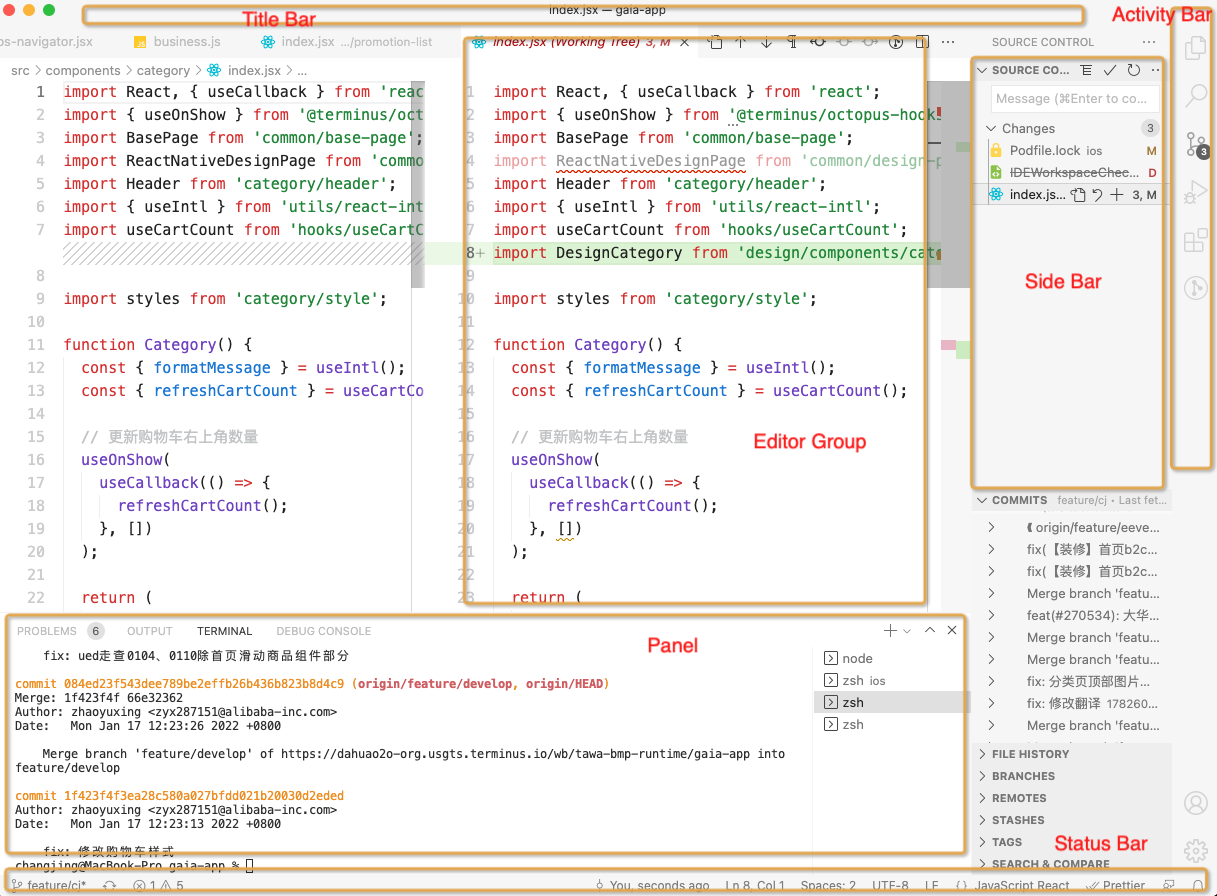
6. 调试
hello vscode
操作一下
确保电脑里安装有node、git。
// 下载脚手架yeoman、vscode插件项目生成器generator-codenpm install -g yo generator-code// 生成vscode插件项目yo code
vscode插件有多种可选种类,脚手架在生成插件项目文件时会要求你选择一种。这里就选New Extension (TypeScript)。
编译调试脚手架为你生成的代码,然后会新弹出一个Extension Development Host窗口,里面安装了刚刚生成的新插件。
在命令板 (⇧⌘P唤起)里输入Hello World命令执行它。
窗口右下方弹出了提示。
生成的插件项目结构:
.
├── .vscode
│ ├── launch.json // Config for launching and debugging the extension
│ └── tasks.json // Config for build task that compiles TypeScript
├── .gitignore // Ignore build output and node_modules
├── README.md // Readable description of your extension’s functionality
├── src
│ └── extension.ts // Extension source code 🌟
├── package.json // Extension manifest 🌟
├── tsconfig.json // TypeScript configuration
发生了什么?
这个简单的vscode插件主要做了3件事:
1.注册onCommand激活事件:onCommand:helloworld.helloWorld,所以当用户运行Hello World命令时,插件会被激活。
2.使用contributes.commands贡献点,使Hello World命令在命令选项板中可用,并将其绑定到命令ID helloworld.helloWorld。
3.使用commands.registerCommand VS Code API将一个函数绑定到已注册的命令,命令ID为 helloworld.helloWorld。
两个重要的文件、三个重要的相关点(实现、声明、激活)
extension.ts
插件入口文件,在它和它导入的文件中可以调用VS Code API,插件功能实现在这里。
入口文件需要导出两个函数,activate函数在注册的触发事件发生时执行,deactivate函数在插件被关闭(vscode被关闭、插件被disable或卸载)前执行。可以类比性地理解为react里的生命周期。如果不需要在deactivate时做什么,也可以不写deactivate函数。
import * as vscode from 'vscode';// this method is called when your extension is activated// your extension is activated the very first time the command is executedexport function activate(context: vscode.ExtensionContext) {// 🌟This line of code will only be executed once when your extension is activatedconsole.log('Congratulations, your extension "helloworld-sample" is now active!');// The command has been defined in the package.json file// Now provide the implementation of the command with registerCommand// The commandId parameter must match the command field in package.jsonlet disposable = vscode.commands.registerCommand('helloworld.helloWorld', () => {// 🌟The code you place here will be executed every time your command is executed// Display a message box to the uservscode.window.showInformationMessage('Hello World!');});context.subscriptions.push(disposable); // 🌟context是当前插件的状态信息}// this method is called when your extension is deactivatedexport function deactivate() {}
package.json
配置了插件的各类元信息。由node.js配置字段(比如scripts、devDependencies)和vscode特有的字段(比如publisher、activationEvents、contributes)组成。所有可配置的vscode特有字段
配置字段中activationEvents、contributes字段很重要。
activationEvents字段用来注册哪些事件会激活插件。contributes声明了你新添加的功能,所有功能必须在这里显式声明(所有可配置的贡献点类型字段)。
{"name": "helloworld-sample","displayName": "helloworld-sample","description": "HelloWorld example for VS Code","version": "0.0.1", // 插件依赖的最小VS Code API版本"publisher": "vscode-samples","repository": "https://github.com/microsoft/vscode-extension-samples/helloworld-sample","engines": {"vscode": "^1.51.0"},"categories": ["Other"],"activationEvents": ["onCommand:helloworld.helloWorld"], // 🌟激活插件的事件"main": "./out/extension.js", // 入口文件"contributes": { // 🌟贡献点"commands": [ // 🌟命令类型的贡献点{"command": "helloworld.helloWorld","title": "Hello World"}]},"scripts": {"vscode:prepublish": "npm run compile","compile": "tsc -p ./","watch": "tsc -watch -p ./"},"devDependencies": {"@types/node": "^8.10.25","@types/vscode": "^1.51.0","tslint": "^5.16.0","typescript": "^3.4.5"}}
宏观层面
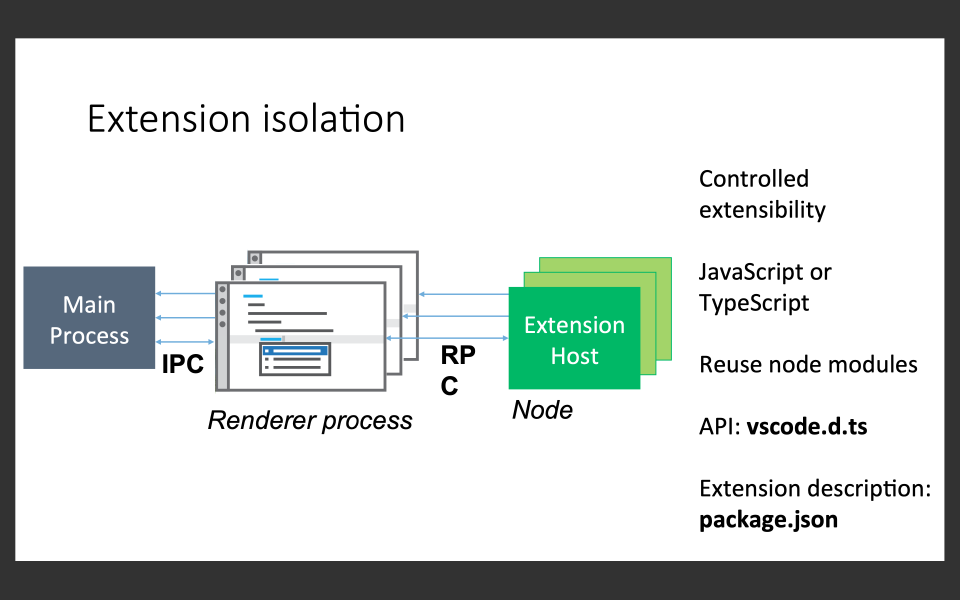
插件代码运行在独立的 Extension Host 宿主进程里,是node进程。
通过RPC和渲染进程通信,所以如果插件崩溃并不会影响到vs code其他功能。
如何更进一步
vscode官方插件文档非常全面,建议结合官方的各种api能力的示例项目,修修改改,理论实践相结合。
ps:一个还不错的开发文档翻译
能力范围
✅从ui界面到编程过程,几乎vscode的所有部分都可以通过插件api进行自定义或增强。
❌无法触及vscode界面的dom结构。
1. 通用能力(核心能力,几乎可用于所有类型的插件)
包括但不限于:
- 注册命令、配置、keybindings、context menu items
- 存储工作区和全局数据
- 弹出提示信息
- 使用Quick Pick收集用户输入
- 允许用户打开系统文件选择器选择文件和文件夹
- 使用 Progress API 提示长时间运行的操作
2. 主题(颜色主题、文件icon主题、工作台icon主题。主题插件基本仅需要配置)
3. 声明方式的语言特性 (基于文本的编辑支持,比如括号匹配、自动缩进、语法高亮。仅需配置,无需编程)
4. 编程方式的语言特性
例如:
- 悬浮提示
- 诊断拼写、编码规范之类的错误
- 注册一个新的代码格式化工具
- 上下文相关的自动补全(IntelliSense)
- 为语言提供折叠、面包屑、大纲支持
5. 工作台拓展(工作台包括:Title Bar、Activity Bar、Side Bar、Panel控制台、Editor Group、Status Bar)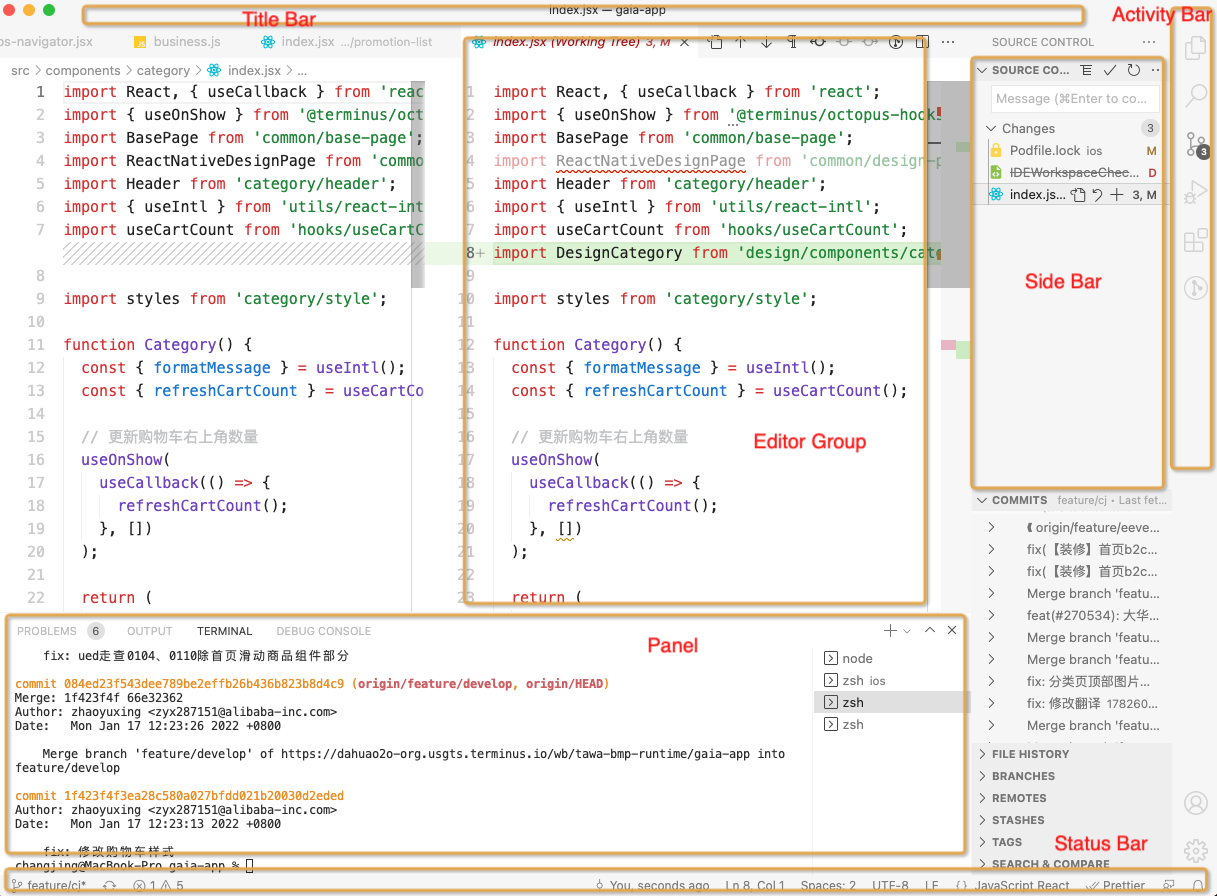
6. 调试
hello vscode
操作一下
确保电脑里安装有node、git。
// 下载脚手架yeoman、vscode插件项目生成器generator-codenpm install -g yo generator-code// 生成vscode插件项目yo code
vscode插件有多种可选种类,脚手架在生成插件项目文件时会要求你选择一种。这里就选New Extension (TypeScript)。
编译调试脚手架为你生成的代码,然后会新弹出一个Extension Development Host窗口,里面安装了刚刚生成的新插件。
在命令板 (⇧⌘P唤起)里输入Hello World命令执行它。
窗口右下方弹出了提示。
生成的插件项目结构:
.
├── .vscode
│ ├── launch.json // Config for launching and debugging the extension
│ └── tasks.json // Config for build task that compiles TypeScript
├── .gitignore // Ignore build output and node_modules
├── README.md // Readable description of your extension’s functionality
├── src
│ └── extension.ts // Extension source code 🌟
├── package.json // Extension manifest 🌟
├── tsconfig.json // TypeScript configuration
发生了什么?
这个简单的vscode插件主要做了3件事:
1.注册onCommand激活事件:onCommand:helloworld.helloWorld,所以当用户运行Hello World命令时,插件会被激活。
2.使用contributes.commands贡献点,使Hello World命令在命令选项板中可用,并将其绑定到命令ID helloworld.helloWorld。
3.使用commands.registerCommand VS Code API将一个函数绑定到已注册的命令,命令ID为 helloworld.helloWorld。
两个重要的文件、三个重要的相关点(实现、声明、激活)
extension.ts
插件入口文件,在它和它导入的文件中可以调用VS Code API,插件功能实现在这里。
入口文件需要导出两个函数,activate函数在注册的触发事件发生时执行,deactivate函数在插件被关闭(vscode被关闭、插件被disable或卸载)前执行。可以类比性地理解为react里的生命周期。如果不需要在deactivate时做什么,也可以不写deactivate函数。
import * as vscode from 'vscode';// this method is called when your extension is activated// your extension is activated the very first time the command is executedexport function activate(context: vscode.ExtensionContext) {// 🌟This line of code will only be executed once when your extension is activatedconsole.log('Congratulations, your extension "helloworld-sample" is now active!');// The command has been defined in the package.json file// Now provide the implementation of the command with registerCommand// The commandId parameter must match the command field in package.jsonlet disposable = vscode.commands.registerCommand('helloworld.helloWorld', () => {// 🌟The code you place here will be executed every time your command is executed// Display a message box to the uservscode.window.showInformationMessage('Hello World!');});context.subscriptions.push(disposable); // 🌟context是当前插件的状态信息}// this method is called when your extension is deactivatedexport function deactivate() {}
package.json
配置了插件的各类元信息。由node.js配置字段(比如scripts、devDependencies)和vscode特有的字段(比如publisher、activationEvents、contributes)组成。所有可配置的vscode特有字段
配置字段中activationEvents、contributes字段很重要。
activationEvents字段用来注册哪些事件会激活插件。contributes声明了你新添加的功能,所有功能必须在这里显式声明(所有可配置的贡献点类型字段)。
{"name": "helloworld-sample","displayName": "helloworld-sample","description": "HelloWorld example for VS Code","version": "0.0.1", // 插件依赖的最小VS Code API版本"publisher": "vscode-samples","repository": "https://github.com/microsoft/vscode-extension-samples/helloworld-sample","engines": {"vscode": "^1.51.0"},"categories": ["Other"],"activationEvents": ["onCommand:helloworld.helloWorld"], // 🌟激活插件的事件"main": "./out/extension.js", // 入口文件"contributes": { // 🌟贡献点"commands": [ // 🌟命令类型的贡献点{"command": "helloworld.helloWorld","title": "Hello World"}]},"scripts": {"vscode:prepublish": "npm run compile","compile": "tsc -p ./","watch": "tsc -watch -p ./"},"devDependencies": {"@types/node": "^8.10.25","@types/vscode": "^1.51.0","tslint": "^5.16.0","typescript": "^3.4.5"}}
宏观层面
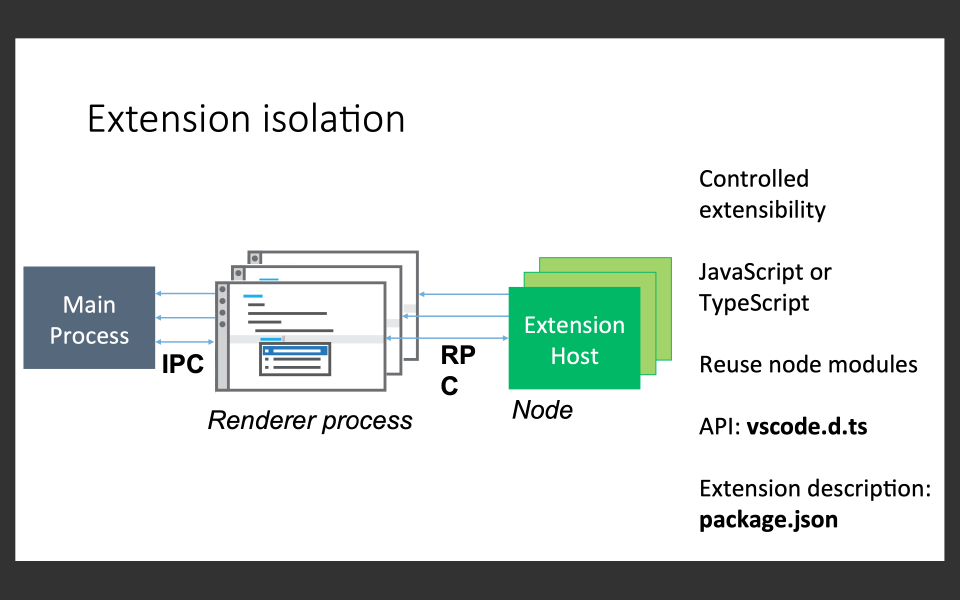
插件代码运行在独立的 Extension Host 宿主进程里,是node进程。
通过RPC和渲染进程通信,所以如果插件崩溃并不会影响到vs code其他功能。
如何更进一步
vscode官方插件文档非常全面,建议结合官方的各种api能力的示例项目,修修改改,理论实践相结合。
ps:一个还不错的开发文档翻译
(不错的资料:云凤蝶的。有助于vscode整体理解,其中也有讲到插件系统
一个复杂一点的插件)
实践
在vscode拓展商店搜索ots,可找到一款全名为OTS的插件。业务同学可以用来从标品的origin目录下拷文件到src目录。
实践
在vscode拓展商店搜索ots,可找到一款全名为OTS的插件。业务同学可以用来从标品的origin目录下拷文件到src目录。

若有收获,就点个赞吧
0 人点赞


