一uniapp自动更新流程逻辑
实现检测版本更新并下载新版本:通过后台返回更新版本的版本号和当前版本号做比较,不同则提示有新版本需要更新,下载地址又后台返回
uniapp自动更新设计思路1. 在服务端配置一个最新的应用版本号;
并将打包生成的 apk(安卓应用) 置于服务器,保证可成功访问的链接
2. 在前端 Uniapp 的最常用的访问页面 ;
设置当前应用的版本号;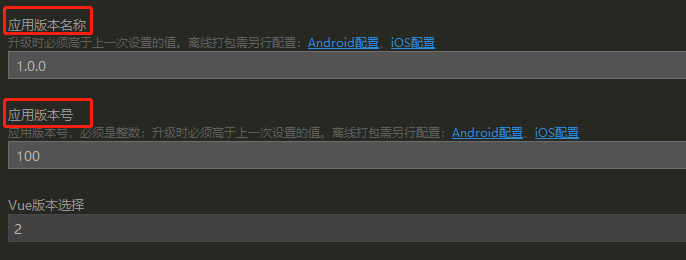
并进行代码编写,判断缓存时间和版本号的大小;
进而通过提示窗口,指导用户实现版本的更新下载等 …
1、客户端检查手机型号
let that = this;uni.getSystemInfo({success:(res) => {console.log(res.platform);//检测当前平台,如果是安卓则启动安卓更新if(res.platform=="android"){that.AndroidCheckUpdate();}}})
2、、检查版本更新差异
进入app登录页面检测系统版本是否是新版本,如果不是新版本,下载安装包,安装新版本。
AndroidCheckUpdate() {let that = this;plus.runtime.getProperty(plus.runtime.appid, (wgtinfo) => {that.version = wgtinfo.version //客户端版本号console.log('当前app版本信息:' + that.version);})that.getUpdateVersion()},getUpdateVersion() {let that = this;// 获取当前app版本信息that.$req.get("/appUpdate/queryUpdate", {}, {}).then(function (res) {console.log('res.data:' + JSON.stringify(res.data))console.log("现在的版本"+ that.version +"数据库版本"+ res.data.data.version +"进入查找app版本");if(res.data.data.version>that.version){// 这里下载apkurl从/appUpdate/queryUpdate接口请求返回数据中获取that.downloadUrl = BaseUrl + '/' + res.data.data.androidUrl// 是否强制更新(0 否;1 是)that.isForceUpdate = res.data.data.isForceUpdateuni.showModal({// 更新提醒title: '发现新版本,是否更新',content: '此版本号:'+ that.version + '\xa0\xa0\xa0' + '待更新版本号:' + res.data.data.version,success: res => {if (res.confirm) {that.downWgt();//下载文件// that.showdownLine = true;// plus.runtime.openURL(androidUrl)} else if (res.cancel) {console.log('that.isForceUpdate:' + that.isForceUpdate);// 不更新强制退出appif (that.isForceUpdate == 1) {console.log('that.isForceUpdate1:' + that.isForceUpdate);uni.showModal({// 更新提醒title: '发现新版本,是否更新',content: '此版本为强制更新版本如不升级将退出APP',success: res => {if (res.confirm) {console.log('不更新强制退出app');plus.runtime.quit();} else if (res.cancel) {that.AndroidCheckUpdate();}}});}}}});//dtask.start();}}).catch(error => {uni.showToast({title: '调用请求失败',mask: false,duration: 5000,icon:"none"});});complete: () => {}},
/appUpdate/queryUpdate此服务端接口仅仅请求数据库保存版本更新表返回,最新版本数据,请自行编写。接口返回数据
{"code":0,"data":{"androidUrl":"static/appupload/android_debug.apk","appUpdateId":"2","iosUrl":"static/appupload/android_debug.apk","isForceUpdate":"1","updateContent":"测试更新","version":"1.0.1","versionCode":"20220721"},"msg":"Ok","time":1658817101226}
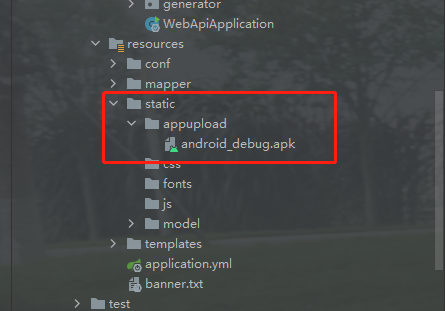
我的返回下载地址指向:127.0.0.1:8088/static/appupload/android_debug.apk,resources下static文件夹已在yml中配置暴露直接访问下载。
3、确认更新后下载安装包
downWgt() {let that=this;console.log('url:' + that.downloadUrl)uni.showLoading({title: '更新中……'})const downloadTask = uni.downloadFile({//执行下载url: that.downloadUrl, //下载地址timeout: 1000 * 30, //30秒超时时间success: downloadResult => {//下载成功that.showdownLine = falseuni.hideLoading();console.log('downloadResult.statusCode' + downloadResult.statusCode)if (downloadResult.statusCode == 200) {console.log('更新中')uni.showModal({title: '',content: '更新成功,确定现在重启吗?',confirmText: '重启',confirmColor: '#EE8F57',success: function(res) {if (res.confirm == true) {plus.runtime.install(//安装downloadResult.tempFilePath, {force: true},function(res) {utils.showToast('更新成功,重启中');plus.runtime.restart();});}}});}},fail: err => {uni.hideLoading();that.showdownLine = falsethat.$u.toast(err.errMsg)console.log(err)},complete: com => {console.log(com)}});// 下载进度downloadTask.onProgressUpdate(res => {// that.$u.toast(res.progress)that.downloadNum = res.progressconsole.log('下载进度' + that.downloadNum);// console.log('已经下载的数据长度' + res.totalBytesWritten);// console.log('预期需要下载的数据总长度' + res.totalBytesExpectedToWrite);// 满足测试条件,取消下载任务。// if (res.progress > 50) {// downloadTask.abort();// }});},

若有收获,就点个赞吧
0 人点赞


