第一课: 查询
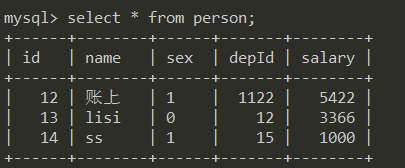
根据某个字段,升序,降序排列
sql中,默认是升序排列 asc
select * from person order by salary;
不写升降序字段 默认升序排列 asc
升序 asc;
降序 desc
根据salary 字段 降序排列
select * from person order by salary desc;

依据多字段排序
select * from person order by salary desc , name asc;

如果存在 salary 字段相同的情况,则启用 name 升序排列, 没有salary 相同,就单纯的依据salary值 降序 排列
名称 hehe 中的h 的ASCII 小于 lili的 l 的ASCII 所以升序时, 排列在前面
order by 后面接数字
select id, name, sex, depId, salary from person order by 5 desc;
select id, name, sex, depId, salary from person order by salary desc;
接数字,表示,以 第几个字段进行排序 和直接写字段名 是一个意思,但是写字段名,可读性高一些
数字依赖前面的字段写法顺序 如果前面的 select 字段1, 字段2, … from person 字段顺序有变化,排序的结果就不同,数字只会指向指定的顺序的那个字段,3 就指向第3个字段, 5就指向第5个字段
查询结果重命名
select id, name as '姓名', sex as '性别', salary '薪水' from person;
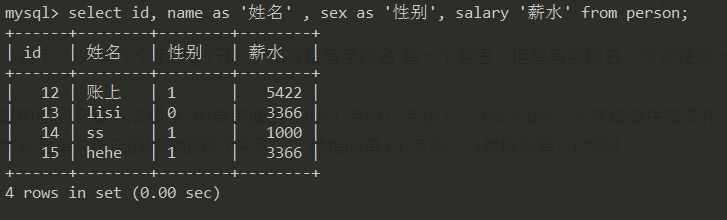
字段后面接 as 表示查询出来的结果 重新命名,select 的重命名 是不会影响我们数据库中的表结构的
字段 as 重命名的字段
字段 空格 重命名字段
上面2种写法都可以
sql查询中写表达式
查询员工一年的薪水, 每个月假设是固定薪水,那就是 固定薪水 * 12
select name, salary * 12 as '年薪', sex from person;
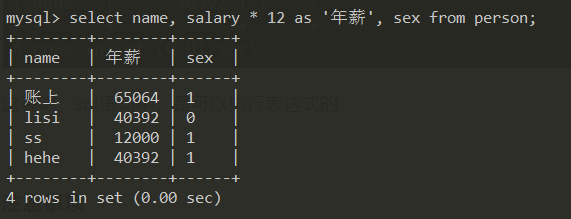
这说明,sql语句中,是可以执行表达式的, 还有, 重命名为中文,其实是没必要的,实际开发中,是不会使用中文字段
注意事项
在程序中,不要写 代替具体的字段, 因为 需要先编译成,name, sex, age这些字段, 速度慢
select name, age, sex from person;
- 通配符,在具体的代码中,可读性差
- mysql中 以 单引号来包裹内容,以分号结尾
- SQL中不区分大小写
第二课: 条件查询
大于
查询员工薪水大于 3000 的
select name, salary from person where salary > 3000;

select name, salary from person where salary > '3000';

上面的这个 salary 是 doule 数据类型,查询的时候,where查询条件,可以写 数字,可以是字符串,建议以 数字作为比较,避免它给我们做类型转义
小于等于
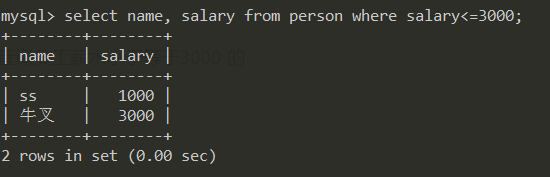
查询员工薪水小于等于3000 的
select name, salary from person where salary <= 3000;
不等于
不等于有2种表示方式
select name, salary from person where salary != 3000;

select name, salary from person where salary <> 3000;
区间
查询出工资 大于3000, 不包含3000, 小于等于 5000 的人
select name, salary from person where salary >3000 and salary <= 5000;


// between 查询出来的结果是闭区间,包含 3000, 包含 5000
select name, salary from person where salary between 3000 and 5000;

XXXX and XXXX 是否要开区间还是闭区间,自己决定
闭区间 [3000, 5000] 包含3000, 也包含5000
开区间 (3000, 5000) 3000-5000 之间,不包含 3000, 不包含 5000
XXX between XXXX and XXX 这种,就是闭区间, 包含首位的
// 还可以用在字面上面
select id, name from person where name between 'a' and 'k';

查询数据库中 空值 is null
数据库中,0是有值的, null 表示没有值
select name, depId from person where depId is null;

数据库中,查询空值 只能用 is null 不能用 = null
select name, depId from person where depId = null; // 这种是错误的, 查询不出结果
非空
查询部门名称不是空的数据
select * from person where depId is not null;
或者 or
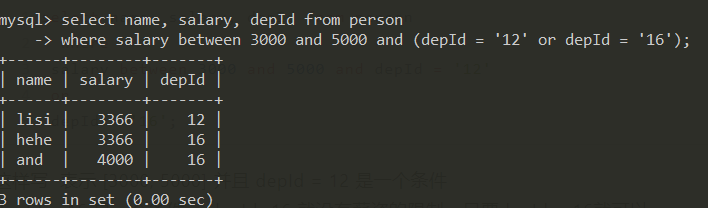
查询出 工资在 [3000, 5000] 这个区间的人,要求职位是 12或者 16
正确的SQL
select name, salary, depId from person
where salary between 3000 and 5000 and (depId = '12' or depId = '16');
错误的SQL
因为优先级问题,导出查询出的结果不对
select name, salary, depId from person
    where
 salary between 3000 and 5000 and depId = '12'
 or
 depId = '16';
这样写 表示 [3000, 5000] 并且 depId = 12 是一个条件
depId = 16 是一个条件, depId=16 就没有薪资的限制,只要depId = 16就可以
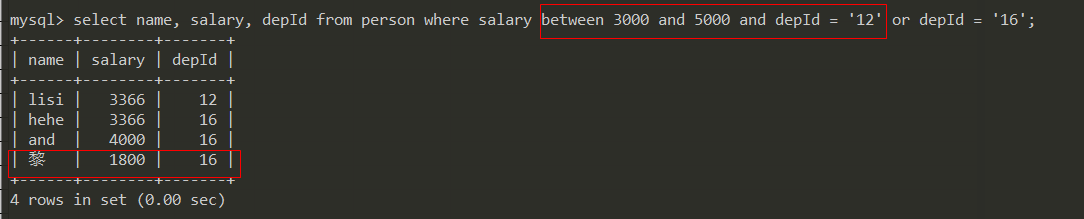
所以,如果你想要谁优先级高,就给谁加括号,上面第一个案例是正确的。
并且 and
in 集合
表示 我们查询的内容,是在 in这个 集合 里面的, 可以简单的理解, 查询的结果只要和in里面的值相等,就符合条件
数学概念里的集合,就是一个一个的元素,陈列出来,都是具体的
in表示具体的集合, between 是表示一个范围区间,区间不特指某个特定的元素。
查询部门编号是 16 和 12 的人
select name, depId from person where depId='12' or depId = '16';

select name, depId from person where depId in ('12', '16');
上面2种写法,表达的都是一个意思, depId 只要符合 12 或者 16 就都被查询出来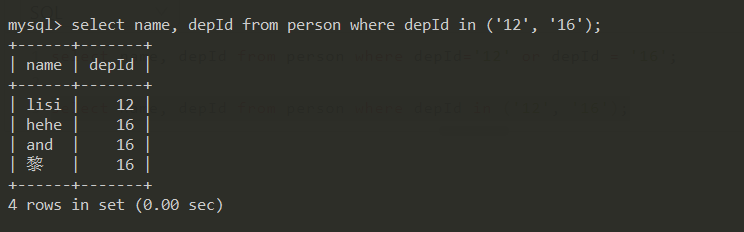
not in 不在某个集合中
select name, depId from person where depId not in ('12', '16');

like 模糊查询
查询姓名中含有 e的人
select name from person where name like '%e%';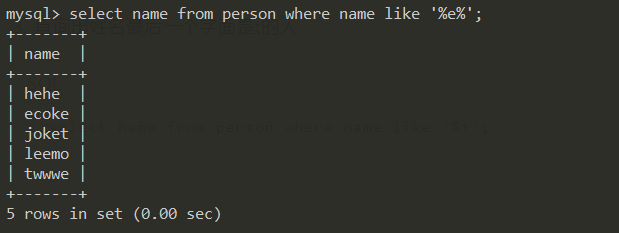
查询出姓名首字母是 l 的人
select name from person where name like 'l%';
查询出姓名最后一个字面是t的人
select name from person where name like '%t';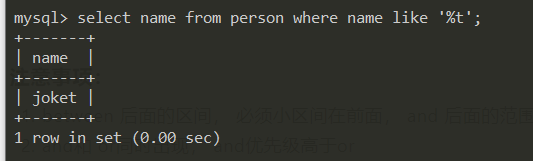
查询出姓名中第二个字面是 e 的人
select name from person where name like '_e%';
第3个字母是 o 的
select name from person where name like '__0%';
就写2个下滑线占位
- 姓名倒数第2位是 k
select name from person where name like '%k_';
所以, % 就是个占位符 表示 0-任意个字符
_ 下划线表示一个占位符
上面模糊查询,基本都涵盖日常用法,足够了
注意事项:
- between 后面的区间, 必须小区间在前面, and 后面的范围一定是大于and左边的区间 不能是 5000 and 3000
- and和 or同时出现, and优先级高于or
- between 是【左区间, 右区间】 只要在这个区间里面的 都查询出来, in 是 指定具体的值 只要符合这个集合,都查询出来
第三课 查询时间段所有数据
查询的条件和更新删除,是一样的,能根据时间段查询出来的,也能根据时间段删除
今天
select * from tags where to_days(create_time) = to_days(now())

SELECT * from tags where created_time BETWEEN '2020-09-19 00:00:00' AND '2020-09-19 23:59:59'

若有收获,就点个赞吧
0 人点赞


