1、项目架构
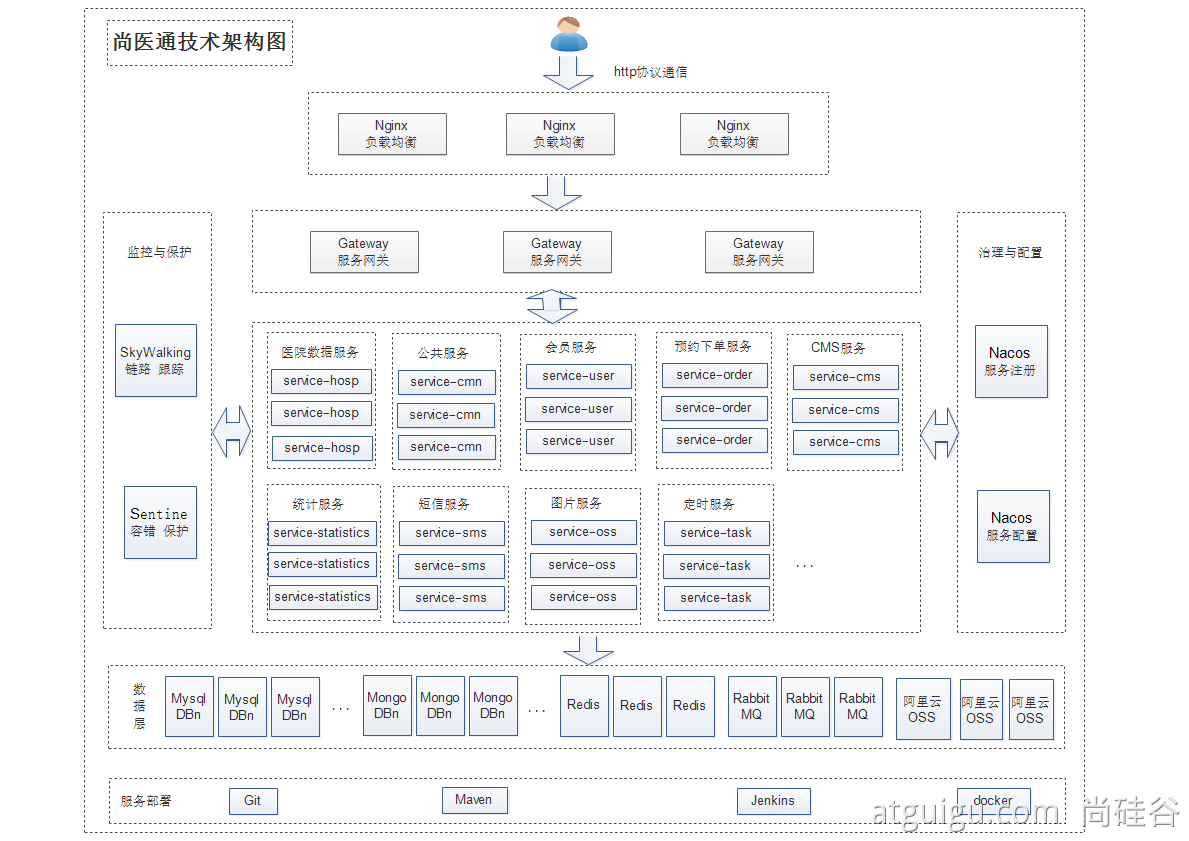
yygh-parent|---common //通用模块|---hospital-manage //医院后台 [9999]|---model //数据模型|---server-gateway //网关 [80]|---service //微服务层|-------service-cmn //公共服务 [8202]|-------service-hosp //医院数据服务 [8201]|-------service-order //预约下单服务 [8206]|-------service-oss //对象存储服务 [8205]|-------service-sms //短信服务 [8204]|-------service-statistics //统计服务 [8208]|-------service-task //定时服务 [8207]|-------service-user //会员服务 [8203]====================================================================yygh-admin //医院管理后台 [9528]yygh-site //挂号平台 [3000]
2、中间件
| 中间件 | 集群内地址 | 外部访问地址 |
|---|---|---|
| Nacos | his-nacos.his:8848 | http://139.198.165.238:30349/nacos |
| MySQL | his-mysql.his:3306 | 139.198.165.238:31840 |
| Redis | his-redis.his:6379 | 139.198.165.238:31968 |
| Sentinel | his-sentinel.his:8080 | http://139.198.165.238:31523/ |
| MongoDB | mongodb.his:27017 | 139.198.165.238:32693 |
| RabbitMQ | rabbitm-yp1tx4-rabbitmq.his:5672 | 139.198.165.238:30375 |
| ElasticSearch | his-es.his:9200 | 139.198.165.238:31300 |
3、流水线
1、项目地址
https://gitee.com/leifengyang/yygh-parent
https://gitee.com/leifengyang/yygh-admin
https://gitee.com/leifengyang/yygh-site
2、项目默认规则
- 每个微服务项目,在生产环境时,会自动获取
微服务名-prod.yml作为自己的核心配置文件 - 每个微服务项目,在生产环境时,默认都是使用
8080端口
3、生产与开发配置隔离
4、deploy.yaml
apiVersion: apps/v1kind: Deploymentmetadata:labels:app: service-cartname: service-cartnamespace: his #一定要写名称空间spec:progressDeadlineSeconds: 600replicas: 1selector:matchLabels:app: service-cartstrategy:rollingUpdate:maxSurge: 50%maxUnavailable: 50%type: RollingUpdatetemplate:metadata:labels:app: service-cartspec:imagePullSecrets:- name: aliyun-docker-hub #提前在项目下配置访问阿里云的账号密码containers:- image: $REGISTRY/$ALIYUNHUB_NAMESPACE/service-cartreadinessProbe:httpGet:path: /actuator/healthport: 8080timeoutSeconds: 10failureThreshold: 30periodSeconds: 5imagePullPolicy: Alwaysname: appports:- containerPort: 8080protocol: TCPresources:limits:cpu: 300mmemory: 600MiterminationMessagePath: /dev/termination-logterminationMessagePolicy: FilednsPolicy: ClusterFirstrestartPolicy: AlwaysterminationGracePeriodSeconds: 30---apiVersion: v1kind: Servicemetadata:labels:app: service-cartname: service-cartnamespace: hisspec:ports:- name: httpport: 8080protocol: TCPtargetPort: 8080selector:app: service-cartsessionAffinity: Nonetype: ClusterIP
4、devops实战
1、修改maven让他从阿里云下载镜像
- 使用admin登陆ks
- 进入集群管理
- 进入配置中心
- 找到配置
- ks-devops-agent
- 修改这个配置。加入maven阿里云镜像加速地址
2、缓存机制
已经下载过的jar包,下一次流水线的启动,不会重复下载
3、部署到k8s集群
- 给每一个微服务准备一个 deploy.yaml(k8s的部署配置文件)
执行以下步骤
传入 deploy.yaml 的位置就能部署
- kubectl apply -f xxxx
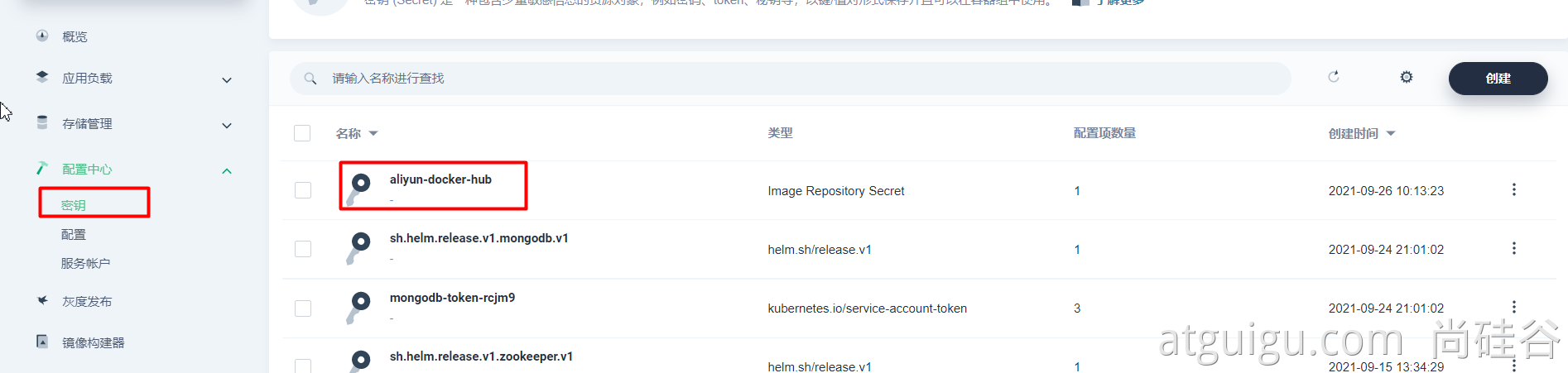
- 一定在项目里面(his,不是流水线项目),找到配置—密钥,配置一个阿里云的访问账号密码

4、前端项目
1、yygh-admin
npm run build会生成dist目录,放到nginx的html下,即可运行
2、yygh-site
npm install --registry=https://registry.npm.taobao.org安装项目依赖npm run build对项目打包,- 打包完成后把
.nuxt ,static, nuxt.config.js, package.json这四个关键文件复制到node环境。先npm install再使用npm run start即可运行
3、思考
- admin的镜像和site的镜像大小为何差距那么大?
- 如何对镜像进行瘦身?
5、webhook
- 1、每个项目,都有流水线文件
- 2、每次修改完项目,手动点击运行
- 3、希望,每次修改完项目,代码推送,流水线能自动运行
- 写代码并提交———> gitee ————-> 给指定的地方发请求(webhook)———> kubesphere平台感知到 ——-> 自动启动流水线继续运行
- http://139.198.165.238:30880/devops_webhook/git/?url=https://gitee.com/leifengyang/yygh-admin.git

若有收获,就点个赞吧
0 人点赞


