php.ini添加xdebug调试配置:
// 推荐配置:zend_extension="/usr/lib/php/extensions/no-debug-non-zts-20131226/xdebug.so"xdebug.remote_enable = Onxdebug.remote_handler = dbgpxdebug.remote_host= localhostxdebug.remote_port = 9002xdebug.idekey = PHPSTORM// 或使用如下配置:zend_extension="/Applications/MxSrvs/bin/php/lib/php/extensions/no-debug-non-zts-20190902/xdebug.so"xdebug.remote_enable=1xdebug.remote_autostart=1xdebug.remote_connect_back=1xdebug.var_display_max_depth = 512xdebug.profiler_append = 1xdebug.profiler_enable_trigger = 1xdebug.max_nesting_level = 200xdebug.profiler_output_dir = "/Applications/MxSrvs/logs/xdebug"xdebug.profiler_output_name = "cachegrind.out.%t.%p"xdebug.remote_host=127.0.0.1xdebug.remote_port=9001xdebug.remote_handler = dbgpxdebug.idekey = PHPSTORM// xdebug3配置zend_extension="/Applications/MxSrvs/bin/php/lib/php/extensions/no-debug-non-zts-20190902/xdebug.so"xdebug.mode = debugxdebug.start_with_request = yesxdebug.client_port = 9000xdebug.remote_host=127.0.0.1xdebug.remote_handler=dbgpxdebug.idekey=PHPSTORM
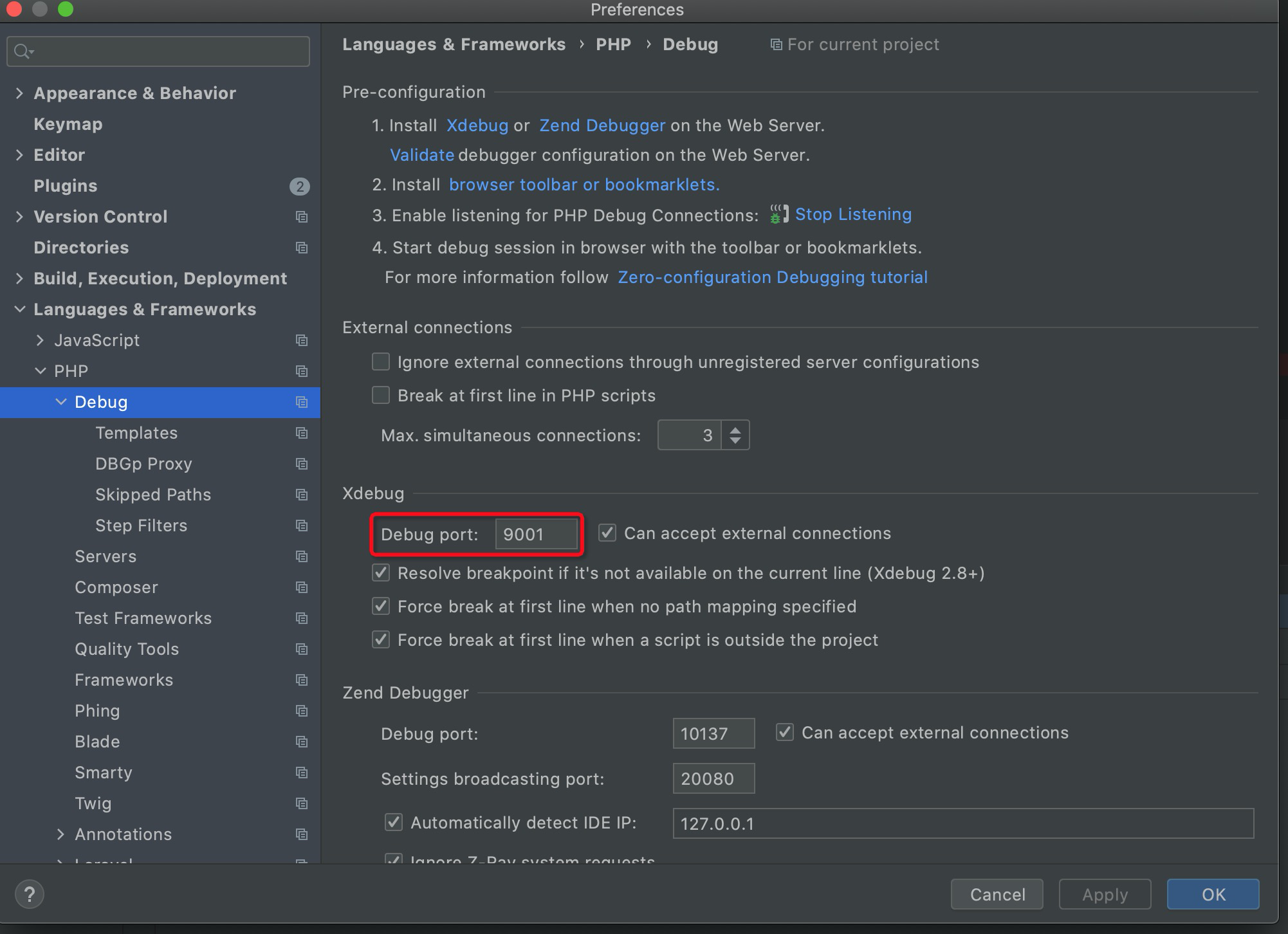


开启监听debug:
官方配置链接:https://www.jetbrains.com/help/phpstorm/configuring-xdebug.html#configure-xdebug-wsl
[xdebug]zend_extension=/usr/local/php/lib/php/extensions/no-debug-non-zts-20190902/xdebug.soxdebug.start_with_request = yes# 使用WSL的IP地址 使用 cat /etc/resolv.conf 命令获取WSL的IP地址xdebug.client_host = 172.31.16.1xdebug.client_port = 9003xdebug.connect_timeout_ms = 200xdebug.discover_client_host = truexdebug.log = /tmp/xdebug.logxdebug.mode = debugxdebug.start_upon_error = yesxdebug.idekey = "PHPSTORM"xdebug.remote_handler = "dbgp"
1、Yii2框架出现强制断点在index.php第一行:Run -> Break at frist line in PHP script 取消勾选
2、断点在控制器中无效:修改settings -> Servers 映射目录,如果是wsl安装的Ubuntu子系统,修改Absolute path on server的映射目录为 /mnt/d/Demo/PHP/backendApi

若有收获,就点个赞吧
0 人点赞


