在使用nginx的过程中,由于业务需要,往往需要在原nginx已安装的基础上追加其他模块,比如用于负载均衡的动态算法第三方模块 nginx-upstream-fair ,那么如何追加安装呢,如下:
查看原nginx的版本及编译参数
首先查看现服务器的nginx版本及配置编译的参数
nginx -Vnginx version: nginx/1.10.3built by gcc 5.4.0 20160609 (Ubuntu 5.4.0-6ubuntu1~16.04.4)built with OpenSSL 1.0.2g 1 Mar 2016TLS SNI support enabledconfigure arguments: --with-cc-opt='-g -O2 -fPIE -fstack-protector-strong -Wformat -Werror=format-security -Wdate-time -D_FORTIFY_SOURCE=2' --with-ld-opt='-Wl,-Bsymbolic-functions -fPIE -pie -Wl,-z,relro -Wl,-z,now' --prefix=/usr/share/nginx --conf-path=/etc/nginx/nginx.conf --http-log-path=/var/log/nginx/access.log --error-log-path=/var/log/nginx/error.log --lock-path=/var/lock/nginx.lock --pid-path=/run/nginx.pid --http-client-body-temp-path=/var/lib/nginx/body --http-fastcgi-temp-path=/var/lib/nginx/fastcgi --http-proxy-temp-path=/var/lib/nginx/proxy --http-scgi-temp-path=/var/lib/nginx/scgi --http-uwsgi-temp-path=/var/lib/nginx/uwsgi --with-debug --with-pcre-jit --with-ipv6 --with-http_ssl_module --with-http_stub_status_module --with-http_realip_module --with-http_auth_request_module --with-http_addition_module --with-http_dav_module --with-http_geoip_module --with-http_gunzip_module --with-http_gzip_static_module --with-http_image_filter_module --with-http_v2_module --with-http_sub_module --with-http_xslt_module --with-stream --with-stream_ssl_module --with-mail --with-mail_ssl_module --with-threads --add-module=/usr/local/nginx-upstream-fair
其中第 3 行与第 7 行,就是我们需要关注的,把这些信息copy到临时文件中,后面要用到。
下载及编译nginx
准备物料,去下载与之对应的nginx源码版本,比如上面的 nginx/1.10.3 ;同时下载你所要追加的模块,比如 nginx-upstream-fair .
分别将tar包copy到指定的目录并解压,进入nginx的源码解压目录
cd $nginx源码目录sudo ./configure $第一步得到的configure参数 --add-module=/$yourdir/nginx-upstream-fairsudo make
先./configure,然后再make, 切记不要 make install
make之后,正常情况下,会在当前目录下生成 objs 目录,在此目录下会生成 nginx 运行的bin 文件,如下:
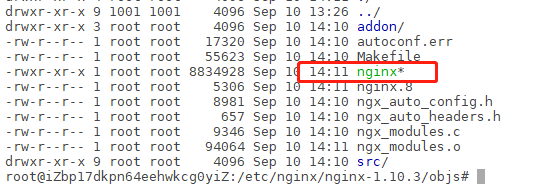
替换原nginx的运行bin文件
最后,找到现在nginx的运行的bin文件,备份后,用objs下的nginx替换原nginx文件
copy /usr/sbin/nginx /usr/sbin/nginx_backcopy $path/objs/nginx /usr/sbin/nginx
结束OK。

若有收获,就点个赞吧
0 人点赞


