Docker的基本组成
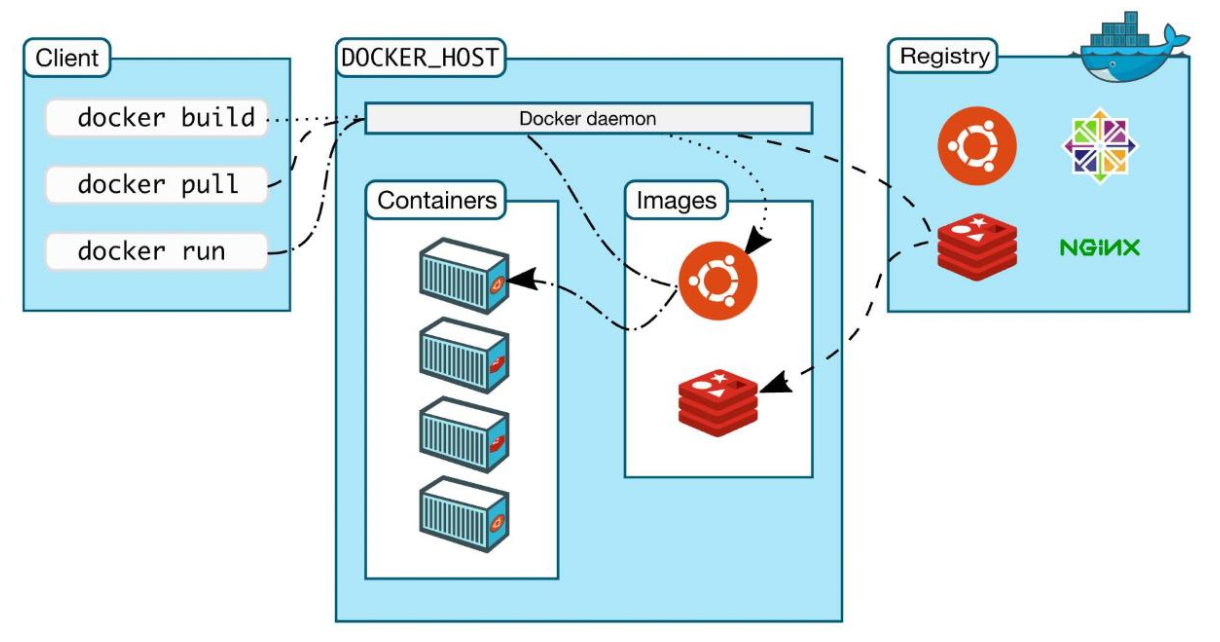
镜像 image
就像是一个模板,可以通过这个模板来创建容器服务,比如:tomcat镜像>>>run>>>tomcat01容器 ,通过镜像可以创建多个容器。最终的服务运行或者项目运行就是在容器中的。
容器 container
Docker利用容器技术,独立运行一个容器或者一个组应用,通过镜像来创建
基本命令:启动、停止、删除等
仓库 repository
仓库分为共有仓库和私有仓库
Docker hub(默认是国外的)
阿里云…都有容器服务器(可以配置镜像加速)
安装Docker
官方文档:https://docs.docker.com/engine/install/centos/
- 部署前提
Docker 要求 CentOS 系统的内核版本高于 3.10,通过下面命令查看当前的内核版本
较旧的 Docker 版本称为 docker 或 docker-engine 。如果已部署这些程序,请卸载它们以及相关的依赖项。
``` uname -r比如返回:
3.10.0-1127.el7.x86_64
查看
cat /etc/os-release
```sudo yum remove docker \docker-client \docker-client-latest \docker-common \docker-latest \docker-latest-logrotate \docker-logrotate \docker-engine
- 部署步骤
部署所需的软件包。yum-utils 提供了 yum-config-manager ,并且 device mapper 存储驱动程序需要 device-mapper-persistent-data 和 lvm2。
使用以下命令来设置稳定的仓库。
部署最新版本的 Docker Engine-Community 和 containerd
Docker 部署完默认未启动。使用下面命令启动docker:
```yum install -y yum-utils \device-mapper-persistent-data \lvm2
默认的镜像仓库,可能很慢
yum-config-manager \--add-repo \ https://download.docker.com/linux/centos/docker-ce.repo
使用国内的阿里云镜像
yum-config-manager \
—add-repo \
https://download.docker.com/linux/centos/docker-ce.repo
http://mirrors.aliyun.com/docker-ce/linux/centos/docker-ce.repo
```
yum install docker-ce docker-ce-cli containerd.io -y
#如果提示您接受 GPG 密钥,请选是。
systemctl start docker
- 测试
通过运行 hello-world 映像来验证是否正确部署了 Docker Engine-Communitydocker run hello-world
containerd.io、docker-ce-cli、docker-ce分别是干什么的。
- containerd.io - daemon to interface with the OS API (in this case, LXC - Linux Containers), essentially decouples Docker from the OS, also provides container services for non-Docker container managers
- docker-ce - Docker daemon, this is the part that does all the management work, requires the other two on Linux
- docker-ce-cli - CLI tools to control the daemon, you can install them on their own if you want to control a remote Docker daemon
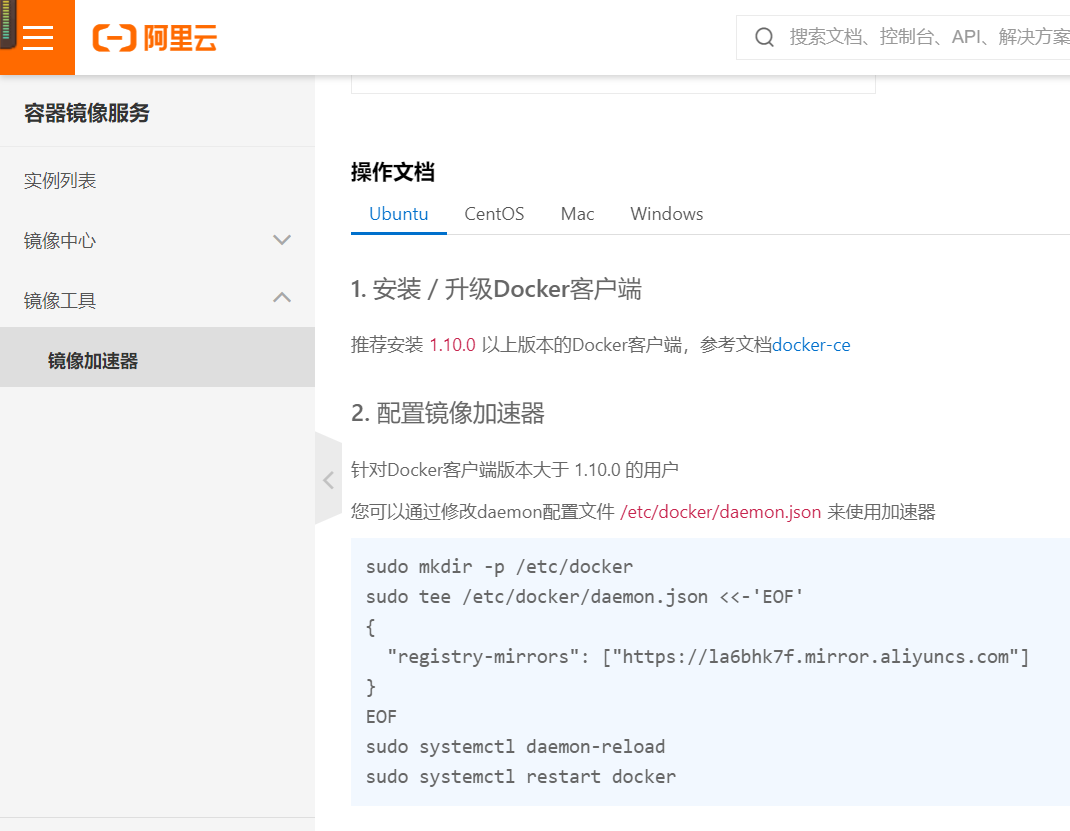
阿里云镜像加速
进入下面网址:
https://cr.console.aliyun.com/cn-hangzhou/mirrors
可以使用支付宝账号登录
进入镜像工具>镜像加速器
根据下面的指示,修改daemon.json即可

若有收获,就点个赞吧
0 人点赞


