使用 webpack 内置的 stats
stats:构建的统计信息。
"script": {"build:stats": "webpack --config webpack.prod.js --json > stats.json"// ...}
速度分析:speed-measure-webpack-plugin
可以看到每个 loader 和插件执行耗时。
速度分析插件作用
分析整个打包总耗时。
分析每个插件和 loader 的耗时情况。
配置
npm i speed-measure-webpack-plugin -D
const SpeedMeasureWebpackPlugin = require('speed-measure-webpack-plugin');

const smp = new SpeedMeasureWebpackPlugin();

module.exports = smp.wrap({
  // ...
  plugins: [
    new MiniCssExtractPlugin({
      filename: '[name]_[contenthash:8].css'
    }),
    new OptimizeCSSAssetsPlugin({
      assetNameRegExp: /\.css$/g,
      cssProcessor: require('cssnano')
    }),
    new CleanWebpackPlugin(),
    // new FriendlyErrorsWebpaclPlugin(),
    // function () {
    //   this.hooks.done.tap('done', (stats) => {
    //     if (
    //         stats.compilation.errors &&
    //         stats.compilation.errors.length &&
    //         process.argv.indexOf('--watch') == -1
    //       ) {
    //       console.log('build error');
    //       process.exit(1);
    //     }
    //   })
    // }
  ].concat(htmlWebpackPlugins)
})
打印信息如下。
  module count = 13
raw-loader, and
babel-loader, and
thread-loader, and
babel-loader took 0.922 secs
  module count = 1
css-loader, and
less-loader, and
postcss-loader, and
px2rem-loader took 0.734 secs
  module count = 2
raw-loader took 0.183 secs
  module count = 1
url-loader took 0.022 secs
  module count = 1
html-webpack-plugin took 0.017 secs
  module count = 2
modules with no loaders took 0.011 secs
  module count = 1
体积分析:使用 webpack-bundle-analyzer
构建完成后会在 8888 端口展示大小。
可以分析哪些问题
依赖的第三方模块大小。
业务里面的组件代码大小。
配置
npm i webpack-bundle-analyzer -D
const { BundleAnalyzerPlugin } = require('webpack-bundle-analyzer');

module.exports = {
  // ...
  plugins: [
    new MiniCssExtractPlugin({
      filename: '[name]_[contenthash:8].css'
    }),
    new OptimizeCSSAssetsPlugin({
      assetNameRegExp: /\.css$/g,
      cssProcessor: require('cssnano')
    }),
    new CleanWebpackPlugin(),
    new FriendlyErrorsWebpaclPlugin(),
    function () {
      this.hooks.done.tap('done', (stats) => {
        if (
            stats.compilation.errors &&
            stats.compilation.errors.length &&
            process.argv.indexOf('--watch') == -1
          ) {
          console.log('build error');
          process.exit(1);
        }
      })
    },
    new BundleAnalyzerPlugin()
  ].concat(htmlWebpackPlugins)
}
亲测好用。
使用高版本的 webpack 和 nodejs
webpack4 内部优化
- V8 带来的优化(for of 替代 forEach、Map 和 Set 替代 Object、includes 替代 indexOf)。
- 默认使用更快的 md4 hash 算法。
- webpacks AST 可以直接从 loader 传递给 AST,减少解析时间。
- 使用字符串方法替代正则表达式。
多进程多实例构建
可选方案
- thread-loader
- parallel-webpack
- HappyPack
HappyPack 解析资源
原理:每次 webpack 解析一个模块,HappyPack 会将它及它的依赖分配给 worker 线程中。
webpack4 原生提供 thread-loader 模块,HappyPack 已不再维护。
npm i happypack -D
thread-loader 解析资源
原理:每次 webpack 解析一个模块,thread-loader 会将它及它的依赖分配给 worker 线程中。
npm i thread-loader -D
const path = require('path');
const glob = require('glob');

module.exports = {
  // ...
  module: {
    rules: [
      {
        test: /\.js$/,
        use: [
          {
            loader: 'thread-loader',
            options: {
              workers: 3
            }
          },
          'babel-loader',
          // 'eslint-loader'
        ]
      }
  },
 // ...
}
经测试,靠谱。
多进程多实例并行压缩
使用 parallel-uglify-plugin 插件
使用 uglifyjs-webpack-plugin 开启 parallel 参数
使用 terser-webpack-plugin 开启 parallel 参数
webpack4 推荐使用 terser-webpack-plugin。
npm i terser-webpack-plugin -D
const TerserWebpackPlugin = require('terser-webpack-plugin');

module.exports = {
  // ...
  optimization: {
    // ...
    minimizer: [
      new TerserWebpackPlugin({
        parallel: true
      })
    ]
  }
}
分包:预编译资源模块
设置 Externals
思路:将 react、react-dom 基础包通过 cdn 引入,不打入 bundle 中。
方法:使用 html-webpack-externals-plugin。
使用预编译资源模块
思路:将 react、react-dom、redux、react-redux 基础包和业务基础包打包成一个文件。
方法:使用 DLLPlugin 进行分包,DllReferencePlugin 对 mainfest.json 引用。
webpack.dll.js
const path = require('path');
const webpack = require('webpack');

module.exports = {
  mode: 'production',
  entry: {
    library: [
      'react',
      'react-dom'
    ]
  },
  output: {
    filename: '[name]_[chunkhash].dll.js',
    path: path.join(__dirname, 'build/library'),
    library: '[name]'
  },
  plugins: [
    new webpack.DllPlugin({
      name: '[name]_[hash]',
      path: path.join(__dirname, 'build/library/[name].json')
    })
  ]
}
package.json
"scripts": {
  "dll": "webpack --config webpack.dll.js"
}
wbpack.prod.js
const webpack = require('webpack');

module.exports = {
  // ...
  // optimization: {
  //   splitChunks: {
  //     minSize: 0,
  //     cacheGroups: {
  //       vendors: {
  //         test: /(react|react-dom)/,
  //         name: 'vendors',
  //         chunks: 'all',
  //         priority: -10
  //       },
  //       commons: {
  //         name: 'commons',
  //         chunks: 'all',
  //         minChunks: 2,
  //         priority: -20
  //       }
  //     }
  //   }
  stats: 'errors-only',
  plugins: [
    // ...
    // new BundleAnalyzerPlugin()
    new webpack.DllReferencePlugin({
      manifest: require('./build/library/library.json')
    })
  ].concat(htmlWebpackPlugins)
}
利用缓存提升二次构建速度
缓存
目的:提升二次构建速度。
缓存思路:
- babel-loader 开启缓存
- terser-webpack-plugin 开启缓存
- 使用 cache-loader 或者 hard-source-webpack-plugin
babel-loader 缓存
'babel-loader?cacheDirectory=true'
terser-webpack-plugin
新版本无 cache 属性。
hard-source-webpack-plugin
npm i hard-source-webpack-plugin -D
webpack 5 无效。
缩小构建目标
目的:尽可能的少构建模块。
比如 babel-loader 不解析 node_modules。
减少文件搜索范围
优化 resolve.modules 配置(减少模块搜索层级)。
优化 resolve.mainFields 配置。
优化 resolve.extensions 配置。
合理使用 alias。
module.exports = {
  // resolve: {
  //   alias: {
  //     'react': path.resolve(__dirname, './node_modules/react/umd/react.production.min.js'),
  //     'react-dom': path.resolve(__dirname, './node_modules/react-dom/umd/react-dom.production.min.js')
  //   },
  //   extensions: ['.js'],
  //   mainFields: ['main']
  // },
  module: {
    rules: [
      {
        test: /\.js$/,
        include: path.resolve('src'),
        use: [
          {
            loader: 'thread-loader',
            options: {
              workers: 3
            }
          },
          'babel-loader',
          // 'babel-loader?cacheDirectory=true',
          // 'eslint-loader'
        ]
      }
    ]
  }
}
resolve 配置测试效果不好,include 效果还可以。
Tree Shaking 擦除无用的 JS 和 CSS
概念:1 个模块可能有多个方法,只要其中的某个方法使用到了,则整个文件都会被打到 bundle 里,tree shaking 就是只把用到的方法打入 bundle,没用到的方法则会在 uglify 阶段被擦除掉。
使用:webpack 默认支持,在 .babelrc 里设置 modules: false 即可。
.production mode 的情况下默认开启。
要求:必须是 ES6 的语法,CJS 的方式不支持。
无用的 CSS 如何删除掉?
PurifyCSS:遍历代码,识别已经用到的 CSS class。
uncss:HTML 需要通过 jsdom 加载,所有的样式通过 PostCSS 解析,通过 doucument.querySelector 来识别在 html 文件里面不存在的选择器。
如何使用 PurifyCSS
使用 purgecss-webpack-plugin 和 mini-css-extract-plugin 配合使用。
npm i purgecss-webpack-plugin -D
const PurgecssWebpackPlugin = require('purgecss-webpack-plugin');

const PATHS = {
  src: path.join(__dirname, 'src')
}

module.exports = {
  // ....
  plugins: [
    // ...
    new PurgecssWebpackPlugin({
      paths: glob.sync(`${PATHS.src}/**/*`,  { nodir: true })
    })
  ].concat(htmlWebpackPlugins)
}
图片压缩
要求:基于 Node 库的 imagemin 或者 tinypng API。
使用:配置 image-webpack-loader。
Imagemin 的优点分析
有很多定制选项 。
可以引入更多第三方优化插件,例如 pngquant 。
可以处理多种图片格式。
Imagemin 的压缩原理
pngquant: 是一款 PNG 压缩器,通过将图像转换为具有 alpha 通道(通常比24/32位PNG 文件小60-80%)的更高效的 8 位 PNG 格式,可显著减小文件大小。
pngcrush: 其主要目的是通过尝试不同的压缩级别和 PNG 过滤方法来降低 PNG IDAT 数据流的大小。
optipng: 其设计灵感来自于pngcrush。optipng 可将图像文件重新压缩为更小尺寸,而不会丢失任何信息。
tinypng: 也是将 24 位 png 文件转化为更小有索引的 8 位图片,同时所有非必要的 metadata 也会被剥离掉。
配置
npm i image-webpack-loader -D
module.exports = {
  module: {
    rules: [
      {
        test: /\.(png|jpg|gif|jpeg)$/,
        use: [
          {
            loader: 'url-loader',
            options: {
              name: '[name]_[hash:8].[ext]',
              limit: 10240
            },
          },
          {
            loader: 'image-webpack-loader',
            options: {
              mozjpeg: {
                progressive: true,
                quality: 65
              },
              // optipng.enabled: false will disable optipng
              optipng: {
                enabled: false,
              },
              pngquant: {
                quality: [0.65, 0.90],
                speed: 4
              },
              gifsicle: {
                interlaced: false,
              },
              // the webp option will enable WEBP
              webp: {
                quality: 75
              }
            }
          }
        ]
      }
    ]
  }
}
使用动态 Polyfill
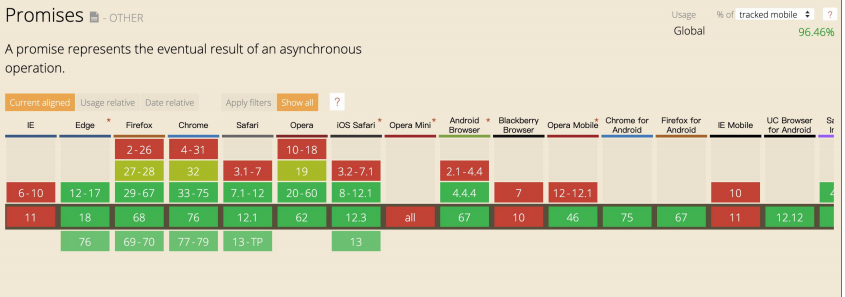
Promise 的浏览器支持情况
动态 Polyfill 方案
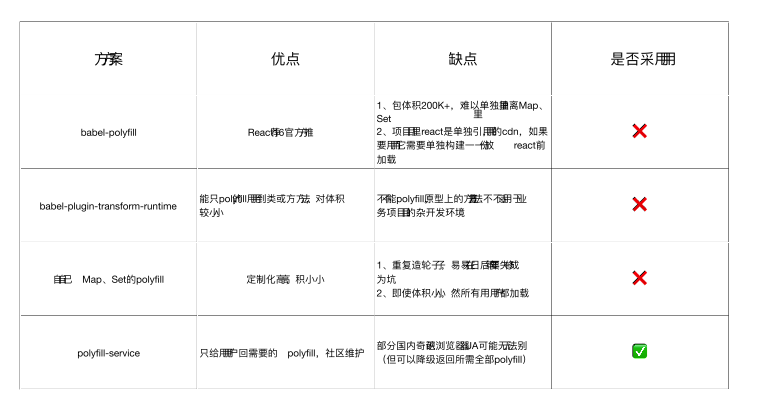
Polyfill Service 原理
识别 User Agent,下发不同的 Polyfill。
如何动态使用 Polyfill Service
polyfill.io 官方提供的服务 。
<script src="https://cdn.polyfill.io/v3/polyfill.min.js"></script>
基于官方自建 polyfill 服务 。
体积优化策略
Scope Hoisting 。
Tree-shaking 。
公共资源分离 。
图片压缩 。
动态 Polyfill。

若有收获,就点个赞吧
0 人点赞


