1.通过root账号登陆数据库
mysql -uroot -p
然后输入root账号密码
2.创建新用户,并授权该用户可以操作的数据库和表
grant all privileges on 数据库名.表名 to ‘用户名’@’主机名’ identified by ‘密码’ with grant option;
flush privileges;
数据库名:如果为,表示所有数据库
表名:如果为,表示所有表
.表示root权限,即满权限
主机名:localhost表示仅允许本地连接,%表示本地和远程均可连接
flush privileges;表示刷新权限,使授权生效
所以允许远程连接的时候可以使用:
grant all privileges on . to ‘root’@’%’ identified by ‘root账号密码’ with grant option;
比如我们新建test用户,授予该用户的权限是仅能操作test_database数据库,密码‘123’
grant all privileges on test_database.* to ‘test’@’%’ identified by ‘123’ with grant option;
3.如何修改用户密码
- root账号登陆
mysql -u root -p
- 使用mysql数据库
use mysql;
- 查看user表
select host,user,authentication_string from user;
结果如下: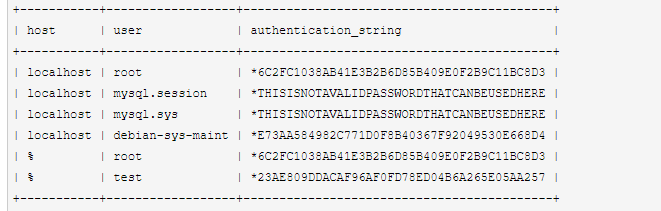
- 修改用户密码:
update user set authentication_string = password(‘新密码’) where user = ‘用户名’ and host = ‘主机名’;
password()为mysql自身的一个加密函数
以修改test用户密码为’456’为例
update user set authentication_string = password(‘456’) where user = ‘test’ and host = ‘%’;
4.如何撤销用户权限
revoke all on 数据库名.表名 from ‘用户名’@’主机名’;
5.如何删除用户
drop user ‘用户名’@’主机名‘;

若有收获,就点个赞吧
0 人点赞


