在开始使用 pytorch RNN 的时候,发现 hn 好像和样本的顺序反过来了,后面才发现是理解错了。在 pytorch 中,数据会被处理成 seq_len first 的形式。一般我们输入的数据是 batch_size first 的,但是当使用 pack_padded_sequence 函数进行处理之后数据会变成 seq_len first 的形式。
https://www.jianshu.com/p/b9ad6b26e690 这篇文章介绍了pytorch Bi-lstm 的用法,其中还涉及了变长序列的处理。
读PyTorch源码学习RNN(1)
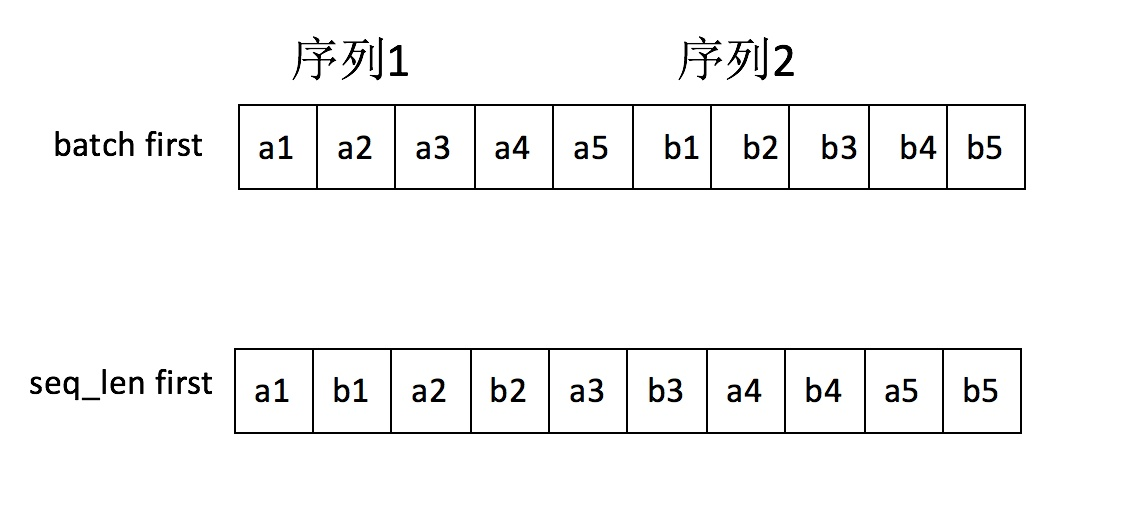
在使用 rnn.pack_padded_sequence 的时候,输入的sequence数据会被处理成上面的 seq_len first 的形式,尽管我使用的是:pack = nn_utils.rnn.pack_padded_sequence(tensor_in, seq_lengths, batch_first=True)
注意我已经设置了 batch_first=True
tensor_in.shape=torch.Size([4, 3, 1]),tensor([[[ 4.0000],[ 9.0000],[ 0.3000]],[[ 1.0000],[ 2.0000],[ 3.0000]],[[ 4.0000],[ 5.0000],[ 0.0000]],[[ 1.0000],[ 0.0000],[ 0.0000]]])PackedSequence(data=tensor([[ 4.0000], # 这里数据就已经被处理成了 seq_len first 的形式[ 1.0000],[ 4.0000],[ 1.0000],[ 9.0000],[ 2.0000],[ 5.0000],[ 0.3000],[ 3.0000]]), batch_sizes=tensor([ 4, 3, 2]))
先理解清楚 out 和 hn
output of shape (seq_len, batch, num_directions * hidden_size): tensor containing the output features (h_k) from the last layer of the RNN, for each k. If a torch.nn.utils.rnn.PackedSequence has been given as the input, the output will also be a packed sequence.
For the unpacked case, the directions can be separated usingoutput.view(seq_len, batch, num_directions, hidden_size), with forward and backward being direction 0 and 1 respectively. Similarly, the directions can be separated in the packed case.h_n (numlayers * num_directions, batch, hidden_size): tensor containing the hidden state for k = seq_len.
Like _output, the layers can be separated usingh_n.view(num_layers, num_directions, batch, hidden_size).
- output 输出的是最后一层每个时刻的状态hk,在双端 lstm 中的话,每个时刻的输出都已经拼接起来了。如果是要使用 attention 的话,直接对每个时刻计算权重就 OK 了。但是要注意的问题是,在变长序列中,如何处理 padding 部分的attention 权重是一个问题。
- hn 输出的是每一层最后一个时刻的状态hn ,在双端 lstm 中的话,假设一句话有T个词,那么前向的 LSTM 只输出第T个词的结果;反向的 LSTM 只输出第一个词的结果。
#forward
out, hn = rnn(pack, h0)
print(out)

# unpack
unpacked = nn_utils.rnn.pad_packed_sequence(out)
print('unpacked', unpacked)
print('hn', hn)
# out 的输出也是 packed 的数据形式,这和前面的输入是保持一致的,注意也是 seq_len first 的
PackedSequence(data=tensor([[-0.4661,  0.4387],
        [-0.2443, -0.0940],
        [-0.9454, -0.6422],
        [ 0.6211,  0.2153],     # 这是第4个样本的最后输出(t1)
        [-0.5690,  0.4126],
        [-0.1983,  0.4202],
        [-0.1798,  0.7067],     # 这是第3个样本的最后输出(t2)
        [ 0.1275,  0.3386],     # 这是第1个样本的最后输出(t3)
        [-0.5069,  0.3829]]),   # 这是第2个样本的最后输出(t3)
batch_sizes=tensor([ 4,  3,  2]))

# unpacked 之后恢复 batch_size first 的形式
unpacked (tensor([[[-0.4661,  0.4387],
         [-0.2443, -0.0940],
         [-0.9454, -0.6422],
         [ 0.6211,  0.2153]],   # 这是第4个样本的最后输出(t1)

        [[-0.5690,  0.4126],
         [-0.1983,  0.4202],
         [-0.1798,  0.7067],
         [ 0.0000,  0.0000]],

        [[ 0.1275,  0.3386],
         [-0.5069,  0.3829],
         [ 0.0000,  0.0000],
         [ 0.0000,  0.0000]]]), tensor([ 3,  3,  2,  1]))

# output 只是输出最后一层的结果,hn 会保留每一层的结果,我们只需要看 hn[-1] 就够了
hn tensor([[[ 0.3476, -0.4623],
         [ 0.9249,  0.5964],
         [ 0.9958,  0.8973],
         [-0.3178, -0.0316]],

        [[ 0.1275,  0.3386],
         [-0.5069,  0.3829],
         [-0.1798,  0.7067],
         [ 0.6211,  0.2153]]])

# 如果后面还需要加上全连接层之类的,我们直接拿 hn[-1] 作为最后的输出连接到下一层就OK了
Bi-LSTM
在双端RNN的时候,我们得到的结果是:
out 以 seq_len first 的结果如下:
# out_packed.shape=[sum_len, hidden_size*2]
# 在我们的输入中一个有4个样本,假设每个样本就是一个句子,长度分别是 [3,3,2,1]
# 也就是一共有9个输入的词。在 out_packed 中,一共也输出了 9 个状态,每个状态的长度为4,因为
# 我们使用的是双端 RNN,而每个时刻对应的正向和反向的结果都已经拼接在一起了。

tensor([[-0.0293, -0.1233, -0.0136, -0.3935],
        [-0.0365, -0.1439, -0.0247, -0.3932],
        [-0.0301, -0.1232, -0.0209, -0.3554],
        [-0.0474, -0.1433, -0.0188, -0.2466],    # 样本4
        [-0.0767, -0.1341, -0.0003, -0.3305],
        [-0.0633, -0.1464, -0.0253, -0.3561],
        [-0.0676, -0.1337, -0.0142, -0.2483],    # 样本3
        [-0.1135, -0.1351, -0.0108, -0.2428],    # 样本1
        [-0.0862, -0.1375, -0.0204, -0.2518]]    # 样本2


# hn 的结果为:
# hn.shape=[layer_num*2, 样本数, 状态数]
# 因为是双端的模型,这里一共是两层的网络,所以 hn.shape=[4,4,2]
# 其中 hn[0] 表示第一层的前向结果,hn[1] 表是第一层的反向结果,
# hn[2]表示第二层的正向结果,hn[3] 表示第二层的反向结果。
# 前向是从头到尾,所以输出的是每个句子最后一个词对应的输出状态
# 反向是从尾到头,所以输出的是每个句子第一个词对应的输出状态

tensor([[[-0.3944,  0.2423],
         [-0.4248,  0.2357],
         [-0.4357,  0.1679],
         [-0.1902,  0.1486]],

        [[-0.0129,  0.1617],
         [-0.0595,  0.0761],
         [-0.0176,  0.1515],
         [-0.0325,  0.0074]],

        [[-0.1135, -0.1351],
         [-0.0862, -0.1375],
         [-0.0676, -0.1337],
         [-0.0474, -0.1433]],

        [[-0.0136, -0.3935],
         [-0.0247, -0.3932],
         [-0.0209, -0.3554],
         [-0.0188, -0.2466]]])
# 前向最后的输出
fw_hn = torch.index_select(hn, 0, torch.LongTensor([len(hn) - 2])).view(batch_size, hidden_size)
# 反向最后的输出
bw_hn = torch.index_select(hn, 0, torch.LongTensor([len(hn) - 1])).view(batch_size, hidden_size)
print(fw_hn.shape)
print(bw_hn.shape)

# 把前向和后向的输出进行拼接
out = torch.cat([fw_hn, bw_hn], dim=1)
print(out.shape)
print(out)
torch.Size([4, 2])
torch.Size([4, 2])
torch.Size([4, 4])
tensor([[-0.5850, 0.4431, 0.6429, 0.3124],
[-0.6502, 0.2883, 0.5098, 0.2970],
[-0.4771, 0.3458, 0.5463, 0.1916],
[-0.3049, 0.2144, 0.3248, 0.1713]])
关于 RNN 的dropout
在 pytorch 中:
dropout option adds dropout after all but last recurrent layer
也就是说RNN的最后一层是不加dropout的。、

若有收获,就点个赞吧
0 人点赞


