- 名词解释
- P0 课前必备知识
- 0.1 TypeScript装饰器(decorator)
- 0.2 调整摄像机
- 0.3 关于项目资源中的三个文件夹的说明
- 0.3 节点(node),组件(component)和函数(function)命名规则
- 0.x FAQ
- https://github.com/cocos/cocos-tutorial-airplane.git/‘: Failed to connect to 127.0.0.1 port 1081 after 2085 ms: Connection refused">fatal: unable to access ‘https://github.com/cocos/cocos-tutorial-airplane.git/‘: Failed to connect to 127.0.0.1 port 1081 after 2085 ms: Connection refused
- P8 滚动背景(两背景板轮流滚动)——MovingSceneBg.ts
- P12 敌机出现逻辑(上)——EnemyPlane.ts,Constant.ts和GameManager.ts
- P13 敌机出现逻辑(下)——Bullet.ts+EnemyPlane.ts+GameManager.ts
- P14 物理碰撞(Physical Collision)——碰撞组件+刚体组件
- P15 飞机与子弹相撞——SelfPlane.ts+EnemyPlane.ts+Bullet.ts
- P16 道具(上)——BulletProp.ts+GameManager.ts
- P17 道具(下)——Bullet.ts + GameManager.ts
- P18 2D与UI(上)
P19 2D与UI(下)- P20 动画编辑器
- P21 面板(UI绘制)
- P22 面板(逻辑)——UIMain.ts+GameManager.ts
- P24 节点池——PoolManager.ts
- P25 粒子和血条
显然,这个视频并非胎教级和零基础,所以,我做了笔记,来补充所需基础知识的不足。
本教程使用的Cocos Creator版本:3.3.2
名词解释
预制(prefab):就是一个具体模型的一个模板,这个模型可能包括不同的材质等,prefab是为了自己的模型复用。注意,千万不可删除prefab对应的资源文件,否则prefab显示会异常,丢失哦!
P0 课前必备知识
0.1 TypeScript装饰器(decorator)
https://blog.csdn.net/qq_42033567/article/details/111931519
P0-P7非常基础,可以看我的这个文档,入个门:
【腾讯文档】TypeScript教程
https://docs.qq.com/doc/DRVZ3ckFXU1NzdWZO
晏几台的Cocos Creator 3.0教程(基础使用)
0.2 调整摄像机
修改摄像机为正交(ortho)投影,原状态为透视投影(perspective)。
0.3 关于项目资源中的三个文件夹的说明
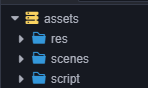 分别存储着游戏资源,场景和脚本。
0.3 节点(node),组件(component)和函数(function)命名规则
外部类的类成员变量/方法:gameManager(驼峰命名:第一个单词首字母小写,后面的单词首字母大写)
本类内部的类成员变量/方法:_currShootTime(下划线+驼峰命名)
constant 常量:PLAN1、BULLET_M(全部大写,单词之间用下划线连接)
类名:GameManager(单词首字母都大写)
0.x FAQ
fatal: unable to access ‘https://github.com/cocos/cocos-tutorial-airplane.git/‘: Failed to connect to 127.0.0.1 port 1081 after 2085 ms: Connection refused
尝试了别的文章里去掉git configuration里的proxy配置
git config —global http.proxy
git config —global —unset http.proxy
其他攻略里很多人到这步就成功了,但是我这边还是报错,用vim看了一下git的config file里面已经空了(在清除了git config之后)
于是我直接用如下代码把整个git config文件删掉了(反正已经空了)
rm ~/.gitconfig
成功
————————————————
版权声明:本文为CSDN博主「Emily_JYN」的原创文章,遵循CC 4.0 BY-SA版权协议,转载请附上原文出处链接及本声明。
原文链接:https://blog.csdn.net/Emily_JYN/article/details/117679831
P8 滚动背景(两背景板轮流滚动)——MovingSceneBg.ts
总体来讲:背景板轮流滚动,头尾连接。
我们要清楚,使用ts脚本来控制来控制bg01和bg02共同所在的节点组MovingBackground的,所以,我们的ts脚本肯定要挂载到MovingBackground这个节点组上的,这个思路很重要!如图: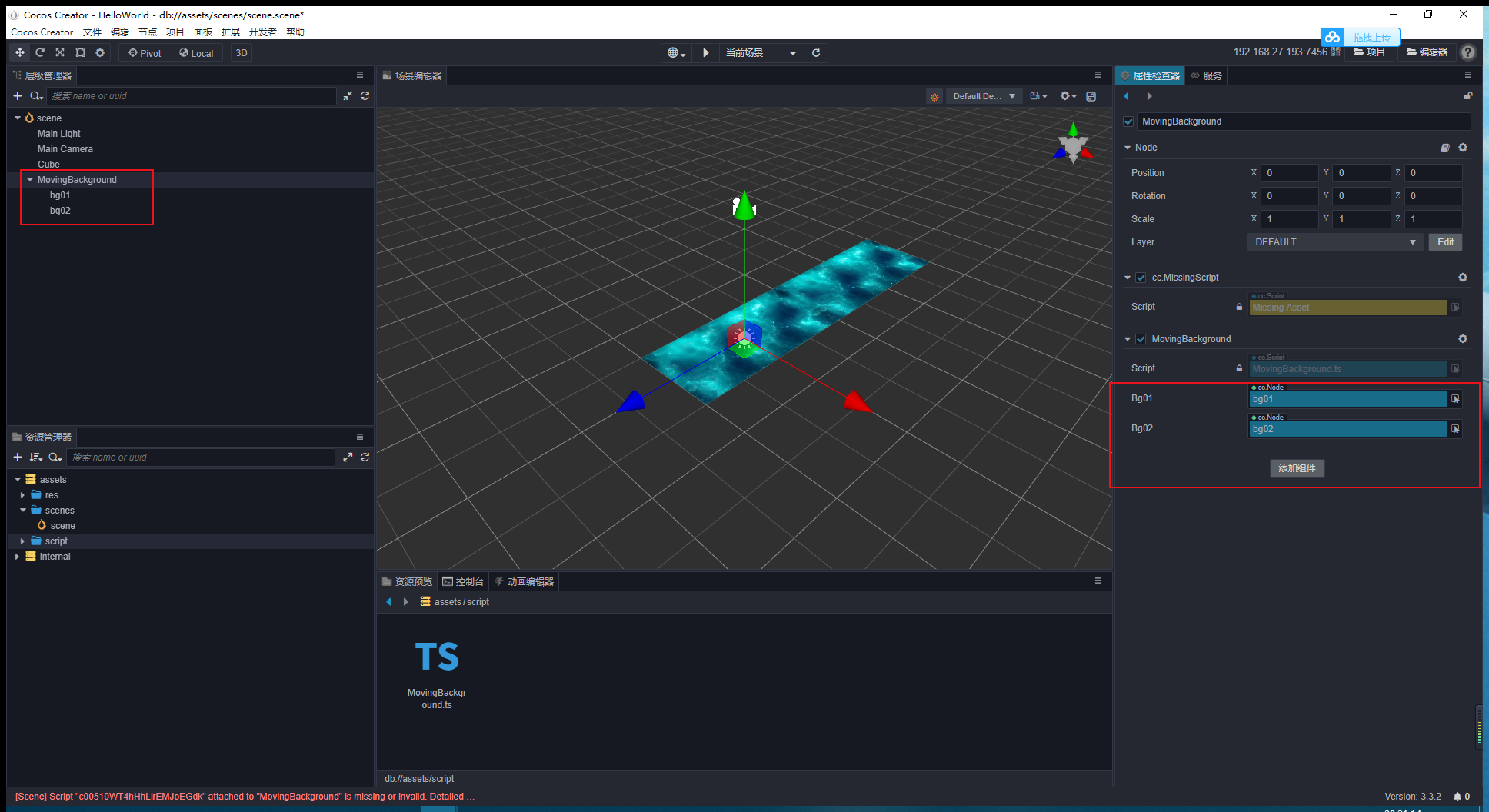
- 在属性装饰器下,定义两个node属性:用于操作bg01和bg02(bg是background的意思)
- 加入速度
_bgSpeed和移动范围_bgMovingRange的两个私有属性(其中,_bgMovingRange应为背景板的长度即两个平面几何中心的距离!) - 重写从父类继承的start和update方法
- strart方法中初始化位置
- update方法中控制两个背景板位置的变化 ```typescript
import { _decorator, Component, Node } from ‘cc’; const { ccclass, property } = _decorator;
@ccclass(‘MovingSceneBg’) export class MovingSceneBg extends Component { @property(Node) bg01: Node = null;
@property(Node)bg02: Node = null;private _bgSpeed = 10;private _bgMovingRange = 90;start () {this._init();}
// 此函数每一帧都会被调用 update (deltaTime: number) { this._moveBackground(deltaTime) }
private _init(){
    this.bg01.setPosition(0, 0, 0);
    this.bg02.setPosition(0, 0, -this._bgMovingRange);
}

private _moveBackground(deltaTime: number){
    this.bg01.setPosition(0, 0, this.bg01.position.z + this._bgSpeed * deltaTime);
    this.bg02.setPosition(0, 0, this.bg02.position.z + this._bgSpeed * deltaTime);

    if (this.bg01.position.z > this._bgMovingRange) {
        this.bg01.setPosition(0, 0, this.bg02.position.z - this._bgMovingRange);
    } else if (this.bg02.position.z > this._bgMovingRange) {
        this.bg02.setPosition(0, 0, this.bg01.position.z - this._bgMovingRange);
    }
}
}
<a name="pPebb"></a>
# P9 代码调试

<a name="XFiW4"></a>
# P10 事件系统
具体可参考这篇文档的[晏几台的Cocos Creator 3.0教程(场景工作流)](https://www.yuque.com/yanjitai/ilfto8/xqrhrc?view=doc_embed)事件系统部分!
<a name="TZ2jg"></a>
## 10.1 全局系统事件(输入事件系统)
全局输入事件是指与节点树不相关的各种输入事件,由 `input`来统一派发,目前支持了以下几种事件:

- 鼠标事件
- 触摸事件
- 键盘事件
- 设备重力传感事件


<a name="it9yu"></a>
## 10.2 节点系统事件

<a name="k9EUq"></a>
# P11 飞机移动和子弹发射
<a name="MB71V"></a>
## 11.1 飞机移动——UIMain.ts(Canvas节点上)
通过触摸事件获取触摸位置和飞机位置,并改变飞机的位置,随着触摸点移动。
> 这一部分,放空小姐姐讲的有一点点乱

**步骤**:

1. 新建Canvas节点,将`UIMain`脚本挂载到canvas节点上
1. 在`start`函数中监听全局的触摸事件
1. 在消息回调函数`_touchMove`中编写控制飞机位置的代码
> PS:如果缺包,记得要及时import哦

> PS:操作屏幕触点的时候是单位,而我们移动模型位置的时候操作的是像素。

<a name="dI3Eq"></a>
### 易错点 1:在电脑上是正常移动的,但到手机端调试就很不跟手!
<a name="ewuYz"></a>
### 代码
```typescript

import { _decorator, Component, Node, SystemEvent, systemEvent,EventTouch,Touch } from 'cc';
import { GameManager } from '../framework/GameManager';
const { ccclass, property } = _decorator;

@ccclass('UIMain')
export class UIMain extends Component {
    @property
    public planeSpeed = 1;

    @property(Node)
    public playerPlane: Node = null;

    @property(GameManager)
    public gameManager: GameManager = null;

    start () {
        // 初始化时,开启
        systemEvent.on(SystemEvent.EventType.TOUCH_START, this._touchStart, this);
        systemEvent.on(SystemEvent.EventType.TOUCH_MOVE, this._touchMove, this);
        systemEvent.on(SystemEvent.EventType.TOUCH_END, this._touchEnd, this);
    }
    _touchMove(touch: Touch, event: EventTouch){

        const delta = touch.getDelta();
        let pos = this.playerPlane.position;
        this.playerPlane.setPosition(pos.x + 0.01 * this.planeSpeed * delta.x, pos.y, pos.z - 0.01 * this.planeSpeed * delta.y);
    }
    // update (deltaTime: number) {
    //     // [4]
    // }

    _touchStart(touch: Touch,event: EventTouch){
        this.gameManager.isShooting(true);
    }

    _touchEnd(touch: Touch,event: EventTouch){
        this.gameManager.isShooting(false);
    }
}
11.2 常用的游戏开发框架
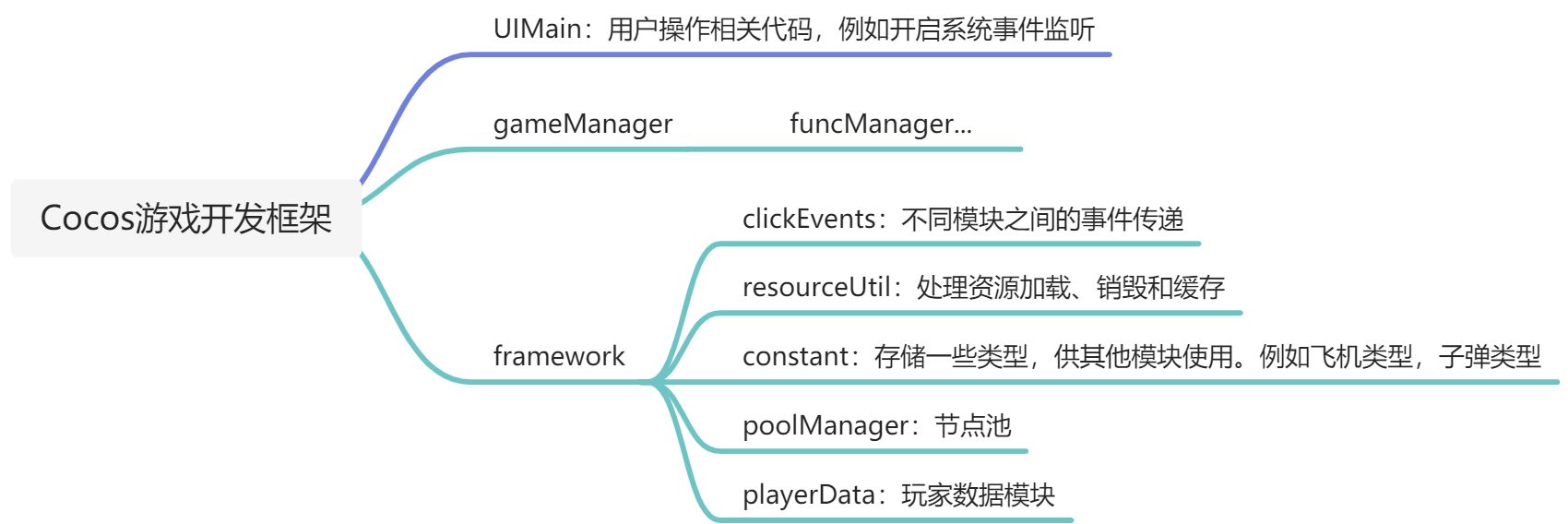
11.3 子弹发射——GameManager.ts+Bullet.ts
总体思路:GameManager控制每颗子弹发射的间隔,相关的变量为shootTime,Bullet控制每颗子弹发射的动画,即速度,相关的变量为_bulletSpeed
- Bullet.ts(assets\script\bullet\Bullet.ts) :
- 操作子弹的运行逻辑(子弹速度,敌我子弹)
- 销毁:移动超出屏幕销毁,可知子弹的位置是由负数变正数,达到移动距离(movaLength)后销毁。
- GameManager.ts(assets\script\framework\GameManager.ts):操作子弹、飞机动画,触摸等状态管理,
步骤:
- 封装子弹的Prefab预制(创建Quad四方形并加上mtl材质)——assets\res\effect\bullet
- 材质:Effect(builtin-unit)、Technique(3-alpha-blend)
- 注意:记得加入Bullet.ts 脚本到子弹预制上面哦!(点击放大观看)
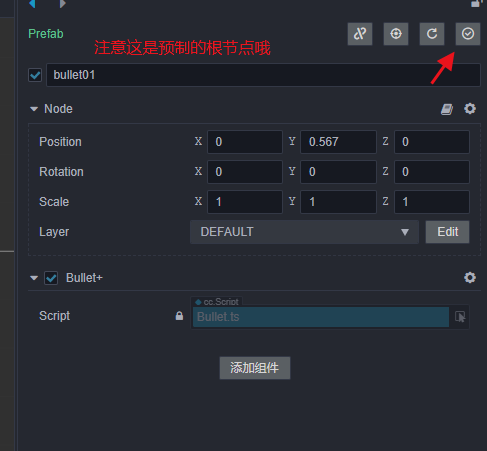
- 在Bullet.ts中 :
- 子弹动画(子弹速度,敌我子弹)
update():销毁:移动超出屏幕销毁,可知子弹的位置是由负数变正数,达到移动距离(movaLength)后销毁。show():速度赋值
- gameManager.ts中控制每隔一段时间,发射一颗子弹(在触摸的情况下)
start():开启触摸开始和结束的事件监听,并且在事件回调函数中给gameManager中的isShooting函数赋值,从而更新触摸状态。update():每隔一段时间(shootTime),根据Prefab创建一个子弹的实例。在触摸并且当前触摸时间_currShootTime大于发射时间周期shootTime的时候,才会创建子弹的实例并清零_currShootTime。- 新建子弹管理节点bulletManager和游戏管理节点gameManager到场景中。
createPlayerBullet():创建一个子弹的实例(Prefab放到场景),设置子弹实例的父节点为bulletRoot节点,即为传入的bulletManager节点,设置子弹位置并设置子弹的速度。
易错点 1:getComponent获取不到组件的实例
做完子弹预制Prefab,添加 Bullet.ts 到预制Prefab根节点
易错点 2:子弹节点的数据是有变化,但看不到子弹。
bulletManager即为gameManager中的bulletRoot,要放到合适的位置,就是子弹发射的位置
代码
import { _decorator, Component, Node } from 'cc';
const { ccclass, property } = _decorator;

/**
 * Predefined variables
 * Name = Bullet
 * DateTime = Sun Apr 03 2022 10:25:08 GMT+0800 (中国标准时间)
 * Author = RobertCarlson
 * FileBasename = Bullet.ts
 * FileBasenameNoExtension = Bullet
 * URL = db://assets/script/bullet/Bullet.ts
 * ManualUrl = https://docs.cocos.com/creator/3.3/manual/zh/
 *
 */
 const OUTOFRANGE = -10
@ccclass('Bullet')
export class Bullet extends Component {
    private _bulletSpeed = 0; // 子弹速度
    start () {
        // [3]
    }

    update (deltaTime: number) {
        const pos = this.node.position; // 获取此时子弹的位置
        let moveLength = 0; // 子弹移动距离,也就是之前单个场景面板的长度,即为20!
        moveLength = pos.z - this._bulletSpeed;
        this.node.setPosition(pos.x,pos.y,moveLength);
        if(moveLength < OUTOFRANGE )
        {
            this.node.destroy();
        }

    }
    show(speed: number){
        this._bulletSpeed = speed;
    }
}
import { _decorator, Component, Node, Prefab, instantiate } from 'cc';
import { Bullet } from '../bullet/Bullet';
import { SelfPlane } from '../plane/SelfPlane';
const { ccclass, property } = _decorator;

/**
 * Predefined variables
 * Name = GameManager
 * DateTime = Sun Apr 03 2022 10:20:52 GMT+0800 (中国标准时间)
 * Author = RobertCarlson
 * FileBasename = GameManager.ts
 * FileBasenameNoExtension = GameManager
 * URL = db://assets/script/framework/GameManager.ts
 * ManualUrl = https://docs.cocos.com/creator/3.3/manual/zh/
 *
 */

@ccclass('GameManager')
export class GameManager extends Component {
    @property(SelfPlane)
    public playerPlane: SelfPlane = null; // 己方飞机
    // bullet
    @property(Prefab)
    public bullet01: Prefab = null;
    @property(Prefab)
    public bullet02: Prefab = null;
    @property(Prefab)
    public bullet03: Prefab = null;
    @property(Prefab)
    public bullet04: Prefab = null;
    @property(Prefab)
    public bullet05: Prefab = null;
    @property
   public shootTime = 0.3;
   @property
   public bulletSpeed = 1;
   @property(Node)
   public bulletRoot: Node = null; // 子弹发射的根节点

   public isGameStart = false;

   private _currShootTime = 0; // 当前触摸的时间
   private _isShooting = false;
   private _currCreateEnemyTime = 0;

   private _score = 0;
    start () {
        this._init()
    }

    update (deltaTime: number) {
        this._currShootTime += deltaTime;
        // 在触摸并且当前触摸时间_currShootTime大于发射时间周期shootTime的时候,才会创建子弹的实例并清零_currShootTime
        if(this._isShooting && this._currShootTime > this.shootTime){
            this.createPlayerBullet();
            this._currShootTime = 0;
        }
    }
    // 判断是否处于触摸(发射)状态,这个值来自于UIMain.ts
    public isShooting(value: boolean){
        this._isShooting = value;
    }
    // 创建一个子弹的实例
    public createPlayerBullet(){
        const bullet = instantiate(this.bullet01);
        bullet.setParent(this.bulletRoot);
        const pos = this.playerPlane.node.position; //这句话和视频中有变化
        bullet.setPosition(pos.x , pos.y, pos.z);
        const bulletComp = bullet.getComponent(Bullet); // 获取子弹预制上的Bullet脚本实例
        bulletComp.show(this.bulletSpeed);
    }
    public _init(){
        this._currShootTime = this.shootTime // 要加这个,否则第一次update的时候,不会创建子弹
    }
}
P12 敌机出现逻辑(上)——EnemyPlane.ts,Constant.ts和GameManager.ts
总体思路:游戏开始后敌人以时间轴为基础,安排敌机以组合方式飞入
本讲完成:飞机自上而下随机飞入并销毁
- 组合是固定的由程序直接制作
- 组合内包含:飞机型号、子弹样式、初始位置、移动
- 组合1∶单架飞机
- 组合2:一字型(5)
- 组合3:V字型(7) | 时间(秒) | 0~10(Plan 1) | 11-20(Plan 2) | 20-30(Plan 3) | | —- | —- | —- | —- | | 组合(Combination) | 1 | 1、2 | 1、2、3 | | 组合间隔 | 1createEnemyTime | 0.8createEnemyTime | 0.6*createEnemyTime |
EnemyPlane.js:敌机移动动画的相关代码
Constant.js:存放常用的类型(此类型并非是ts语言的类型…),并非是组件,所以不继承于Component,比如说飞机类型、子弹类型以及飞机组合等等
步骤:
- 创建敌机的Prefab及附属于Prefab的EnemyPlane.ts(使用的是模型中的plane02和plane03,记得挂脚本啊!)
- 编写EnemyPlane.js(代码逻辑有点像上一节的子弹,移动方向不同):
update():
- 编写EnemyPlane.js(飞机类型、子弹类型以及飞机组合等等)
- 编写GameManager.ts:控制敌机移动的起始地点以及移动速度
易错点1:编写完代码后,GameManager是运行正常的,但场景中并没有敌机!
因为没有把敌机加入到场景中,记得之前我们在创建子弹实例createPlayerBullet()函数中bullet.setParent(this.bulletRoot);就是类似的道理,只是enemy.setParent(this.node);
代码
GameManager.ts
import { _decorator, Component, Node, Prefab, instantiate, math, sp, randomRangeInt } from 'cc';
import { Bullet } from '../bullet/Bullet';
import { EnemyPlane } from '../plane/EnemyPlane';
import { SelfPlane } from '../plane/SelfPlane';
import { Constant } from './Constant';
const { ccclass, property } = _decorator;

/**
 * Predefined variables
 * Name = GameManager
 * DateTime = Sun Apr 03 2022 10:20:52 GMT+0800 (中国标准时间)
 * Author = RobertCarlson
 * FileBasename = GameManager.ts
 * FileBasenameNoExtension = GameManager
 * URL = db://assets/script/framework/GameManager.ts
 * ManualUrl = https://docs.cocos.com/creator/3.3/manual/zh/
 *
 */

@ccclass('GameManager')
export class GameManager extends Component {
    @property(SelfPlane)
    public playerPlane: SelfPlane = null; // 己方飞机
    // bullet
    @property(Prefab)
    public bullet01: Prefab = null;
    @property(Prefab)
    public bullet02: Prefab = null;
    @property(Prefab)
    public bullet03: Prefab = null;
    @property(Prefab)
    public bullet04: Prefab = null;
    @property(Prefab)
    public bullet05: Prefab = null;

    // enemy
    @property(Prefab)
    public enemy01: Prefab = null;
    @property(Prefab)
    public enemy02: Prefab = null;
    @property
    public createEnemyTime = 1; // 创建敌机的周期
    @property
    public enemy1Speed = 0.5;
    @property
    public enemy2Speed = 0.7;

    @property
    public shootTime = 0.3;
    @property
    public bulletSpeed = 1;
    @property(Node)
    public bulletRoot: Node = null; // 子弹发射的根节点

    public isGameStart = false;

    private _currShootTime = 0; // 当前触摸的时间
    private _isShooting = false;
    private _currCreateEnemyTime = 0; // 当前敌机的生成时间,用于累加使用
    private _combinationInterval = Constant.Combination.PLAN1; // 组合方式
    private _bulletType = Constant.BulletPropType.BULLET_M;
    private _score = 0;


    start () {
        this._init()
    }

    update (deltaTime: number) {
        this._currShootTime += deltaTime;
        // 在触摸并且当前触摸时间_currShootTime大于发射时间周期shootTime的时候,才会创建子弹的实例并清零_currShootTime
        if(this._isShooting && this._currShootTime > this.shootTime){
            this.createPlayerBullet();
            this._currShootTime = 0;
        }
        if(this._combinationInterval === Constant.Combination.PLAN1){ // 如果是组合一
            this._currCreateEnemyTime += deltaTime;
            if(this._currCreateEnemyTime > this.createEnemyTime){
                this.createEnemyPlane();
                this._currCreateEnemyTime = 0;
            }
        }else if(this._combinationInterval === Constant.Combination.PLAN2){ // 如果是组合二

        }else{ // 如果是组合三

        }
    }
    private _init(){
        this._currShootTime = this.shootTime; // 要加这个,否则第一次update的时候,不会创建子弹
        this.changePlaneMode();
    }
    // 更改飞机模式
    private changePlaneMode(){
        this.schedule(this._modeChanged,10,3); //10秒一次,重复三次
    }
    private _modeChanged(){
        this._combinationInterval ++;
    }
    // 判断是否处于触摸(发射)状态,这个值来自于UIMain.ts
    public isShooting(value: boolean){
        this._isShooting = value;
    }
    // 创建一个子弹的实例
    public createPlayerBullet(){
        const bullet = instantiate(this.bullet01);
        bullet.setParent(this.bulletRoot); // 如果没有这个,场景中就不会有子弹
        const pos = this.playerPlane.node.position; //这句话和视频中有变化
        bullet.setPosition(pos.x , pos.y, pos.z);
        const bulletComp = bullet.getComponent(Bullet); // 获取子弹预制上的Bullet脚本实例
        bulletComp.show(this.bulletSpeed);
    }

    // 创建一个敌机的实例,随机组合
    public createEnemyPlane(){
        const whichEnemy = math.randomRangeInt(1,3); // 从飞机类型1和2中随机选择,由于取不到最高数,所以为3
        let prefab: Prefab = null;
        let speed = 0;
        if(whichEnemy === Constant.EnemyType.TYPE1){
            prefab = this.enemy01;
            speed = this.enemy1Speed;
        }else{
            prefab = this.enemy02;
            speed = this.enemy2Speed;
        }

        const enemy = instantiate(prefab); // 实例化预制
        enemy.setParent(this.node); // 如果没有这个,场景中就不会有子弹
        const enemyComp = enemy.getComponent(EnemyPlane); // 获取子弹预制上的Bullet脚本实例
        enemyComp.show(this.enemy1Speed);
        // 控制敌机横向的位置,,EnemyPlane.ts控制的是敌机纵向的动画哦
        const randomPos = randomRangeInt(-6,7);
        enemy.setPosition(randomPos,0,-11);

    }

}
Constant.ts
import { _decorator } from 'cc';
const { ccclass, property } = _decorator;

/**
 * Predefined variables
 * Name = Constant
 * DateTime = Sun Apr 03 2022 21:53:48 GMT+0800 (中国标准时间)
 * Author = RobertCarlson
 * FileBasename = Constant.ts
 * FileBasenameNoExtension = Constant
 * URL = db://assets/script/framework/Constant.ts
 * ManualUrl = https://docs.cocos.com/creator/3.3/manual/zh/
 *
 */

@ccclass('Constant')
export class Constant{
    public static EnemyType = {
        TYPE1: 1,
        TYPE2: 2,
    };

    public static Combination = {
        PLAN1: 1,
        PLAN2: 2,
        PLAN3: 3,
    };

    public static CollisionType = {
        SELF_PLANE: 1 << 1,
        ENEMY_PLANE: 1 << 2,
        SELF_BULLET: 1 << 3,
        ENEMY_BULLET: 1 << 4,
        BULLET_PROP: 1 << 5,
    };

    public static BulletPropType = {
        BULLET_M: 1,
        BULLET_H: 2,
        BULLET_S: 3,
    }

    public static Direction = {
        LEFT: 1,
        MIDDLE: 2,
        RIGHT: 3,
    }

    start () {
        // [3]
    }

    // update (deltaTime: number) {
    //     // [4]
    // }
}

/**
 * [1] Class member could be defined like this.
 * [2] Use `property` decorator if your want the member to be serializable.
 * [3] Your initialization goes here.
 * [4] Your update function goes here.
 *
 * Learn more about scripting: https://docs.cocos.com/creator/3.3/manual/zh/scripting/
 * Learn more about CCClass: https://docs.cocos.com/creator/3.3/manual/zh/scripting/ccclass.html
 * Learn more about life-cycle callbacks: https://docs.cocos.com/creator/3.3/manual/zh/scripting/life-cycle-callbacks.html
 */
EnemyPlane.ts
import { _decorator, Component, Node } from 'cc';
import { Constant } from '../framework/Constant';
import { GameManager } from '../framework/GameManager';
const { ccclass, property } = _decorator;

/**
 * Predefined variables
 * Name = EnemyPlane
 * DateTime = Sun Apr 03 2022 20:16:51 GMT+0800 (中国标准时间)
 * Author = RobertCarlson
 * FileBasename = EnemyPlane.ts
 * FileBasenameNoExtension = EnemyPlane
 * URL = db://assets/script/plane/EnemyPlane.ts
 * ManualUrl = https://docs.cocos.com/creator/3.3/manual/zh/
 *
 */
 const OUTOFRANGE = 11; // 和自己搭建的场景有关

@ccclass('EnemyPlane')
export class EnemyPlane extends Component {
    @property
    public createBulletTime = 0.5; // Time period for creating bullets

    private _enemySpeed = 0; // 敌机速度
    private _needBullet = false;
    private _gameManager: GameManager = null;

    private _currCreateBulletTime = 0;

    // private enemyType = Constant.EnemyType.TYPE1;

    start () {
        // [3]
    }

    update (deltaTime: number) {
        // 敌机由上而下移动的动画,移动出屏幕自动销毁
        const pos = this.node.position;
        const moveDistance = pos.z + this._enemySpeed;
        console.log(moveDistance)
        this.node.setPosition(pos.x,pos.y,moveDistance);
        if(moveDistance > OUTOFRANGE){
            this.node.destroy();
        }
        // -----------------------------------------
    }

    public show(speed: number){
        this._enemySpeed = speed;
    }
}
P13 敌机出现逻辑(下)——Bullet.ts+EnemyPlane.ts+GameManager.ts
说在前面:我觉得有部分代码的逻辑有点乱,所以我自己又整理了一下。比如敌机子弹速度要在敌机预制的脚本里更改,而不是直接在GameManager里面修改。
本讲完成:实现不同分组飞机进入场景的计划,以及敌机发射子弹的代码实现。
- 组合是固定的由程序直接制作
- 组合内包含:飞机型号、子弹样式、初始位置、移动
- 组合1:单架飞机
- 组合2:一字型(5)
- 组合3:V字型(7) | 时间(秒) | 0~10(Plan 1) | 11-20(Plan 2) | 20+(Plan 3) | | —- | —- | —- | —- | | 组合(Combination) | 1 | 1、2 | 1、2、3 | | 组合间隔 | 1createEnemyTime | 0.8createEnemyTime | 0.6*createEnemyTime |
我发现组合函数命名和上面这个表格不一样,所以我做了符合上面表格的处理,分别为createCombination1,2,3。
难点 1:玩家和敌机创建子弹的时刻问题,发射子弹周期和发射出的子弹的速度理解混乱问题。
我们做游戏,玩家飞机和敌方飞机,不同的飞机有着不同的射速,则取决于子弹飞行速度。所以需要后续在代码上完善细节,例如设计两个变量,一个控制玩家飞机速度,一个控制敌方飞机速度。
发射子弹的时机
| 飞机 | 发射子弹周期 | 子弹飞行速度 |
|---|---|---|
| 玩家飞机 | 在GameManager.ts中实现 | 在Bullet.ts中实现 |
| 敌方飞机 | 在EnemyPlane.ts中实现 | 在Bullet.ts中实现 |
代码
EnemyPlane.ts
import { _decorator, Component, Node, game } from 'cc';
import { Constant } from '../framework/Constant';
import { GameManager } from '../framework/GameManager';
const { ccclass, property } = _decorator;

/**
 * Predefined variables
 * Name = EnemyPlane
 * DateTime = Sun Apr 03 2022 20:16:51 GMT+0800 (中国标准时间)
 * Author = RobertCarlson
 * FileBasename = EnemyPlane.ts
 * FileBasenameNoExtension = EnemyPlane
 * URL = db://assets/script/plane/EnemyPlane.ts
 * ManualUrl = https://docs.cocos.com/creator/3.3/manual/zh/
 *
 */
 const OUTOFRANGE = 11; // 和自己搭建的场景有关
 // 敌机是会发射子弹的!
@ccclass('EnemyPlane')
export class EnemyPlane extends Component {
    @property
    public createBulletTime = 0.1; // Time period for creating bullets

    private _enemySpeed = 0; // 敌机速度
    private _needBullet = false;
    private _gameManager: GameManager = null; // 需要GameManager中的创建子弹的方法

    private _currCreateBulletTime = 0; // 用于累加


    start () {
        // [3]
    }

    update (deltaTime: number) {
        // 敌机由上而下移动的动画,移动出屏幕自动销毁
        const pos = this.node.position;
        const moveDistance = pos.z + this._enemySpeed;
        this.node.setPosition(pos.x,pos.y,moveDistance);

        if(this._needBullet){
            this._currCreateBulletTime += deltaTime;
            if(this._currCreateBulletTime > this.createBulletTime){
                this._gameManager.createEnemyBullet(this.node.position); // 发射一枚子弹
                this._currCreateBulletTime = 0;
            }
        }


        if(moveDistance > OUTOFRANGE){
            this.node.destroy();
        }
        // -----------------------------------------
    }

    public show(gameManager: GameManager,speed: number,needBullet: boolean){
        this._enemySpeed = speed;
        this._needBullet = needBullet;
        this._gameManager = gameManager;
    }
}
Bullet.ts
import { _decorator, Component, Node } from 'cc';
const { ccclass, property } = _decorator;

/**
 * Predefined variables
 * Name = Bullet
 * DateTime = Sun Apr 03 2022 10:25:08 GMT+0800 (中国标准时间)
 * Author = RobertCarlson
 * FileBasename = Bullet.ts
 * FileBasenameNoExtension = Bullet
 * URL = db://assets/script/bullet/Bullet.ts
 * ManualUrl = https://docs.cocos.com/creator/3.3/manual/zh/
 *
 */

@ccclass('Bullet')
export class Bullet extends Component {
    private _bulletSpeed = 0; // 子弹速度
    private _isEnemyBullet = false; // 判断是不是敌机子弹
    start () {
        // [3]
    }

    update (deltaTime: number) {
        const pos = this.node.position; // 获取此时子弹的位置
        let moveDistance = 0; // 子弹移动距离,也就是之前单个场景面板的长度,即为20!
        if(this._isEnemyBullet){
            moveDistance = pos.z + this._bulletSpeed;
            this.node.setPosition(pos.x,pos.y,moveDistance);
            if(moveDistance > 11 )
            {
                this.node.destroy();
            }
        }else{
            moveDistance = pos.z - this._bulletSpeed;
            this.node.setPosition(pos.x,pos.y,moveDistance);
            if(moveDistance < -10 )
            {
                this.node.destroy();
            }
        }


    }
    show(speed: number, isEnemyBullet: boolean){
        this._bulletSpeed = speed;
        this._isEnemyBullet = isEnemyBullet;
    }
}
GameManager.ts
import { _decorator, Component, Node, Prefab, instantiate, math, sp, randomRangeInt, Vec3 } from 'cc';
import { Bullet } from '../bullet/Bullet';
import { EnemyPlane } from '../plane/EnemyPlane';
import { SelfPlane } from '../plane/SelfPlane';
import { Constant } from './Constant';
const { ccclass, property } = _decorator;

/**
 * Predefined variables
 * Name = GameManager
 * DateTime = Sun Apr 03 2022 10:20:52 GMT+0800 (中国标准时间)
 * Author = RobertCarlson
 * FileBasename = GameManager.ts
 * FileBasenameNoExtension = GameManager
 * URL = db://assets/script/framework/GameManager.ts
 * ManualUrl = https://docs.cocos.com/creator/3.3/manual/zh/
 *
 */

@ccclass('GameManager')
export class GameManager extends Component {
    @property(SelfPlane)
    public playerPlane: SelfPlane = null; // 己方飞机
    // bullet
    @property(Prefab)
    public bullet01: Prefab = null;
    @property(Prefab)
    public bullet02: Prefab = null;
    @property(Prefab)
    public bullet03: Prefab = null;
    @property(Prefab)
    public bullet04: Prefab = null;
    @property(Prefab)
    public bullet05: Prefab = null;

    // enemy
    @property(Prefab)
    public enemy01: Prefab = null;
    @property(Prefab)
    public enemy02: Prefab = null;
    @property
    public createEnemyTime = 1; // 创建敌机的周期
    @property
    public enemy1Speed = 0.5;
    @property
    public enemy2Speed = 0.7;

    @property
    public shootTime = 0.3;
    @property
    public bulletSpeed = 1;
    @property(Node)
    public bulletRoot: Node = null; // 子弹发射的根节点

    public isGameStart = false;

    private _currShootTime = 0; // 当前触摸的时间
    private _isShooting = false;
    private _currCreateEnemyTime = 0; // 当前敌机的生成时间,用于累加使用
    private _combinationInterval = Constant.Combination.PLAN1; // 组合方式
    private _bulletType = Constant.BulletPropType.BULLET_M;
    private _score = 0;


    start () {
        this._init()
    }

    update (deltaTime: number) {
        this._currShootTime += deltaTime;
        // 在触摸并且当前触摸时间_currShootTime大于发射时间周期shootTime的时候,才会创建子弹的实例并清零_currShootTime
        if(this._isShooting && this._currShootTime > this.shootTime){
            this.createPlayerBullet();
            this._currShootTime = 0;
        }
        this._currCreateEnemyTime += deltaTime;
        if(this._combinationInterval === Constant.Combination.PLAN1){ // 如果是计划一
            console.log('plan1 starting');
            if(this._currCreateEnemyTime > this.createEnemyTime){
                this.createCombination1();
                this._currCreateEnemyTime = 0;
            }
        }else if(this._combinationInterval === Constant.Combination.PLAN2){ // 如果是计划二
            console.log('plan2 starting');
            if(this._currCreateEnemyTime > this.createEnemyTime * 0.8){
                let randomCombination = math.randomRangeInt(1,3);
                console.log('randomCombination:'+randomCombination);
                if(randomCombination === Constant.Combination.PLAN2){
                    this.createCombination2();
                }else{
                    this.createCombination1();
                }
                this._currCreateEnemyTime = 0;
            }
        }else{ // 如果是计划三
            console.log('plan3 starting');
            if(this._currCreateEnemyTime > this.createEnemyTime * 1){
                let randomCombination = math.randomRangeInt(1,4);
                console.log(randomCombination)
                if(randomCombination === Constant.Combination.PLAN2){
                    this.createCombination2();
                }else if(randomCombination === Constant.Combination.PLAN1){
                    this.createCombination1();
                }else{
                    this.createCombination3();
                }
                this._currCreateEnemyTime = 0;
            }
        }
    }
    private _init(){
        this._currShootTime = this.shootTime; // 要加这个,否则第一次update的时候,不会创建子弹
        this.changePlaneMode();
    }
    // 更改飞机模式
    private changePlaneMode(){
        this.schedule(this._modeChanged,10,3); //10秒一次,重复三次
    }
    private _modeChanged(){
        this._combinationInterval ++;
    }
    // 判断是否处于触摸(发射)状态,这个值来自于UIMain.ts
    public isShooting(value: boolean){
        this._isShooting = value;
    }
    // 创建一枚玩家子弹的实例
    public createPlayerBullet(){
        const bullet = instantiate(this.bullet01);
        bullet.setParent(this.bulletRoot); // 如果没有这个,场景中就不会有子弹
        const pos = this.playerPlane.node.position; //获取玩家飞机位置
        bullet.setPosition(pos.x , pos.y, pos.z);
        const bulletComp = bullet.getComponent(Bullet); // 获取子弹预制上的Bullet脚本实例
        bulletComp.show(this.bulletSpeed, false); // 不是敌机子弹为false
    }
    // 创建一枚敌机子弹的实例并放置位置
    public createEnemyBullet(targetPos: Vec3){
        const bullet = instantiate(this.bullet01);
        bullet.setParent(this.bulletRoot); // 如果没有这个,场景中就不会有子弹
        bullet.setPosition(targetPos.x, targetPos.y, targetPos.z + 2.5);
        const bulletComp = bullet.getComponent(Bullet);
        bulletComp.show(this.bulletSpeed, true);
    }

    // 创建一个敌机的实例,随机组合
    public createEnemyPlane(){
        // 随机生成不同敌机的实例
        const whichEnemy = math.randomRangeInt(1,3); // 从飞机类型1和2中随机选择,由于取不到最高数,所以为3
        let prefab: Prefab = null;
        let speed = 0;
        if(whichEnemy === Constant.EnemyType.TYPE1){
            prefab = this.enemy01;
            speed = this.enemy1Speed;
        }else{
            prefab = this.enemy02;
            speed = this.enemy2Speed;
        }
        // ----------------------

        const enemy = instantiate(prefab); // 实例化预制
        enemy.setParent(this.node); // 敌机的父节点设置为GameManager.ts
        const enemyComp = enemy.getComponent(EnemyPlane); // 获取子弹预制上的Bullet脚本实例
        enemyComp.show(this, speed, true);
        // 控制敌机横向的位置,,EnemyPlane.ts控制的是敌机纵向的动画哦
        const randomPos = randomRangeInt(-6,7);
        enemy.setPosition(randomPos,0,-11);

    }
    // 创建组合一
    public createCombination1(){
        this.createEnemyPlane();
    }
    // 创建组合二:一字型(5)
    public createCombination2(){
        const enemyArray = new Array<Node>(5);
        for(let i = 0;i <enemyArray.length;i ++){
            enemyArray[i] = instantiate(this.enemy01);
            const element = enemyArray[i];
            element.parent = this.node;
            element.setPosition(-5 + i*2.4, 0 ,-11);
            const enemyComp = element.getComponent(EnemyPlane);
            enemyComp.show(this, this.enemy1Speed, true);
        }
    }
    // 创建组合三:V字型(7)
    public createCombination3(){
        const enemyArray = new Array<Node>(7);

        const combinationPos = [
            -4.8,0,-14.6,
            -3.2,0,-13.4,
            -1.6,0,-12.2,
            0,0,-11,
            1.6,0,-12.2,
            3.2,0,-13.4,
            4.8,0,-14.6,
        ];
        for(let i = 0;i < enemyArray.length ;i ++){
            enemyArray[i] =instantiate(this.enemy01);
            const element = enemyArray[i];
            element.parent = this.node;
            const startIndex = i * 3;
            element.setPosition(combinationPos[startIndex],combinationPos[startIndex + 1],combinationPos[startIndex + 2]);
            const enemyComp = element.getComponent(EnemyPlane);
            enemyComp.show(this, this.enemy1Speed, true);
        }
    }

}
P14 物理碰撞(Physical Collision)——碰撞组件+刚体组件
晏几台的Cocos Creator 3.3教程03(功能模块)
Cocos Creator 目前支持:
- builtin:仅具有碰撞检测功能,没有复杂的物理模拟计算,轻量的碰撞检测系统
- cannon.js:具有物理模拟的物理引擎
- ammo.js:以及功能完善强大的 bullet 的 asm.js/wasm 版本(ammo.js)
PhysX:由英伟达公司开发的开源实时商业物理引擎,具有完善的功能特性和极高的稳定性,发布到原生平台具有更好的性能。
碰撞组件(例如BoxCollider)
isTrigger
Group(碰撞分组):可以从Project->Project Setting->Physics->Collision Matrix
- 后期还需要用代码来配置碰撞组件的分组哦,上面的项目设置只能保证不同组合间的碰撞关系,具体还是要你自己配置的,具体可看下一讲。
- Type
- DUNAMIC(动力学刚体):需要施加力才可以运动的
- STATIC(静态刚体):描述质量很大的物体,例如建筑物。
- KINEMATIC(运动学刚体):例如电梯
分组与掩码
在 Cocos Creator 中,目前物理元素和节点是一对一的关系,分组和掩码是属于物理元素的,单个节点上的物理组件修改的都是节点对应物理元素的分组和掩码。
https://docs.cocos.com/creator/manual/zh/physics/physics-group-mask.html原理
只要以下条件为真就会进行检测
例如:两个物理元素 A 和 B。(GroupA & MaskB) && (GroupB & MaskA)
A 的分组值为 1,掩码值为 3
B 的分组值为 2,掩码值为 2
算式 (1 & 2) && (2 & 3) 为假,所以这里 A 不会和 B 进行检测。
这里通过 B 的掩码值为 2,可以知道 B 可检测的组是 1,而 A 在的组是 0,所以不检测。
注:表达式依赖位运算,JavaScript中位运算的操作数为32位,且最后一位是符号位,为避免超出运算范围,建议组的范围为[0, 31)。
分组
设置分组值以下分组值为 3,二进制为 11,表示在第 0,1 组(从 0 开始)
const group = (1 << 0) + (1 << 1);
Collider.setGroup(group);
获取分组值
Collider.getGroup();添加分组值上述代码基础上,经过以下代码后,分组值为 7,二进制为 111,所以表示在 0,1,2组。
const group = 1 << 2;
Collider.addGroup(group);
减少分组值上述代码基础上,经过以下代码后,分组值为 3,所以在 0,1 组。
const group = 1 << 2; Collider.removeGroup(group);注:推荐分组固定为一个位,并通过掩码来控制可检测的分组。 注:上述方法接收参数均为十进制数字,为方便理解,此处用二进制解释,开发者熟悉后也可直接传入十进制数字进行分组操作。
掩码
设置掩码值以下 mask 的值 3,二进制为 11,表示可检测的组为 0,1。
const mask = (1 << 0) + (1 << 1);
Collider.setMask(mask);
获取掩码值
console.log(Collider.getMask());添加掩码值上述代码的基础上,经过以下代码后,增加了一个可检测组 3。
const mask = 1 << 2;
Collider.addMask(mask);
减少掩码值以下代码去掉了一个可检测组 3。
const mask = 1 << 2; Collider.removeMask(mask);注:加减符号的优先级高于位移符号。 注:灵活使用分组和掩码可以减少额外检测的消耗。
举例
定义分组
方式一:定义在一个 object 中
export const PHY_GROUP = {
    Group0: 1 << 0, // 第 0 组,相当于给它取了一个 Group0 的别名。
    Group1: 1 << 1
};
方式二:定义在一个 enum 中(typescript only)
enum PHY_GROUP {
    Group0 = 1 << 0,
    Group1 = 1 << 1
};
为了能够在面板上设置分组,需要通过 cc 模块导出的 Enum 函数,将定义好的分组注册到编辑器中 Enum(PHY_GROUP)。
注:由于历史原因,Enum 函数对 -1 有特殊处理,如果不熟悉,请勿定义值为 -1 的属性。
使用掩码
掩码可以根据分组进行定义,例如以下示例
定义一个只检测 Group1 的掩码
const maskForGroup1 = PHY_GROUP.Group1;定义一个可检测 Group0 和 Group1 的掩码
const maskForGroup01 = PHY_GROUP.Group0 + PHY_GROUP.Group1;定义一个所有组都不检测的掩码
const maskForNone = 0;定义一个所有组都检测的掩码
const maskForAll = 0xffffffff;查看二进制
在 JavaScript 的运行环境中通过执行 (value >>> 0).toString(2),可以看到二进制的字符串表示。

碰撞矩阵
碰撞矩阵是对分组掩码配置的进一步封装,它提供了一种更加统一的管理方式,用于初始化刚体的分组和掩码,同时也无需书写任何代码即可完成初始化配置。
P15 飞机与子弹相撞——SelfPlane.ts+EnemyPlane.ts+Bullet.ts
本节完成:
玩家飞机与敌方子弹碰撞
- 玩家飞机与敌方碰撞
- 敌方飞机与玩家子弹碰撞
所以要在玩家飞机、敌方飞机和子弹配置好BoxCollider和Rigidbody,然后测试的时候,记得一项一项测试,否则很容易乱!
步骤:
- SelfPlane.ts中注册碰撞组件事件,并在其回调函数中判断产生碰撞的分组,这里需要用到与运算。
下面的代码根据不同的配置都要加入这三个ts脚本中。
    onEnable(){
        const collider = this.getComponent(Collider);
        collider.on('onCollisionEnter',this._onTriggerEnter,this); // 监听碰撞事件
    }

    onDisable(){
        const collider = this.getComponent(Collider);
        collider.off('onCollisionEnter',this._onTriggerEnter,this);
    }

    public _onTriggerEnter(event: ITriggerEvent){
        const collisionGroup = event.otherCollider.getGroup();
        console.log(collisionGroup);
        if(collisionGroup === Constant.CollisionType.ENEMY_PLANE || Constant.CollisionType.ENEMY_BULLET){
            console.log('reduce blood!');
        }
    }
2、在GameManager.ts文件中,给子弹设置碰撞组件的分组
设置敌机子弹的分组(因为我们在预制中配置子弹的分组,实际上同一子弹有玩家和敌机两种分组)
    // 创建一枚敌机子弹的实例并放置位置
    public createEnemyBullet(targetPos: Vec3){
        const bullet = instantiate(this.bullet02);
        bullet.setParent(this.bulletRoot); // 如果没有这个,场景中就不会有子弹
        bullet.setPosition(targetPos.x, targetPos.y, targetPos.z + 2.5);
        const bulletComp = bullet.getComponent(Bullet);
        bulletComp.show(this.bulletEnemySpeed, true);

        // 设置敌机子弹的分组(因为我们并没有在预制中配置子弹的分组,实际上同一子弹有玩家和敌机两种分组也无法配置)
        const colliderComp = bullet.getComponent(BoxCollider);
        colliderComp.setGroup(Constant.CollisionType.ENEMY_BULLET);
        colliderComp.setMask(Constant.CollisionType.SELF_PLANE);
    }
易错点1:onCollisionEnter和onTriggerEnter区别
onTriggerEnter只有是触发器模式(isTrigger为true)才会生效
易错点2:分组与掩码
易错点3:玩家飞机发射的子弹打到敌机上没有触发事件
是因为之前碰撞器的y轴太小的缘故。需要修改子弹预制的BoxCollider中y轴的参数。
P16 道具(上)——BulletProp.ts+GameManager.ts
总体设计
玩家和敌机都会发射子弹。玩家在游戏中收集道具即可更换子弹样式。
子弹样式分为以下三种:
- H型:直线发射2发白色小子弹
- S型:扇形发射3发红色小子弹,夹角为45度
- M型:直线发射1发月牙子弹
不同的子弹可以根据需要自行配置不同的飞行速度和体积以上子弹也可配置给敌机使用。
玩家在游戏中收集道具即可更换子弹样式。
道具的类型和出现方式如下:
- 道具每10秒出现一个,出现类型为 SMH其中一种。
- 道具出现后以S型方式前进,速度比敌机慢。
- 射击时子弹类型不会改变,直到收集到与当前模式不相同的道具才会切换。
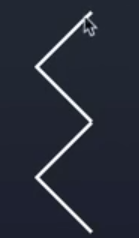
本节完成:制作子弹类型Prefab并编写创建预制和预制的动画代码
代码
import { _decorator, Component, Node, Prefab, instantiate, math, sp, randomRangeInt, Vec3, BoxCollider, macro } from 'cc';
import { Bullet } from '../bullet/Bullet';
import { BulletProp } from '../bullet/BulletProp';
import { EnemyPlane } from '../plane/EnemyPlane';
import { SelfPlane } from '../plane/SelfPlane';
import { Constant } from './Constant';
const { ccclass, property } = _decorator;

/**
 * Predefined variables
 * Name = GameManager
 * DateTime = Sun Apr 03 2022 10:20:52 GMT+0800 (中国标准时间)
 * Author = RobertCarlson
 * FileBasename = GameManager.ts
 * FileBasenameNoExtension = GameManager
 * URL = db://assets/script/framework/GameManager.ts
 * ManualUrl = https://docs.cocos.com/creator/3.3/manual/zh/
 *
 */

@ccclass('GameManager')
export class GameManager extends Component {
    @property(SelfPlane)
    public playerPlane: SelfPlane = null; // 己方飞机
    // bullet
    @property(Prefab)
    public bullet01: Prefab = null;
    @property(Prefab)
    public bullet02: Prefab = null;
    @property(Prefab)
    public bullet03: Prefab = null;
    @property(Prefab)
    public bullet04: Prefab = null;
    @property(Prefab)
    public bullet05: Prefab = null;

    // enemy
    @property(Prefab)
    public enemy01: Prefab = null;
    @property(Prefab)
    public enemy02: Prefab = null;
    @property
    public createEnemyTime = 1; // 创建敌机的周期
    @property
    public enemy1Speed = 0.5;
    @property
    public enemy2Speed = 0.7;

    // bullet
    @property
    public shootTime = 0.3;
    @property
    public bulletPlayerSpeed = 1;
    @property
    public bulletEnemySpeed = 1;
    @property(Node)
    public bulletRoot: Node = null; // 子弹发射的根节点

    // bulletProp
    @property(Prefab)
    public bulletPropM: Prefab = null;
    @property(Prefab)
    public bulletPropH: Prefab = null;
    @property(Prefab)
    public bulletPropS: Prefab = null;
    @property
    public bulletPropSpeed = 0.3;


    public isGameStart = false;

    private _currShootTime = 0; // 当前触摸的时间
    private _isShooting = false;
    private _currCreateEnemyTime = 0; // 当前敌机的生成时间,用于累加使用
    private _combinationInterval = Constant.Combination.PLAN1; // 组合方式
    private _bulletType = Constant.BulletPropType.BULLET_M;
    private _score = 0;


    start () {
        this._init()
    }

    update (deltaTime: number) {
        this._currShootTime += deltaTime;
        // 在触摸并且当前触摸时间_currShootTime大于发射时间周期shootTime的时候,才会创建子弹的实例并清零_currShootTime
        if(this._isShooting && this._currShootTime > this.shootTime){
            this.createPlayerBullet();
            this._currShootTime = 0;
        }
        this._currCreateEnemyTime += deltaTime;
        if(this._combinationInterval === Constant.Combination.PLAN1){ // 如果是计划一
            if(this._currCreateEnemyTime > this.createEnemyTime){
                this.createCombination1();
                this._currCreateEnemyTime = 0;
            }
        }else if(this._combinationInterval === Constant.Combination.PLAN2){ // 如果是计划二
            if(this._currCreateEnemyTime > this.createEnemyTime * 0.8){
                let randomCombination = math.randomRangeInt(1,3);
                if(randomCombination === Constant.Combination.PLAN2){
                    this.createCombination2();
                }else{
                    this.createCombination1();
                }
                this._currCreateEnemyTime = 0;
            }
        }else{ // 如果是计划三
            if(this._currCreateEnemyTime > this.createEnemyTime * 1){
                let randomCombination = math.randomRangeInt(1,4);
                if(randomCombination === Constant.Combination.PLAN2){
                    this.createCombination2();
                }else if(randomCombination === Constant.Combination.PLAN1){
                    this.createCombination1();
                }else{
                    this.createCombination3();
                }
                this._currCreateEnemyTime = 0;
            }
        }
    }
    private _init(){
        this._currShootTime = this.shootTime; // 要加这个,否则第一次update的时候,不会创建子弹
        this.changePlaneMode();
    }
    // 更改飞机模式
    private changePlaneMode(){
        this.schedule(this._modeChanged,10,macro.REPEAT_FOREVER); // 配置macro.REPEAT_FOREVER定时器会一直重复下去
    }
    private _modeChanged(){
        this._combinationInterval ++;
        this.createBulletProp();
    }

    // 判断是否处于触摸(发射)状态,这个值来自于UIMain.ts
    public isShooting(value: boolean){
        this._isShooting = value;
    }
    // 创建一枚玩家子弹的实例
    public createPlayerBullet(){
        const bullet = instantiate(this.bullet01);
        bullet.setParent(this.bulletRoot); // 如果没有这个,场景中就不会有子弹
        const pos = this.playerPlane.node.position; //获取玩家飞机位置
        // console.log('pos.x:'+pos.x+' pos.y:'+pos.y+'pos.z:'+pos.z);
        bullet.setPosition(pos.x , pos.y, pos.z);
        const bulletComp = bullet.getComponent(Bullet); // 获取子弹预制上的Bullet脚本实例
        bulletComp.show(this.bulletPlayerSpeed, false); // 不是敌机子弹为false
    }
    // 创建一枚敌机子弹的实例并放置位置
    public createEnemyBullet(targetPos: Vec3){
        const bullet = instantiate(this.bullet02);
        bullet.setParent(this.bulletRoot); // 如果没有这个,场景中就不会有子弹
        bullet.setPosition(targetPos.x, targetPos.y, targetPos.z + 0.5);
        const bulletComp = bullet.getComponent(Bullet);
        bulletComp.show(this.bulletEnemySpeed, true);

        // 设置敌机子弹的分组(因为我们并没有在预制中配置子弹的分组,实际上同一子弹有玩家和敌机两种分组也无法配置)
        const colliderComp = bullet.getComponent(BoxCollider);
        colliderComp.setGroup(Constant.CollisionType.ENEMY_BULLET);
        colliderComp.setMask(Constant.CollisionType.SELF_PLANE); // 可以碰撞的分组
    }
    // 创建子弹类型的实例
    public createBulletProp(){
        const randomProp = math.randomRangeInt(1, 4);
        let prefab: Prefab = null;
        if(randomProp === Constant.BulletPropType.BULLET_H){
            prefab = this.bulletPropH;
        } else if(randomProp === Constant.BulletPropType.BULLET_S){
            prefab = this.bulletPropS;
        } else {
            prefab = this.bulletPropM;
        }

        const prop = instantiate(prefab);
        prop.setParent(this.node);
        prop.setPosition(-5, 0, -10);
        const propComp = prop.getComponent(BulletProp);
        propComp.show(this,-this.bulletPropSpeed);
    }

    // 创建一个敌机的实例,随机组合
    public createEnemyPlane(){
        // 随机生成不同敌机的实例
        const whichEnemy = math.randomRangeInt(1,3); // 从飞机类型1和2中随机选择,由于取不到最高数,所以为3
        let prefab: Prefab = null;
        let speed = 0;
        if(whichEnemy === Constant.EnemyType.TYPE1){
            prefab = this.enemy01;
            speed = this.enemy1Speed;
        }else{
            prefab = this.enemy02;
            speed = this.enemy2Speed;
        }
        // ----------------------

        const enemy = instantiate(prefab); // 实例化预制
        enemy.setParent(this.node); // 敌机的父节点设置为GameManager.ts
        const enemyComp = enemy.getComponent(EnemyPlane); // 获取子弹预制上的Bullet脚本实例
        enemyComp.show(this, speed, true);
        // 控制敌机横向的位置,,EnemyPlane.ts控制的是敌机纵向的动画哦
        const randomPos = randomRangeInt(-6,7);
        enemy.setPosition(randomPos,0,-11); // 1.083要和玩家飞机在同一水平面,才可以方便出发碰撞事件

    }

    // 创建组合一
    public createCombination1(){
        this.createEnemyPlane();
    }
    // 创建组合二:一字型(5)
    public createCombination2(){
        const enemyArray = new Array<Node>(5);
        for(let i = 0;i <enemyArray.length;i ++){
            enemyArray[i] = instantiate(this.enemy01);
            const element = enemyArray[i];
            element.parent = this.node;
            element.setPosition(-5 + i*2.4, 0 ,-11);
            const enemyComp = element.getComponent(EnemyPlane);
            enemyComp.show(this, this.enemy1Speed, true);
        }
    }
    // 创建组合三:V字型(7)
    public createCombination3(){
        const enemyArray = new Array<Node>(7);

        const combinationPos = [
            -4.8,0,-14.6,
            -3.2,0,-13.4,
            -1.6,0,-12.2,
            0,0,-11,
            1.6,0,-12.2,
            3.2,0,-13.4,
            4.8,0,-14.6,
        ];
        for(let i = 0;i < enemyArray.length ;i ++){
            enemyArray[i] =instantiate(this.enemy01);
            const element = enemyArray[i];
            element.parent = this.node;
            const startIndex = i * 3;
            element.setPosition(combinationPos[startIndex],combinationPos[startIndex + 1],combinationPos[startIndex + 2]);
            const enemyComp = element.getComponent(EnemyPlane);
            enemyComp.show(this, this.enemy1Speed, true);
        }
    }

    public addScore(){
        console.log('分数增加!');

    }
    // 改变子弹类型
    public changeBulletType(type: number){
        this._bulletType = type;
    }


}
import { _decorator, Component, Node, Collider, ITriggerEvent } from 'cc';
import { Constant } from '../framework/Constant';
import { GameManager } from '../framework/GameManager';
const { ccclass, property } = _decorator;

/**
 * Predefined variables
 * Name = BulletProp
 * DateTime = Wed Apr 06 2022 18:22:26 GMT+0800 (中国标准时间)
 * Author = RobertCarlson
 * FileBasename = BulletProp.ts
 * FileBasenameNoExtension = BulletProp
 * URL = db://assets/script/bullet/BulletProp.ts
 * ManualUrl = https://docs.cocos.com/creator/3.3/manual/en/
 *
 */

@ccclass('BulletProp')
export class BulletProp extends Component {
    private _propSpeed = 0.3;
    private _propXSpeed = 0.3;
    private _gameManager: GameManager = null;

    start () {
        // [3]
    }

    update (deltaTime: number) {
        let pos = this.node.position;
        if(pos.x >= 5){
            this._propXSpeed = this._propSpeed;
        }else if(pos.x <= -5){
            this._propXSpeed = -this._propSpeed;
        }

        this.node.setPosition(pos.x + this._propXSpeed, pos.y, pos.z - this._propSpeed);
        pos = this.node.position;
        if(pos.z > 11){
            this.node.destroy();
        }
    }


    onEnable () {
        const collider = this.getComponent(Collider);
        collider.on('onTriggerEnter', this._onTriggerEnter, this);
    }

    onDisable () {
        const collider = this.getComponent(Collider);
        collider.off('onTriggerEnter', this._onTriggerEnter, this);
    }

    _onTriggerEnter(event: ITriggerEvent){
        // 根据本节点的名字来选择要替换子弹的类型。
        const name = event.selfCollider.node.name;
        if(name === 'bulletH'){
            this._gameManager.changeBulletType(Constant.BulletPropType.BULLET_H);
        } else if (name === 'bulletS') {
            this._gameManager.changeBulletType(Constant.BulletPropType.BULLET_S);
        } else {
            this._gameManager.changeBulletType(Constant.BulletPropType.BULLET_M);
        }
        this.node.destroy();
    }

    show(gameManager: GameManager, speed: number){
        this._gameManager = gameManager;
        this._propSpeed = speed;
    }
}
P17 道具(下)——Bullet.ts + GameManager.ts
本节完成:完成玩家飞机发射不同类型的子弹。
bullet01、03和05为玩家子弹,bullet02和04为敌机子弹。
注意:Bullet.ts 主要修改的是纵向的动画,例如速度等参数,
发射子弹的位置是在GameManager.ts配置。
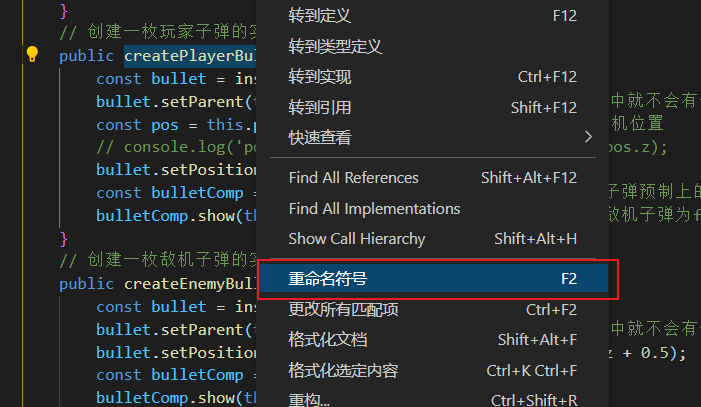
知识点1:全局修改函数名(所有引用到的地方都会修改)
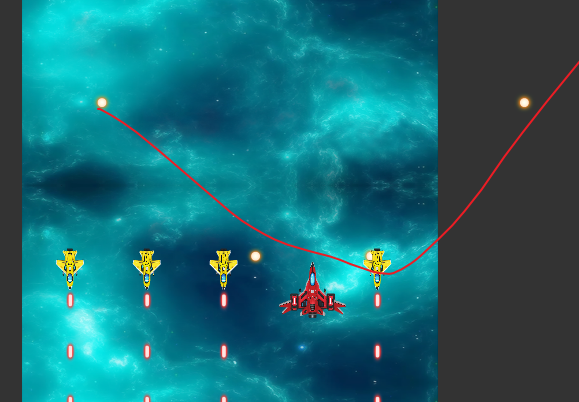
易错点1:在Bullet.ts中配置,子弹类型判断的时候,x轴加了个速度,就并非H形状。
    update (deltaTime: number) {
        const pos = this.node.position;
        let moveLength = 0;
        if (this._isEnemyBullet) {
            moveLength = pos.z + this._bulletSpeed;
            this.node.setPosition(pos.x, pos.y, moveLength);
            if (moveLength > 50) {
                // this.node.destroy();
                PoolManager.instance().putNode(this.node);
                // console.log('bullet destroy');
            }
        } else {
            moveLength = pos.z - this._bulletSpeed;
            if(this._direction === Constant.Direction.LEFT){
                this.node.setPosition(pos.x - this._bulletSpeed * 0.2, pos.y, moveLength);
            } else if(this._direction === Constant.Direction.RIGHT){
                this.node.setPosition(pos.x + this._bulletSpeed * 0.2, pos.y, moveLength);
            } else{
                this.node.setPosition(pos.x, pos.y, moveLength);
            }

            if (moveLength < -50) {
                // this.node.destroy();
                PoolManager.instance().putNode(this.node);
                // console.log('bullet destroy');
            }
        }
    }
原来Constant.ts中的Direction控制的是子弹的方向,官方源码调用的时候,默认的方向是MIDDUM。额,好吧,没事了
代码
import { _decorator, Component, Node, Prefab, instantiate, math, sp, randomRangeInt, Vec3, BoxCollider, macro } from 'cc';
import { Bullet } from '../bullet/Bullet';
import { BulletProp } from '../bullet/BulletProp';
import { EnemyPlane } from '../plane/EnemyPlane';
import { SelfPlane } from '../plane/SelfPlane';
import { Constant } from './Constant';
const { ccclass, property } = _decorator;

/**
 * Predefined variables
 * Name = GameManager
 * DateTime = Sun Apr 03 2022 10:20:52 GMT+0800 (中国标准时间)
 * Author = RobertCarlson
 * FileBasename = GameManager.ts
 * FileBasenameNoExtension = GameManager
 * URL = db://assets/script/framework/GameManager.ts
 * ManualUrl = https://docs.cocos.com/creator/3.3/manual/zh/
 *
 */

@ccclass('GameManager')
export class GameManager extends Component {
    @property(SelfPlane)
    public playerPlane: SelfPlane = null; // 己方飞机
    // bullet
    @property(Prefab)
    public bullet01: Prefab = null;
    @property(Prefab)
    public bullet02: Prefab = null;
    @property(Prefab)
    public bullet03: Prefab = null;
    @property(Prefab)
    public bullet04: Prefab = null;
    @property(Prefab)
    public bullet05: Prefab = null;

    // enemy
    @property(Prefab)
    public enemy01: Prefab = null;
    @property(Prefab)
    public enemy02: Prefab = null;
    @property
    public createEnemyTime = 1; // 创建敌机的周期
    @property
    public enemy1Speed = 0.5;
    @property
    public enemy2Speed = 0.7;

    // bullet
    @property
    public shootTime = 0.3;
    @property
    public bulletPlayerSpeed = 1;
    @property
    public bulletEnemySpeed = 1;
    @property(Node)
    public bulletRoot: Node = null; // 子弹发射的根节点

    // bulletProp
    @property(Prefab)
    public bulletPropM: Prefab = null;
    @property(Prefab)
    public bulletPropH: Prefab = null;
    @property(Prefab)
    public bulletPropS: Prefab = null;
    @property
    public bulletPropSpeed = 0.3;


    public isGameStart = false;

    private _currShootTime = 0; // 当前触摸的时间
    private _isShooting = false;
    private _currCreateEnemyTime = 0; // 当前敌机的生成时间,用于累加使用
    private _combinationInterval = Constant.Combination.PLAN1; // 组合方式
    private _bulletType = Constant.BulletPropType.BULLET_M;
    private _score = 0;


    start () {
        this._init()
    }

    update (deltaTime: number) {
        this._currShootTime += deltaTime;
        // 在触摸并且当前触摸时间_currShootTime大于发射时间周期shootTime的时候,才会创建子弹的实例并清零_currShootTime
        if(this._isShooting && this._currShootTime > this.shootTime){
            if(this._bulletType === Constant.BulletPropType.BULLET_H){
                this.createPlayerBulletH();
            }else if(this._bulletType === Constant.BulletPropType.BULLET_S){
                this.createPlayerBulletS();
            }else{
                this.createPlayerBulletM();
            }
            this._currShootTime = 0;
        }
        this._currCreateEnemyTime += deltaTime;
        if(this._combinationInterval === Constant.Combination.PLAN1){ // 如果是计划一
            if(this._currCreateEnemyTime > this.createEnemyTime){
                this.createCombination1();
                this._currCreateEnemyTime = 0;
            }
        }else if(this._combinationInterval === Constant.Combination.PLAN2){ // 如果是计划二
            if(this._currCreateEnemyTime > this.createEnemyTime * 0.8){
                let randomCombination = math.randomRangeInt(1,3);
                if(randomCombination === Constant.Combination.PLAN2){
                    this.createCombination2();
                }else{
                    this.createCombination1();
                }
                this._currCreateEnemyTime = 0;
            }
        }else{ // 如果是计划三
            if(this._currCreateEnemyTime > this.createEnemyTime * 1){
                let randomCombination = math.randomRangeInt(1,4);
                if(randomCombination === Constant.Combination.PLAN2){
                    this.createCombination2();
                }else if(randomCombination === Constant.Combination.PLAN1){
                    this.createCombination1();
                }else{
                    this.createCombination3();
                }
                this._currCreateEnemyTime = 0;
            }
        }
    }
    private _init(){
        this._currShootTime = this.shootTime; // 要加这个,否则第一次update的时候,不会创建子弹
        this.changePlaneMode();
    }
    // 更改飞机模式
    private changePlaneMode(){
        this.schedule(this._modeChanged,10,macro.REPEAT_FOREVER); // 配置macro.REPEAT_FOREVER定时器会一直重复下去
    }
    private _modeChanged(){
        this._combinationInterval ++;
        this.createBulletProp();
    }

    // 判断是否处于触摸(发射)状态,这个值来自于UIMain.ts
    public isShooting(value: boolean){
        this._isShooting = value;
    }
    // 创建一枚玩家子弹的实例
    public createPlayerBulletM(){
        const bullet = instantiate(this.bullet01);
        bullet.setParent(this.bulletRoot); // 如果没有这个,场景中就不会有子弹
        const pos = this.playerPlane.node.position; //获取玩家飞机位置
        bullet.setPosition(pos.x , pos.y, pos.z + 0.5);
        const bulletComp = bullet.getComponent(Bullet); // 获取子弹预制上的Bullet脚本实例
        bulletComp.show(this.bulletPlayerSpeed, false); // 参数1:速度,参数2:不是敌机子弹为false,参数3:方向
    }

    public createPlayerBulletH(){
        const pos = this.playerPlane.node.position; //获取玩家飞机位置

        // left
        const bullet1 = instantiate(this.bullet03);
        bullet1.setParent(this.bulletRoot); // 如果没有这个,场景中就不会有子弹
        bullet1.setPosition(pos.x - 0.6 , pos.y, pos.z + 0.5);
        const bulletComp1 = bullet1.getComponent(Bullet); // 获取子弹预制上的Bullet脚本实例
        bulletComp1.show(this.bulletPlayerSpeed, false); // 不是敌机子弹为false

        // right
        const bullet2 = instantiate(this.bullet03);
        bullet2.setParent(this.bulletRoot); // 如果没有这个,场景中就不会有子弹
        bullet2.setPosition(pos.x + 0.6, pos.y, pos.z + 0.5);
        const bulletComp2 = bullet2.getComponent(Bullet); // 获取子弹预制上的Bullet脚本实例
        bulletComp2.show(this.bulletPlayerSpeed, false); // 不是敌机子弹为false
    }

    public createPlayerBulletS(){
        const pos = this.playerPlane.node.position; //获取玩家飞机位置
        // middle
        const bullet1 = instantiate(this.bullet05);
        bullet1.setParent(this.bulletRoot); // 如果没有这个,场景中就不会有子弹
        bullet1.setPosition(pos.x , pos.y, pos.z + 0.5);
        const bulletComp1 = bullet1.getComponent(Bullet); // 获取子弹预制上的Bullet脚本实例
        bulletComp1.show(this.bulletPlayerSpeed, false); // 不是敌机子弹为false

        // left
        const bullet2 = instantiate(this.bullet05);
        bullet2.setParent(this.bulletRoot); // 如果没有这个,场景中就不会有子弹
        bullet2.setPosition(pos.x , pos.y, pos.z + 0.5);
        const bulletComp2 = bullet2.getComponent(Bullet); // 获取子弹预制上的Bullet脚本实例
        bulletComp2.show(this.bulletPlayerSpeed, false); // 不是敌机子弹为false

        // right
        const bullet3 = instantiate(this.bullet01);
        bullet3.setParent(this.bulletRoot); // 如果没有这个,场景中就不会有子弹
        bullet3.setPosition(pos.x , pos.y, pos.z + 0.5);
        const bulletComp3 = bullet3.getComponent(Bullet); // 获取子弹预制上的Bullet脚本实例
        bulletComp3.show(this.bulletPlayerSpeed, false); // 不是敌机子弹为false
    }
    // 创建一枚敌机子弹的实例并放置位置
    public createEnemyBullet(targetPos: Vec3){
        const bullet = instantiate(this.bullet02);
        bullet.setParent(this.bulletRoot); // 如果没有这个,场景中就不会有子弹
        bullet.setPosition(targetPos.x, targetPos.y, targetPos.z + 0.5);
        const bulletComp = bullet.getComponent(Bullet);
        bulletComp.show(this.bulletEnemySpeed, true);

        // 设置敌机子弹的分组(因为我们并没有在预制中配置子弹的分组,实际上同一子弹有玩家和敌机两种分组也无法配置)
        const colliderComp = bullet.getComponent(BoxCollider);
        colliderComp.setGroup(Constant.CollisionType.ENEMY_BULLET);
        colliderComp.setMask(Constant.CollisionType.SELF_PLANE); // 可以碰撞的分组
    }
    // 创建子弹类型的实例
    public createBulletProp(){
        const randomProp = math.randomRangeInt(1, 4);
        let prefab: Prefab = null;
        if(randomProp === Constant.BulletPropType.BULLET_H){
            prefab = this.bulletPropH;
        } else if(randomProp === Constant.BulletPropType.BULLET_S){
            prefab = this.bulletPropS;
        } else {
            prefab = this.bulletPropM;
        }

        const prop = instantiate(prefab);
        prop.setParent(this.node);
        prop.setPosition(-5, 0, -10);
        const propComp = prop.getComponent(BulletProp);
        propComp.show(this,-this.bulletPropSpeed);
    }

    // 创建一个敌机的实例,随机组合
    public createEnemyPlane(){
        // 随机生成不同敌机的实例
        const whichEnemy = math.randomRangeInt(1,3); // 从飞机类型1和2中随机选择,由于取不到最高数,所以为3
        let prefab: Prefab = null;
        let speed = 0;
        if(whichEnemy === Constant.EnemyType.TYPE1){
            prefab = this.enemy01;
            speed = this.enemy1Speed;
        }else{
            prefab = this.enemy02;
            speed = this.enemy2Speed;
        }
        // ----------------------

        const enemy = instantiate(prefab); // 实例化预制
        enemy.setParent(this.node); // 敌机的父节点设置为GameManager.ts
        const enemyComp = enemy.getComponent(EnemyPlane); // 获取子弹预制上的Bullet脚本实例
        enemyComp.show(this, speed, true);
        // 控制敌机横向的位置,,EnemyPlane.ts控制的是敌机纵向的动画哦
        const randomPos = randomRangeInt(-6,7);
        enemy.setPosition(randomPos,0,-11); // 1.083要和玩家飞机在同一水平面,才可以方便出发碰撞事件

    }

    // 创建组合一
    public createCombination1(){
        this.createEnemyPlane();
    }
    // 创建组合二:一字型(5)
    public createCombination2(){
        const enemyArray = new Array<Node>(5);
        for(let i = 0;i <enemyArray.length;i ++){
            enemyArray[i] = instantiate(this.enemy01);
            const element = enemyArray[i];
            element.parent = this.node;
            element.setPosition(-5 + i*2.4, 0 ,-11);
            const enemyComp = element.getComponent(EnemyPlane);
            enemyComp.show(this, this.enemy1Speed, true);
        }
    }
    // 创建组合三:V字型(7)
    public createCombination3(){
        const enemyArray = new Array<Node>(7);

        const combinationPos = [
            -4.8,0,-14.6,
            -3.2,0,-13.4,
            -1.6,0,-12.2,
            0,0,-11,
            1.6,0,-12.2,
            3.2,0,-13.4,
            4.8,0,-14.6,
        ];
        for(let i = 0;i < enemyArray.length ;i ++){
            enemyArray[i] =instantiate(this.enemy01);
            const element = enemyArray[i];
            element.parent = this.node;
            const startIndex = i * 3;
            element.setPosition(combinationPos[startIndex],combinationPos[startIndex + 1],combinationPos[startIndex + 2]);
            const enemyComp = element.getComponent(EnemyPlane);
            enemyComp.show(this, this.enemy1Speed, true);
        }
    }

    public addScore(){
        console.log('分数增加!');

    }
    // 改变子弹类型
    public changeBulletType(type: number){
        this._bulletType = type;
    }


}
import { _decorator, Component, Node, Collider, ITriggerEvent } from 'cc';
import { Constant } from '../framework/Constant';
const { ccclass, property } = _decorator;

/**
 * Predefined variables
 * Name = Bullet
 * DateTime = Sun Apr 03 2022 10:25:08 GMT+0800 (中国标准时间)
 * Author = RobertCarlson
 * FileBasename = Bullet.ts
 * FileBasenameNoExtension = Bullet
 * URL = db://assets/script/bullet/Bullet.ts
 * ManualUrl = https://docs.cocos.com/creator/3.3/manual/zh/
 *
 */

@ccclass('Bullet')
export class Bullet extends Component {
    private _bulletSpeed = 0; // 子弹速度
    private _isEnemyBullet = false; // 判断是不是敌机子弹
    private _direction = 0;
    start () {
        // [3]
    }

    update (deltaTime: number) {
        const pos = this.node.position; // 获取此时子弹的位置
        let moveDistance = 0; // 子弹移动距离,也就是之前单个场景面板的长度,即为20!
        if(this._isEnemyBullet){
            moveDistance = pos.z + this._bulletSpeed;
            this.node.setPosition(pos.x,pos.y,moveDistance);
            if(moveDistance > 11 )
            {
                this.node.destroy();
            }
        }else{
            moveDistance = pos.z - this._bulletSpeed;
            // 根据子弹类型的不同来设置子弹相对于飞机的位置。
            if(this._direction === Constant.Direction.LEFT){
                this.node.setPosition(pos.x - this._bulletSpeed * 0.2, pos.y, moveDistance);
            }else if(this._direction === Constant.Direction.RIGHT){
                this.node.setPosition(pos.x + this._bulletSpeed * 0.2, pos.y, moveDistance);
            }else{
                this.node.setPosition(pos.x,pos.y,moveDistance);
            }
            if(moveDistance < -10 )
            {
                this.node.destroy();
            }
        }
    }

    show(speed: number, isEnemyBullet: boolean, direction = Constant.Direction.MIDDLE){
        this._bulletSpeed = speed;
        this._isEnemyBullet = isEnemyBullet;
        this._direction = direction;
    }

    onEnable () {
        const collider = this.getComponent(Collider);
        collider.on('onTriggerEnter', this._onTriggerEnter, this);
    }

    onDisable () {
        const collider = this.getComponent(Collider);
        collider.off('onTriggerEnter', this._onTriggerEnter, this);
    }

    public _onTriggerEnter(event: ITriggerEvent){
     //   console.log('trigger bullet destory!');
        this.node.destroy();
    }
}
P18 2D与UI(上)
https://docs.cocos.com/creator/3.3/manual/zh/ui-system/components/editor/sprite.html
创建2D视图的方式:
- 右键UI 组件 -> 创建Canvas节点
- 右键添加空节点 -> 添加 RenderRoot2D 组件
Sprite(精灵)是 2D/3D 游戏最常见的显示图像的方式,在节点上添加 Sprite 组件,就可以在场景中显示项目资源中的图片。
Sprite 组件剪裁相关设置详解
和图片裁剪相关的 Sprite 组件设置有以下两个:
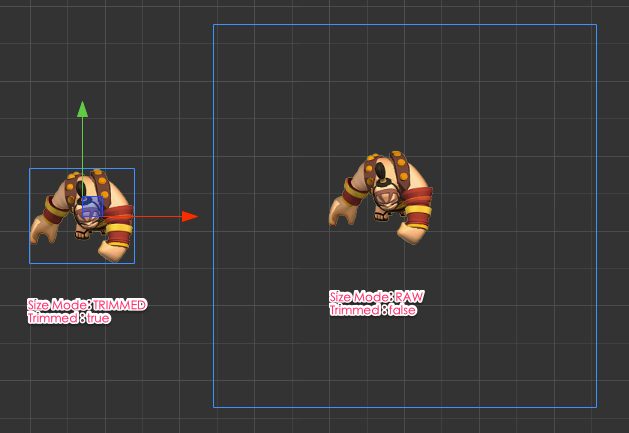
- Trim 勾选后将在渲染 Sprite 图像时去除图像周围的透明像素,我们将看到刚好能把图像包裹住的约束框。取消勾选,Sprite 节点的约束框会包括透明像素的部分。
- Size Mode 用来将节点的尺寸设置为原图或原图裁剪透明像素后的大小,通常用于在序列帧动画中保证图像显示为正确的尺寸。有以下几种选择:
- TRIMMED 选择该选项,会将节点的尺寸(size)设置为原始图片裁剪掉透明像素后的大小。
- RAW 选择该选项,会将节点尺寸设置为原始图片包括透明像素的大小。
- CUSTOM 自定义尺寸,用户在使用 矩形变换工具 拖拽改变节点的尺寸,或通过修改 Size 属性,或在脚本中修改 width 或 height 后,都会自动将 Size Mode 设为 CUSTOM。表示用户将自己决定节点的尺寸,而不需要考虑原始图片的大小。
P19 2D与UI(下)
P20 动画编辑器
P21 面板(UI绘制)
创建一个UI组件中的Canvas节点(注意Canvas是根据渲染的分辨率来决定其大小的)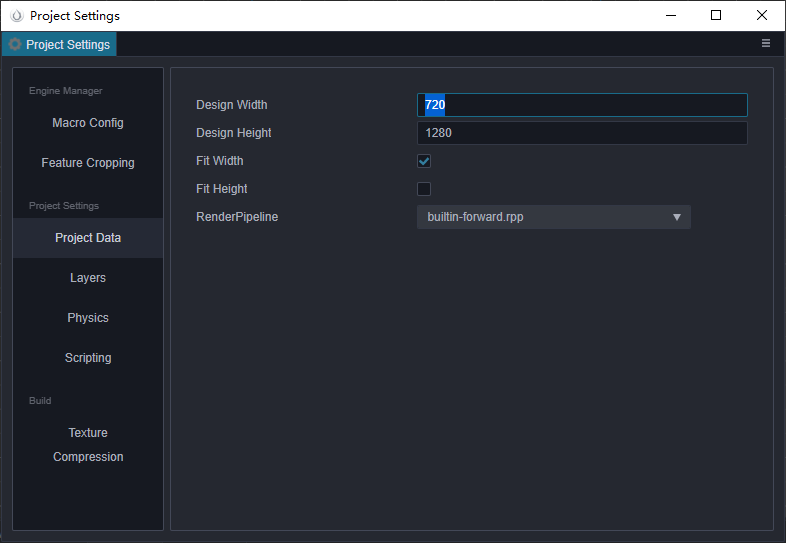
使用Widget对齐组件来使gameStart节点完全适配Canvas
使用Sprite组件来显示示意图
label中Overflow的CLAMP是截断模式
Label 排版
| 属性 | 功能说明 |
|---|---|
| CLAMP | 文字尺寸不会根据 Content Size 的大小进行缩放。 Wrap Text 关闭的情况下,按照正常文字排列,超出 Content Size 的部分将不会显示。 Wrap Text 开启的情况下,会试图将本行超出范围的文字换行到下一行。如果纵向空间也不够时,也会隐藏无法完整显示的文字。 |
| SHRINK | 文字尺寸会根据 Content Size 大小进行自动缩放(不会自动放大,最大显示 Font Size 规定的尺寸)。 Wrap Text 开启时,当宽度不足时会优先将文字换到下一行,如果换行后还无法完整显示,则会将文字进行自动适配 Content Size 的大小。 Wrap Text 关闭时,则直接按照当前文字进行排版,如果超出边界则会进行自动缩放。 |
| RESIZE_HEIGHT | 文本的 Content Size 会根据文字排版进行适配,这个状态下用户无法手动修改文本的高度,文本的高度由内部算法自动计算出来。 |
Sprite组件和Gphics组件的区别
本节完成(UI绘制):
- 游戏开始gameStart
- 游戏界面game
- 游戏结束gameOver(带动画)
P22 面板(逻辑)——UIMain.ts+GameManager.ts
这一讲,本来应该按照游戏开始、进行和结束逐个实现并讲解,但放空一直都在讲代码,同时进行三个功能,所以就听得累~
游戏开始逻辑:
滑动屏幕开始游戏(切换到游戏进行中的界面)。
游戏结束逻辑:
绑定按钮的回调函数:reStart() 、returnMain()——(UIMain.ts+GameManager.ts中都具有同名函数哦,但功能不同)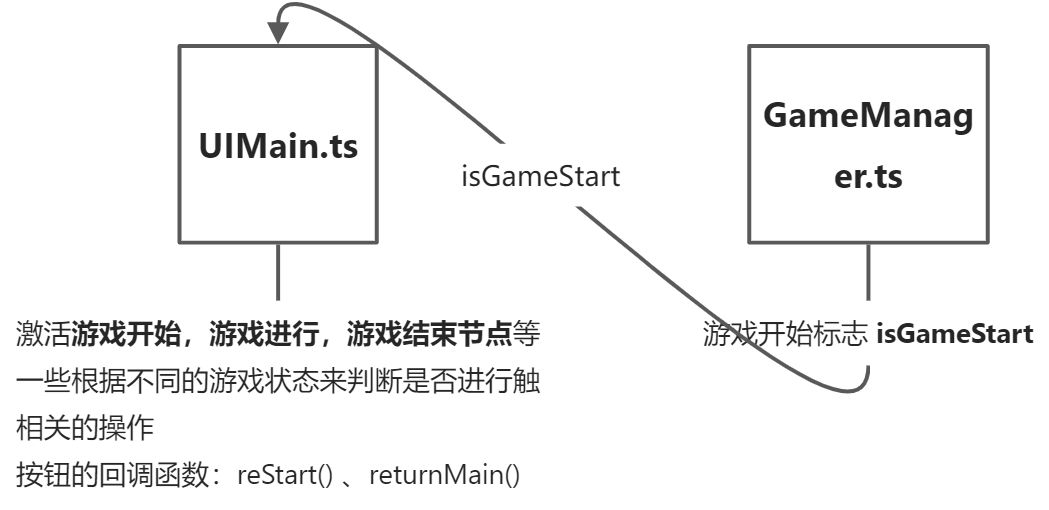
UIMain.ts:游戏开始,游戏进行和游戏结束总体的逻辑是在这个里面写的,游戏开始,游戏进行和游戏结束的节点是需要挂载到这个上面的。具体的行为细节,是在GameManager.ts这个文件中实现的,也就是说,UIMain.ts调用了GameManager.ts的一些属性和方法。 ```typescript
import { _decorator, Component, Node, systemEvent, SystemEvent, Touch, EventTouch, Vec2 } from ‘cc’; import { GameManager } from ‘../framework/GameManager’; const { ccclass, property } = _decorator;
/**
- Predefined variables
- Name = UIMain
- DateTime = Mon Nov 15 2021 14:10:01 GMT+0800 (China Standard Time)
- Author = mywayday
- FileBasename = UIMain.ts
- FileBasenameNoExtension = UIMain
- URL = db://assets/script/ui/UIMain.ts
- ManualUrl = https://docs.cocos.com/creator/3.3/manual/en/ /
@ccclass(‘UIMain’) export class UIMain extends Component { @property public planeSpeed = 1;
@property(Node)
public playerPlane: Node = null;

@property(GameManager)
public gameManager: GameManager = null;
// 挂载游戏开始、游戏进行和游戏结束的节点
@property(Node)
public gameStart: Node = null;
@property(Node)
public game: Node = null;
@property(Node)
public gameOver: Node = null;

start () {
    this.node.on(SystemEvent.EventType.TOUCH_START, this._touchStart, this);
    this.node.on(SystemEvent.EventType.TOUCH_MOVE, this._touchMove, this);
    this.node.on(SystemEvent.EventType.TOUCH_END, this._touchEnd, this);

    this.gameStart.active  = true;
}

// update (deltaTime: number) {
//     // [4]
// }

public reStart(){
    this.gameOver.active = false;
    this.game.active = true;
    this.gameManager.playAudioEffect('button');
    this.gameManager.gameReStart();
}

public returnMain(){
    this.gameOver.active = false;
    this.gameStart.active = true;
    this.gameManager.playAudioEffect('button');
    this.gameManager.returnMain();
}

_touchStart(touch: Touch, event: EventTouch){
    if (this.gameManager.isGameStart) {
        this.gameManager.isShooting(true);
    } else {
        this.gameStart.active = false;
        this.game.active = true;
        this.gameManager.playAudioEffect('button');
        this.gameManager.gameStart();
    }

}

_touchMove(touch: Touch, event: EventTouch){
    if (!this.gameManager.isGameStart) {
        return;
    }

    const delta = touch.getDelta();
    let pos = this.playerPlane.position;
    this.playerPlane.setPosition(pos.x + 0.01 * this.planeSpeed * delta.x, pos.y, pos.z - 0.01 * this.planeSpeed * delta.y);
}

_touchEnd(touch: Touch, event: EventTouch){
    if (!this.gameManager.isGameStart) {
        return;
    }

    this.gameManager.isShooting(false);
}
}
GameManager.ts:<br />关联game、gameOver、游戏score标签以及游戏结束标签。
```typescript
    public returnMain(){
        this._currShootTime = 0;
        this._currCreateEnemyTime = 0;
        this._combinationInterval = Constant.Combination.PLAN1;
        this._bulletType = Constant.BulletPropType.BULLET_M;
        this.playerPlane.node.setPosition(0, 0, 15);
        this._score = 0;
    }

    public gameStart(){
        this.isGameStart = true;
        this._changePlaneMode();
        this._score = 0;
        this.gameScore.string = this._score.toString();
        this.playerPlane.init();
    }

    public gameReStart(){
        this.gameStart();
        this._currShootTime = 0;
        this._currCreateEnemyTime = 0;
        this._combinationInterval = Constant.Combination.PLAN1;
        this._bulletType = Constant.BulletPropType.BULLET_M;
        this.playerPlane.node.setPosition(0, 0, 15);
    }

    public gameOver(){
        this.isGameStart = false;
        this.gamePage.active = false;
        this.gameOverPage.active = true;
        this.gameOverScore.string = this._score.toString();
        this.overAnim.play();
        this._isShooting = false;
        // this.playerPlane.init();
        this.unschedule(this._modeChanged);
        this._destroyAll();
    }
易错点1:游戏结束后依然可以控制飞机移动
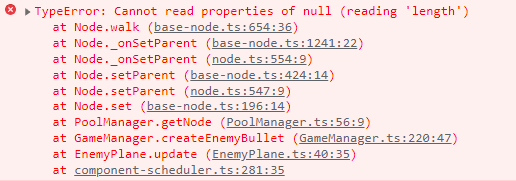 TypeError: Cannot read properties of null (reading ‘length’)
每个结点的销毁方式都要改做用节点池的方式销毁。解决了这个问题,但还是游戏结束后依然可以控制飞机移动。
- 在gameOver节点上添加
**BlockInputEvents**方可阻止输入事件 - 并且,需要将gameOver的节点Layer改为
**UI_2D**
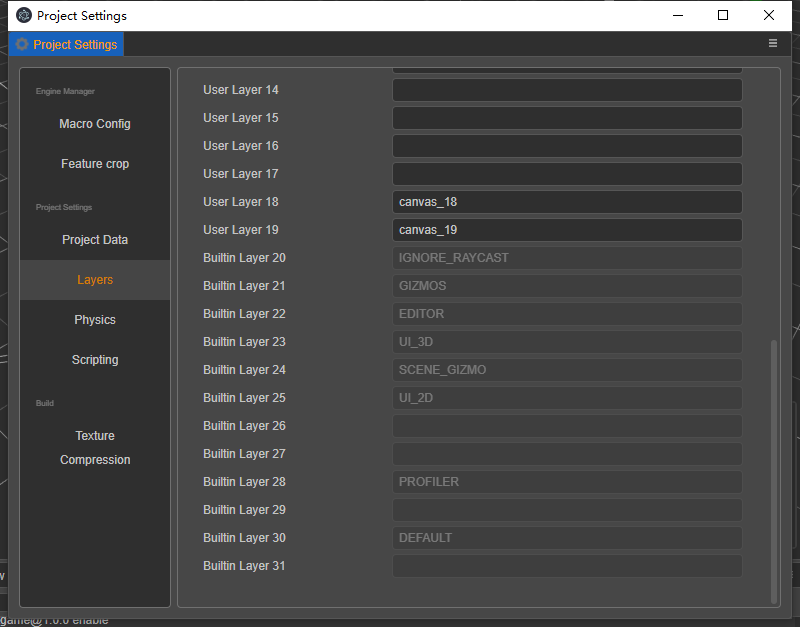
| 属性 | 说明 | 值 |
|---|---|---|
| NONE | 设置全都不可见 | 0 |
| IGNORE_RAYCAST | 设置忽略射线检测 | 1 << 20 |
| GIZMOS | 设置配置信息可见 | 1 << 21 |
| EDITOR | 设置编辑器可见 | 1 << 22 |
| UI_3D | 设置 3D UI 节点可见 | 1 << 23 |
| SCENE_GIZMO | 设置场景配置节点可见 | 1 << 24 |
| UI_2D | 设置 2D UI 节点可见 | 1 << 25 |
| PROFILER | 设置分析工具节点可见 | 1 << 28 |
| DEFAULT | 设置默认节点可见 | 1 << 30 |
| ALL | 设置所有节点可见 | 0xffffffff |
易错点2:游戏结束动画播放不了

Animation不是来自于cc的,所以我们在导入的时候,应该从cc导入Animation
P24 节点池——PoolManager.ts
NodePool 是用于管理节点对象的对象缓存池。它可以帮助您提高游戏性能,适用于优化对象的反复创建和销毁。以前 cocos2d-x 中的 pool 和新的节点事件注册系统不兼容,因此请使用NodePool来代替。
新的 NodePool 需要实例化之后才能使用,每种不同的节点对象池需要一个不同的对象池实例,这里的种类对应于游戏中的节点设计,一个 prefab 相当于一个种类的节点。
在创建缓冲池时,可以传入一个包含 unuse, reuse 函数的组件类型用于节点的回收和复用逻辑。
一些常见的用例是:
1.在游戏中的子弹(死亡很快,频繁创建,对其他对象无副作用)
2.糖果粉碎传奇中的木块(频繁创建)。
等等….
PoolManager.ts:
getNode(prefab: Prafeb,parent: Node)
putNode()
import { _decorator, Component, Node, Prefab, NodePool, instantiate } from 'cc';
const { ccclass, property } = _decorator;

/**
 * Predefined variables
 * Name = PoolManager
 * DateTime = Fri Nov 26 2021 18:00:45 GMT+0800 (China Standard Time)
 * Author = mywayday
 * FileBasename = PoolManager.ts
 * FileBasenameNoExtension = PoolManager
 * URL = db://assets/script/framework/PoolManager.ts
 * ManualUrl = https://docs.cocos.com/creator/3.3/manual/en/
 *
 */

interface IDictPool {
    [name: string]: NodePool; // 定义一个字典,key为字符串数组,value为NodePool
}

interface IDictPrefab {
    [name: string]: Prefab;
}

@ccclass('PoolManager')
export class PoolManager {

    private _dictPool: IDictPool = {}; // 节点池,这个是关键哦!
    private _dictPrefab: IDictPrefab = {}; // 缓存预制,貌似没用到。
    private static _instance: PoolManager;
    // 实例化节点池管理器,注意是静态的。
    public static instance(){
        if(!this._instance){
            this._instance = new PoolManager();
        }
        return this._instance;
    }

    public getNode(prefab: Prefab, parent: Node){
        let name = prefab.data.name;
        // console.log('get node   ' + name);
        let node: Node = null;
        this._dictPrefab[name] = prefab;
        const pool = this._dictPool[name]; // 节点池中是否存在对应的预制
        if (pool) { // 如果节点池中存在对应的预制
            if (pool.size() > 0) { // 如果对应节点池中容量充足的话,就直接获取
                node = pool.get();
            } else {
                node = instantiate(prefab);
            }
        } else {
            this._dictPool[name] = new NodePool();
            node = instantiate(prefab);
        }

        node.parent = parent; // 设置父节点
        node.active = true; // 激活这个节点
        return node;
    }

    public putNode(node: Node){
        let name = node.name;
        // console.log('put node   ' + name);
        node.parent = null;
        if (!this._dictPool[name]) {
            this._dictPool[name] = new NodePool();
        }

        this._dictPool[name].put(node);
    }
}

/**
 * [1] Class member could be defined like this.
 * [2] Use `property` decorator if your want the member to be serializable.
 * [3] Your initialization goes here.
 * [4] Your update function goes here.
 *
 * Learn more about scripting: https://docs.cocos.com/creator/3.3/manual/en/scripting/
 * Learn more about CCClass: https://docs.cocos.com/creator/3.3/manual/en/scripting/ccclass.html
 * Learn more about life-cycle callbacks: https://docs.cocos.com/creator/3.3/manual/en/scripting/life-cycle-callbacks.html
 */
P25 粒子和血条
这个非常简单,等我有空再整理

若有收获,就点个赞吧
0 人点赞


