一、Zipkin 介绍
Zipkin 是什么?
Zipkin的官方介绍:https://zipkin.apache.org/
Zipkin是一款开源的分布式实时数据追踪系统(Distributed Tracking System),基于 Google Dapper的论文设计而来,由 Twitter 公司开发贡献。其主要功能是聚集来自各个异构系统的实时监控数据。分布式跟踪系统还有其他比较成熟的实现,例如:Naver的Pinpoint、Apache的HTrace、阿里的鹰眼Tracing、京东的Hydra、新浪的Watchman,美团点评的CAT,skywalking等。
为什么用 Zipkin?
随着业务越来越复杂,系统也随之进行各种拆分,特别是随着微服务架构和容器技术的兴起,看似简单的一个应用,后台可能有几十个甚至几百个服务在支撑;一个前端的请求可能需要多次的服务调用最后才能完成;当请求变慢或者不可用时,我们无法得知是哪个后台服务引起的,这时就需要解决如何快速定位服务故障点,Zipkin分布式跟踪系统就能很好的解决这样的问题。
Zipkin的一些基本概念?
Brave
Brave 是用来装备 Java 程序的类库,提供了面向 Standard Servlet、Spring MVC、Http Client、JAX RS、Jersey、Resteasy 和 MySQL 等接口的装备能力,可以通过编写简单的配置和代码,让基于这些框架构建的应用可以向 Zipkin报告数据。同时 Brave 也提供了非常简单且标准化的接口,在以上封装无法满足要求的时候可以方便扩展与定制。
如下图是 Brave 的结构图。Brave 利用 reporter 向 Zipkin的 Collector 发送 trace 信息。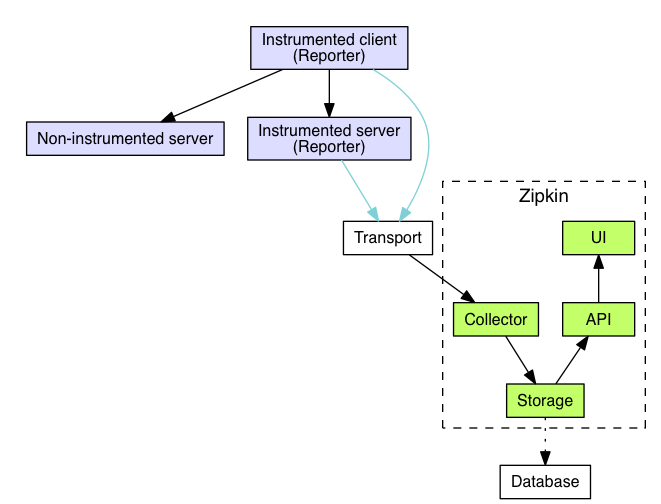
Brave 主要是利用拦截器在请求前和请求后分别埋点。例如 Spingmvc 监控使用 Interceptors,Mysql 监控使用 statementInterceptors。同理 Dubbo 的监控是利用 com.alibaba.dubbo.rpc.Filter 来过滤生产者和消费者的请求。
traceId
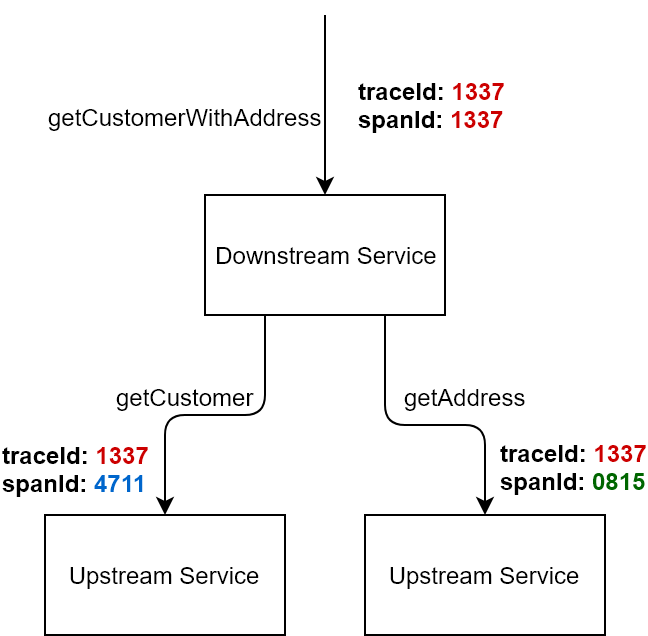
一次请求全局只有一个traceId。用来在海量的请求中找到同一链路的几次请求。比如servlet服务器接收到用户请求,调用dubbo服务,然后将结果返回给用户,整条链路只有一个traceId。开始于用户请求,结束于用户收到结果。
- spanId
一个链路中每次请求都会有一个spanId。例如一次rpc,一次sql都会有一个单独的spanId从属于traceId。
- cs
Clent Sent 客户端发起请求的时间,比如 dubbo 调用端开始执行远程调用之前。
- cr
Client Receive 客户端收到处理完请求的时间。
- ss
Server Receive 服务端处理完逻辑的时间。
- sr
Server Receive 服务端收到调用端请求的时间。
sr - cs = 请求在网络上的耗时ss - sr = 服务端处理请求的耗时cr - ss = 回应在网络上的耗时cr - cs = 一次调用的整体耗时
Zipkin的工作过程
当用户发起一次调用时,Zipkin 的客户端会在入口处为整条调用链路生成一个全局唯一的 trace id,并为这条链路中的每一次分布式调用生成一个 span id。span 与 span 之间可以有父子嵌套关系,代表分布式调用中的上下游关系。span 和 span 之间可以是兄弟关系,代表当前调用下的两次子调用。一个 trace 由一组 span 组成,可以看成是由 trace 为根节点,span 为若干个子节点的一棵树。
Zipkin 会将 trace 相关的信息在调用链路上传递,并在每个调用边界结束时异步的把当前调用的耗时信息上报给 Zipkin Server。Zipkin Server 在收到 trace 信息后,将其存储起来。随后 Zipkin 的 Web UI 会通过 API 访问的方式从存储中将 trace 信息提取出来分析并展示。
二、Zipkin的部署与运行
Zipkin的 github 地址:https://github.com/apache/incubator-zipkin
Docker 方式
docker run -d -p 9411:9411 openzipkin/zipkin
Jar 包方式(JDK8)
curl -sSL https://zipkin.io/quickstart.sh | bash -sjava -jar zipkin.jar
注意:以上方式的 Zipkin 都是基于内存存储,Zipkin 重启后数据会丢失,建议测试环境使用。Zipkin 支持的存储类型有 inMemory、MySql、Cassandra、以及 ElasticsSearch 几种方式。正式环境推荐使用 Cassandra 和 ElasticSearch。
zipkin 基于 mysql 存储进行启动
1、在mysql数据库中创建zipkin需要用到的表结构
---- Copyright 2015-2019 The OpenZipkin Authors---- Licensed under the Apache License, Version 2.0 (the "License"); you may not use this file except-- in compliance with the License. You may obtain a copy of the License at---- http://www.apache.org/licenses/LICENSE-2.0---- Unless required by applicable law or agreed to in writing, software distributed under the License-- is distributed on an "AS IS" BASIS, WITHOUT WARRANTIES OR CONDITIONS OF ANY KIND, either express-- or implied. See the License for the specific language governing permissions and limitations under-- the License.--CREATE DATABASE `zipkin` /*!40100 DEFAULT CHARACTER SET utf8 */;use zipkin;CREATE TABLE IF NOT EXISTS zipkin_spans (`trace_id_high` BIGINT NOT NULL DEFAULT 0 COMMENT 'If non zero, this means the trace uses 128 bit traceIds instead of 64 bit',`trace_id` BIGINT NOT NULL,`id` BIGINT NOT NULL,`name` VARCHAR(255) NOT NULL,`remote_service_name` VARCHAR(255),`parent_id` BIGINT,`debug` BIT(1),`start_ts` BIGINT COMMENT 'Span.timestamp(): epoch micros used for endTs query and to implement TTL',`duration` BIGINT COMMENT 'Span.duration(): micros used for minDuration and maxDuration query',PRIMARY KEY (`trace_id_high`, `trace_id`, `id`)) ENGINE=InnoDB ROW_FORMAT=COMPRESSED CHARACTER SET=utf8 COLLATE utf8_general_ci;ALTER TABLE zipkin_spans ADD INDEX(`trace_id_high`, `trace_id`) COMMENT 'for getTracesByIds';ALTER TABLE zipkin_spans ADD INDEX(`name`) COMMENT 'for getTraces and getSpanNames';ALTER TABLE zipkin_spans ADD INDEX(`remote_service_name`) COMMENT 'for getTraces and getRemoteServiceNames';ALTER TABLE zipkin_spans ADD INDEX(`start_ts`) COMMENT 'for getTraces ordering and range';CREATE TABLE IF NOT EXISTS zipkin_annotations (`trace_id_high` BIGINT NOT NULL DEFAULT 0 COMMENT 'If non zero, this means the trace uses 128 bit traceIds instead of 64 bit',`trace_id` BIGINT NOT NULL COMMENT 'coincides with zipkin_spans.trace_id',`span_id` BIGINT NOT NULL COMMENT 'coincides with zipkin_spans.id',`a_key` VARCHAR(255) NOT NULL COMMENT 'BinaryAnnotation.key or Annotation.value if type == -1',`a_value` BLOB COMMENT 'BinaryAnnotation.value(), which must be smaller than 64KB',`a_type` INT NOT NULL COMMENT 'BinaryAnnotation.type() or -1 if Annotation',`a_timestamp` BIGINT COMMENT 'Used to implement TTL; Annotation.timestamp or zipkin_spans.timestamp',`endpoint_ipv4` INT COMMENT 'Null when Binary/Annotation.endpoint is null',`endpoint_ipv6` BINARY(16) COMMENT 'Null when Binary/Annotation.endpoint is null, or no IPv6 address',`endpoint_port` SMALLINT COMMENT 'Null when Binary/Annotation.endpoint is null',`endpoint_service_name` VARCHAR(255) COMMENT 'Null when Binary/Annotation.endpoint is null') ENGINE=InnoDB ROW_FORMAT=COMPRESSED CHARACTER SET=utf8 COLLATE utf8_general_ci;ALTER TABLE zipkin_annotations ADD UNIQUE KEY(`trace_id_high`, `trace_id`, `span_id`, `a_key`, `a_timestamp`) COMMENT 'Ignore insert on duplicate';ALTER TABLE zipkin_annotations ADD INDEX(`trace_id_high`, `trace_id`, `span_id`) COMMENT 'for joining with zipkin_spans';ALTER TABLE zipkin_annotations ADD INDEX(`trace_id_high`, `trace_id`) COMMENT 'for getTraces/ByIds';ALTER TABLE zipkin_annotations ADD INDEX(`endpoint_service_name`) COMMENT 'for getTraces and getServiceNames';ALTER TABLE zipkin_annotations ADD INDEX(`a_type`) COMMENT 'for getTraces and autocomplete values';ALTER TABLE zipkin_annotations ADD INDEX(`a_key`) COMMENT 'for getTraces and autocomplete values';ALTER TABLE zipkin_annotations ADD INDEX(`trace_id`, `span_id`, `a_key`) COMMENT 'for dependencies job';CREATE TABLE IF NOT EXISTS zipkin_dependencies (`day` DATE NOT NULL,`parent` VARCHAR(255) NOT NULL,`child` VARCHAR(255) NOT NULL,`call_count` BIGINT,`error_count` BIGINT,PRIMARY KEY (`day`, `parent`, `child`)) ENGINE=InnoDB ROW_FORMAT=COMPRESSED CHARACTER SET=utf8 COLLATE utf8_general_ci;
2、编写docker-compose文件
#编写内容#注意mysql数据库版本最好是5.6-5.7的,我用mysql8.0连接不成功version: '2'services:# The zipkin process services the UI, and also exposes a POST endpoint that# instrumentation can send trace data to. Scribe is disabled by default.zipkin:image: openzipkin/zipkincontainer_name: zipkinenvironment:- STORAGE_TYPE=mysql# Point the zipkin at the storage backend- MYSQL_DB=your database name- MYSQL_USER=your database username- MYSQL_PASS=your database password- MYSQL_HOST=your database host- MYSQL_TCP_PORT=your database port# Uncomment to enable scribe# - SCRIBE_ENABLED=true# Uncomment to enable self-tracing# - SELF_TRACING_ENABLED=true# Uncomment to 10:17 debug logging# - JAVA_OPTS=-Dlogging.level.zipkin=DEBUG -Dlogging.level.zipkin2=DEBUGnetwork_mode: hostports:# Port used for the Zipkin UI and HTTP Api- 9411:9411# Uncomment if you set SCRIBE_ENABLED=true# - 9410:9410#networks:# - default# - my_net #创建网路 docker network create my_net 删除网络 docker network rm my_net#networks:#my_net:#external: true
STORAGE_TYPE=mysqlMYSQL_DB=zipkinMYSQL_USER=rootMYSQL_PASS=123456MYSQL_HOST=127.0.0.1MYSQL_TCP_PORT=3306STORAGE_TYPE=mysql MYSQL_DB=zipkin MYSQL_USER=root MYSQL_PASS='123456' MYSQL_HOST='127.0.0.1' MYSQL_TCP_PORT=3306 java -jar zipkin.jar > start.logger 2>&1 &
3、启动zipkin后,在浏览器中访问
#启动服务编排,在docker-compose.yml所在文件目录执行docker-compose up -d#查看服务日志docker-compose logs
启动后,访问 http://127.0.0.1:9411 可以看到效果:

至此,zipkin服务就安装完成了,需要注意的是mysql版本8.0是不行的,需要5.6或者5.7。
三、Zipkin 与 Dubbo 和 Springmvc 的集成
上面我们搭建好了 Zipkin 服务器,现在的任务就是如何把我们系统内产生的请求数据报送给 Zipkin 服务器,以便在 UI 上渲染出来。
1. pom.xml
<!-- 使用 okhttp3 作为 reporter --><dependency><groupId>io.zipkin.reporter2</groupId><artifactId>zipkin-sender-okhttp3</artifactId><version>2.8.2</version></dependency><!-- brave 对 dubbo 的集成 --><dependency><groupId>io.zipkin.brave</groupId><artifactId>brave-instrumentation-dubbo-rpc</artifactId><version>5.6.3</version></dependency><!-- brave 对 mvc 的集成 --><dependency><groupId>io.zipkin.brave</groupId><artifactId>brave-instrumentation-spring-webmvc</artifactId><version>5.6.3</version></dependency>
2. application.yml
zipkin:url: http://127.0.0.1:9411/api/v2/spansconnectTimeout: 5000readTimeout: 10000# 取样率,指的是多次请求中有百分之多少传到zipkin。例如 1.0 是全部取样,0.5是 50% 取样rate: 1.0f
3. ZipkinProperties.java
@Configuration@ConfigurationProperties("zipkin")public class ZipkinProperties {@Value("${spring.application.name}")private String serviceName;private String url;private Long connectTimeout;private Long readTimeout;private Float rate;/*getter and setter*/}
注意:记得在 SpringBoot 的启动类上加上 @EnableConfigurationProperties 注解才能使 @ConfigurationProperties(“zipkin”) 生效哦!
4. ZipkinConfig.java
@Configurationpublic class ZipkinConfig {@Autowiredprivate ZipkinProperties zipkinProperties;/*** 为了实现 dubbo rpc调用的拦截** @return*/@Beanpublic Tracing tracing() {Sender sender = OkHttpSender.create(zipkinProperties.getUrl());AsyncReporter reporter = AsyncReporter.builder(sender).closeTimeout(zipkinProperties.getConnectTimeout(), TimeUnit.MILLISECONDS).messageTimeout(zipkinProperties.getReadTimeout(), TimeUnit.MILLISECONDS).build();Tracing tracing = Tracing.newBuilder().localServiceName(zipkinProperties.getServiceName()).propagationFactory(ExtraFieldPropagation.newFactory(B3Propagation.FACTORY, "shiliew")).sampler(Sampler.create(zipkinProperties.getRate())).spanReporter(reporter).build();return tracing;}/*** MVC Filter,为了实现 SpringMvc 调用的拦截* @param tracing* @return*/@Beanpublic Filter tracingFilter(Tracing tracing) {HttpTracing httpTracing = HttpTracing.create(tracing);httpTracing.toBuilder().serverParser(new HttpServerParser() {@Overridepublic <Req> String spanName(HttpAdapter<Req, ?> adapter, Req req) {return adapter.path(req);}}).clientParser(new HttpClientParser() {@Overridepublic <Req> String spanName(HttpAdapter<Req, ?> adapter, Req req) {return adapter.path(req);}}).build();return TracingFilter.create(httpTracing);}}
如此,我们就把 Zipkin 和 Dubbo 以及 Springmvc 的集成做好了:
四、Zipkin 与 Spring Cloud 的集成
在 Spring Cloud 中整合 zipkin 则更为简单了。只需在 pom.xml 中引入相关依赖:
<dependency><groupId>org.springframework.cloud</groupId><artifactId>spring-cloud-starter-zipkin</artifactId></dependency>
然后,在 application.yml 中配置 zipkin-server 的路径:
spring:zipkin:base-url: http://localhost:9411/
tips:
- Zipkin Server 一定要在调用后才会产生数据,不会先把服务的信息注册上去。
- MVC 的拦截,span 的名字是以请求方式命名的,如下:
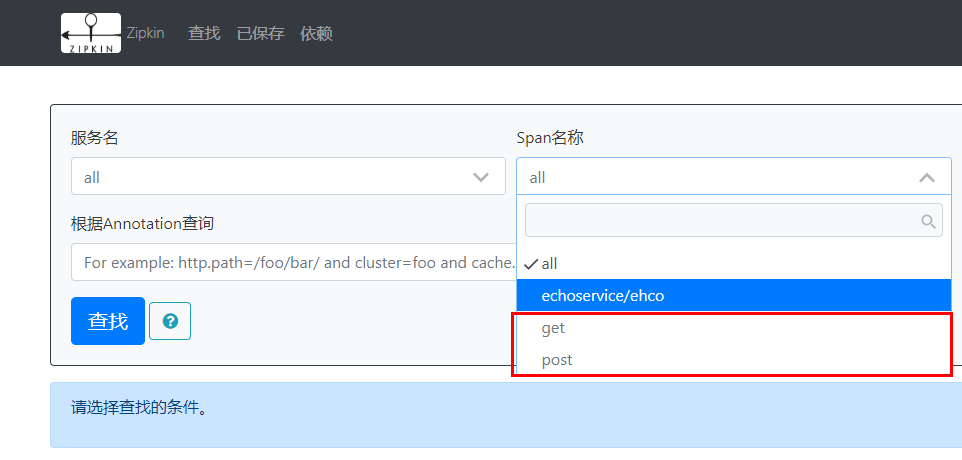
- 如果仍然想查看,某个请求路径的调用情况呢?

- 以上介绍的方式,链路信息均通过 HTTP 发送到 Zipkin-Server 上,生产上为了不影响主流程的性能,可考虑使用消息队列。
Reference
- github 源代码:https://github.com/JMCuixy/dubbo-demo

若有收获,就点个赞吧
0 人点赞


