ECMAScript
简称ES,通常看作JavaScript的标准化规范
实际上JavaScript是ECMAScript的扩展语言
ECMAScript只提供了最基本的语法,也就是说约定了代码该如何编写
只停留在语言层面,并不能直接用来在实际应用中的功能开发
JavaScript实现了ECMAScript的语言标准,并且在此基础之上做了一些扩展,使得我们可以在浏览器环境中
操作DOM BOM,在node环境中做读写文件之类的操作
1:JavaScript在浏览器环境当中,等于ECMAScript + Web APIs(web提供的API,即BOM DOM)
2:node环境中使用JavaScript,等于ECMAScript + Node APIs(如fs net etc.)
JavaScript语言本身指的就是ECMAScript
从2015年开始ES开始每年保持一个大版本的迭代,ES2015又被常称为ES6
市面上主流环境开始渐渐支持这些新特性
ES2015 — 习惯这之后更新的版本的都叫ES6(特指、泛指)- 变化较大,新标准多
Nodemon- 修改完代码后可以自动执行代码
- 安装到项目中 yarn add nodemon —dev
- 使用 yarn nodemon XXX.js
块级作用域- let 用花括号括起来的范围{}
- const
const obj = {}obj.name = 'zce' //被允许,内存指向只能定义一次,但时面属性可以改变
数组的解构const arr = [100, 200, 300];const [, , baz] = arr;console.log(baz) //300const [foo, ...rest] = arr;console.log(rest); //[200, 300] ... 提取级数剩余元素,只能在最后使用const [foo, bar, baz, more] = arrconsole.log(more) //undefinedconst [foo, bar, baz = 123, more = 'default value'] = arrconsole.log(baz, more) //300 default value
对象的解构
```javascript const obj = { name: ‘zce’, age: 18 }
// const { name } = obj // console.log(name) //zce
// const name = ‘tom’ // const { name: objName } = obj // console.log(objName) //zce
const { log } = console log(‘foo’)
- <br />模板字符串- 支持换行- 支持插值表达式```javascript// 反引号包裹// const str = `hello es2015, this is a string`// 允许换行// const str = `hello es2015,// this is a \`string\``// console.log(str)const name = 'tom'// 可以通过 ${} 插入表达式,表达式的执行结果将会输出到对应位置const msg = `hey, ${name} --- ${1 + 2} ---- ${Math.random()}`console.log(msg)
带标签的模板字符串const name = 'tom'const gender = falsefunction myTagFunc (strings) {//console.log(strings) //[ 'hey, ', ' is a ', '.' ]// return '123'//const sex = gender ? 'man' : 'woman'return strings[0] + name + strings[1] + sex + strings[2] //hey, tom is a woman.}const result = myTagFunc`hey, ${name} is a ${gender}.`
字符串的扩展方法- startsWith()
- endsWith()
- includes()
参数默认值// 默认参数一定是在形参列表的最后function foo1 (enable = true) {console.log('foo invoked - enable: ')console.log(enable)}foo1(false) //false 默认参数只有在没有传递实参,或者传递undefined的时候才会被使用
剩余参数function foo (first, ...args) {console.log(args)}foo(1, 2, 3, 4) //[ 2, 3, 4 ]
展开数组const arr = ['foo', 'bar', 'baz']// console.log.apply(console, arr)console.log(...arr) //与上等效 foo bar baz
箭头函数- 箭头函数不会改变this指向
对象字面量的增强
```javascript const bar = ‘345’const obj = {
foo: 123,// bar: bar// 属性名与变量名相同,可以省略 : barbar,// method1: function () {// console.log('method111')// }// 方法可以省略 : functionmethod1 () {console.log('method111')// 这种方法就是普通的函数,同样影响 this 指向。console.log(this)},// Math.random(): 123 // 不允许// 通过 [] 让表达式的结果作为属性名
[bar]: 123}// obj[Math.random()] = 123console.log(obj)obj.method1()
- <br />Object.assign<br />```javascript// const source1 = {// a: 123,// b: 123// }// const source2 = {// b: 789,// d: 789// }// const target = {// a: 456,// c: 456// }// const result = Object.assign(target, source1, source2)// console.log(target) { a:123,c:456,b:789,d:789}// console.log(result === target) true// 应用场景function func (obj) {// obj.name = 'func obj'// console.log(obj)const funcObj = Object.assign({}, obj)funcObj.name = 'func obj'console.log(funcObj)}const obj = { name: 'global obj' }func(obj)console.log(obj)
Object.isconsole.log(// 0 == false // => true// 0 === false // => false// +0 === -0 // => true// NaN === NaN // => false// Object.is(+0, -0) // => false// Object.is(NaN, NaN) // => true)
Proxy
为对象设置访问代理器
监视到对象的读写过程
vue3使用proxy实现数据内部的响应
defineProperty只能监视属性的读写
Proxy能够监视到更多对象操作,比如delete操作、对对象中方法的调用
proxy handler方法,如下图
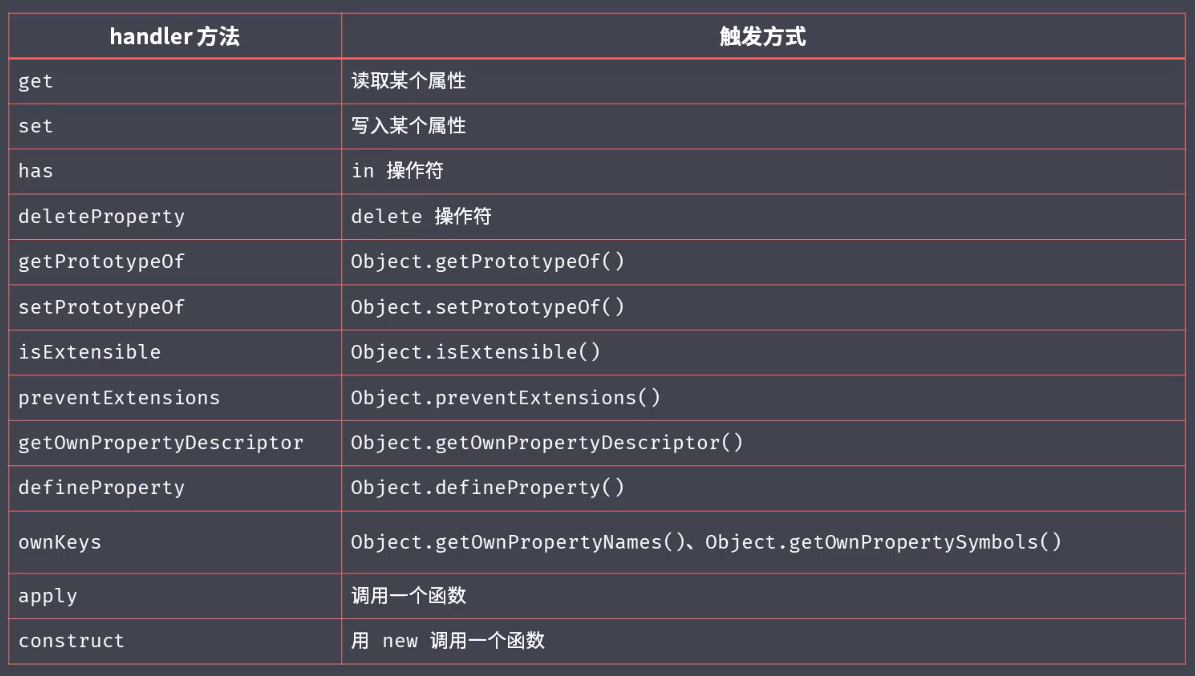
proxy能更好的支持数组对象的监视// const person = {// name: 'zce',// age: 20// }// const personProxy = new Proxy(person, {// // 监视属性读取// get (target, property) {// return property in target ? target[property] : 'default'// // console.log(target, property)// // return 100// },// // 监视属性设置// set (target, property, value) {// if (property === 'age') {// if (!Number.isInteger(value)) {// throw new TypeError(`${value} is not an int`)// }// }// target[property] = value// // console.log(target, property, value)// }// })// personProxy.age = 100// personProxy.gender = true// console.log(personProxy.name)// console.log(personProxy.xxx)// Proxy 对比 Object.defineProperty() ===============// 优势1:Proxy 可以监视读写以外的操作 --------------------------// const person = {// name: 'zce',// age: 20// }// const personProxy = new Proxy(person, {// deleteProperty (target, property) {// console.log('delete', property)// delete target[property]// }// })// delete personProxy.age// console.log(person)// 优势2:Proxy 可以很方便的监视数组操作 --------------------------// const list = []// const listProxy = new Proxy(list, {// set (target, property, value) {// console.log('set', property, value)// target[property] = value// return true // 表示设置成功// }// })// listProxy.push(100)// listProxy.push(100)// 优势3:Proxy 不需要侵入对象 --------------------------// const person = {}// Object.defineProperty(person, 'name', {// get () {// console.log('name 被访问')// return person._name// },// set (value) {// console.log('name 被设置')// person._name = value// }// })// Object.defineProperty(person, 'age', {// get () {// console.log('age 被访问')// return person._age// },// set (value) {// console.log('age 被设置')// person._age = value// }// })// person.name = 'jack'// console.log(person.name)// Proxy 方式更为合理const person2 = {name: 'zce',age: 20}const personProxy = new Proxy(person2, {get (target, property) {console.log('get', property)return target[property]},set (target, property, value) {console.log('set', property, value)target[property] = value}})personProxy.name = 'jack'console.log(personProxy.name)
Reflect- 统一的对象操作API,属于一个静态类
- Reflect成员方法就是Proxy处理对象的默认实现
// const obj = {// foo: '123',// bar: '456'// }// const proxy = new Proxy(obj, {// get (target, property) {// console.log('watch logic~')// return Reflect.get(target, property)// }// })// console.log(proxy.foo)const obj = {name: 'zce',age: 18}// console.log('name' in obj)// console.log(delete obj['age'])// console.log(Object.keys(obj))console.log(Reflect.has(obj, 'name'))console.log(Reflect.deleteProperty(obj, 'age'))console.log(Reflect.ownKeys(obj))
class staticclass Person {constructor (name) {this.name = name}say () {console.log(`hi, my name is ${this.name}`)}static create (name) {return new Person(name)}}// const p = new Person('tom')// p.say()const tom = Person.create('tom')tom.say()
extendclass Person {constructor (name) {this.name = name}say () {console.log(`hi, my name is ${this.name}`)}}class Student extends Person {constructor (name, number) {super(name) // 父类构造函数this.number = number}hello () {super.say() // 调用父类成员console.log(`my school number is ${this.number}`)}}const s = new Student('jack', '100')s.hello()
Set 数据结构- 集合,与数组类似,但内部成员不允许重复
如果重复添加,会忽略 ```javascript const s = new Set()
s.add(1).add(2).add(3).add(4).add(2)
// console.log(s)
// s.forEach(i => console.log(i))
// for (let i of s) { // console.log(i) // }
// console.log(s.size)
// console.log(s.has(100))
// console.log(s.delete(3)) console.log(s) //Set { 1, 2, 3, 4 }
// s.clear()// console.log(s)// 应用场景:数组去重const arr = [1, 2, 1, 3, 4, 1]// const result = Array.from(new Set(arr))const result = [...new Set(arr)]console.log(result) //[ 1, 2, 3, 4 ]// 弱引用版本 WeakSet// 差异就是 Set 中会对所使用到的数据产生引用// 即便这个数据在外面被消耗,但是由于 Set 引用了这个数据,所以依然不会回收// 而 WeakSet 的特点就是不会产生引用,// 一旦数据销毁,就可以被回收,所以不会产生内存泄漏问题。
- <br />map<br />```javascript// const obj = {}// obj[true] = 'value'// obj[123] = 'value'// obj[{ a: 1 }] = 'value'// console.log(Object.keys(obj))// console.log(obj['[object Object]'])const m = new Map()const tom = { name: 'tom' }m.set(tom, 90)console.log(m) //Map { { name: 'tom' } => 90 }console.log(m.get(tom)) //90// m.has()// m.delete()// m.clear()m.forEach((value, key) => {console.log(value, key) //90 { name: 'tom' }})// 弱引用版本 WeakMap// 差异就是 Map 中会对所使用到的数据产生引用// 即便这个数据在外面被消耗,但是由于 Map 引用了这个数据,所以依然不会回// 一旦数据销毁,就可以被回收,所以不会产生内存泄漏问题。
Symbol- 一种全新的原始数据类型
- 表示一个独一无二的值
- 从2015年开始,对象可以直接使用Symbol类型的值作为属性名
- 最主要的作用就是为对象添加独一无二的属性名
// Symbol 数据类型// 场景1:扩展对象,属性名冲突问题// // shared.js ====================================// const cache = {}// // a.js =========================================// cache['a_foo'] = Math.random()// // b.js =========================================// cache['b_foo'] = '123'// console.log(cache)// =========================================================// const s = Symbol()// console.log(s)// console.log(typeof s)// 两个 Symbol 永远不会相等// console.log(// Symbol() === Symbol()// )// Symbol 描述文本// console.log(Symbol('foo'))// console.log(Symbol('bar'))// console.log(Symbol('baz'))// 使用 Symbol 为对象添加用不重复的键// const obj = {}// obj[Symbol()] = '123'// obj[Symbol()] = '456'// console.log(obj) //{ [Symbol()]: '123', [Symbol()]: '456' }// 也可以在计算属性名中使用// const obj = {// [Symbol()]: 123// }// console.log(obj)// =========================================================// 案例2:Symbol 模拟实现私有成员// a.js ======================================const name = Symbol()const person = {[name]: 'zce',say () {console.log(this[name])}}// 只对外暴露 person// b.js =======================================// 由于无法创建出一样的 Symbol 值,// 所以无法直接访问到 person 中的「私有」成员// person[Symbol()]person.say()
Symbol.for(‘xxx’)- 维护了一个全局的注册表,为我们的字符串和symbol值提供了一个一一对应的关系
Symbol.toStringTag 是内置的一个Symbol常量,为对象实现迭代器时,会经常用到
// Symbol 补充// console.log(// // Symbol() === Symbol()// Symbol('foo') === Symbol('foo')// )// Symbol 全局注册表 ----------------------------------------------------// const s1 = Symbol.for('foo')// const s2 = Symbol.for('foo')// console.log(s1 === s2)// console.log(// Symbol.for(true) === Symbol.for('true')// )// 内置 Symbol 常量 ---------------------------------------------------// console.log(Symbol.iterator)// console.log(Symbol.hasInstance)// const obj = {// [Symbol.toStringTag]: 'XObject'// }// console.log(obj.toString())// Symbol 属性名获取 ---------------------------------------------------const obj = {[Symbol()]: 'symbol value',foo: 'normal va1lue'}for (var key in obj) {console.log(key) //foo}console.log(obj); //{ foo: 'normal value', [Symbol()]: 'symbol value' }console.log(Object.keys(obj)) //[ 'foo' ]console.log(JSON.stringify(obj)) //{"foo":"normal value"}console.log(Object.getOwnPropertySymbols(obj)) //[ Symbol() ]
for-of// for...of 循环const arr = [100, 200, 300, 400]for (const item of arr) {console.log(item)}// for...of 循环可以替代 数组对象的 forEach 方法arr.forEach(item => {console.log(item)})// for (const item of arr) {// console.log(item)// if (item > 100) {// break// }// }// forEach 无法跳出循环,必须使用 some 或者 every 方法// arr.forEach() // 不能跳出循环// arr.some()// arr.every()// 遍历 Set 与遍历数组相同const s = new Set(['foo', 'bar'])for (const item of s) {console.log(item)}// 遍历 Map 可以配合数组结构语法,直接获取键值const m = new Map()m.set('foo', '123')m.set('bar', '345')for (const [key, value] of m) {console.log(key, value)}// 普通对象不能被直接 for...of 遍历const obj = { foo: 123, bar: 456 }for (const item of obj) {console.log(item)}
迭代器(Iterator)// 迭代器(Iterator)const set = new Set(['foo', 'bar', 'baz11'])const iterator = set[Symbol.iterator]()// console.log(iterator.next())// console.log(iterator.next())// console.log(iterator.next())// console.log(iterator.next())// console.log(iterator.next())while (true) {const current = iterator.next()if (current.done) {break // 迭代已经结束了,没必要继续了}console.log(current.value)}
实现可迭代接口(Iterable)// const obj = {// [Symbol.iterator]: function () {// return {// next: function () {// return {// value: 'zce',// done: true// }// }// }// }// }const obj = {store: ['foo', 'bar', 'baz'],[Symbol.iterator]: function () {let index = 0const self = thisreturn {next: function () {const result = {value: self.store[index],done: index >= self.store.length}index++return result}}}}for (const item of obj) {console.log('循环体', item)//循环体 foo//循环体 bar//循环体 baz}
迭代器设计模式
// 迭代器设计模式// 场景:你我协同开发一个任务清单应用// 我的代码 ===============================const todos = {life: ['吃饭', '睡觉', '打豆豆'],learn: ['语文', '数学', '外语'],work: ['喝茶'],// 提供统一遍历访问接口each: function (callback) {const all = [].concat(this.life, this.learn, this.work)for (const item of all) {callback(item)}},//提供迭代器(ES2015 统一遍历访问接口)[Symbol.iterator]: function () {const all = [...this.life, ...this.learn, ...this.work]let index = 0return {next: function () {return {value: all[index],done: index++ >= all.length}}}}}todos.each(function (item) {console.log(item)})console.log('-------------------------------')for (const item of todos) {console.log(item)}
// Generator 应用// 案例1:发号器function * createIdMaker () {let id = 1while (true) {yield id++}}const idMaker = createIdMaker()console.log(idMaker.next().value)console.log(idMaker.next().value)console.log(idMaker.next().value)console.log(idMaker.next().value)// 案例2:使用 Generator 函数实现 iterator 方法const todos = {life: ['吃饭', '睡觉', '打豆豆'],learn: ['语文', '数学', '外语'],work: ['喝茶'],[Symbol.iterator]: function * () {const all = [...this.life, ...this.learn, ...this.work]for (const item of all) {yield item}}}for (const item of todos) {console.log(item)}
ES Modules- 语言层面的模块化标准
- 会在模块那里详解
ES2016Array.prototype.includes
//旧const arr = ['foo', 1, NaN, false];console.log(arr.indexOf('bar')) //-1console.log(arr.includes('foo')) true
指数运算符
//2的10次方console.log(Math.pow(2,10));console.log(2 ** 10);
ES2017
```javascript const obj = {foo: 'value1',bar: 'value2'
}
//Object.values() //Object.entries() //Object.getOwnPropertyDescriptors() console.log(Object.values(obj)); //[‘value1’, ‘value2’]
console.log(Object.entries(obj)); //[[‘foo’, ‘value1’], [‘bar’, ‘value2]]
for(const [key, value] of Object.entries(obj)) {
console.log(key,value);//for value1//bar value2
}
console.log(new Map(Object.entries(obj))) //Map { ‘foo’ => ‘value1’, ‘bar’ => ‘value2’ }
const p1 = {firName: 'Lei',laName: 'Wang',get fullName() {return this.firName + ' ' + this.laName}}const des = Object.getOwnPropertyDescriptors(p1);const p2 = Object.defineProperties({}, des)p2.firName = "zce"console.log(p2.fullName)//字符串填充方法//String.prototype.padStart/padEndconst books = {html: 5,css: 16,javascript: 128}for(const [name, count] of Object.entries(books)) {console.log(`${name.padEnd(16, '-')} | ${count.toString().padStart(3, '0')}`);}//在函数参数中添加尾逗号//如果想重新排列数组顺序,调整起来容易//如果修改元素中个数,方便插入const arr = {100,200,300,}//Async / Await//解决异步深嵌
```

若有收获,就点个赞吧
0 人点赞


