1. Mach-O
Mach-O(Mach Object)是macOS、iOS、iPadOS 存储程序(可执行文件)、库(动态库和静态库)或者目标文件(.o)的文件格式,是一个可读可写的二进制文件。对应系统通过应用二进制接口(application binary interface,缩写为ABI)来运行该格式的文件。
Mach-O格式用来替代BSD系统的a.out格式。Mach-O文件格式保存了在 编译过程和链接过程中产生的机器代码和数据,从而为静态链接和动态链接的代码提供了单一文件格式。
2. 可执行文件的调用过程:
- 调用
fork函数,创建一个process
2. 调用execve或其衍生函数,在该进程上加载Mach-O文件到虚拟内存中
3. 开始分析Mach-O中的Mach Header,以确认它是有效可执行的Mach-O文件,即文件类型为EXCUTE的。3. mach-o内部的格式
Mach-O = Mach Header + 二进制代码. 如下图所示: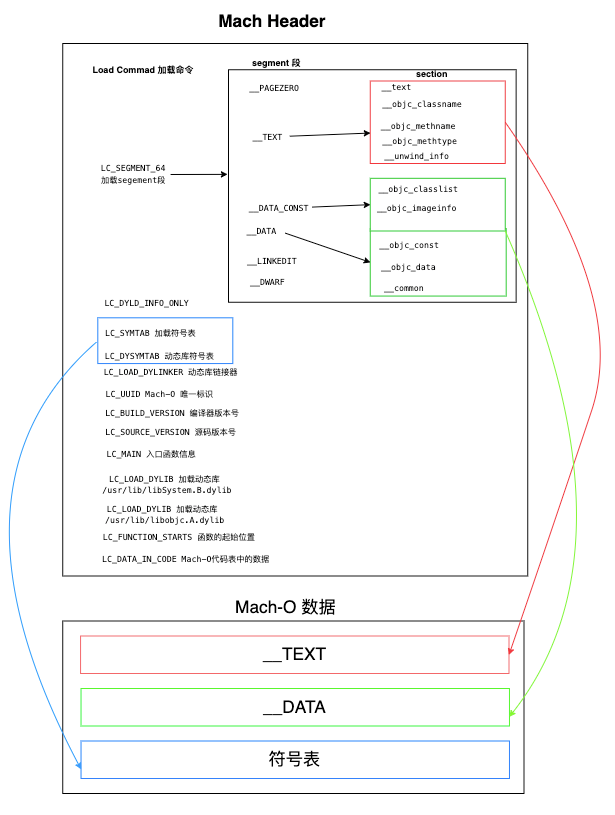
header 中存放的是Mach-O的配置信息,包含Mach-O文件的类型,动态库信息,静态库信息,代码段的大小及偏移,main函数的位置,链接器等信息。3.1 Mach-O 可读
3.1.1 读取 Mach Header
objdump和otool命令,均可读取 Mach-O 内部数据。1. 读取 Mach Header 总览信息
获取 Mach-O 的一些基础信息,如支持的CPU架构、文件的类型、Load Commond数量及大小等。 ``` // 读取 Mach Header(可读性比较好) // —macho 可缩写为 -m objdump —macho -private-header ${MACH-PATH}
// 显示整个文件头的内容, 缩写为 -f —file-headers - Display the contents of the overall file header
随便找一个 Mach-O 文件,执行一下:<br /><br />**与目标文件的格式一样,动态库与静态库的类型为OBJECT ,只能被链接,不能被执行。**<a name="Rzsdy"></a>#### 2.读取 Mach Header 的所有信息
// —all-headers 可缩写为-x objdump -macho —all-headers test
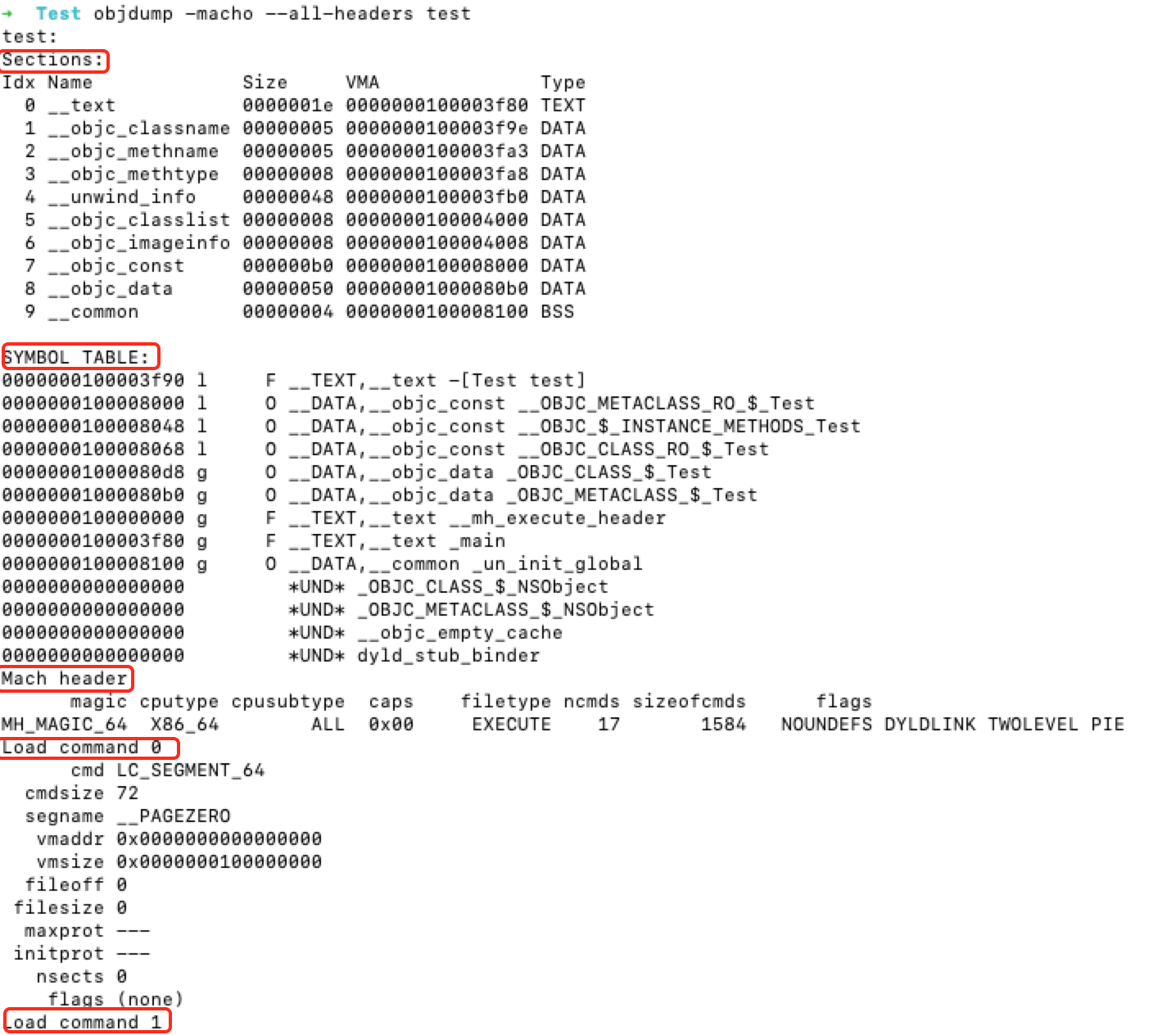
<a name="NGTu7"></a>
### 3.1.2 读取Mach-O绑定信息
—bind - Display mach-o binding inf —lazy-bind - Display mach-o lazy binding info —weak-bind - Display mach-o weak binding info
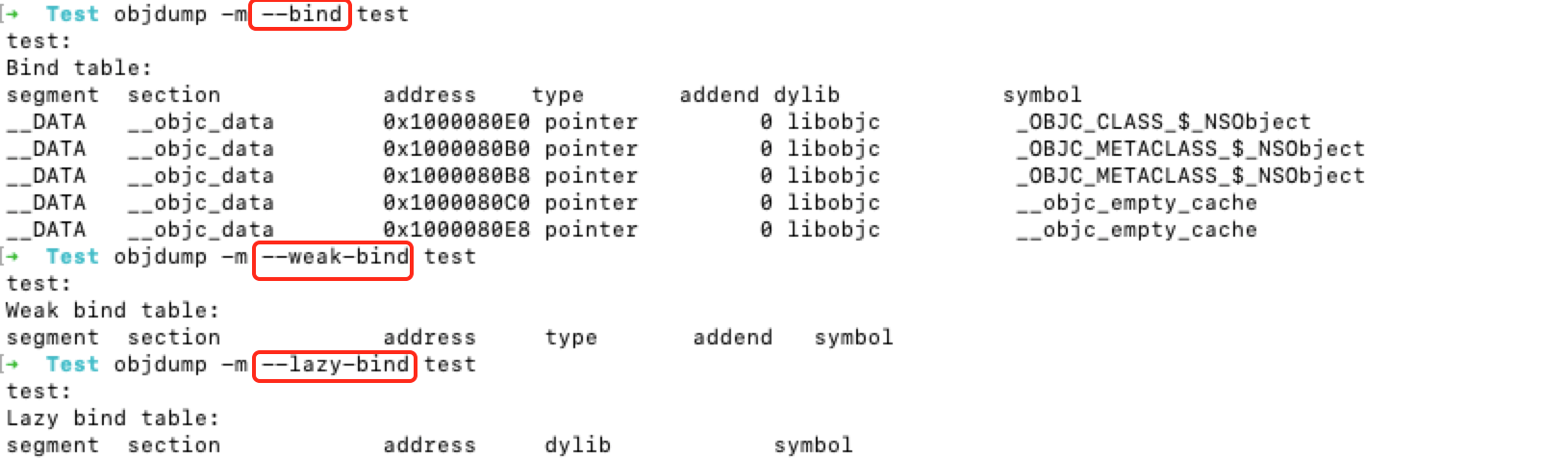
<a name="Aitlp"></a>
###
<a name="nTZaE"></a>
### 3.1.4 显示机器指令的汇编助记符
// -d - Alias for —disassemble
—disassemble - Display assembler mnemonics for the machine instructions
// -D - Alias for —disassemble-all
—disassemble-all - Display assembler mnemonics for the machine instructions
—disassemble-functions=
```
// 读取__TEXT段机器指令的汇编助记符
objdump --macho -d ${MACH-PATH}
 __text 中存储的代码: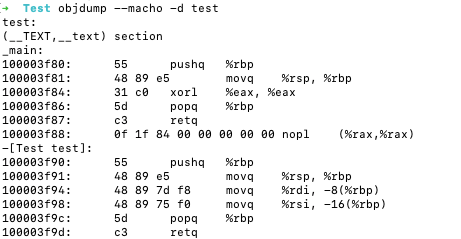
3.1.5 读取 section 信息
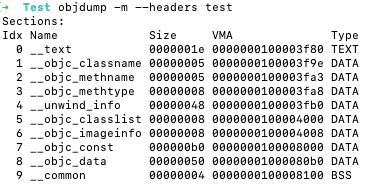
1.读取 section header 的信息
// --section-headers可缩写为 --headers 或者 -h
objdump -m --section-headers test
2. 读取section 全部信息
// 缩写为-s
objdump -m --full-contents  test.o

3.1.6 objdump所有参数
objdump --help查看帮助文档,或者man objdump
USAGE: objdump [options] <input object files>

OPTIONS:

Generic Options:

  --help                           - Display available options (--help-hidden for more)
  --help-list                      - Display list of available options (--help-list-hidden for more)
  --version                        - Display the version of this program

llvm-objdump MachO Specific Options:

  --arch=<string>                  - architecture(s) from a Mach-O file to dump
  --archive-member-offsets         - Print the offset to each archive member for Mach-O archives (requires -macho and -archive-headers)
  --bind                           - Display mach-o binding info
  --data-in-code                   - Print the data in code table for Mach-O objects (requires -macho)
  --dis-symname=<string>           - disassemble just this symbol's instructions (requires -macho)
  --dsym=<string>                  - Use .dSYM file for debug info
  --dylib-id                       - Print the shared library's id for the dylib Mach-O file (requires -macho)
  --dylibs-used                    - Print the shared libraries used for linked Mach-O files (requires -macho)
  --exports-trie                   - Display mach-o exported symbols
  --full-leading-addr              - Print full leading address
  -g                               - Print line information from debug info if available
  --indirect-symbols               - Print indirect symbol table for Mach-O objects (requires -macho)
  --info-plist                     - Print the info plist section as strings for Mach-O objects (requires -macho)
  --lazy-bind                      - Display mach-o lazy binding info
  --link-opt-hints                 - Print the linker optimization hints for Mach-O objects (requires -macho)
  --no-leading-headers             - Print no leading headers
  --no-symbolic-operands           - do not symbolic operands when disassembling (requires -macho)
  --non-verbose                    - Print the info for Mach-O objects in non-verbose or numeric form (requires -macho)
  --objc-meta-data                 - Print the Objective-C runtime meta data for Mach-O files (requires -macho)
  --private-header                 - Display only the first format specific file header
  --rebase                         - Display mach-o rebasing info
  --universal-headers              - Print Mach-O universal headers (requires -macho)
  --weak-bind                      - Display mach-o weak binding info

llvm-objdump Options:

  -C                               - Alias for --demangle
  -D                               - Alias for --disassemble-all
  -M                               - Alias for --disassembler-options
  -R                               - Alias for --dynamic-reloc
  -S                               - Alias for -source
  -a                               - Alias for --archive-headers
  --adjust-vma=<offset>            - Increase the displayed address by the specified offset
  --all-headers                    - Display all available header information
  --arch-name=<string>             - Target arch to disassemble for, see -version for available targets
  --archive-headers                - Display archive header information
  -d                               - Alias for --disassemble
  --demangle                       - Demangle symbols names
  --disassemble                    - Display assembler mnemonics for the machine instructions
  --disassemble-all                - Display assembler mnemonics for the machine instructions
  --disassemble-functions=<string> - List of functions to disassemble. Accept demangled names when --demangle is specified, otherwise accept mangled names
  --disassemble-zeroes             - Do not skip blocks of zeroes when disassembling
  --disassembler-options=<options> - Pass target specific disassembler options
  --dwarf=<value>                  - Dump of dwarf debug sections:
    =frames                        -   .debug_frame
  --dynamic-reloc                  - Display the dynamic relocation entries in the file
  -f                               - Alias for --file-headers
  --fault-map-section              - Display contents of faultmap section
  --file-headers                   - Display the contents of the overall file header
  --full-contents                  - Display the content of each section
  -h                               - Alias for --section-headers
  --headers                        - Alias for --section-headers
  -j                               - Alias for --section
  -l                               - Alias for --line-numbers
  --line-numbers                   - Display source line numbers with disassembly. Implies disassemble object
  -m                               - Alias for --macho
  --macho                          - Use MachO specific object file parser
  --mattr=<a1,+a2,-a3,...>         - Target specific attributes
  --mcpu=<cpu-name>                - Target a specific cpu type (-mcpu=help for details)
  --no-leading-addr                - Print no leading address
  --no-show-raw-insn               - When disassembling instructions, do not print the instruction bytes.
  -p                               - Alias for --private-headers
  --print-imm-hex                  - Use hex format for immediate values
  --private-headers                - Display format specific file headers
  -r                               - Alias for --reloc
  --raw-clang-ast                  - Dump the raw binary contents of the clang AST section
  --reloc                          - Display the relocation entries in the file
  -s                               - Alias for --full-contents
  --section=<string>               - Operate on the specified sections only. With -macho dump segment,section
  --section-headers                - Display summaries of the headers for each section.
  --show-lma                       - Display LMA column when dumping ELF section headers
  --source                         - Display source inlined with disassembly. Implies disassemble object
  --start-address=<address>        - Disassemble beginning at address
  --stop-address=<address>         - Stop disassembly at address
  --syms                           - Display the symbol table
  -t                               - Alias for --syms
  --triple=<string>                - Target triple to disassemble for, see -version for available targets
  -u                               - Alias for --unwind-info
  --unwind-info                    - Display unwind information
  --wide                           - Ignored for compatibility with GNU objdump
  -x                               - Alias for --all-headers
  -z                               - Alias for --disassemble-zeroes
3.1.7 otool
// 读取 Mach Header 所有原始信息(可读性比较差)
otool -h ${MACH-PATH}

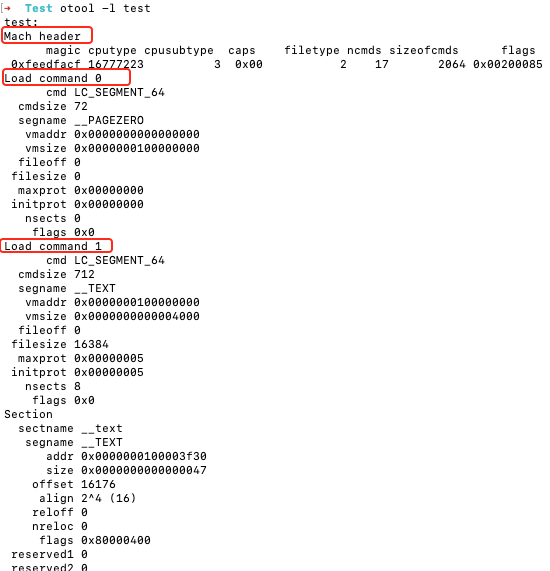
// 读取 Mach-O load commad 信息
otool -l  ${MACH-PATH}
otool 所有命令:man otool
otool [-arch arch_type] [-fahlLDtdorSTMRIHGvVcXmqQjCP] [-mcpu=arg] [--version] <object file> ...
    -f print the fat headers
    -a print the archive header
    -h print the mach header
    -l print the load commands
    -L print shared libraries used
    -D print shared library id name
    -t print the text section (disassemble with -v)
    -x print all text sections (disassemble with -v)
    -p <routine name>  start dissassemble from routine name
    -s <segname> <sectname> print contents of section
    -d print the data section
    -o print the Objective-C segment
    -r print the relocation entries
    -S print the table of contents of a library (obsolete)
    -T print the table of contents of a dynamic shared library (obsolete)
    -M print the module table of a dynamic shared library (obsolete)
    -R print the reference table of a dynamic shared library (obsolete)
    -I print the indirect symbol table
    -H print the two-level hints table (obsolete)
    -G print the data in code table
    -v print verbosely (symbolically) when possible
    -V print disassembled operands symbolically
    -c print argument strings of a core file
    -X print no leading addresses or headers
    -m don't use archive(member) syntax
    -B force Thumb disassembly (ARM objects only)
    -q use llvm's disassembler (the default)
    -Q use otool(1)'s disassembler
    -mcpu=arg use `arg' as the cpu for disassembly
    -j print opcode bytes
    -P print the info plist section as strings
    -C print linker optimization hints
    --version print the version of /Applications/Xcode.app/Contents/Developer/Toolchains/XcodeDefault.xctoolchain/usr/bin/otool
2. Mach-O 可写
macho可修改,修改后需要重新签名。 2016年,iphone7,8的时候,限制TEXT.text 段最大60M,现在改成500M了,有项目比较大的人,为了符合苹果规定,将text 移到别的段,同时对应修改了 Mach Header 中指向text 的 LOAD Commad __TEXT ,然后重新签名上架。

若有收获,就点个赞吧
0 人点赞


