

Go tutorial
Why Go? good support for threads convenient RPC type safe garbage-collected (no use after freeing problems) threads + GC is particularly attractive!
支持多线程,
为什么用 Go
- 语法先进。在语言层面支持线程(goroutine)和管道(channel)。对线程间的加锁、同步支持良好。
- 类型安全(type safe)。内存访问安全(memory safe),很难写出像 C++ 一样内存越界访问等 bug。
- 支持垃圾回收(GC)。不需要用户手动管理内存,这一点在多线程编程中尤为重要,因为在多线程中你很容易引用某块内存,然后忘记了在哪引用过。
- 简洁直观。没 C++ 那么多复杂的语言特性,并且在报错上很友好。
Effective Go
https://golang.org/doc/effective_go.html
A tour of go
https://go.dev/tour/welcome/1
Basics
Packages, variables, and functions
Packages
Every Go program is made up of packages
Programs start running in package main
Imports
import ("fmt""math")
Exported Names
In Go, a name is exported if it begins with a capitla letter
package main

import (
    "fmt"
    "math"
)

func main() {
    fmt.Println(math.Pi)
}
Functions
A function can take zero or more arguments.
Functions continued
x int, y intshortened tox, y int
Multiple results
Named return values
A return statement without arguments reutrns the named return values
Variables
Variables with initializers
Flow control statement,: for, if, else, switch and defer
If
Go’s if statements are like its for loops; the expression need not be surrounded by parentheses ( ) but the braces { } are required.
package main

import (
    "fmt"
    "math"
)

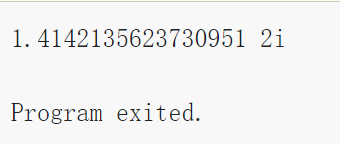
func sqrt(x float64) string {
    if x < 0 {
        return sqrt(-x) + "i"
    }
    return fmt.Sprint(math.Sqrt(x))
}

func main() {
    fmt.Println(sqrt(2), sqrt(-4))

}
If with a short statement
Like for, the if statement can start with a short statement to execute before the condition.
package main

import (
    "fmt"
    "math"
)

func pow(x, n, lim float64) float64 {
    if v := math.Pow(x, n); v < lim {
        return v
    }

    return lim

}

func main() {
    fmt.Println(
        pow(3, 2, 10),
        pow(3, 3, 20),
    )
}
这里的math.Pow表示指数计算
If and else
Variables declared inside an if short statement are also available inside any of the else blocks.
package main

import (
    "fmt"
    "math"
)

func pow(x, n, lim float64) float64 {
    if v := math.Pow(x, n); v < lim {
        return v
    } else {
        fmt.Printf("%g >= %g\n", v, lim)
    }
    return lim
}

func main() {
    fmt.Println(
        pow(3, 2, 10),
        pow(3, 3, 20),
    )
}

Exercise: Loops and Functions
package main

import (
    "fmt"
)

func Sqrt(x float64) float64 {
    z := 1.0

    for v:=1; v< 10; v ++{
        fmt.Println(z)
        z -=(z * z -x)/ (2 * z)

    }

    return z
}

func main() {
    fmt.Println(Sqrt(2))
}
Switch
A switch statement is a shorter way to write a sequence of if - else statements. It runs the first case whose value is equal to the condition expression.
package main

import (
    "fmt"
    "runtime"
)

func main() {
    fmt.Print("Go runs on ")

    switch os := runtime.GOOS; os {
    case "darwin":
        fmt.Println("Os X.")
    case "linux":
        fmt.Println("Linux.")
    default:
        fmt.Printf("%s.\n", os)
    }
}

Switch evaluation order
Switch cases evaluate cases from top to bottom, stopping when a case succeeds.
package main

import (
    "fmt"

    "time"
)

func main() {
    fmt.Println("When's Saturday")

    today := time.Now().Weekday()
    switch time.Saturday {
    case today + 0:
        fmt.Println("Today.")
    case today + 1:
        fmt.Println("Tomorrow.")
    case today + 2:
        fmt.Println("Int two days,")

    default:
        fmt.Println("Too far away.")
    }

}
Switch with no condition
Switch without a condition is the same as switch true.
package main

import (
    "fmt"
    "time"
)

func main() {
    t := time.Now()

    switch {
    case t.Hour() < 12:
        fmt.Println("")
    case t.Hour() < 17:
        fmt.Println("Good afternoon.")
    default:
        fmt.Println("Good evening.")

    }
}
Defer
A defer statement defers the execution of a function until the surrounding function returns.
defer 表示最后再执行
package main

import "fmt"

func main() {
    defer fmt.Println("world")
    fmt.Println("Hello")
}
Stacking defers
Deferred function calls are pushed onto a stack. When a function returns, its deferred calls are executed in last-in-first-out order.
存入栈中
package main

import "fmt"

func main() {
    fmt.Println("counting")

    for i := 0; i < 10; i++ {
        defer fmt.Println(i)
    }

    fmt.Println("done")
}

More types: structs, slices, and maps
Pointers
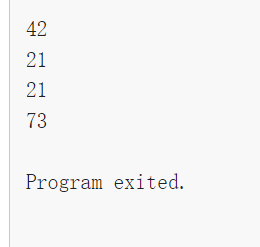
package main

import "fmt"

func main() {
    i, j := 42, 2701

    //p作为指针指向i
    p := &i
    fmt.Println(*p)
    //p指向的数值改成21
    *p = 21
    fmt.Println(*p)

    fmt.Println(i)

    //p作为j的指针
    p = &j
    // p指向的数进行计算
    *p = *p / 37

    fmt.Println(j)

}
Structs
A struct is a collection of fields.
package main

import "fmt"

type Vertex struct {
    X int
    Y int
}

func main() {
    fmt.Println(Vertex{1, 2})
}

Struct Fields
package main

import "fmt"

type Vertex struct {
    X int
    Y int
}

func main() {
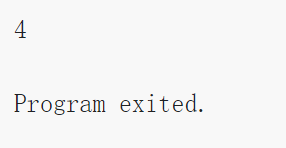
    v := Vertex{1, 2}

    v.X = 4

    fmt.Println(v.X)
}
Pointers to structs
Struct fields can be accessed through a struct pointer.
package main

import "fmt"

type Vertex struct {
    X int
    Y int
}

func main() {
    v := Vertex{1, 2}
    p := &v
    p.X = 1e9
    fmt.Println(v)
}
Struct Literals
A struct literal denotes a newly allocated struct value by listing the values of its fields.
package main
package main

import "fmt"

type Vertex struct {
    X, Y int
}

var (
    v1 = Vertex{1, 2}
    v2 = Vertex{X: 1}
    v3 = Vertex{}
    p  = &Vertex{1, 2}
)

func main() {
    fmt.Println(v1, p, v2, v3)
}
Arrays
The expressionvar a [10]int
package main

import "fmt"

func main() {
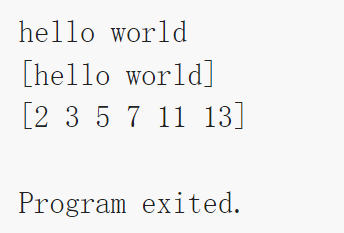
    var a [2]string
    a[0] = "hello"
    a[1] = "world"
    fmt.Println(a[0], a[1])
    fmt.Println(a)

    primes := [6]int{2, 3, 5, 7, 11, 13}

    fmt.Println(primes)

}
Slices
An array has a fixed size. A slice, on the other hand, is a dynamically-sized, flexible view into the elements of an array
切片,动态数组
The type []T is a slice with elements of type T.
package main

import "fmt"

func main() {
    primes := [6]int{2, 3, 5, 7, 11, 13}

    var s []int = primes[1:4]

    fmt.Println(s)
}
从primes中取1:4元素
Slices are like references to arrays
A slice does not store any data, it just describes a section of an underlying array.
只是表示一部分underlying array
package main

import "fmt"

func main() {
    names := [4]string{
        "John",
        "Paul",
        "George",
        "Ringo",
    }

    fmt.Println(names)

    a := names[0:2]

    b := names[1:3]

    fmt.Println(a, b)
    b[0] = "XXX"

    fmt.Println(a, b)
    fmt.Println(names)
}

Slice literals
Slice Literal 切片字面量
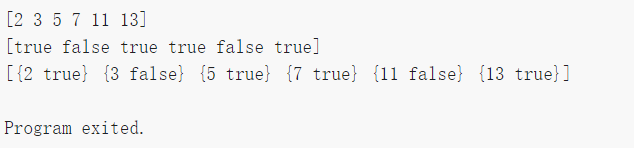
A slice literal is like an array literal without the length.[3]bool{true, true, false}[]bool{true, true, false}
package main

import "fmt"

func main() {
    q := []int{2, 3, 5, 7, 11, 13}

    fmt.Println(q)

    r := []bool{true, false, true, true, false, true}

    fmt.Println(r)

    s := []struct {
        i int
        b bool
    }{
        {2, true},
        {3, false},
        {5, true},
        {7, true},
        {11, false},
        {13, true},
    }

    fmt.Println(s)
}
Slice defaults
When slicing, you may omit the high or low bounds to use their defaults instead.var a [10]int
以下表达相同
a[0:10]
a[:10]
a[0:]
a[:]
package main

import "fmt"

func main() {
    s := []int{2, 3, 5, 7, 11, 13}


    // s取1:4
    s = s[1:4]

    fmt.Println(s)

    //s取前2个
    s = s[:2]

    fmt.Println(s)

    //s从第一个开始向后取,原本的s从0开始
    s = s[1:]
    fmt.Println(s)
}
Slice length and capacity
A slice has both a length and a capacity.
The capacity of a slice is the number of elements in the underlying array, counting from the first element in the slice.
切片的容量是从它的第一个元素开始数,到其底层数组元素末尾的个数
The length and capacity of a slice s can be obtained using the expressions len(s) and cap(s).
package main

import "fmt"

func main() {
    s := []int{2, 3, 5, 7, 11, 13}
    printSlice(s)

    // Slice the slice to give it zero length.
    s = s[:0]
    printSlice(s)

    // Extend its length.
    s = s[:4]
    printSlice(s)

    // Drop its first two values.
    s = s[2:]
    printSlice(s)
}

func printSlice(s []int) {
    fmt.Printf("len=%d cap=%d %v\n", len(s), cap(s), s)
}
length 实时变化,capacity counting the numbers of elements in the underlying array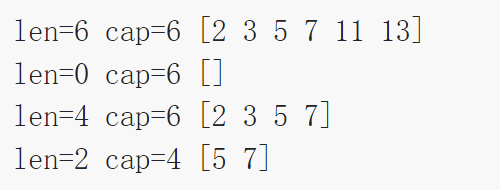
Nil slices
The zero value of a slice is nil.
A nil slice has a length and capacity of 0 and has no underlying array.
package main

import "fmt"

func main() {
    var s []int
    fmt.Println(s, len(s), cap(s))
    if s == nil {
        fmt.Println("nil!")
    }
}

Creating a slice with make
Slices can be created with the built-in make function; this is how you create dynamically-sized arrays.
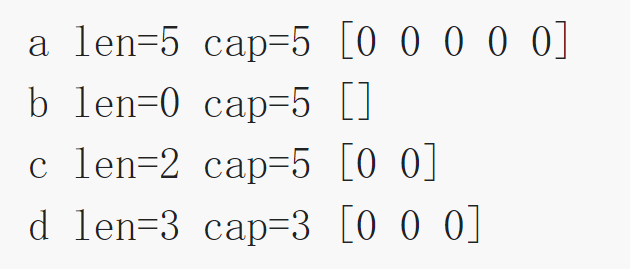
The make function allocates a zeroed array and returns a slice that refers to that array:a := make([]int, 5) // len(a)=5
make 函数确定一个0数组和一个slice
To specify a capacity, pass a third argument to make:
capacity可以声明如下
b := make([]int, 0, 5) // len(b)=0, cap(b)=5

b = b[:cap(b)] // len(b)=5, cap(b)=5
b = b[1:]      // len(b)=4, cap(b)=4
package main

import "fmt"

func main() {

    //len =5 ,cap =5
    a := make([]int, 5)
    printSlice("a", a)

    //len = 0, cap = 5
    b := make([]int, 0, 5)
    printSlice("b", b)

    //len =2, cap =5
    c := b[:2]
    printSlice("c", c)

    len = 3 cap =3
    d := c[2:5]
    printSlice("d", d)

}

func printSlice(s string, x []int) {
    fmt.Printf("%s len=%d cap=%d %v\n", s, len(x), cap(x), x)
}
Slices of slices
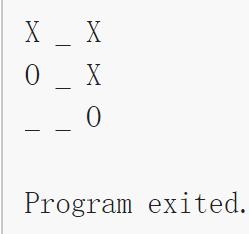
Slice 可以包含各种类型,包括套娃slice
package main

import (
    "fmt"
    "strings"
)

func main() {
    // 本质上就是一个slicexslice矩阵?
    board := [][]string{
        []string{"_", "_", "_"},
        []string{"_", "_", "_"},
        []string{"_", "_", "_"},
    }

    board[0][0] = "X"
    board[2][2] = "O"
    board[1][2] = "X"
    board[1][0] = "O"
    board[0][2] = "X"

    for i := 0; i < len(board); i++ {
        fmt.Printf("%s\n", strings.Join(board[i], " "))
    }
}
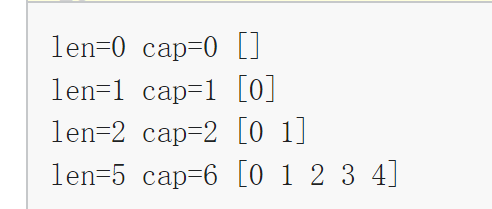
Appending to a slice
func append(s []T, vs ...T) []T
The first parameter s of append is a slice of type T, and the rest are T values to append to the slice.
The resulting value of append is a slice containing all the elements of the original slice plus the provided values.
If the backing array of s is too small to fit all the given values a bigger array will be allocated. The returned slice will point to the newly allocated array.
如果s矩阵太小不能放下所有给定的值, 会重新 allocate一个更大的array, 然后return 的slice会指向新分配的array
package main

import "fmt"

func main() {
    var s []int
    printSlice(s)

    s = append(s, 0)

    printSlice(s)

    s = append(s, 1)

    printSlice(s)

    s = append(s, 2, 3, 4)

    printSlice(s)
}

func printSlice(s []int) {
    fmt.Printf("len=%d cap=%d %v\n", len(s), cap(s), s)
}
Range
The range form of the for loop iterates over a slice or map.
range 遍历一个slice或者map
package main

import "fmt"

var pow = []int{1, 2, 4, 8, 16, 32, 64, 128}

func main() {
    for i, v := range pow {
        fmt.Printf("2**%d = %d\n", i, v)
    }
}

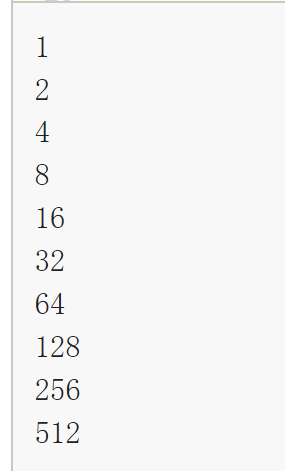
Range continued
You can skip the index or value by assigning to _.
for i, _ := range pow
for _, value := range pow
If you only want the index, you can omit the second variable.
for i := range pow
package main

import "fmt"

func main() {
    pow := make([]int, 10)


    //只取下标
    for i := range pow {
        pow[i] = 1 << uint(i)
    }
    //只取值
    for _, v := range pow {
        fmt.Printf("%d\n", v)
    }
}
Exercise: Slices
实现一个pic函数
注意先用image := make([][]uint8, dy)定义image
再用image[i] = make([]uint8, dx)定义image[i]
package main

import "golang.org/x/tour/pic"

func Pic(dx, dy int) [][]uint8 {
    image := make([][]uint8, dy)

    for i := range image {
        image[i] = make([]uint8, dx)
        for j := range image[i] {
            image[i][j] = uint8(i ^ j)
        }
    }

    return image
}

func main() {
    pic.Show(Pic)
}

Maps
A map maps keys to values.
map映射key to values
The zero value of a map is nil. A nil map has no keys, nor can keys be added.
nil的map没有key
The make function returns a map of the given type, initialized and ready for use.
package main

import "fmt"

type Vertex struct {
    Lat, long float64
}

var m map[string]Vertex

func main() {
    m = make(map[string]Vertex)
    m["Bell Labs"] = Vertex{
        40.68433, -74.39967,
    }

    fmt.Println(m["Bell Labs"])
}

Map literals Map自面量
package main

import "fmt"

type Vertex struct {
    Lat, Long float64
}

var m = map[string]Vertex{
    "Bell Labs": Vertex{
        40.68433, -74.39967,
    },
    "Google": Vertex{
        37.42202, -122.08408,
    },
}

func main() {
    fmt.Println(m)
}

Map literals continued
If the top-level type is just a type name, you can omit it from the elements of the literal.
若顶级类型只是一个类型名,你可以在文法的元素中省略它。
package main

import "fmt"

type Vertex struct {
    Lat, Long float64
}

var m = map[string]Vertex{
    "Bell Labs": {40.68433, -74.39967},
    "Google":    {37.42202, -122.08408},
}

func main() {
    fmt.Println(m)
}
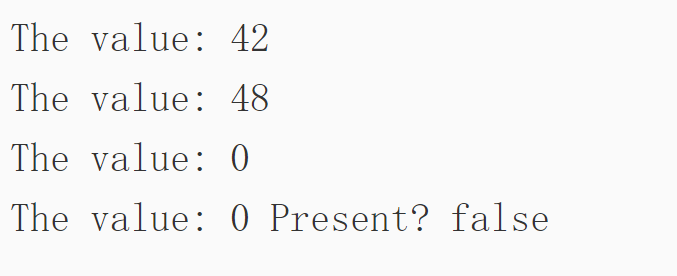
Mutating Maps修改映射map
Insert or update an element in map m: 插入或修改元素m[key] = elem
Retrieve an element: 获取一个元素elem = m[key]
Delete an element: 删除一个元素delete(m, key)
双赋值检测是否某个key存在elem, ok = m[key]
If key is in m, ok is true. If not, ok is false.
package main

import "fmt"

func main() {
    m := make(map[string]int)

    //"answer" 映射42
    m["Answer"] = 42
    fmt.Println("The value:", m["Answer"])

    m["Answer"] = 48
    fmt.Println("The value:", m["Answer"])

    //删除之后为0
    delete(m, "Answer")
    fmt.Println("The value:", m["Answer"])

    //双赋值
    v, ok := m["Answer"]
    fmt.Println("The value:", v, "Present?", ok)
}
Exercise: Maps
实现string拆分 数单词
package main

import (
    "strings"

    "golang.org/x/tour/wc"
)

func WordCount(s string) map[string]int {
    m := make(map[string]int)

    strs := strings.Fields(s)
    for _, value := range strs {
        v, ok := m[value]
        if !ok {
            m[value] = 1
        } else {
            m[value] = v + 1
        }
    }

    return m

}

func main() {
    wc.Test(WordCount)
}

Function values
Functions are values too. They can be passed around just like other values.
package main

import (
    "fmt"
    "math"
)

func compute(fn func(float64, float64) float64) float64 {
    return fn(3, 4)
}

func main() {
    hypot := func(x, y float64) float64 {
        return math.Sqrt(x*x + y*y)
    }

    // 调用hypot ,输出13
    fmt.Println(hypot(5, 12))
    //compute函数,传入hypot, return hypot(3,4)输出5
    fmt.Println(compute(hypot))

    //compute函数,传入math.Pow return 3^4
    fmt.Println(compute(math.Pow))
}

Function closures
Go functions may be closures.
go函数也可以是一个闭包
A closure is a function value that references variables from outside its body.
闭包指的是一个函数值, 引用了函数外的变量
The function may access and assign to the referenced variables; in this sense the function is “bound” to the variables.
这个函数可以访问并被赋予引用的值, 函数和这个variable 绑定在了一起
For example, the adder function returns a closure. Each closure is bound to its own sum variable.
package main

import "fmt"

func adder() func(int) int {
    sum := 0

    return func(x int) int {
        sum += x
        return sum
    }
}

func main() {
    pos, neg := adder(), adder()
    for i := 0; i < 10; i++ {
        fmt.Println(
            pos(i),
            neg(-2*i),
        )
    }
}

没理解 yet to be solved
Exercise: Fibonacci closure
package main

import "fmt"

// 返回一个“返回int的函数”
func fibonacci() func() int {
    before := 0
    now := 0
    return func() int{
        if before == 0{
            before ++
            return before
        }

        if now == 0 {
            now ++
            return now
        }

        temp := now
        now = before + now
        before = temp
        return now
    }

}

func main() {
    f := fibonacci()
    for i := 0; i < 10; i++ {
        fmt.Println(f())
    }
}
yet to be solved
Methods and interfaces
Methods and interfaces
Methods
Go does not have classes. However, you can define methods on types.
Go没有class的概念但是你可以为结构体定义方法
A method is a function with a special receiver argument.
方法就是一个带特殊接收者的函数
The receiver appears in its own argument list between the func keyword and the method name.
接收者在自己的参数咧白哦内, 在func关键字和方法名字之间
In this example, the Abs method has a receiver of type Vertex named v.
package main

import (
    "fmt"
    "math"
)

type Vertex struct {
    X, Y float64
}


//定义Abs方法
func (v Vertex) Abs() float64 {
    return math.Sqrt(v.X*v.X + v.Y*v.Y)
}

func main() {
    v := Vertex{3, 4}
    fmt.Println(v.Abs())
}
Methods are functions
Methods continued
You can declare a method on non-struct types, too.
In this example we see a numeric type MyFloat with an Abs method.
You can only declare a method with a receiver whose type is defined in the same package as the method. You cannot declare a method with a receiver whose type is defined in another package (which includes the built-in types such as int).
就是接收者的类型定义和方法声明必须在同一包内;不能为内建类型声明方法。
package main

import (
    "fmt"
    "math"
)

type MyFloat float64

func (f MyFloat) Abs() float64 {
    if f < 0 {
        return float64(-f)
    }

    return float64(f)
}

func main() {
    f := MyFloat(-math.Sqrt2)
    fmt.Println(f.Abs())
}

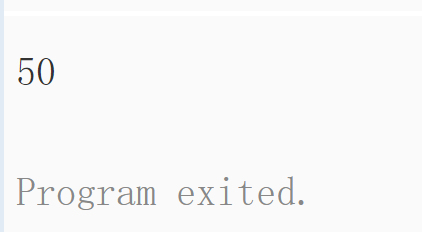
Pointer receivers
You can declare methods with pointer receivers.
你可以为指针接收者提供方法
Methods with pointer receivers can modify the value to which the receiver points (as Scale does here). Since methods often need to modify their receiver, pointer receivers are more common than value receivers.
指针接收者可以修改接收者指向的值,因此会更常用
package main

import (
    "fmt"
    "math"
)

type Vertex struct {
    X, Y float64
}

func (v Vertex) Abs() float64 {
    return math.Sqrt(v.X*v.X + v.Y*v.Y)
}

func (v *Vertex) Scale(f float64) {
    v.X = v.X * f
    v.Y = v.Y * f
}

func main() {
    v := Vertex{3, 4}
    v.Scale(10)
    fmt.Println(v.Abs())
}
指针接收者定义的Scale 把指向的,3, 4修改扩大了
Pointers and functions
也可以用function结合指针改写上面的程序
package main

import (
    "fmt"
    "math"
)

type Vertex struct {
    X, Y float64
}

func Abs(v Vertex) float64 {
    return math.Sqrt(v.X*v.X + v.Y*v.Y)
}

func Scale(v *Vertex, f float64) {
    v.X = v.X * f
    v.Y = v.Y * f
}

func main() {
    v := Vertex{3, 4}
    Scale(&v, 10)
    fmt.Println(Abs(v))
}
Methods and pointer indirection
var v Vertex
v.Scale(5)  // OK
p := &v
p.Scale(10) // OK
package main

import "fmt"

type Vertex struct {
    X, Y float64
}

func (v *Vertex) Scale(f float64) {
    v.X = v.X * f
    v.Y = v.Y * f
}

func ScaleFunc(v *Vertex, f float64) {
    v.X = v.X * f
    v.Y = v.Y * f
}

func main() {
    v := Vertex{3, 4}
    v.Scale(2)
    ScaleFunc(&v, 10)

    p := &Vertex{4, 3}
    p.Scale(3)
    ScaleFunc(p, 8)

    fmt.Println(v, p)
}

Methods and pointer indirection (2)
Functions that take a value argument must take a value of that specific type:
接受一个值作为参数的函数必须接受一个指定类型的值:
var v Vertex
fmt.Println(AbsFunc(v))  // OK
fmt.Println(AbsFunc(&v)) // Compile error!
while methods with value receivers take either a value or a pointer as the receiver when they are called:
当以值为接收者的方法被调用的时候,接收者既能为值又能为指针
var v Vertex
fmt.Println(v.Abs()) // OK
p := &v
fmt.Println(p.Abs()) // OK
这种情况下,方法调用 p.Abs() 会被解释为 (*p).Abs()。 两种方式都是可以的
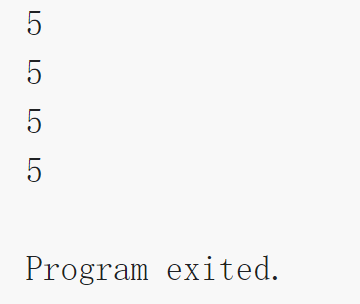
package main

import (
    "fmt"
    "math"
)

type Vertex struct {
    X, Y float64
}

func (v Vertex) Abs() float64 {
    return math.Sqrt(v.X*v.X + v.Y*v.Y)
}
func AbsFunc(v Vertex) float64 {
    return math.Sqrt(v.X*v.X + v.Y*v.Y)
}
func main() {
    v := Vertex{3, 4}

    fmt.Println(v.Abs())
    fmt.Println(AbsFunc(v))

    p := &Vertex{4, 3}

    fmt.Println(p.Abs())

    fmt.Println(AbsFunc(*p))
}
Choosing a value or pointer receiver
There are two reasons to use a pointer receiver.
The first is so that the method can modify the value that its receiver points to.
一是用pointer receiver 可以直接修改指向的数值
The second is to avoid copying the value on each method call. This can be more efficient if the receiver is a large struct, for example.
二是避免每次调用方法的时候都要复制这个值
Interfaces
An interface type is defined as a set of method signatures.
接口类型是的一组方法签名定义的set
A value of interface type can hold any value that implements those methods.
package main

import (
    "fmt"
    "math"
)

type Abser interface {
    Abs() float64
}

func main() {
    var a Abser
    f := MyFloat(-math.Sqrt2)
    v := Vertex{3, 4}

    a = f  // a MyFloat implements Abser 实现接口
    a = &v // a *Vertex implements Abser实现接口

    // In the following line, v is a Vertex (not *Vertex)
    // and does NOT implement Abser.没有实现
    a = v

    fmt.Println(a.Abs())
}

type MyFloat float64

func (f MyFloat) Abs() float64 {
    if f < 0 {
        return float64(-f)
    }
    return float64(f)
}

type Vertex struct {
    X, Y float64
}

func (v *Vertex) Abs() float64 {
    return math.Sqrt(v.X*v.X + v.Y*v.Y)
}
Interfaces are implemented implicitly接口隐式实现
类似多态
package main

import "fmt"

type I interface {
    M()
}

type T struct {
    S string
}
// 此方法表示类型 T 实现了接口 I,但我们无需显式声明此事。
func (t T) M() {
    fmt.Println(t.S)
}

func main() {
    var i I = T{"hello"}

    i.M()
}
Interface values
Under the hood, interface values can be thought of as a tuple of a value and a concrete type:
接口也是值在内部,接口值可以看做包含值和具体类型的元组:(value, type)
An interface value holds a value of a specific underlying concrete type.
接口保存了底层的一个具体值
Calling a method on an interface value executes the method of the same name on its underlying type.
接口值调用方法会执行底层类型的同名方法
Concurrency
Concurrency
Goroutine
go f(x, y, z)go f(x, y, z)
go f(x, y, z)
会启动一个新的Go程并执行
The evaluation of f, x, y, and z happens in the current goroutine and the execution of f happens in the new goroutine.
f, x, y z, 的值求值发生在当前goroutine 中, f的执行发生在新的goroutine中
package main

import (
    "fmt"
    "time"
)

func say(s string) {
    for i := 0; i < 5; i++ {
        time.Sleep(100 * time.Millisecond)
        fmt.Println(s)
    }
}

func main() {
    go say("world")
    say("hello")
}

Channels
Channels are a typed conduit through which you can send and receive values with the channel operator, <-.
信道是带有类型的管道
ch <- v    // Send v to channel ch.
v := <-ch  // Receive from ch, and
           // assign value to v.
Like maps and slices, channels must be created before use:信道在使用前需要被创建ch := make(chan int)
By default, sends and receives block until the other side is ready. This allows goroutines to synchronize without explicit locks or condition variables.
默认的,接收和发送方都会阻塞直到另一端准备好了,这就能让Goroutine同步
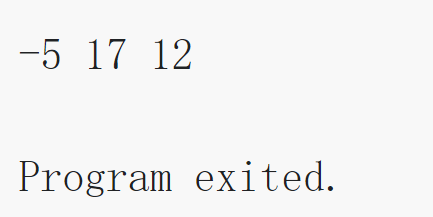
The example code sums the numbers in a slice, distributing the work between two goroutines. Once both goroutines have completed their computation, it calculates the final result.
示例代码对slice里面的数进行求和, 在两个goroutine中进行分布计算
package main

import "fmt"

func sum(s []int, c chan int) {
    sum := 0
    for _, v := range s {
        sum += v
    }
    c <- sum
}

func main() {
    s := []int{7, 2, 8, -9, 4, 0}

    c := make(chan int)

    go sum(s[:len(s)/2], c)
    go sum(s[len(s)/2:], c)

    x, y := <-c, <-c

    fmt.Println(x, y, x+y)
}
Buffered Channels 带缓冲的信道
Channels can be buffered. Provide the buffer length as the second argument to make to initialize a buffered channel:ch := make(chan int, 100)
Sends to a buffered channel block only when the buffer is full. Receives block when the buffer is empty.
package main

import "fmt"

func main() {
    ch := make(chan int, 2)
    ch <- 1
    ch <- 2
    fmt.Println(<-ch)
    fmt.Println(<-ch)
}

Range and Close
A sender can close a channel to indicate that no more values will be sent. Receivers can test whether a channel has been closed by assigning a second parameter to the receive expression: after
发送者可以close一个信道来表示没有需要发送的值了, 接收者通过接收分配第二个参数来测试信道是否关闭v, ok := <-ch
之后 ok 会被设置为 false。
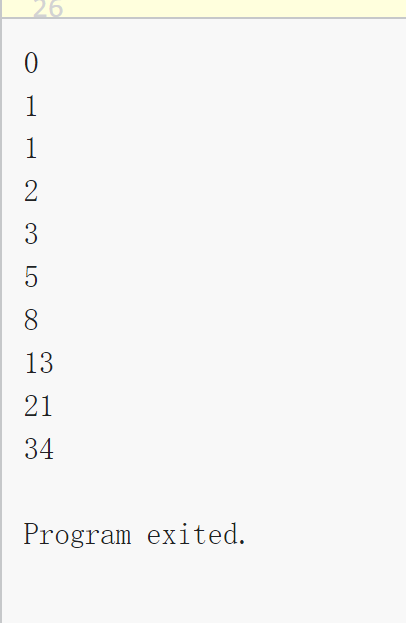
The loop for i := range c receives values from the channel repeatedly until it is closed.
循环 for i := range c 会不断从信道接收值,直到它被关闭。
Note: Only the sender should close a channel, never the receiver. Sending on a closed channel will cause a panic.
只有发送者才能关闭信道,而接收者不能。向一个已经关闭的信道发送数据会引发程序恐慌(panic)。
Another note: Channels aren’t like files; you don’t usually need to close them. Closing is only necessary when the receiver must be told there are no more values coming, such as to terminate a range loop.
还要注意: 信道与文件不同,通常情况下无需关闭它们。只有在必须告诉接收者不再有需要发送的值时才有必要关闭,例如终止一个 range 循环。
package main

import "fmt"

func fibonacci(n int, c chan int) {
    x, y := 0, 1

    for i := 0; i < n; i++ {
        c <- x
        x, y = y, x+y
    }
    close(c)
}

func main() {
    c := make(chan int, 10)

    go fibonacci(cap(c), c)

    for i := range c {
        fmt.Println(i)
    }
}
Select
The select statement lets a goroutine wait on multiple communication operations.
Thread
使用原因
IO concurrency(IO并发):一个历史说法,以前单核时,IO 是主要瓶颈,为了充分利用 CPU,一个线程在进行IO 时,可以让出 CPU,让另一个线程进行计算、读取或发送网络消息等。在这里可以理解为:你可以通过多个线程并行的发送多个网络请求(比如 RPC、HTTP 等),然后分别等待其回复。
Parallelism(并行):充分利用多核 CPU。
关于并发(concurrency)和并行(parallelism)的区别和联系,可以看这篇文章。记住两个关键词即可:逻辑并发设计 vs 物理并行执行。
Convenience(方便):比如可以在后台启动一个线程,定时执行某件事、周期性的检测什么东西(比如心跳)。
Thread = “thread of execution” threads allow one program to do many things at once each thread executes serially, just like an ordinary non-threaded program the threads share memory each thread includes some per-thread state: program counter, registers, stack
thread 让一个程序在一次执行中做多个事情, thread share memory, 并且包括一些pre-thread state: 程序计数器、寄存器、栈
Why threads? They express concurrency, which you need in distributed systems I/O concurrency Client sends requests to many servers in parallel and waits for replies. Server processes multiple client requests; each request may block. While waiting for the disk to read data for client X, process a request from client Y.
thread 能够并行,在分布式系统中I/O 并发都会涉及多线程操作, 比如启动一个线程等待其他Server返回IO信息时主线程可以继续处理下一个请求。
Multicore performance Execute code in parallel on several cores. Convenience In background, once per second, check whether each worker is still alive.
Go 运行环境会调度这些线程在多核上运行
Is there an alternative to threads? Yes: write code that explicitly interleaves activities, in a single thread. Usually called “event-driven.” Keep a table of state about each activity, e.g. each client request. One “event” loop that: checks for new input for each activity (e.g. arrival of reply from server), does the next step for each activity, updates state. Event-driven gets you I/O concurrency, and eliminates thread costs (which can be substantial), but doesn’t get multi-core speedup, and is painful to program.
线程可以用其他方法替代吗? 可以, 比如在一个独立线程里面,event-driven 的程序,能够带来IO并行,并且能够消除线程的花费, 但是并不能得到多核的加速,而且编写起来困难
Threading challenges: shared data e.g. what if two threads do n = n + 1 at the same time? or one thread reads while another increments? this is a “race” — and is usually a bug -> use locks (Go’s sync.Mutex) -> or avoid sharing mutable data coordination between threads e.g. one thread is producing data, another thread is consuming it how can the consumer wait (and release the CPU)? how can the producer wake up the consumer? -> use Go channels or sync.Cond or WaitGroup deadlock cycles via locks and/or communication (e.g. RPC or Go channels)
线程挑战: share data/memory
比如两个线程同时 n = n + 1
load add sr 对寄存器操作,不同thread 会造成race混乱
go:加锁, 变成原子操作
mu.Lock()
mu.Unlock();
go实际不知道变量和lock的关系
协调方法:Coordination
Channels
sync.Cond
waitGroup
使用线程时的挑战:
https://pdos.csail.mit.edu/6.824/notes/crawler.go 展示的crawler.go 文件
运行结果
=== Serial===
found:   http://golang.org/
found:   http://golang.org/pkg/
missing: http://golang.org/cmd/
found:   http://golang.org/pkg/fmt/
found:   http://golang.org/pkg/os/
=== ConcurrentMutex ===
found:   http://golang.org/
missing: http://golang.org/cmd/
found:   http://golang.org/pkg/
found:   http://golang.org/pkg/os/
found:   http://golang.org/pkg/fmt/
=== ConcurrentChannel ===
found:   http://golang.org/
missing: http://golang.org/cmd/
found:   http://golang.org/pkg/
found:   http://golang.org/pkg/os/
found:   http://golang.org/pkg/fmt/

Program exited.
What is a web crawler? goal is to fetch all web pages, e.g. to feed to an indexer web pages and links form a graph multiple links to some pages graph has cycles
网络爬虫,目的是抓取网页
Crawler challenges Exploit I/O concurrency Network latency is more limiting than network capacity Fetch many URLs at the same time To increase URLs fetched per second => Need threads for concurrency Fetch each URL only once avoid wasting network bandwidth be nice to remote servers => Need to remember which URLs visited Know when finished
爬虫显示IO并行的网络延迟的限制比网络容量抓取url连结的线直达
为了增加每秒钟抓取的url,
- 需要线程并行抓取避免浪费网络带宽
- 需要抓取后记录哪些url被抓取过
We’ll look at two styles of solution [crawler.go on schedule page
package main

import (
    "fmt"
    "sync"
)

//
// Several solutions to the crawler exercise from the Go tutorial
// https://tour.golang.org/concurrency/10
//

//
// Serial crawler
//

func Serial(url string, fetcher Fetcher, fetched map[string]bool) {
    if fetched[url] {
        return
    }
    fetched[url] = true
    urls, err := fetcher.Fetch(url)
    if err != nil {
        return
    }
    for _, u := range urls {
        Serial(u, fetcher, fetched)
    }
    return
}

//
// Concurrent crawler with shared state and Mutex
//

type fetchState struct {
    mu      sync.Mutex
    fetched map[string]bool
}

func ConcurrentMutex(url string, fetcher Fetcher, f *fetchState) {
    f.mu.Lock()
    already := f.fetched[url]
    f.fetched[url] = true
    f.mu.Unlock()

    if already {
        return
    }

    urls, err := fetcher.Fetch(url)
    if err != nil {
        return
    }
    var done sync.WaitGroup
    for _, u := range urls {
        done.Add(1)
        u2 := u
        go func() {
            defer done.Done()
            ConcurrentMutex(u2, fetcher, f)
        }()
        //go func(u string) {
        //    defer done.Done()
        //    ConcurrentMutex(u, fetcher, f)
        //}(u)
    }
    done.Wait()
    return
}

func makeState() *fetchState {
    f := &fetchState{}
    f.fetched = make(map[string]bool)
    return f
}

//
// Concurrent crawler with channels
//

func worker(url string, ch chan []string, fetcher Fetcher) {
    urls, err := fetcher.Fetch(url)
    if err != nil {
        ch <- []string{}
    } else {
        ch <- urls
    }
}

func master(ch chan []string, fetcher Fetcher) {
    n := 1
    fetched := make(map[string]bool)
    for urls := range ch {
        for _, u := range urls {
            if fetched[u] == false {
                fetched[u] = true
                n += 1
                go worker(u, ch, fetcher)
            }
        }
        n -= 1
        if n == 0 {
            break
        }
    }
}

func ConcurrentChannel(url string, fetcher Fetcher) {
    ch := make(chan []string)
    go func() {
        ch <- []string{url}
    }()
    master(ch, fetcher)
}

//
// main
//

func main() {
    fmt.Printf("=== Serial===\n")
    Serial("http://golang.org/", fetcher, make(map[string]bool))

    fmt.Printf("=== ConcurrentMutex ===\n")
    ConcurrentMutex("http://golang.org/", fetcher, makeState())

    fmt.Printf("=== ConcurrentChannel ===\n")
    ConcurrentChannel("http://golang.org/", fetcher)
}

//
// Fetcher
//

type Fetcher interface {
    // Fetch returns a slice of URLs found on the page.
    Fetch(url string) (urls []string, err error)
}

// fakeFetcher is Fetcher that returns canned results.
type fakeFetcher map[string]*fakeResult

type fakeResult struct {
    body string
    urls []string
}

func (f fakeFetcher) Fetch(url string) ([]string, error) {
    if res, ok := f[url]; ok {
        fmt.Printf("found:   %s\n", url)
        return res.urls, nil
    }
    fmt.Printf("missing: %s\n", url)
    return nil, fmt.Errorf("not found: %s", url)
}

// fetcher is a populated fakeFetcher.
var fetcher = fakeFetcher{
    "http://golang.org/": &fakeResult{
        "The Go Programming Language",
        []string{
            "http://golang.org/pkg/",
            "http://golang.org/cmd/",
        },
    },
    "http://golang.org/pkg/": &fakeResult{
        "Packages",
        []string{
            "http://golang.org/",
            "http://golang.org/cmd/",
            "http://golang.org/pkg/fmt/",
            "http://golang.org/pkg/os/",
        },
    },
    "http://golang.org/pkg/fmt/": &fakeResult{
        "Package fmt",
        []string{
            "http://golang.org/",
            "http://golang.org/pkg/",
        },
    },
    "http://golang.org/pkg/os/": &fakeResult{
        "Package os",
        []string{
            "http://golang.org/",
            "http://golang.org/pkg/",
        },
    },
}
Serial crawler 串行爬虫
Serial crawler: performs depth-first exploration via recursive Serial calls the “fetched” map avoids repeats, breaks cycles a single map, passed by reference, caller sees callee’s updates but: fetches only one page at a time can we just put a “go” in front of the Serial() call? let’s try it… what happened?
深搜建立起fetched maps,fetch only one page, 用一个fetched set存储已经抓取过的url
但是很明显这不是parallel的,跑完发现结果是串行返回的
go routine
go funct()
pass arguments
//
// Serial crawler
//

func Serial(url string, fetcher Fetcher, fetched map[string]bool) {
    if fetched[url] {
        return
    }
    fetched[url] = true
    urls, err := fetcher.Fetch(url)
    if err != nil {
        return
    }
    for _, u := range urls {
        Serial(u, fetcher, fetched)
    }
    return
}
ConcurrentMutex crawler并发带互斥锁的爬虫
ConcurrentMutex crawler: Creates a thread for each page fetch Many concurrent fetches, higher fetch rate the “go func” creates a goroutine and starts it running func… is an “anonymous function” The threads share the “fetched” map So only one thread will fetch any given page Why the Mutex (Lock() and Unlock())?
在fetch each page 创建线程
One reason: Two different web pages contain links to the same URL Two threads simultaneouly fetch those two pages T1 reads fetched[url], T2 reads fetched[url] Both see that url hasn’t been fetched (already == false) Both fetch, which is wrong The lock causes the check and update to be atomic So only one thread sees already==false
加上lock() unlock()这样就可以保证每个thread在读写map的时候都是互斥的
Another reason: Internally, map is a complex data structure (tree? expandable hash?) Concurrent update/update may wreck internal invariants Concurrent update/read may crash the read What if I comment out Lock() / Unlock()? go run crawler.go
waitGroup的使用可以保证等待所有条件满足再结束(有点unix里面的system call的意味,类似wait和signal等等,当然c里面的线程也不一样比如pthread等等)
Wait Group
    var done sync.WaitGroup
    for _, u := range urls {
        done.Add(1)
        u2 := u
        go func() {
            defer done.Done()
            ConcurrentMutex(u2, fetcher, f)
        }()
        //go func(u string) {
        //    defer done.Done()
        //    ConcurrentMutex(u, fetcher, f)
        //}(u)
    }
    done.Wait()
WaitGroup 内部维护了一个计数器:调用 wg.Add(n) 时候会增加 n;调用 wait.Done() 时候会减少1。这时候调用 wg.Wait() 会一直阻塞直到当计数器变为 0 。所以 WaitGroup 很适合等待一组 goroutine 都结束的场景。
Why does it work? go run -race crawler.go Detects races even when output is correct! How does the ConcurrentMutex crawler decide it is done? sync.WaitGroup Wait() waits for all Add()s to be balanced by Done()s i.e. waits for all child threads to finish [diagram: tree of goroutines, overlaid on cyclic URL graph] there’s a WaitGroup per node in the tree How many concurrent threads might this crawler create?
go detector可以帮助检查出race脏数据的问题 而go会raise an error当同时read write一个变量
- 将抓取部分使用 go 关键字变为并行。但如果仅这么改造,不利用某些手段(sync.WaitGroup)等待子 goroutine,而直接返回,那么可能只会抓取到种子 URL,同时造成子 goroutine 的泄露。
- 如果访问已经抓取的 URL 集合 fetched 不加锁,很可能造成多次拉取同一个网页。 ```go // // Concurrent crawler with shared state and Mutex //
type fetchState struct { mu sync.Mutex fetched map[string]bool }
func ConcurrentMutex(url string, fetcher Fetcher, f *fetchState) { f.mu.Lock() already := f.fetched[url] f.fetched[url] = true f.mu.Unlock()
if already {
    return
}

urls, err := fetcher.Fetch(url)
if err != nil {
    return
}
var done sync.WaitGroup
for _, u := range urls {
    done.Add(1)
    u2 := u
    go func() {
        defer done.Done()
        ConcurrentMutex(u2, fetcher, f)
    }()
    //go func(u string) {
    //    defer done.Done()
    //    ConcurrentMutex(u, fetcher, f)
    //}(u)
}
done.Wait()
return
}
func makeState() *fetchState { f := &fetchState{} f.fetched = make(map[string]bool) return f }
<a name="aeOIY"></a>
## 线程数量问题 Thread Pool 线程池

- threads成百上千还ok,但是millions of threads就不大可能了
- 所以更好的方式是搞一个fixed size pool of workser,让worker一个一个fetch url而不是给每个Url创建一个线程
<a name="bbZHe"></a>
##  ConcurrentChannel crawler a Go channel: Go channel 爬虫
ConcurrentChannel crawler a Go channel: a channel is an object ch := make(chan int) a channel lets one thread send an object to another thread ch <- x the sender waits until some goroutine receives y := <- ch for y := range ch a receiver waits until some goroutine sends channels both communicate and synchronize several threads can send and receive on a channel channels are cheap remember: sender blocks until the receiver receives! <br />使用Go channel instead of shared memory <br />没有map, 没有shared memory, 也没有锁

"synchronous" watch out for deadlock ConcurrentChannel master() master() creates a worker goroutine to fetch each page worker() sends slice of page's URLs on a channel multiple workers send on the single channel master() reads URL slices from the channel At what line does the master wait? Does the master use CPU time while it waits? No need to lock the fetched map, because it isn't shared! How does the master know it is done? Keeps count of workers in n. Each worker sends exactly one item on channel.

类似生产者消费者

1. 初始将种子 url 塞进 channel。
1. 消费者:master 不断从 channel 中取出 urls,判断是否抓取过,然后启动新的 worker goroutine 去抓取。
1. 生产者:worker goroutine 抓取到给定的_任务_ url,并将解析出的_结果_ urls 塞回 channel。
1. master 使用一个变量 n 来追踪发出的_任务_数;往发出一份_任务_增加一;从 channel 中获取并处理完一份_结果_(即将其再安排给worker)减掉一;当所有任务都处理完时,退出程序。
```go
//
// Concurrent crawler with channels
//

func worker(url string, ch chan []string, fetcher Fetcher) {
    urls, err := fetcher.Fetch(url)
    if err != nil {
        ch <- []string{}
    } else {
        ch <- urls
    }
}

func master(ch chan []string, fetcher Fetcher) {
    n := 1
    fetched := make(map[string]bool)
    for urls := range ch {
        for _, u := range urls {
            if fetched[u] == false {
                fetched[u] = true
                n += 1
                go worker(u, ch, fetcher)
            }
        }
        n -= 1
        if n == 0 {
            break
        }
    }
}

func ConcurrentChannel(url string, fetcher Fetcher) {
    ch := make(chan []string)
    go func() {
        ch <- []string{url}
    }()
    master(ch, fetcher)
}

若有收获,就点个赞吧
0 人点赞


