思路:搭建环境——>导入Mybatis——>编写代码——>测试
帮助文档传送门:Mybatis帮助文档
1 搭建环境
搭建数据库
Create database mybatis;use mybatis;create table user(id int(20) not null PRIMARY key,name VARCHAR(255) not null,pwd VARCHAR(255) not null)ENGINE=INNODB DEFAULT CHARSET=utf8;INSERT into user(id,name,pwd) VALUES(1,'张三','123456'),(2,'李四','123456'),(3,'王五','123456');
2 创建项目
创建一个普通的Maven项目,及时将path文件修改为正确的目录,避免占用C盘资源。
删除src目录,可以当做父工程使用。
2.1 在pom.xml文件中导入依赖
<!--导入依赖-->
    <dependencies>
        <!--mysql驱动-->
        <dependency>
            <groupId>mysql</groupId>
            <artifactId>mysql-connector-java</artifactId>
            <version>5.1.47</version>
        </dependency>
        <!--mybatis-->
        <dependency>
            <groupId>org.mybatis</groupId>
            <artifactId>mybatis</artifactId>
            <version>3.5.2</version>
        </dependency>
        <!--junit-->
        <dependency>
            <groupId>junit</groupId>
            <artifactId>junit</artifactId>
            <version>4.12</version>
        </dependency>
    </dependencies>
3 创建模块
new——>Module——>Maven,在resources里新建一个xml配置文件
3.1 编写Mybatis工具类
理解:String resource = "org/mybatis/example/mybatis-config.xml";读取配置文件
然后封装成一个工具类。InputStream inputStream = Resources.getResourceAsStream(resource);SqlSessionFactory sqlSessionFactory = new SqlSessionFactoryBuilder().build(inputStream);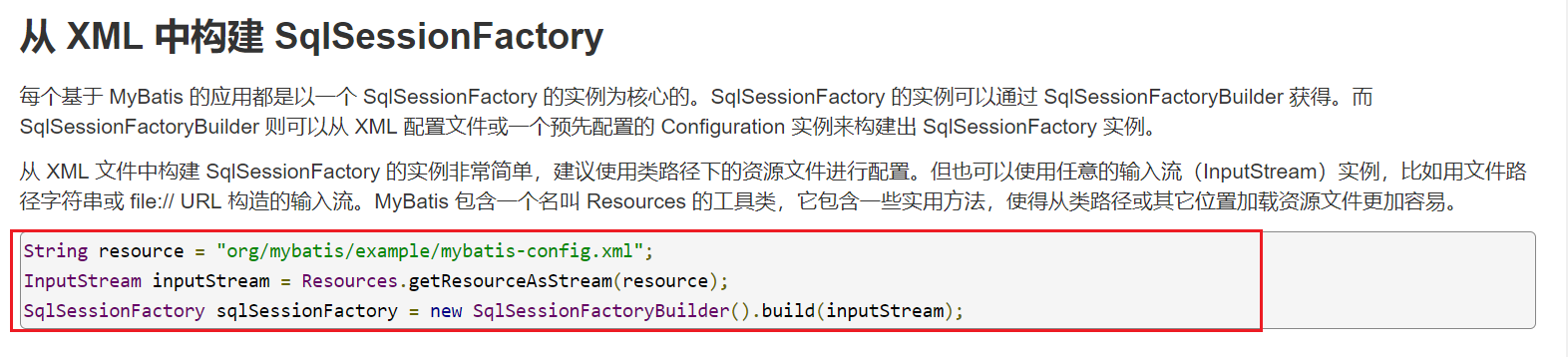
Mybatis工具类: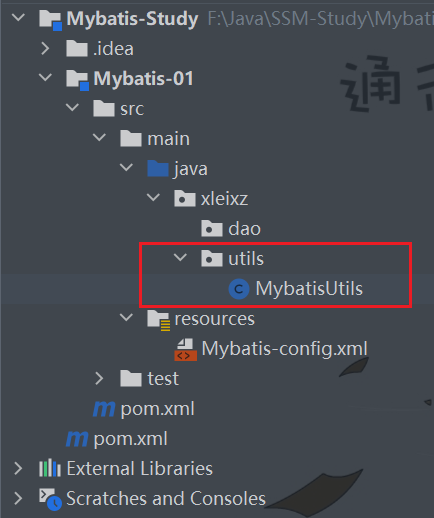
public class MybatisUtils {

    private static SqlSessionFactory sqlSessionFactory;

    static {


        try {
            //使用Mybatis第一步,必须要做!!!
            //获取SqlSessionFactory对象
            String resource = "mybatis-config.xml";
            InputStream inputStream = Resources.getResourceAsStream(resource);
            sqlSessionFactory = new SqlSessionFactoryBuilder().build(inputStream);
        } catch (IOException e) {
            e.printStackTrace();
        }

    }

    //既然有了 SqlSessionFactory,顾名思义,我们可以从中获得 SqlSession 的实例。
    //org.apache.ibatis.session.SqlSession 提供了在数据库执行 SQL 命令所需的所有方法

    public static SqlSession getSqlSession() {

        return sqlSessionFactory.openSession();
    }
}
3.2 编写Mybatis的核心配置文件
Mybatis-config.xml(注意这里测试常见报错)
<?xml version="1.0" encoding="UTF-8" ?>
<!DOCTYPE configuration
PUBLIC "-//mybatis.org//DTD Config 3.0//EN"
"http://mybatis.org/dtd/mybatis-3-config.dtd">
<!--configuration核心配置文件-->
<configuration>
<environments default="development">
<environment id="development">
<!--transactionManager事务管理-->
<transactionManager type="JDBC"/>
<dataSource type="POOLED">
<property name="driver" value="com.mysql.jdbc.Driver"/>
<!--防止出现问号-->
<property name="url"
value="jdbc:mysql://localhost:3306/mybatis?useSSL=false&useUnicode=true&characterEncoding=UTF8"/>
<property name="username" value="root"/>
<property name="password" value="123456"/>
</dataSource>
</environment>
</environments>
<!--这里需要配置文件,见5.1-->
</configuration>
4 编写代码
4.1 实体类
文件:User
位置:
//实体类

public class User {
    private int id;
    private String name;
    private String pwd;

    public User() {
    }

    public User(int id, String name, String pwd) {
        this.id = id;
        this.name = name;
        this.pwd = pwd;
    }

    public String getName() {
        return name;
    }

    public void setName(String name) {
        this.name = name;
    }

    public String getPwd() {
        return pwd;
    }

    public void setPwd(String pwd) {
        this.pwd = pwd;
    }

    public int getId() {
        return id;
    }

    public void setId(int id) {
        this.id = id;
    }

    @Override
    public String toString() {
        return "User{" +
                "id=" + id +
                ", name='" + name + '\'' +
                ", pwd='" + pwd + '\'' +
                '}';
    }
}
4.2 Mapper接口
文件:UserDao(Dao等价于Mapper。)
位置:
//Dao等价于Mapper

public interface UserDao {
    List<User> getUserList();
}
4.3 接口实现类
由原来的UserDaoImpl转变为一个Mapper配置文件
文件:UserMapper.xml
位置: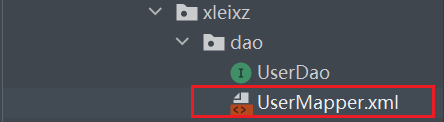
<?xml version="1.0" encoding="UTF-8" ?>
<!DOCTYPE mapper
        PUBLIC "-//mybatis.org//DTD Mapper 3.0//EN"
        "http://mybatis.org/dtd/mybatis-3-mapper.dtd">

<!--namespace绑定一个对应的Dao/Mapper接口-->
<mapper namespace="xleixz.dao.UserDao">

    <!--select查询语句-->
    <select id="getUserList" resultType="xleixz.pojo.User">
        select * from mybatis.user
    </select>

</mapper>
5 测试
5.1 Junit测试
方式一(推荐)
public class UserDaoTest<userList> {

    @Test
    public void test() {

        //第一步:获取SqlSession对象
        SqlSession sqlSession = MybatisUtils.getSqlSession();
        //第二步:执行SQL
        //方式一:
        UserDao userDao = sqlSession.getMapper(UserDao.class);
        List<User> userList = userDao.getUserList();

        for (User user : userList) {
            System.out.println(user);
        }

        //关闭SqlSession
        sqlSession.close();
    }
}

方式二(较老,不推荐,了解)
package xleixz.dao;

import org.apache.ibatis.session.SqlSession;
import org.junit.Test;
import xleixz.pojo.User;
import xleixz.utils.MybatisUtils;

import java.util.List;

/**
 * @Author: 小雷学长
 * @Date: 2022/4/17 - 16:36
 * @Version: 1.8
 */

public class UserDaoTest<userList> {

    @Test
    public void test() {

        //第一步:获取SqlSession对象
        SqlSession sqlSession = MybatisUtils.getSqlSession();
        //第二步:执行SQL
        //方式一:
        /*UserDao userDao = sqlSession.getMapper(UserDao.class);
        List<User> userList = userDao.getUserList();*/

        //方式二:
        List<User> userList =  sqlSession.selectList("xleixz.dao.UserDao.getUserList");


        for (User user : userList) {
            System.out.println(user);
        }

        //关闭SqlSession
        sqlSession.close();
    }
}
6 错误分析
6.1 常见报错类型一
org.apache.ibatis.binding.BindingException: Type interface xleixz.dao.UserMapper is not known to the MapperRegistry.
MapperRegistry是什么?如何解决?
——>解决:在编写Mybatis的核心配置文件中的xml添加注册mappers配置。
<!--每一个Mapper.xml都需要在Mybatis核心配置文件中注册!!-->
    <mappers>
        <mapper resource="xleixz/dao/UserMapper.xml"/>
    </mappers>
6.2 常见报错类型二
The error may exist in xleixz/dao/UserMapper.xml
原因是Test中没有UserMapper.xml文件,可以通过手动复制到Test中,但是这样太多!太麻烦!
——>解决:手动配置资源过滤,将Build配置信息导入到pop文件中。
<build>
        <resources>
            <resource>
                <directory>src/main/resources</directory>
                <includes>
                    <include>**/*.properties</include>
                    <include>**/*.xml</include>
                </includes>
                <filtering>false</filtering>
            </resource>
            <resource>
                <directory>src/main/java</directory>
                <includes>
                    <include>**/*.properties</include>
                    <include>**/*.xml</include>
                </includes>
                <filtering>false</filtering>
            </resource>
        </resources>
    </build>
6.3 报错类型三
Sun Apr 17 18:17:14 CST 2022 WARN: Establishing SSL connection without server's identity verification is not recommended. According to MySQL 5.5.45+, 5.6.26+ and 5.7.6+ requirements SSL connection must be established by default if explicit option isn't set. For compliance with existing applications not using SSL the verifyServerCertificate property is set to 'false'. You need either to explicitly disable SSL by setting useSSL=false, or set useSSL=true and provide truststore for server certificate verification.
——>解决:将配置文件里的useSSL=true改成useSSL=false
value="jdbc:mysql://localhost:3306/mybatis?useSSL=false&useUnicode=true&characterEncoding=UTF8"/>

若有收获,就点个赞吧
0 人点赞


